light NISSAN ARMADA 2015 2.G 08IT Navigation Manual
[x] Cancel search | Manufacturer: NISSAN, Model Year: 2015, Model line: ARMADA, Model: NISSAN ARMADA 2015 2.GPages: 241, PDF Size: 4.22 MB
Page 104 of 241
![NISSAN ARMADA 2015 2.G 08IT Navigation Manual 5-20Route guidance
1. Highlight [Preview] and push<ENTER>.
2. Highlight the preferred key and push <ENTER>.
: Moves forward in the direction of the
destination.
: Moves backward in the direction of
th](/img/5/407/w960_407-103.png "NISSAN ARMADA 2015 2.G 08IT Navigation Manual 5-20Route guidance
1. Highlight [Preview] and push<ENTER>.
2. Highlight the preferred key and push <ENTER>.
: Moves forward in the direction of the
destination.
: Moves backward in the direction of
th")
5-20Route guidance
1. Highlight [Preview] and push
2. Highlight the preferred key and push
: Moves forward in the direction of the
destination.
: Moves backward in the direction of
the starting point.
/: Pauses the route preview.
3. Push
Page 105 of 241
information event on the route.
Voice command
1. Push
wheel switch.
2. After the tone sounds, speak a command. To turn on or off the Voice Guidance:
“Voice Guidance On/Off” (Alternate com-
mand mode)
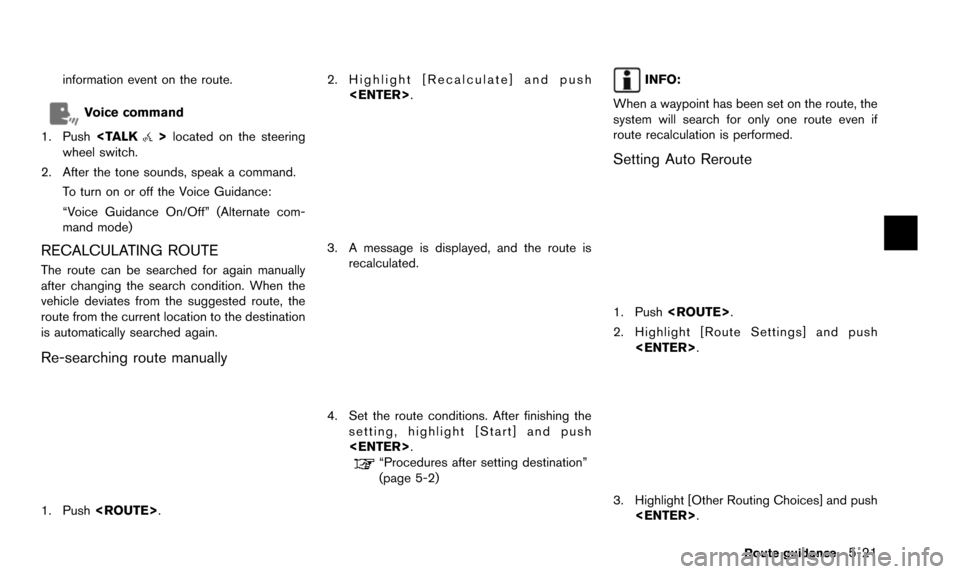
RECALCULATING ROUTE
The route can be searched for again manually
after changing the search condition. When the
vehicle deviates from the suggested route, the
route from the current location to the destination
is automatically searched again.
Re-searching route manually
1. Push
3. A message is displayed, and the route isrecalculated.
4. Set the route conditions. After finishing thesetting, highlight [Start] and push
“Procedures after setting destination”
(page 5-2)
INFO:
When a waypoint has been set on the route, the
system will search for only one route even if
route recalculation is performed.
Setting Auto Reroute
1. Push
2. Highlight [Route Settings] and push
3. Highlight [Other Routing Choices] and push
Route guidance5-21
Page 106 of 241
![NISSAN ARMADA 2015 2.G 08IT Navigation Manual 5-22Route guidance
4. Highlight [Auto Reroute] and push<ENTER>. The indicator for the selected
condition illuminates. When the current
location map screen or route setting screen
is displayed, the sys](/img/5/407/w960_407-105.png "NISSAN ARMADA 2015 2.G 08IT Navigation Manual 5-22Route guidance
4. Highlight [Auto Reroute] and push<ENTER>. The indicator for the selected
condition illuminates. When the current
location map screen or route setting screen
is displayed, the sys")
5-22Route guidance
4. Highlight [Auto Reroute] and push
condition illuminates. When the current
location map screen or route setting screen
is displayed, the system recalculates a route
with the set conditions.
“Basic operation” (page 5-24)
SETTING DETOUR ROUTE
To detour from the suggested route, a route
detouring for a specified distance can be
calculated.
1. Push
2. Highlight [Detour] and push
3. Highlight a detour distance and push
After calculating the detour, the system displays
the detour route on the map.
INFO:
. When the vehicle has deviated from the
suggested route, [Detour] cannot be se-
lected.
. If the system cannot calculate a detour with
the specified conditions, it displays the
previous suggested route.
. If the vehicle is traveling very fast, the detour
route may start from a location that the
vehicle has already passed.
SEARCHING FOR DETOUR ROUTE
TAKING TRAFFIC INFORMATION INTO
CONSIDERATION
When a serious traffic event occurs on the route,
or if the system finds a faster route, a detour alert
will pop up automatically. If the automatic alert is
missed, a detour can also be searched for
manually.
1. Push
2. Highlight [Traffic Detour] and push
Page 107 of 241
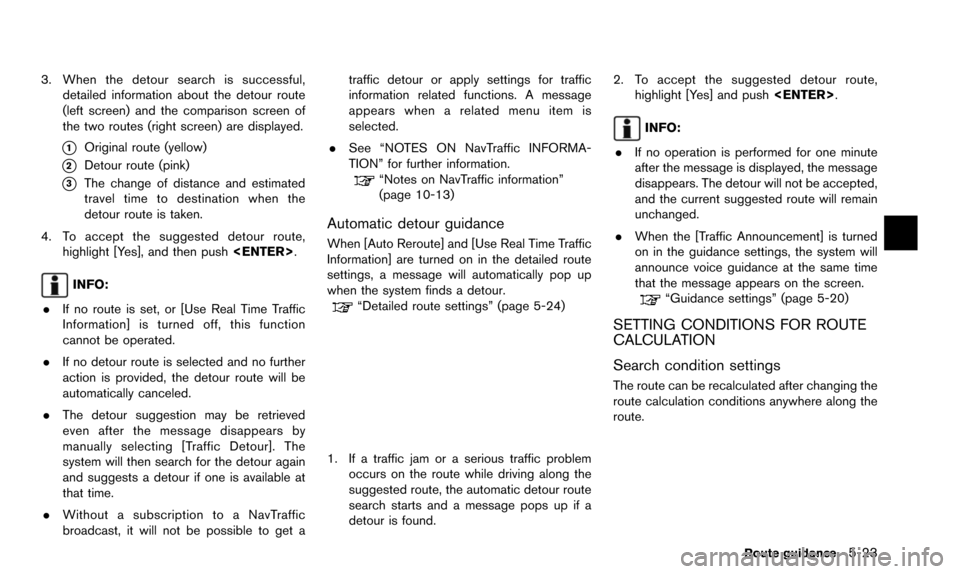
3. When the detour search is successful,detailed information about the detour route
(left screen) and the comparison screen of
the two routes (right screen) are displayed.
*1Original route (yellow)
*2Detour route (pink)
*3The change of distance and estimated
travel time to destination when the
detour route is taken.
4. To accept the suggested detour route, highlight [Yes], and then push
INFO:
. If no route is set, or [Use Real Time Traffic
Information] is turned off, this function
cannot be operated.
. If no detour route is selected and no further
action is provided, the detour route will be
automatically canceled.
. The detour suggestion may be retrieved
even after the message disappears by
manually selecting [Traffic Detour]. The
system will then search for the detour again
and suggests a detour if one is available at
that time.
. Without a subscription to a NavTraffic
broadcast, it will not be possible to get a traffic detour or apply settings for traffic
information related functions. A message
appears when a related menu item is
selected.
. See “NOTES ON NavTraffic INFORMA-
TION” for further information.
“Notes on NavTraffic information”
(page 10-13)
Automatic detour guidance
When [Auto Reroute] and [Use Real Time Traffic
Information] are turned on in the detailed route
settings, a message will automatically pop up
when the system finds a detour.
“Detailed route settings” (page 5-24)
1. If a traffic jam or a serious traffic problem
occurs on the route while driving along the
suggested route, the automatic detour route
search starts and a message pops up if a
detour is found. 2. To accept the suggested detour route,
highlight [Yes] and push
INFO:
. If no operation is performed for one minute
after the message is displayed, the message
disappears. The detour will not be accepted,
and the current suggested route will remain
unchanged.
. When the [Traffic Announcement] is turned
on in the guidance settings, the system will
announce voice guidance at the same time
that the message appears on the screen.
“Guidance settings” (page 5-20)
SETTING CONDITIONS FOR ROUTE
CALCULATION
Search condition settings
The route can be recalculated after changing the
route calculation conditions anywhere along the
route.
Route guidance5-23
Page 108 of 241
![NISSAN ARMADA 2015 2.G 08IT Navigation Manual 5-24Route guidance
Basic operation:
1. Push<ROUTE>.
2. Highlight [Route Settings] and push <ENTER>.
3. Highlight [Basic Route Type] and push <ENTER>.
4. Highlight the preferred condition and push <ENT](/img/5/407/w960_407-107.png "NISSAN ARMADA 2015 2.G 08IT Navigation Manual 5-24Route guidance
Basic operation:
1. Push<ROUTE>.
2. Highlight [Route Settings] and push <ENTER>.
3. Highlight [Basic Route Type] and push <ENTER>.
4. Highlight the preferred condition and push <ENT")
5-24Route guidance
Basic operation:
1. Push
2. Highlight [Route Settings] and push
3. Highlight [Basic Route Type] and push
4. Highlight the preferred condition and push
condition illuminates.
5. When the conditions are set, the system starts calculating the route with the new
conditions, and the current location map
screen is displayed.
Available conditions: . [Fastest Route]:
Prioritizes by the fastest time. .
[Minimize Freeway]:
Minimizes the use of motorways.
. [Shortest Route]:
Prioritizes by the shortest route.
INFO:
Only one of these conditions can be utilized at a
time.
Voice command
1. Push
wheel switch.
2. After the tone sounds, speak a command. To set conditions for the route calculation
(Alternate command mode):
“Fastest Route”
“Minimize Freeway Route”
“Shortest Route”
Detailed route settings
Detailed conditions can be set for the route
calculation.
Basic operation:
1. Push
2. Highlight [Route Settings] and push
3. Highlight [Other Routing Choices] and push
4. Highlight the preferred condition and push
condition illuminates.
5. If [Route Settings] is exited after changing the settings, the system starts calculating
the route with the new conditions.
Available setting items: . [Minimize Toll Roads]:
Minimizes the use of toll roads.
. [Use Time Restricted Roads]:
Uses any roads subject to time restrictions.
Page 110 of 241
![NISSAN ARMADA 2015 2.G 08IT Navigation Manual 5-26Route guidance
— [Use Real Time Traffic Information] isturned on. Various guidance information can be set to be
played during route guidance and activate or
deactivate route and/or voice guidanc](/img/5/407/w960_407-109.png "NISSAN ARMADA 2015 2.G 08IT Navigation Manual 5-26Route guidance
— [Use Real Time Traffic Information] isturned on. Various guidance information can be set to be
played during route guidance and activate or
deactivate route and/or voice guidanc")
5-26Route guidance
— [Use Real Time Traffic Information] isturned on. Various guidance information can be set to be
played during route guidance and activate or
deactivate route and/or voice guidance.
BASIC OPERATION
1. Push
2. Highlight [Navigation] and push
3. Highlight [Guidance Settings] and push
4. Highlight the preferred item and push
5. Push
screen. Push
Page 111 of 241
![NISSAN ARMADA 2015 2.G 08IT Navigation Manual .[Guidance Display Settings]:
Activates or deactivates small turn arrow
display on the map.
“Displaying small turn arrow on map”
(page 5-28)
. [Estimated Time]:
Switches the display of estimated t](/img/5/407/w960_407-110.png "NISSAN ARMADA 2015 2.G 08IT Navigation Manual .[Guidance Display Settings]:
Activates or deactivates small turn arrow
display on the map.
“Displaying small turn arrow on map”
(page 5-28)
. [Estimated Time]:
Switches the display of estimated t")
.[Guidance Display Settings]:
Activates or deactivates small turn arrow
display on the map.
“Displaying small turn arrow on map”
(page 5-28)
. [Estimated Time]:
Switches the display of estimated travel time
to the destination or waypoint that is
displayed on the map screen.
“Switching estimated arrival time dis-
play” (page 5-28)
. [Others]:
— [Set Average Speeds]: Set an average vehicle speed for each
type of road, which is reflected in the
calculation of the required time to the
destination.
“Set average speeds” (page 5-29)
— [Auto Reroute]: If the vehicle deviates from the sug-
gested route, the system automatically
recalculates a route.
“Setting Auto Reroute” (page 5-21)
SETTING VOICE GUIDANCE AT IN-
TERSECTIONS
1. Push
2. Highlight [Navigation] and push
3. Highlight [Guidance Settings] and push
4. Highlight [Voice Guidance Settings] and push
5. Highlight [Intersection Guidance Settings]
and push
6. Highlight the preferred item and push
Available setting items
.[Voice Announcements]:
Sets how many times the voice guidance is
announced before the vehicle reaches an
intersection.
1. Highlight [Voice Announcements] and push
2. Highlight the preferred item and push
.[Full]:
The system announces three kinds of
voice guidance: “Turning Point”, “1
Guide” and “2 Guide”.
.[Concise]:The system announces two kinds of
voice guidance: “Turning Point” and “1
Guide”.
Route guidance5-27
Page 112 of 241
![NISSAN ARMADA 2015 2.G 08IT Navigation Manual 5-28Route guidance
.[Turning Point]:
Turns on the sound that chimes when a
maneuver is supposed to be occurring.
DISPLAYING SMALL TURN ARROW
ON MAP
The guidance screen displayed when the vehicle
passe](/img/5/407/w960_407-111.png "NISSAN ARMADA 2015 2.G 08IT Navigation Manual 5-28Route guidance
.[Turning Point]:
Turns on the sound that chimes when a
maneuver is supposed to be occurring.
DISPLAYING SMALL TURN ARROW
ON MAP
The guidance screen displayed when the vehicle
passe")
5-28Route guidance
.[Turning Point]:
Turns on the sound that chimes when a
maneuver is supposed to be occurring.
DISPLAYING SMALL TURN ARROW
ON MAP
The guidance screen displayed when the vehicle
passes through an intersection can be changed.
1. Push
2. Highlight [Navigation] and push
3. Highlight [Guidance Settings] and push
4. Highlight [Guidance Display Settings] and push
5. Highlight [Small Turn Arrow on Map] and
push
Small Turn Arrow on the Map (simplified turn
indicator) displayed in the upper left corner
of the map screen. The indicator illuminates
if the Small Turn Arrow on the Map is
displayed.
SWITCHING ESTIMATED ARRIVAL
TIME DISPLAY
The display of the travel time on the map screen
can be switched between the travel time to the
destination and the travel time to the waypoint.
Example: Switching the display to the travel time
to the waypoint
1. Push
2. Highlight [Navigation] and push
3. Highlight [Guidance Settings] and push
4. Highlight [Estimated Time] and push
5. Highlight [Waypoint] and push
The indicator for the selected condition
illuminates.
Page 113 of 241
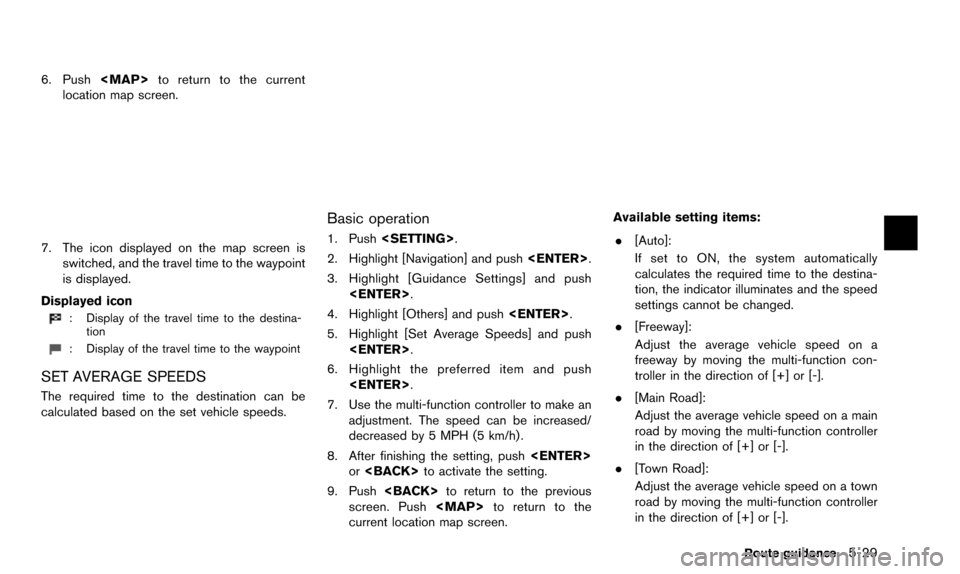
6. Push
Page 116 of 241
6-2Storing location/route
Often visited locations can be stored in the
Address Book. The stored addresses can be
easily retrieved to set them as a destination or
waypoint.
INFO:
. The Address Book can store up to 300
locations.
. New information placed in the same storage
position will overwrite the old data.
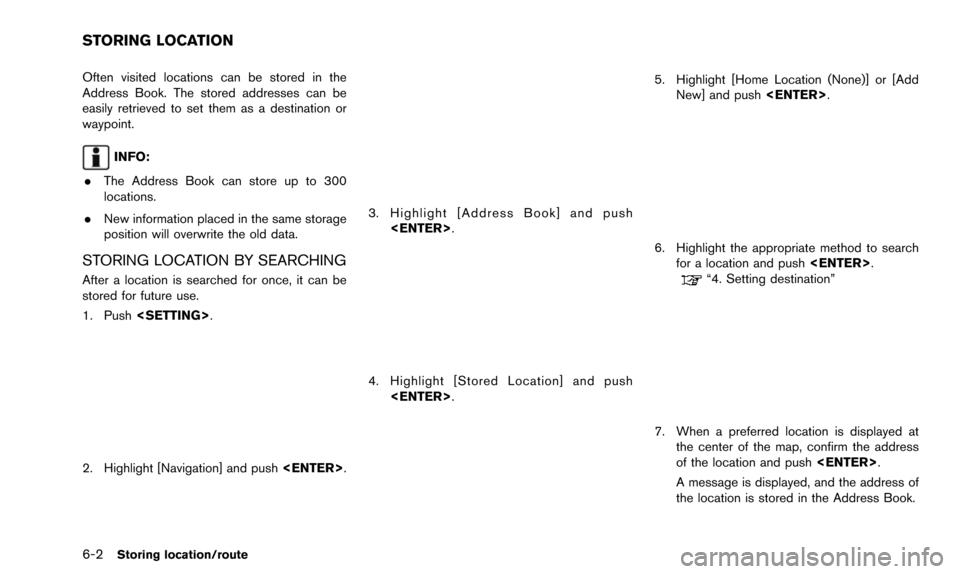
STORING LOCATION BY SEARCHING
After a location is searched for once, it can be
stored for future use.
1. Push
2. Highlight [Navigation] and push
3. Highlight [Address Book] and push
4. Highlight [Stored Location] and push
5. Highlight [Home Location (None)] or [AddNew] and push
6. Highlight the appropriate method to search
for a location and push
“4. Setting destination”
7. When a preferred location is displayed at
the center of the map, confirm the address
of the location and push
A message is displayed, and the address of
the location is stored in the Address Book.
STORING LOCATION