Window NISSAN ARMADA 2017 2.G User Guide
[x] Cancel search | Manufacturer: NISSAN, Model Year: 2017, Model line: ARMADA, Model: NISSAN ARMADA 2017 2.GPages: 614, PDF Size: 2.87 MB
Page 121 of 614
2-32Instruments and controls
SIC2045
Security indicator light
The security indicator light is located on the
meter panel. It indicates the status of the
NISSAN Vehicle Immobilizer System.
The light blinks after the ignition switch was in
the ACC, OFF and LOCK position. This function
indicates the security systems equipped on the
vehicle are operational.
If the NISSAN Vehicle Immobilizer System is
malfunctioning, this light will remain on while the
ignition switch is in the ON position.
If the light still remains on and/or the
engine will not start, seek service for the
NISSAN Vehicle Immobilizer System assoon as possible. Please bring all regis-
tered keys that you have. It is recom-
mended you visit a NISSAN dealer for
this service.
WARNING
In freezing temperatures the washer
solution may freeze on the window
and obscure your vision which may lead
to an accident. Warm the window with
the defroster before you wash the
window.
CAUTION
.
Do not operate the washer continu-
ously for more than 30 seconds.
. Do not operate the washer if the
reservoir tank is empty.
. Do not fill the window washer
reservoir tank with washer fluid
concentrates at full strength. Some
methyl alcohol based washer fluid
concentrates may permanently stain
the grille if spilled while filling the
window washer reservoir tank.
. Pre-mix washer fluid concentrates
with water to the manufacturer’s
recommended levels before pouring
the fluid into the window washer
WIPER AND WASHER SWITCH
Page 122 of 614
reservoir tank. Do not use the
window washer reservoir tank to
mix the washer fluid concentrate
and water.
If the wiper operation is interrupted by
snow or ice, the wiper may stop moving to
protect its motor. If this occurs, turn the
wiper switch to the OFF position and
remove the snow or ice that is on and
around the wiper arms. In approximately 1
minute, turn the switch on again to operate
the wiper.
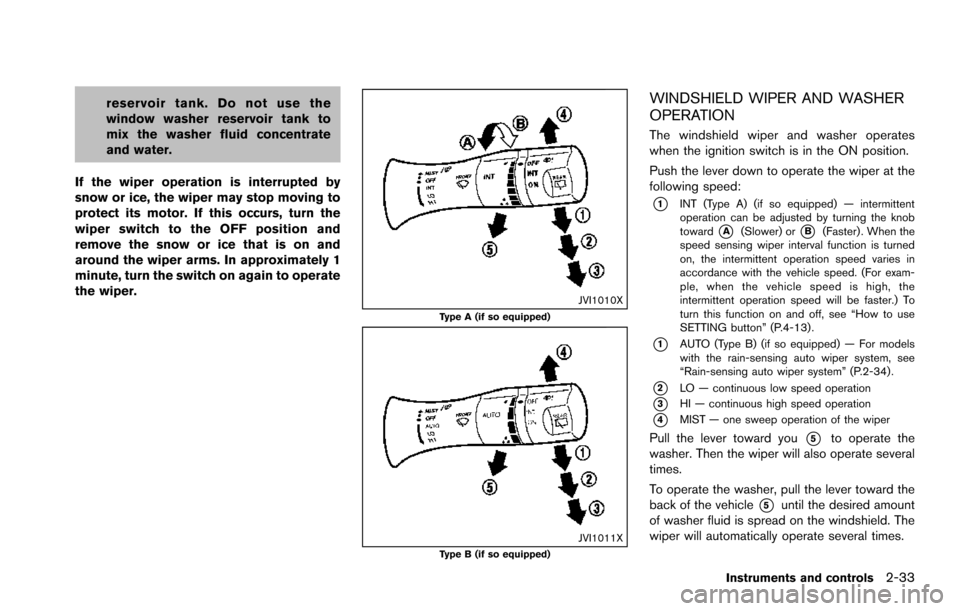
JVI1010XType A (if so equipped)
JVI1011XType B (if so equipped)
WINDSHIELD WIPER AND WASHER
OPERATION
The windshield wiper and washer operates
when the ignition switch is in the ON position.
Push the lever down to operate the wiper at the
following speed:
*1INT (Type A) (if so equipped) — intermittent
operation can be adjusted by turning the knob
toward
*A(Slower) or*B(Faster) . When the
speed sensing wiper interval function is turned
on, the intermittent operation speed varies in
accordance with the vehicle speed. (For exam-
ple, when the vehicle speed is high, the
intermittent operation speed will be faster.) To
turn this function on and off, see “How to use
SETTING button” (P.4-13) .
*1AUTO (Type B) (if so equipped) — For models
with the rain-sensing auto wiper system, see
“Rain-sensing auto wiper system” (P.2-34) .
*2LO — continuous low speed operation
*3HI — continuous high speed operation
*4MIST — one sweep operation of the wiper
Pull the lever toward you*5to operate the
washer. Then the wiper will also operate several
times.
To operate the washer, pull the lever toward the
back of the vehicle
*5until the desired amount
of washer fluid is spread on the windshield. The
wiper will automatically operate several times.
Instruments and controls2-33
Page 124 of 614
even though the amount of the rainfall
is small.
. Be sure to turn off the rain-sensing
auto wiper system when you use a car
wash.
. Using genuine wiper blades is recom-
mended for proper operation of the
rain-sensing auto wiper system. (See
“Windshield wiper blades” (P.8-16) for
wiper blade replacement.)
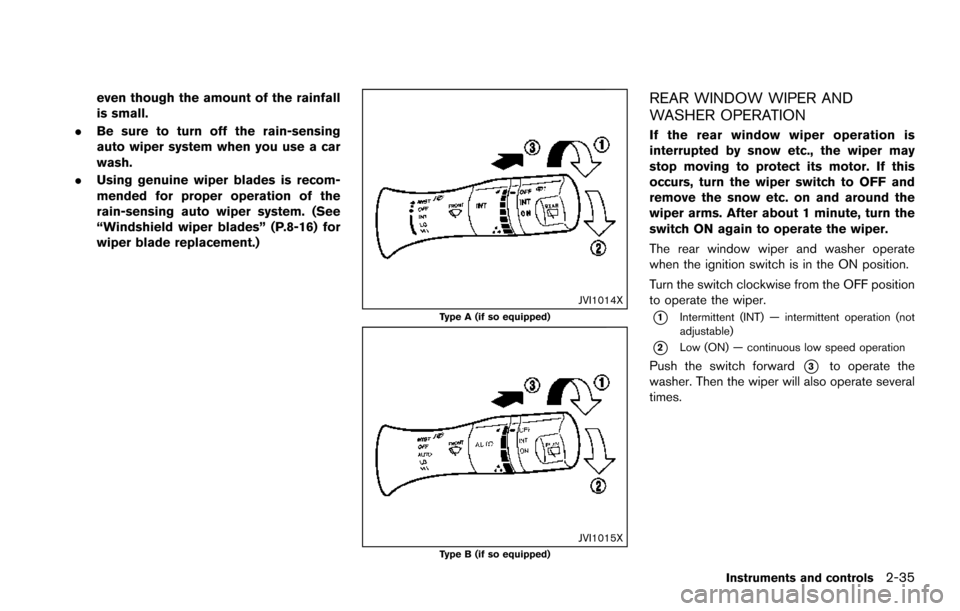
JVI1014XType A (if so equipped)
JVI1015XType B (if so equipped)
REAR WINDOW WIPER AND
WASHER OPERATION
If the rear window wiper operation is
interrupted by snow etc., the wiper may
stop moving to protect its motor. If this
occurs, turn the wiper switch to OFF and
remove the snow etc. on and around the
wiper arms. After about 1 minute, turn the
switch ON again to operate the wiper.
The rear window wiper and washer operate
when the ignition switch is in the ON position.
Turn the switch clockwise from the OFF position
to operate the wiper.
*1Intermittent (INT) — intermittent operation (not
adjustable)
*2Low (ON) — continuous low speed operation
Push the switch forward*3to operate the
washer. Then the wiper will also operate several
times.
Instruments and controls2-35
Page 125 of 614
2-36Instruments and controls
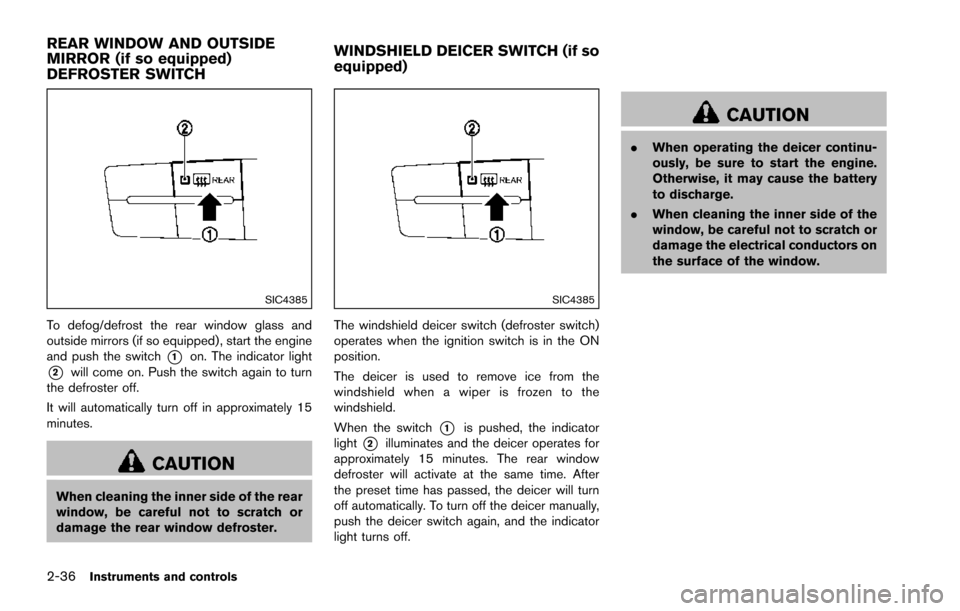
SIC4385
To defog/defrost the rear window glass and
outside mirrors (if so equipped) , start the engine
and push the switch
*1on. The indicator light
*2will come on. Push the switch again to turn
the defroster off.
It will automatically turn off in approximately 15
minutes.
CAUTION
When cleaning the inner side of the rear
window, be careful not to scratch or
damage the rear window defroster.
SIC4385
The windshield deicer switch (defroster switch)
operates when the ignition switch is in the ON
position.
The deicer is used to remove ice from the
windshield when a wiper is frozen to the
windshield.
When the switch
*1is pushed, the indicator
light
*2illuminates and the deicer operates for
approximately 15 minutes. The rear window
defroster will activate at the same time. After
the preset time has passed, the deicer will turn
off automatically. To turn off the deicer manually,
push the deicer switch again, and the indicator
light turns off.
CAUTION
. When operating the deicer continu-
ously, be sure to start the engine.
Otherwise, it may cause the battery
to discharge.
. When cleaning the inner side of the
window, be careful not to scratch or
damage the electrical conductors on
the surface of the window.
REAR WINDOW AND OUTSIDE
MIRROR (if so equipped)
DEFROSTER SWITCH WINDSHIELD DEICER SWITCH (if so
equipped)
Page 137 of 614
2-48Instruments and controls
SIC4455
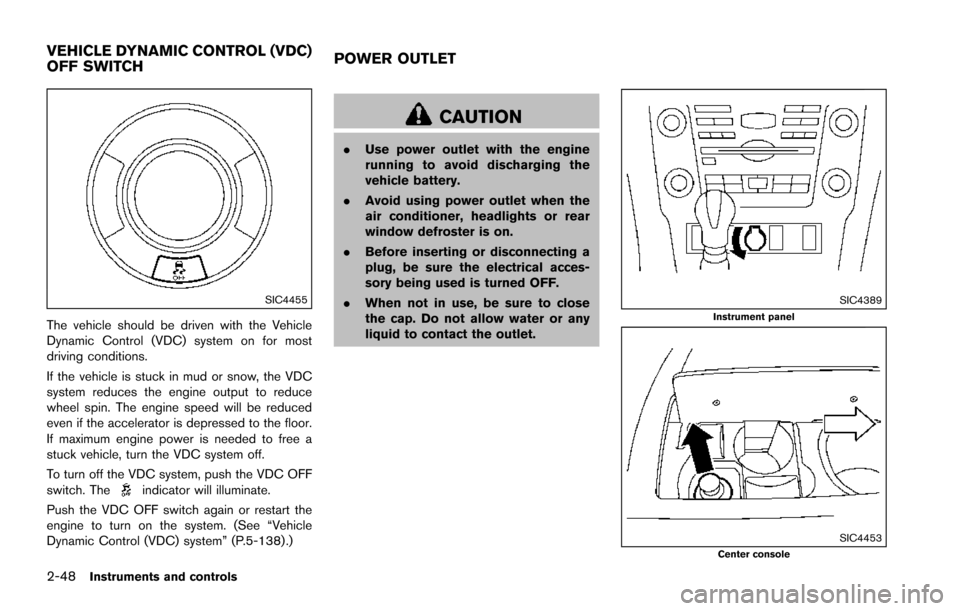
The vehicle should be driven with the Vehicle
Dynamic Control (VDC) system on for most
driving conditions.
If the vehicle is stuck in mud or snow, the VDC
system reduces the engine output to reduce
wheel spin. The engine speed will be reduced
even if the accelerator is depressed to the floor.
If maximum engine power is needed to free a
stuck vehicle, turn the VDC system off.
To turn off the VDC system, push the VDC OFF
switch. The
indicator will illuminate.
Push the VDC OFF switch again or restart the
engine to turn on the system. (See “Vehicle
Dynamic Control (VDC) system” (P.5-138) .)
CAUTION
. Use power outlet with the engine
running to avoid discharging the
vehicle battery.
. Avoid using power outlet when the
air conditioner, headlights or rear
window defroster is on.
. Before inserting or disconnecting a
plug, be sure the electrical acces-
sory being used is turned OFF.
. When not in use, be sure to close
the cap. Do not allow water or any
liquid to contact the outlet.
SIC4389Instrument panel
SIC4453Center console
VEHICLE DYNAMIC CONTROL (VDC)
OFF SWITCH POWER OUTLET
Page 148 of 614
WARNING
.Never install the rear bumper cover
while the engine is running. The
exhaust gas could heat the rear
bumper cover and this may cause a
fire.
. Never drive with the rear bumper
cover left in place. There is a risk
that the liftgate will not close cor-
rectly, and that carbon monoxide
may enter the cabin causing serious
injury or death.
CAUTION
.Failure to follow the instructions
below could result in damage to
the rear bumper cover.
— Do not close the liftgate with the
rear bumper cover installed.
— Do not strike or apply excessive force to the rear bumper cover.
— Keep the rear bumper cover away from heat or fire. — To clean the rear bumper cover,
use a soft cloth, dampened with
a mild solution of neutral deter-
gent. Never use benzine, thinner
or any similar chemical.
— Remove any solvent such as oil or gasoline spilled on the sur-
face of the rear bumper cover as
soon as possible.
POWER WINDOWS
WARNING
. Make sure that all passengers have
their hands, etc. inside the vehicle
while it is in motion and before
closing the windows. Use the win-
dow lock switch to prevent unex-
pected use of the power windows.
. To help avoid risk of injury or death
through unintended operation of
the vehicle and or its systems,
including entrapment in windows
or inadvertent door lock activation,
do not leave children, people who
require the assistance of others or
pets unattended in your vehicle.
Additionally, the temperature inside
a closed vehicle on a warm day can
quickly become high enough to
cause a significant risk of injury or
death to people and pets.
The power windows operate when the ignition
switch is in the ON position or for about 45
seconds after the ignition switch is pushed to
the OFF position. If the driver’s or front
passenger’s door is opened during this period
Instruments and controls2-59
WINDOWS
Page 149 of 614
2-60Instruments and controls
of about 45 seconds, power to the windows is
canceled.
SIC4352
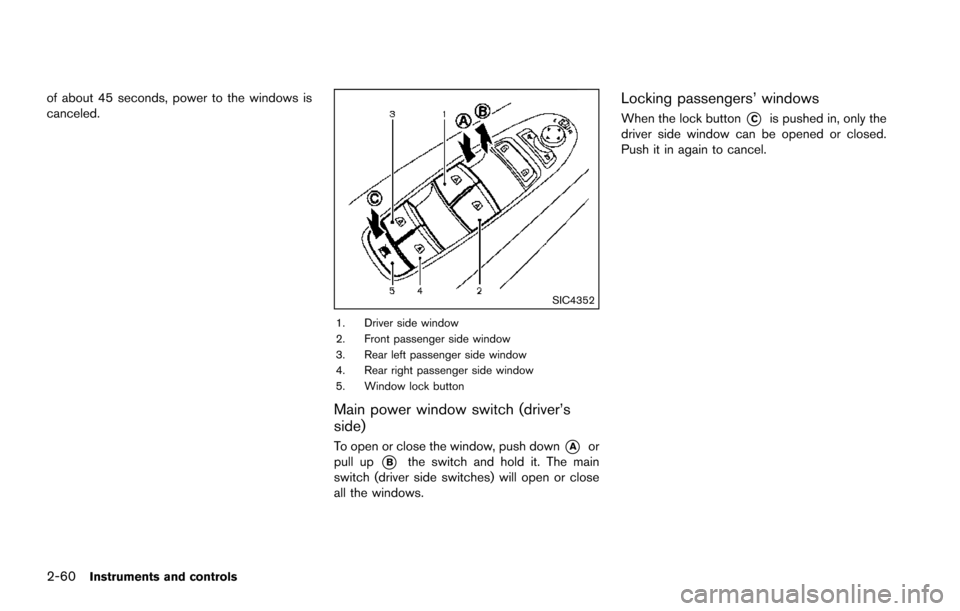
1. Driver side window
2. Front passenger side window
3. Rear left passenger side window
4. Rear right passenger side window
5. Window lock button
Main power window switch (driver’s
side)
To open or close the window, push down*Aor
pull up
*Bthe switch and hold it. The main
switch (driver side switches) will open or close
all the windows.
Locking passengers’ windows
When the lock button*Cis pushed in, only the
driver side window can be opened or closed.
Push it in again to cancel.
Page 150 of 614
SIC4353
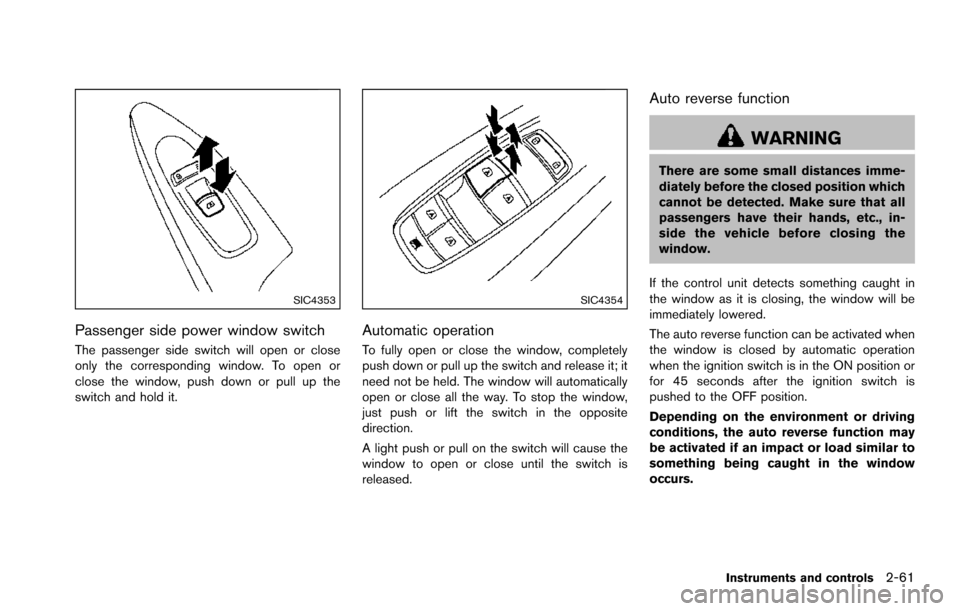
Passenger side power window switch
The passenger side switch will open or close
only the corresponding window. To open or
close the window, push down or pull up the
switch and hold it.
SIC4354
Automatic operation
To fully open or close the window, completely
push down or pull up the switch and release it; it
need not be held. The window will automatically
open or close all the way. To stop the window,
just push or lift the switch in the opposite
direction.
A light push or pull on the switch will cause the
window to open or close until the switch is
released.
Auto reverse function
WARNING
There are some small distances imme-
diately before the closed position which
cannot be detected. Make sure that all
passengers have their hands, etc., in-
side the vehicle before closing the
window.
If the control unit detects something caught in
the window as it is closing, the window will be
immediately lowered.
The auto reverse function can be activated when
the window is closed by automatic operation
when the ignition switch is in the ON position or
for 45 seconds after the ignition switch is
pushed to the OFF position.
Depending on the environment or driving
conditions, the auto reverse function may
be activated if an impact or load similar to
something being caught in the window
occurs.
Instruments and controls2-61
Page 151 of 614
2-62Instruments and controls
If the windows do not close automatically
If the power window automatic function (closing
only) does not operate properly, perform the
following procedure to initialize the power
window system.
1. Place the ignition switch in the ON position.
2. Close the door.
3. Open the window completely by operatingthe power window switch.
4. Pull the power window switch and hold it to close the window, and then hold the switch
more than 3 seconds after the window is
closed completely.
5. Release the power window switch. Operate the window by the automatic function to
confirm the initialization is complete.
6. Perform steps 2 through 5 above for other windows.
If the power window automatic function does
not operate properly after performing the pro-
cedure above, have your vehicle checked. It is
recommended you visit a NISSAN dealer for this
service.WARNING
. In an accident you could be thrown
from the vehicle through an open
moonroof. Always use seat belts
and child restraints.
. Do not allow anyone to stand up or
extend any portion of their body out
of the moonroof opening while the
vehicle is in motion or while the
moonroof is closing.
CAUTION
.Remove water drops, snow, ice or
sand from the moonroof before
opening.
. Do not place any heavy object on
the moonroof or surrounding area.
POWER MOONROOF
The moonroof only operates when the ignition
switch is in the ON position.
The moonroof is operational for about 45
seconds, even if the ignition switch is pushed
to the OFF position. If the driver’s door or the passenger’s door is opened during this period of
about 45 seconds, power to the moonroof is
canceled.
MOONROOF (if so equipped)
Page 162 of 614

3 Pre-driving checks and adjustments
Keys ........................................................................\
...................... 3-2Intelligent Key ....................................................................... 3-2
Valet hand-off ....................................................................... 3-4
Doors ........................................................................\
.................... 3-4 Locking with mechanical key ............................................ 3-4
Opening and closing windows with the
mechanical key ..................................................................... 3-5
Locking with inside lock knob .......................................... 3-5
Locking with power door lock switch ............................ 3-5
Automatic door locks ......................................................... 3-6
Child safety rear door lock .............................................. 3-6
Intelligent Key system .............................................................. 3-7 Intelligent Key operating range ........................................ 3-9
Door locks/unlocks precaution ........................................ 3-9
Intelligent Key operation ................................................. 3-10
Battery saver system ....................................................... 3-12
Warning signals ................................................................ 3-12
Troubleshooting guide ..................................................... 3-13
Remote keyless entry system ............................................. 3-15 How to use remote keyless entry system .................. 3-16
Remote engine start (if so equipped) .............................. 3-19 Remote engine start operating range ......................... 3-19
Remote starting the engine ........................................... 3-19
Extending engine run time ............................................. 3-20 Canceling a remote start ............................................. 3-20
Conditions the remote engine start will
not work ........................................................................\
.... 3-20
Hood ........................................................................\
................. 3-21
Liftgate ........................................................................\
............. 3-22 Operating manual liftgate ............................................. 3-22
Operating power liftgate (if so equipped) ............... 3-22
Auto closure ................................................................... 3-25
Liftgate release lever ..................................................... 3-26
Fuel-filler door ........................................................................\
3-26
Opening the fuel-filler door ......................................... 3-26
Fuel-filler cap .................................................................. 3-27
Tilt/telescopic steering ......................................................... 3-29
Electric operation ........................................................... 3-29
Sun visors ........................................................................\
........ 3-29
Mirrors ........................................................................\
.............. 3-30
Inside mirror ..................................................................... 3-30
Outside mirrors ............................................................... 3-31
Vanity mirror ..................................................................... 3-33
Automatic drive positioner (if so equipped) ................... 3-33
Entry/exit function .......................................................... 3-33
Memory storage .............................................................. 3-34
Setting memory function .............................................. 3-35
System operation ........................................................... 3-35