child lock NISSAN ARMADA 2017 2.G User Guide
[x] Cancel search | Manufacturer: NISSAN, Model Year: 2017, Model line: ARMADA, Model: NISSAN ARMADA 2017 2.GPages: 614, PDF Size: 2.87 MB
Page 60 of 614
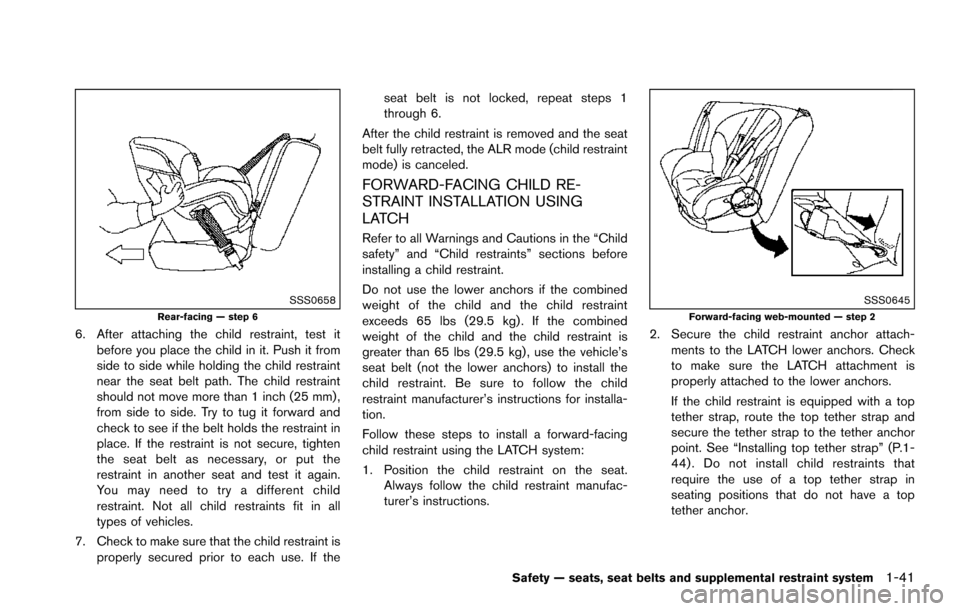
SSS0658Rear-facing — step 6
6. After attaching the child restraint, test itbefore you place the child in it. Push it from
side to side while holding the child restraint
near the seat belt path. The child restraint
should not move more than 1 inch (25 mm) ,
from side to side. Try to tug it forward and
check to see if the belt holds the restraint in
place. If the restraint is not secure, tighten
the seat belt as necessary, or put the
restraint in another seat and test it again.
You may need to try a different child
restraint. Not all child restraints fit in all
types of vehicles.
7. Check to make sure that the child restraint is properly secured prior to each use. If the seat belt is not locked, repeat steps 1
through 6.
After the child restraint is removed and the seat
belt fully retracted, the ALR mode (child restraint
mode) is canceled.
FORWARD-FACING CHILD RE-
STRAINT INSTALLATION USING
LATCH
Refer to all Warnings and Cautions in the “Child
safety” and “Child restraints” sections before
installing a child restraint.
Do not use the lower anchors if the combined
weight of the child and the child restraint
exceeds 65 lbs (29.5 kg) . If the combined
weight of the child and the child restraint is
greater than 65 lbs (29.5 kg) , use the vehicle’s
seat belt (not the lower anchors) to install the
child restraint. Be sure to follow the child
restraint manufacturer’s instructions for installa-
tion.
Follow these steps to install a forward-facing
child restraint using the LATCH system:
1. Position the child restraint on the seat. Always follow the child restraint manufac-
turer’s instructions.
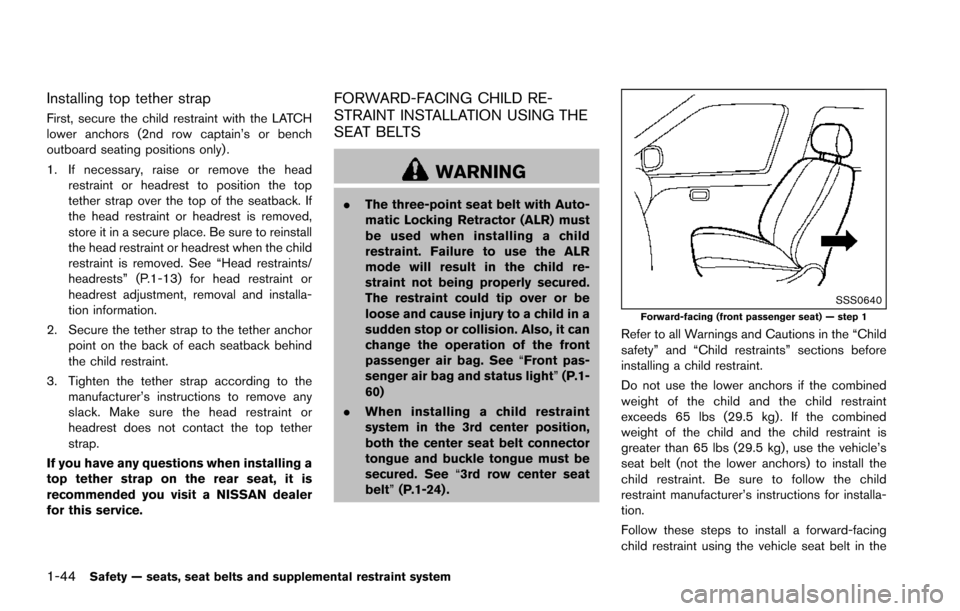
SSS0645Forward-facing web-mounted — step 2
2. Secure the child restraint anchor attach-ments to the LATCH lower anchors. Check
to make sure the LATCH attachment is
properly attached to the lower anchors.
If the child restraint is equipped with a top
tether strap, route the top tether strap and
secure the tether strap to the tether anchor
point. See “Installing top tether strap” (P.1-
44) . Do not install child restraints that
require the use of a top tether strap in
seating positions that do not have a top
tether anchor.
Safety — seats, seat belts and supplemental restraint system1-41
Page 63 of 614
1-44Safety — seats, seat belts and supplemental restraint system
Installing top tether strap
First, secure the child restraint with the LATCH
lower anchors (2nd row captain’s or bench
outboard seating positions only) .
1. If necessary, raise or remove the headrestraint or headrest to position the top
tether strap over the top of the seatback. If
the head restraint or headrest is removed,
store it in a secure place. Be sure to reinstall
the head restraint or headrest when the child
restraint is removed. See “Head restraints/
headrests” (P.1-13) for head restraint or
headrest adjustment, removal and installa-
tion information.
2. Secure the tether strap to the tether anchor point on the back of each seatback behind
the child restraint.
3. Tighten the tether strap according to the manufacturer’s instructions to remove any
slack. Make sure the head restraint or
headrest does not contact the top tether
strap.
If you have any questions when installing a
top tether strap on the rear seat, it is
recommended you visit a NISSAN dealer
for this service.
FORWARD-FACING CHILD RE-
STRAINT INSTALLATION USING THE
SEAT BELTS
WARNING
. The three-point seat belt with Auto-
matic Locking Retractor (ALR) must
be used when installing a child
restraint. Failure to use the ALR
mode will result in the child re-
straint not being properly secured.
The restraint could tip over or be
loose and cause injury to a child in a
sudden stop or collision. Also, it can
change the operation of the front
passenger air bag. See “Front pas-
senger air bag and status light” (P.1-
60)
. When installing a child restraint
system in the 3rd center position,
both the center seat belt connector
tongue and buckle tongue must be
secured. See “3rd row center seat
belt” (P.1-24) .
SSS0640Forward-facing (front passenger seat) — step 1
Refer to all Warnings and Cautions in the “Child
safety” and “Child restraints” sections before
installing a child restraint.
Do not use the lower anchors if the combined
weight of the child and the child restraint
exceeds 65 lbs (29.5 kg) . If the combined
weight of the child and the child restraint is
greater than 65 lbs (29.5 kg) , use the vehicle’s
seat belt (not the lower anchors) to install the
child restraint. Be sure to follow the child
restraint manufacturer’s instructions for installa-
tion.
Follow these steps to install a forward-facing
child restraint using the vehicle seat belt in the
Page 64 of 614
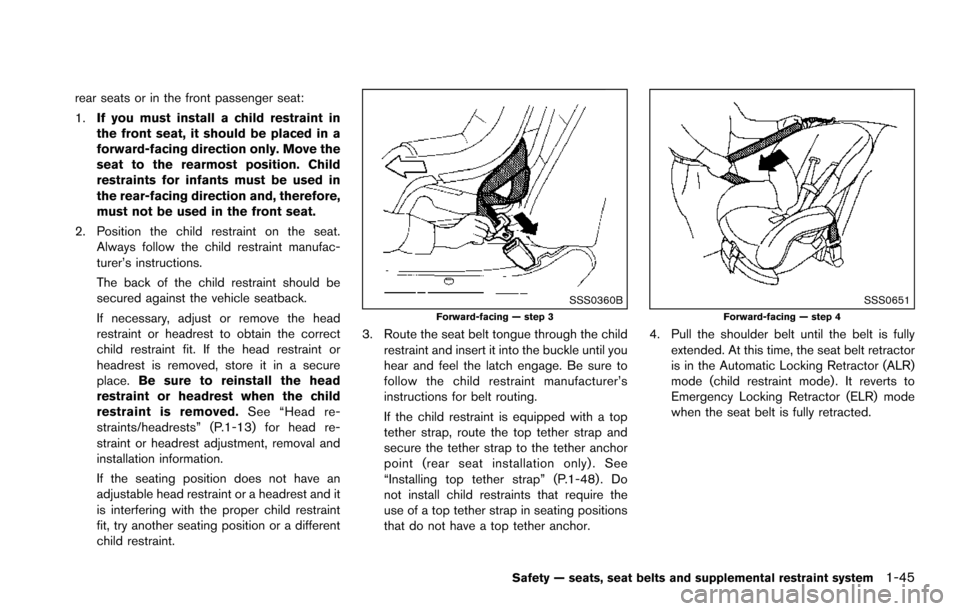
rear seats or in the front passenger seat:
1.If you must install a child restraint in
the front seat, it should be placed in a
forward-facing direction only. Move the
seat to the rearmost position. Child
restraints for infants must be used in
the rear-facing direction and, therefore,
must not be used in the front seat.
2. Position the child restraint on the seat. Always follow the child restraint manufac-
turer’s instructions.
The back of the child restraint should be
secured against the vehicle seatback.
If necessary, adjust or remove the head
restraint or headrest to obtain the correct
child restraint fit. If the head restraint or
headrest is removed, store it in a secure
place. Be sure to reinstall the head
restraint or headrest when the child
restraint is removed. See “Head re-
straints/headrests” (P.1-13) for head re-
straint or headrest adjustment, removal and
installation information.
If the seating position does not have an
adjustable head restraint or a headrest and it
is interfering with the proper child restraint
fit, try another seating position or a different
child restraint.
SSS0360BForward-facing — step 3
3. Route the seat belt tongue through the child restraint and insert it into the buckle until you
hear and feel the latch engage. Be sure to
follow the child restraint manufacturer’s
instructions for belt routing.
If the child restraint is equipped with a top
tether strap, route the top tether strap and
secure the tether strap to the tether anchor
point (rear seat installation only) . See
“Installing top tether strap” (P.1-48) . Do
not install child restraints that require the
use of a top tether strap in seating positions
that do not have a top tether anchor.
SSS0651Forward-facing — step 4
4. Pull the shoulder belt until the belt is fullyextended. At this time, the seat belt retractor
is in the Automatic Locking Retractor (ALR)
mode (child restraint mode) . It reverts to
Emergency Locking Retractor (ELR) mode
when the seat belt is fully retracted.
Safety — seats, seat belts and supplemental restraint system1-45
Page 66 of 614
seat belt is not locked, repeat steps 2
through 8.
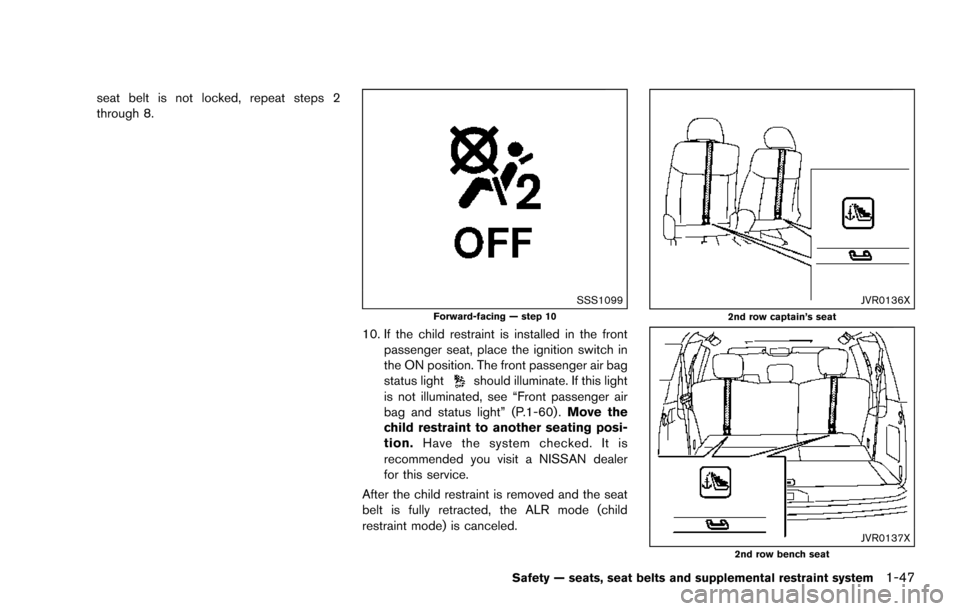
SSS1099Forward-facing — step 10
10. If the child restraint is installed in the frontpassenger seat, place the ignition switch in
the ON position. The front passenger air bag
status light
should illuminate. If this light
is not illuminated, see “Front passenger air
bag and status light” (P.1-60) . Move the
child restraint to another seating posi-
tion. Have the system checked. It is
recommended you visit a NISSAN dealer
for this service.
After the child restraint is removed and the seat
belt is fully retracted, the ALR mode (child
restraint mode) is canceled.
JVR0136X2nd row captain’s seat
JVR0137X2nd row bench seat
Safety — seats, seat belts and supplemental restraint system1-47
Page 68 of 614
LRS0455
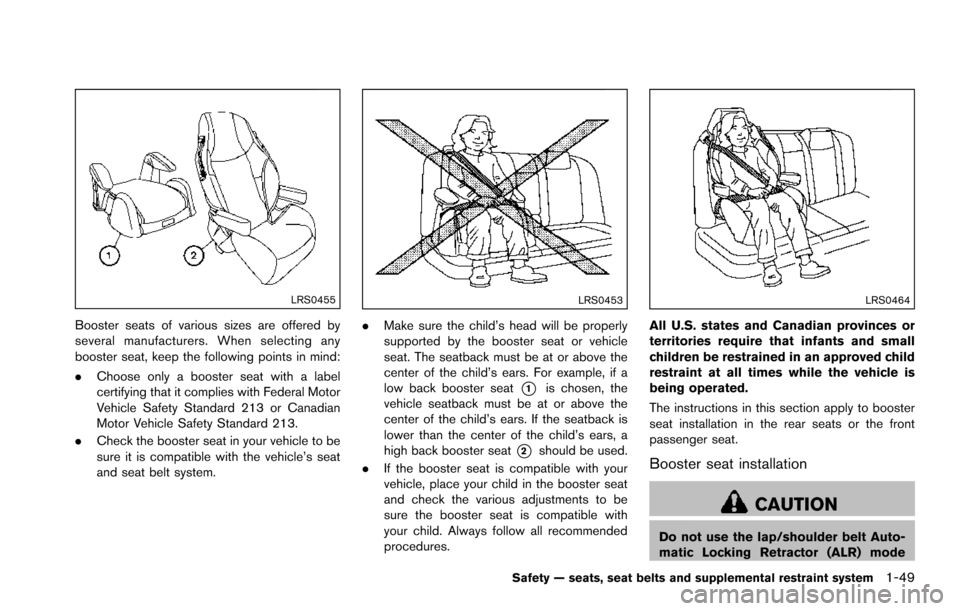
Booster seats of various sizes are offered by
several manufacturers. When selecting any
booster seat, keep the following points in mind:
.Choose only a booster seat with a label
certifying that it complies with Federal Motor
Vehicle Safety Standard 213 or Canadian
Motor Vehicle Safety Standard 213.
. Check the booster seat in your vehicle to be
sure it is compatible with the vehicle’s seat
and seat belt system.
LRS0453
.Make sure the child’s head will be properly
supported by the booster seat or vehicle
seat. The seatback must be at or above the
center of the child’s ears. For example, if a
low back booster seat
*1is chosen, the
vehicle seatback must be at or above the
center of the child’s ears. If the seatback is
lower than the center of the child’s ears, a
high back booster seat
*2should be used.
. If the booster seat is compatible with your
vehicle, place your child in the booster seat
and check the various adjustments to be
sure the booster seat is compatible with
your child. Always follow all recommended
procedures.
LRS0464
All U.S. states and Canadian provinces or
territories require that infants and small
children be restrained in an approved child
restraint at all times while the vehicle is
being operated.
The instructions in this section apply to booster
seat installation in the rear seats or the front
passenger seat.
Booster seat installation
CAUTION
Do not use the lap/shoulder belt Auto-
matic Locking Retractor (ALR) mode
Safety — seats, seat belts and supplemental restraint system1-49
Page 81 of 614
1-62Safety — seats, seat belts and supplemental restraint system
not illuminated (indicating that the air bag might
inflate in a crash) , it could be that the child
restraint or seat belt is not being used properly.
Make sure that the child restraint is installed
properly, the seat belt is used properly and the
occupant is positioned properly. If the front
passenger air bag status light is still not
illuminated, reposition the occupant or child
restraint in a rear seat.
If the front passenger air bag status light will not
illuminate even though you believe that the child
restraint, the seat belts and the occupant are
properly positioned, the system may be sensing
an unoccupied seat (in which case the air bag is
OFF) . Your NISSAN dealer can check that the
system is OFF by using a special tool. However,
until you have confirmed with your dealer that
your air bag is working properly, reposition the
occupant or child restraint in a rear seat.
The NISSAN Advanced Air Bag System and
front passenger air bag status light will take a
few seconds to register a change in the front
passenger seat status. However, if the seat
becomes unoccupied, the air bag status light
will remain off.
If a malfunction occurs in the front passenger air
bag system, the supplemental air bag warning
light
, located in the meter and gauges area
will blink. Have the system checked. It is recommended you visit a NISSAN dealer for
this service.
Normal operation:
In order for the occupant classification sensor
system to classify the front passenger based on
weight, please follow the precautions and steps
outlined below:
Precautions:
.
Make sure that there are no objects weigh-
ing over 9.1 lbs (4 kg) hanging on the seat
or placed in the seatback pocket.
. Make sure that a child restraint or other
object is not pressing against the rear of the
seatback.
. Make sure that a rear passenger is not
pushing or pulling on the back of the front
passenger seat.
. Make sure that the front passenger seat or
seatback is not forced back against an
object on the seat or floor behind it.
. Make sure that there is no object placed
under the front passenger seat. Steps:
1. Adjust the seat as outlined. (See “Seats”
(P.1-2) .) Sit upright, leaning against the
seatback, and centered on the seat cushion
with your feet comfortably extended to the
floor.
2. Make sure there are no objects on your lap.
3. Fasten the seat belt as outlined. (See “Seat belts” (P.1-18) .)
4. Remain in this position for 30 seconds allowing the system to classify the front
passenger before the vehicle is put into
motion.
5. Ensure proper classification by checking the front passenger air bag status light.
NOTE:
This vehicle’s occupant classification sen-
sor system locks the classification during
driving so it is important that you confirm
that the front passenger is properly classi-
fied prior to driving. Also, the occupant
classification sensor system may recalcu-
late the weight of the occupant when the
vehicle comes to a stop (i.e. stop light, stop
sign, etc.) , so the front passenger seat
occupant should continue to remain
seated as outlined above.
Page 148 of 614
WARNING
.Never install the rear bumper cover
while the engine is running. The
exhaust gas could heat the rear
bumper cover and this may cause a
fire.
. Never drive with the rear bumper
cover left in place. There is a risk
that the liftgate will not close cor-
rectly, and that carbon monoxide
may enter the cabin causing serious
injury or death.
CAUTION
.Failure to follow the instructions
below could result in damage to
the rear bumper cover.
— Do not close the liftgate with the
rear bumper cover installed.
— Do not strike or apply excessive force to the rear bumper cover.
— Keep the rear bumper cover away from heat or fire. — To clean the rear bumper cover,
use a soft cloth, dampened with
a mild solution of neutral deter-
gent. Never use benzine, thinner
or any similar chemical.
— Remove any solvent such as oil or gasoline spilled on the sur-
face of the rear bumper cover as
soon as possible.
POWER WINDOWS
WARNING
. Make sure that all passengers have
their hands, etc. inside the vehicle
while it is in motion and before
closing the windows. Use the win-
dow lock switch to prevent unex-
pected use of the power windows.
. To help avoid risk of injury or death
through unintended operation of
the vehicle and or its systems,
including entrapment in windows
or inadvertent door lock activation,
do not leave children, people who
require the assistance of others or
pets unattended in your vehicle.
Additionally, the temperature inside
a closed vehicle on a warm day can
quickly become high enough to
cause a significant risk of injury or
death to people and pets.
The power windows operate when the ignition
switch is in the ON position or for about 45
seconds after the ignition switch is pushed to
the OFF position. If the driver’s or front
passenger’s door is opened during this period
Instruments and controls2-59
WINDOWS
Page 162 of 614

3 Pre-driving checks and adjustments
Keys ........................................................................\
...................... 3-2Intelligent Key ....................................................................... 3-2
Valet hand-off ....................................................................... 3-4
Doors ........................................................................\
.................... 3-4 Locking with mechanical key ............................................ 3-4
Opening and closing windows with the
mechanical key ..................................................................... 3-5
Locking with inside lock knob .......................................... 3-5
Locking with power door lock switch ............................ 3-5
Automatic door locks ......................................................... 3-6
Child safety rear door lock .............................................. 3-6
Intelligent Key system .............................................................. 3-7 Intelligent Key operating range ........................................ 3-9
Door locks/unlocks precaution ........................................ 3-9
Intelligent Key operation ................................................. 3-10
Battery saver system ....................................................... 3-12
Warning signals ................................................................ 3-12
Troubleshooting guide ..................................................... 3-13
Remote keyless entry system ............................................. 3-15 How to use remote keyless entry system .................. 3-16
Remote engine start (if so equipped) .............................. 3-19 Remote engine start operating range ......................... 3-19
Remote starting the engine ........................................... 3-19
Extending engine run time ............................................. 3-20 Canceling a remote start ............................................. 3-20
Conditions the remote engine start will
not work ........................................................................\
.... 3-20
Hood ........................................................................\
................. 3-21
Liftgate ........................................................................\
............. 3-22 Operating manual liftgate ............................................. 3-22
Operating power liftgate (if so equipped) ............... 3-22
Auto closure ................................................................... 3-25
Liftgate release lever ..................................................... 3-26
Fuel-filler door ........................................................................\
3-26
Opening the fuel-filler door ......................................... 3-26
Fuel-filler cap .................................................................. 3-27
Tilt/telescopic steering ......................................................... 3-29
Electric operation ........................................................... 3-29
Sun visors ........................................................................\
........ 3-29
Mirrors ........................................................................\
.............. 3-30
Inside mirror ..................................................................... 3-30
Outside mirrors ............................................................... 3-31
Vanity mirror ..................................................................... 3-33
Automatic drive positioner (if so equipped) ................... 3-33
Entry/exit function .......................................................... 3-33
Memory storage .............................................................. 3-34
Setting memory function .............................................. 3-35
System operation ........................................................... 3-35
Page 165 of 614
3-4Pre-driving checks and adjustments
CAUTION
Always carry the mechanical key in-
stalled in the Intelligent Key.
VALET HAND-OFF
When you have to leave a key with a valet, give
them the Intelligent Key itself and keep the
mechanical key with you to protect your
belongings.
To prevent the glove box from being opened
during valet hand-off, follow the procedures
below.
1. Remove the mechanical key from the In-telligent Key.
2. Lock the glove box with the mechanical key.
3. Hand the Intelligent Key to the valet, keeping the mechanical key in your pocket or bag for
insertion into the Intelligent Key when you
retrieve your vehicle.
See “Storage” (P.2-50) .
WARNING
. Always have the doors locked while
driving. Along with the use of seat
belts, this provides greater safety in
the event of an accident by helping
to prevent persons from being
thrown from the vehicle. This also
helps keep children and others from
unintentionally opening the doors,
and will help keep out intruders.
. Before opening any door, always
look for and avoid oncoming traffic.
. To help avoid risk of injury or death
through unintended operation of
the vehicle and or its systems,
including entrapment in windows
or inadvertent door lock activation,
do not leave children, people who
require the assistance of others or
pets unattended in your vehicle.
Additionally, the temperature inside
a closed vehicle on a warm day can
quickly become high enough to
cause a significant risk of injury or
death to people and pets.
SPA2457B
LOCKING WITH MECHANICAL KEY
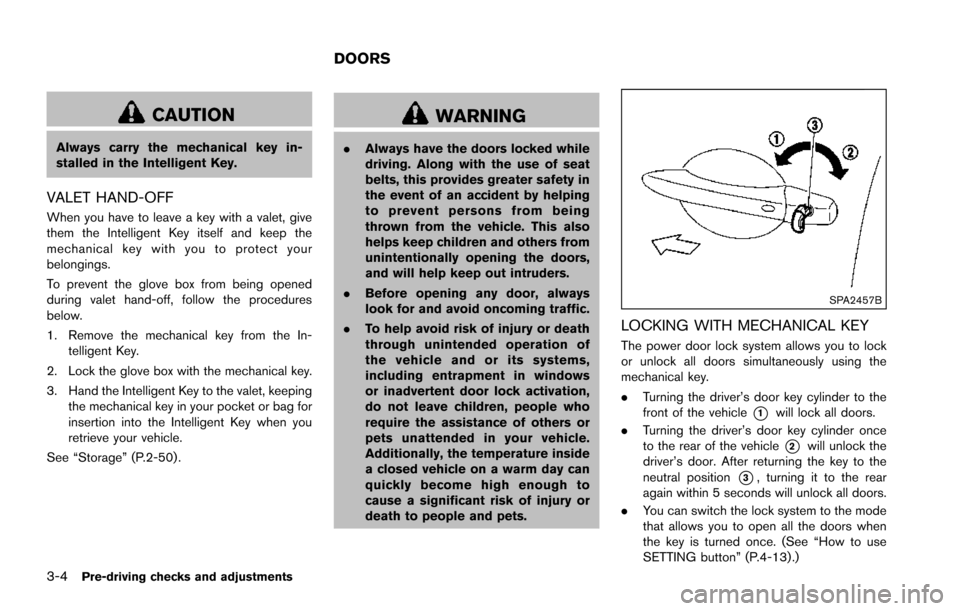
The power door lock system allows you to lock
or unlock all doors simultaneously using the
mechanical key.
.Turning the driver’s door key cylinder to the
front of the vehicle
*1will lock all doors.
. Turning the driver’s door key cylinder once
to the rear of the vehicle
*2will unlock the
driver’s door. After returning the key to the
neutral position
*3, turning it to the rear
again within 5 seconds will unlock all doors.
. You can switch the lock system to the mode
that allows you to open all the doors when
the key is turned once. (See “How to use
SETTING button” (P.4-13).)
DOORS
Page 167 of 614
3-6Pre-driving checks and adjustments
Lockout protection
When the power door lock switch (driver or front
passenger) is moved to the lock position with
any door open, all doors will lock and unlock
automatically. With the Intelligent Key left in the
vehicle and any door open, all doors will unlock
automatically and a chime will sound after the
door is closed.
These functions help to prevent the Intelligent
Key from being accidentally locked inside the
vehicle.
AUTOMATIC DOOR LOCKS
.All doors lock automatically when the vehicle
speed reaches 15 MPH (24 km/h) .
. All doors unlock automatically when the
ignition switch is placed in the OFF position.
The automatic unlock function can be
deactivated or activated. To deactivate or
activate the automatic door unlock system,
perform the following procedure:
1. Close all doors.
2. Place the ignition switch in the ON position.
3. Within 20 seconds of performing Step 2, push and hold the power door lock switch to
the
position (UNLOCK) for more than 5
seconds. 4. When activated, the hazard indicator will
flash twice. When deactivated, the hazard
indicator will flash once.
5. The ignition switch must be placed in the OFF and ON position again between each
setting change.
When the automatic door unlock system is
deactivated, the doors do not unlock when the
ignition switch is placed in the OFF position. To
unlock the door manually, use the inside lock
knob or the power door lock switch (driver’s or
front passenger’s side) .
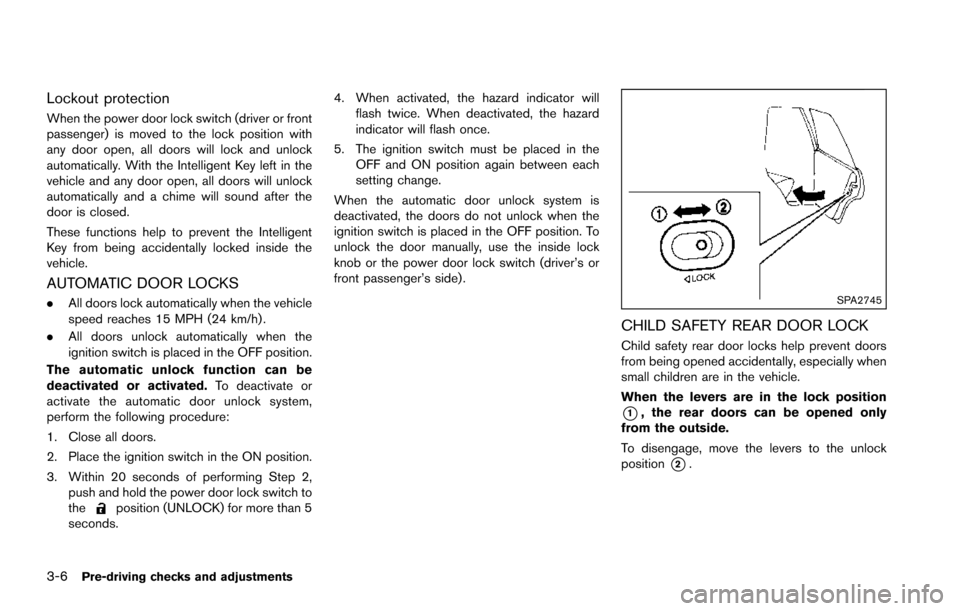
SPA2745
CHILD SAFETY REAR DOOR LOCK
Child safety rear door locks help prevent doors
from being opened accidentally, especially when
small children are in the vehicle.
When the levers are in the lock position
*1, the rear doors can be opened only
from the outside.
To disengage, move the levers to the unlock
position
*2.