display NISSAN ARMADA 2017 2.G User Guide
[x] Cancel search | Manufacturer: NISSAN, Model Year: 2017, Model line: ARMADA, Model: NISSAN ARMADA 2017 2.GPages: 614, PDF Size: 2.87 MB
Page 103 of 614
2-14Instruments and controls
recommended you visit a NISSAN
dealer for this service.
. If the 4WD warning light turns on
when driving on dry or hard surfaced
roads:
— in the 4H(I) position, shift the
4WD shift switch to AUTO
— in the 4L(O) position, stop the vehicle and shift the transmis-
sion shift lever to the N (Neutral)
position and shift the 4WD shift
switch to AUTO
. If the warning light is still on after
the above operations, have your
vehicle checked as soon as possi-
ble. It is recommended you visit a
NISSAN dealer for this service.
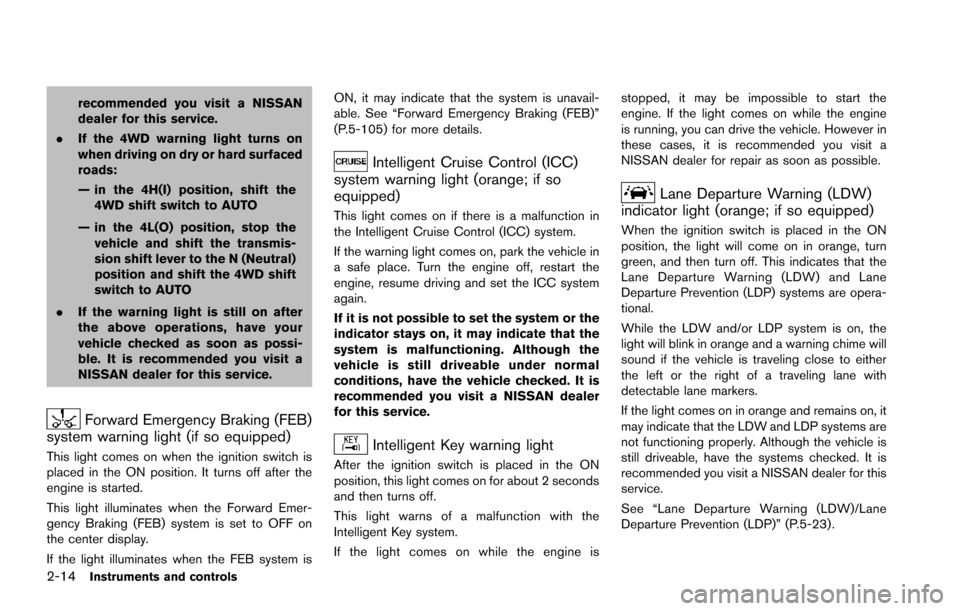
Forward Emergency Braking (FEB)
system warning light (if so equipped)
This light comes on when the ignition switch is
placed in the ON position. It turns off after the
engine is started.
This light illuminates when the Forward Emer-
gency Braking (FEB) system is set to OFF on
the center display.
If the light illuminates when the FEB system is ON, it may indicate that the system is unavail-
able. See “Forward Emergency Braking (FEB)”
(P.5-105) for more details.
Intelligent Cruise Control (ICC)
system warning light (orange; if so
equipped)
This light comes on if there is a malfunction in
the Intelligent Cruise Control (ICC) system.
If the warning light comes on, park the vehicle in
a safe place. Turn the engine off, restart the
engine, resume driving and set the ICC system
again.
If it is not possible to set the system or the
indicator stays on, it may indicate that the
system is malfunctioning. Although the
vehicle is still driveable under normal
conditions, have the vehicle checked. It is
recommended you visit a NISSAN dealer
for this service.
Intelligent Key warning light
After the ignition switch is placed in the ON
position, this light comes on for about 2 seconds
and then turns off.
This light warns of a malfunction with the
Intelligent Key system.
If the light comes on while the engine is stopped, it may be impossible to start the
engine. If the light comes on while the engine
is running, you can drive the vehicle. However in
these cases, it is recommended you visit a
NISSAN dealer for repair as soon as possible.
Lane Departure Warning (LDW)
indicator light (orange; if so equipped)
When the ignition switch is placed in the ON
position, the light will come on in orange, turn
green, and then turn off. This indicates that the
Lane Departure Warning (LDW) and Lane
Departure Prevention (LDP) systems are opera-
tional.
While the LDW and/or LDP system is on, the
light will blink in orange and a warning chime will
sound if the vehicle is traveling close to either
the left or the right of a traveling lane with
detectable lane markers.
If the light comes on in orange and remains on, it
may indicate that the LDW and LDP systems are
not functioning properly. Although the vehicle is
still driveable, have the systems checked. It is
recommended you visit a NISSAN dealer for this
service.
See “Lane Departure Warning (LDW)/Lane
Departure Prevention (LDP)” (P.5-23).
Page 104 of 614
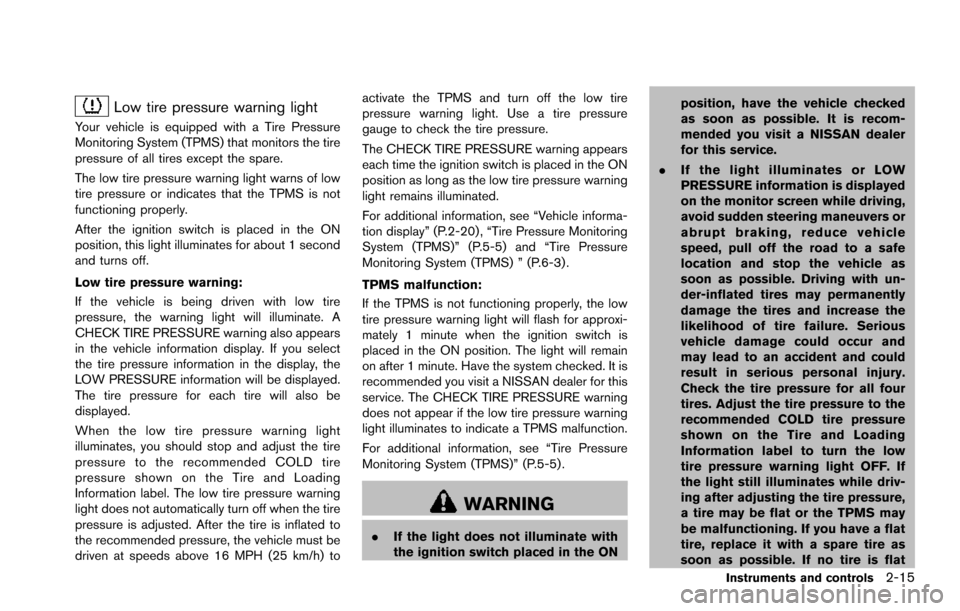
Low tire pressure warning light
Your vehicle is equipped with a Tire Pressure
Monitoring System (TPMS) that monitors the tire
pressure of all tires except the spare.
The low tire pressure warning light warns of low
tire pressure or indicates that the TPMS is not
functioning properly.
After the ignition switch is placed in the ON
position, this light illuminates for about 1 second
and turns off.
Low tire pressure warning:
If the vehicle is being driven with low tire
pressure, the warning light will illuminate. A
CHECK TIRE PRESSURE warning also appears
in the vehicle information display. If you select
the tire pressure information in the display, the
LOW PRESSURE information will be displayed.
The tire pressure for each tire will also be
displayed.
When the low tire pressure warning light
illuminates, you should stop and adjust the tire
pressure to the recommended COLD tire
pressure shown on the Tire and Loading
Information label. The low tire pressure warning
light does not automatically turn off when the tire
pressure is adjusted. After the tire is inflated to
the recommended pressure, the vehicle must be
driven at speeds above 16 MPH (25 km/h) toactivate the TPMS and turn off the low tire
pressure warning light. Use a tire pressure
gauge to check the tire pressure.
The CHECK TIRE PRESSURE warning appears
each time the ignition switch is placed in the ON
position as long as the low tire pressure warning
light remains illuminated.
For additional information, see “Vehicle informa-
tion display” (P.2-20) , “Tire Pressure Monitoring
System (TPMS)” (P.5-5) and “Tire Pressure
Monitoring System (TPMS) ” (P.6-3) .
TPMS malfunction:
If the TPMS is not functioning properly, the low
tire pressure warning light will flash for approxi-
mately 1 minute when the ignition switch is
placed in the ON position. The light will remain
on after 1 minute. Have the system checked. It is
recommended you visit a NISSAN dealer for this
service. The CHECK TIRE PRESSURE warning
does not appear if the low tire pressure warning
light illuminates to indicate a TPMS malfunction.
For additional information, see “Tire Pressure
Monitoring System (TPMS)” (P.5-5) .
WARNING
.
If the light does not illuminate with
the ignition switch placed in the ON position, have the vehicle checked
as soon as possible. It is recom-
mended you visit a NISSAN dealer
for this service.
. If the light illuminates or LOW
PRESSURE information is displayed
on the monitor screen while driving,
avoid sudden steering maneuvers or
abrupt braking, reduce vehicle
speed, pull off the road to a safe
location and stop the vehicle as
soon as possible. Driving with un-
der-inflated tires may permanently
damage the tires and increase the
likelihood of tire failure. Serious
vehicle damage could occur and
may lead to an accident and could
result in serious personal injury.
Check the tire pressure for all four
tires. Adjust the tire pressure to the
recommended COLD tire pressure
shown on the Tire and Loading
Information label to turn the low
tire pressure warning light OFF. If
the light still illuminates while driv-
ing after adjusting the tire pressure,
a tire may be flat or the TPMS may
be malfunctioning. If you have a flat
tire, replace it with a spare tire as
soon as possible. If no tire is flat
Instruments and controls2-15
Page 105 of 614
2-16Instruments and controls
and all tires are properly inflated, it
is recommended you consult a
NISSAN dealer.
. Since the spare tire is not equipped
with the TPMS, when a spare tire is
mounted or a wheel is replaced, the
TPMS will not function and the low
tire pressure warning light will flash
for approximately 1 minute. The
light will remain on after 1 minute.
Have your tires replaced and/or
TPMS system reset as soon as
possible. It is recommended you
visit a NISSAN dealer for these
services.
. Replacing tires with those not ori-
ginally specified by NISSAN could
affect the proper operation of the
TPMS.
CAUTION
.The TPMS is not a substitute for the
regular tire pressure check. Be sure
to check the tire pressure regularly.
. If the vehicle is being driven at
speeds of less than 16 MPH (25
km/h) , the TPMS may not operate correctly.
. Be sure to install the specified size
of tires to the four wheels correctly.
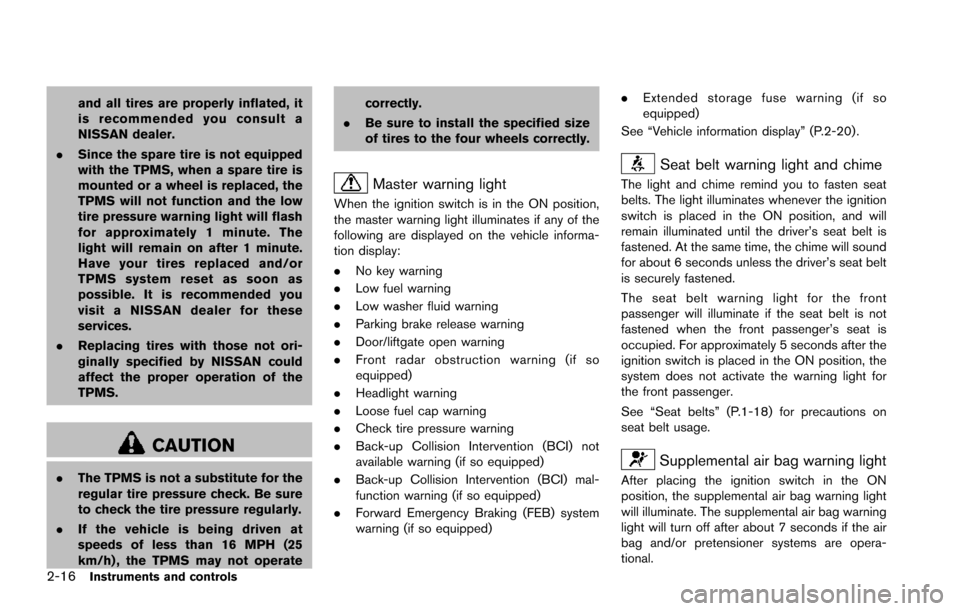
Master warning light
When the ignition switch is in the ON position,
the master warning light illuminates if any of the
following are displayed on the vehicle informa-
tion display:
.No key warning
. Low fuel warning
. Low washer fluid warning
. Parking brake release warning
. Door/liftgate open warning
. Front radar obstruction warning (if so
equipped)
. Headlight warning
. Loose fuel cap warning
. Check tire pressure warning
. Back-up Collision Intervention (BCI) not
available warning (if so equipped)
. Back-up Collision Intervention (BCI) mal-
function warning (if so equipped)
. Forward Emergency Braking (FEB) system
warning (if so equipped) .
Extended storage fuse warning (if so
equipped)
See “Vehicle information display” (P.2-20) .
Seat belt warning light and chime
The light and chime remind you to fasten seat
belts. The light illuminates whenever the ignition
switch is placed in the ON position, and will
remain illuminated until the driver’s seat belt is
fastened. At the same time, the chime will sound
for about 6 seconds unless the driver’s seat belt
is securely fastened.
The seat belt warning light for the front
passenger will illuminate if the seat belt is not
fastened when the front passenger’s seat is
occupied. For approximately 5 seconds after the
ignition switch is placed in the ON position, the
system does not activate the warning light for
the front passenger.
See “Seat belts” (P.1-18) for precautions on
seat belt usage.
Supplemental air bag warning light
After placing the ignition switch in the ON
position, the supplemental air bag warning light
will illuminate. The supplemental air bag warning
light will turn off after about 7 seconds if the air
bag and/or pretensioner systems are opera-
tional.
Page 108 of 614
system malfunction exists.
If this indicator light remains on for 20 seconds
and then blinks for 10 seconds when the engine
is not running, it indicates that the vehicle is not
ready for an emission control system inspection/
maintenance test. (See “Readiness for Inspec-
tion/Maintenance (I/M) test” (P.10-32) .)
Operation:
The malfunction indicator light will come on in
one of two ways:
.Malfunction indicator light on steady — An
emission control system malfunction has
been detected. Check the fuel-filler cap if
the LOOSE FUEL CAP warning appears in
the vehicle information display. If the fuel-
filler cap is loose or missing, tighten or install
the cap and continue to drive the vehicle.
The
light should turn off after a few
driving trips. If thelight does not turn off
after a few driving trips, have the vehicle
inspected. It is recommended you visit a
NISSAN dealer for this service. You do not
need to have your vehicle towed to the
dealer.
. Malfunction indicator light blinking — An
engine misfire has been detected which may
damage the emission control system. To reduce or avoid emission control system
damage:
1) Do not drive at speeds above 45 MPH
(72 km/h) .
2) Avoid hard acceleration or deceleration.
3) Avoid steep uphill grades.
4) If possible, reduce the amount of cargo being hauled or towed.
The malfunction indicator light may stop
blinking and remain on.
Have the vehicle inspected. It is recom-
mended you visit a NISSAN dealer for this
service. You do not need to have your
vehicle towed to the dealer.
CAUTION
Continued vehicle operation without
having the emission control system
checked and repaired as necessary
could lead to poor driveability, reduced
fuel economy, and possible damage to
the emission control system.
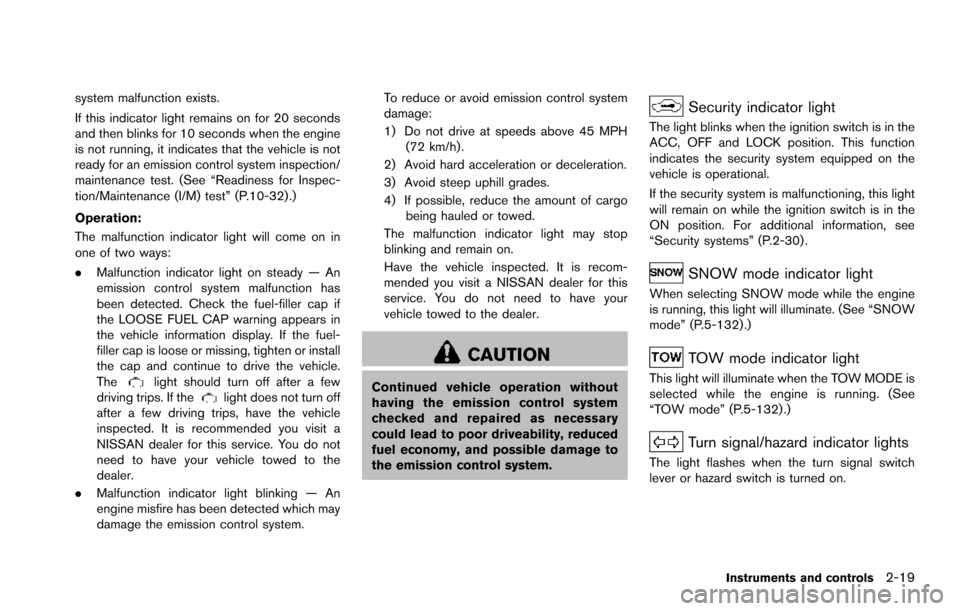
Security indicator light
The light blinks when the ignition switch is in the
ACC, OFF and LOCK position. This function
indicates the security system equipped on the
vehicle is operational.
If the security system is malfunctioning, this light
will remain on while the ignition switch is in the
ON position. For additional information, see
“Security systems” (P.2-30) .
SNOW mode indicator light
When selecting SNOW mode while the engine
is running, this light will illuminate. (See “SNOW
mode” (P.5-132) .)
TOW mode indicator light
This light will illuminate when the TOW MODE is
selected while the engine is running. (See
“TOW mode” (P.5-132) .)
Turn signal/hazard indicator lights
The light flashes when the turn signal switch
lever or hazard switch is turned on.
Instruments and controls2-19
Page 109 of 614
2-20Instruments and controls
Vehicle Dynamic Control (VDC) off
indicator light
When the ignition switch is in the ON position,
the Vehicle Dynamic Control (VDC) off indicator
light illuminates and then turns off.
The light comes on when the VDC off switch is
pushed to OFF. This indicates that the VDC
system is not operating.
When the 4L position is selected with the Four-
Wheel Drive (4WD) shift switch, the VDC
system is disabled and the VDC off indicator
light illuminates. (4WD models)
For additional information, see “Vehicle Dynamic
Control (VDC) system” (P.5-138) .
AUDIBLE REMINDERS
Key reminder chime
A chime will sound if the driver side door is
opened while the ignition switch is placed in the
ACC position. Make sure the ignition switch is
placed in the OFF position, and take the
Intelligent Key with you when leaving the vehicle.
Light reminder chime
A chime will sound when the driver side door is
opened with the light switch in theorposition and the ignition switch in the ACC, OFF
or LOCK position.
Turn the light switch off when you leave the
vehicle.
Parking brake reminder chime
The chime will sound if the vehicle is driven at
more than 4 MPH (7 km/h) with the parking
brake applied. Stop the vehicle and release the
parking brake.
Brake pad wear warning
The disc brake pads have audible wear warn-
ings. When a brake pad requires replacement, it
will make a high pitched scraping sound when
the vehicle is in motion. This scraping sound will
first occur only when the brake pedal is
depressed. After more wear of the brake pad,
the sound will always be heard even if the brake
pedal is not depressed. Have the brakes
checked as soon as possible if the warning
sound is heard.
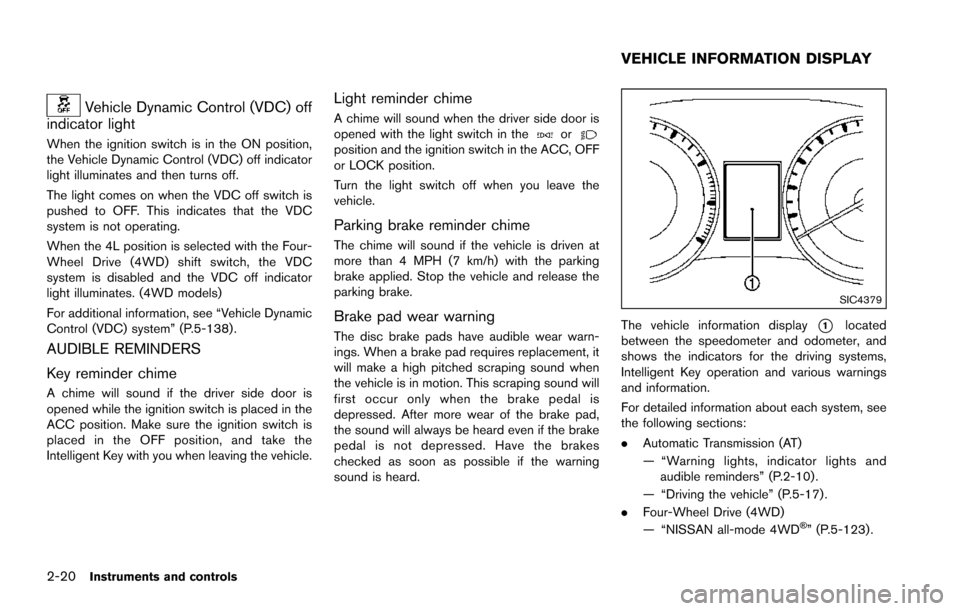
SIC4379
The vehicle information display*1located
between the speedometer and odometer, and
shows the indicators for the driving systems,
Intelligent Key operation and various warnings
and information.
For detailed information about each system, see
the following sections:
. Automatic Transmission (AT)
— “Warning lights, indicator lights and
audible reminders” (P.2-10) .
— “Driving the vehicle” (P.5-17) .
. Four-Wheel Drive (4WD)
— “NISSAN all-mode 4WD
Š” (P.5-123).
VEHICLE INFORMATION DISPLAY
Page 113 of 614
2-24Instruments and controls
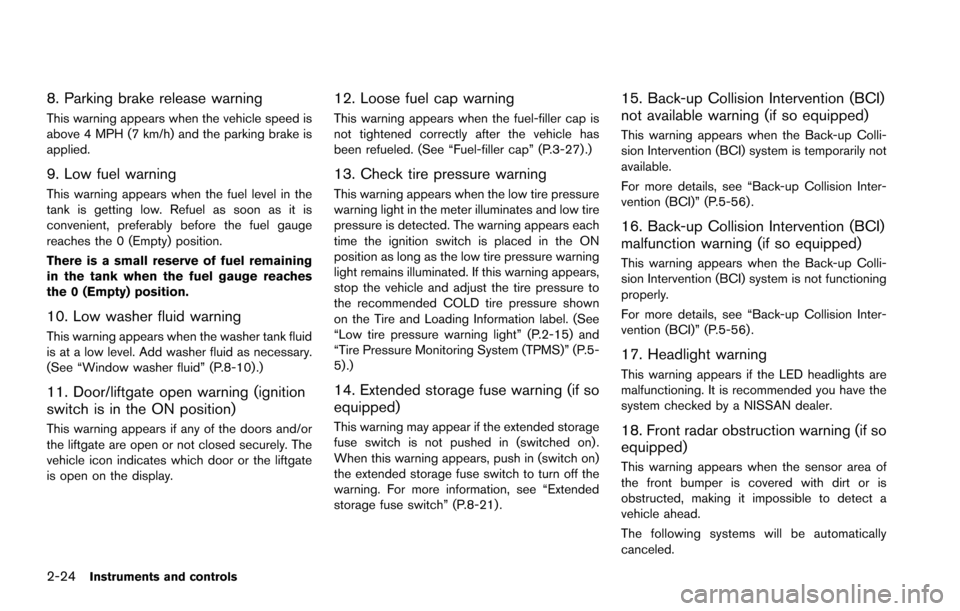
8. Parking brake release warning
This warning appears when the vehicle speed is
above 4 MPH (7 km/h) and the parking brake is
applied.
9. Low fuel warning
This warning appears when the fuel level in the
tank is getting low. Refuel as soon as it is
convenient, preferably before the fuel gauge
reaches the 0 (Empty) position.
There is a small reserve of fuel remaining
in the tank when the fuel gauge reaches
the 0 (Empty) position.
10. Low washer fluid warning
This warning appears when the washer tank fluid
is at a low level. Add washer fluid as necessary.
(See “Window washer fluid” (P.8-10).)
11. Door/liftgate open warning (ignition
switch is in the ON position)
This warning appears if any of the doors and/or
the liftgate are open or not closed securely. The
vehicle icon indicates which door or the liftgate
is open on the display.
12. Loose fuel cap warning
This warning appears when the fuel-filler cap is
not tightened correctly after the vehicle has
been refueled. (See “Fuel-filler cap” (P.3-27) .)
13. Check tire pressure warning
This warning appears when the low tire pressure
warning light in the meter illuminates and low tire
pressure is detected. The warning appears each
time the ignition switch is placed in the ON
position as long as the low tire pressure warning
light remains illuminated. If this warning appears,
stop the vehicle and adjust the tire pressure to
the recommended COLD tire pressure shown
on the Tire and Loading Information label. (See
“Low tire pressure warning light” (P.2-15) and
“Tire Pressure Monitoring System (TPMS)” (P.5-
5) .)
14. Extended storage fuse warning (if so
equipped)
This warning may appear if the extended storage
fuse switch is not pushed in (switched on) .
When this warning appears, push in (switch on)
the extended storage fuse switch to turn off the
warning. For more information, see “Extended
storage fuse switch” (P.8-21) .
15. Back-up Collision Intervention (BCI)
not available warning (if so equipped)
This warning appears when the Back-up Colli-
sion Intervention (BCI) system is temporarily not
available.
For more details, see “Back-up Collision Inter-
vention (BCI)” (P.5-56) .
16. Back-up Collision Intervention (BCI)
malfunction warning (if so equipped)
This warning appears when the Back-up Colli-
sion Intervention (BCI) system is not functioning
properly.
For more details, see “Back-up Collision Inter-
vention (BCI)” (P.5-56) .
17. Headlight warning
This warning appears if the LED headlights are
malfunctioning. It is recommended you have the
system checked by a NISSAN dealer.
18. Front radar obstruction warning (if so
equipped)
This warning appears when the sensor area of
the front bumper is covered with dirt or is
obstructed, making it impossible to detect a
vehicle ahead.
The following systems will be automatically
canceled.
Page 114 of 614
.Intelligent Cruise Control (ICC) system (if so
equipped)
. Distance Control Assist (DCA) system (if so
equipped)
. Forward Emergency Braking (FEB) system
(if so equipped)
. Predictive Forward Collision Warning
(PFCW) system (if so equipped)
For more details, see “Intelligent Cruise Control
(ICC)” (P.5-69) , “Distance Control Assist
(DCA)” (P.5-91), “Forward Emergency Braking
(FEB)” (P.5-105) or “Predictive Forward Colli-
sion Warning (PFCW)” (P.5-112) .
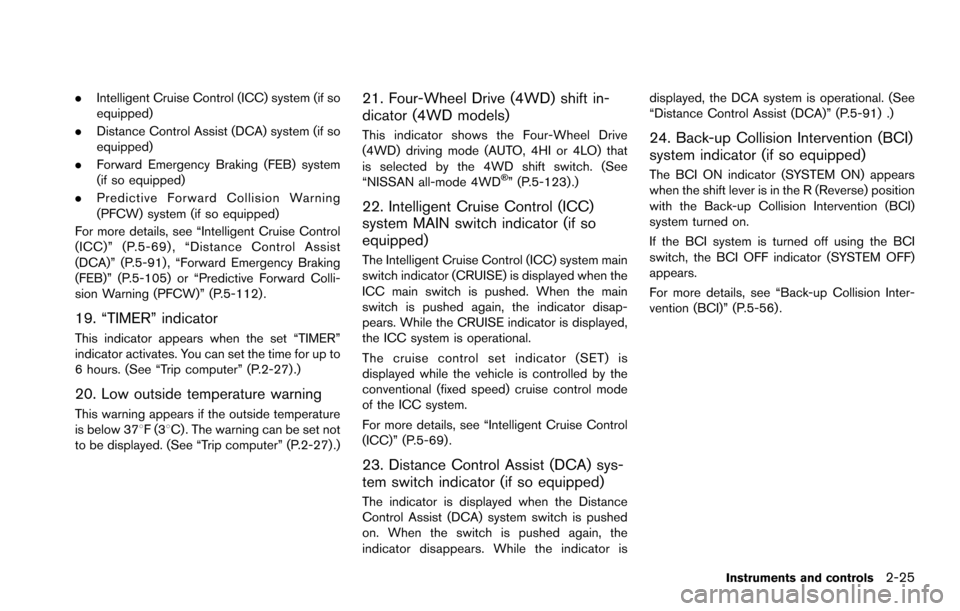
19. “TIMER” indicator
This indicator appears when the set “TIMER”
indicator activates. You can set the time for up to
6 hours. (See “Trip computer” (P.2-27) .)
20. Low outside temperature warning
This warning appears if the outside temperature
is below 378F(3 8C) . The warning can be set not
to be displayed. (See “Trip computer” (P.2-27) .)
21. Four-Wheel Drive (4WD) shift in-
dicator (4WD models)
This indicator shows the Four-Wheel Drive
(4WD) driving mode (AUTO, 4HI or 4LO) that
is selected by the 4WD shift switch. (See
“NISSAN all-mode 4WD
Š” (P.5-123) .)
22. Intelligent Cruise Control (ICC)
system MAIN switch indicator (if so
equipped)
The Intelligent Cruise Control (ICC) system main
switch indicator (CRUISE) is displayed when the
ICC main switch is pushed. When the main
switch is pushed again, the indicator disap-
pears. While the CRUISE indicator is displayed,
the ICC system is operational.
The cruise control set indicator (SET) is
displayed while the vehicle is controlled by the
conventional (fixed speed) cruise control mode
of the ICC system.
For more details, see “Intelligent Cruise Control
(ICC)” (P.5-69) .
23. Distance Control Assist (DCA) sys-
tem switch indicator (if so equipped)
The indicator is displayed when the Distance
Control Assist (DCA) system switch is pushed
on. When the switch is pushed again, the
indicator disappears. While the indicator is displayed, the DCA system is operational. (See
“Distance Control Assist (DCA)” (P.5-91) .)
24. Back-up Collision Intervention (BCI)
system indicator (if so equipped)
The BCI ON indicator (SYSTEM ON) appears
when the shift lever is in the R (Reverse) position
with the Back-up Collision Intervention (BCI)
system turned on.
If the BCI system is turned off using the BCI
switch, the BCI OFF indicator (SYSTEM OFF)
appears.
For more details, see “Back-up Collision Inter-
vention (BCI)” (P.5-56) .
Instruments and controls2-25
Page 115 of 614
2-26Instruments and controls
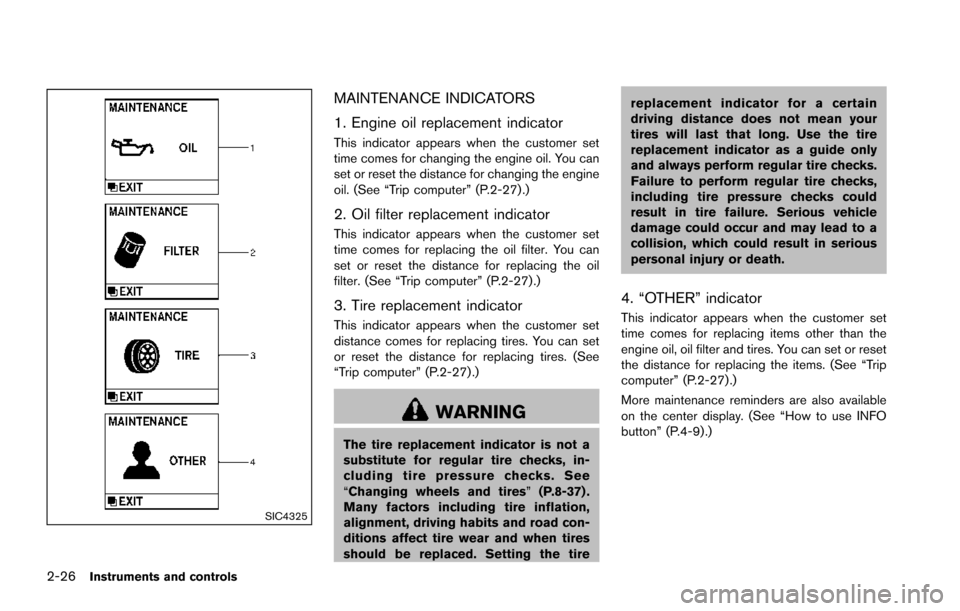
SIC4325
MAINTENANCE INDICATORS
1. Engine oil replacement indicator
This indicator appears when the customer set
time comes for changing the engine oil. You can
set or reset the distance for changing the engine
oil. (See “Trip computer” (P.2-27) .)
2. Oil filter replacement indicator
This indicator appears when the customer set
time comes for replacing the oil filter. You can
set or reset the distance for replacing the oil
filter. (See “Trip computer” (P.2-27).)
3. Tire replacement indicator
This indicator appears when the customer set
distance comes for replacing tires. You can set
or reset the distance for replacing tires. (See
“Trip computer” (P.2-27) .)
WARNING
The tire replacement indicator is not a
substitute for regular tire checks, in-
cluding tire pressure checks. See
“Changing wheels and tires”(P.8-37) .
Many factors including tire inflation,
alignment, driving habits and road con-
ditions affect tire wear and when tires
should be replaced. Setting the tire replacement indicator for a certain
driving distance does not mean your
tires will last that long. Use the tire
replacement indicator as a guide only
and always perform regular tire checks.
Failure to perform regular tire checks,
including tire pressure checks could
result in tire failure. Serious vehicle
damage could occur and may lead to a
collision, which could result in serious
personal injury or death.
4. “OTHER” indicator
This indicator appears when the customer set
time comes for replacing items other than the
engine oil, oil filter and tires. You can set or reset
the distance for replacing the items. (See “Trip
computer” (P.2-27).)
More maintenance reminders are also available
on the center display. (See “How to use INFO
button” (P.4-9).)
Page 116 of 614
SIC4494
SIC4420
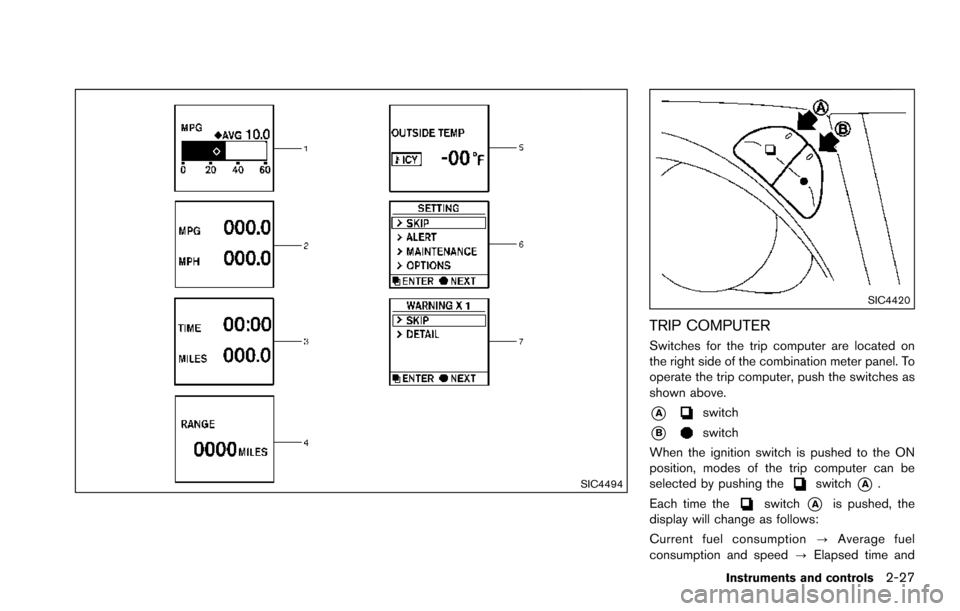
TRIP COMPUTER
Switches for the trip computer are located on
the right side of the combination meter panel. To
operate the trip computer, push the switches as
shown above.
*Aswitch
*Bswitch
When the ignition switch is pushed to the ON
position, modes of the trip computer can be
selected by pushing the
switch*A.
Each time the
switch*Ais pushed, the
display will change as follows:
Current fuel consumption ?Average fuel
consumption and speed ?Elapsed time and
Instruments and controls2-27
Page 117 of 614
2-28Instruments and controls
trip odometer?Distance to empty (dte) ?
Outside air temperature (ICY) ?Setting ?
Warning check
1. Current and average fuel consumption
The current and average fuel consumption mode
shows the current and average fuel consump-
tion.
2. Average fuel consumption (MPG or l
(liter)/100 km) and speed (MPH or km/h)
Fuel consumption:
The average fuel consumption mode shows the
average fuel consumption since the last reset.
Resetting is done by pushing the
switch*Bfor longer than 1 second. (The average speed is
also reset at the same time.)
The display is updated every 30 seconds. At
about the first 1/3 mile (500 m) after a reset, the
display shows “——”.
Speed:
The average speed mode shows the average
vehicle speed since the last reset. Resetting is
done by pushing the
switch*Bfor longer
than 1 second. (The average fuel consumption is
also reset at the same time.)
The display is updated every 30 seconds. The
first 30 seconds after a reset, the display shows
“——”.
3. Elapsed time and trip odometer
(MILES or km)
Elapsed time:
The elapsed time mode shows the time since
the last reset. The displayed time can be reset
by pushing the
switch*Bfor longer than 1
second. (The trip odometer is also reset at the
same time.)
Trip odometer:
The trip odometer mode shows the total
distance the vehicle has been driven since the
last reset. Resetting is done by pushing the
switch*Bfor longer than 1 second. (The
elapsed time is also reset at the same time.)
4. Distance to empty (dte — MILES or
km)
The distance to empty (dte) mode provides you
with an estimation of the distance that can be
driven before refueling. The dte is constantly
being calculated, based on the amount of fuel in
the fuel tank and the actual fuel consumption.
The display is updated every 30 seconds.
The dte mode includes a low range warning
feature. If the fuel level is low, the warning is
displayed on the screen.
When the fuel level drops even lower, the dte
display will change to “——”. .
If the amount of fuel added is small, the
display just before the ignition switch is
pushed to the OFF position may continue to
be displayed.
. When driving uphill or rounding curves, the
fuel in the tank shifts, which may momenta-
rily change the display.
5. Outside air temperature (ICY — 8For
8C)
The outside air temperature is displayed in 8For
8C in the range of í22 to 1318F(í30 to 558C) .
The outside air temperature mode includes a low
temperature warning feature. If the outside air
temperature is below 378F(3 8C) , the warning is
displayed on the screen.
The outside temperature sensor is located in
front of the radiator. The sensor may be affected
by road or engine heat, wind directions and
other driving conditions. The display may differ
from the actual outside temperature or the
temperature displayed on various signs or bill-
boards.