instrument panel NISSAN ARMADA 2017 2.G Owner's Manual
[x] Cancel search | Manufacturer: NISSAN, Model Year: 2017, Model line: ARMADA, Model: NISSAN ARMADA 2017 2.GPages: 614, PDF Size: 2.87 MB
Page 134 of 614
3. To turn off the heater, return the switch tothe level position. Make sure the indicator
light turns off.
The heater is controlled by a thermostat,
automatically turning the heater on and off.
The indicator light will remain on as long as
the switch is on.
When the vehicle’s interior is warmed, or
before you leave the vehicle, be sure to turn
off the switch.
SIC4334
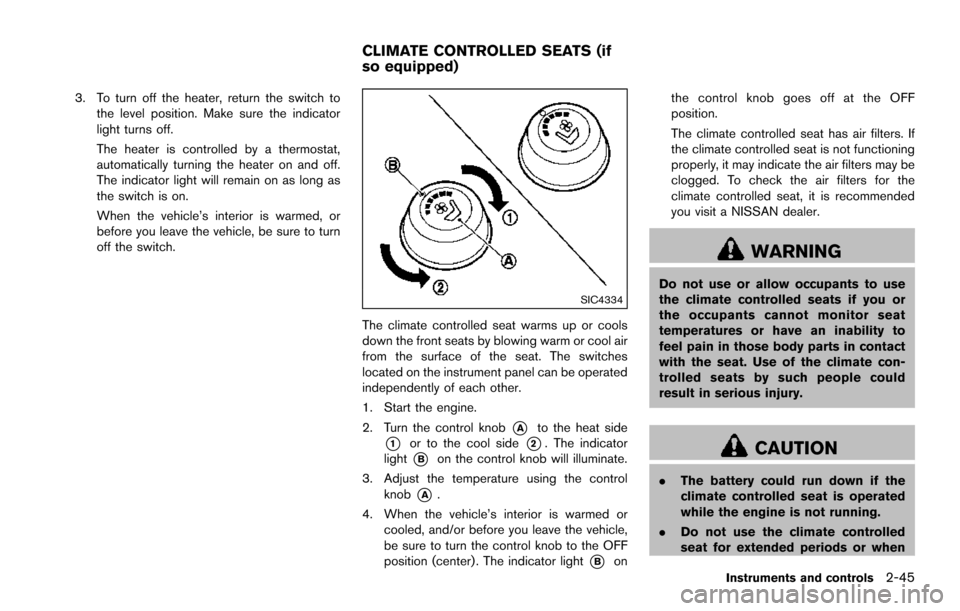
The climate controlled seat warms up or cools
down the front seats by blowing warm or cool air
from the surface of the seat. The switches
located on the instrument panel can be operated
independently of each other.
1. Start the engine.
2. Turn the control knob
*Ato the heat side
*1or to the cool side*2. The indicator
light
*Bon the control knob will illuminate.
3. Adjust the temperature using the control knob
*A.
4. When the vehicle’s interior is warmed or cooled, and/or before you leave the vehicle,
be sure to turn the control knob to the OFF
position (center) . The indicator light
*Bon the control knob goes off at the OFF
position.
The climate controlled seat has air filters. If
the climate controlled seat is not functioning
properly, it may indicate the air filters may be
clogged. To check the air filters for the
climate controlled seat, it is recommended
you visit a NISSAN dealer.
WARNING
Do not use or allow occupants to use
the climate controlled seats if you or
the occupants cannot monitor seat
temperatures or have an inability to
feel pain in those body parts in contact
with the seat. Use of the climate con-
trolled seats by such people could
result in serious injury.
CAUTION
.
The battery could run down if the
climate controlled seat is operated
while the engine is not running.
. Do not use the climate controlled
seat for extended periods or when
Instruments and controls2-45
CLIMATE CONTROLLED SEATS (if
so equipped)
Page 136 of 614
SSD0972
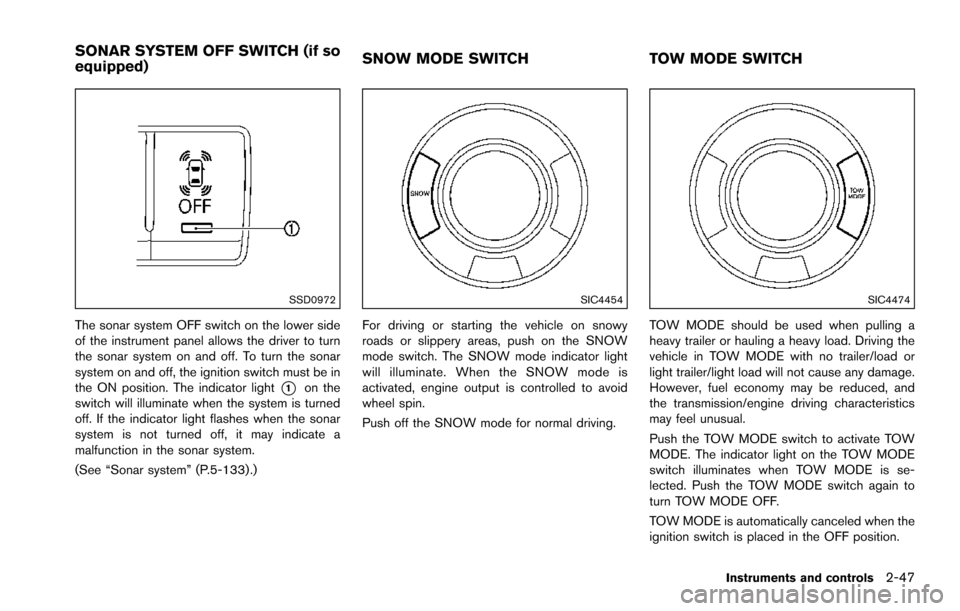
The sonar system OFF switch on the lower side
of the instrument panel allows the driver to turn
the sonar system on and off. To turn the sonar
system on and off, the ignition switch must be in
the ON position. The indicator light
*1on the
switch will illuminate when the system is turned
off. If the indicator light flashes when the sonar
system is not turned off, it may indicate a
malfunction in the sonar system.
(See “Sonar system” (P.5-133) .)
SIC4454
For driving or starting the vehicle on snowy
roads or slippery areas, push on the SNOW
mode switch. The SNOW mode indicator light
will illuminate. When the SNOW mode is
activated, engine output is controlled to avoid
wheel spin.
Push off the SNOW mode for normal driving.
SIC4474
TOW MODE should be used when pulling a
heavy trailer or hauling a heavy load. Driving the
vehicle in TOW MODE with no trailer/load or
light trailer/light load will not cause any damage.
However, fuel economy may be reduced, and
the transmission/engine driving characteristics
may feel unusual.
Push the TOW MODE switch to activate TOW
MODE. The indicator light on the TOW MODE
switch illuminates when TOW MODE is se-
lected. Push the TOW MODE switch again to
turn TOW MODE OFF.
TOW MODE is automatically canceled when the
ignition switch is placed in the OFF position.
Instruments and controls2-47
SONAR SYSTEM OFF SWITCH (if so
equipped) SNOW MODE SWITCH
TOW MODE SWITCH
Page 137 of 614
2-48Instruments and controls
SIC4455
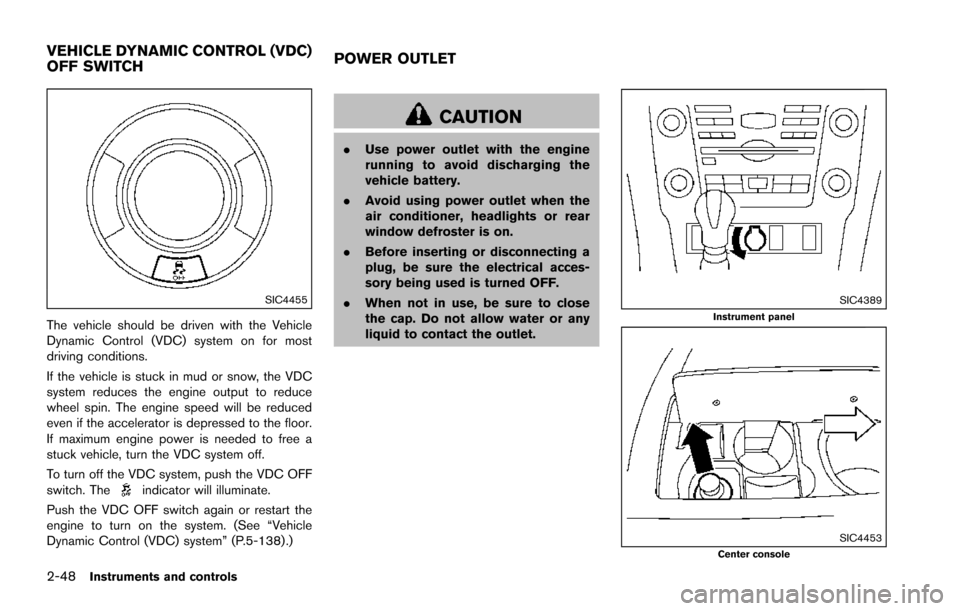
The vehicle should be driven with the Vehicle
Dynamic Control (VDC) system on for most
driving conditions.
If the vehicle is stuck in mud or snow, the VDC
system reduces the engine output to reduce
wheel spin. The engine speed will be reduced
even if the accelerator is depressed to the floor.
If maximum engine power is needed to free a
stuck vehicle, turn the VDC system off.
To turn off the VDC system, push the VDC OFF
switch. The
indicator will illuminate.
Push the VDC OFF switch again or restart the
engine to turn on the system. (See “Vehicle
Dynamic Control (VDC) system” (P.5-138) .)
CAUTION
. Use power outlet with the engine
running to avoid discharging the
vehicle battery.
. Avoid using power outlet when the
air conditioner, headlights or rear
window defroster is on.
. Before inserting or disconnecting a
plug, be sure the electrical acces-
sory being used is turned OFF.
. When not in use, be sure to close
the cap. Do not allow water or any
liquid to contact the outlet.
SIC4389Instrument panel
SIC4453Center console
VEHICLE DYNAMIC CONTROL (VDC)
OFF SWITCH POWER OUTLET
Page 172 of 614
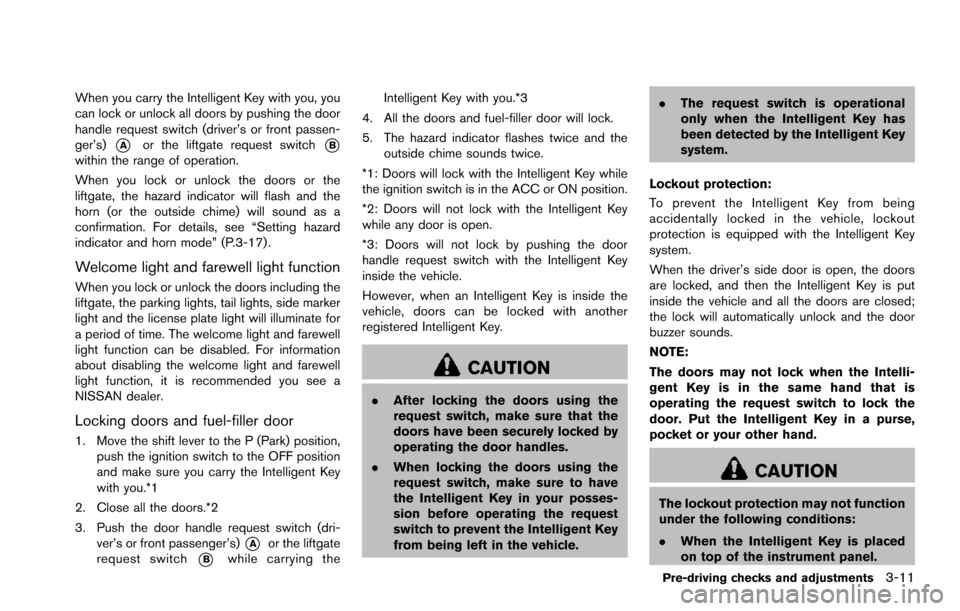
When you carry the Intelligent Key with you, you
can lock or unlock all doors by pushing the door
handle request switch (driver’s or front passen-
ger’s)
*Aor the liftgate request switch*Bwithin the range of operation.
When you lock or unlock the doors or the
liftgate, the hazard indicator will flash and the
horn (or the outside chime) will sound as a
confirmation. For details, see “Setting hazard
indicator and horn mode” (P.3-17) .
Welcome light and farewell light function
When you lock or unlock the doors including the
liftgate, the parking lights, tail lights, side marker
light and the license plate light will illuminate for
a period of time. The welcome light and farewell
light function can be disabled. For information
about disabling the welcome light and farewell
light function, it is recommended you see a
NISSAN dealer.
Locking doors and fuel-filler door
1. Move the shift lever to the P (Park) position,push the ignition switch to the OFF position
and make sure you carry the Intelligent Key
with you.*1
2. Close all the doors.*2
3. Push the door handle request switch (dri- ver’s or front passenger’s)
*Aor the liftgate
request switch
*Bwhile carrying the Intelligent Key with you.*3
4. All the doors and fuel-filler door will lock.
5. The hazard indicator flashes twice and the outside chime sounds twice.
*1: Doors will lock with the Intelligent Key while
the ignition switch is in the ACC or ON position.
*2: Doors will not lock with the Intelligent Key
while any door is open.
*3: Doors will not lock by pushing the door
handle request switch with the Intelligent Key
inside the vehicle.
However, when an Intelligent Key is inside the
vehicle, doors can be locked with another
registered Intelligent Key.
CAUTION
. After locking the doors using the
request switch, make sure that the
doors have been securely locked by
operating the door handles.
. When locking the doors using the
request switch, make sure to have
the Intelligent Key in your posses-
sion before operating the request
switch to prevent the Intelligent Key
from being left in the vehicle. .
The request switch is operational
only when the Intelligent Key has
been detected by the Intelligent Key
system.
Lockout protection:
To prevent the Intelligent Key from being
accidentally locked in the vehicle, lockout
protection is equipped with the Intelligent Key
system.
When the driver’s side door is open, the doors
are locked, and then the Intelligent Key is put
inside the vehicle and all the doors are closed;
the lock will automatically unlock and the door
buzzer sounds.
NOTE:
The doors may not lock when the Intelli-
gent Key is in the same hand that is
operating the request switch to lock the
door. Put the Intelligent Key in a purse,
pocket or your other hand.
CAUTION
The lockout protection may not function
under the following conditions:
. When the Intelligent Key is placed
on top of the instrument panel.
Pre-driving checks and adjustments3-11
Page 182 of 614
.The theft alarm sounds due to illegal entry
into the vehicle.
. Two remote engine starts, or a single remote
start with an extension, have already been
used.
. The shift lever is not in the P (Park) position.
The remote engine start may display a warning
or indicator in the vehicle information display. For
an explanation of the warning or indicator, see
“Operational indicators” (P.2-23) .
JVP0463X
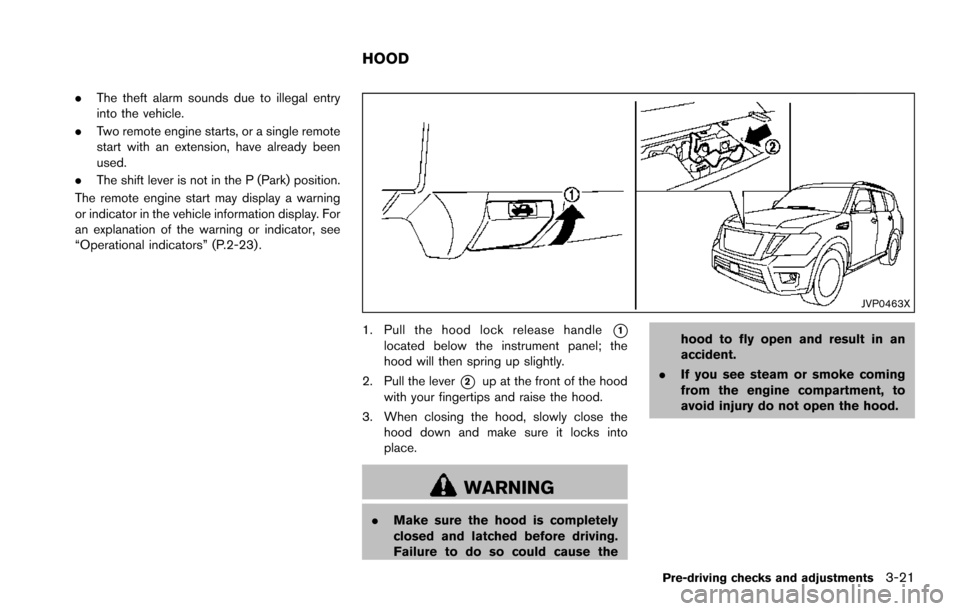
1. Pull the hood lock release handle*1located below the instrument panel; the
hood will then spring up slightly.
2. Pull the lever
*2up at the front of the hood
with your fingertips and raise the hood.
3. When closing the hood, slowly close the hood down and make sure it locks into
place.
WARNING
.Make sure the hood is completely
closed and latched before driving.
Failure to do so could cause the hood to fly open and result in an
accident.
. If you see steam or smoke coming
from the engine compartment, to
avoid injury do not open the hood.
Pre-driving checks and adjustments3-21
HOOD
Page 184 of 614
SPA2547
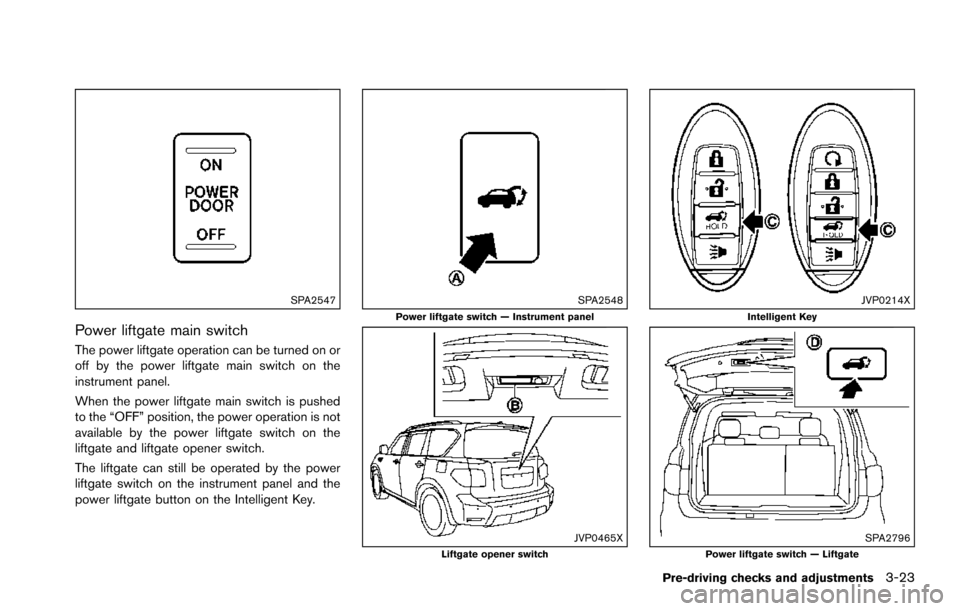
Power liftgate main switch
The power liftgate operation can be turned on or
off by the power liftgate main switch on the
instrument panel.
When the power liftgate main switch is pushed
to the “OFF” position, the power operation is not
available by the power liftgate switch on the
liftgate and liftgate opener switch.
The liftgate can still be operated by the power
liftgate switch on the instrument panel and the
power liftgate button on the Intelligent Key.
SPA2548Power liftgate switch — Instrument panel
JVP0465XLiftgate opener switch
JVP0214XIntelligent Key
SPA2796Power liftgate switch — Liftgate
Pre-driving checks and adjustments3-23
Page 185 of 614
3-24Pre-driving checks and adjustments
Power open
When the liftgate is fully closed, the liftgate will
fully open automatically by:
.pushing the power liftgate switch
*Aon the
instrument panel
. pushing the liftgate opener switch
*B
.pushing the power liftgate button*Con the
Intelligent Key for more than 1 second
The hazard flashes 4 times and the outside
chime sounds when the liftgate starts opening.
NOTE:
The liftgate can be opened by the power
liftgate switch
*A, the liftgate opener
switch
*Bor the power liftgate button
*Ceven if the liftgate is locked. The
liftgate will individually unlock and open.
Power close
When the liftgate is fully opened, the liftgate will
fully close automatically by:
. pushing the power liftgate switch
*Aon the
instrument panel
. pushing the power liftgate button
*Con the
Intelligent Key for more than 1 second
. pushing the power liftgate switch
*Don the
lower part of the liftgate
The hazard flashes 4 times and the outside
chime sounds when the liftgate starts closing. NOTE:
When the liftgate is closed, it remains
unlocked. Manually lock the liftgate.
Reverse function
The power liftgate will reverse immediately if one
of the following actions is performed during
power open or power close.
.
pushing the power liftgate switch
*Aon the
instrument panel
. pushing the power liftgate button
*Con the Intelligent Key.
. pushing the liftgate switch
*Don the lower
part of the liftgate
The outside chime sounds when the liftgate
starts to reverse.
Auto reverse function
The auto-reverse function enables the liftgate to
automatically reverse when something is caught
in the liftgate as it is opening or closing. When
the control unit detects an obstacle, the liftgate
will reverse and return to the full open or full
close position.
If a second obstacle is detected, the liftgate
motion will stop and the drive motor will
disengage. The liftgate will enter the manual
mode.
A pinch sensor is mounted on each side of the
liftgate. If an obstacle is detected by the pinch sensor during power close, the liftgate will
reverse and return to the full open position
immediately.
NOTE:
If the pinch sensor is damaged or removed,
the power close function will not operate.
WARNING
There is a small distance immediately
before the closed position that cannot
be detected. Make sure that all passen-
gers keep their hands, etc., clear from
the liftgate opening before closing the
liftgate.
Manual mode
If power operation is not available, the liftgate
can be operated manually. Power operation may
not be available if multiple obstacles have been
detected in a single power cycle or if the battery
voltage is low. When the power liftgate main
switch is in the OFF position, the liftgate can be
opened manually by pushing the liftgate opener
switch. If the power liftgate opener switch is
pushed during power open or close, the power
operation will be canceled and the liftgate can
be operated manually.
Page 255 of 614
4-58Monitor, heater, air conditioner, audio, phone and voice recognition systems
SAA3088
SAA3058
OPERATING TIPS
When the engine coolant temperature and
outside air temperature are low, the air flow
from the foot outlets may not operate. However,
this is not a malfunction. After the coolant
temperature warms up, the air flow from the
foot outlets will operate normally.
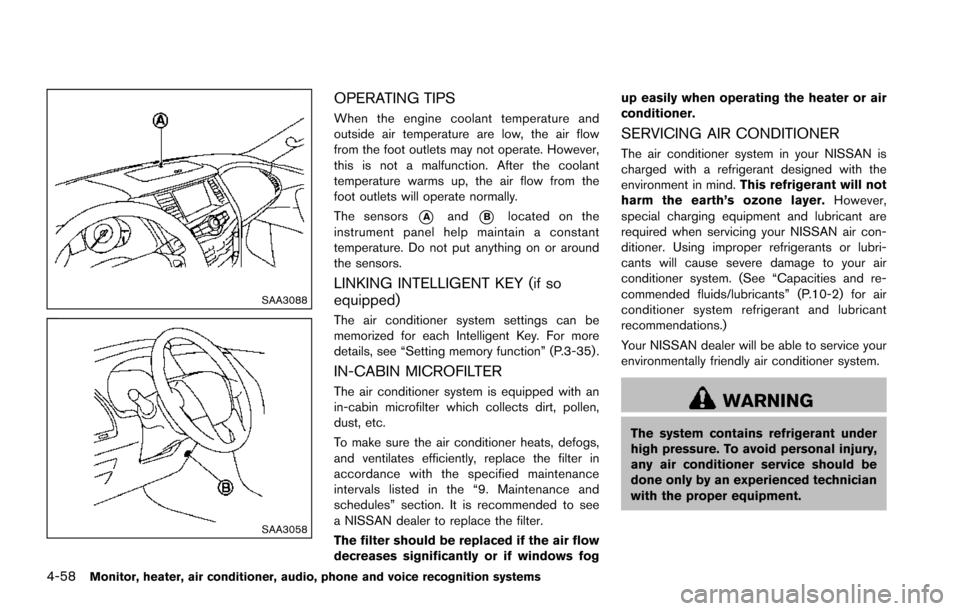
The sensors
*Aand*Blocated on the
instrument panel help maintain a constant
temperature. Do not put anything on or around
the sensors.
LINKING INTELLIGENT KEY (if so
equipped)
The air conditioner system settings can be
memorized for each Intelligent Key. For more
details, see “Setting memory function” (P.3-35) .
IN-CABIN MICROFILTER
The air conditioner system is equipped with an
in-cabin microfilter which collects dirt, pollen,
dust, etc.
To make sure the air conditioner heats, defogs,
and ventilates efficiently, replace the filter in
accordance with the specified maintenance
intervals listed in the “9. Maintenance and
schedules” section. It is recommended to see
a NISSAN dealer to replace the filter.
The filter should be replaced if the air flow
decreases significantly or if windows fog up easily when operating the heater or air
conditioner.
SERVICING AIR CONDITIONER
The air conditioner system in your NISSAN is
charged with a refrigerant designed with the
environment in mind.
This refrigerant will not
harm the earth’s ozone layer. However,
special charging equipment and lubricant are
required when servicing your NISSAN air con-
ditioner. Using improper refrigerants or lubri-
cants will cause severe damage to your air
conditioner system. (See “Capacities and re-
commended fluids/lubricants” (P.10-2) for air
conditioner system refrigerant and lubricant
recommendations.)
Your NISSAN dealer will be able to service your
environmentally friendly air conditioner system.
WARNING
The system contains refrigerant under
high pressure. To avoid personal injury,
any air conditioner service should be
done only by an experienced technician
with the proper equipment.
Page 272 of 614
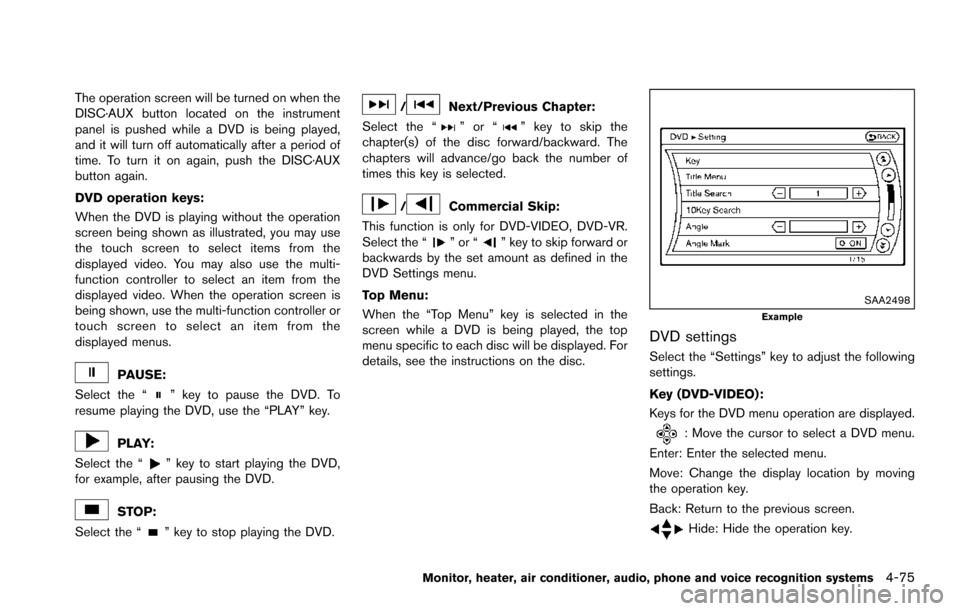
The operation screen will be turned on when the
DISC·AUX button located on the instrument
panel is pushed while a DVD is being played,
and it will turn off automatically after a period of
time. To turn it on again, push the DISC·AUX
button again.
DVD operation keys:
When the DVD is playing without the operation
screen being shown as illustrated, you may use
the touch screen to select items from the
displayed video. You may also use the multi-
function controller to select an item from the
displayed video. When the operation screen is
being shown, use the multi-function controller or
touch screen to select an item from the
displayed menus.
PAUSE:
Select the “
” key to pause the DVD. To
resume playing the DVD, use the “PLAY” key.
PLAY:
Select the “
” key to start playing the DVD,
for example, after pausing the DVD.
STOP:
Select the “
” key to stop playing the DVD.
/Next/Previous Chapter:
Select the “
”or“” key to skip the
chapter(s) of the disc forward/backward. The
chapters will advance/go back the number of
times this key is selected.
/Commercial Skip:
This function is only for DVD-VIDEO, DVD-VR.
Select the “
”or“” key to skip forward or
backwards by the set amount as defined in the
DVD Settings menu.
Top Menu:
When the “Top Menu” key is selected in the
screen while a DVD is being played, the top
menu specific to each disc will be displayed. For
details, see the instructions on the disc.
SAA2498Example
DVD settings
Select the “Settings” key to adjust the following
settings.
Key (DVD-VIDEO) :
Keys for the DVD menu operation are displayed.
: Move the cursor to select a DVD menu.
Enter: Enter the selected menu.
Move: Change the display location by moving
the operation key.
Back: Return to the previous screen.
Hide: Hide the operation key.
Monitor, heater, air conditioner, audio, phone and voice recognition systems4-75
Page 285 of 614
4-88Monitor, heater, air conditioner, audio, phone and voice recognition systems
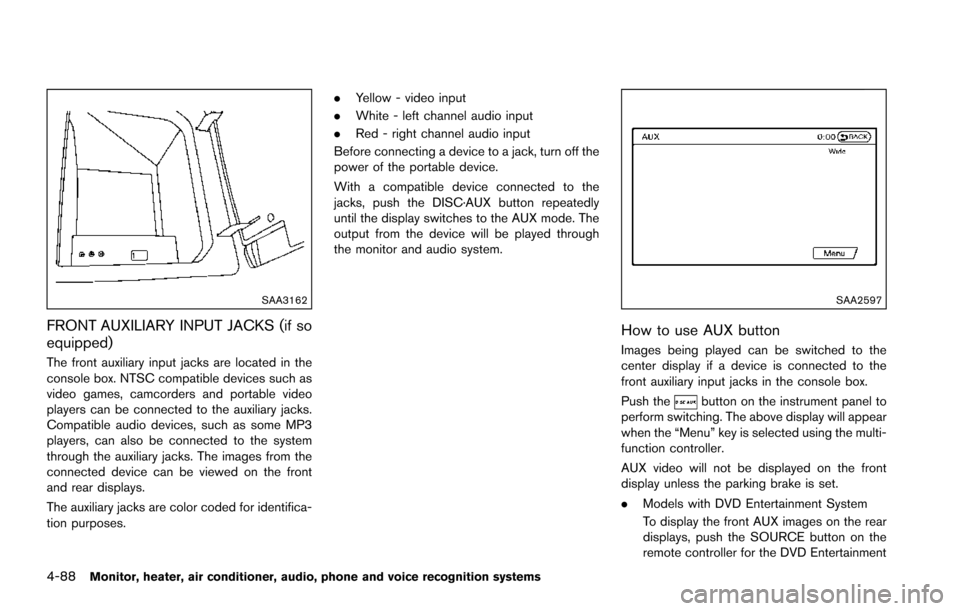
SAA3162
FRONT AUXILIARY INPUT JACKS (if so
equipped)
The front auxiliary input jacks are located in the
console box. NTSC compatible devices such as
video games, camcorders and portable video
players can be connected to the auxiliary jacks.
Compatible audio devices, such as some MP3
players, can also be connected to the system
through the auxiliary jacks. The images from the
connected device can be viewed on the front
and rear displays.
The auxiliary jacks are color coded for identifica-
tion purposes..
Yellow - video input
. White - left channel audio input
. Red - right channel audio input
Before connecting a device to a jack, turn off the
power of the portable device.
With a compatible device connected to the
jacks, push the DISC·AUX button repeatedly
until the display switches to the AUX mode. The
output from the device will be played through
the monitor and audio system.
SAA2597
How to use AUX button
Images being played can be switched to the
center display if a device is connected to the
front auxiliary input jacks in the console box.
Push the
button on the instrument panel to
perform switching. The above display will appear
when the “Menu” key is selected using the multi-
function controller.
AUX video will not be displayed on the front
display unless the parking brake is set.
. Models with DVD Entertainment System
To display the front AUX images on the rear
displays, push the SOURCE button on the
remote controller for the DVD Entertainment