maintenance NISSAN ARMADA 2018 Owner´s Manual
[x] Cancel search | Manufacturer: NISSAN, Model Year: 2018, Model line: ARMADA, Model: NISSAN ARMADA 2018Pages: 532, PDF Size: 2.3 MB
Page 267 of 532
5-12Starting and driving
similar equipment even if the
other two wheels are raised off
the ground. Make sure you inform
test facility personnel that your
vehicle is equipped with 4WD
before it is placed on a dynam-
ometer. Using the wrong test
equipment may result in drive-
train damage or unexpected ve-
hicle movement which could
result in serious vehicle damage
or personal injury (4WD models).
. When a wheel is off the ground
due to an unlevel surface, do not
spin the wheel excessively.
. Accelerating quickly, sharp steer-
ing maneuvers or sudden braking
may cause loss of control.
. If at all possible, avoid sharp
turning maneuvers, particularly
at high speeds. Your vehicle has
a higher center of gravity than a
conventional passenger car. The
vehicle is not designed for cor-
nering at the same speeds as
conventional passenger cars.
Failure to operate this vehicle
correctly could result in loss of
control and/or a rollover acci-
dent. .
Always use tires of the same type,
size, brand, construction (bias,
bias-belted or radial), and tread
pattern on all four wheels. Install
tire chains on the rear wheels
when driving on slippery roads
and drive carefully.
. Be sure to check the brakes im-
mediately after driving in mud or
water. See “Brake system” (P.5-
137) for wet brakes.
. Avoid parking your vehicle on
steep hills. If you get out of the
vehicle and it rolls forward, back-
ward or sideways, you could be
injured.
. Whenever you drive off-road
through sand, mud or water as
deep as the wheel hub, more
frequent maintenance may be
required. See the maintenance
schedule shown in the "9. Main-
tenance and schedules" section.
. Spinning the rear wheels on slip-
pery surfaces may cause the 4WD
warning light to flash. The 4WD
system may also automatically
switch from the 4WD mode to
the 2WD mode. This could reduce
traction. Be especially careful
when towing a trailer (4WD mod- els).
Page 287 of 532
5-32Starting and driving
I-LI system:If the vehicle is parked in
direct sunlight under high temperature
conditions (over approximately 104°F
(40°C)) and then the I-LI system is turned
on, the I-LI system will be turned off
automatically, a beep will sound and the
I-LI ON indicator light (green)
will blink.
The LDW and I-LI systems are not avail-
able until the conditions no longer exist.
Action to take:
When the above conditions no longer
exist, the LDW system will resume auto-
matically.
For the I-LI system, push the dynamic
driver assistance switch
again to turn
the I-LI system back on.
SYSTEM MALFUNCTION
LDW system: When the LDW system
malfunctions, it will cancel automatically,
and the LDW indicator light (orange) will
illuminate.
I-LI system: When the I-LI system mal-
functions, it will be turned off automati-
cally, a beep will sound, and the LDW
indicator light (orange) will illuminate.
Action to take:
Stop the vehicle in a safe location, place
the vehicle in the P (Park) position, turn
the engine off and restart the engine. If
the LDW indicator light (orange) con- tinues to illuminate, have the system
checked. It is recommended you visit a
NISSAN dealer for this service.
SSD0453
SYSTEM MAINTENANCE
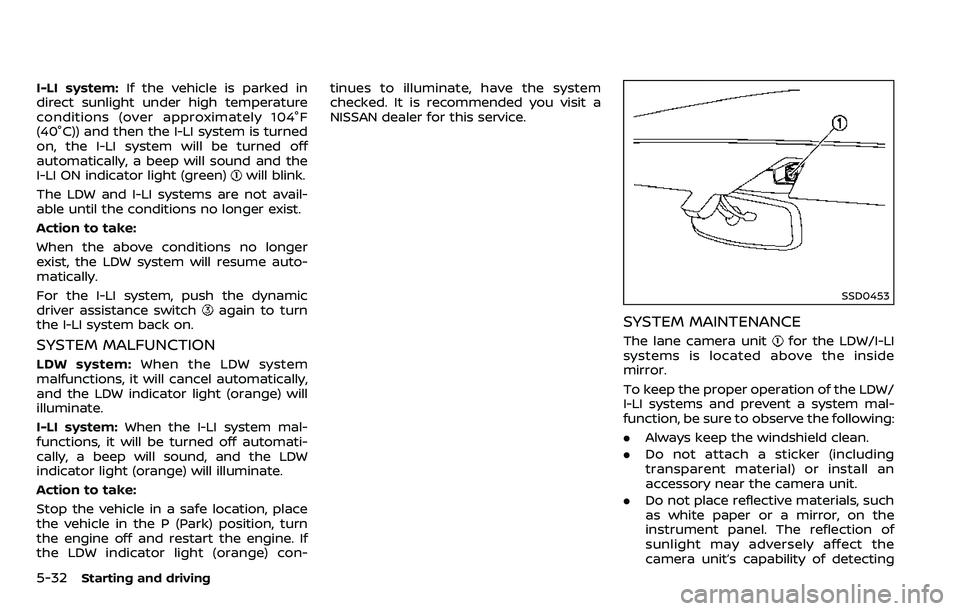
The lane camera unitfor the LDW/I-LI
systems is located above the inside
mirror.
To keep the proper operation of the LDW/
I-LI systems and prevent a system mal-
function, be sure to observe the following:
. Always keep the windshield clean.
. Do not attach a sticker (including
transparent material) or install an
accessory near the camera unit.
. Do not place reflective materials, such
as white paper or a mirror, on the
instrument panel. The reflection of
sunlight may adversely affect the
camera unit’s capability of detecting
Page 297 of 532
5-42Starting and driving
SYSTEM MALFUNCTION
When the system malfunctions, it will be
turned off automatically, a beep will
sound and the BSW system warning light
(orange) will illuminate.
Action to take:
Stop the vehicle in a safe location, place
the vehicle in the P (Park) position, turn
the engine off and restart the engine.
If the BSW system warning light continues
to illuminate, have the system checked. It
is recommended you visit a NISSAN dealer
for this service.
JVS0908X
SYSTEM MAINTENANCE
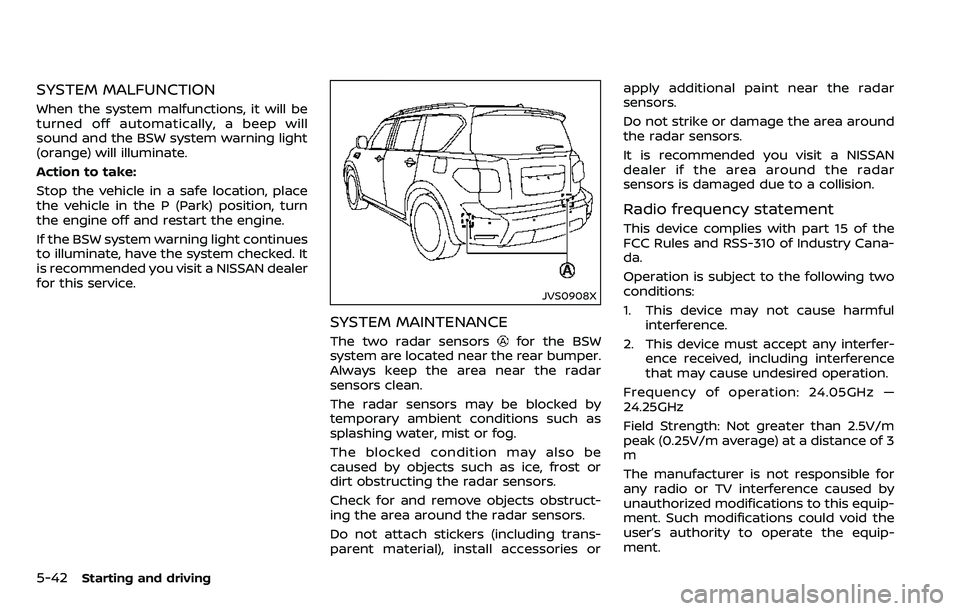
The two radar sensorsfor the BSW
system are located near the rear bumper.
Always keep the area near the radar
sensors clean.
The radar sensors may be blocked by
temporary ambient conditions such as
splashing water, mist or fog.
The blocked condition may also be
caused by objects such as ice, frost or
dirt obstructing the radar sensors.
Check for and remove objects obstruct-
ing the area around the radar sensors.
Do not attach stickers (including trans-
parent material), install accessories or apply additional paint near the radar
sensors.
Do not strike or damage the area around
the radar sensors.
It is recommended you visit a NISSAN
dealer if the area around the radar
sensors is damaged due to a collision.
Radio frequency statement
This device complies with part 15 of the
FCC Rules and RSS-310 of Industry Cana-
da.
Operation is subject to the following two
conditions:
1. This device may not cause harmful
interference.
2. This device must accept any interfer- ence received, including interference
that may cause undesired operation.
Frequency of operation: 24.05GHz —
24.25GHz
Field Strength: Not greater than 2.5V/m
peak (0.25V/m average) at a distance of 3
m
The manufacturer is not responsible for
any radio or TV interference caused by
unauthorized modifications to this equip-
ment. Such modifications could void the
user’s authority to operate the equip-
ment.
Page 311 of 532
5-56Starting and driving
such as ice, frost or dirt obstructing the
radar sensors.
Action to take:
When the above conditions no longer
exist, turn the I-BSI system off and turn
it on again. If the I-BSI system warning
light (orange)
continues to blink even
after the I-BSI system is turned on again,
stop the vehicle in a safe location, place
the shift lever in the P (Park) position and
turn the engine off. Check for and remove
objects obscuring the radar sensors on
the rear bumper, and restart the engine.
If the I-BSI system warning light (orange)
continues to blink, have the I-BSI
system checked. It is recommended you
visit a NISSAN dealer for this service.
SYSTEM MALFUNCTION
When the I-BSI system malfunctions, it will
be turned off automatically, a chime will
sound and the I-BSI system warning light
(orange) will illuminate.
Action to take:
Stop the vehicle in a safe location, place
the shift lever in the P (Park) position, turn
the engine off and restart the engine.
If the warning light (orange) continues to
illuminate, have the I-BSI system checked.
It is recommended you visit a NISSAN
dealer for this service.
JVS0910X
SYSTEM MAINTENANCE
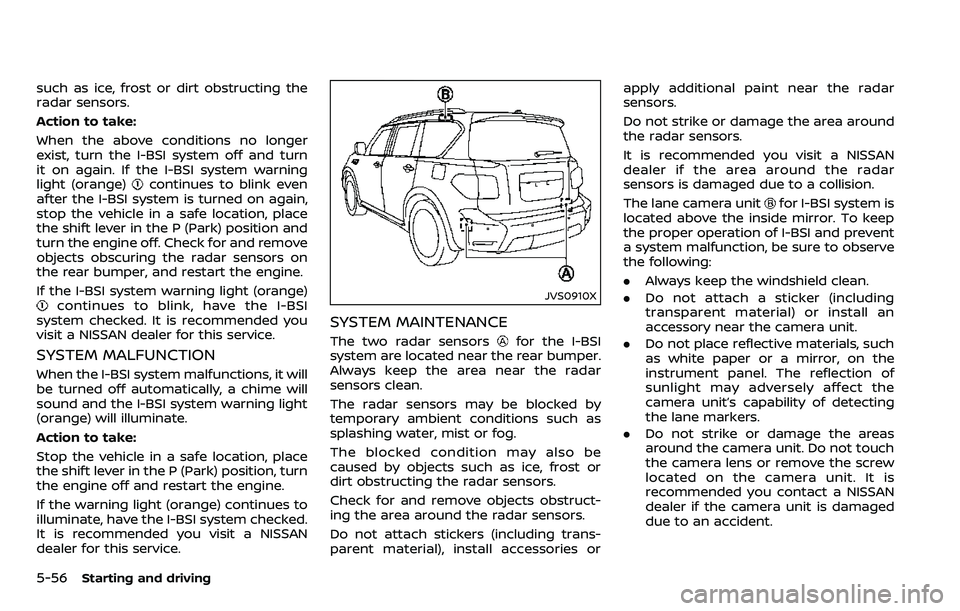
The two radar sensorsfor the I-BSI
system are located near the rear bumper.
Always keep the area near the radar
sensors clean.
The radar sensors may be blocked by
temporary ambient conditions such as
splashing water, mist or fog.
The blocked condition may also be
caused by objects such as ice, frost or
dirt obstructing the radar sensors.
Check for and remove objects obstruct-
ing the area around the radar sensors.
Do not attach stickers (including trans-
parent material), install accessories or apply additional paint near the radar
sensors.
Do not strike or damage the area around
the radar sensors.
It is recommended you visit a NISSAN
dealer if the area around the radar
sensors is damaged due to a collision.
The lane camera unit
for I-BSI system is
located above the inside mirror. To keep
the proper operation of I-BSI and prevent
a system malfunction, be sure to observe
the following:
. Always keep the windshield clean.
. Do not attach a sticker (including
transparent material) or install an
accessory near the camera unit.
. Do not place reflective materials, such
as white paper or a mirror, on the
instrument panel. The reflection of
sunlight may adversely affect the
camera unit’s capability of detecting
the lane markers.
. Do not strike or damage the areas
around the camera unit. Do not touch
the camera lens or remove the screw
located on the camera unit. It is
recommended you contact a NISSAN
dealer if the camera unit is damaged
due to an accident.
Page 321 of 532
5-66Starting and driving
SYSTEM MALFUNCTION
If the I-BI system malfunctions, it will turn
off automatically, a chime will sound and
“BCI MALFUNCTION” warning message will
appear in the vehicle information display
.
Action to take
Stop the vehicle in a safe location and
place the shift lever in the P (Park)
position. Turn the engine off and restart
the engine. If the warning message con-
tinues to appear, have the system
checked. It is recommended you visit a
NISSAN dealer for this service.
JVS0908X
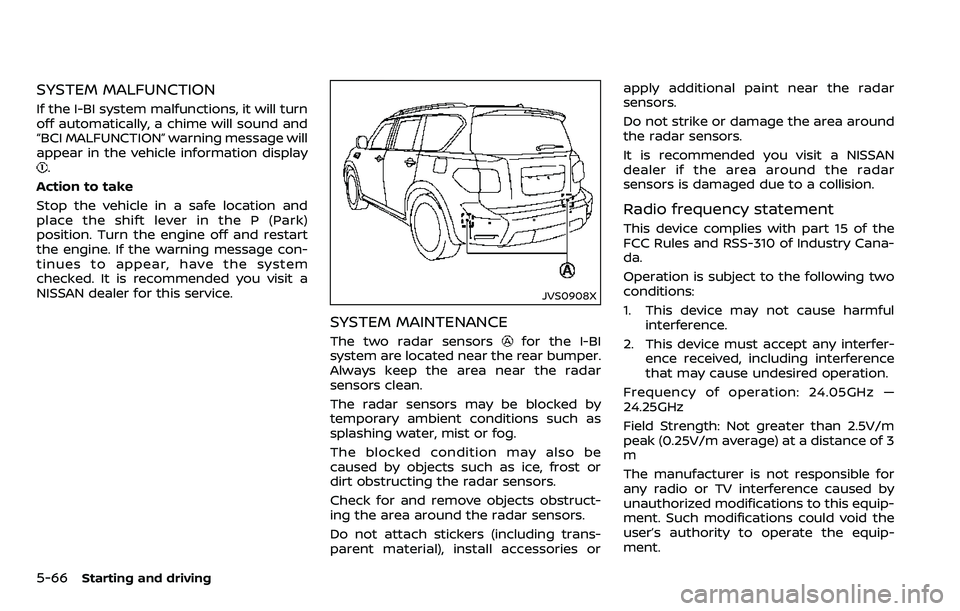
SYSTEM MAINTENANCE
The two radar sensorsfor the I-BI
system are located near the rear bumper.
Always keep the area near the radar
sensors clean.
The radar sensors may be blocked by
temporary ambient conditions such as
splashing water, mist or fog.
The blocked condition may also be
caused by objects such as ice, frost or
dirt obstructing the radar sensors.
Check for and remove objects obstruct-
ing the area around the radar sensors.
Do not attach stickers (including trans-
parent material), install accessories or apply additional paint near the radar
sensors.
Do not strike or damage the area around
the radar sensors.
It is recommended you visit a NISSAN
dealer if the area around the radar
sensors is damaged due to a collision.
Radio frequency statement
This device complies with part 15 of the
FCC Rules and RSS-310 of Industry Cana-
da.
Operation is subject to the following two
conditions:
1. This device may not cause harmful
interference.
2. This device must accept any interfer- ence received, including interference
that may cause undesired operation.
Frequency of operation: 24.05GHz —
24.25GHz
Field Strength: Not greater than 2.5V/m
peak (0.25V/m average) at a distance of 3
m
The manufacturer is not responsible for
any radio or TV interference caused by
unauthorized modifications to this equip-
ment. Such modifications could void the
user’s authority to operate the equip-
ment.
Page 341 of 532
5-86Starting and driving
SSD0979
Condition C:
When the ICC system is not operating
properly, the chime sounds and the ICC
system warning light (orange) will come
on.
Action to take:
If the warning light comes on, park the
vehicle in a safe place. Turn the engine off,
restart the engine, resume driving and set
the ICC system again.
If it is not possible to set the system or
the indicator stays on, it may indicate
that the ICC system is malfunctioning.
Although the vehicle is still driveable
under normal conditions, have the ve-hicle checked. It is recommended you
visit a NISSAN dealer for this service.
JVS0913X
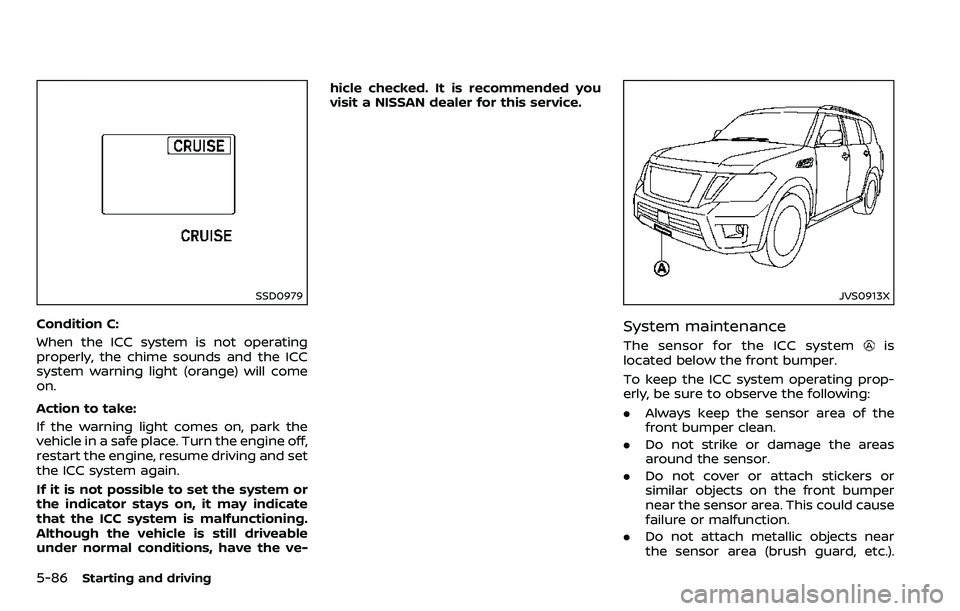
System maintenance
The sensor for the ICC systemis
located below the front bumper.
To keep the ICC system operating prop-
erly, be sure to observe the following:
. Always keep the sensor area of the
front bumper clean.
. Do not strike or damage the areas
around the sensor.
. Do not cover or attach stickers or
similar objects on the front bumper
near the sensor area. This could cause
failure or malfunction.
. Do not attach metallic objects near
the sensor area (brush guard, etc.).
Page 358 of 532
SSD0999
SYSTEM MALFUNCTION
Condition:
When the I-DC system is not operating
properly, the chime sounds and the
system warning light (“CRUISE” orange)
will come on.
Action to take:
If the warning light comes on, park the
vehicle in a safe place. Turn the engine off,
restart the engine, and turn on the I-DC
system again.
If it is not possible to set the system or
the indicator stays on, it may indicate
that the system is malfunctioning.
Although the vehicle is still driveableunder normal conditions, have the ve-
hicle checked. It is recommended you
visit a NISSAN dealer for this service.
JVS0913X
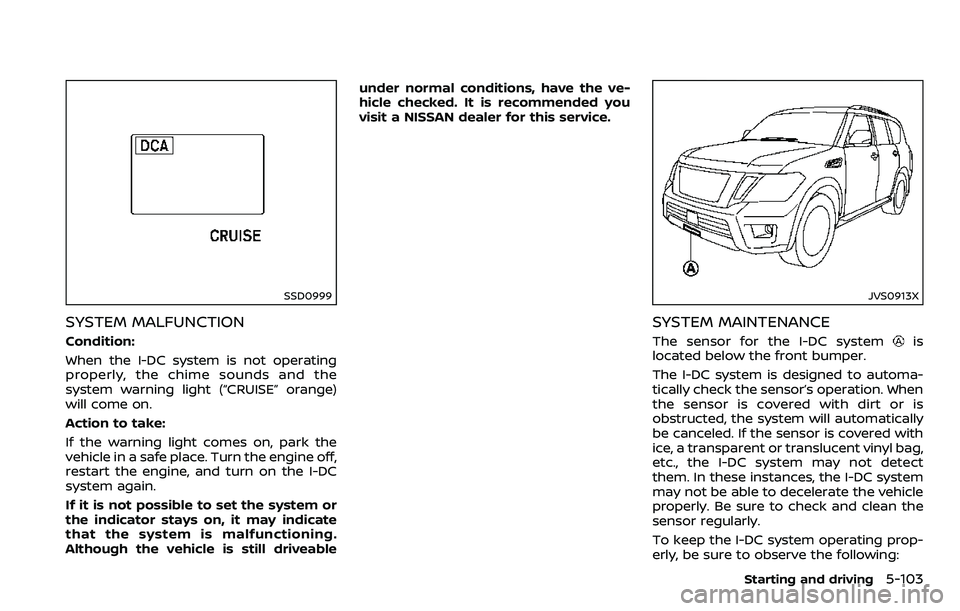
SYSTEM MAINTENANCE
The sensor for the I-DC systemis
located below the front bumper.
The I-DC system is designed to automa-
tically check the sensor’s operation. When
the sensor is covered with dirt or is
obstructed, the system will automatically
be canceled. If the sensor is covered with
ice, a transparent or translucent vinyl bag,
etc., the I-DC system may not detect
them. In these instances, the I-DC system
may not be able to decelerate the vehicle
properly. Be sure to check and clean the
sensor regularly.
To keep the I-DC system operating prop-
erly, be sure to observe the following:
Starting and driving5-103
Page 367 of 532
5-112Starting and driving
JVS0913X
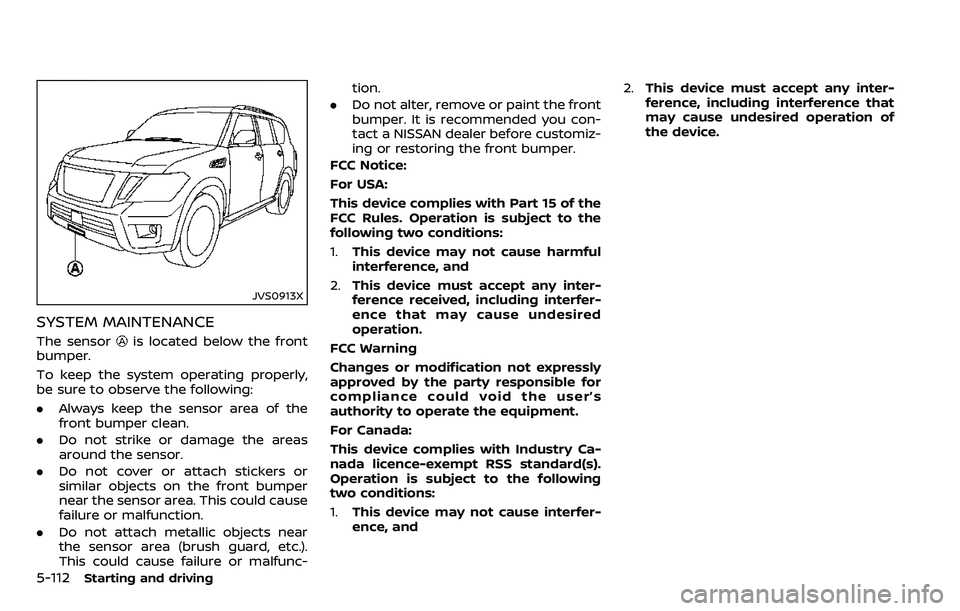
SYSTEM MAINTENANCE
The sensoris located below the front
bumper.
To keep the system operating properly,
be sure to observe the following:
. Always keep the sensor area of the
front bumper clean.
. Do not strike or damage the areas
around the sensor.
. Do not cover or attach stickers or
similar objects on the front bumper
near the sensor area. This could cause
failure or malfunction.
. Do not attach metallic objects near
the sensor area (brush guard, etc.).
This could cause failure or malfunc- tion.
. Do not alter, remove or paint the front
bumper. It is recommended you con-
tact a NISSAN dealer before customiz-
ing or restoring the front bumper.
FCC Notice:
For USA:
This device complies with Part 15 of the
FCC Rules. Operation is subject to the
following two conditions:
1. This device may not cause harmful
interference, and
2. This device must accept any inter-
ference received, including interfer-
ence that may cause undesired
operation.
FCC Warning
Changes or modification not expressly
approved by the party responsible for
compliance could void the user’s
authority to operate the equipment.
For Canada:
This device complies with Industry Ca-
nada licence-exempt RSS standard(s).
Operation is subject to the following
two conditions:
1. This device may not cause interfer-
ence, and 2.
This device must accept any inter-
ference, including interference that
may cause undesired operation of
the device.
Page 376 of 532
JVS0913X
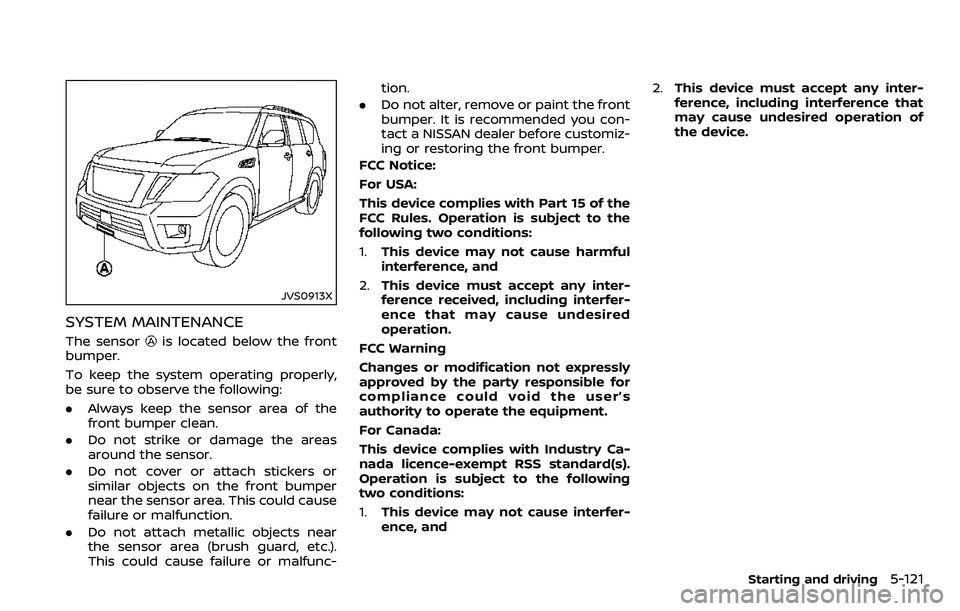
SYSTEM MAINTENANCE
The sensoris located below the front
bumper.
To keep the system operating properly,
be sure to observe the following:
. Always keep the sensor area of the
front bumper clean.
. Do not strike or damage the areas
around the sensor.
. Do not cover or attach stickers or
similar objects on the front bumper
near the sensor area. This could cause
failure or malfunction.
. Do not attach metallic objects near
the sensor area (brush guard, etc.).
This could cause failure or malfunc- tion.
. Do not alter, remove or paint the front
bumper. It is recommended you con-
tact a NISSAN dealer before customiz-
ing or restoring the front bumper.
FCC Notice:
For USA:
This device complies with Part 15 of the
FCC Rules. Operation is subject to the
following two conditions:
1. This device may not cause harmful
interference, and
2. This device must accept any inter-
ference received, including interfer-
ence that may cause undesired
operation.
FCC Warning
Changes or modification not expressly
approved by the party responsible for
compliance could void the user’s
authority to operate the equipment.
For Canada:
This device complies with Industry Ca-
nada licence-exempt RSS standard(s).
Operation is subject to the following
two conditions:
1. This device may not cause interfer-
ence, and 2.
This device must accept any inter-
ference, including interference that
may cause undesired operation of
the device.
Starting and driving5-121
Page 378 of 532
7. Avoid idling..Shutting off your engine when safefor stops exceeding 30-60 seconds
saves fuel and reduces emissions.
8. Buy an automated pass for toll roads.
.Automated passes permit drivers to use special lanes to maintain cruis-
ing speed through the toll and
avoid stopping and starting.
9. Winter warm up.
.Limit idling time to minimize impact to fuel economy.
.Vehicles typically need no morethan 30 seconds of idling at start-
up to effectively circulate the en-
gine oil before driving.
.Your vehicle will reach its ideal
operating temperature more
quickly while driving versus idling.
10. Keeping your vehicle cool.
.Park your vehicle in a covered parking area or in the shade when-
ever possible.
.When entering a hot vehicle, open- ing the windows will help to reduce
the inside temperature faster, re-
sulting in reduced demand on your
A/C system. .
Keep your engine tuned up.
. Follow the recommended scheduled
maintenance.
. Keep the tires inflated to the correct
pressure. Low tire pressure increases
tire wear and lowers fuel economy.
. Keep the wheels in correct alignment.
Improper alignment increases tire
wear and lowers fuel economy.
. Use the recommended viscosity en-
gine oil. (See “Engine oil and oil filter
recommendation” (P.10-6).)
WARNING
.Do not attempt to raise two
wheels off the ground and shift
the transmission to any drive or
reverse position with the engine
running. Doing so may result in
drivetrain damage or unexpected
vehicle movement which could
result in serious vehicle damage
or personal injury.
. Do not attempt to test a 4WD
equipped vehicle on a 2-wheel
dynamometer or similar equip-
ment even if the other two
wheels are raised off the ground.
Make sure you inform test facility
personnel that your vehicle is
equipped with 4WD before it is
placed on a dynamometer. Using
the wrong test equipment may
result in drivetrain damage or
unexpected vehicle movement
which could result in serious ve-
hicle damage or personal injury.
Starting and driving5-123
INCREASING FUEL ECONOMYNISSAN ALL-MODE 4WD® (if so equipped)