brake NISSAN ARMADA 2018 Owner´s Manual
[x] Cancel search | Manufacturer: NISSAN, Model Year: 2018, Model line: ARMADA, Model: NISSAN ARMADA 2018Pages: 532, PDF Size: 2.3 MB
Page 317 of 532
5-62Starting and driving
.In the case of several vehicles ap-
proaching in a row (Illustration 1) or in
the opposite direction (Illustration 2), a
chime may not be issued to the I-BI
system after the first vehicle passes
the sensors.
. The sonar system chime indicating
there is an object behind the vehicle
has a higher priority than the I-BI
chime (single beep) indicating an ap-
proaching vehicle. If the sonar system
detects an object behind the vehicle
and the I-BI system detects an ap-
proaching vehicle at the same time,
the following indications are provided:
— The sonar system chime sounds
— The side indicator light on the side
of the approaching vehicle flashes,
and
— A yellow rectangular frame appears in the center display.
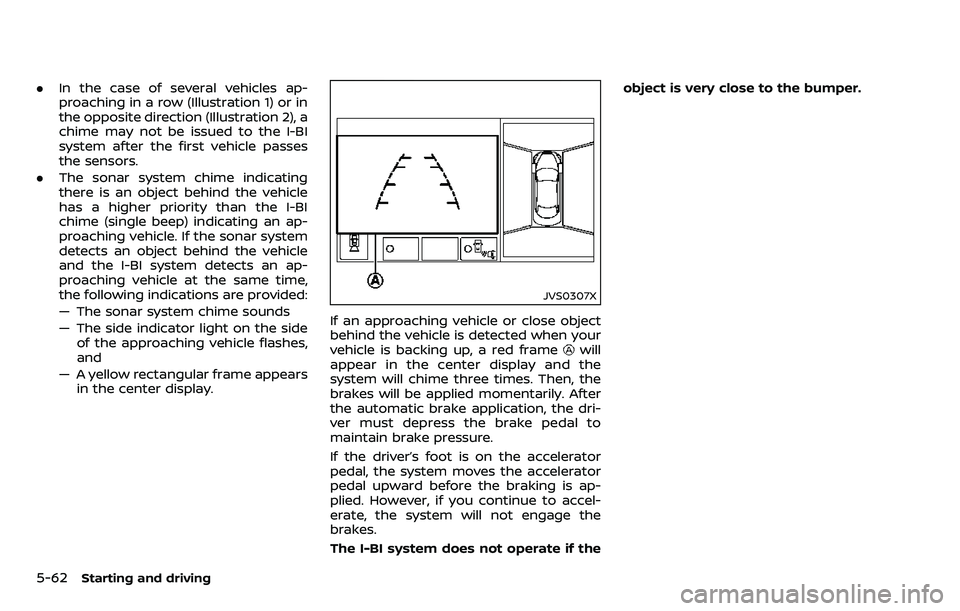
JVS0307X
If an approaching vehicle or close object
behind the vehicle is detected when your
vehicle is backing up, a red frame
will
appear in the center display and the
system will chime three times. Then, the
brakes will be applied momentarily. After
the automatic brake application, the dri-
ver must depress the brake pedal to
maintain brake pressure.
If the driver’s foot is on the accelerator
pedal, the system moves the accelerator
pedal upward before the braking is ap-
plied. However, if you continue to accel-
erate, the system will not engage the
brakes.
The I-BI system does not operate if the object is very close to the bumper.
Page 320 of 532
— Severe weather
— Road spray
— Ice/frost/dirt build up on thevehicle
. Do not attach stickers (including
transparent material), install ac-
cessories or apply additional
paint near the radar sensors.
These conditions may reduce the
ability of the radar sensors to
detect other vehicles.
. The sonar sensors detect station-
ary objects behind the vehicle.
The sonar sensor may not detect:
— Small or moving objects
— Wedge-shaped objects
— Object close to the bumper
(less than approximately 1 ft
(30 cm))
— Thin objects such as rope, wire and chain, etc.
. The brake engagement by the I-
BI system is not as effective on a
slope as it is on flat ground. When
on a steep slope the system may
not function properly.
. Do not use the I-BI system under
the following conditions because
the system may not function properly.
— When driving with a tire that is
not within normal tire condi-
tions (for example, tire wear,
low tire pressure, installation
of spare tire, tire chains, non-
standard wheels).
— When the vehicle is equipped with non-original brake parts
or suspension parts.
— When towing a trailer or other vehicle.
. Excessive noise (for example,
audio system volume, open vehi-
cle window) will interfere with the
chime sound, and it may not be
heard.
JVS0689X
Vehicle information display
SYSTEM TEMPORARILY UNAVAIL-
ABLE
Under the following conditions, a chime
will sound and “BCI NOT AVAILABLE”
warning message will appear in the
vehicle information display
, and the I-
BI system will be turned off automatically.
. If the vehicle is parked in direct sun-
light under high temperature condi-
tions (over approximately 104°F
(40°C)).
. When side radar blockage is detected.
Turn off the I-BI system and turn it on
again when the above conditions no
longer exist.
Starting and driving5-65
Page 323 of 532
5-68Starting and driving
vehicle will maintain the set speed.
.To pass another vehicle, depress the
accelerator pedal. When you release
the pedal, the vehicle will return to the
previously set speed.
. The vehicle may not maintain the set
speed on winding or hilly roads. If this
happens, drive without the cruise
control.
To cancel the preset speed, follow any of
these methods:
1. Push the CANCEL switch.
2. Tap the brake pedal.
3. Move the shift lever to the N (Neutral)
position.
4. Turn the MAIN switch off. The CRUISE indicator light will turn off.
. If you depress the brake pedal while
pushing the ACCELERATE/RESUME or
COAST/SET switch and reset at the
cruising speed, the cruise control will
disengage. Turn the MAIN switch off
once and then turn it on again.
. The cruise control will automatically
cancel if the vehicle slows more than 8
MPH (13 km/h) below the set speed.
. If you move the shift lever to N
(Neutral) position, the cruise control
will be canceled. To reset at a faster cruising speed,
use
one of the following methods:
. Depress the accelerator pedal. When
the vehicle attains the desired speed,
push and release the COAST/SET
switch.
. Push and hold the ACCELERATE/RE-
SUME switch. When the vehicle attains
the speed you desire, release the
switch.
. Push, then quickly release the ACCEL-
ERATE/RESUME switch. Each time you
do this, the set speed will increase by
about 1 MPH (1.6 km/h).
To reset at a slower cruising speed, use
one of the following methods:
. Lightly tap the brake pedal. When the
vehicle attains the desired speed,
push the COAST/SET switch and re-
lease it.
. Push and hold the COAST/SET switch.
Release the switch when the vehicle
slows down to the desired speed.
. Push, then quickly release the COAST/
SET switch. Each time you do this, the
set speed will decrease by about 1
MPH (1.6 km/h).
To resume the preset speed, push and
release the ACCELERATE/RESUME switch.
The vehicle will resume the last set
cruising speed when the vehicle speed is over 25 MPH (40 km/h).
Page 324 of 532
WARNING
Failure to follow the warnings and
instructions for proper use of the ICC
system could result in serious injury
or death.
.ICC is not a collision avoidance or
warning device. For highway use
only and it is not intended for
congested areas or city driving.
Failure to apply the brakes could
result in an accident.
. Always observe posted speed
limits and do not set the speed
over them.
. Always drive carefully and atten-
tively when using either cruise
control mode. Read and under-
stand the Owner’s Manual thor-
oughly before using the cruise
control. To avoid serious injury
or death, do not rely on the
system to prevent accidents or
to control the vehicle’s speed in
emergency situations. Do not use
cruise control except in appropri-
ate road and traffic conditions.
. In the conventional (fixed speed)
cruise control mode, a warning
chime will not sound to warn you if you are too close to the vehicle
ahead. Pay special attention to
the distance between your vehi-
cle and the vehicle ahead of you
or a collision could occur.
The ICC system maintains a selected
distance from the vehicle in front of you
within the speed range of 0 to 90 MPH (0
to 144 km/h) up to the set speed. The set
speed can be selected by the driver
between 20 to 90 MPH (32 to 144 km/h).
The vehicle travels at a set speed when
the road ahead is clear.
The ICC system can be set to one of two
cruise control modes.
. Vehicle-to-vehicle distance control
mode:
For maintaining a selected distance
between your vehicle and the vehicle
in front of you up to the preset speed.
. Conventional (fixed speed) cruise con-
trol mode:
For cruising at a preset speed.
Starting and driving5-69
INTELLIGENT CRUISE CONTROL
(ICC) (if so equipped)
Page 326 of 532
SSD1051
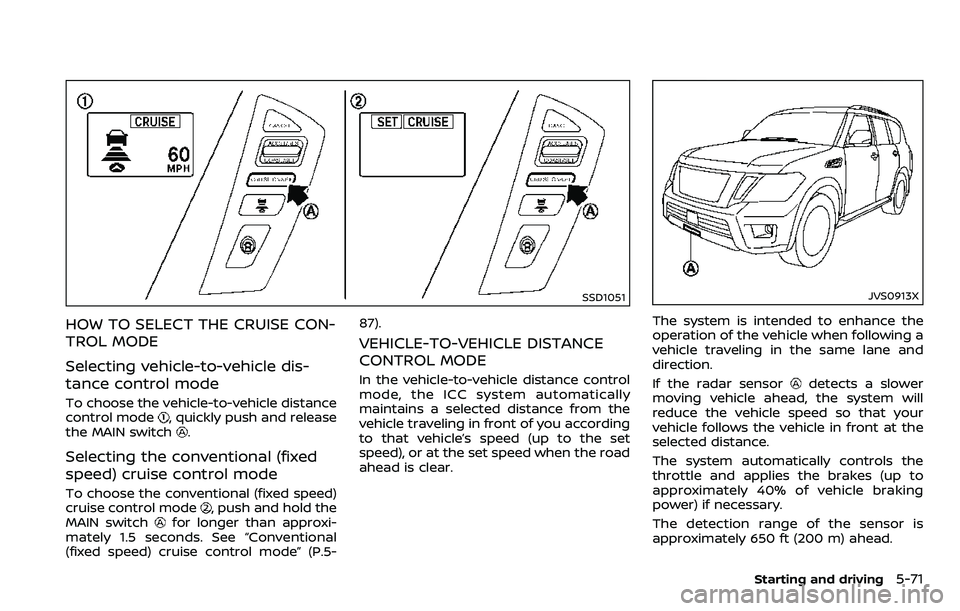
HOW TO SELECT THE CRUISE CON-
TROL MODE
Selecting vehicle-to-vehicle dis-
tance control mode
To choose the vehicle-to-vehicle distance
control mode, quickly push and release
the MAIN switch.
Selecting the conventional (fixed
speed) cruise control mode
To choose the conventional (fixed speed)
cruise control mode, push and hold the
MAIN switchfor longer than approxi-
mately 1.5 seconds. See “Conventional
(fixed speed) cruise control mode” (P.5- 87).
VEHICLE-TO-VEHICLE DISTANCE
CONTROL MODE
In the vehicle-to-vehicle distance control
mode, the ICC system automatically
maintains a selected distance from the
vehicle traveling in front of you according
to that vehicle’s speed (up to the set
speed), or at the set speed when the road
ahead is clear.
JVS0913X
The system is intended to enhance the
operation of the vehicle when following a
vehicle traveling in the same lane and
direction.
If the radar sensor
detects a slower
moving vehicle ahead, the system will
reduce the vehicle speed so that your
vehicle follows the vehicle in front at the
selected distance.
The system automatically controls the
throttle and applies the brakes (up to
approximately 40% of vehicle braking
power) if necessary.
The detection range of the sensor is
approximately 650 ft (200 m) ahead.
Starting and driving5-71
Page 328 of 532
a vehicle ahead, this system automati-
cally accelerates or decelerates your ve-
hicle according to the speed of the
vehicle ahead. Depress the accelerator
to properly accelerate your vehicle when
acceleration is required for a lane change.
Depress the brake pedal when decelera-
tion is required to maintain a safe dis-
tance to the vehicle ahead due to its
sudden braking or if a vehicle cuts in.
Always stay alert when using the ICC
system.
SSD0964
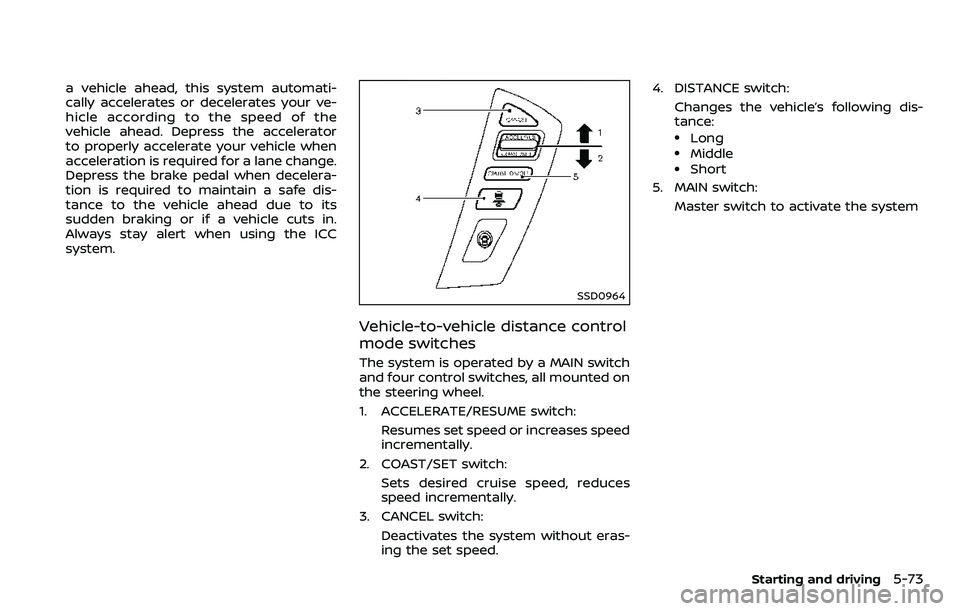
Vehicle-to-vehicle distance control
mode switches
The system is operated by a MAIN switch
and four control switches, all mounted on
the steering wheel.
1. ACCELERATE/RESUME switch:Resumes set speed or increases speed
incrementally.
2. COAST/SET switch: Sets desired cruise speed, reduces
speed incrementally.
3. CANCEL switch:
Deactivates the system without eras-
ing the set speed. 4. DISTANCE switch:
Changes the vehicle’s following dis-
tance:
.Long.Middle.Short
5. MAIN switch:
Master switch to activate the system
Starting and driving5-73
Page 330 of 532
SSD1052
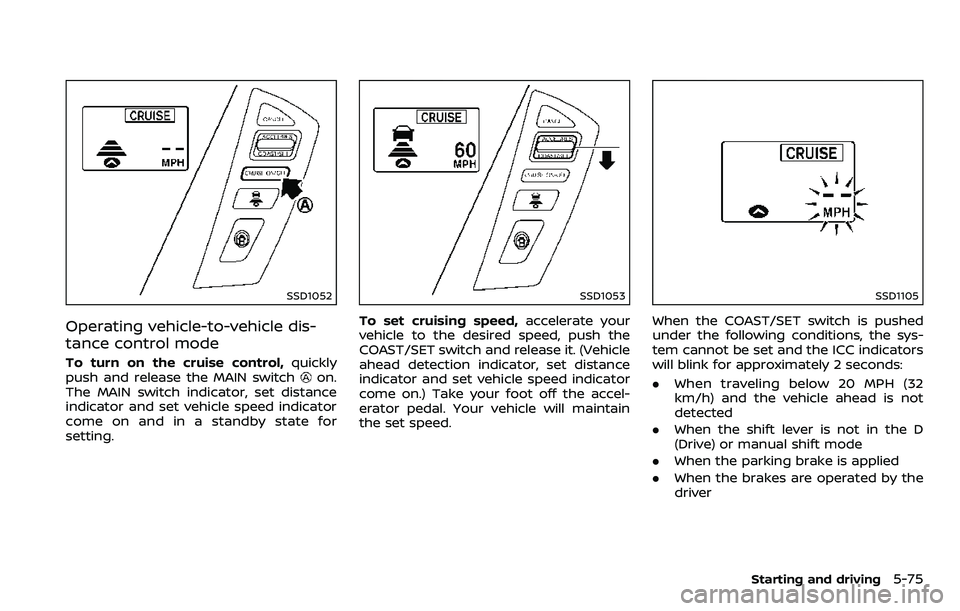
Operating vehicle-to-vehicle dis-
tance control mode
To turn on the cruise control,quickly
push and release the MAIN switchon.
The MAIN switch indicator, set distance
indicator and set vehicle speed indicator
come on and in a standby state for
setting.
SSD1053
To set cruising speed, accelerate your
vehicle to the desired speed, push the
COAST/SET switch and release it. (Vehicle
ahead detection indicator, set distance
indicator and set vehicle speed indicator
come on.) Take your foot off the accel-
erator pedal. Your vehicle will maintain
the set speed.
SSD1105
When the COAST/SET switch is pushed
under the following conditions, the sys-
tem cannot be set and the ICC indicators
will blink for approximately 2 seconds:
. When traveling below 20 MPH (32
km/h) and the vehicle ahead is not
detected
. When the shift lever is not in the D
(Drive) or manual shift mode
. When the parking brake is applied
. When the brakes are operated by the
driver
Starting and driving5-75
Page 332 of 532
SSD1107
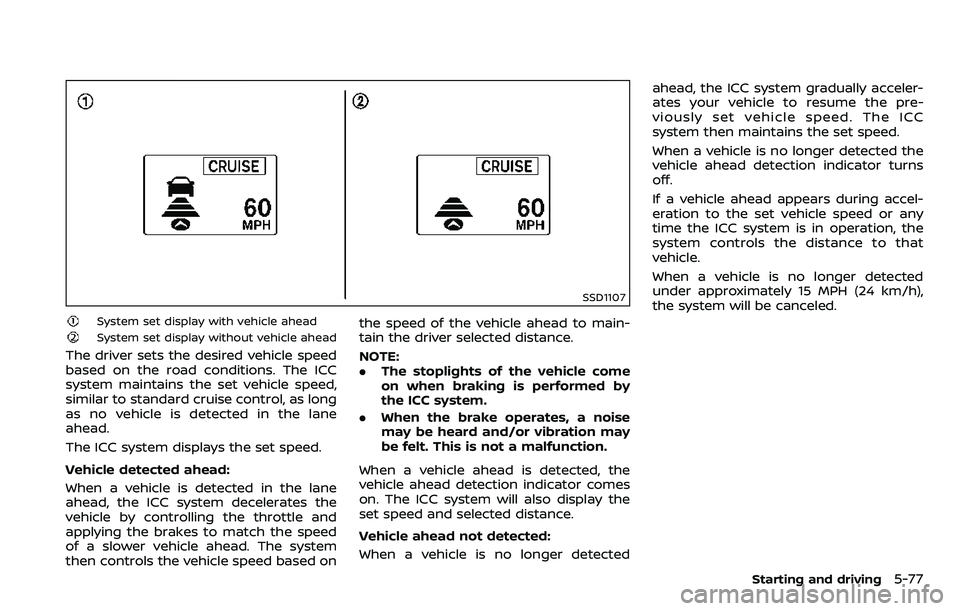
System set display with vehicle ahead
System set display without vehicle ahead
The driver sets the desired vehicle speed
based on the road conditions. The ICC
system maintains the set vehicle speed,
similar to standard cruise control, as long
as no vehicle is detected in the lane
ahead.
The ICC system displays the set speed.
Vehicle detected ahead:
When a vehicle is detected in the lane
ahead, the ICC system decelerates the
vehicle by controlling the throttle and
applying the brakes to match the speed
of a slower vehicle ahead. The system
then controls the vehicle speed based onthe speed of the vehicle ahead to main-
tain the driver selected distance.
NOTE:
.
The stoplights of the vehicle come
on when braking is performed by
the ICC system.
. When the brake operates, a noise
may be heard and/or vibration may
be felt. This is not a malfunction.
When a vehicle ahead is detected, the
vehicle ahead detection indicator comes
on. The ICC system will also display the
set speed and selected distance.
Vehicle ahead not detected:
When a vehicle is no longer detected ahead, the ICC system gradually acceler-
ates your vehicle to resume the pre-
viously set vehicle speed. The ICC
system then maintains the set speed.
When a vehicle is no longer detected the
vehicle ahead detection indicator turns
off.
If a vehicle ahead appears during accel-
eration to the set vehicle speed or any
time the ICC system is in operation, the
system controls the distance to that
vehicle.
When a vehicle is no longer detected
under approximately 15 MPH (24 km/h),
the system will be canceled.
Starting and driving5-77
Page 333 of 532
5-78Starting and driving
SSD1108
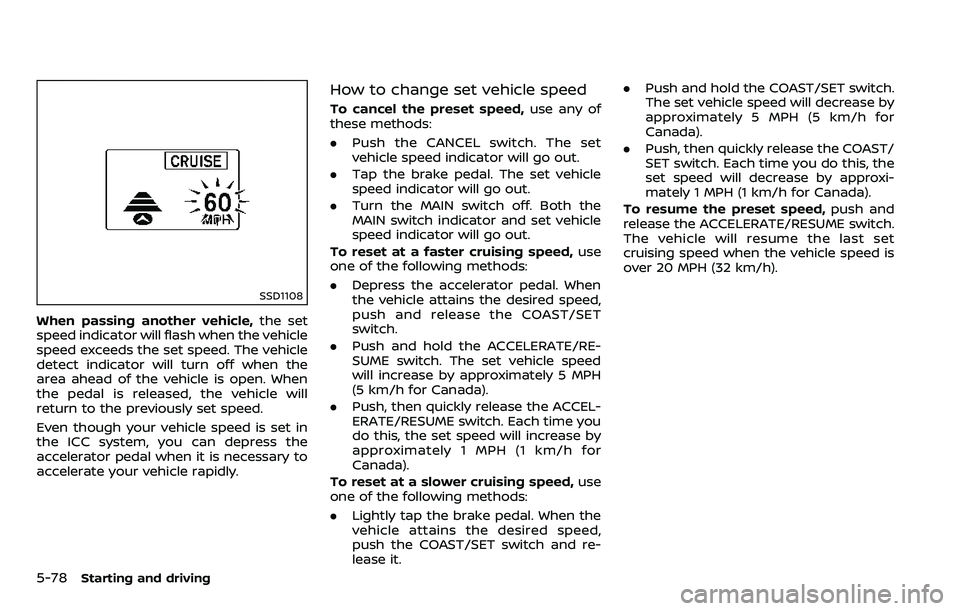
When passing another vehicle,the set
speed indicator will flash when the vehicle
speed exceeds the set speed. The vehicle
detect indicator will turn off when the
area ahead of the vehicle is open. When
the pedal is released, the vehicle will
return to the previously set speed.
Even though your vehicle speed is set in
the ICC system, you can depress the
accelerator pedal when it is necessary to
accelerate your vehicle rapidly.
How to change set vehicle speed
To cancel the preset speed, use any of
these methods:
. Push the CANCEL switch. The set
vehicle speed indicator will go out.
. Tap the brake pedal. The set vehicle
speed indicator will go out.
. Turn the MAIN switch off. Both the
MAIN switch indicator and set vehicle
speed indicator will go out.
To reset at a faster cruising speed, use
one of the following methods:
. Depress the accelerator pedal. When
the vehicle attains the desired speed,
push and release the COAST/SET
switch.
. Push and hold the ACCELERATE/RE-
SUME switch. The set vehicle speed
will increase by approximately 5 MPH
(5 km/h for Canada).
. Push, then quickly release the ACCEL-
ERATE/RESUME switch. Each time you
do this, the set speed will increase by
approximately 1 MPH (1 km/h for
Canada).
To reset at a slower cruising speed, use
one of the following methods:
. Lightly tap the brake pedal. When the
vehicle attains the desired speed,
push the COAST/SET switch and re-
lease it. .
Push and hold the COAST/SET switch.
The set vehicle speed will decrease by
approximately 5 MPH (5 km/h for
Canada).
. Push, then quickly release the COAST/
SET switch. Each time you do this, the
set speed will decrease by approxi-
mately 1 MPH (1 km/h for Canada).
To resume the preset speed, push and
release the ACCELERATE/RESUME switch.
The vehicle will resume the last set
cruising speed when the vehicle speed is
over 20 MPH (32 km/h).
Page 334 of 532
SSD0967
How to change set distance to
vehicle ahead
The distance to the vehicle ahead can be
selected at any time depending on the
traffic conditions.
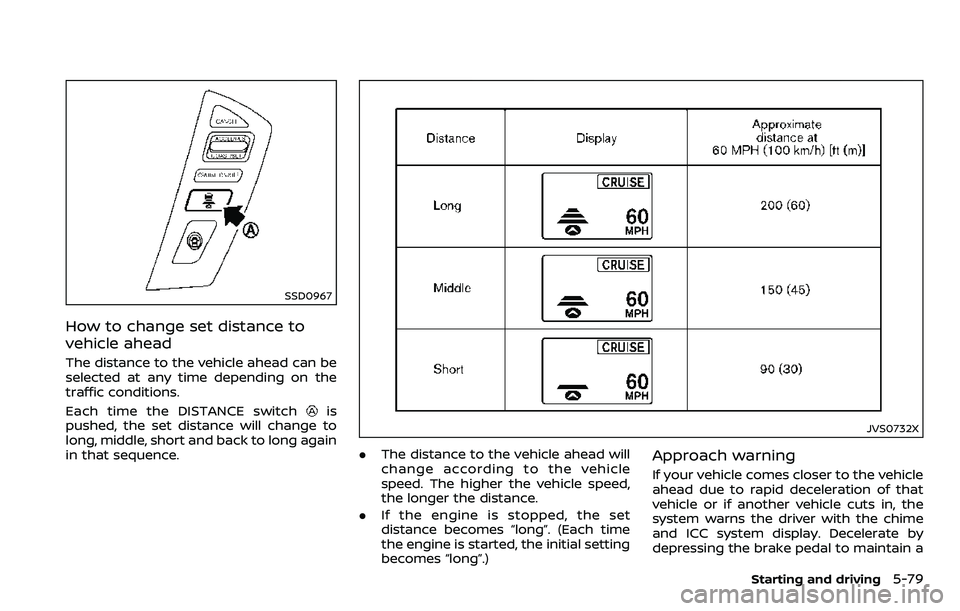
Each time the DISTANCE switch
is
pushed, the set distance will change to
long, middle, short and back to long again
in that sequence.
JVS0732X
. The distance to the vehicle ahead will
change according to the vehicle
speed. The higher the vehicle speed,
the longer the distance.
. If the engine is stopped, the set
distance becomes “long”. (Each time
the engine is started, the initial setting
becomes “long”.)Approach warning
If your vehicle comes closer to the vehicle
ahead due to rapid deceleration of that
vehicle or if another vehicle cuts in, the
system warns the driver with the chime
and ICC system display. Decelerate by
depressing the brake pedal to maintain a
Starting and driving5-79