key NISSAN ARMADA 2018 Owner´s Manual
[x] Cancel search | Manufacturer: NISSAN, Model Year: 2018, Model line: ARMADA, Model: NISSAN ARMADA 2018Pages: 532, PDF Size: 2.3 MB
Page 231 of 532
4-20Monitor, heater, air conditioner, audio, phone and voice recognition systems
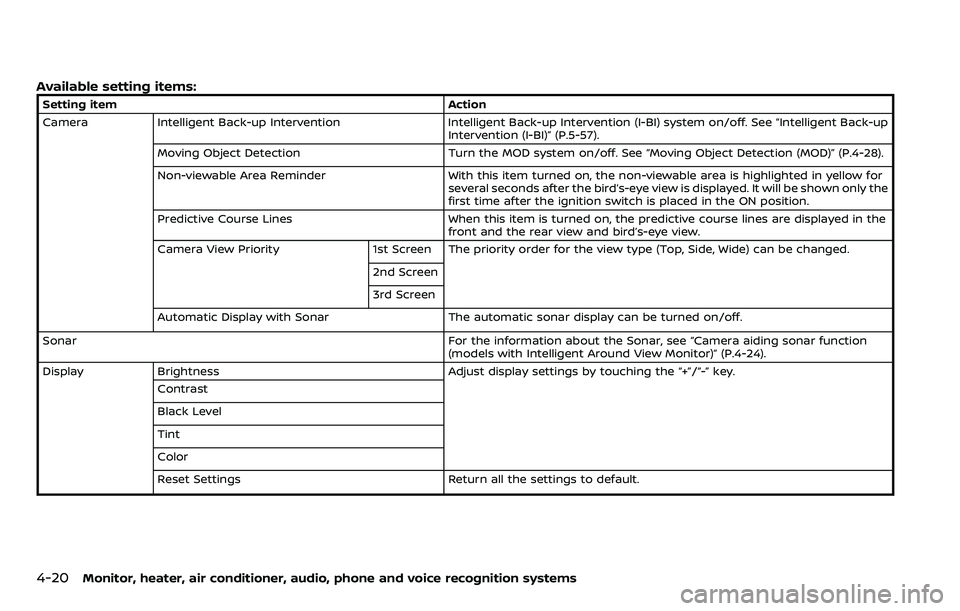
Available setting items:
Setting itemAction
Camera Intelligent Back-up Intervention Intelligent Back-up Intervention (I-BI) system on/off. See “Intelligent Back-up Intervention (I-BI)” (P.5-57).
Moving Object Detection Turn the MOD system on/off. See “Moving Object Detection (MOD)” (P.4-28).
Non-viewable Area Reminder With this item turned on, the non-viewable area is highlighted in yellow for
several seconds after the bird’s-eye view is displayed. It will be shown only the
first time after the ignition switch is placed in the ON position.
Predictive Course Lines When this item is turned on, the predictive course lines are displayed in the
front and the rear view and bird’s-eye view.
Camera View Priority 1st Screen The priority order for the view type (Top, Side, Wide) can be changed.
2nd Screen
3rd Screen
Automatic Display with Sonar The automatic sonar display can be turned on/off.
Sonar For the information about the Sonar, see “Camera aiding sonar function
(models with Intelligent Around View Monitor)” (P.4-24).
Display Brightness Adjust display settings by touching the “+”/“-” key.
Contrast
Black Level
Tint
Color
Reset Settings Return all the settings to default.
Page 236 of 532
center display, the system shows the
sonar indicator regardless of the shift
lever position.
The system is deactivated at speeds
above 6 MPH (10 km/h). It is reactivated
at lower speeds.
The colors of the sonar indicators and the
distance guide lines in the front, front-
wide, rear and rear-wide views indicate
different distances to the object.
When the objects are detected, the in-
dicator (green) appears and blinks and
the tone sounds intermittently. When the
vehicle moves closer to the object, the
color of the indicator turns yellow and the
rate of the blinking and the rate of the
tone increase. When the vehicle is very
close to the object, the indicator stops
blinking and turns red, and the tone
sounds continuously.
The intermittent tone will stop after 3
seconds when an object is detected by
only the sonar and the distance does not
change.
The tone will stop when the object is no
longer near the vehicle.
JVH1694X
TURNING ON AND OFF THE SONAR
FUNCTION
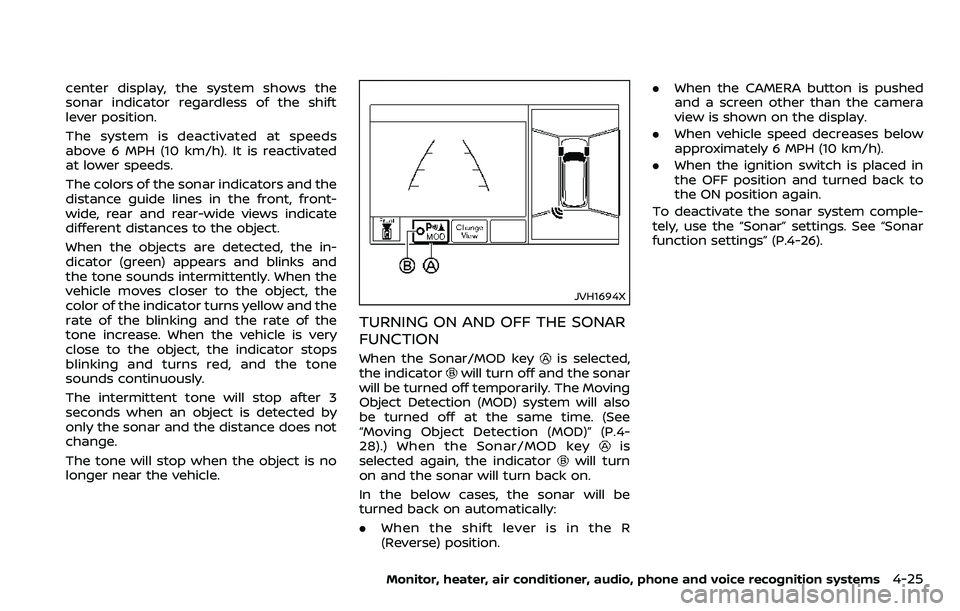
When the Sonar/MOD keyis selected,
the indicatorwill turn off and the sonar
will be turned off temporarily. The Moving
Object Detection (MOD) system will also
be turned off at the same time. (See
“Moving Object Detection (MOD)” (P.4-
28).) When the Sonar/MOD key
is
selected again, the indicatorwill turn
on and the sonar will turn back on.
In the below cases, the sonar will be
turned back on automatically:
. When the shift lever is in the R
(Reverse) position. .
When the CAMERA button is pushed
and a screen other than the camera
view is shown on the display.
. When vehicle speed decreases below
approximately 6 MPH (10 km/h).
. When the ignition switch is placed in
the OFF position and turned back to
the ON position again.
To deactivate the sonar system comple-
tely, use the “Sonar” settings. See “Sonar
function settings” (P.4-26).
Monitor, heater, air conditioner, audio, phone and voice recognition systems4-25
Page 237 of 532
4-26Monitor, heater, air conditioner, audio, phone and voice recognition systems
JVH1695X
Sonar function settings
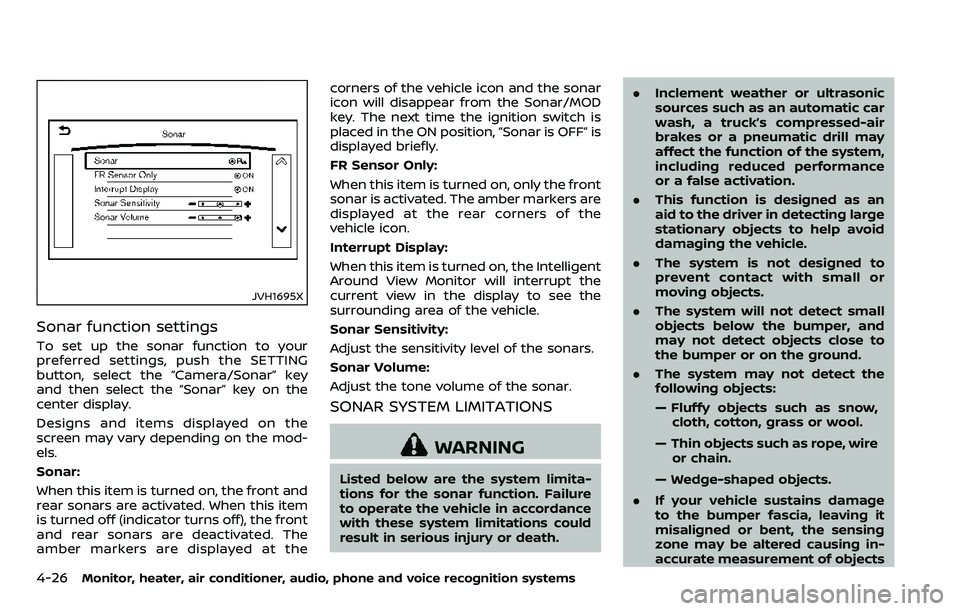
To set up the sonar function to your
preferred settings, push the SETTING
button, select the “Camera/Sonar” key
and then select the “Sonar” key on the
center display.
Designs and items displayed on the
screen may vary depending on the mod-
els.
Sonar:
When this item is turned on, the front and
rear sonars are activated. When this item
is turned off (indicator turns off), the front
and rear sonars are deactivated. The
amber markers are displayed at thecorners of the vehicle icon and the sonar
icon will disappear from the Sonar/MOD
key. The next time the ignition switch is
placed in the ON position, “Sonar is OFF” is
displayed briefly.
FR Sensor Only:
When this item is turned on, only the front
sonar is activated. The amber markers are
displayed at the rear corners of the
vehicle icon.
Interrupt Display:
When this item is turned on, the Intelligent
Around View Monitor will interrupt the
current view in the display to see the
surrounding area of the vehicle.
Sonar Sensitivity:
Adjust the sensitivity level of the sonars.
Sonar Volume:
Adjust the tone volume of the sonar.
SONAR SYSTEM LIMITATIONS
WARNING
Listed below are the system limita-
tions for the sonar function. Failure
to operate the vehicle in accordance
with these system limitations could
result in serious injury or death.
.
Inclement weather or ultrasonic
sources such as an automatic car
wash, a truck’s compressed-air
brakes or a pneumatic drill may
affect the function of the system,
including reduced performance
or a false activation.
. This function is designed as an
aid to the driver in detecting large
stationary objects to help avoid
damaging the vehicle.
. The system is not designed to
prevent contact with small or
moving objects.
. The system will not detect small
objects below the bumper, and
may not detect objects close to
the bumper or on the ground.
. The system may not detect the
following objects:
— Fluffy objects such as snow,
cloth, cotton, grass or wool.
— Thin objects such as rope, wire or chain.
— Wedge-shaped objects.
. If your vehicle sustains damage
to the bumper fascia, leaving it
misaligned or bent, the sensing
zone may be altered causing in-
accurate measurement of objects
Page 241 of 532
4-30Monitor, heater, air conditioner, audio, phone and voice recognition systems
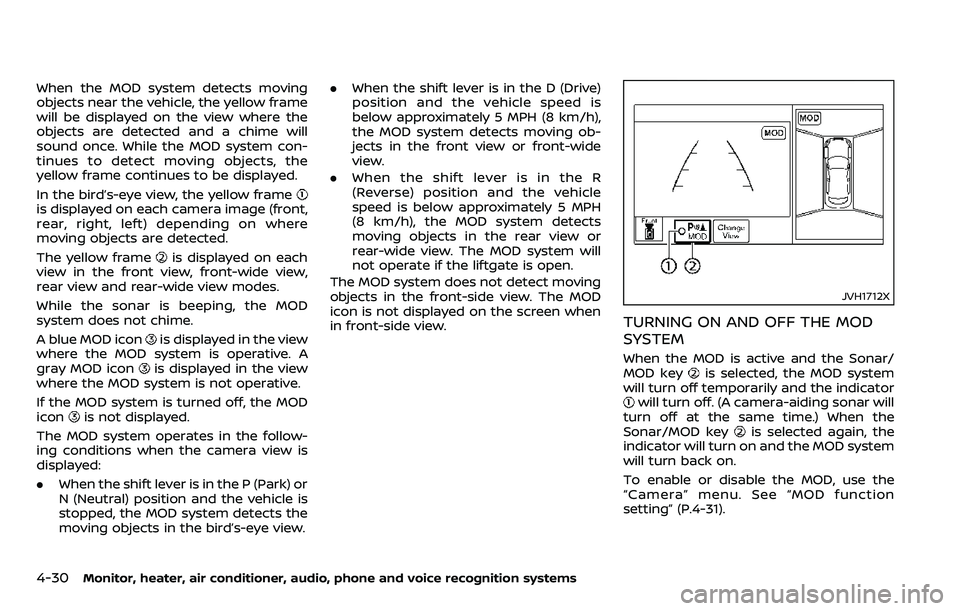
When the MOD system detects moving
objects near the vehicle, the yellow frame
will be displayed on the view where the
objects are detected and a chime will
sound once. While the MOD system con-
tinues to detect moving objects, the
yellow frame continues to be displayed.
In the bird’s-eye view, the yellow frame
is displayed on each camera image (front,
rear, right, left) depending on where
moving objects are detected.
The yellow frame
is displayed on each
view in the front view, front-wide view,
rear view and rear-wide view modes.
While the sonar is beeping, the MOD
system does not chime.
A blue MOD icon
is displayed in the view
where the MOD system is operative. A
gray MOD icon
is displayed in the view
where the MOD system is not operative.
If the MOD system is turned off, the MOD
icon
is not displayed.
The MOD system operates in the follow-
ing conditions when the camera view is
displayed:
. When the shift lever is in the P (Park) or
N (Neutral) position and the vehicle is
stopped, the MOD system detects the
moving objects in the bird’s-eye view. .
When the shift lever is in the D (Drive)
position and the vehicle speed is
below approximately 5 MPH (8 km/h),
the MOD system detects moving ob-
jects in the front view or front-wide
view.
. When the shift lever is in the R
(Reverse) position and the vehicle
speed is below approximately 5 MPH
(8 km/h), the MOD system detects
moving objects in the rear view or
rear-wide view. The MOD system will
not operate if the liftgate is open.
The MOD system does not detect moving
objects in the front-side view. The MOD
icon is not displayed on the screen when
in front-side view.
JVH1712X
TURNING ON AND OFF THE MOD
SYSTEM
When the MOD is active and the Sonar/
MOD keyis selected, the MOD system
will turn off temporarily and the indicator
will turn off. (A camera-aiding sonar will
turn off at the same time.) When the
Sonar/MOD key
is selected again, the
indicator will turn on and the MOD system
will turn back on.
To enable or disable the MOD, use the
“Camera” menu. See “MOD function
setting” (P.4-31).
Page 242 of 532
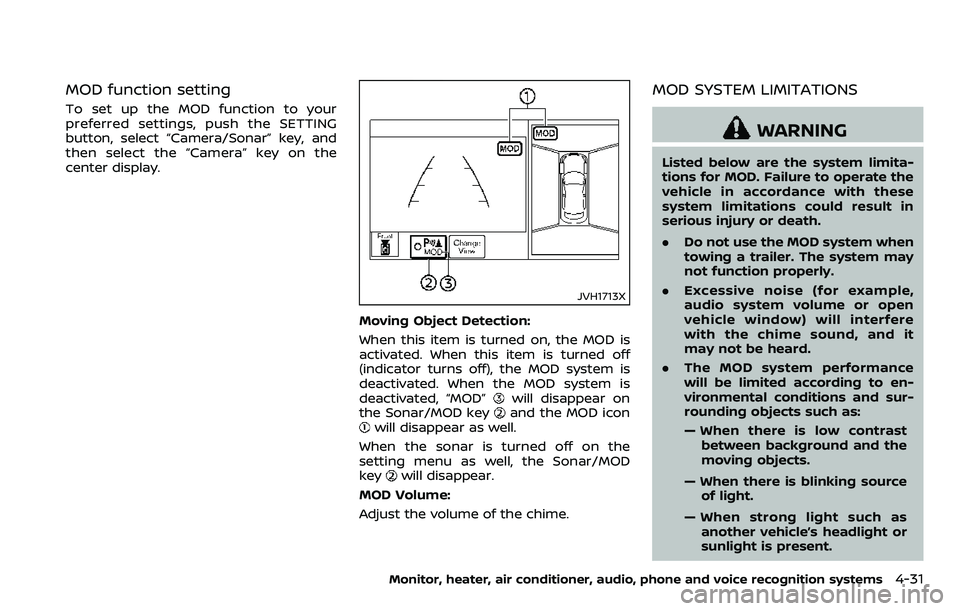
MOD function setting
To set up the MOD function to your
preferred settings, push the SETTING
button, select “Camera/Sonar” key, and
then select the “Camera” key on the
center display.
JVH1713X
Moving Object Detection:
When this item is turned on, the MOD is
activated. When this item is turned off
(indicator turns off), the MOD system is
deactivated. When the MOD system is
deactivated, “MOD”
will disappear on
the Sonar/MOD keyand the MOD iconwill disappear as well.
When the sonar is turned off on the
setting menu as well, the Sonar/MOD
key
will disappear.
MOD Volume:
Adjust the volume of the chime.
MOD SYSTEM LIMITATIONS
WARNING
Listed below are the system limita-
tions for MOD. Failure to operate the
vehicle in accordance with these
system limitations could result in
serious injury or death.
. Do not use the MOD system when
towing a trailer. The system may
not function properly.
. Excessive noise (for example,
audio system volume or open
vehicle window) will interfere
with the chime sound, and it
may not be heard.
. The MOD system performance
will be limited according to en-
vironmental conditions and sur-
rounding objects such as:
— When there is low contrast
between background and the
moving objects.
— When there is blinking source of light.
— When strong light such as another vehicle’s headlight or
sunlight is present.
Monitor, heater, air conditioner, audio, phone and voice recognition systems4-31
Page 249 of 532
4-38Monitor, heater, air conditioner, audio, phone and voice recognition systems
.A/C
Touch to turn the air conditioner on/
off.
. DUAL
Touch to turn the DUAL mode (pas-
senger’s side temperature control)
on/off.
. Upper Vent
Touch to turn the upper vent system
on/off. (See “Upper vent system” (P.4-
36).)
JVH1621X
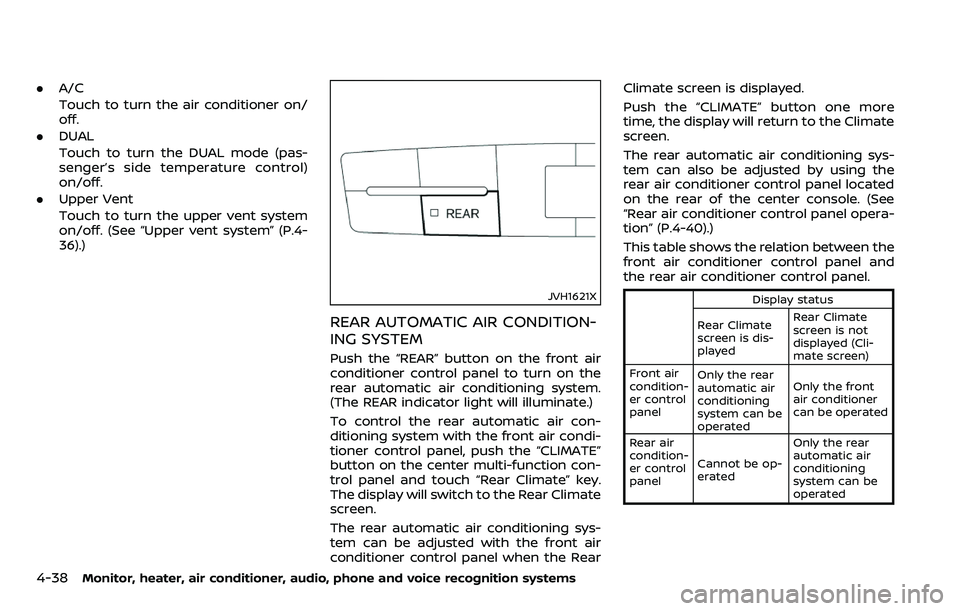
REAR AUTOMATIC AIR CONDITION-
ING SYSTEM
Push the “REAR” button on the front air
conditioner control panel to turn on the
rear automatic air conditioning system.
(The REAR indicator light will illuminate.)
To control the rear automatic air con-
ditioning system with the front air condi-
tioner control panel, push the “CLIMATE”
button on the center multi-function con-
trol panel and touch “Rear Climate” key.
The display will switch to the Rear Climate
screen.
The rear automatic air conditioning sys-
tem can be adjusted with the front air
conditioner control panel when the Rear Climate screen is displayed.
Push the “CLIMATE” button one more
time, the display will return to the Climate
screen.
The rear automatic air conditioning sys-
tem can also be adjusted by using the
rear air conditioner control panel located
on the rear of the center console. (See
“Rear air conditioner control panel opera-
tion” (P.4-40).)
This table shows the relation between the
front air conditioner control panel and
the rear air conditioner control panel.
Display status
Rear Climate
screen is dis-
played Rear Climate
screen is not
displayed (Cli-
mate screen)
Front air
condition-
er control
panel Only the rear
automatic air
conditioning
system can be
operated Only the front
air conditioner
can be operated
Rear air
condition-
er control
panel Cannot be op-
erated Only the rear
automatic air
conditioning
system can be
operated
Page 250 of 532
Front air conditioner control panel
operation
Automatic operation:
1. Push the “REAR” button to turn on rearautomatic air conditioning system.
Push the “CLIMATE” button on the
center multi-function control panel
and select the “Rear Climate” key to
display the Rear Climate screen.
2. Push the “AUTO” button. (The AUTO indicator light will illuminate and
“AUTO” will appear on the display.)
3. Turn the temperature control dial (driver’s side) to set the desired tem-
perature.
Cooling and dehumidified heating:
1. Push the “REAR” button to turn on the rear automatic air conditioning sys-
tem. Push the “CLIMATE” button on
the center multi-function control pa-
nel and touch “Rear Climate” key to
display the Rear Climate screen.
2. Turn the temperature control dial (driver’s side) to set the desired tem-
perature.
3. Switch the air flow mode to
by
pushing the “MODE” button.
4. Push the “CLIMATE” button on the center multi-function control panel
one more time to return to the Climate screen. If the A/C indicator
light does not illuminate, push the
“A/C” button. (The A/C indicator light
will turn on.)
NOTE:
When the front air conditioner is off, the
rear automatic air conditioning system
only operates the fan. When you would
like to use the air conditioner, be sure to
push the “A/C” button on the front air
conditioner control panel to turn on the
A/C indicator light.
Manual operation:
. Temperature control
Turn the temperature control dial
(driver’s side) to set the desired tem-
perature.
. Fan speed control
Push the fan speed control “
”
button or “” button to manually
control the fan speed.
. Air flow control
Push the “MODE” button to change the
air flow mode.
: The air outlet is fixed at foot level.
: The air outlet is fixed at both the head
and foot levels.
: The air outlet is fixed at the head level.
Touch panel operation
The rear automatic air conditioning sys-
tem can also be controlled on the Rear
Climate screen.
Touch the “Rear Climate” key on the
Climate screen to display the Rear Cli-
mate screen.
Monitor, heater, air conditioner, audio, phone and voice recognition systems4-39
Page 252 of 532
6. “TEMP” button
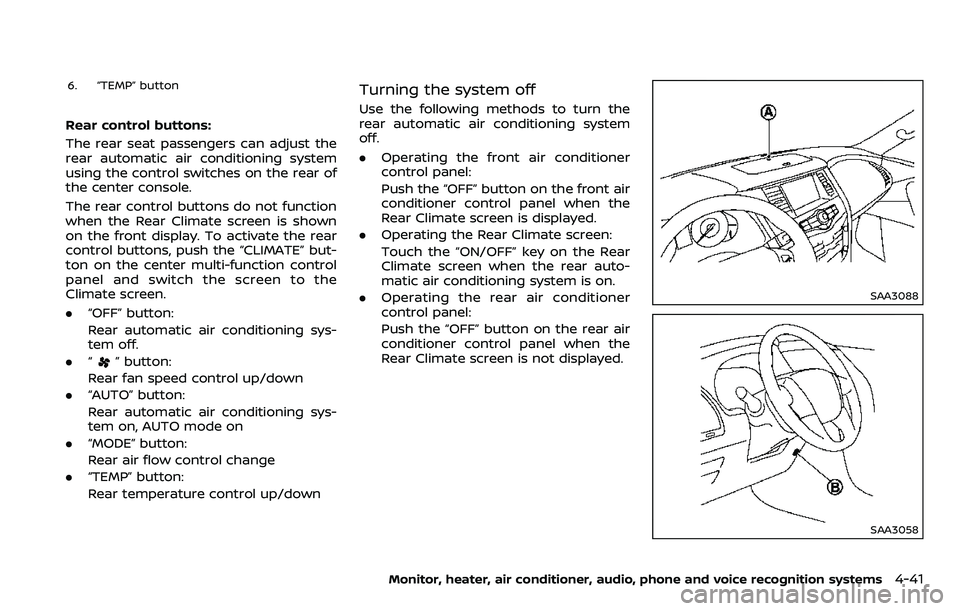
Rear control buttons:
The rear seat passengers can adjust the
rear automatic air conditioning system
using the control switches on the rear of
the center console.
The rear control buttons do not function
when the Rear Climate screen is shown
on the front display. To activate the rear
control buttons, push the “CLIMATE” but-
ton on the center multi-function control
panel and switch the screen to the
Climate screen.
.“OFF” button:
Rear automatic air conditioning sys-
tem off.
. “
” button:
Rear fan speed control up/down
. “AUTO” button:
Rear automatic air conditioning sys-
tem on, AUTO mode on
. “MODE” button:
Rear air flow control change
. “TEMP” button:
Rear temperature control up/down
Turning the system off
Use the following methods to turn the
rear automatic air conditioning system
off.
.Operating the front air conditioner
control panel:
Push the “OFF” button on the front air
conditioner control panel when the
Rear Climate screen is displayed.
. Operating the Rear Climate screen:
Touch the “ON/OFF” key on the Rear
Climate screen when the rear auto-
matic air conditioning system is on.
. Operating the rear air conditioner
control panel:
Push the “OFF” button on the rear air
conditioner control panel when the
Rear Climate screen is not displayed.
SAA3088
SAA3058
Monitor, heater, air conditioner, audio, phone and voice recognition systems4-41
Page 253 of 532
4-42Monitor, heater, air conditioner, audio, phone and voice recognition systems
OPERATING TIPS
When the engine coolant temperature
and outside air temperature are low, the
air flow from the foot outlets may not
operate. However, this is not a malfunc-
tion. After the coolant temperature
warms up, the air flow from the foot
outlets will operate normally.
The sensors
andlocated on the
instrument panel help maintain a con-
stant temperature. Do not put anything
on or around the sensors.
LINKING INTELLIGENT KEY (if so
equipped)
The air conditioner system settings can
be memorized for each Intelligent Key.
For more details, see “Setting memory
function” (P.3-42).
IN-CABIN MICROFILTER
The air conditioner system is equipped
with an in-cabin microfilter which collects
dirt, pollen, dust, etc.
To make sure the air conditioner heats,
defogs, and ventilates efficiently, replace
the filter in accordance with the specified
maintenance intervals listed in the “9.
Maintenance and schedules” section. It is
recommended to see a NISSAN dealer to
replace the filter.
The filter should be replaced if the air flow decreases significantly or if win-
dows fog up easily when operating the
heater or air conditioner.
SERVICING AIR CONDITIONER
The air conditioner system in your NISSAN
is charged with a refrigerant designed
with the environment in mind.
This re-
frigerant will not harm the earth’s
ozone layer. However, special charging
equipment and lubricant are required
when servicing your NISSAN air condi-
tioner. Using improper refrigerants or
lubricants will cause severe damage to
your air conditioner system. (See “Capa-
cities and recommended fluids/lubri-
cants” (P.10-2) for air conditioner system
refrigerant and lubricant recommenda-
tions.)
Your NISSAN dealer will be able to service
your environmentally friendly air condi-
tioner system.
WARNING
The system contains refrigerant un-
der high pressure. To avoid personal
injury, any air conditioner service
should be done only by an experi-
enced technician with the proper
equipment.
WINDOW ANTENNA
The antenna pattern is printed inside the
rear side glass.
CAUTION
. Do not place metalized film near
the 3rd row seat window or at-
tach any metal parts to it. This
may cause poor reception or
noise.
. When cleaning the inside of the
rear side window, be careful not
to scratch or damage the rear
side window antenna. Lightly
wipe along the antenna with a
dampened soft cloth.
ANTENNA
Page 256 of 532
5 Starting and driving
Precautions when starting and driving ...................... 5-4Exhaust gas (carbon monoxide) ................................ 5-4
Three-way catalyst ............................................................... 5-4
Tire Pressure Monitoring System (TPMS) ........... 5-5
Avoiding collision and rollover .................................... 5-8
On-pavement and off-road
driving precautions .............................................................. 5-9
Off-road recovery .................................................................. 5-9
Rapid air pressure loss ...................................................... 5-9
Drinking alcohol/drugs and driving ..................... 5-10
Driving safety precautions .......................................... 5-10
Push-button ignition switch ............................................. 5-13 Operating range for engine start function ...... 5-13
Push-button ignition switch positions .............. 5-14
Emergency engine shut off ........................................ 5-15
Intelligent Key battery discharge ........................... 5-15
Before starting the engine ................................................. 5-16
Starting the engine .................................................................. 5-16 Remote start (if so equipped) ................................... 5-17
Driving the vehicle .................................................................... 5-17
Engine protection mode ............................................... 5-17
Automatic transmission ................................................ 5-18 Parking brake ........................................................................\
....... 5-22
Lane Departure Warning (LDW)/Intelligent
Lane Intervention (I-LI) (if so equipped) .................. 5-23
LDW system operation ................................................. 5-25
Turning the LDW system ON/OFF ...................... 5-26
How to enable/disable the LDW system ....... 5-27
I-LI system operation .................................................... 5-27
Turning the I-LI system ON/OFF .......................... 5-28
How to enable/disable the I-LI system .......... 5-29
LDW/I-LI system limitations ..................................... 5-29
System temporarily unavailable ........................... 5-31
System malfunction ....................................................... 5-32
System maintenance .................................................... 5-32
Blind Spot Warning (BSW) (if so equipped) ........... 5-33 BSW system operation ................................................. 5-35
Turning the BSW system ON/OFF ...................... 5-36
How to enable/disable the BSW system ....... 5-36
BSW system limitations ............................................... 5-37
BSW driving situations .................................................. 5-38
System temporarily unavailable ........................... 5-41
System malfunction ....................................................... 5-42
System maintenance .................................................... 5-42