driver seat adjustment NISSAN ARMADA 2018 Owner´s Manual
[x] Cancel search | Manufacturer: NISSAN, Model Year: 2018, Model line: ARMADA, Model: NISSAN ARMADA 2018Pages: 532, PDF Size: 2.3 MB
Page 30 of 532
SSS1116
Power seat adjustment (if so
equipped)
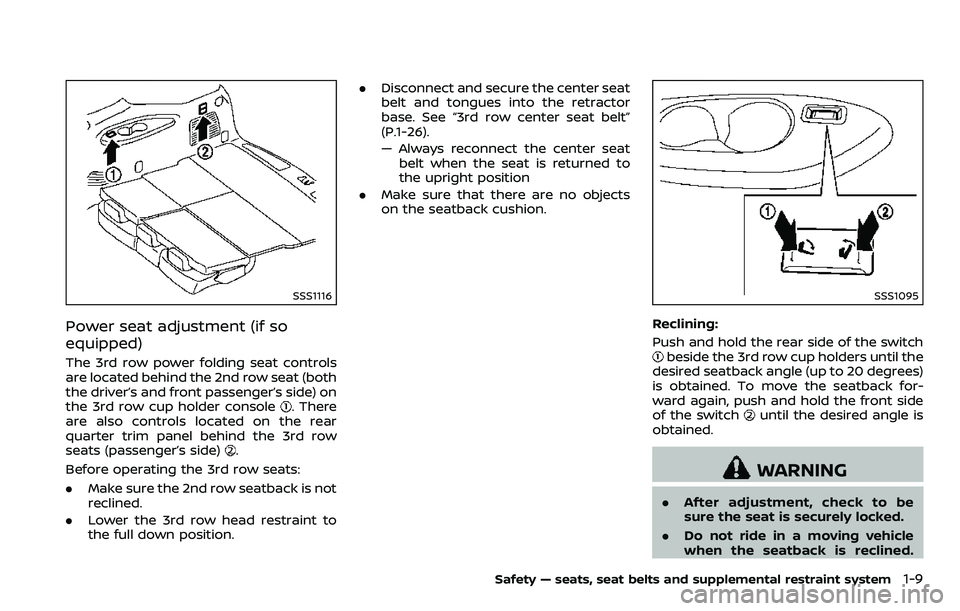
The 3rd row power folding seat controls
are located behind the 2nd row seat (both
the driver’s and front passenger’s side) on
the 3rd row cup holder console
. There
are also controls located on the rear
quarter trim panel behind the 3rd row
seats (passenger’s side)
.
Before operating the 3rd row seats:
. Make sure the 2nd row seatback is not
reclined.
. Lower the 3rd row head restraint to
the full down position. .
Disconnect and secure the center seat
belt and tongues into the retractor
base. See “3rd row center seat belt”
(P.1-26).
— Always reconnect the center seat
belt when the seat is returned to
the upright position
. Make sure that there are no objects
on the seatback cushion.
SSS1095
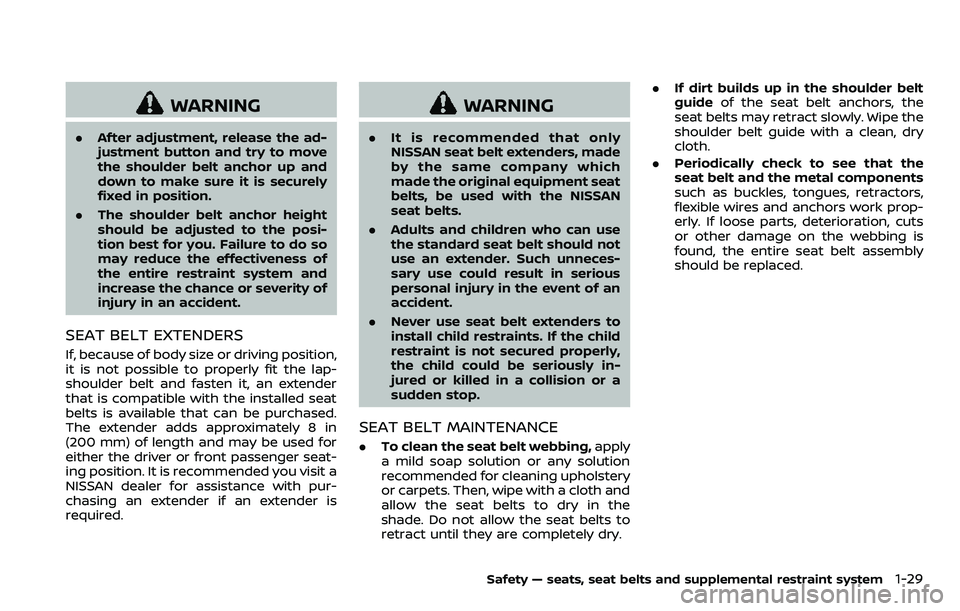
Reclining:
Push and hold the rear side of the switch
beside the 3rd row cup holders until the
desired seatback angle (up to 20 degrees)
is obtained. To move the seatback for-
ward again, push and hold the front side
of the switch
until the desired angle is
obtained.
WARNING
. After adjustment, check to be
sure the seat is securely locked.
. Do not ride in a moving vehicle
when the seatback is reclined.
Safety — seats, seat belts and supplemental restraint system1-9
Page 50 of 532
WARNING
.After adjustment, release the ad-
justment button and try to move
the shoulder belt anchor up and
down to make sure it is securely
fixed in position.
. The shoulder belt anchor height
should be adjusted to the posi-
tion best for you. Failure to do so
may reduce the effectiveness of
the entire restraint system and
increase the chance or severity of
injury in an accident.
SEAT BELT EXTENDERS
If, because of body size or driving position,
it is not possible to properly fit the lap-
shoulder belt and fasten it, an extender
that is compatible with the installed seat
belts is available that can be purchased.
The extender adds approximately 8 in
(200 mm) of length and may be used for
either the driver or front passenger seat-
ing position. It is recommended you visit a
NISSAN dealer for assistance with pur-
chasing an extender if an extender is
required.
WARNING
.It is recommended that only
NISSAN seat belt extenders, made
by the same company which
made the original equipment seat
belts, be used with the NISSAN
seat belts.
. Adults and children who can use
the standard seat belt should not
use an extender. Such unneces-
sary use could result in serious
personal injury in the event of an
accident.
. Never use seat belt extenders to
install child restraints. If the child
restraint is not secured properly,
the child could be seriously in-
jured or killed in a collision or a
sudden stop.
SEAT BELT MAINTENANCE
.To clean the seat belt webbing, apply
a mild soap solution or any solution
recommended for cleaning upholstery
or carpets. Then, wipe with a cloth and
allow the seat belts to dry in the
shade. Do not allow the seat belts to
retract until they are completely dry. .
If dirt builds up in the shoulder belt
guide of the seat belt anchors, the
seat belts may retract slowly. Wipe the
shoulder belt guide with a clean, dry
cloth.
. Periodically check to see that the
seat belt and the metal components
such as buckles, tongues, retractors,
flexible wires and anchors work prop-
erly. If loose parts, deterioration, cuts
or other damage on the webbing is
found, the entire seat belt assembly
should be replaced.
Safety — seats, seat belts and supplemental restraint system1-29
Page 173 of 532
3-4Pre-driving checks and adjustments
CAUTION
Always carry the mechanical key
installed in the Intelligent Key.
VALET HAND-OFF
When you have to leave a key with a valet,
give them the Intelligent Key itself and
keep the mechanical key with you to
protect your belongings.
To prevent the glove box from being
opened during valet hand-off, follow the
procedures below.
1. Remove the mechanical key from theIntelligent Key.
2. Lock the glove box with the mechan- ical key.
3. Hand the Intelligent Key to the valet, keeping the mechanical key in your
pocket or bag for insertion into the
Intelligent Key when you retrieve your
vehicle.
See “Storage” (P.2-51).
WARNING
. Always have the doors locked
while driving. Along with the use
of seat belts, this provides great-
er safety in the event of an
accident by helping to prevent
persons from being thrown from
the vehicle. This also helps keep
children and others from unin-
tentionally opening the doors,
and will help keep out intruders.
. Before opening any door, always
look for and avoid oncoming
traffic.
. To help avoid risk of injury or
death through unintended opera-
tion of the vehicle and or its
systems, including entrapment
in windows or inadvertent door
lock activation, do not leave chil-
dren, people who require the
assistance of others or pets un-
attended in your vehicle. Addi-
tionally, the temperature inside a
closed vehicle on a warm day can
quickly become high enough to
cause a significant risk of injury
or death to people and pets.
SPA2457B
LOCKING WITH MECHANICAL KEY
The power door lock system allows you to
lock or unlock all doors simultaneously
using the mechanical key.
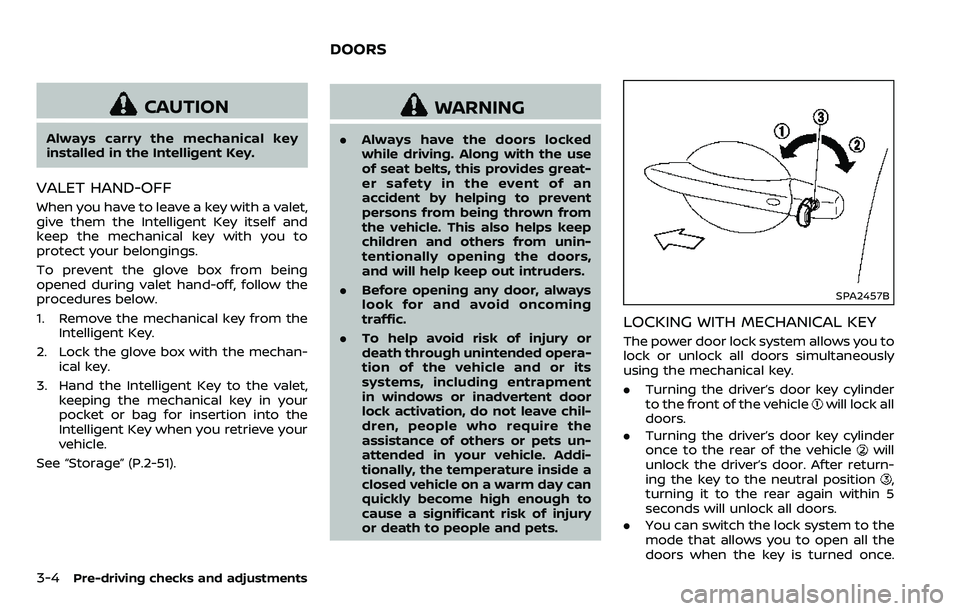
.Turning the driver’s door key cylinder
to the front of the vehicle
will lock all
doors.
. Turning the driver’s door key cylinder
once to the rear of the vehicle
will
unlock the driver’s door. After return-
ing the key to the neutral position
,
turning it to the rear again within 5
seconds will unlock all doors.
. You can switch the lock system to the
mode that allows you to open all the
doors when the key is turned once.
DOORS
Page 198 of 532
SPA2815
LOOSE FUEL CAP warning
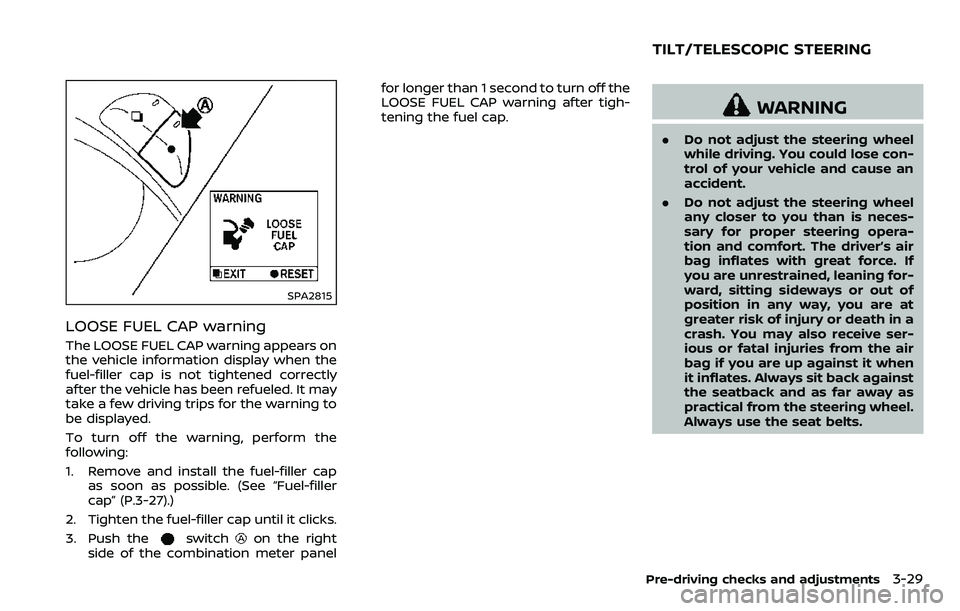
The LOOSE FUEL CAP warning appears on
the vehicle information display when the
fuel-filler cap is not tightened correctly
after the vehicle has been refueled. It may
take a few driving trips for the warning to
be displayed.
To turn off the warning, perform the
following:
1. Remove and install the fuel-filler capas soon as possible. (See “Fuel-filler
cap” (P.3-27).)
2. Tighten the fuel-filler cap until it clicks.
3. Push the
switchon the right
side of the combination meter panel for longer than 1 second to turn off the
LOOSE FUEL CAP warning after tigh-
tening the fuel cap.
WARNING
.
Do not adjust the steering wheel
while driving. You could lose con-
trol of your vehicle and cause an
accident.
. Do not adjust the steering wheel
any closer to you than is neces-
sary for proper steering opera-
tion and comfort. The driver’s air
bag inflates with great force. If
you are unrestrained, leaning for-
ward, sitting sideways or out of
position in any way, you are at
greater risk of injury or death in a
crash. You may also receive ser-
ious or fatal injuries from the air
bag if you are up against it when
it inflates. Always sit back against
the seatback and as far away as
practical from the steering wheel.
Always use the seat belts.
Pre-driving checks and adjustments3-29
TILT/TELESCOPIC STEERING
Page 199 of 532
3-30Pre-driving checks and adjustments
SPA2754
ELECTRIC OPERATION
Tilt or telescopic operation
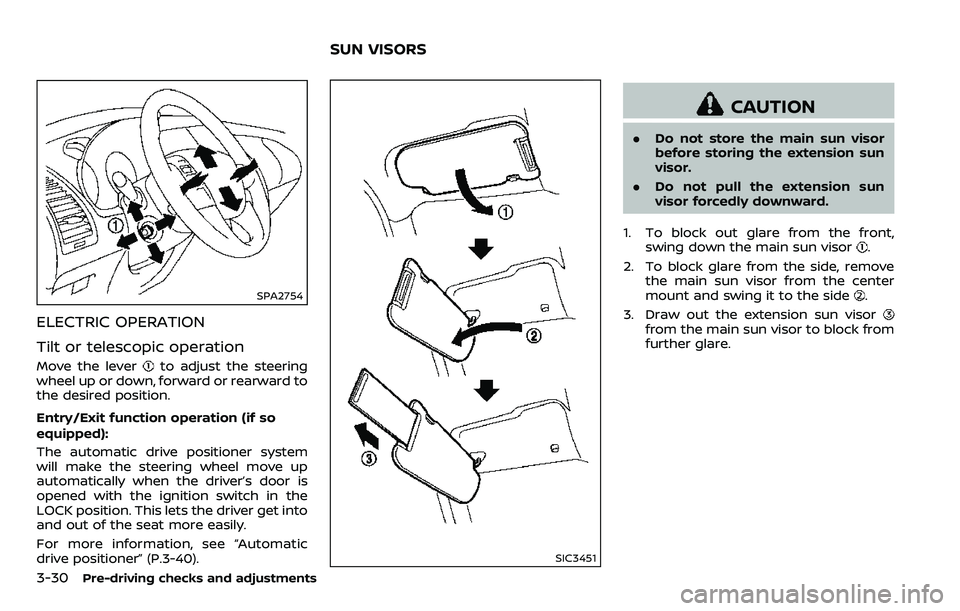
Move the leverto adjust the steering
wheel up or down, forward or rearward to
the desired position.
Entry/Exit function operation (if so
equipped):
The automatic drive positioner system
will make the steering wheel move up
automatically when the driver’s door is
opened with the ignition switch in the
LOCK position. This lets the driver get into
and out of the seat more easily.
For more information, see “Automatic
drive positioner” (P.3-40).
SIC3451
CAUTION
. Do not store the main sun visor
before storing the extension sun
visor.
. Do not pull the extension sun
visor forcedly downward.
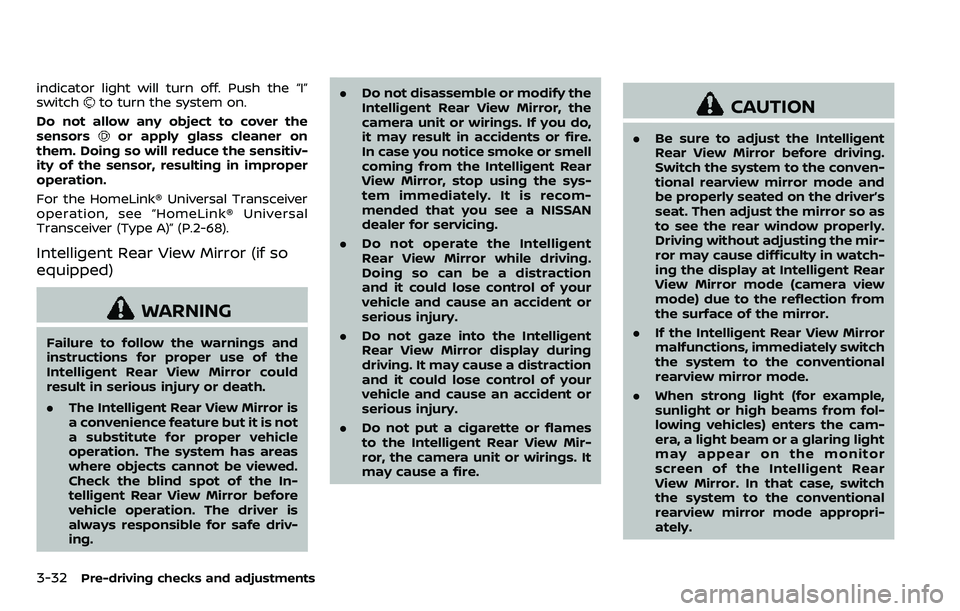
1. To block out glare from the front, swing down the main sun visor
.
2. To block glare from the side, remove the main sun visor from the center
mount and swing it to the side
.
3. Draw out the extension sun visor
from the main sun visor to block from
further glare.
SUN VISORS
Page 201 of 532
3-32Pre-driving checks and adjustments
indicator light will turn off. Push the “I”
switchto turn the system on.
Do not allow any object to cover the
sensors
or apply glass cleaner on
them. Doing so will reduce the sensitiv-
ity of the sensor, resulting in improper
operation.
For the HomeLink® Universal Transceiver
operation, see “HomeLink® Universal
Transceiver (Type A)” (P.2-68).
Intelligent Rear View Mirror (if so
equipped)
WARNING
Failure to follow the warnings and
instructions for proper use of the
Intelligent Rear View Mirror could
result in serious injury or death.
. The Intelligent Rear View Mirror is
a convenience feature but it is not
a substitute for proper vehicle
operation. The system has areas
where objects cannot be viewed.
Check the blind spot of the In-
telligent Rear View Mirror before
vehicle operation. The driver is
always responsible for safe driv-
ing. .
Do not disassemble or modify the
Intelligent Rear View Mirror, the
camera unit or wirings. If you do,
it may result in accidents or fire.
In case you notice smoke or smell
coming from the Intelligent Rear
View Mirror, stop using the sys-
tem immediately. It is recom-
mended that you see a NISSAN
dealer for servicing.
. Do not operate the Intelligent
Rear View Mirror while driving.
Doing so can be a distraction
and it could lose control of your
vehicle and cause an accident or
serious injury.
. Do not gaze into the Intelligent
Rear View Mirror display during
driving. It may cause a distraction
and it could lose control of your
vehicle and cause an accident or
serious injury.
. Do not put a cigarette or flames
to the Intelligent Rear View Mir-
ror, the camera unit or wirings. It
may cause a fire.
CAUTION
.Be sure to adjust the Intelligent
Rear View Mirror before driving.
Switch the system to the conven-
tional rearview mirror mode and
be properly seated on the driver’s
seat. Then adjust the mirror so as
to see the rear window properly.
Driving without adjusting the mir-
ror may cause difficulty in watch-
ing the display at Intelligent Rear
View Mirror mode (camera view
mode) due to the reflection from
the surface of the mirror.
. If the Intelligent Rear View Mirror
malfunctions, immediately switch
the system to the conventional
rearview mirror mode.
. When strong light (for example,
sunlight or high beams from fol-
lowing vehicles) enters the cam-
era, a light beam or a glaring light
may appear on the monitor
screen of the Intelligent Rear
View Mirror. In that case, switch
the system to the conventional
rearview mirror mode appropri-
ately.
Page 209 of 532
3-40Pre-driving checks and adjustments
3. Choose the right or left outside mirrorby operating the outside mirror con-
trol switch.
4. The outside mirror surfaces move downward.
When one of the following conditions has
occurred, the outside mirror surfaces will
return to their original positions.
. The shift lever is moved to any posi-
tion other than R (Reverse).
. The outside mirror control switch is
set to the center position.
. The ignition switch is placed in the
OFF position.
Automatic anti-glare (if so
equipped)
The outside rearview mirrors are de-
signed so that its automatically change
reflection according to the intensity of
the headlights of the vehicle following
you.
The anti-glare system will be automati-
cally turned on when the ignition switch is
placed in the ON position.
SIC4448
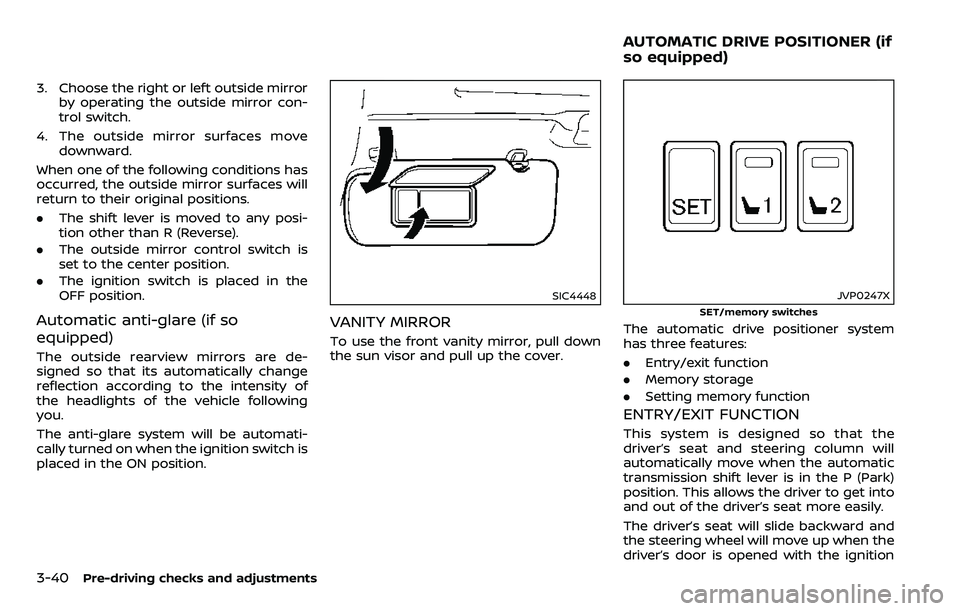
VANITY MIRROR
To use the front vanity mirror, pull down
the sun visor and pull up the cover.
JVP0247X
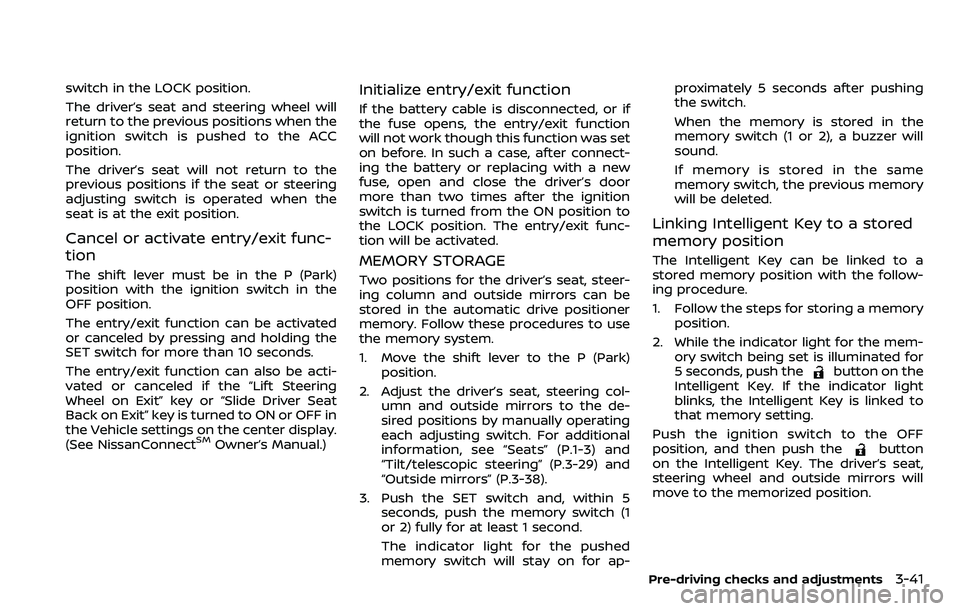
SET/memory switches
The automatic drive positioner system
has three features:
.Entry/exit function
. Memory storage
. Setting memory function
ENTRY/EXIT FUNCTION
This system is designed so that the
driver’s seat and steering column will
automatically move when the automatic
transmission shift lever is in the P (Park)
position. This allows the driver to get into
and out of the driver’s seat more easily.
The driver’s seat will slide backward and
the steering wheel will move up when the
driver’s door is opened with the ignition
AUTOMATIC DRIVE POSITIONER (if
so equipped)
Page 210 of 532
switch in the LOCK position.
The driver’s seat and steering wheel will
return to the previous positions when the
ignition switch is pushed to the ACC
position.
The driver’s seat will not return to the
previous positions if the seat or steering
adjusting switch is operated when the
seat is at the exit position.
Cancel or activate entry/exit func-
tion
The shift lever must be in the P (Park)
position with the ignition switch in the
OFF position.
The entry/exit function can be activated
or canceled by pressing and holding the
SET switch for more than 10 seconds.
The entry/exit function can also be acti-
vated or canceled if the “Lift Steering
Wheel on Exit” key or “Slide Driver Seat
Back on Exit” key is turned to ON or OFF in
the Vehicle settings on the center display.
(See NissanConnect
SMOwner’s Manual.)
Initialize entry/exit function
If the battery cable is disconnected, or if
the fuse opens, the entry/exit function
will not work though this function was set
on before. In such a case, after connect-
ing the battery or replacing with a new
fuse, open and close the driver’s door
more than two times after the ignition
switch is turned from the ON position to
the LOCK position. The entry/exit func-
tion will be activated.
MEMORY STORAGE
Two positions for the driver’s seat, steer-
ing column and outside mirrors can be
stored in the automatic drive positioner
memory. Follow these procedures to use
the memory system.
1. Move the shift lever to the P (Park)position.
2. Adjust the driver’s seat, steering col- umn and outside mirrors to the de-
sired positions by manually operating
each adjusting switch. For additional
information, see “Seats” (P.1-3) and
“Tilt/telescopic steering” (P.3-29) and
“Outside mirrors” (P.3-38).
3. Push the SET switch and, within 5 seconds, push the memory switch (1
or 2) fully for at least 1 second.
The indicator light for the pushed
memory switch will stay on for ap- proximately 5 seconds after pushing
the switch.
When the memory is stored in the
memory switch (1 or 2), a buzzer will
sound.
If memory is stored in the same
memory switch, the previous memory
will be deleted.
Linking Intelligent Key to a stored
memory position
The Intelligent Key can be linked to a
stored memory position with the follow-
ing procedure.
1. Follow the steps for storing a memory
position.
2. While the indicator light for the mem- ory switch being set is illuminated for
5 seconds, push the
button on the
Intelligent Key. If the indicator light
blinks, the Intelligent Key is linked to
that memory setting.
Push the ignition switch to the OFF
position, and then push the
button
on the Intelligent Key. The driver’s seat,
steering wheel and outside mirrors will
move to the memorized position.
Pre-driving checks and adjustments3-41
Page 211 of 532
3-42Pre-driving checks and adjustments
Confirming memory storage
.Push the ignition switch to the ON
position and push the SET switch. If
the main memory has not been
stored, the indicator light will come
on for approximately 0.5 second.
When the memory has stored in posi-
tion, the indicator light will stay on for
approximately 5 seconds.
. If the battery cable is disconnected, or
if the fuse opens, the memory will be
canceled. In this case, reset the de-
sired position using the previous pro-
cedure.
. If optional Intelligent Keys are added
to your vehicle, the memory storage
procedure to switch 1 or 2 and linking
Intelligent Key procedure to a stored
memory position should be per-
formed again for each Intelligent Key.
For additional Intelligent Key informa-
tion, see “Keys” (P.3-2).
Selecting the memorized position
1. Move the shift lever to the P (Park)
position.
2. Use one of the following methods to move the driver’s seat, the outside
mirrors and the steering wheel.
.Push the memory switch (1 or 2)fully for at least 1 second. The driver’s seat, steering column and
outside mirrors will move to the
memorized position or to the exit
position when the entry/exit function
is set to active with the indicator light
flashing, and then the light will stay on
for approximately 5 seconds.
SETTING MEMORY FUNCTION
The status of the following settings can
be linked to the Intelligent Key and the
memorized settings can be available for
each Intelligent Key.
.
Air conditioner system
. Navigation system (if so equipped)
. Audio system
To use the memory function, lock the
doors with the Intelligent Key that is
linked to the settings.
To enable the memorized settings:
1. Carry the Intelligent Key that is linked to the settings, and unlock the doors
by pushing the driver’s door handle
request switch or “UNLOCK”
but-
ton on the Intelligent Key.
2. Place the ignition switch in the ON position. “Connection with the key has
been done” will be displayed on the
screen and the memorized settings
are available (only when a new Intel-
ligent Key is used).
SYSTEM OPERATION
The automatic drive positioner system
will not work or will stop operating under
the following conditions:
.When the vehicle speed is above 0
MPH (0 km/h) or 4 MPH (7 km/h) for
some limited functions such linking an
Intelligent Key to the vehicle when the
power source is turned on from off or
during the Exit function.
. When any of the memory switches are
pushed while the automatic drive
positioner is operating.
. When the adjusting switch for the
driver’s seat and steering column is
turned on while the automatic drive
positioner is operating.
. When the seat has already been
moved to the memorized position.
. When no seat position is stored in the
memory switch.
. When the shift lever is moved from the
P (Park) position to any other position.
Page 528 of 532
Owner’s Manual/Service Manual
order information..................................................... 10-35
P
Panic alarm....................................................................... 3-17
ParkingBrake break-in .................................................... 5-138
Parking brake operation................................. 5-22
Parking on hills................................................... 5-132
Phone Car phone or CB radio ..................................... 4-43
Pocket........................................................................\
........... 2-55
Power Front seat adjustment ........................................ 1-4
Moonroof..................................................................... 2-63
Power door lock ....................................................... 3-4
Power outlet ............................................................. 2-48
Power steering ................................................... 5-137
Power steering fluid .............................................. 8-8
Power windows ..................................................... 2-60
Precautions Braking precautions....................................... 5-137
Child restraints ....................................................... 1-33
Cruise control .......................................................... 5-67
Driving safety ........................................................... 5-10
Maintenance................................................................ 8-2
On-pavement and off-road driving .......... 5-9
Seat belt usage ...................................................... 1-20
Supplemental restraint system................. 1-54
When starting and driving................................ 5-4
Push starting................................................................\
... 6-14
Push-button ignition switch............................... 5-13
R
Radio Car phone or CB radio ..................................... 4-43
Rain-sensing auto wiper system .................... 2-34
Rapid air pressure loss................................................ 5-9
Readiness for Inspection/Maintenance
(I/M) test........................................................................\
... 10-33
Rear bumper cover .................................................... 2-58
Rear door lock, Child safety rear
door lock ........................................................................\
........ 3-6
Rear personal lights .................................................. 2-66
Rear window wiper and washer switch .... 2-35
Rear window wiper blades .................................. 8-17
RearView Monitor............................................................ 4-3
RearView Monitor system operation ............... 4-4
Recorders, Event data .......................................... 10-34
Registering your vehicle in
another country ........................................................ 10-11
Remote engine start................................................. 3-19
Remote keyless entry system ........................... 3-15
Reporting safety defects .................................... 10-32
Roadside assistance program .............................. 6-2
Rollover ........................................................................\
............ 5-8
Roof Moonroof..................................................................... 2-64
Roof rack ..................................................................... 2-57
S
SafetyChild seat belts....................................................... 1-30
Towing safety...................................................... 10-23
Seat adjustment Front power seat adjustment ....................... 1-4
Front seats..................................................... 1-4, 1-11 Seat belt(s)
Child safety................................................................ 1-30
Infants.................................................................\
........... 1-31
Injured persons ...................................................... 1-22
Larger children ....................................................... 1-31
Precautions on seat belt usage................ 1-20
Pregnant women.................................................. 1-22
Seat belt cleaning ................................................... 7-7
Seat belt extenders............................................. 1-29
Seat belt maintenance..................................... 1-29
Seat belt warning light and chime......... 2-17
Seat belts .................................................................... 1-20
Seat belts with pretensioners .................... 1-69
Small children .......................................................... 1-31
Three-point type ................................................... 1-22
Seat(s) Climate controlled seats................................. 2-45
Driver-side memory ............................................ 3-40
Heated seats ............................................................ 2-43
Seats ........................................................................\
.......... 1-3
Security system (NISSAN Vehicle
Immobilizer System), Engine start ................. 2-31
Security system, Vehicle
security system ............................................................. 2-30
Servicing air conditioner........................................ 4-42
Setting memory function, Automatic
drive positioner ............................................................. 3-42
Shift lever, Shift lock release............................... 5-22
Shift lock release Transmission............................................................ 5-22
Shifting, Automatic transmission ................... 5-18
SNOW mode.................................................................. 5-134
SNOW mode switch ................................................... 2-47
Sonar system............................................................... 5-134
Spare tire............................................................. 8-40, 10-9
Spark plugs....................................................................... 8-14
Speedometer ...................................................................... 2-6
11-5