park assist NISSAN ARMADA 2018 Owner´s Manual
[x] Cancel search | Manufacturer: NISSAN, Model Year: 2018, Model line: ARMADA, Model: NISSAN ARMADA 2018Pages: 532, PDF Size: 2.3 MB
Page 104 of 532
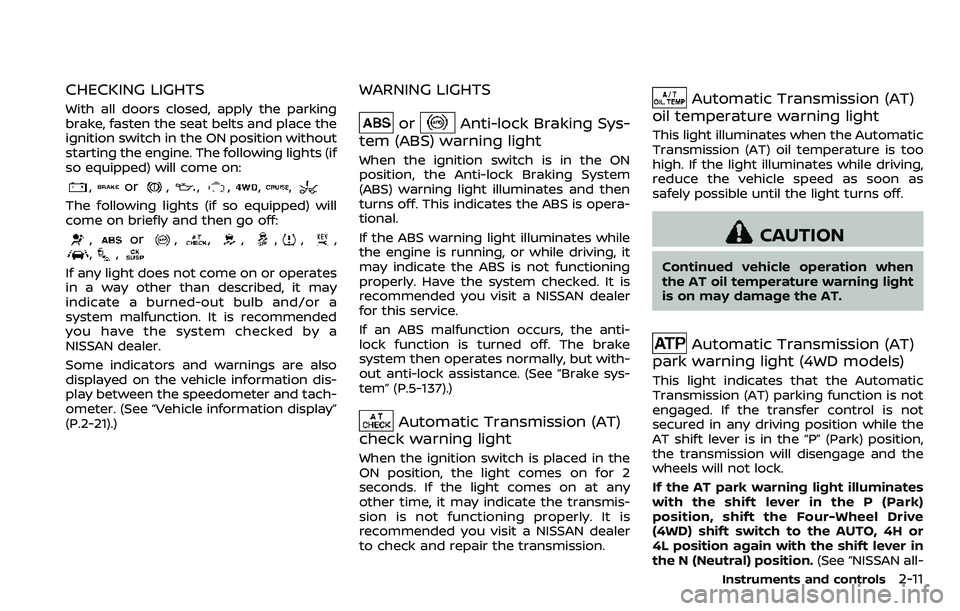
CHECKING LIGHTS
With all doors closed, apply the parking
brake, fasten the seat belts and place the
ignition switch in the ON position without
starting the engine. The following lights (if
so equipped) will come on:
,or,,,,,
The following lights (if so equipped) will
come on briefly and then go off:
,or,,,,,,,,
If any light does not come on or operates
in a way other than described, it may
indicate a burned-out bulb and/or a
system malfunction. It is recommended
you have the system checked by a
NISSAN dealer.
Some indicators and warnings are also
displayed on the vehicle information dis-
play between the speedometer and tach-
ometer. (See “Vehicle information display”
(P.2-21).)
WARNING LIGHTS
orAnti-lock Braking Sys-
tem (ABS) warning light
When the ignition switch is in the ON
position, the Anti-lock Braking System
(ABS) warning light illuminates and then
turns off. This indicates the ABS is opera-
tional.
If the ABS warning light illuminates while
the engine is running, or while driving, it
may indicate the ABS is not functioning
properly. Have the system checked. It is
recommended you visit a NISSAN dealer
for this service.
If an ABS malfunction occurs, the anti-
lock function is turned off. The brake
system then operates normally, but with-
out anti-lock assistance. (See “Brake sys-
tem” (P.5-137).)
Automatic Transmission (AT)
check warning light
When the ignition switch is placed in the
ON position, the light comes on for 2
seconds. If the light comes on at any
other time, it may indicate the transmis-
sion is not functioning properly. It is
recommended you visit a NISSAN dealer
to check and repair the transmission.
Automatic Transmission (AT)
oil temperature warning light
This light illuminates when the Automatic
Transmission (AT) oil temperature is too
high. If the light illuminates while driving,
reduce the vehicle speed as soon as
safely possible until the light turns off.
CAUTION
Continued vehicle operation when
the AT oil temperature warning light
is on may damage the AT.
Automatic Transmission (AT)
park warning light (4WD models)
This light indicates that the Automatic
Transmission (AT) parking function is not
engaged. If the transfer control is not
secured in any driving position while the
AT shift lever is in the “P” (Park) position,
the transmission will disengage and the
wheels will not lock.
If the AT park warning light illuminates
with the shift lever in the P (Park)
position, shift the Four-Wheel Drive
(4WD) shift switch to the AUTO, 4H or
4L position again with the shift lever in
the N (Neutral) position. (See “NISSAN all-
Instruments and controls2-11
Page 258 of 532
Fuel efficient driving tips ................................................. 5-122
Increasing fuel economy ................................................. 5-123
NISSAN all-mode 4WD® (if so equipped) ............. 5-123NISSAN all-mode 4WD® system ........................... 5-124
4WD shift switch .............................................................. 5-128
4WD shift indicator ........................................................ 5-129
4WD warning light ......................................................... 5-129
Hill Start Assist system ...................................................... 5-131
Parking/parking on hills ................................................... 5-132
TOW mode ........................................................................\
.......... 5-133
SNOW mode ........................................................................\
....... 5-134
Sonar system (if so equipped) .................................... 5-134 Sonar settings ................................................................... 5-135
Sonar indicator ................................................................. 5-136
Power steering ........................................................................\
5-137
Brake system ........................................................................\
.... 5-137 Braking precautions ..................................................... 5-137
Parking brake break-in ............................................... 5-138 Brake assist ........................................................................\
....... 5-138
Brake assist ....................................................................... 5-138
Anti-lock Braking System (ABS) ........................ 5-138
Vehicle Dynamic Control (VDC) system .............. 5-140
Vehicle Dynamic Control (VDC)
OFF switch ........................................................................\
. 5-141
Cold weather driving ......................................................... 5-142 Freeing a frozen door lock ................................... 5-142
Antifreeze ........................................................................\
.... 5-142
Battery ........................................................................\
........... 5-142
Draining of coolant water ..................................... 5-142
Tire equipment ............................................................... 5-142
Special winter equipment ..................................... 5-143
Driving on snow or ice ............................................. 5-143
Engine block heater (if so equipped) ........... 5-143
Page 278 of 532
SPA2331
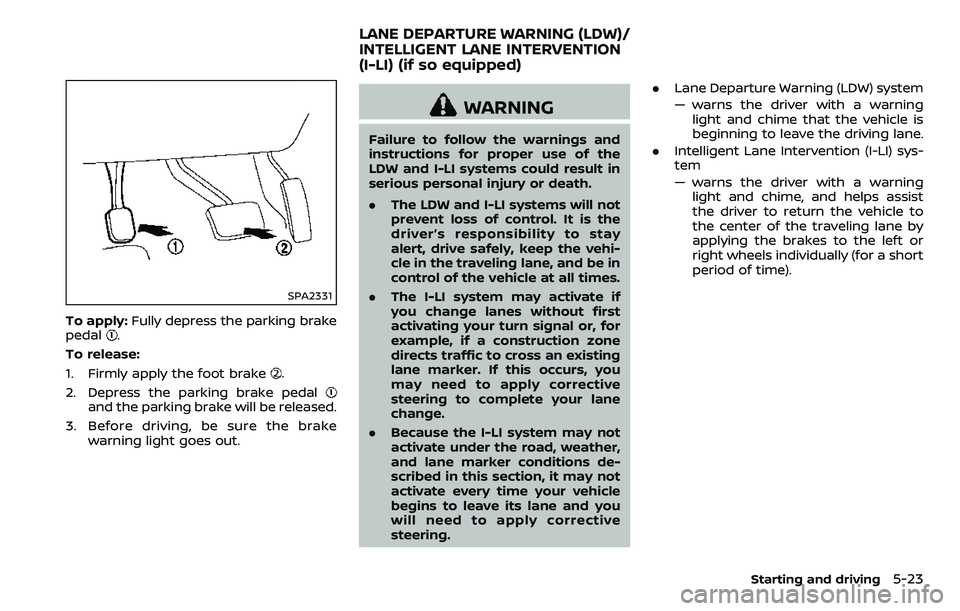
To apply:Fully depress the parking brake
pedal.
To release:
1. Firmly apply the foot brake
.
2. Depress the parking brake pedal
and the parking brake will be released.
3. Before driving, be sure the brake warning light goes out.
WARNING
Failure to follow the warnings and
instructions for proper use of the
LDW and I-LI systems could result in
serious personal injury or death.
.The LDW and I-LI systems will not
prevent loss of control. It is the
driver’s responsibility to stay
alert, drive safely, keep the vehi-
cle in the traveling lane, and be in
control of the vehicle at all times.
. The I-LI system may activate if
you change lanes without first
activating your turn signal or, for
example, if a construction zone
directs traffic to cross an existing
lane marker. If this occurs, you
may need to apply corrective
steering to complete your lane
change.
. Because the I-LI system may not
activate under the road, weather,
and lane marker conditions de-
scribed in this section, it may not
activate every time your vehicle
begins to leave its lane and you
will need to apply corrective
steering. .
Lane Departure Warning (LDW) system
— warns the driver with a warning
light and chime that the vehicle is
beginning to leave the driving lane.
. Intelligent Lane Intervention (I-LI) sys-
tem
— warns the driver with a warning
light and chime, and helps assist
the driver to return the vehicle to
the center of the traveling lane by
applying the brakes to the left or
right wheels individually (for a short
period of time).
Starting and driving5-23
LANE DEPARTURE WARNING (LDW)/
INTELLIGENT LANE INTERVENTION
(I-LI) (if so equipped)
Page 286 of 532
JVS0882X
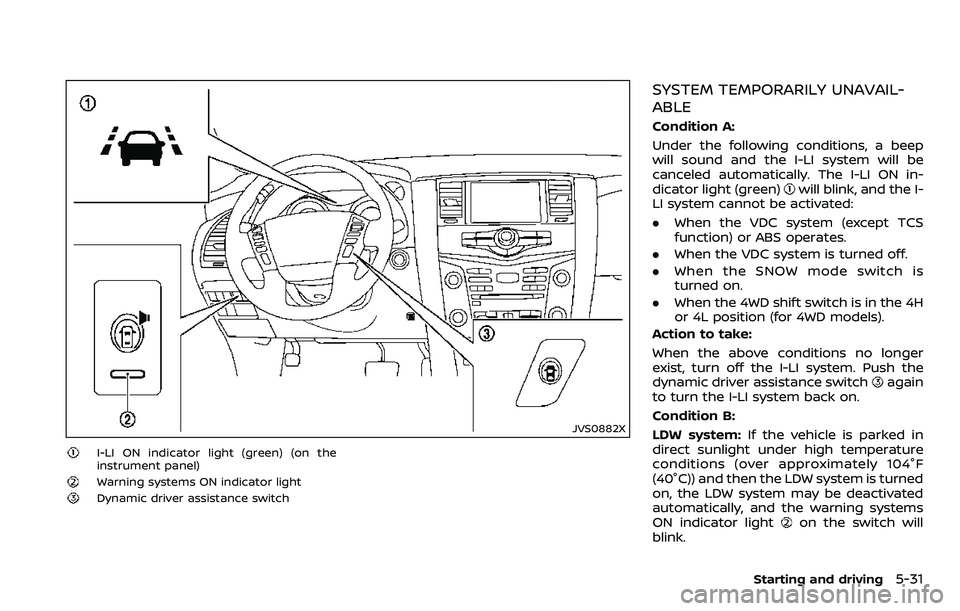
I-LI ON indicator light (green) (on the
instrument panel)
Warning systems ON indicator light
Dynamic driver assistance switch
SYSTEM TEMPORARILY UNAVAIL-
ABLE
Condition A:
Under the following conditions, a beep
will sound and the I-LI system will be
canceled automatically. The I-LI ON in-
dicator light (green)
will blink, and the I-
LI system cannot be activated:
. When the VDC system (except TCS
function) or ABS operates.
. When the VDC system is turned off.
. When the SNOW mode switch is
turned on.
. When the 4WD shift switch is in the 4H
or 4L position (for 4WD models).
Action to take:
When the above conditions no longer
exist, turn off the I-LI system. Push the
dynamic driver assistance switch
again
to turn the I-LI system back on.
Condition B:
LDW system: If the vehicle is parked in
direct sunlight under high temperature
conditions (over approximately 104°F
(40°C)) and then the LDW system is turned
on, the LDW system may be deactivated
automatically, and the warning systems
ON indicator light
on the switch will
blink.
Starting and driving5-31
Page 287 of 532
5-32Starting and driving
I-LI system:If the vehicle is parked in
direct sunlight under high temperature
conditions (over approximately 104°F
(40°C)) and then the I-LI system is turned
on, the I-LI system will be turned off
automatically, a beep will sound and the
I-LI ON indicator light (green)
will blink.
The LDW and I-LI systems are not avail-
able until the conditions no longer exist.
Action to take:
When the above conditions no longer
exist, the LDW system will resume auto-
matically.
For the I-LI system, push the dynamic
driver assistance switch
again to turn
the I-LI system back on.
SYSTEM MALFUNCTION
LDW system: When the LDW system
malfunctions, it will cancel automatically,
and the LDW indicator light (orange) will
illuminate.
I-LI system: When the I-LI system mal-
functions, it will be turned off automati-
cally, a beep will sound, and the LDW
indicator light (orange) will illuminate.
Action to take:
Stop the vehicle in a safe location, place
the vehicle in the P (Park) position, turn
the engine off and restart the engine. If
the LDW indicator light (orange) con- tinues to illuminate, have the system
checked. It is recommended you visit a
NISSAN dealer for this service.
SSD0453
SYSTEM MAINTENANCE
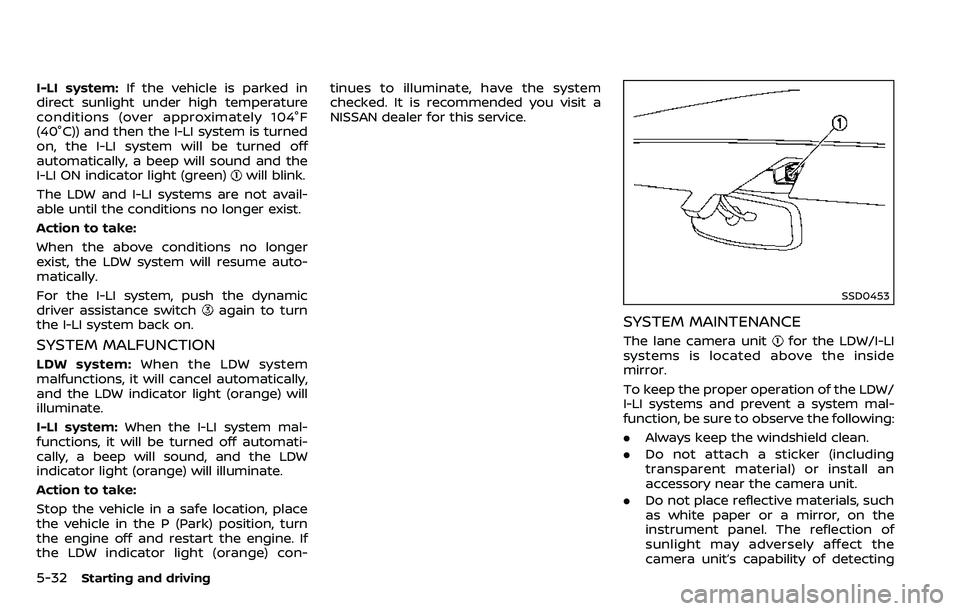
The lane camera unitfor the LDW/I-LI
systems is located above the inside
mirror.
To keep the proper operation of the LDW/
I-LI systems and prevent a system mal-
function, be sure to observe the following:
. Always keep the windshield clean.
. Do not attach a sticker (including
transparent material) or install an
accessory near the camera unit.
. Do not place reflective materials, such
as white paper or a mirror, on the
instrument panel. The reflection of
sunlight may adversely affect the
camera unit’s capability of detecting
Page 292 of 532
![NISSAN ARMADA 2018 Owner´s Manual JVS1043X
Perform the following steps to enable or
disable the BSW system.
1. Push the SETTING button
.
2. Touch [Driver Assistance].
3. Touch [Blind Spot Assist].
4. Touch [Blind Spot Warning] to turn](/img/5/40302/w960_40302-291.png "NISSAN ARMADA 2018 Owner´s Manual JVS1043X
Perform the following steps to enable or
disable the BSW system.
1. Push the SETTING button
.
2. Touch [Driver Assistance].
3. Touch [Blind Spot Assist].
4. Touch [Blind Spot Warning] to turn")
JVS1043X
Perform the following steps to enable or
disable the BSW system.
1. Push the SETTING button
.
2. Touch [Driver Assistance].
3. Touch [Blind Spot Assist].
4. Touch [Blind Spot Warning] to turn the system ON/OFF.
BSW SYSTEM LIMITATIONS
WARNING
Listed below are the system limita-
tions for the BSW system. Failure to
operate the vehicle in accordance with these system limitations could
result in serious injury or death.
.
The BSW system cannot detect all
vehicles under all conditions.
. The radar sensors may not be
able to detect and activate BSW
when certain objects are present
such as:
— Pedestrians, bicycles, animals.
— Vehicles such as motorcycles,
low height vehicles, or high
ground clearance vehicles.
— Oncoming vehicles.
— Vehicles remaining in the de- tection zone when you accel-
erate from a stop.
— A vehicle merging into an adjacent lane at a speed ap-
proximately the same as your
vehicle.
— A vehicle approaching rapidly from behind.
— A vehicle which your vehicle overtakes rapidly.
— A vehicle that passes through the detection zone quickly.
. The radar sensor’s detection zone
is designed based on a standard lane width. When driving in a
wider lane, the radar sensors
may not detect vehicles in an
adjacent lane. When driving in a
narrow lane, the radar sensors
may detect vehicles driving two
lanes away.
. The radar sensors are designed
to ignore most stationary objects,
however objects such as guard-
rails, walls, foliage and parked
vehicles may occasionally be de-
tected. This is a normal operation
condition.
. The following conditions may re-
duce the ability of the radar to
detect other vehicles:
— Severe weather
— Road spray
— Ice/frost/snow build-up on
the vehicle
— Dirt build-up on the vehicle
. Do not attach stickers (including
transparent material), install ac-
cessories or apply additional
paint near the radar sensors.
These conditions may reduce the
ability of the radar to detect other
vehicles.
Starting and driving5-37
Page 303 of 532
![NISSAN ARMADA 2018 Owner´s Manual 5-48Starting and driving
JVS1043X
HOW TO ENABLE/DISABLE THE I-BSI
SYSTEM
Perform the following steps to enable or
disable the I-BSI system.
1. Push the SETTING button
.
2. Touch [Driver Assistance].
3](/img/5/40302/w960_40302-302.png "NISSAN ARMADA 2018 Owner´s Manual 5-48Starting and driving
JVS1043X
HOW TO ENABLE/DISABLE THE I-BSI
SYSTEM
Perform the following steps to enable or
disable the I-BSI system.
1. Push the SETTING button
.
2. Touch [Driver Assistance].
3")
5-48Starting and driving
JVS1043X
HOW TO ENABLE/DISABLE THE I-BSI
SYSTEM
Perform the following steps to enable or
disable the I-BSI system.
1. Push the SETTING button
.
2. Touch [Driver Assistance].
3. Touch [Blind Spot Assist].
4. Touch [Blind Spot Intervention] to turn the system ON/OFF.
I-BSI SYSTEM LIMITATIONS
WARNING
Listed below are the system limita-
tions for the I-BSI system. Failure to
operate the vehicle in accordance
with these system limitations could
result in serious injury or death.
.The I-BSI system cannot detect all
vehicles under all conditions.
. The radar sensors may not be
able to detect and activate I-BSI
when certain objects are present
such as:
— Pedestrians, bicycles, animals.
— Vehicles such as motorcycles,
low height vehicles, or high
ground clearance vehicles.
— Vehicles remaining in the de- tection zone when you accel-
erate from a stop.
— Oncoming vehicles.
— A vehicle merging into an adjacent lane at a speed ap-
proximately the same as your
vehicle. — A vehicle approaching rapidly
from behind.
— A vehicle which your vehicle overtakes rapidly.
— A vehicle that passes through the detection zone quickly.
. The radar sensor’s detection zone
is designed based on a standard
lane width. When driving in a
wider lane, the radar sensors
may not detect vehicles in an
adjacent lane. When driving in a
narrow lane, the radar sensors
may detect vehicles driving two
lanes away.
. The radar sensors are designed
to ignore most stationary objects,
however objects such as guard-
rails, walls, foliage and parked
vehicles may occasionally be de-
tected. This is a normal operation
condition.
. The camera may not detect lane
markers in the following situa-
tions and the I-BSI system may
not operate properly.
— On roads where there are
multiple parallel lane markers;
lane markers that are faded or
not painted clearly; yellow
Page 357 of 532
5-102Starting and driving
.When the VDC or ABS (including the
traction control system) operates
. When the SNOW mode switch is ON
(To use the I-DC system, turn off the
SNOW mode switch, then turn on the
dynamic driver assistance switch
.)
For details about the SNOW mode
switch, see “SNOW mode switch” (P.2-
47).
. When the 4WD shift switch is in the 4H
or 4L position (for 4WD models)
. When the radar signal is temporarily
interrupted
Action to take:
When the conditions listed above are no
longer present, turn the system off with
the dynamic driver assistance switch
.
Turn the I-DC system back on to use the
system.
JVS0482X
Condition B:
Under the following conditions, making it
impossible to detect a vehicle ahead, the
I-DC system is automatically canceled.
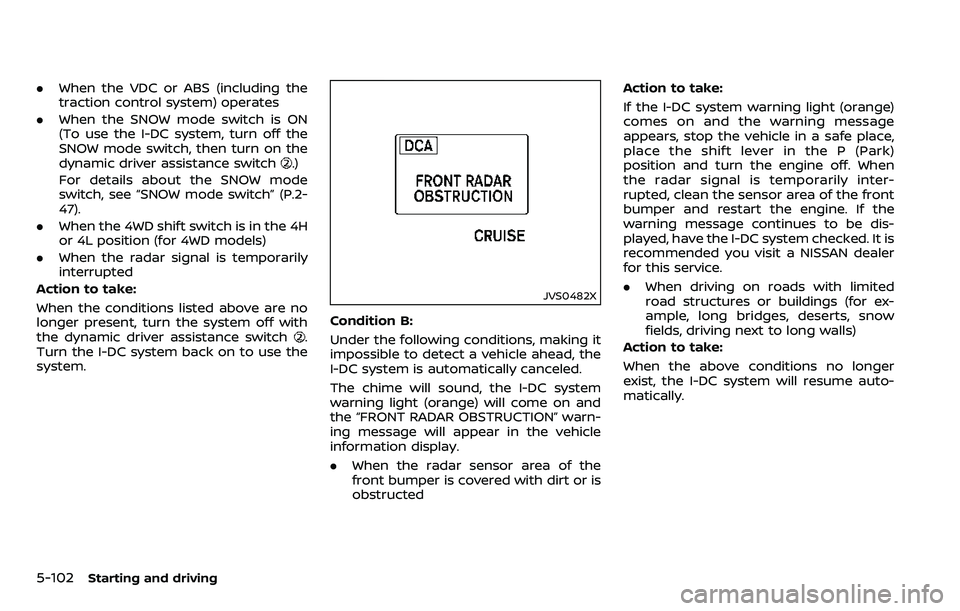
The chime will sound, the I-DC system
warning light (orange) will come on and
the “FRONT RADAR OBSTRUCTION” warn-
ing message will appear in the vehicle
information display.
. When the radar sensor area of the
front bumper is covered with dirt or is
obstructed Action to take:
If the I-DC system warning light (orange)
comes on and the warning message
appears, stop the vehicle in a safe place,
place the shift lever in the P (Park)
position and turn the engine off. When
the radar signal is temporarily inter-
rupted, clean the sensor area of the front
bumper and restart the engine. If the
warning message continues to be dis-
played, have the I-DC system checked. It is
recommended you visit a NISSAN dealer
for this service.
.
When driving on roads with limited
road structures or buildings (for ex-
ample, long bridges, deserts, snow
fields, driving next to long walls)
Action to take:
When the above conditions no longer
exist, the I-DC system will resume auto-
matically.
Page 386 of 532
WARNING
.Never rely solely on the hill start
assist system to prevent the ve-
hicle from moving backward on a
hill. Always drive carefully and
attentively. Depress the brake
pedal when the vehicle is stopped
on a steep hill. Be especially care-
ful when stopped on a hill on
frozen or muddy roads. Failure
to prevent the vehicle from rolling
backwards may result in a loss of
control of the vehicle and possi-
ble serious injury or death.
. The hill start assist system is not
designed to hold the vehicle at a
standstill on a hill. Depress the
brake pedal when the vehicle is
stopped on a steep hill. Failure to
do so may cause the vehicle to
roll backwards and may result in
a collision or serious personal
injury.
. The hill start assist system may
not prevent the vehicle from roll-
ing backwards on a hill under all
load or road conditions. Always
be prepared to depress the brake
pedal to prevent the vehicle from
rolling backwards. Failure to do so may result in a collision or
serious personal injury.
The hill start assist system automatically
keeps the brakes applied to help prevent
the vehicle from rolling backwards in the
time it takes the driver to release the
brake pedal and apply the accelerator
when the vehicle is stopped on a hill.
The hill start assist system will operate
automatically under the following condi-
tions:
. The transmission is shifted to a for-
ward or reverse gear.
. The vehicle is stopped completely on a
hill by applying the brake.
The maximum holding time is 2 seconds.
After 2 seconds the vehicle will begin to
roll back and the hill start assist system
will stop operating completely.
The hill start assist system will not
operate when the transmission is shifted
to the N (Neutral) or P (Park) position or
on a flat and level road.
When the Vehicle Dynamic Control (VDC)
warning light illuminates in the meter, the
hill start assist system will not operate.
(See “Warning lights, indicator lights and
audible reminders” (P.2-10).)
Starting and driving5-131
HILL START ASSIST SYSTEM
Page 393 of 532
5-138Starting and driving
function correctly.
PARKING BRAKE BREAK-IN
Break in the parking brake shoes when-
ever the stopping effect of the parking
brake is weakened or whenever the
parking brake shoes and/or drums/ro-
tors are replaced, in order to assure the
best braking performance.
This procedure is described in the vehicle
service manual. It is recommended you
visit a NISSAN dealer for this service.
Using the brakes
Avoid resting your foot on the brake
pedal while driving. This will cause over-
heating of the brakes, wearing out the
brake and pads faster and reduce gas
mileage.
To help save the brakes and to prevent
the brakes from overheating, reduce
speed and downshift to a lower gear
before going down a slope or long grade.
Overheated brakes may reduce braking
performance and could result in loss of
vehicle control.
WARNING
.While driving on a slippery sur-
face, be careful when braking,
accelerating or downshifting. Abrupt braking or accelerating
could cause the wheels to skid
and result in an accident.
. If the engine is not running or is
turned off while driving, the
power assist for the brakes will
not work. Braking will be harder.
BRAKE ASSIST
When the force applied to the brake pedal
exceeds a certain level, the Brake Assist is
activated generating greater braking
force than a conventional brake booster
even with light pedal force.
WARNING
The Brake Assist is only an aid to
assist braking operation and is not a
collision warning or avoidance de-
vice. It is the driver’s responsibility to
stay alert, drive safely and be in
control of the vehicle at all times.
ANTI-LOCK BRAKING SYSTEM (ABS)
WARNING
.The Anti-lock Braking System
(ABS) is a sophisticated device,
but it cannot prevent accidents
resulting from careless or dan-
gerous driving techniques. It can
help maintain vehicle control dur-
ing braking on slippery surfaces.
Remember that stopping dis-
tances on slippery surfaces will
be longer than on normal sur-
BRAKE ASSIST