rear fan NISSAN ARMADA 2018 Owner´s Manual
[x] Cancel search | Manufacturer: NISSAN, Model Year: 2018, Model line: ARMADA, Model: NISSAN ARMADA 2018Pages: 532, PDF Size: 2.3 MB
Page 22 of 532

1 Safety — seats, seat belts and supple-mental restraint system
Seats ........................................................................\
............................... 1-3
Front seats ........................................................................\
.......... 1-4
2nd row seats ........................................................................\
.. 1-5
3rd row seats ........................................................................\
... 1-7
Armrest ........................................................................\
............... 1-11
Flexible seating ..................................................................... 1-12
Head restraints/headrests ................................................. 1-15 Adjustable head
restraint/headrest components ............................. 1-16
Non-adjustable head
restraint/headrest components ............................. 1-16
Remove ........................................................................\
............... 1-17
Install ........................................................................\
..................... 1-17
Adjust ........................................................................\
.................... 1-18
Front-seat Active Head Restraint .......................... 1-19
Seat belts ........................................................................\
................. 1-20
Precautions on seat belt usage .............................. 1-20
Pregnant women ................................................................ 1-22
Injured persons ..................................................................... 1-22
Three-point type seat belt .......................................... 1-22
Seat belt extenders ........................................................... 1-29
Seat belt maintenance ................................................... 1-29
Child safety ........................................................................\
............. 1-30
Infants ........................................................................\
.................. 1-31
Small children ........................................................................\
1-31 Larger children ................................................................... 1-31
Child restraints ........................................................................\
... 1-32 Precautions on child restraints ............................. 1-33
Lower Anchors and Tethers for CHildren
(LATCH) system ................................................................ 1-35
Top tether strap child restraint ............................ 1-37
Rear-facing child restraint installation
using LATCH ........................................................................\
. 1-38
Rear-facing child restraint installation
using the seat belts ........................................................ 1-40
Forward-facing child restraint installation
using LATCH ........................................................................\
. 1-43
Forward-facing child restraint installation
using the seat belts ........................................................ 1-46
Booster seats ....................................................................... 1-51
Supplemental restraint system ..................................... 1-54
Precautions on supplemental
restraint system ................................................................ 1-54
NISSAN Advanced Air Bag System
(front seats) ........................................................................\
... 1-60
Front seat-mounted side-impact
supplemental air bag and roof-mounted
curtain side-impact and rollover
supplemental air bag systems .............................. 1-68
Seat belts with pretensioners
(front seats) ........................................................................\
... 1-69
Page 51 of 532
1-30Safety — seats, seat belts and supplemental restraint system
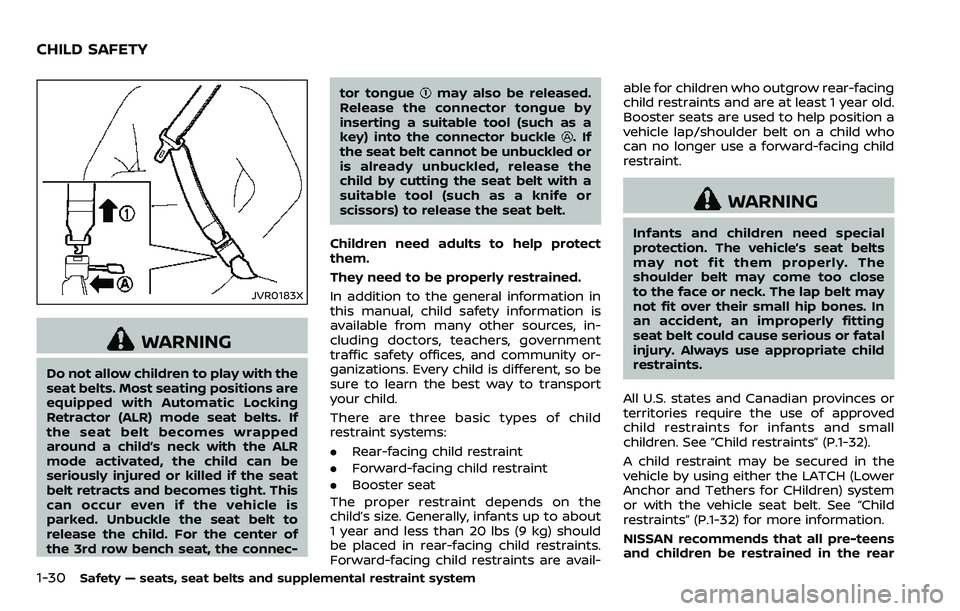
JVR0183X
WARNING
Do not allow children to play with the
seat belts. Most seating positions are
equipped with Automatic Locking
Retractor (ALR) mode seat belts. If
the seat belt becomes wrapped
around a child’s neck with the ALR
mode activated, the child can be
seriously injured or killed if the seat
belt retracts and becomes tight. This
can occur even if the vehicle is
parked. Unbuckle the seat belt to
release the child. For the center of
the 3rd row bench seat, the connec-tor tongue
may also be released.
Release the connector tongue by
inserting a suitable tool (such as a
key) into the connector buckle
.If
the seat belt cannot be unbuckled or
is already unbuckled, release the
child by cutting the seat belt with a
suitable tool (such as a knife or
scissors) to release the seat belt.
Children need adults to help protect
them.
They need to be properly restrained.
In addition to the general information in
this manual, child safety information is
available from many other sources, in-
cluding doctors, teachers, government
traffic safety offices, and community or-
ganizations. Every child is different, so be
sure to learn the best way to transport
your child.
There are three basic types of child
restraint systems:
. Rear-facing child restraint
. Forward-facing child restraint
. Booster seat
The proper restraint depends on the
child’s size. Generally, infants up to about
1 year and less than 20 lbs (9 kg) should
be placed in rear-facing child restraints.
Forward-facing child restraints are avail- able for children who outgrow rear-facing
child restraints and are at least 1 year old.
Booster seats are used to help position a
vehicle lap/shoulder belt on a child who
can no longer use a forward-facing child
restraint.
WARNING
Infants and children need special
protection. The vehicle’s seat belts
may not fit them properly. The
shoulder belt may come too close
to the face or neck. The lap belt may
not fit over their small hip bones. In
an accident, an improperly fitting
seat belt could cause serious or fatal
injury. Always use appropriate child
restraints.
All U.S. states and Canadian provinces or
territories require the use of approved
child restraints for infants and small
children. See “Child restraints” (P.1-32).
A child restraint may be secured in the
vehicle by using either the LATCH (Lower
Anchor and Tethers for CHildren) system
or with the vehicle seat belt. See “Child
restraints” (P.1-32) for more information.
NISSAN recommends that all pre-teens
and children be restrained in the rear
CHILD SAFETY
Page 52 of 532
seat. Studies show that children are
safer when properly restrained in the
rear seat than in the front seat.
This is especially important because
your vehicle has a supplemental re-
straint system (Air bag system) for the
front passenger. See “Supplemental re-
straint system” (P.1-54).
INFANTS
Infants up to at least 1 year old should be
placed in a rear-facing child restraint.
NISSAN recommends that infants be
placed in child restraints that comply with
Federal Motor Vehicle Safety Standards
or Canadian Motor Vehicle Safety Stan-
dards. You should choose a child restraint
that fits your vehicle and always follow
the manufacturer’s instructions for instal-
lation and use.
SMALL CHILDREN
Children that are over 1 year old and
weigh at least 20 lbs (9 kg) should remain
in a rear-facing child restraint as long as
possible up to the height or weight limit
of the child restraint. Children who out-
grow the height or weight limit of the
rear-facing child restraint and are at least
1 year old should be secured in a forward-
facing child restraint with a harness. Refer
to the manufacturer’s instructions for
minimum and maximum weight andheight recommendations. NISSAN recom-
mends that small children be placed in
child restraints that comply with Federal
Motor Vehicle Safety Standards or Cana-
dian Motor Vehicle Safety Standards. You
should choose a child restraint that fits
your vehicle and always follow the man-
ufacturer’s instructions for installation
and use.
LARGER CHILDREN
Children should remain in a forward-
facing child restraint with a harness until
they reach the maximum height or
weight limit allowed by the child restraint
manufacturer.
Once a child outgrows the height or
weight limit of the harness-equipped
forward-facing child restraint, NISSAN
recommends that the child be placed in
a commercially available booster seat to
obtain proper seat belt fit. For a seat belt
to fit properly, the booster seat should
raise the child so that the shoulder belt is
properly positioned across the chest and
the top, middle portion of the shoulder.
The shoulder belt should not cross the
neck or face and should not fall off the
shoulder. The lap belt should lie snugly
across the lower hips or upper thighs, not
the abdomen.
A booster seat can only be used in
seating positions that have a three-pointtype seat belt. The booster seat should fit
the vehicle seat and have a label certify-
ing that it complies with Federal Motor
Vehicle Safety Standards or Canadian
Motor Vehicle Safety Standards.
A booster seat should be used until the
child can pass the seat belt fit test below:
.
Are the child’s back and hips against
the vehicle seatback?
. Is the child able to sit without slouch-
ing?
. Do the child’s knees bend easily over
the front edge of the seat with feet flat
on the floor?
. Can the child safely wear the seat belt
(lap belt low and snug across the hips
and shoulder belt across mid-chest
and shoulder)?
. Is the child able to use the properly
adjusted head restraint/headrest?
. Will the child be able to stay in position
for the entire ride?
Safety — seats, seat belts and supplemental restraint system1-31
Page 54 of 532
PRECAUTIONS ON CHILD RE-
STRAINTS
WARNING
.Failure to follow the warnings
and instructions for proper use
and installation of child restraints
could result in serious injury or
death of a child or other passen-
gers in a sudden stop or collision:
— The child restraint must be
used and installed properly.
Always follow all of the child
restraint manufacturer’s in-
structions for installation and
use.
— Infants and children should never be held on anyone’s
lap. Even the strongest adult
cannot resist the forces of a
collision.
— Do not put a seat belt around both a child and another pas-
senger.
— NISSAN recommends that all child restraints be installed in
the rear seat. Studies show
that children are safer when
properly restrained in the rear seat than in the front seat. If
you must install a forward-
facing child restraint in the
front seat, see “Forward-fa-
cing child restraint installation
using the seat belts” (P.1-46).
— Even with the NISSAN Ad- vanced Air Bag System, never
install a rear-facing child re-
straint in the front seat. An
inflating air bag could ser-
iously injure or kill a child. A
rear-facing child restraint
must only be used in the rear
seat.
— Be sure to purchase a child restraint that will fit the child
and vehicle. Some child re-
straints may not fit properly
in your vehicle.
— Child restraint anchor points are designed to withstand
loads from child restraints
that are properly fitted.
— Never use the anchor points for adult seat belts or har-
nesses.
— A child restraint with a top tether strap should not be
used in the front passenger seat.
— Keep seatbacks as upright as possible after fitting the child
restraint.
— Infants and children should always be placed in an appro-
priate child restraint while in
the vehicle.
. When the child restraint is not in
use, keep it secured with the
LATCH system or a seat belt. In a
sudden stop or collision, loose
objects can injure occupants or
damage the vehicle.
CAUTION
A child restraint in a closed vehicle
can become very hot. Check the
seating surface and buckles before
placing a child in the child restraint.
This vehicle is equipped with a universal
child restraint anchor system, referred to
as the LATCH (Lower Anchors and
Tethers for CHildren) system. Some child
restraints include rigid or webbing-
mounted attachments that can be con-
nected to these anchors.
Safety — seats, seat belts and supplemental restraint system1-33
Page 62 of 532
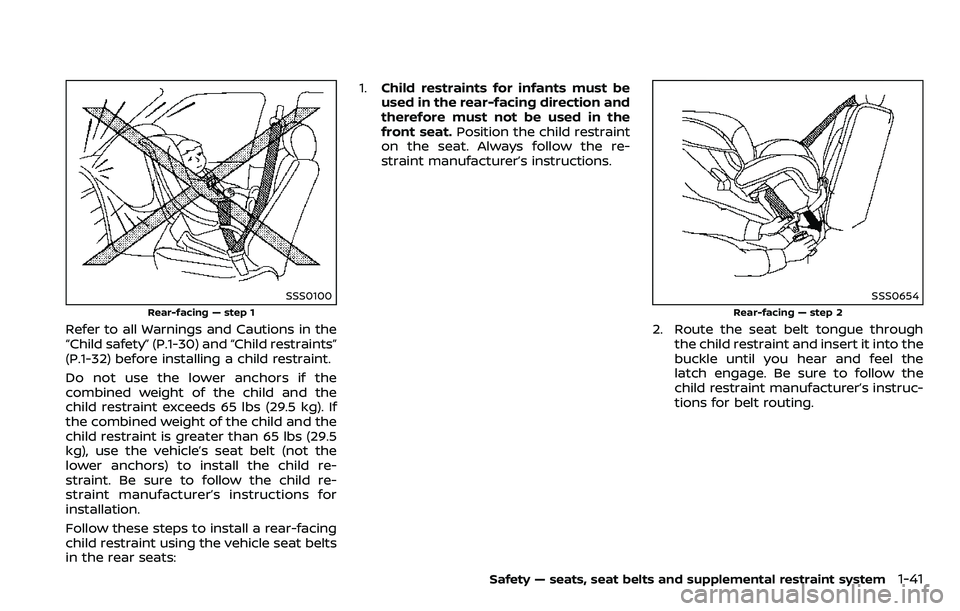
SSS0100
Rear-facing — step 1
Refer to all Warnings and Cautions in the
“Child safety” (P.1-30) and “Child restraints”
(P.1-32) before installing a child restraint.
Do not use the lower anchors if the
combined weight of the child and the
child restraint exceeds 65 lbs (29.5 kg). If
the combined weight of the child and the
child restraint is greater than 65 lbs (29.5
kg), use the vehicle’s seat belt (not the
lower anchors) to install the child re-
straint. Be sure to follow the child re-
straint manufacturer’s instructions for
installation.
Follow these steps to install a rear-facing
child restraint using the vehicle seat belts
in the rear seats:1.
Child restraints for infants must be
used in the rear-facing direction and
therefore must not be used in the
front seat. Position the child restraint
on the seat. Always follow the re-
straint manufacturer’s instructions.
SSS0654
Rear-facing — step 2
2. Route the seat belt tongue through the child restraint and insert it into the
buckle until you hear and feel the
latch engage. Be sure to follow the
child restraint manufacturer’s instruc-
tions for belt routing.
Safety — seats, seat belts and supplemental restraint system1-41
Page 68 of 532
passenger seat:
1.If you must install a child restraint in
the front seat, it should be placed in
a forward-facing direction only.
Move the seat to the rearmost posi-
tion. Child restraints for infants must
be used in the rear-facing direction
and, therefore, must not be used in
the front seat.
2. Position the child restraint on the seat. Always follow the child restraint man-
ufacturer’s instructions.
The back of the child restraint should
be secured against the vehicle seat-
back.
If necessary, adjust or remove the
head restraint or headrest to obtain
the correct child restraint fit. If the
head restraint or headrest is removed,
store it in a secure place. Be sure to
reinstall the head restraint or head-
rest when the child restraint is re-
moved. See “Head restraints/
headrests” (P.1-15) for head restraint
or headrest adjustment, removal and
installation information.
If the seating position does not have
an adjustable head restraint or a
headrest and it is interfering with the
proper child restraint fit, try another
seating position or a different child restraint.
SSS0360B
Forward-facing — step 3
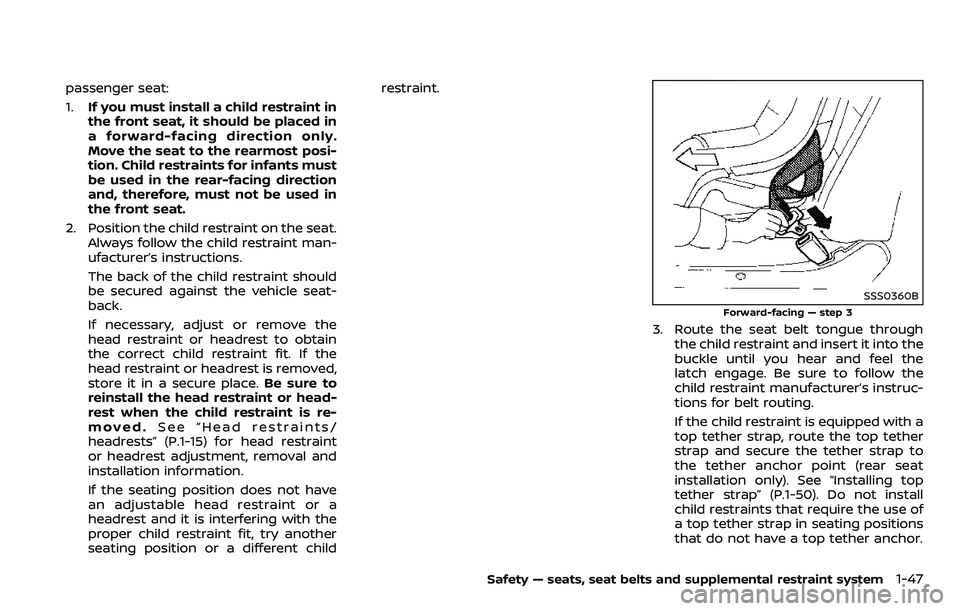
3. Route the seat belt tongue through
the child restraint and insert it into the
buckle until you hear and feel the
latch engage. Be sure to follow the
child restraint manufacturer’s instruc-
tions for belt routing.
If the child restraint is equipped with a
top tether strap, route the top tether
strap and secure the tether strap to
the tether anchor point (rear seat
installation only). See “Installing top
tether strap” (P.1-50). Do not install
child restraints that require the use of
a top tether strap in seating positions
that do not have a top tether anchor.
Safety — seats, seat belts and supplemental restraint system1-47
Page 73 of 532
1-52Safety — seats, seat belts and supplemental restraint system
cedures.
LRS0464
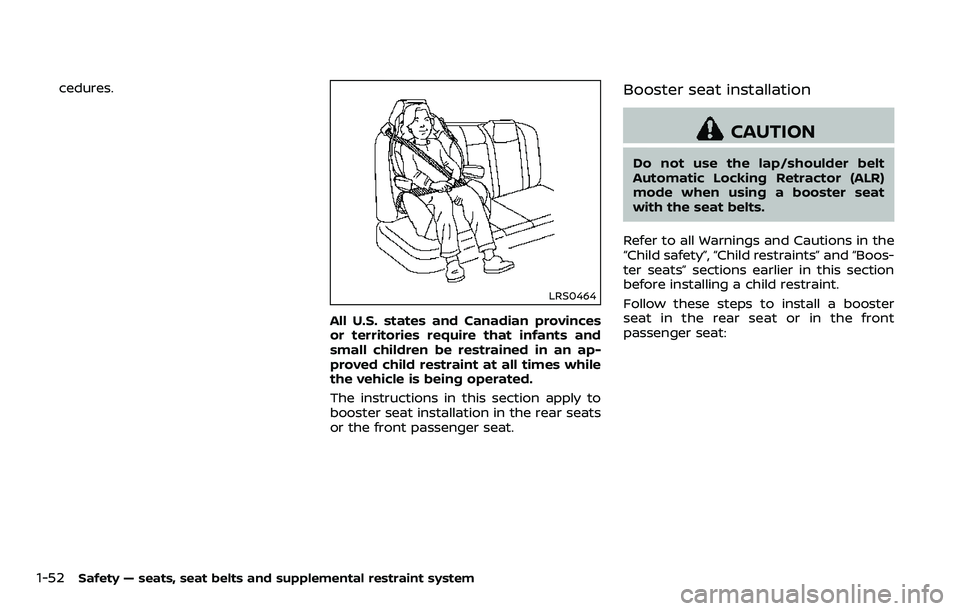
All U.S. states and Canadian provinces
or territories require that infants and
small children be restrained in an ap-
proved child restraint at all times while
the vehicle is being operated.
The instructions in this section apply to
booster seat installation in the rear seats
or the front passenger seat.
Booster seat installation
CAUTION
Do not use the lap/shoulder belt
Automatic Locking Retractor (ALR)
mode when using a booster seat
with the seat belts.
Refer to all Warnings and Cautions in the
“Child safety”, “Child restraints” and “Boos-
ter seats” sections earlier in this section
before installing a child restraint.
Follow these steps to install a booster
seat in the rear seat or in the front
passenger seat:
Page 246 of 532
SAA3059
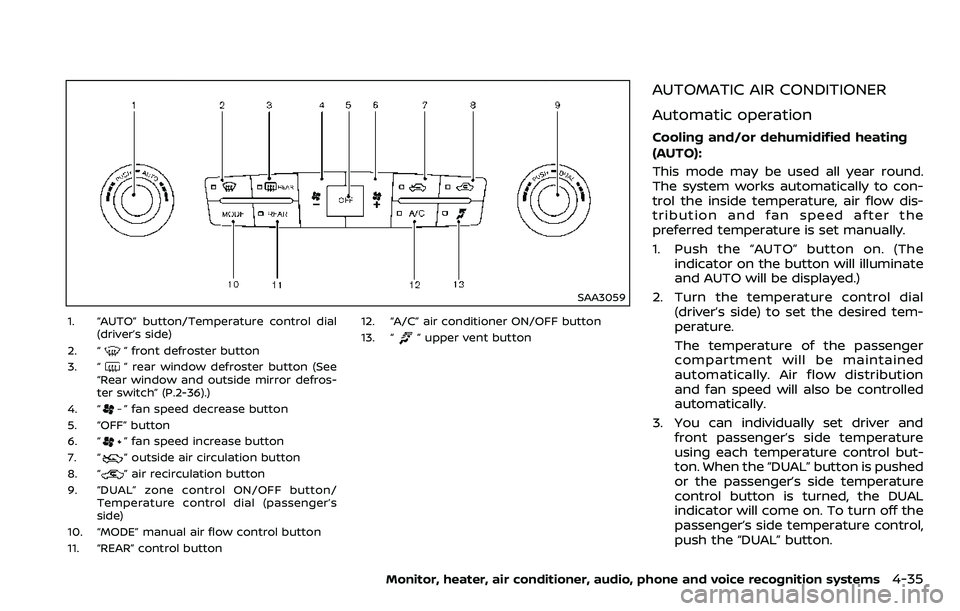
1. “AUTO” button/Temperature control dial(driver’s side)
2. “
” front defroster button
3. “
” rear window defroster button (See
“Rear window and outside mirror defros-
ter switch” (P.2-36).)
4. “
” fan speed decrease button
5. “OFF” button
6. “
” fan speed increase button
7. “
” outside air circulation button
8. “
” air recirculation button
9. “DUAL” zone control ON/OFF button/ Temperature control dial (passenger’s
side)
10. “MODE” manual air flow control button
11. “REAR” control button 12. “A/C” air conditioner ON/OFF button
13. “
” upper vent button
AUTOMATIC AIR CONDITIONER
Automatic operation
Cooling and/or dehumidified heating
(AUTO):
This mode may be used all year round.
The system works automatically to con-
trol the inside temperature, air flow dis-
tribution and fan speed after the
preferred temperature is set manually.
1. Push the “AUTO” button on. (The
indicator on the button will illuminate
and AUTO will be displayed.)
2. Turn the temperature control dial (driver’s side) to set the desired tem-
perature.
The temperature of the passenger
compartment will be maintained
automatically. Air flow distribution
and fan speed will also be controlled
automatically.
3. You can individually set driver and front passenger’s side temperature
using each temperature control but-
ton. When the “DUAL” button is pushed
or the passenger’s side temperature
control button is turned, the DUAL
indicator will come on. To turn off the
passenger’s side temperature control,
push the “DUAL” button.
Monitor, heater, air conditioner, audio, phone and voice recognition systems4-35
Page 248 of 532
vent “” button to turn the indicator
light off.
JVH1630X
Operations on touch panel screen
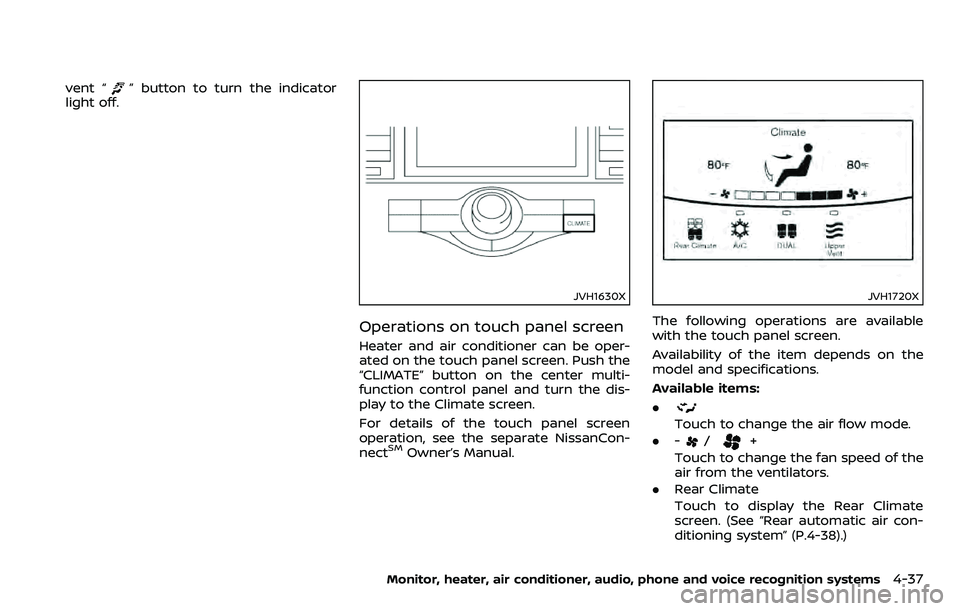
Heater and air conditioner can be oper-
ated on the touch panel screen. Push the
“CLIMATE” button on the center multi-
function control panel and turn the dis-
play to the Climate screen.
For details of the touch panel screen
operation, see the separate NissanCon-
nect
SMOwner’s Manual.
JVH1720X
The following operations are available
with the touch panel screen.
Availability of the item depends on the
model and specifications.
Available items:
.
Touch to change the air flow mode.
. -
/+
Touch to change the fan speed of the
air from the ventilators.
. Rear Climate
Touch to display the Rear Climate
screen. (See “Rear automatic air con-
ditioning system” (P.4-38).)
Monitor, heater, air conditioner, audio, phone and voice recognition systems4-37
Page 250 of 532
Front air conditioner control panel
operation
Automatic operation:
1. Push the “REAR” button to turn on rearautomatic air conditioning system.
Push the “CLIMATE” button on the
center multi-function control panel
and select the “Rear Climate” key to
display the Rear Climate screen.
2. Push the “AUTO” button. (The AUTO indicator light will illuminate and
“AUTO” will appear on the display.)
3. Turn the temperature control dial (driver’s side) to set the desired tem-
perature.
Cooling and dehumidified heating:
1. Push the “REAR” button to turn on the rear automatic air conditioning sys-
tem. Push the “CLIMATE” button on
the center multi-function control pa-
nel and touch “Rear Climate” key to
display the Rear Climate screen.
2. Turn the temperature control dial (driver’s side) to set the desired tem-
perature.
3. Switch the air flow mode to
by
pushing the “MODE” button.
4. Push the “CLIMATE” button on the center multi-function control panel
one more time to return to the Climate screen. If the A/C indicator
light does not illuminate, push the
“A/C” button. (The A/C indicator light
will turn on.)
NOTE:
When the front air conditioner is off, the
rear automatic air conditioning system
only operates the fan. When you would
like to use the air conditioner, be sure to
push the “A/C” button on the front air
conditioner control panel to turn on the
A/C indicator light.
Manual operation:
. Temperature control
Turn the temperature control dial
(driver’s side) to set the desired tem-
perature.
. Fan speed control
Push the fan speed control “
”
button or “” button to manually
control the fan speed.
. Air flow control
Push the “MODE” button to change the
air flow mode.
: The air outlet is fixed at foot level.
: The air outlet is fixed at both the head
and foot levels.
: The air outlet is fixed at the head level.
Touch panel operation
The rear automatic air conditioning sys-
tem can also be controlled on the Rear
Climate screen.
Touch the “Rear Climate” key on the
Climate screen to display the Rear Cli-
mate screen.
Monitor, heater, air conditioner, audio, phone and voice recognition systems4-39