Manual release NISSAN ARMADA 2019 Owner´s Manual
[x] Cancel search | Manufacturer: NISSAN, Model Year: 2019, Model line: ARMADA, Model: NISSAN ARMADA 2019Pages: 536, PDF Size: 2.56 MB
Page 16 of 536
0-8Illustrated table of contents
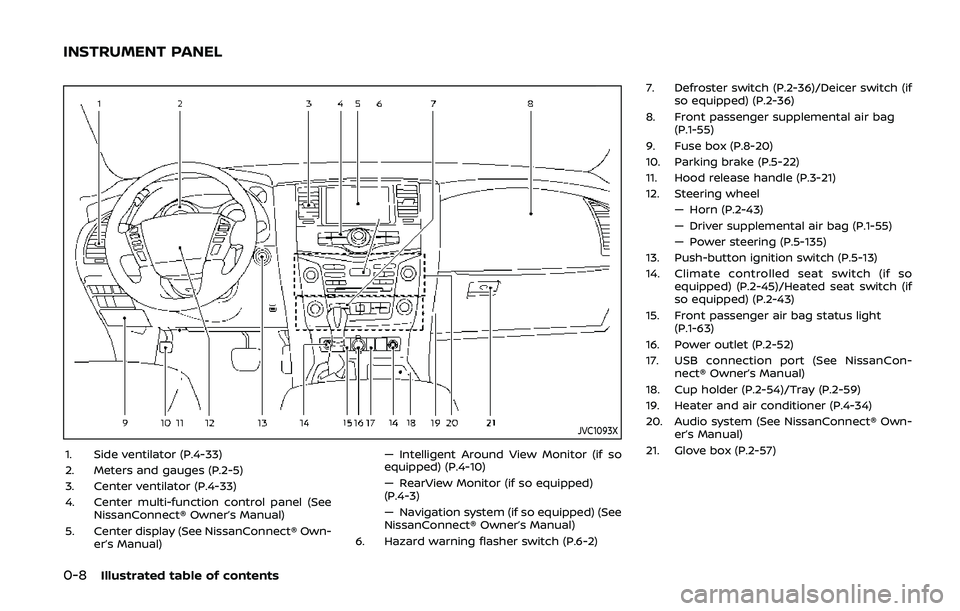
JVC1093X
1. Side ventilator (P.4-33)
2. Meters and gauges (P.2-5)
3. Center ventilator (P.4-33)
4. Center multi-function control panel (SeeNissanConnect® Owner’s Manual)
5. Center display (See NissanConnect® Own- er’s Manual) — Intelligent Around View Monitor (if so
equipped) (P.4-10)
— RearView Monitor (if so equipped)
(P.4-3)
— Navigation system (if so equipped) (See
NissanConnect® Owner’s Manual)
6. Hazard warning flasher switch (P.6-2) 7. Defroster switch (P.2-36)/Deicer switch (if
so equipped) (P.2-36)
8. Front passenger supplemental air bag (P.1-55)
9. Fuse box (P.8-20)
10. Parking brake (P.5-22)
11. Hood release handle (P.3-21)
12. Steering wheel — Horn (P.2-43)
— Driver supplemental air bag (P.1-55)
— Power steering (P.5-135)
13. Push-button ignition switch (P.5-13)
14. Climate controlled seat switch (if so equipped) (P.2-45)/Heated seat switch (if
so equipped) (P.2-43)
15. Front passenger air bag status light (P.1-63)
16. Power outlet (P.2-52)
17. USB connection port (See NissanCon- nect® Owner’s Manual)
18. Cup holder (P.2-54)/Tray (P.2-59)
19. Heater and air conditioner (P.4-34)
20. Audio system (See NissanConnect® Own- er’s Manual)
21. Glove box (P.2-57)
INSTRUMENT PANEL
Page 27 of 536
SSS1066
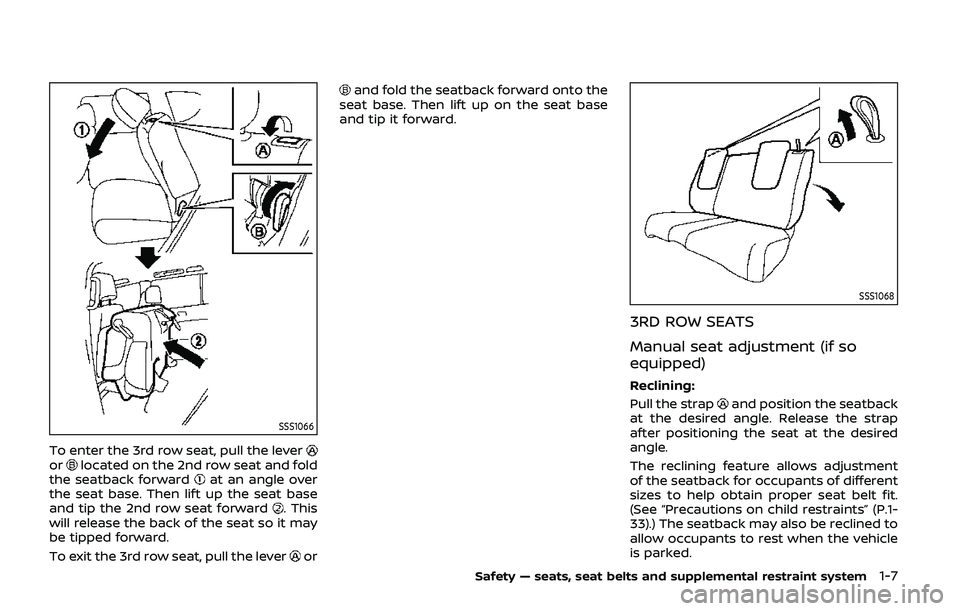
To enter the 3rd row seat, pull the leverorlocated on the 2nd row seat and fold
the seatback forwardat an angle over
the seat base. Then lift up the seat base
and tip the 2nd row seat forward
. This
will release the back of the seat so it may
be tipped forward.
To exit the 3rd row seat, pull the lever
or
and fold the seatback forward onto the
seat base. Then lift up on the seat base
and tip it forward.
SSS1068
3RD ROW SEATS
Manual seat adjustment (if so
equipped)
Reclining:
Pull the strap
and position the seatback
at the desired angle. Release the strap
after positioning the seat at the desired
angle.
The reclining feature allows adjustment
of the seatback for occupants of different
sizes to help obtain proper seat belt fit.
(See “Precautions on child restraints” (P.1-
33).) The seatback may also be reclined to
allow occupants to rest when the vehicle
is parked.
Safety — seats, seat belts and supplemental restraint system1-7
Page 50 of 536
1-30Safety — seats, seat belts and supplemental restraint system
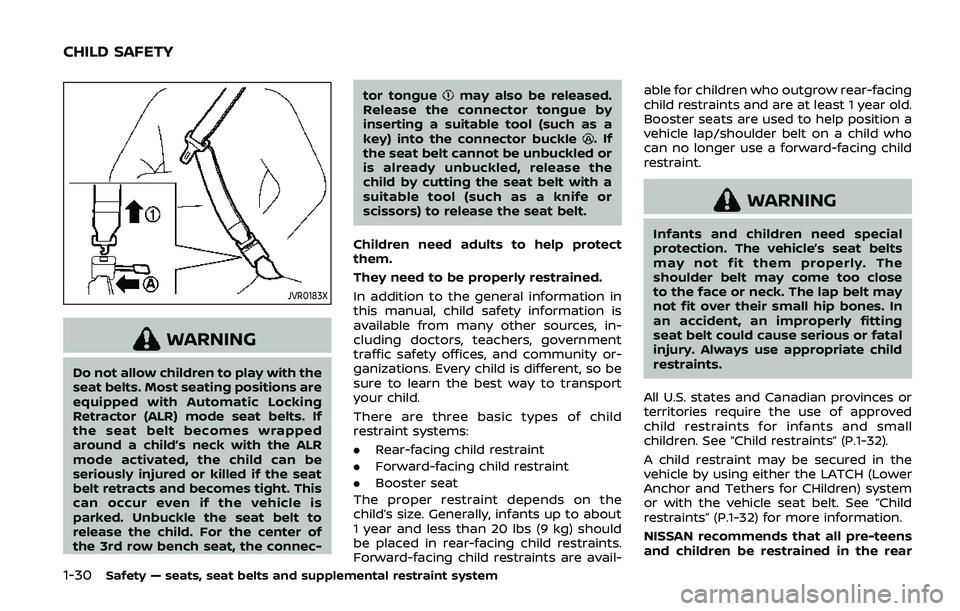
JVR0183X
WARNING
Do not allow children to play with the
seat belts. Most seating positions are
equipped with Automatic Locking
Retractor (ALR) mode seat belts. If
the seat belt becomes wrapped
around a child’s neck with the ALR
mode activated, the child can be
seriously injured or killed if the seat
belt retracts and becomes tight. This
can occur even if the vehicle is
parked. Unbuckle the seat belt to
release the child. For the center of
the 3rd row bench seat, the connec-tor tongue
may also be released.
Release the connector tongue by
inserting a suitable tool (such as a
key) into the connector buckle
.If
the seat belt cannot be unbuckled or
is already unbuckled, release the
child by cutting the seat belt with a
suitable tool (such as a knife or
scissors) to release the seat belt.
Children need adults to help protect
them.
They need to be properly restrained.
In addition to the general information in
this manual, child safety information is
available from many other sources, in-
cluding doctors, teachers, government
traffic safety offices, and community or-
ganizations. Every child is different, so be
sure to learn the best way to transport
your child.
There are three basic types of child
restraint systems:
. Rear-facing child restraint
. Forward-facing child restraint
. Booster seat
The proper restraint depends on the
child’s size. Generally, infants up to about
1 year and less than 20 lbs (9 kg) should
be placed in rear-facing child restraints.
Forward-facing child restraints are avail- able for children who outgrow rear-facing
child restraints and are at least 1 year old.
Booster seats are used to help position a
vehicle lap/shoulder belt on a child who
can no longer use a forward-facing child
restraint.
WARNING
Infants and children need special
protection. The vehicle’s seat belts
may not fit them properly. The
shoulder belt may come too close
to the face or neck. The lap belt may
not fit over their small hip bones. In
an accident, an improperly fitting
seat belt could cause serious or fatal
injury. Always use appropriate child
restraints.
All U.S. states and Canadian provinces or
territories require the use of approved
child restraints for infants and small
children. See “Child restraints” (P.1-32).
A child restraint may be secured in the
vehicle by using either the LATCH (Lower
Anchor and Tethers for CHildren) system
or with the vehicle seat belt. See “Child
restraints” (P.1-32) for more information.
NISSAN recommends that all pre-teens
and children be restrained in the rear
CHILD SAFETY
Page 82 of 536
1-62Safety — seats, seat belts and supplemental restraint system
may flash.
. If a forward facing child restraint
is installed in the front passenger
seat, do not position the front
passenger seat so the child re-
straint contacts the instrument
panel. If the child restraint does
contact the instrument panel, the
system may determine the seat is
occupied and the passenger air
bag may deploy in a collision.
Also the front passenger air bag
status light may not illuminate.
See “Child restraints” (P.1-32) for
information about installing and
using child restraints.
. Confirm the operating condition
with the front passenger air bag
status light.
. If you notice that the front pas-
senger air bag status light is not
operating as described in this
section, it is recommended you
visit a NISSAN dealer to check the
passenger seat Advanced Air Bag
System.
. Until you have confirmed with
your dealer that your passenger
seat advanced air bag is working
properly, position the occupants
in the rear seating positions. This vehicle is equipped with the NISSAN
Advanced Air Bag System for the driver
and front passenger seats. This system is
designed to meet certification require-
ments under U.S. regulations. It is also
permitted in Canada.
All of the informa-
tion, cautions and warnings in this
manual apply and must be followed.
The driver supplemental front-impact air
bag is located in the center of the
steering wheel. The passenger supple-
mental front-impact air bag is mounted in
the instrument panel above the glove
box. The front air bags are designed to
inflate in higher severity frontal collisions,
although they may inflate if the forces in
another type of collision are similar to
those of a higher severity frontal impact.
They may not inflate in certain frontal
collisions. Vehicle damage (or lack of it) is
not always an indication of proper front
air bag operation.
The NISSAN Advanced Air Bag System
monitors information from the Air bag
Control Unit (ACU), seat belt buckle sen-
sors and the occupant classification sen-
sors (weight sensors). Inflator operation is
based on the severity of a collision and
seat belt usage for the driver. For the
front passenger, the occupant classifica-
tion sensors are also monitored. Based on
information from the sensors, only one
front air bag may inflate in a crash, depending on the crash severity and
whether the front occupants are belted
or unbelted. Additionally, the front pas-
senger air bag may be automatically
turned OFF under some conditions, de-
pending on the information provided by
the occupant classification sensors. If the
front passenger air bag is OFF, the front
passenger air bag status light will be
illuminated (if the seat is unoccupied, the
light will not be illuminated, but the air
bag will be off). (See “Front passenger air
bag and status light” (P.1-63) for further
details.) One front air bag inflating does
not indicate improper performance of the
system.
If you have any questions about your air
bag system, it is recommended you visit a
NISSAN dealer to obtain information
about the system. If you are considering
modification of your vehicle due to a
disability, you may also contact NISSAN.
Contact information is contained in the
front of this Owner’s Manual.
When a front air bag inflates, a fairly loud
noise may be heard, followed by release
of smoke. This smoke is not harmful and
does not indicate a fire. Care should be
taken not to inhale it, as it may cause
irritation and choking. Those with a
history of a breathing condition should
get fresh air promptly.
Page 89 of 536
SSS1092
FRONT SEAT-MOUNTED SIDE-IM-
PACT SUPPLEMENTAL AIR BAG AND
ROOF-MOUNTED CURTAIN SIDE-
IMPACT AND ROLLOVER SUPPLE-
MENTAL AIR BAG SYSTEMS
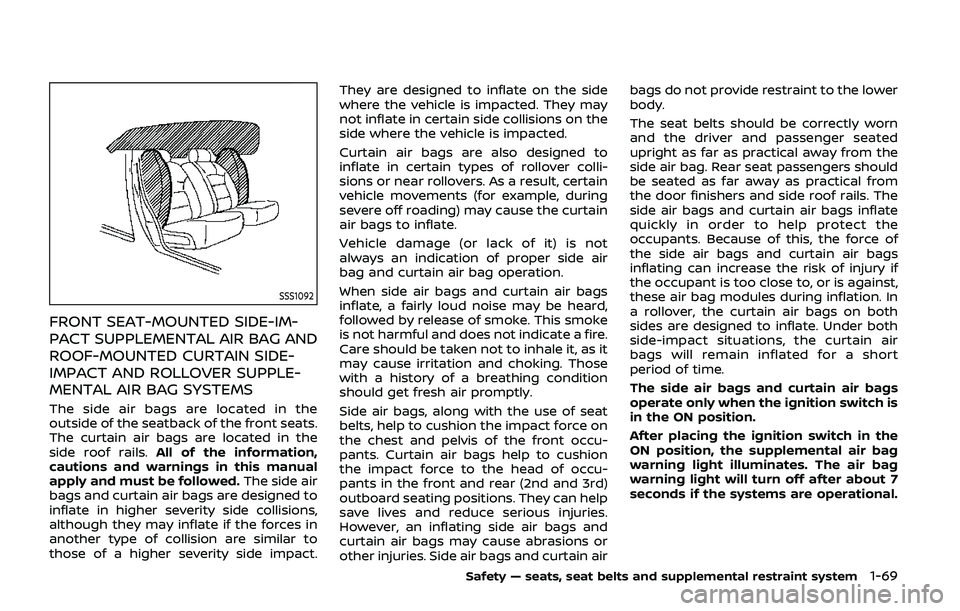
The side air bags are located in the
outside of the seatback of the front seats.
The curtain air bags are located in the
side roof rails.All of the information,
cautions and warnings in this manual
apply and must be followed. The side air
bags and curtain air bags are designed to
inflate in higher severity side collisions,
although they may inflate if the forces in
another type of collision are similar to
those of a higher severity side impact. They are designed to inflate on the side
where the vehicle is impacted. They may
not inflate in certain side collisions on the
side where the vehicle is impacted.
Curtain air bags are also designed to
inflate in certain types of rollover colli-
sions or near rollovers. As a result, certain
vehicle movements (for example, during
severe off roading) may cause the curtain
air bags to inflate.
Vehicle damage (or lack of it) is not
always an indication of proper side air
bag and curtain air bag operation.
When side air bags and curtain air bags
inflate, a fairly loud noise may be heard,
followed by release of smoke. This smoke
is not harmful and does not indicate a fire.
Care should be taken not to inhale it, as it
may cause irritation and choking. Those
with a history of a breathing condition
should get fresh air promptly.
Side air bags, along with the use of seat
belts, help to cushion the impact force on
the chest and pelvis of the front occu-
pants. Curtain air bags help to cushion
the impact force to the head of occu-
pants in the front and rear (2nd and 3rd)
outboard seating positions. They can help
save lives and reduce serious injuries.
However, an inflating side air bags and
curtain air bags may cause abrasions or
other injuries. Side air bags and curtain airbags do not provide restraint to the lower
body.
The seat belts should be correctly worn
and the driver and passenger seated
upright as far as practical away from the
side air bag. Rear seat passengers should
be seated as far away as practical from
the door finishers and side roof rails. The
side air bags and curtain air bags inflate
quickly in order to help protect the
occupants. Because of this, the force of
the side air bags and curtain air bags
inflating can increase the risk of injury if
the occupant is too close to, or is against,
these air bag modules during inflation. In
a rollover, the curtain air bags on both
sides are designed to inflate. Under both
side-impact situations, the curtain air
bags will remain inflated for a short
period of time.
The side air bags and curtain air bags
operate only when the ignition switch is
in the ON position.
After placing the ignition switch in the
ON position, the supplemental air bag
warning light illuminates. The air bag
warning light will turn off after about 7
seconds if the systems are operational.
Safety — seats, seat belts and supplemental restraint system1-69
Page 91 of 536
electrical equipment. Unauthor-
ized electrical test equipment
and probing devices should not
be used on the pretensioner sys-
tem.
. If you need to dispose of a pre-
tensioner or scrap the vehicle, it is
recommended you visit a NISSAN
dealer for this service. Correct
pretensioner disposal procedures
are set forth in the appropriate
NISSAN Service Manual. Incorrect
disposal procedures could cause
personal injury.
The pretensioner system may activate
with the supplemental air bag system in
certain types of collisions. Working with
the seat belt retractor, it helps tighten the
seat belt when the vehicle becomes
involved in certain types of collisions,
helping to restrain front seat occupants.
The pretensioner is encased with the seat
belt retractor and buckle anchor. These
seat belts are used the same way as
conventional seat belts.
When a pretensioner activates, smoke is
released and a loud noise may be heard.
The smoke is not harmful, and it does not
indicate a fire. Care should be taken not
to inhale it as it may cause irritation and
choking. Those with a history of a breath- ing condition should get fresh air
promptly.
After pretensioner activation, load limiters
allow the seat belt to release webbing (if
necessary) to reduce forces against the
chest.
The supplemental air bag warning light
is used to indicate malfunctions in
the pretensioner system. (See “Supple-
mental air bag warning light” (P.1-72) for
more details.) If the operation of the
supplemental air bag warning light indi-
cates there is a malfunction, have the
system checked. It is recommended you
visit a NISSAN dealer for this service.
When selling your vehicle, we request that
you inform the buyer about the preten-
sioner system and guide the buyer to the
appropriate sections in this Owner’s Man-
ual.
SSS1016
SUPPLEMENTAL AIR BAG WARNING
LABELS
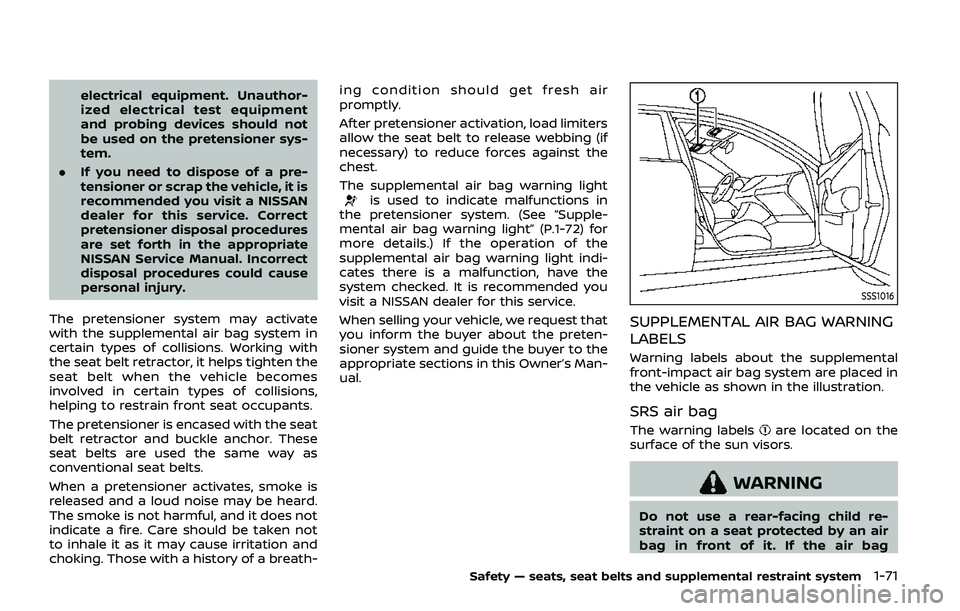
Warning labels about the supplemental
front-impact air bag system are placed in
the vehicle as shown in the illustration.
SRS air bag
The warning labelsare located on the
surface of the sun visors.
WARNING
Do not use a rear-facing child re-
straint on a seat protected by an air
bag in front of it. If the air bag
Safety — seats, seat belts and supplemental restraint system1-71
Page 161 of 536
during this period of about 45 seconds,
power to the moonroof is canceled.
JVI0614X
Sunshade
The sunshade will open automatically
when the moonroof is opened. However,
it must be closed manually.
Tilting the moonroof
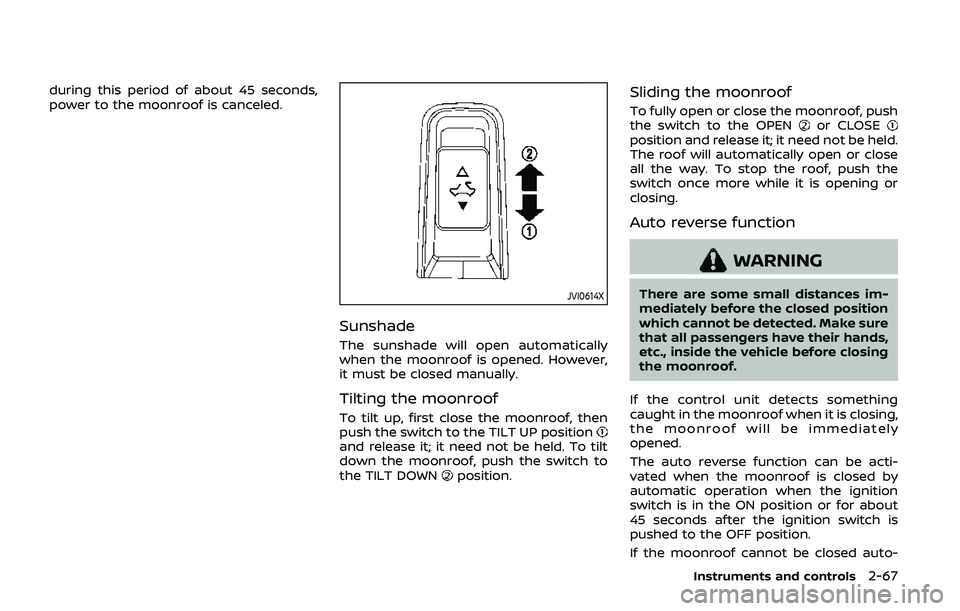
To tilt up, first close the moonroof, then
push the switch to the TILT UP position
and release it; it need not be held. To tilt
down the moonroof, push the switch to
the TILT DOWN
position.
Sliding the moonroof
To fully open or close the moonroof, push
the switch to the OPENor CLOSEposition and release it; it need not be held.
The roof will automatically open or close
all the way. To stop the roof, push the
switch once more while it is opening or
closing.
Auto reverse function
WARNING
There are some small distances im-
mediately before the closed position
which cannot be detected. Make sure
that all passengers have their hands,
etc., inside the vehicle before closing
the moonroof.
If the control unit detects something
caught in the moonroof when it is closing,
the moonroof will be immediately
opened.
The auto reverse function can be acti-
vated when the moonroof is closed by
automatic operation when the ignition
switch is in the ON position or for about
45 seconds after the ignition switch is
pushed to the OFF position.
If the moonroof cannot be closed auto-
Instruments and controls2-67
Page 167 of 536
JVI0429X
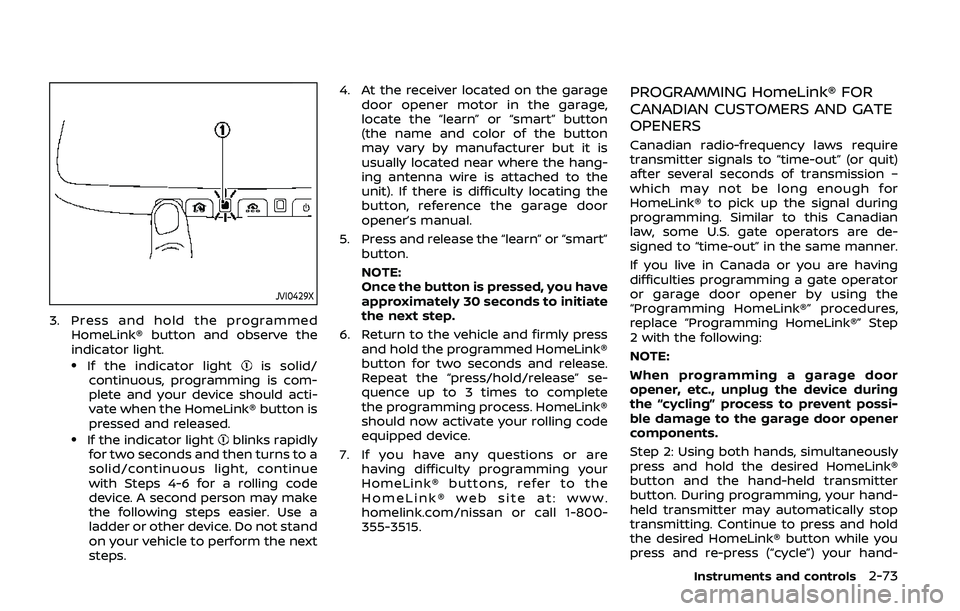
3. Press and hold the programmedHomeLink® button and observe the
indicator light.
.If the indicator lightis solid/
continuous, programming is com-
plete and your device should acti-
vate when the HomeLink® button is
pressed and released.
.If the indicator lightblinks rapidly
for two seconds and then turns to a
solid/continuous light, continue
with Steps 4-6 for a rolling code
device. A second person may make
the following steps easier. Use a
ladder or other device. Do not stand
on your vehicle to perform the next
steps. 4. At the receiver located on the garage
door opener motor in the garage,
locate the “learn” or “smart” button
(the name and color of the button
may vary by manufacturer but it is
usually located near where the hang-
ing antenna wire is attached to the
unit). If there is difficulty locating the
button, reference the garage door
opener’s manual.
5. Press and release the “learn” or “smart” button.
NOTE:
Once the button is pressed, you have
approximately 30 seconds to initiate
the next step.
6. Return to the vehicle and firmly press and hold the programmed HomeLink®
button for two seconds and release.
Repeat the “press/hold/release” se-
quence up to 3 times to complete
the programming process. HomeLink®
should now activate your rolling code
equipped device.
7. If you have any questions or are having difficulty programming your
HomeLink® buttons, refer to the
HomeLink® web site at: www.
homelink.com/nissan or call 1-800-
355-3515.
PROGRAMMING HomeLink® FOR
CANADIAN CUSTOMERS AND GATE
OPENERS
Canadian radio-frequency laws require
transmitter signals to “time-out” (or quit)
after several seconds of transmission –
which may not be long enough for
HomeLink® to pick up the signal during
programming. Similar to this Canadian
law, some U.S. gate operators are de-
signed to “time-out” in the same manner.
If you live in Canada or you are having
difficulties programming a gate operator
or garage door opener by using the
“Programming HomeLink®” procedures,
replace “Programming HomeLink®” Step
2 with the following:
NOTE:
When programming a garage door
opener, etc., unplug the device during
the “cycling” process to prevent possi-
ble damage to the garage door opener
components.
Step 2: Using both hands, simultaneously
press and hold the desired HomeLink®
button and the hand-held transmitter
button. During programming, your hand-
held transmitter may automatically stop
transmitting. Continue to press and hold
the desired HomeLink® button while you
press and re-press (“cycle”) your hand-
Instruments and controls2-73
Page 175 of 536

3 Pre-driving checks and adjustments
Keys ........................................................................\
................................. 3-2Intelligent Key ........................................................................\
... 3-2
Valet hand-off ........................................................................\
... 3-4
Doors ........................................................................\
.............................. 3-4 Locking with mechanical key ...................................... 3-4
Opening and closing windows with the
mechanical key ........................................................................\
3-5
Locking with inside lock knob ..................................... 3-5
Locking with power door lock switch ................... 3-5
Automatic door locks ......................................................... 3-6
Child safety rear door lock ........................................... 3-6
Intelligent Key system .............................................................. 3-7 Intelligent Key operating range ................................. 3-9
Door locks/unlocks precaution .................................. 3-9
Intelligent Key operation .............................................. 3-10
Battery saver system ....................................................... 3-12
Warning signals .................................................................... 3-12
Troubleshooting guide ................................................... 3-13
Remote keyless entry system ......................................... 3-15 How to use remote keyless entry system ...... 3-16
Remote engine start (if so equipped) ....................... 3-19 Remote engine start operating range ............... 3-19
Remote starting the engine ....................................... 3-19
Extending engine run time ......................................... 3-20 Canceling a remote engine start ........................ 3-20
Conditions the remote engine start will
not work ........................................................................\
.......... 3-20
Hood ........................................................................\
............................ 3-21
Liftgate ........................................................................\
...................... 3-22 Operating manual liftgate ......................................... 3-22
Operating power liftgate (if so equipped) ...... 3-22
Auto closure ........................................................................\
3-25
Liftgate release lever ..................................................... 3-26
Fuel-filler door ........................................................................\
..... 3-26
Opening the fuel-filler door ...................................... 3-26
Fuel-filler cap ....................................................................... 3-27
Tilt/telescopic steering ........................................................ 3-29
Electric operation ............................................................. 3-30
Sun visors ........................................................................\
................ 3-30
Mirrors ........................................................................\
........................ 3-31
Inside mirror ........................................................................\
. 3-31
Outside mirrors .................................................................. 3-38
Vanity mirror ........................................................................\
3-40
Automatic drive positioner (if so equipped) ........ 3-40
Entry/exit function .......................................................... 3-40
Memory storage ................................................................ 3-41
Setting memory function ........................................... 3-42
System operation ............................................................. 3-42
Page 184 of 536
3-10Pre-driving checks and adjustments
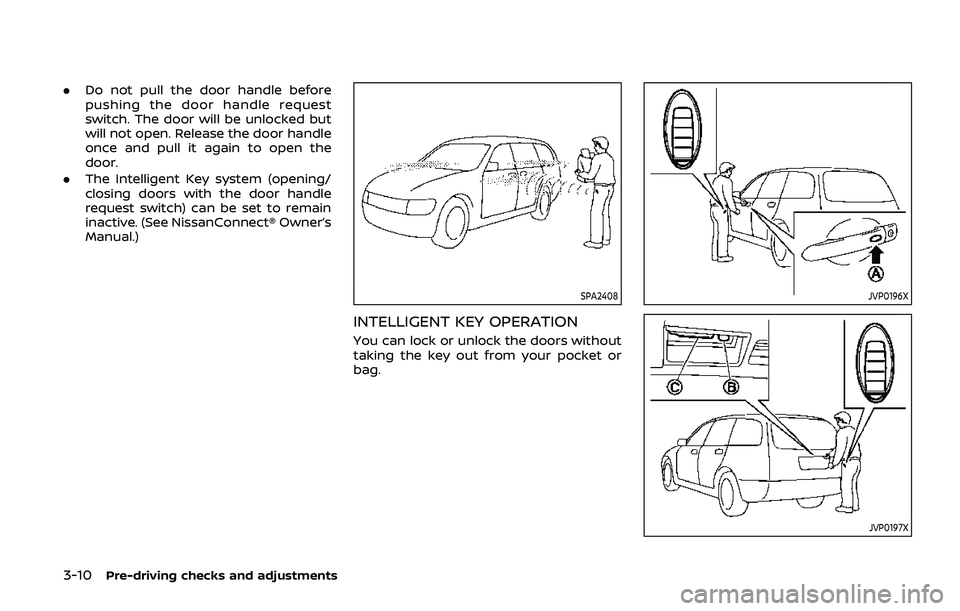
.Do not pull the door handle before
pushing the door handle request
switch. The door will be unlocked but
will not open. Release the door handle
once and pull it again to open the
door.
. The Intelligent Key system (opening/
closing doors with the door handle
request switch) can be set to remain
inactive. (See NissanConnect® Owner’s
Manual.)
SPA2408
INTELLIGENT KEY OPERATION
You can lock or unlock the doors without
taking the key out from your pocket or
bag.
JVP0196X
JVP0197X