ABS NISSAN ARMADA 2019 Owner´s Manual
[x] Cancel search | Manufacturer: NISSAN, Model Year: 2019, Model line: ARMADA, Model: NISSAN ARMADA 2019Pages: 536, PDF Size: 2.56 MB
Page 339 of 536
.This system will not adapt auto-
matically to road conditions. This
system should be used in evenly
flowing traffic. Do not use the
system on roads with sharp
curves, or on icy roads, in heavy
rain or in fog.
. As there is a performance limit to
the distance control function,
never rely solely on the ICC sys-
tem. This system does not correct
careless, inattentive or absent-
minded driving, or overcome
poor visibility in rain, fog, or other
bad weather. Decelerate the ve-
hicle speed by depressing the
brake pedal, depending on the
distance to the vehicle ahead
and the surrounding circum-
stances in order to maintain a
safe distance between vehicles.
. If the vehicle ahead comes to a
stop, the vehicle decelerates to a
standstill within the limitations of
the system. The system will can-
cel once it judges that the vehicle
has come to a standstill and
sound a warning chime. To pre-
vent the vehicle from moving, the
driver must depress the brake
pedal. .
Always pay attention to the op-
eration of the vehicle and be
ready to manually control the
proper following distance. The
vehicle-to-vehicle distance con-
trol mode of the ICC system may
not be able to maintain the se-
lected distance between vehicles
(following distance) or selected
vehicle speed under some cir-
cumstances.
. The system may not detect the
vehicle in front of you in certain
road or weather conditions. To
avoid accidents, never use the ICC
system under the following con-
ditions:
— On roads where the traffic is
heavy or there are sharp
curves
— On slippery road surfaces such as on ice or snow, etc.
— During bad weather (rain, fog, snow, etc.)
— When rain, snow or dirt adhere to the system sensor
— On steep downhill roads (the vehicle may go beyond the set
vehicle speed and frequent
braking may result in over- heating the brakes)
— On repeated uphill and down- hill roads
— When traffic conditions make it difficult to keep a proper
distance between vehicles be-
cause of frequent accelera-
tion or deceleration
. Do not use the ICC system if you
are towing a trailer. The system
may not detect a vehicle ahead.
. In some road or traffic conditions,
a vehicle or object can unexpect-
edly come into the sensor detec-
tion zone and cause automatic
braking. You may need to control
the distance from other vehicles
using the accelerator pedal. Al-
ways stay alert and avoid using
the ICC system when it is not
recommended in this section.
The radar sensor will not detect the
following objects:
. Stationary and slow moving vehicles
. Pedestrians or objects in the roadway
. Oncoming vehicles in the same lane
. Motorcycles traveling offset in the
travel lane
The sensor generally detects the signals
Starting and driving5-79
Page 342 of 536
5-82Starting and driving
JVS0889X
Warning light and display (example)MAIN (ON·OFF) switch
SSD1110
System temporarily unavailable
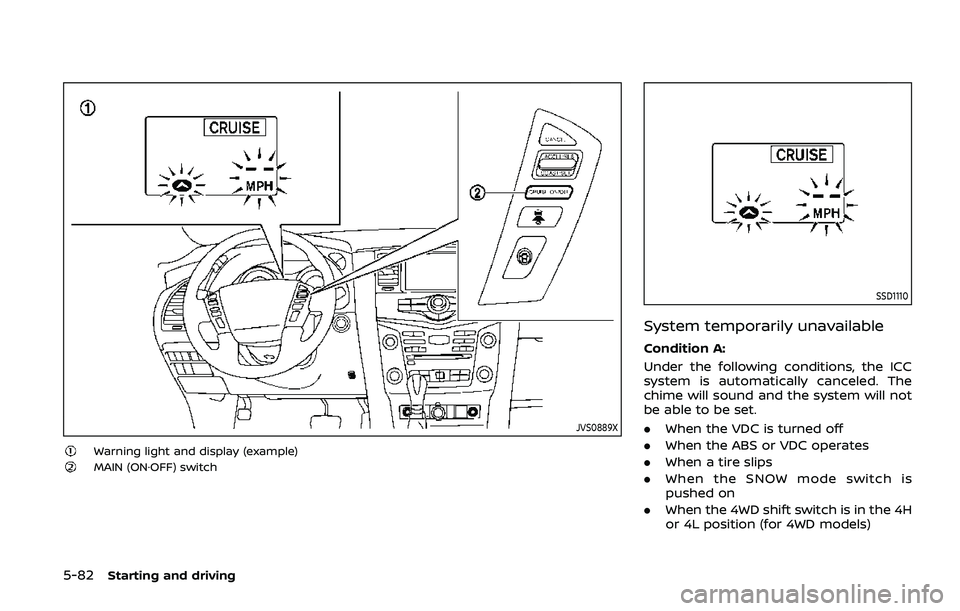
Condition A:
Under the following conditions, the ICC
system is automatically canceled. The
chime will sound and the system will not
be able to be set.
.When the VDC is turned off
. When the ABS or VDC operates
. When a tire slips
. When the SNOW mode switch is
pushed on
. When the 4WD shift switch is in the 4H
or 4L position (for 4WD models)
Page 349 of 536
dealer for this service.
WARNING
Failure to follow the warnings and
instructions for proper use of the I-
DC system could result in serious
personal injury or death.
.Always drive carefully and atten-
tively when using the I-DC sys-
tem. Read and understand the
Owner’s Manual thoroughly be-
fore using the I-DC system. To
avoid serious injury or death, do
not rely on the system to prevent
accidents or to control the vehi-
cle’s speed in emergency situa-
tions. Do not use the I-DC system
except in appropriate road and
traffic conditions.
. This system is only an aid to
assist the driver and is not a
collision warning or avoidance
device. It is the driver’s responsi-
bility to stay alert, drive safely
and be in control of the vehicle at
all times.
. As there is a performance limit to
the distance control function,
never rely solely on the I-DC
system. This system does not
correct careless, inattentive or absent-minded driving, or over-
come poor visibility in rain, fog, or
other bad weather. Decelerate
the vehicle speed by depressing
the brake pedal, depending on
the distance to the vehicle ahead
and the surrounding circum-
stances in order to maintain a
safe distance between vehicles.
. Always pay attention to the op-
eration of the vehicle and be
ready to manually decelerate to
maintain the proper following
distance. The I-DC system may
not be able to decelerate the
vehicle under some circum-
stances.
. This system only brakes and
moves the accelerator pedal up-
ward to help assist the driver to
maintain a following distance
from the vehicle ahead. Accelera-
tion should be operated by the
driver.
. The I-DC system does not control
vehicle speed or warn you when
you approach stationary and
slow moving vehicles. You must
pay attention to vehicle operation
to maintain proper distance from
vehicles ahead.
Starting and driving5-89
INTELLIGENT DISTANCE CONTROL
(I-DC) (if so equipped)
Page 356 of 536
5-96Starting and driving
I-DC SYSTEM LIMITATIONS
WARNING
Listed below are the system limita-
tions of the I-DC system. Failure to
operate the vehicle in accordance
with these system limitations could
result in serious injury or death.
.This system will not adapt auto-
matically to road conditions. Do
not use the system on roads with
sharp curves, or on icy roads, in
heavy rain or in fog.
. The I-DC system will not apply
brake control while the driver’s
foot is on the accelerator pedal.
. As there is a performance limit to
the distance control function,
never rely solely on the I-DC
system. This system does not
correct careless, inattentive or
absent-minded driving, or over-
come poor visibility in rain, fog, or
other bad weather. Decelerate
the vehicle speed by depressing
the brake pedal, depending on
the distance to the vehicle ahead
and the surrounding circum-
stances in order to maintain a
safe distance between vehicles. .
The system may not detect the
vehicle in front of you in certain
road or weather conditions. To
avoid accidents, never use the I-
DC system under the following
conditions:
— On roads with sharp curves
— On slippery road surfaces
such as on ice or snow, etc.
— On off-road surfaces such as on sand or rock, etc.
— During bad weather (rain, fog, snow, etc.)
— When rain, snow or dirt adhere to the system sensor
— On steep downhill roads (fre- quent braking may result in
overheating the brakes)
— On repeated uphill and down- hill roads
— When towing a trailer or other vehicle
. In some road or traffic conditions,
a vehicle or object can unexpect-
edly come into the sensor detec-
tion zone and cause automatic
braking. You may need to control
the distance from other vehicles
using the accelerator pedal. Al- ways stay alert and avoid using
the I-DC system when it is not
recommended in this section.
The radar sensor will not detect the
following objects:
. Stationary and slow moving vehicles
. Pedestrians or objects in the roadway
. Oncoming vehicles in the same lane
. Motorcycles traveling offset in the
travel lane
The following are some conditions in
which the sensor cannot detect the
signals:
. When the snow or road spray from
traveling vehicles reduces the sensor’s
visibility
. When excessively heavy baggage is
loaded in the rear seat or the luggage
room of your vehicle
Page 360 of 536
5-100Starting and driving
.When the VDC or ABS (including the
traction control system) operates
. When the SNOW mode switch is ON
(To use the I-DC system, turn off the
SNOW mode switch, then turn on the
dynamic driver assistance switch
.)
For details about the SNOW mode
switch, see “SNOW mode switch” (P.2-
47).
. When the 4WD shift switch is in the 4H
or 4L position (for 4WD models)
. When the radar signal is temporarily
interrupted
Action to take:
When the conditions listed above are no
longer present, turn the system off with
the dynamic driver assistance switch
.
Turn the I-DC system back on to use the
system.
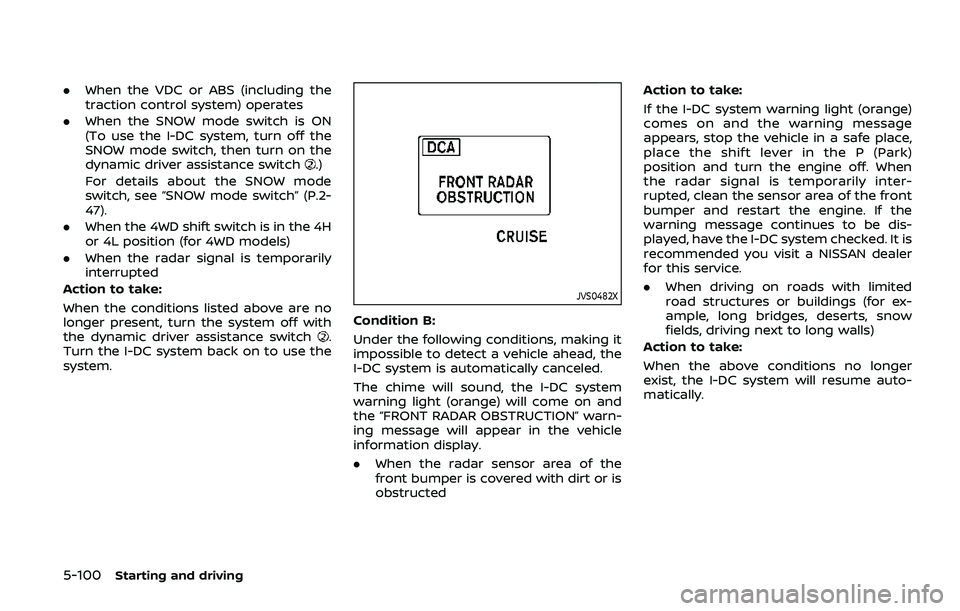
JVS0482X
Condition B:
Under the following conditions, making it
impossible to detect a vehicle ahead, the
I-DC system is automatically canceled.
The chime will sound, the I-DC system
warning light (orange) will come on and
the “FRONT RADAR OBSTRUCTION” warn-
ing message will appear in the vehicle
information display.
. When the radar sensor area of the
front bumper is covered with dirt or is
obstructed Action to take:
If the I-DC system warning light (orange)
comes on and the warning message
appears, stop the vehicle in a safe place,
place the shift lever in the P (Park)
position and turn the engine off. When
the radar signal is temporarily inter-
rupted, clean the sensor area of the front
bumper and restart the engine. If the
warning message continues to be dis-
played, have the I-DC system checked. It is
recommended you visit a NISSAN dealer
for this service.
.
When driving on roads with limited
road structures or buildings (for ex-
ample, long bridges, deserts, snow
fields, driving next to long walls)
Action to take:
When the above conditions no longer
exist, the I-DC system will resume auto-
matically.
Page 396 of 536
5-136Starting and driving
function correctly.
PARKING BRAKE BREAK-IN
Break in the parking brake shoes when-
ever the stopping effect of the parking
brake is weakened or whenever the
parking brake shoes and/or drums/ro-
tors are replaced, in order to assure the
best braking performance.
This procedure is described in the vehicle
service manual. It is recommended you
visit a NISSAN dealer for this service.
Using the brakes
Avoid resting your foot on the brake
pedal while driving. This will cause over-
heating of the brakes, wearing out the
brake and pads faster and reduce gas
mileage.
To help save the brakes and to prevent
the brakes from overheating, reduce
speed and downshift to a lower gear
before going down a slope or long grade.
Overheated brakes may reduce braking
performance and could result in loss of
vehicle control.
WARNING
.While driving on a slippery sur-
face, be careful when braking,
accelerating or downshifting. Abrupt braking or accelerating
could cause the wheels to skid
and result in an accident.
. If the engine is not running or is
turned off while driving, the
power assist for the brakes will
not work. Braking will be harder.
BRAKE ASSIST
When the force applied to the brake pedal
exceeds a certain level, the Brake Assist is
activated generating greater braking
force than a conventional brake booster
even with light pedal force.
WARNING
The Brake Assist is only an aid to
assist braking operation and is not a
collision warning or avoidance de-
vice. It is the driver’s responsibility to
stay alert, drive safely and be in
control of the vehicle at all times.
ANTI-LOCK BRAKING SYSTEM (ABS)
WARNING
.The Anti-lock Braking System
(ABS) is a sophisticated device,
but it cannot prevent accidents
resulting from careless or dan-
gerous driving techniques. It can
help maintain vehicle control dur-
ing braking on slippery surfaces.
Remember that stopping dis-
tances on slippery surfaces will
be longer than on normal sur-
BRAKE ASSIST
Page 397 of 536
faces even with ABS. Stopping
distances may also be longer on
rough, gravel or snow covered
roads, or if you are using tire
chains. Always maintain a safe
distance from the vehicle in front
of you. Ultimately, the driver is
responsible for safety.
. Tire type and condition may also
affect braking effectiveness.
— When replacing tires, install
the specified size of tires on
all four wheels.
— When installing a spare tire, make sure that it is the proper
size and type as specified on
the Tire and Loading Informa-
tion label. See “Tire and load-
ing information label” (P.10-
12).
— For detailed information, see “Wheels and tires” (P.8-30).
The Anti-lock Braking System (ABS) con-
trols the brakes so the wheels do not lock
during hard braking or when braking on
slippery surfaces. The system detects the
rotation speed at each wheel and varies
the brake fluid pressure to prevent each
wheel from locking and sliding. By pre-
venting each wheel from locking, the system helps the driver maintain steering
control and helps to minimize swerving
and spinning on slippery surfaces.
Using the system
Depress the brake pedal and hold it down.
Depress the brake pedal with firm steady
pressure, but do not pump the brakes.
The ABS will operate to prevent the
wheels from locking up. Steer the vehicle
to avoid obstacles.
WARNING
Do not pump the brake pedal. Doing
so may result in increased stopping
distances.
Self-test feature
The ABS includes electronic sensors, elec-
tric pumps, hydraulic solenoids and a
computer. The computer has a built-in
diagnostic feature that tests the system
each time you start the engine and move
the vehicle at a low speed in forward or
reverse. When the self-test occurs, you
may hear a “clunk” noise and/or feel a
pulsation in the brake pedal. This is
normal and does not indicate a malfunc-
tion. If the computer senses a malfunc-
tion, it switches the ABS off and
illuminates the ABS warning light on the
instrument panel. The brake system then
operates normally, but without anti-lock
assistance.
If the ABS warning light illuminates during
the self-test or while driving, have the
vehicle checked. It is recommended you
visit a NISSAN dealer for this service.
Normal operation
The ABS operates at speeds above 3 to 6
MPH (5 to 10 km/h). The speed varies
according to road conditions.
When the ABS senses that one or more
wheels are close to locking up, the
actuator rapidly applies and releases
hydraulic pressure. This action is similar
to pumping the brakes very quickly. You
may feel a pulsation in the brake pedal
and hear a noise from under the hood or
feel a vibration from the actuator when it
is operating. This is normal and indicates
that the ABS is operating properly. How-
ever, the pulsation may indicate that road
conditions are hazardous and extra care
is required while driving.
Starting and driving5-137
Page 398 of 536
5-138Starting and driving
The Vehicle Dynamic Control (VDC) sys-
tem uses various sensors to monitor
driver inputs and vehicle motion. Under
certain driving conditions, the VDC sys-
tem helps to perform the following func-
tions.
.Controls brake pressure to reduce
wheel slip on one slipping drive wheel
so power is transferred to a non
slipping drive wheel on the same axle.
. Controls brake pressure and engine
output to reduce drive wheel slip
based on vehicle speed (traction con-
trol function).
. Controls brake pressure at individual
wheels and engine output to help the
driver maintain control of the vehicle
in the following conditions:
— understeer (vehicle tends to not
follow the steered path despite
increased steering input)
— oversteer (vehicle tends to spin due to certain road or driving condi-
tions).
The VDC system can help the driver to
maintain control of the vehicle, but it
cannot prevent loss of vehicle control in
all driving situations.
When the VDC system operates, the VDC
warning light
in the instrument panel
flashes so note the following: .
The road may be slippery or the
system may determine some action
is required to help keep the vehicle on
the steered path.
. You may feel a pulsation in the brake
pedal and hear a noise or vibration
from under the hood. This is normal
and indicates that the VDC system is
working properly.
. Adjust your speed and driving to the
road conditions.
If a malfunction occurs in the system, the
VDC warning light
illuminates in the
instrument panel. The VDC system auto-
matically turns off.
The VDC OFF switch is used to turn off the
VDC system. The VDC off indicator
illuminates to indicate the VDC system is
off. When the VDC switch is used to turn
off the system, the VDC system still
operates to prevent one drive wheel from
slipping by transferring power to a non
slipping drive wheel. The VDC warning
light
flashes if this occurs. All other
VDC functions are off, and the VDC
warning light
will not flash. The VDC
system is automatically reset to on when
the ignition switch is placed in the OFF
position then back to the ON position.
When the 4L position is selected with the
4WD shift switch, the VDC system is
disabled and the VDC off indicator light illuminates (for 4WD models).
See “Vehicle Dynamic Control (VDC) warn-
ing light” (P.2-17) and “Vehicle Dynamic
Control (VDC) off indicator light” (P.2-20).
The computer has a built-in diagnostic
feature that tests the system each time
you start the engine and move the vehicle
forward or in reverse at a slow speed.
When the self-test occurs, you may hear a
“clunk” noise and/or feel a pulsation in the
brake pedal. This is normal and is not an
indication of a malfunction.
WARNING
.
The VDC system is designed to
help improve driving stability but
does not prevent accidents due
to abrupt steering operation at
high speeds or by careless or
dangerous driving techniques.
Reduce vehicle speed and be
especially careful when driving
and cornering on slippery sur-
faces and always drive carefully.
. Do not modify the vehicle’s sus-
pension. If suspension parts such
as shock absorbers, struts,
springs, stabilizer bars, bushings
and wheels are not NISSAN re-
commended for your vehicle or
VEHICLE DYNAMIC CONTROL (VDC) SYSTEM
Page 455 of 536
SDI2704
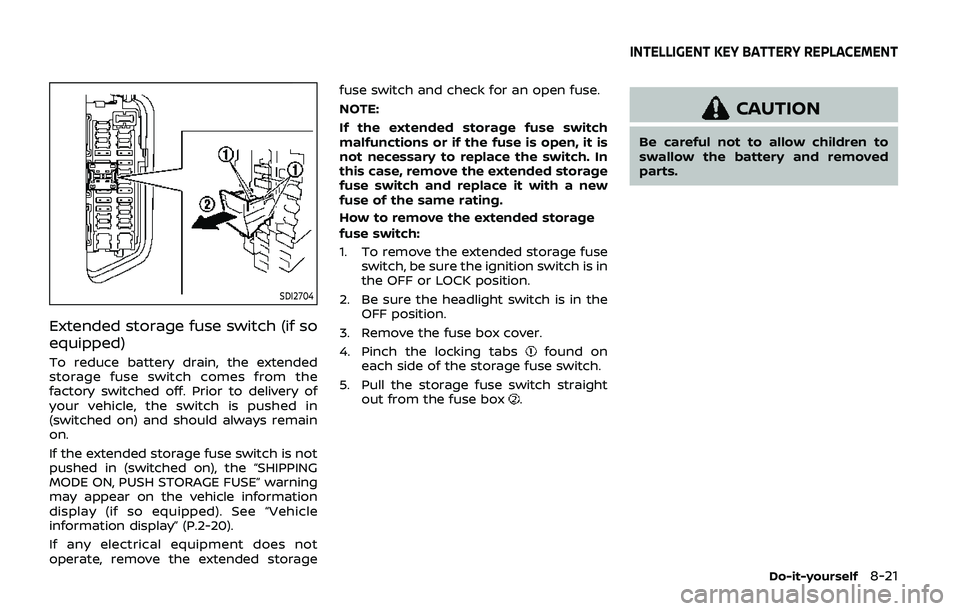
Extended storage fuse switch (if so
equipped)
To reduce battery drain, the extended
storage fuse switch comes from the
factory switched off. Prior to delivery of
your vehicle, the switch is pushed in
(switched on) and should always remain
on.
If the extended storage fuse switch is not
pushed in (switched on), the “SHIPPING
MODE ON, PUSH STORAGE FUSE” warning
may appear on the vehicle information
display (if so equipped). See “Vehicle
information display” (P.2-20).
If any electrical equipment does not
operate, remove the extended storagefuse switch and check for an open fuse.
NOTE:
If the extended storage fuse switch
malfunctions or if the fuse is open, it is
not necessary to replace the switch. In
this case, remove the extended storage
fuse switch and replace it with a new
fuse of the same rating.
How to remove the extended storage
fuse switch:
1. To remove the extended storage fuse switch, be sure the ignition switch is in
the OFF or LOCK position.
2. Be sure the headlight switch is in the OFF position.
3. Remove the fuse box cover.
4. Pinch the locking tabsfound on
each side of the storage fuse switch.
5. Pull the storage fuse switch straight out from the fuse box
.
CAUTION
Be careful not to allow children to
swallow the battery and removed
parts.
Do-it-yourself8-21
INTELLIGENT KEY BATTERY REPLACEMENT
Page 517 of 536
Trailer towing tips
In order to gain skill and an understand-
ing of the vehicle’s behavior, you should
practice turning, stopping and backing up
in an area which is free from traffic.
Steering stability, and braking perfor-
mance will be somewhat different than
under normal driving conditions.
.Always secure items in the trailer to
prevent load shift while driving.
. Lock the trailer hitch coupler with a
pin or lock to prevent the coupler from
inadvertently becoming unlatched.
. Avoid abrupt starts, acceleration or
stops.
. Avoid sharp turns or lane changes.
. Always drive your vehicle at a moder-
ate speed. Some states or provinces
have specific speed limits for vehicles
that are towing trailers. Obey the local
speed limits.
. When backing up, hold the bottom of
the steering wheel with one hand.
Move your hand in the direction in
which you want the trailer to go. Make
small corrections and back up slowly.
If possible, have someone guide you
when you are backing up.
Always block the wheels on both vehicle
and trailer when parking. Parking on a
slope is not recommended; however, if you must do so:
CAUTION
If you move the shift lever to the P
(Park) position before blocking the
wheels and applying the parking
brake, transmission damage could
occur.
1. Apply and hold the brake pedal.
2. Have someone place blocks on the downhill side of the vehicle and trailer
wheels.
3. After the wheel blocks are in place, slowly release the brake pedal until
the blocks absorb the vehicle load.
4. Apply the parking brake.
5. Shift the transmission into P (Park).
6. Four-Wheel Drive (4WD) models:
Make sure that the 4WD shift switch is
engaged in the AUTO, 4HI or 4LO
position and the Automatic Transmis-
sion (AT) park warning light is turned
off.
7. Turn off the engine.
To drive away:
1. Apply and hold the brake pedal. 2. Start the engine.
3. Shift the transmission into gear.
4. Release the parking brake.
5. Drive slowly until the vehicle and
trailer are clear from the blocks.
6. Apply and hold the brake pedal.
7. Have someone retrieve and store the blocks.
. While going downhill, the weight of the
trailer pushing on the tow vehicle may
decrease overall stability. Therefore, to
maintain adequate control, reduce
your speed and shift to a lower gear.
Avoid long or repeated use of the
brakes when descending a hill, as this
reduces their effectiveness and could
cause overheating. Shifting to a lower
gear instead provides “engine braking”
and reduces the need to brake as
frequently.
. If the engine coolant temperature
rises to a high temperature, see “If
your vehicle overheats” (P.6-14).
. Trailer towing requires more fuel than
normal circumstances.
. Avoid towing a trailer for your vehicle’s
first 500 miles (800 km).
. Have your vehicle serviced more often
than at intervals specified in the
recommended maintenance schedule
shown in the "9. Maintenance and
Technical and consumer information10-27