fog light NISSAN ARMADA 2019 Owner´s Manual
[x] Cancel search | Manufacturer: NISSAN, Model Year: 2019, Model line: ARMADA, Model: NISSAN ARMADA 2019Pages: 536, PDF Size: 2.56 MB
Page 252 of 536
4-36Monitor, heater, air conditioner, audio, phone and voice recognition systems
4. To turn off the heater and air condi-tioner system, push the “OFF” button.
A visible mist may be seen coming from
the ventilators in hot, humid conditions as
the air is cooled rapidly. This does not
indicate a malfunction.
Dehumidified defrosting or defogging:
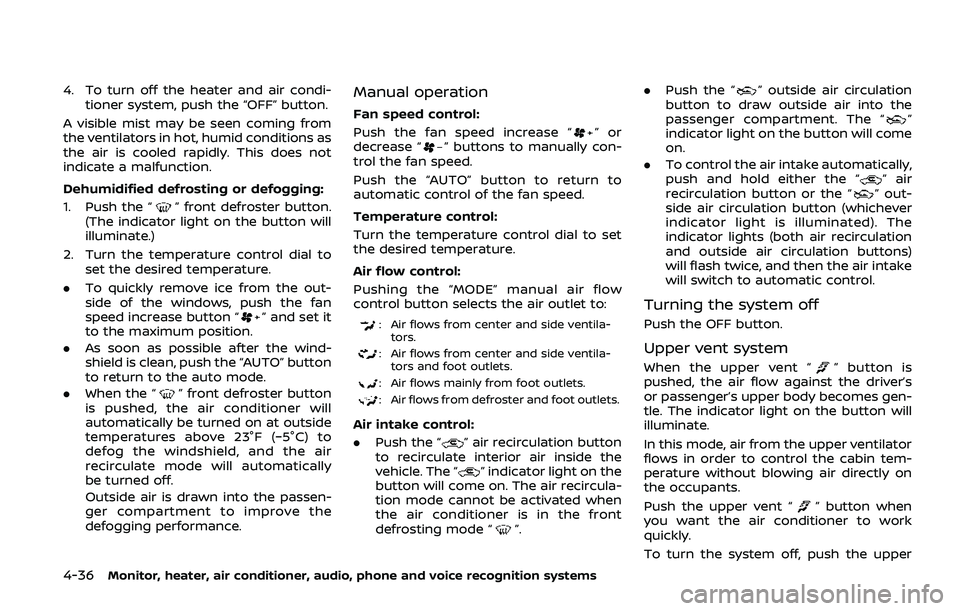
1. Push the “
” front defroster button.
(The indicator light on the button will
illuminate.)
2. Turn the temperature control dial to set the desired temperature.
. To quickly remove ice from the out-
side of the windows, push the fan
speed increase button “
” and set it
to the maximum position.
. As soon as possible after the wind-
shield is clean, push the “AUTO” button
to return to the auto mode.
. When the “
” front defroster button
is pushed, the air conditioner will
automatically be turned on at outside
temperatures above 23°F (−5°C) to
defog the windshield, and the air
recirculate mode will automatically
be turned off.
Outside air is drawn into the passen-
ger compartment to improve the
defogging performance.
Manual operation
Fan speed control:
Push the fan speed increase “
”or
decrease “” buttons to manually con-
trol the fan speed.
Push the “AUTO” button to return to
automatic control of the fan speed.
Temperature control:
Turn the temperature control dial to set
the desired temperature.
Air flow control:
Pushing the “MODE” manual air flow
control button selects the air outlet to:
: Air flows from center and side ventila-
tors.
: Air flows from center and side ventila-tors and foot outlets.
: Air flows mainly from foot outlets.
: Air flows from defroster and foot outlets.
Air intake control:
. Push the “
” air recirculation button
to recirculate interior air inside the
vehicle. The “
” indicator light on the
button will come on. The air recircula-
tion mode cannot be activated when
the air conditioner is in the front
defrosting mode “
”. .
Push the “
” outside air circulation
button to draw outside air into the
passenger compartment. The “
”
indicator light on the button will come
on.
. To control the air intake automatically,
push and hold either the “
” air
recirculation button or the “” out-
side air circulation button (whichever
indicator light is illuminated). The
indicator lights (both air recirculation
and outside air circulation buttons)
will flash twice, and then the air intake
will switch to automatic control.
Turning the system off
Push the OFF button.
Upper vent system
When the upper vent “” button is
pushed, the air flow against the driver’s
or passenger’s upper body becomes gen-
tle. The indicator light on the button will
illuminate.
In this mode, air from the upper ventilator
flows in order to control the cabin tem-
perature without blowing air directly on
the occupants.
Push the upper vent “
” button when
you want the air conditioner to work
quickly.
To turn the system off, push the upper
Page 258 of 536
4-42Monitor, heater, air conditioner, audio, phone and voice recognition systems
OPERATING TIPS
When the engine coolant temperature
and outside air temperature are low, the
air flow from the foot outlets may not
operate. However, this is not a malfunc-
tion. After the coolant temperature
warms up, the air flow from the foot
outlets will operate normally.
The sensors
andlocated on the
instrument panel help maintain a con-
stant temperature. Do not put anything
on or around the sensors.
LINKING INTELLIGENT KEY (if so
equipped)
The air conditioner system settings can
be memorized for each Intelligent Key.
For more details, see “Setting memory
function” (P.3-42).
IN-CABIN MICROFILTER
The air conditioner system is equipped
with an in-cabin microfilter which collects
dirt, pollen, dust, etc.
To make sure the air conditioner heats,
defogs, and ventilates efficiently, replace
the filter in accordance with the specified
maintenance intervals listed in the “9.
Maintenance and schedules” section. It is
recommended to see a NISSAN dealer to
replace the filter.
The filter should be replaced if the air flow decreases significantly or if win-
dows fog up easily when operating the
heater or air conditioner.
SERVICING AIR CONDITIONER
The air conditioner system in your NISSAN
is charged with a refrigerant designed
with the environment in mind.
This re-
frigerant will not harm the earth’s
ozone layer. However, special charging
equipment and lubricant are required
when servicing your NISSAN air condi-
tioner. Using improper refrigerants or
lubricants will cause severe damage to
your air conditioner system. (See “Capa-
cities and recommended fluids/lubri-
cants” (P.10-2) for air conditioner system
refrigerant and lubricant recommenda-
tions.)
Your NISSAN dealer will be able to service
your environmentally friendly air condi-
tioner system.
WARNING
The system contains refrigerant un-
der high pressure. To avoid personal
injury, any air conditioner service
should be done only by an experi-
enced technician with the proper
equipment.
WINDOW ANTENNA
The antenna pattern is printed inside the
rear side glass.
CAUTION
. Do not place metalized film near
the 3rd row seat window or at-
tach any metal parts to it. This
may cause poor reception or
noise.
. When cleaning the inside of the
rear side window, be careful not
to scratch or damage the rear
side window antenna. Lightly
wipe along the antenna with a
dampened soft cloth.
ANTENNA
Page 301 of 536
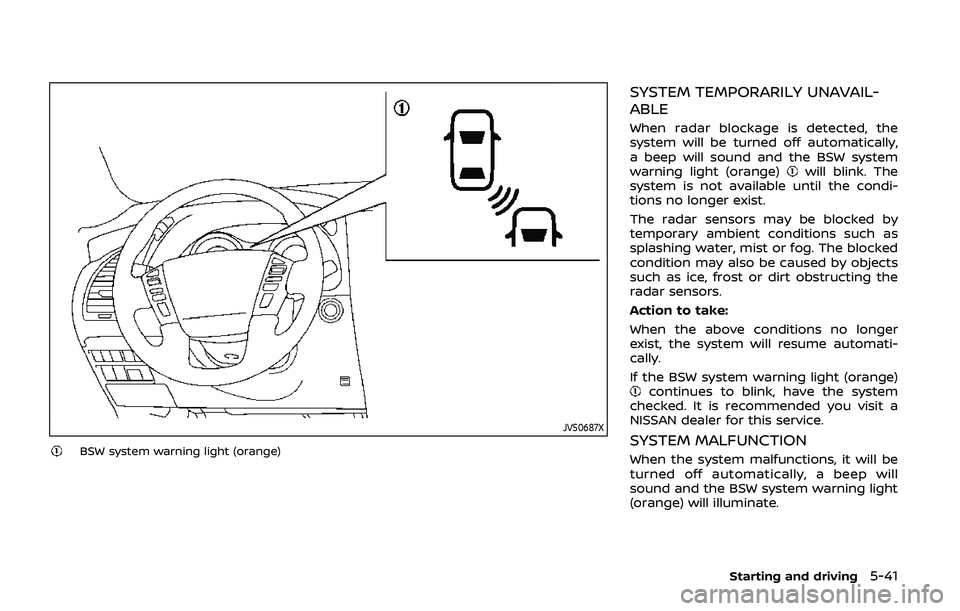
JVS0687X
BSW system warning light (orange)
SYSTEM TEMPORARILY UNAVAIL-
ABLE
When radar blockage is detected, the
system will be turned off automatically,
a beep will sound and the BSW system
warning light (orange)
will blink. The
system is not available until the condi-
tions no longer exist.
The radar sensors may be blocked by
temporary ambient conditions such as
splashing water, mist or fog. The blocked
condition may also be caused by objects
such as ice, frost or dirt obstructing the
radar sensors.
Action to take:
When the above conditions no longer
exist, the system will resume automati-
cally.
If the BSW system warning light (orange)
continues to blink, have the system
checked. It is recommended you visit a
NISSAN dealer for this service.
SYSTEM MALFUNCTION
When the system malfunctions, it will be
turned off automatically, a beep will
sound and the BSW system warning light
(orange) will illuminate.
Starting and driving5-41
Page 302 of 536
5-42Starting and driving
Action to take:
Stop the vehicle in a safe location, place
the vehicle in the P (Park) position, turn
the engine off and restart the engine.
If the BSW system warning light continues
to illuminate, have the system checked. It
is recommended you visit a NISSAN dealer
for this service.
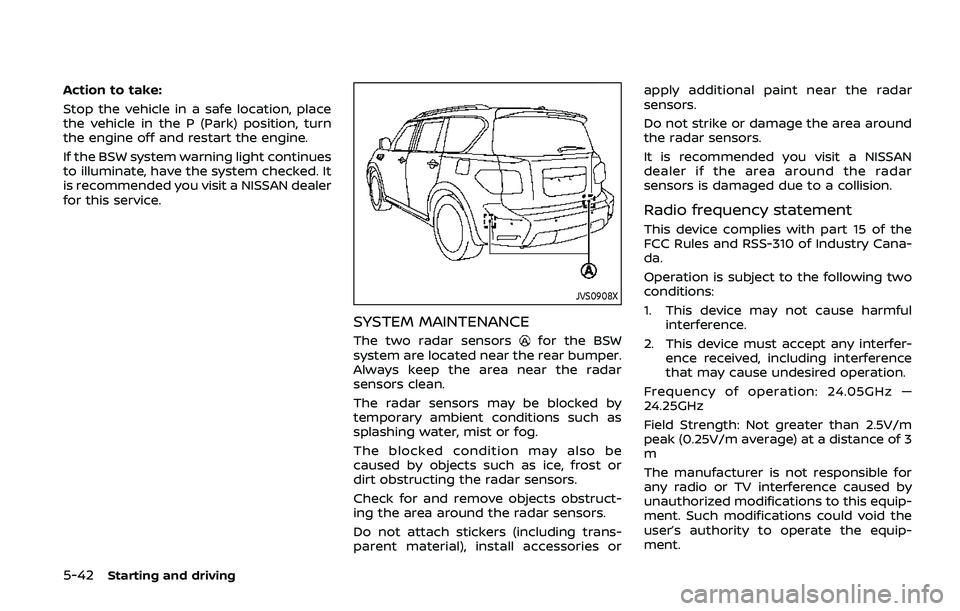
JVS0908X
SYSTEM MAINTENANCE
The two radar sensorsfor the BSW
system are located near the rear bumper.
Always keep the area near the radar
sensors clean.
The radar sensors may be blocked by
temporary ambient conditions such as
splashing water, mist or fog.
The blocked condition may also be
caused by objects such as ice, frost or
dirt obstructing the radar sensors.
Check for and remove objects obstruct-
ing the area around the radar sensors.
Do not attach stickers (including trans-
parent material), install accessories or apply additional paint near the radar
sensors.
Do not strike or damage the area around
the radar sensors.
It is recommended you visit a NISSAN
dealer if the area around the radar
sensors is damaged due to a collision.
Radio frequency statement
This device complies with part 15 of the
FCC Rules and RSS-310 of Industry Cana-
da.
Operation is subject to the following two
conditions:
1. This device may not cause harmful
interference.
2. This device must accept any interfer- ence received, including interference
that may cause undesired operation.
Frequency of operation: 24.05GHz —
24.25GHz
Field Strength: Not greater than 2.5V/m
peak (0.25V/m average) at a distance of 3
m
The manufacturer is not responsible for
any radio or TV interference caused by
unauthorized modifications to this equip-
ment. Such modifications could void the
user’s authority to operate the equip-
ment.
Page 309 of 536
painted lane markers; non-
standard lane markers; lane
markers covered with water,
dirt, snow, etc.
— On roads where discontinued lane markers are still detect-
able.
— On roads where there are sharp curves.
— On roads where there are sharply contrasting objects,
such as shadows, snow,
water, wheel ruts, seams or
lines remaining after road re-
pairs.
— On roads where the traveling lane merges or separates.
— When the vehicle’s traveling direction does not align with
the lane markers.
— When traveling close to the vehicle in front of you, which
obstructs the lane camera
unit detection range.
— When rain, snow or dirt ad- heres to the windshield in
front of a lane camera unit.
— When the headlights are not bright due to dirt on the lens or if aiming is not adjusted
properly.
— When strong light enters a lane camera unit. (For exam-
ple: light directly shines on the
front of the vehicle at sunrise
or sunset.)
— When a sudden change in brightness occurs. (For exam-
ple: when the vehicle enters or
exits a tunnel or under a
bridge.)
. Do not use the I-BSI system under
the following conditions because
the system may not function
properly.
— During bad weather. (For ex-
ample: rain, fog, snow, etc.)
— When driving on slippery roads, such as on ice or snow,
etc.
— When driving on winding or uneven roads.
— When there is a lane closure due to road repairs.
— When driving in a makeshift or temporary lane. — When driving on roads where
the lane width is too narrow.
— When driving with a tire that is not within normal tire condi-
tions (for example, tire wear,
low tire pressure, installation
of spare tire, tire chains, non-
standard wheels).
— When the vehicle is equipped with non-original brake parts
or suspension parts.
— When towing a trailer or other vehicle.
. Excessive noise (for example,
audio system volume, open vehi-
cle window) will interfere with the
chime sound, and it may not be
heard.
Starting and driving5-49
Page 315 of 536
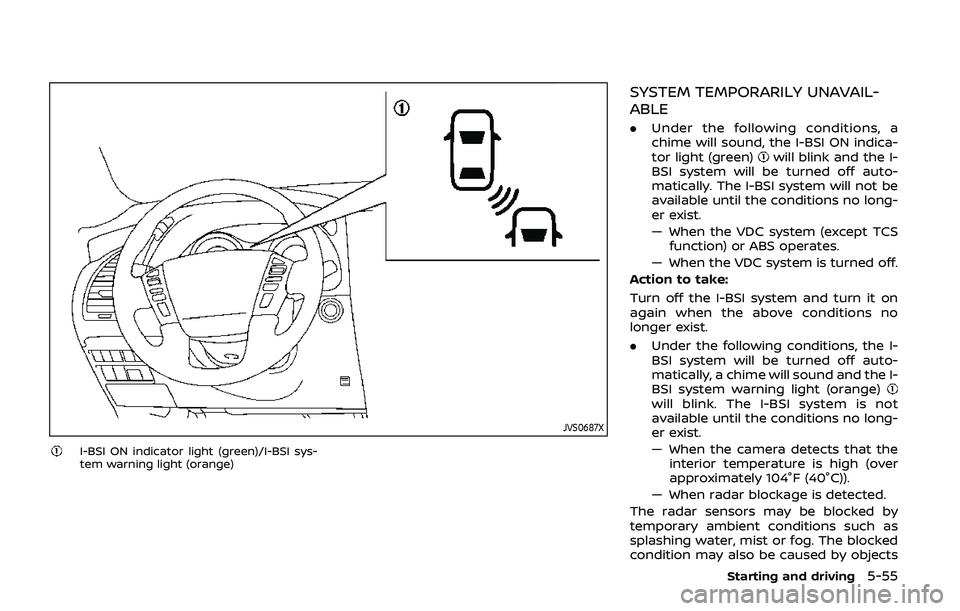
JVS0687X
I-BSI ON indicator light (green)/I-BSI sys-
tem warning light (orange)
SYSTEM TEMPORARILY UNAVAIL-
ABLE
.Under the following conditions, a
chime will sound, the I-BSI ON indica-
tor light (green)
will blink and the I-
BSI system will be turned off auto-
matically. The I-BSI system will not be
available until the conditions no long-
er exist.
— When the VDC system (except TCS function) or ABS operates.
— When the VDC system is turned off.
Action to take:
Turn off the I-BSI system and turn it on
again when the above conditions no
longer exist.
. Under the following conditions, the I-
BSI system will be turned off auto-
matically, a chime will sound and the I-
BSI system warning light (orange)
will blink. The I-BSI system is not
available until the conditions no long-
er exist.
— When the camera detects that the
interior temperature is high (over
approximately 104°F (40°C)).
— When radar blockage is detected.
The radar sensors may be blocked by
temporary ambient conditions such as
splashing water, mist or fog. The blocked
condition may also be caused by objects
Starting and driving5-55
Page 316 of 536
5-56Starting and driving
such as ice, frost or dirt obstructing the
radar sensors.
Action to take:
When the above conditions no longer
exist, turn the I-BSI system off and turn
it on again. If the I-BSI system warning
light (orange)
continues to blink even
after the I-BSI system is turned on again,
stop the vehicle in a safe location, place
the shift lever in the P (Park) position and
turn the engine off. Check for and remove
objects obscuring the radar sensors on
the rear bumper, and restart the engine.
If the I-BSI system warning light (orange)
continues to blink, have the I-BSI
system checked. It is recommended you
visit a NISSAN dealer for this service.
SYSTEM MALFUNCTION
When the I-BSI system malfunctions, it will
be turned off automatically, a chime will
sound and the I-BSI system warning light
(orange) will illuminate.
Action to take:
Stop the vehicle in a safe location, place
the shift lever in the P (Park) position, turn
the engine off and restart the engine.
If the warning light (orange) continues to
illuminate, have the I-BSI system checked.
It is recommended you visit a NISSAN
dealer for this service.
JVS0910X
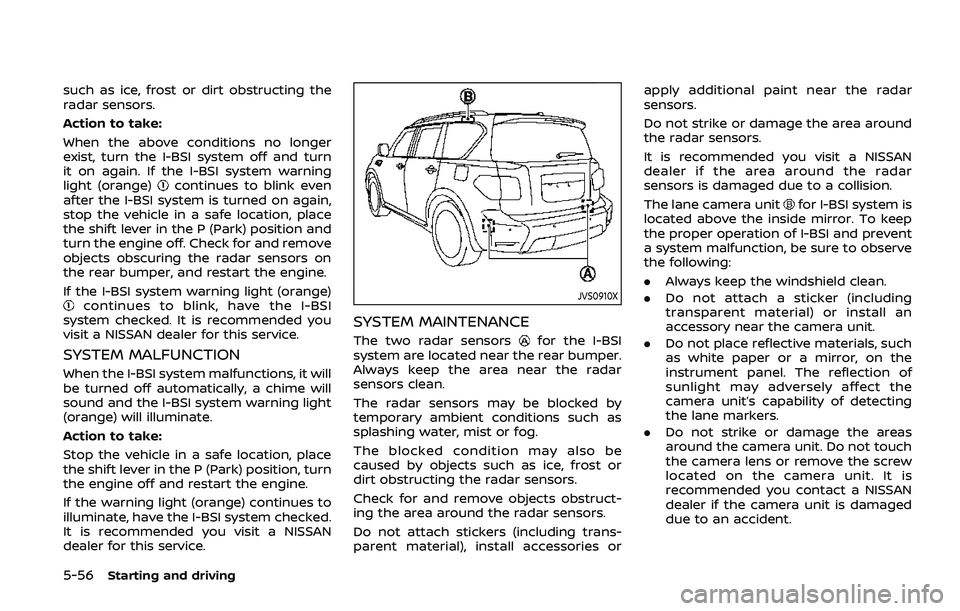
SYSTEM MAINTENANCE
The two radar sensorsfor the I-BSI
system are located near the rear bumper.
Always keep the area near the radar
sensors clean.
The radar sensors may be blocked by
temporary ambient conditions such as
splashing water, mist or fog.
The blocked condition may also be
caused by objects such as ice, frost or
dirt obstructing the radar sensors.
Check for and remove objects obstruct-
ing the area around the radar sensors.
Do not attach stickers (including trans-
parent material), install accessories or apply additional paint near the radar
sensors.
Do not strike or damage the area around
the radar sensors.
It is recommended you visit a NISSAN
dealer if the area around the radar
sensors is damaged due to a collision.
The lane camera unit
for I-BSI system is
located above the inside mirror. To keep
the proper operation of I-BSI and prevent
a system malfunction, be sure to observe
the following:
. Always keep the windshield clean.
. Do not attach a sticker (including
transparent material) or install an
accessory near the camera unit.
. Do not place reflective materials, such
as white paper or a mirror, on the
instrument panel. The reflection of
sunlight may adversely affect the
camera unit’s capability of detecting
the lane markers.
. Do not strike or damage the areas
around the camera unit. Do not touch
the camera lens or remove the screw
located on the camera unit. It is
recommended you contact a NISSAN
dealer if the camera unit is damaged
due to an accident.
Page 458 of 536
8-24Do-it-yourself
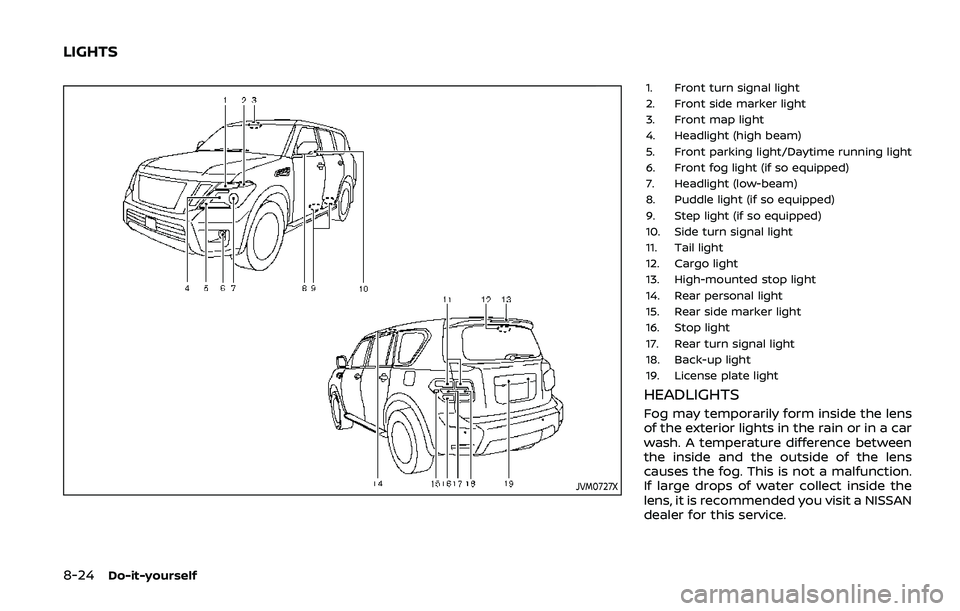
JVM0727X
1. Front turn signal light
2. Front side marker light
3. Front map light
4. Headlight (high beam)
5. Front parking light/Daytime running light
6. Front fog light (if so equipped)
7. Headlight (low-beam)
8. Puddle light (if so equipped)
9. Step light (if so equipped)
10. Side turn signal light
11. Tail light
12. Cargo light
13. High-mounted stop light
14. Rear personal light
15. Rear side marker light
16. Stop light
17. Rear turn signal light
18. Back-up light
19. License plate light
HEADLIGHTS
Fog may temporarily form inside the lens
of the exterior lights in the rain or in a car
wash. A temperature difference between
the inside and the outside of the lens
causes the fog. This is not a malfunction.
If large drops of water collect inside the
lens, it is recommended you visit a NISSAN
dealer for this service.
LIGHTS
Page 460 of 536
8-26Do-it-yourself
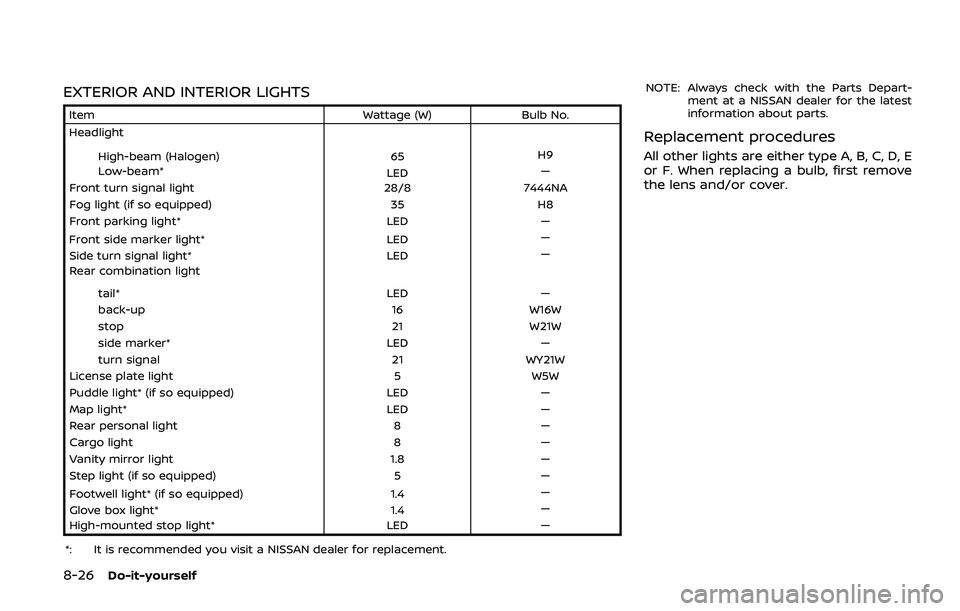
EXTERIOR AND INTERIOR LIGHTS
ItemWattage (W)Bulb No.
Headlight
High-beam (Halogen) 65H9
Low-beam* LED—
Front turn signal light 28/87444NA
Fog light (if so equipped) 35H8
Front parking light* LED—
Front side marker light* LED—
Side turn signal light* LED—
Rear combination light
tail* LED—
back-up 16W16W
stop 21W21W
side marker* LED—
turn signal 21WY21W
License plate light 5W5W
Puddle light* (if so equipped) LED—
Map light* LED—
Rear personal light 8—
Cargo light 8—
Vanity mirror light 1.8—
Step light (if so equipped) 5—
Footwell light* (if so equipped) 1.4—
Glove box light* 1.4—
High-mounted stop light* LED—
*: It is recommended you visit a NISSAN dealer for replacement. NOTE: Always check with the Parts Depart-
ment at a NISSAN dealer for the latest
information about parts.
Replacement procedures
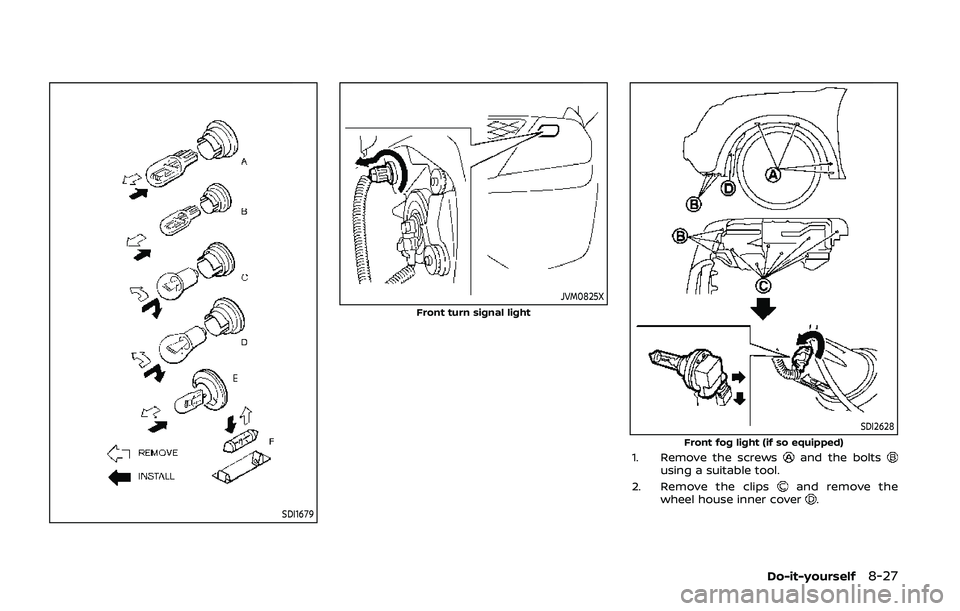
All other lights are either type A, B, C, D, E
or F. When replacing a bulb, first remove
the lens and/or cover.
Page 461 of 536
SDI1679
JVM0825X
Front turn signal light
SDI2628Front fog light (if so equipped)1. Remove the screwsand the boltsusing a suitable tool.
2. Remove the clips
and remove the
wheel house inner cover.
Do-it-yourself8-27