ESP NISSAN ARMADA 2019 Owner´s Manual
[x] Cancel search | Manufacturer: NISSAN, Model Year: 2019, Model line: ARMADA, Model: NISSAN ARMADA 2019Pages: 536, PDF Size: 2.56 MB
Page 283 of 536
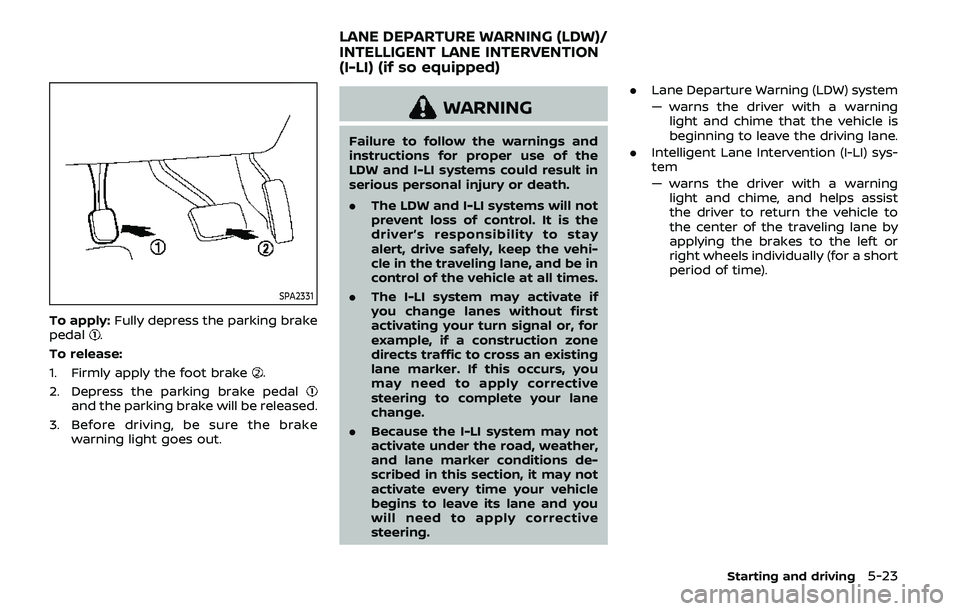
SPA2331
To apply:Fully depress the parking brake
pedal.
To release:
1. Firmly apply the foot brake
.
2. Depress the parking brake pedal
and the parking brake will be released.
3. Before driving, be sure the brake warning light goes out.
WARNING
Failure to follow the warnings and
instructions for proper use of the
LDW and I-LI systems could result in
serious personal injury or death.
.The LDW and I-LI systems will not
prevent loss of control. It is the
driver’s responsibility to stay
alert, drive safely, keep the vehi-
cle in the traveling lane, and be in
control of the vehicle at all times.
. The I-LI system may activate if
you change lanes without first
activating your turn signal or, for
example, if a construction zone
directs traffic to cross an existing
lane marker. If this occurs, you
may need to apply corrective
steering to complete your lane
change.
. Because the I-LI system may not
activate under the road, weather,
and lane marker conditions de-
scribed in this section, it may not
activate every time your vehicle
begins to leave its lane and you
will need to apply corrective
steering. .
Lane Departure Warning (LDW) system
— warns the driver with a warning
light and chime that the vehicle is
beginning to leave the driving lane.
. Intelligent Lane Intervention (I-LI) sys-
tem
— warns the driver with a warning
light and chime, and helps assist
the driver to return the vehicle to
the center of the traveling lane by
applying the brakes to the left or
right wheels individually (for a short
period of time).
Starting and driving5-23
LANE DEPARTURE WARNING (LDW)/
INTELLIGENT LANE INTERVENTION
(I-LI) (if so equipped)
Page 302 of 536
5-42Starting and driving
Action to take:
Stop the vehicle in a safe location, place
the vehicle in the P (Park) position, turn
the engine off and restart the engine.
If the BSW system warning light continues
to illuminate, have the system checked. It
is recommended you visit a NISSAN dealer
for this service.
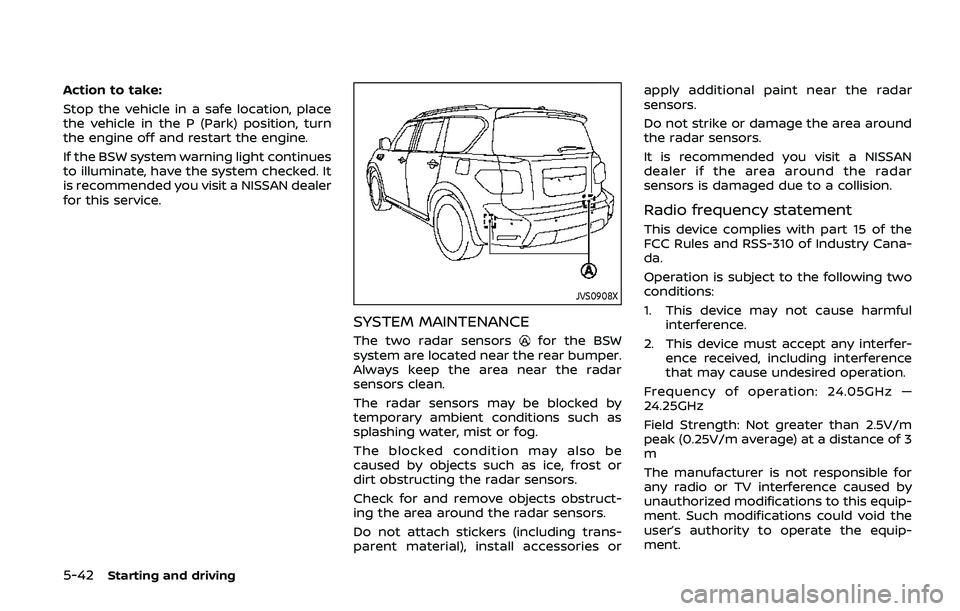
JVS0908X
SYSTEM MAINTENANCE
The two radar sensorsfor the BSW
system are located near the rear bumper.
Always keep the area near the radar
sensors clean.
The radar sensors may be blocked by
temporary ambient conditions such as
splashing water, mist or fog.
The blocked condition may also be
caused by objects such as ice, frost or
dirt obstructing the radar sensors.
Check for and remove objects obstruct-
ing the area around the radar sensors.
Do not attach stickers (including trans-
parent material), install accessories or apply additional paint near the radar
sensors.
Do not strike or damage the area around
the radar sensors.
It is recommended you visit a NISSAN
dealer if the area around the radar
sensors is damaged due to a collision.
Radio frequency statement
This device complies with part 15 of the
FCC Rules and RSS-310 of Industry Cana-
da.
Operation is subject to the following two
conditions:
1. This device may not cause harmful
interference.
2. This device must accept any interfer- ence received, including interference
that may cause undesired operation.
Frequency of operation: 24.05GHz —
24.25GHz
Field Strength: Not greater than 2.5V/m
peak (0.25V/m average) at a distance of 3
m
The manufacturer is not responsible for
any radio or TV interference caused by
unauthorized modifications to this equip-
ment. Such modifications could void the
user’s authority to operate the equip-
ment.
Page 317 of 536
Radio frequency statement
This device complies with part 15 of the
FCC Rules and RSS-310 of Industry Cana-
da.
Operation is subject to the following two
conditions:
1. This device may not cause harmfulinterference.
2. This device must accept any interfer- ence received, including interference
that may cause undesired operation.
Frequency of operation: 24.05GHz —
24.25GHz
Field Strength: Not greater than 2.5V/m
peak (0.25V/m average) at a distance of 3
m
The manufacturer is not responsible for
any radio or TV interference caused by
unauthorized modifications to this equip-
ment. Such modifications could void the
user’s authority to operate the equip-
ment.WARNING
Failure to follow the warnings and
instructions for proper use of the I-BI
system could result in serious injury
or death.
. The I-BI system is not a replace-
ment for proper driving proce-
dure, is not designed to prevent
contact with vehicles or objects
and does not provide full brake
power. When backing out of park-
ing spaces, always use the inside
and rear mirrors and turn and
look in the direction you will
move. Never rely solely on the I-
BI system.
. There is a limitation to the detec-
tion capability of the radar or the
sonar. Using the I-BI system un-
der some road, ground, traffic or
weather conditions could lead to
improper system operation. Al-
ways rely on your own operation
to avoid accidents.
The I-BI system can help alert the driver of
an approaching vehicle or objects behind
the vehicle when the driver is backing out
of a parking space.
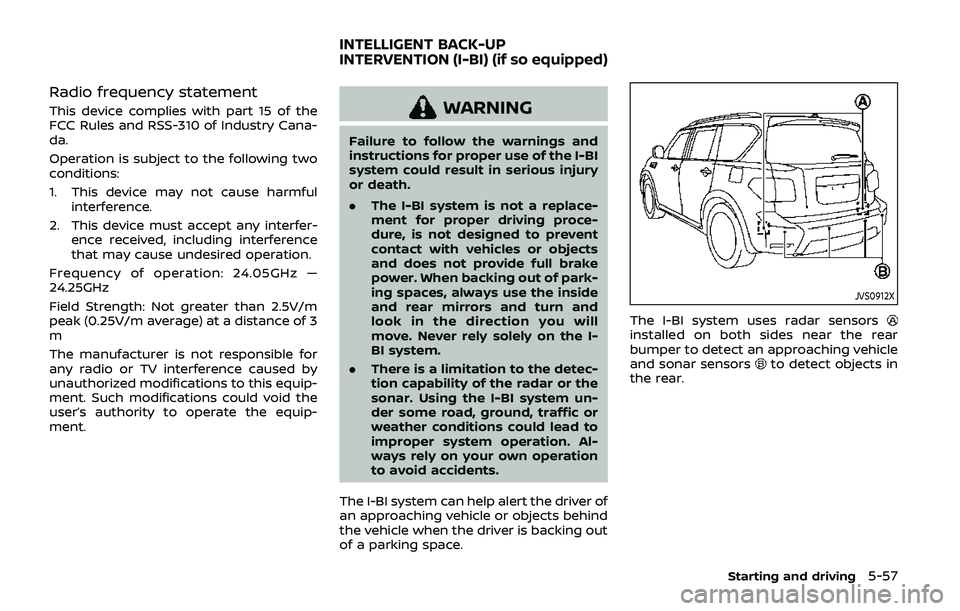
JVS0912X
The I-BI system uses radar sensorsinstalled on both sides near the rear
bumper to detect an approaching vehicle
and sonar sensors
to detect objects in
the rear.
Starting and driving5-57
INTELLIGENT BACK-UP
INTERVENTION (I-BI) (if so equipped)
Page 326 of 536
5-66Starting and driving
SYSTEM MALFUNCTION
If the I-BI system malfunctions, it will turn
off automatically, a chime will sound and
“BCI MALFUNCTION” warning message will
appear in the vehicle information display
.
Action to take
Stop the vehicle in a safe location and
place the shift lever in the P (Park)
position. Turn the engine off and restart
the engine. If the warning message con-
tinues to appear, have the system
checked. It is recommended you visit a
NISSAN dealer for this service.
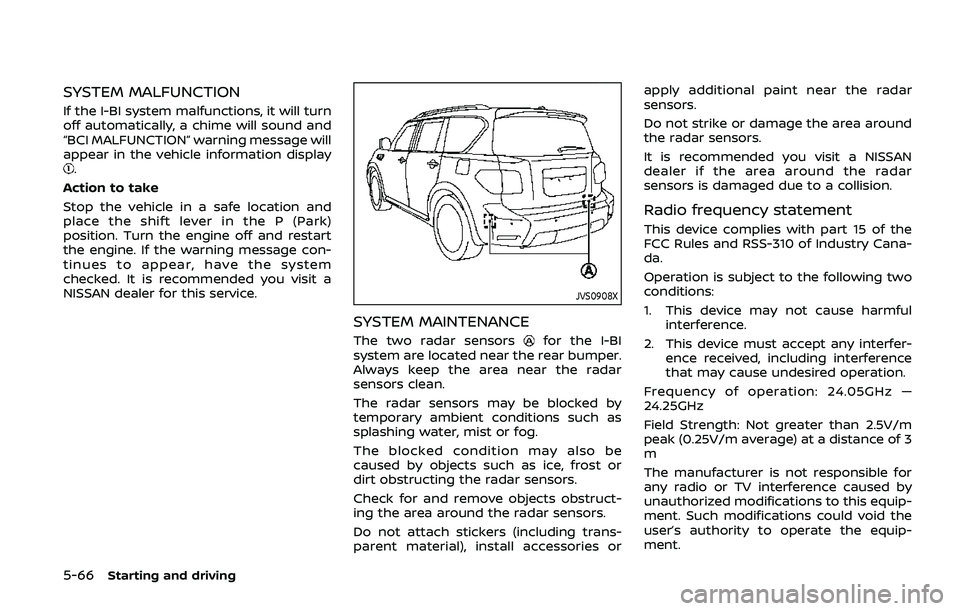
JVS0908X
SYSTEM MAINTENANCE
The two radar sensorsfor the I-BI
system are located near the rear bumper.
Always keep the area near the radar
sensors clean.
The radar sensors may be blocked by
temporary ambient conditions such as
splashing water, mist or fog.
The blocked condition may also be
caused by objects such as ice, frost or
dirt obstructing the radar sensors.
Check for and remove objects obstruct-
ing the area around the radar sensors.
Do not attach stickers (including trans-
parent material), install accessories or apply additional paint near the radar
sensors.
Do not strike or damage the area around
the radar sensors.
It is recommended you visit a NISSAN
dealer if the area around the radar
sensors is damaged due to a collision.
Radio frequency statement
This device complies with part 15 of the
FCC Rules and RSS-310 of Industry Cana-
da.
Operation is subject to the following two
conditions:
1. This device may not cause harmful
interference.
2. This device must accept any interfer- ence received, including interference
that may cause undesired operation.
Frequency of operation: 24.05GHz —
24.25GHz
Field Strength: Not greater than 2.5V/m
peak (0.25V/m average) at a distance of 3
m
The manufacturer is not responsible for
any radio or TV interference caused by
unauthorized modifications to this equip-
ment. Such modifications could void the
user’s authority to operate the equip-
ment.
Page 345 of 536
This could cause failure or malfunc-
tion.
. Do not alter, remove or paint the front
bumper. It is recommended you con-
tact a NISSAN dealer before customiz-
ing or restoring the front bumper.
FCC Notice:
For USA:
This device complies with Part 15 of the
FCC Rules. Operation is subject to the
following two conditions:
1. This device may not cause harmful
interference, and
2. This device must accept any inter-
ference received, including interfer-
ence that may cause undesired
operation.
FCC Warning
Changes or modification not expressly
approved by the party responsible for
compliance could void the user’s
authority to operate the equipment.
For Canada:
This device complies with Industry Ca-
nada licence-exempt RSS standard(s).
Operation is subject to the following
two conditions:
1. This device may not cause interfer-
ence, and 2.
This device must accept any inter-
ference, including interference that
may cause undesired operation of
the device.
CONVENTIONAL (fixed speed)
CRUISE CONTROL MODE
This mode allows driving at a speed
between 25 to 90 MPH (40 to 144 km/h)
without keeping your foot on the accel-
erator pedal.
WARNING
.In the conventional (fixed speed)
cruise control mode, a warning
chime does not sound to warn
you if you are too close to the
vehicle ahead, as neither the pre-
sence of the vehicle ahead nor
the vehicle-to-vehicle distance is
detected.
. Pay special attention to the dis-
tance between your vehicle and
the vehicle ahead of you or a
collision could occur.
. Always confirm the setting in the
ICC system display.
. Do not use the conventional
(fixed speed) cruise control mode
when driving under the following conditions.
— when it is not possible to keep
the vehicle at a set speed
— in heavy traffic or in traffic that varies in speed
— on winding or hilly roads
— on slippery roads (rain, snow, ice, etc.)
— in very windy areas
Doing so could cause a loss of
vehicle control and result in an acci-
dent.
Starting and driving5-85
Page 349 of 536
dealer for this service.
WARNING
Failure to follow the warnings and
instructions for proper use of the I-
DC system could result in serious
personal injury or death.
.Always drive carefully and atten-
tively when using the I-DC sys-
tem. Read and understand the
Owner’s Manual thoroughly be-
fore using the I-DC system. To
avoid serious injury or death, do
not rely on the system to prevent
accidents or to control the vehi-
cle’s speed in emergency situa-
tions. Do not use the I-DC system
except in appropriate road and
traffic conditions.
. This system is only an aid to
assist the driver and is not a
collision warning or avoidance
device. It is the driver’s responsi-
bility to stay alert, drive safely
and be in control of the vehicle at
all times.
. As there is a performance limit to
the distance control function,
never rely solely on the I-DC
system. This system does not
correct careless, inattentive or absent-minded driving, or over-
come poor visibility in rain, fog, or
other bad weather. Decelerate
the vehicle speed by depressing
the brake pedal, depending on
the distance to the vehicle ahead
and the surrounding circum-
stances in order to maintain a
safe distance between vehicles.
. Always pay attention to the op-
eration of the vehicle and be
ready to manually decelerate to
maintain the proper following
distance. The I-DC system may
not be able to decelerate the
vehicle under some circum-
stances.
. This system only brakes and
moves the accelerator pedal up-
ward to help assist the driver to
maintain a following distance
from the vehicle ahead. Accelera-
tion should be operated by the
driver.
. The I-DC system does not control
vehicle speed or warn you when
you approach stationary and
slow moving vehicles. You must
pay attention to vehicle operation
to maintain proper distance from
vehicles ahead.
Starting and driving5-89
INTELLIGENT DISTANCE CONTROL
(I-DC) (if so equipped)
Page 362 of 536
5-102Starting and driving
.Always keep the sensor area of the
front bumper clean.
. Do not strike or damage the areas
around the sensor.
. Do not cover or attach stickers or
similar objects on the front bumper
near the sensor area. This could cause
failure or malfunction.
. Do not attach metallic objects near
the sensor area (brush guard, etc.).
This could cause failure or malfunc-
tion.
. Do not alter, remove or paint the front
bumper. It is recommended you con-
tact a NISSAN dealer before customiz-
ing or restoring the front bumper.
FCC Notice:
For USA:
This device complies with Part 15 of the
FCC Rules. Operation is subject to the
following two conditions:
1. This device may not cause harmful
interference, and
2. This device must accept any inter-
ference received, including interfer-
ence that may cause undesired
operation.
FCC Warning
Changes or modification not expressly
approved by the party responsible for compliance could void the user’s
authority to operate the equipment.
For Canada:
This device complies with Industry Ca-
nada licence-exempt RSS standard(s).
Operation is subject to the following
two conditions:
1.
This device may not cause interfer-
ence, and
2. This device must accept any inter-
ference, including interference that
may cause undesired operation of
the device.
WARNING
Failure to follow the warnings and
instructions for proper use of the
AEB system could result in serious
injury or death.
.The AEB system is a supplemen-
tal aid to the driver. It is not a
replacement for the driver’s at-
tention to traffic conditions or
responsibility to drive safely. It
cannot prevent accidents due to
carelessness or dangerous driv-
ing techniques.
. The AEB system does not func-
tion in all driving, traffic, weather
and road conditions.
The AEB system can assist the driver
when there is a risk of a forward collision
with the vehicle ahead in the traveling
lane.
AUTOMATIC EMERGENCY BRAKING (AEB)
Page 370 of 536
5-110Starting and driving
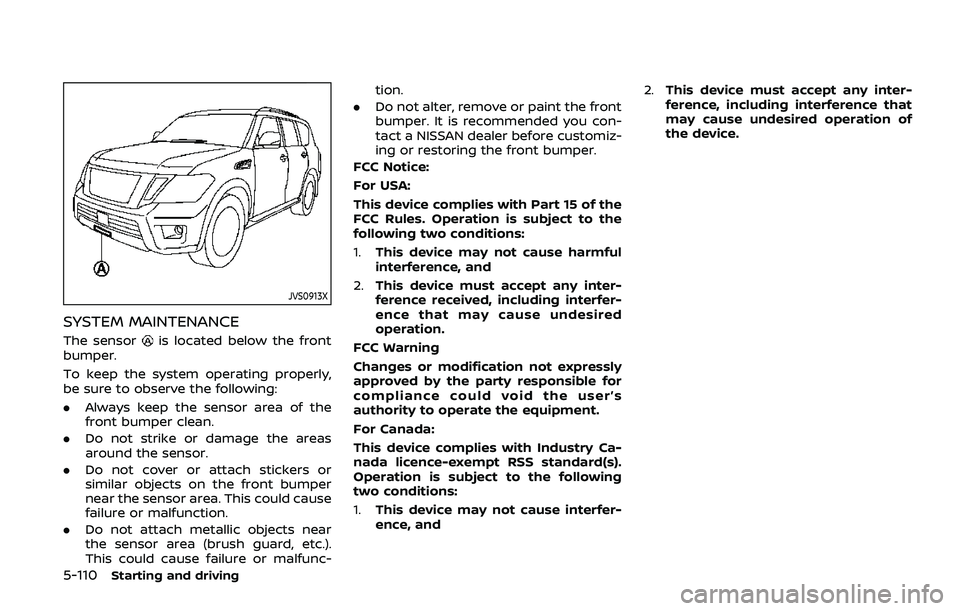
JVS0913X
SYSTEM MAINTENANCE
The sensoris located below the front
bumper.
To keep the system operating properly,
be sure to observe the following:
. Always keep the sensor area of the
front bumper clean.
. Do not strike or damage the areas
around the sensor.
. Do not cover or attach stickers or
similar objects on the front bumper
near the sensor area. This could cause
failure or malfunction.
. Do not attach metallic objects near
the sensor area (brush guard, etc.).
This could cause failure or malfunc- tion.
. Do not alter, remove or paint the front
bumper. It is recommended you con-
tact a NISSAN dealer before customiz-
ing or restoring the front bumper.
FCC Notice:
For USA:
This device complies with Part 15 of the
FCC Rules. Operation is subject to the
following two conditions:
1. This device may not cause harmful
interference, and
2. This device must accept any inter-
ference received, including interfer-
ence that may cause undesired
operation.
FCC Warning
Changes or modification not expressly
approved by the party responsible for
compliance could void the user’s
authority to operate the equipment.
For Canada:
This device complies with Industry Ca-
nada licence-exempt RSS standard(s).
Operation is subject to the following
two conditions:
1. This device may not cause interfer-
ence, and 2.
This device must accept any inter-
ference, including interference that
may cause undesired operation of
the device.
Page 371 of 536
WARNING
Failure to follow the warnings and
instructions for proper use of the I-
FCW system could result in serious
injury or death.
.The I-FCW system helps warn the
driver before a collision but will
not avoid a collision. It is the
driver’s responsibility to stay
alert, drive safely and be in con-
trol of the vehicle at all times.
The I-FCW system can help alert the driver
when there is a sudden braking of a
second vehicle traveling in front of the
vehicle ahead in the same lane.
JVS0913X
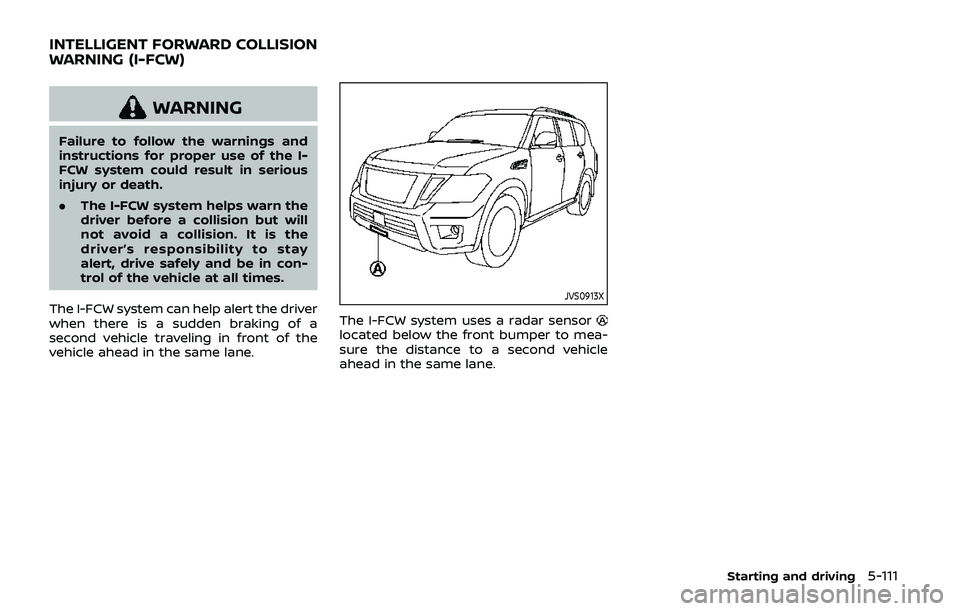
The I-FCW system uses a radar sensorlocated below the front bumper to mea-
sure the distance to a second vehicle
ahead in the same lane.
Starting and driving5-111
INTELLIGENT FORWARD COLLISION
WARNING (I-FCW)
Page 379 of 536
JVS0913X
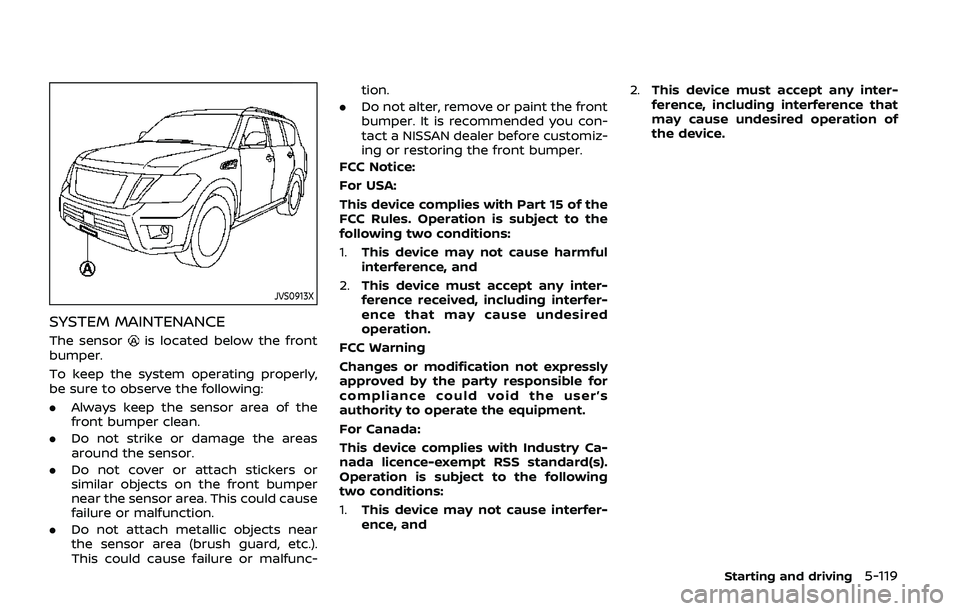
SYSTEM MAINTENANCE
The sensoris located below the front
bumper.
To keep the system operating properly,
be sure to observe the following:
. Always keep the sensor area of the
front bumper clean.
. Do not strike or damage the areas
around the sensor.
. Do not cover or attach stickers or
similar objects on the front bumper
near the sensor area. This could cause
failure or malfunction.
. Do not attach metallic objects near
the sensor area (brush guard, etc.).
This could cause failure or malfunc- tion.
. Do not alter, remove or paint the front
bumper. It is recommended you con-
tact a NISSAN dealer before customiz-
ing or restoring the front bumper.
FCC Notice:
For USA:
This device complies with Part 15 of the
FCC Rules. Operation is subject to the
following two conditions:
1. This device may not cause harmful
interference, and
2. This device must accept any inter-
ference received, including interfer-
ence that may cause undesired
operation.
FCC Warning
Changes or modification not expressly
approved by the party responsible for
compliance could void the user’s
authority to operate the equipment.
For Canada:
This device complies with Industry Ca-
nada licence-exempt RSS standard(s).
Operation is subject to the following
two conditions:
1. This device may not cause interfer-
ence, and 2.
This device must accept any inter-
ference, including interference that
may cause undesired operation of
the device.
Starting and driving5-119