light NISSAN ARMADA 2019 Owner´s Manual
[x] Cancel search | Manufacturer: NISSAN, Model Year: 2019, Model line: ARMADA, Model: NISSAN ARMADA 2019Pages: 536, PDF Size: 2.56 MB
Page 141 of 536
traveling lane with detectable lane mar-
kers. (See “Lane Departure Warning
(LDW)/Intelligent Lane Intervention (I-LI)”
(P.5-23).)
The BSW system will turn on the side
indicator lights, located next to the out-
side mirrors, if the radar sensors detect a
vehicle in the detection zone. If the turn
signal is activated in the direction of the
detected vehicle, a chime sounds twice
and the side indicator light will flash. (See
“Blind Spot Warning (BSW)” (P.5-33).)
SIC4454
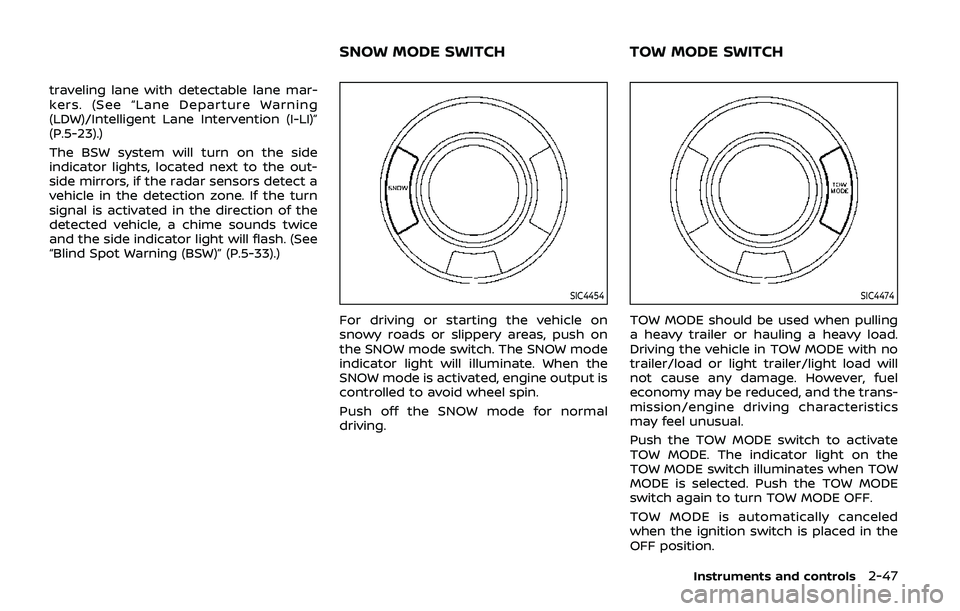
For driving or starting the vehicle on
snowy roads or slippery areas, push on
the SNOW mode switch. The SNOW mode
indicator light will illuminate. When the
SNOW mode is activated, engine output is
controlled to avoid wheel spin.
Push off the SNOW mode for normal
driving.
SIC4474
TOW MODE should be used when pulling
a heavy trailer or hauling a heavy load.
Driving the vehicle in TOW MODE with no
trailer/load or light trailer/light load will
not cause any damage. However, fuel
economy may be reduced, and the trans-
mission/engine driving characteristics
may feel unusual.
Push the TOW MODE switch to activate
TOW MODE. The indicator light on the
TOW MODE switch illuminates when TOW
MODE is selected. Push the TOW MODE
switch again to turn TOW MODE OFF.
TOW MODE is automatically canceled
when the ignition switch is placed in the
OFF position.
Instruments and controls2-47
SNOW MODE SWITCHTOW MODE SWITCH
Page 143 of 536
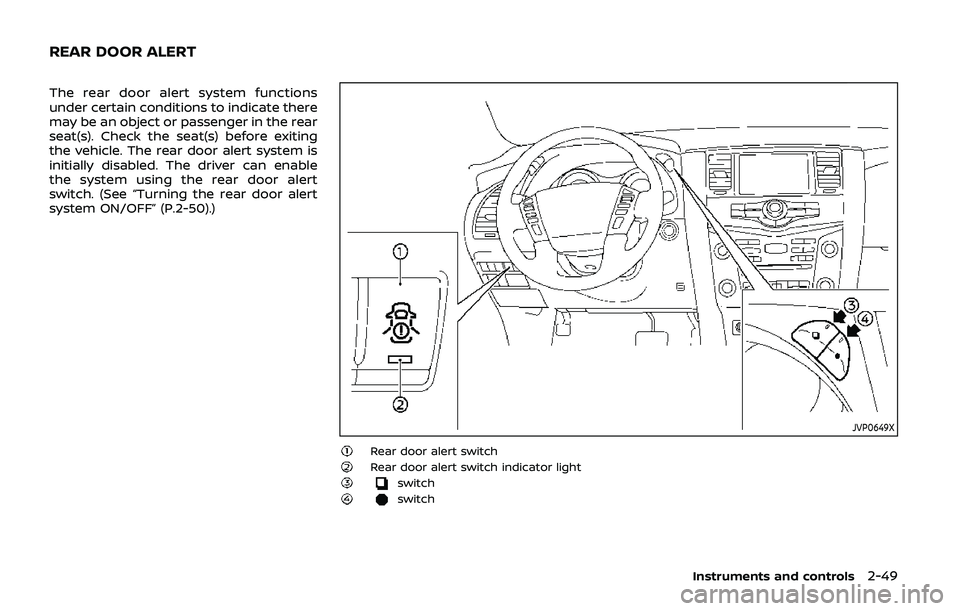
The rear door alert system functions
under certain conditions to indicate there
may be an object or passenger in the rear
seat(s). Check the seat(s) before exiting
the vehicle. The rear door alert system is
initially disabled. The driver can enable
the system using the rear door alert
switch. (See “Turning the rear door alert
system ON/OFF” (P.2-50).)
JVP0649X
Rear door alert switchRear door alert switch indicator lightswitchswitch
Instruments and controls2-49
REAR DOOR ALERT
Page 144 of 536
2-50Instruments and controls
TURNING THE REAR DOOR ALERT
SYSTEM ON/OFF
To turn on the rear door alert system,
push the rear door alert switch. The
rear door alert switch indicator lightwill
illuminate.
To turn off the system, push the rear door
alert switch again. The rear door alert
switch indicator light will go off.
When the system is turned ON:
. The system is activated when a rear
door is opened and closed approxi-
mately 10 minutes before the vehicle
is started. For additional information,
refer to “System operation” (P.2-50).
. If a rear door is opened and closed but
the vehicle is not started within ap-
proximately 10 minutes, the system
will not be activated. A rear door must
be opened and closed and the vehicle
started within 10 minutes for the
system to be activated.
NOTE:
. When turning on or off the system,
the system will retain current set-
tings even if the engine is restarted.
. If the battery terminal is discon-
nected and connected after the sys-
tem is turned on, the system will be
turned off and initialized. To use the
rear door alert system after the battery terminal is disconnected
and connected for servicing by the
customer or a NISSAN dealer, push
the rear door alert switch to turn on
the system.SYSTEM OPERATION
When the rear door alert system is
activated and the driver exits the vehicle
after arriving at a destination:
.
When the driver places the vehicle in
the P (Park) position, a message ap-
pears in the vehicle information dis-
play for a driver to select “DISMISS
MESSAGE” or “DISABLE ALERT” if de-
sired.
. With the system enabled, when the
driver exits the vehicle, an audible alert
(horn sound) will occur unless a rear
door is opened and closed within a
short time to deactivate the alert.
. If the doors are locked before the alert
is deactivated by opening a rear door,
the horn will sound.
. If the system is activated but the
liftgate is opened before opening a
rear door, the audible horn alert will be
delayed until after the liftgate is
closed.
. If the audible horn alert occurs, a
message will also appear in the vehi-
cle information display that states, “CHECK BACK SEAT FOR All ARTICLES”.
Page 146 of 536
2-52Instruments and controls
CAUTION
.Use power outlet with the engine
running to avoid discharging the
vehicle battery.
. Avoid using power outlet when
the air conditioner, headlights or
rear window defroster is on.
. Before inserting or disconnecting
a plug, be sure the electrical
accessory being used is turned
OFF.
. When not in use, be sure to close
the cap. Do not allow water or any
liquid to contact the outlet.
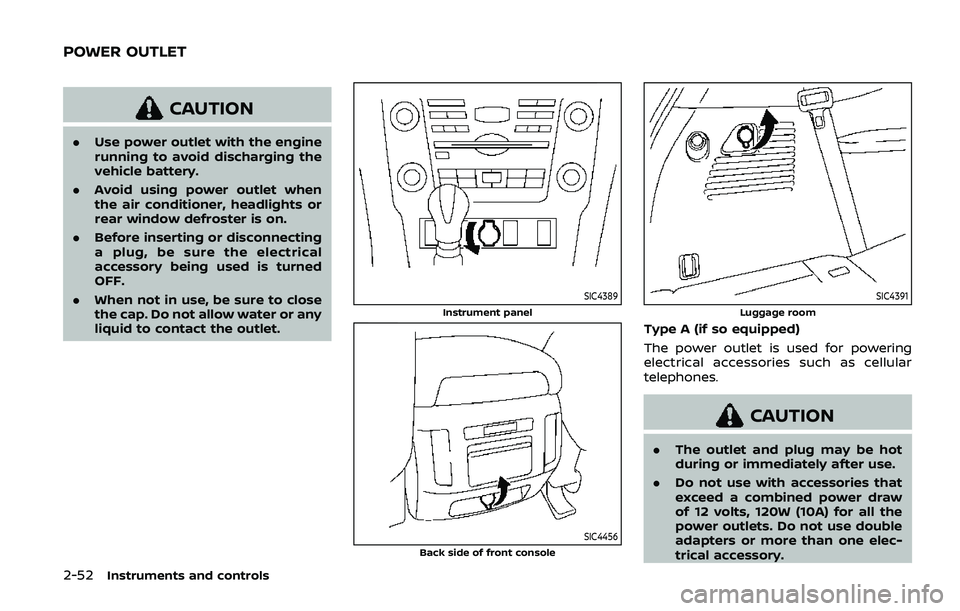
SIC4389
Instrument panel
SIC4456Back side of front console
SIC4391
Luggage room
Type A (if so equipped)
The power outlet is used for powering
electrical accessories such as cellular
telephones.
CAUTION
.The outlet and plug may be hot
during or immediately after use.
. Do not use with accessories that
exceed a combined power draw
of 12 volts, 120W (10A) for all the
power outlets. Do not use double
adapters or more than one elec-
trical accessory.
POWER OUTLET
Page 147 of 536
.This power outlet is not designed
for use with a cigarette lighter
unit.
. Push the plug in as far as it will
go. If good contact is not made,
the plug may overheat or the
internal temperature fuse may
blow.
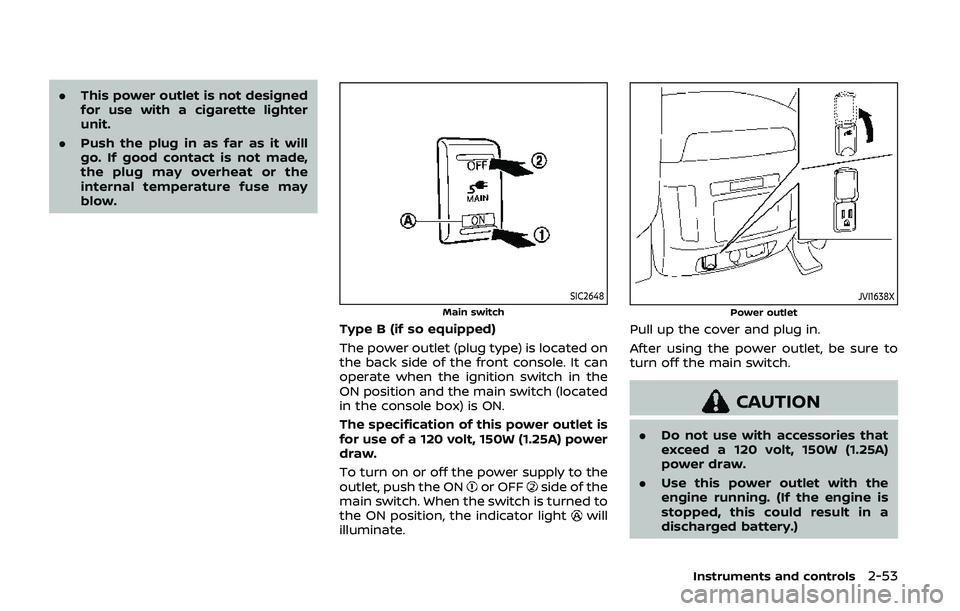
SIC2648
Main switch
Type B (if so equipped)
The power outlet (plug type) is located on
the back side of the front console. It can
operate when the ignition switch in the
ON position and the main switch (located
in the console box) is ON.
The specification of this power outlet is
for use of a 120 volt, 150W (1.25A) power
draw.
To turn on or off the power supply to the
outlet, push the ON
or OFFside of the
main switch. When the switch is turned to
the ON position, the indicator light
will
illuminate.
JVI1638X
Power outlet
Pull up the cover and plug in.
After using the power outlet, be sure to
turn off the main switch.
CAUTION
. Do not use with accessories that
exceed a 120 volt, 150W (1.25A)
power draw.
. Use this power outlet with the
engine running. (If the engine is
stopped, this could result in a
discharged battery.)
Instruments and controls2-53
Page 149 of 536
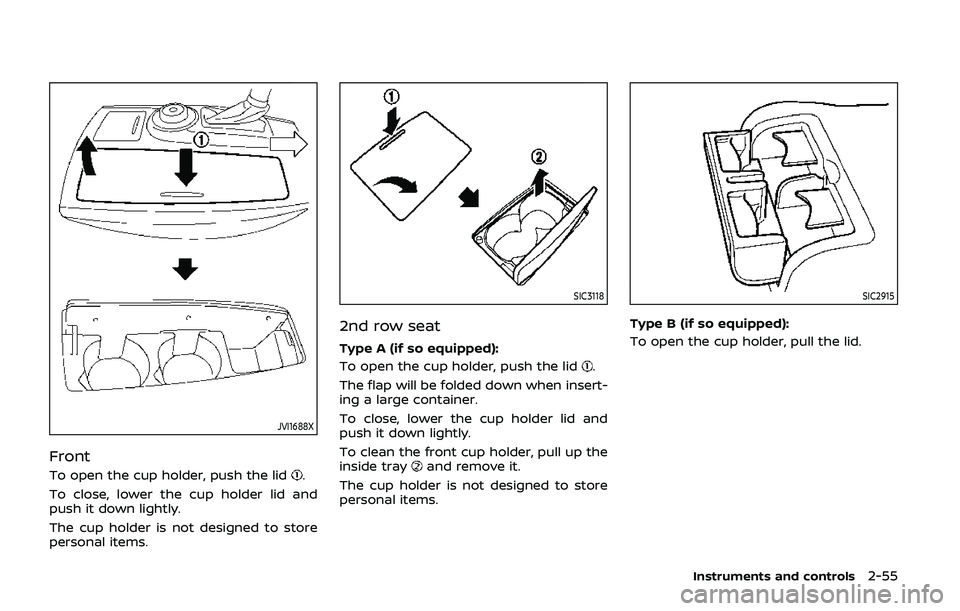
JVI1688X
Front
To open the cup holder, push the lid.
To close, lower the cup holder lid and
push it down lightly.
The cup holder is not designed to store
personal items.
SIC3118
2nd row seat
Type A (if so equipped):
To open the cup holder, push the lid
.
The flap will be folded down when insert-
ing a large container.
To close, lower the cup holder lid and
push it down lightly.
To clean the front cup holder, pull up the
inside tray
and remove it.
The cup holder is not designed to store
personal items.
SIC2915
Type B (if so equipped):
To open the cup holder, pull the lid.
Instruments and controls2-55
Page 151 of 536
CAUTION
.Do not use for anything other
than glasses.
. Do not leave glasses in the sun-
glasses holder while parking in
direct sunlight. The heat may
damage the glasses.
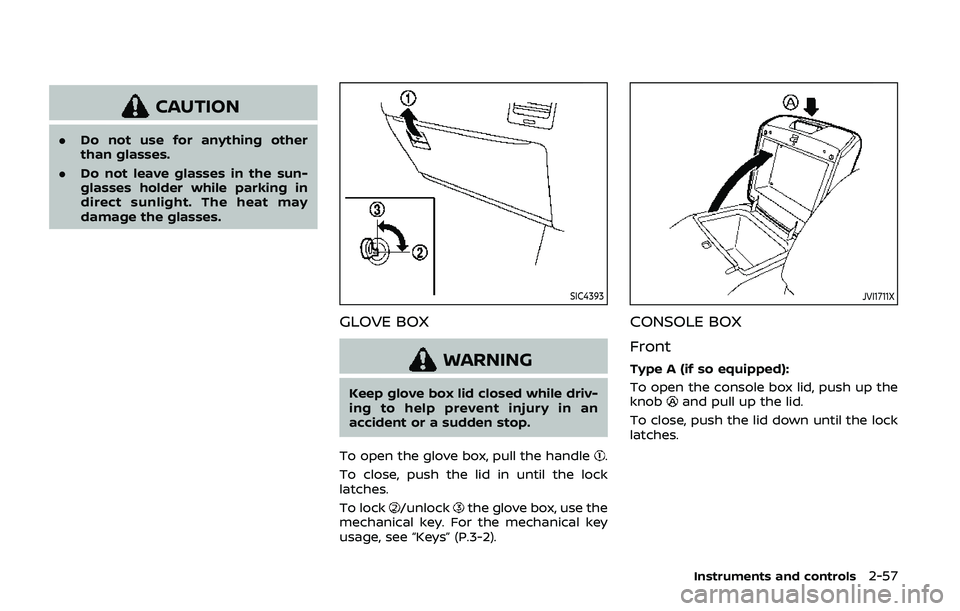
SIC4393
GLOVE BOX
WARNING
Keep glove box lid closed while driv-
ing to help prevent injury in an
accident or a sudden stop.
To open the glove box, pull the handle
.
To close, push the lid in until the lock
latches.
To lock
/unlockthe glove box, use the
mechanical key. For the mechanical key
usage, see “Keys” (P.3-2).
JVI1711X
CONSOLE BOX
Front
Type A (if so equipped):
To open the console box lid, push up the
knob
and pull up the lid.
To close, push the lid down until the lock
latches.
Instruments and controls2-57
Page 159 of 536
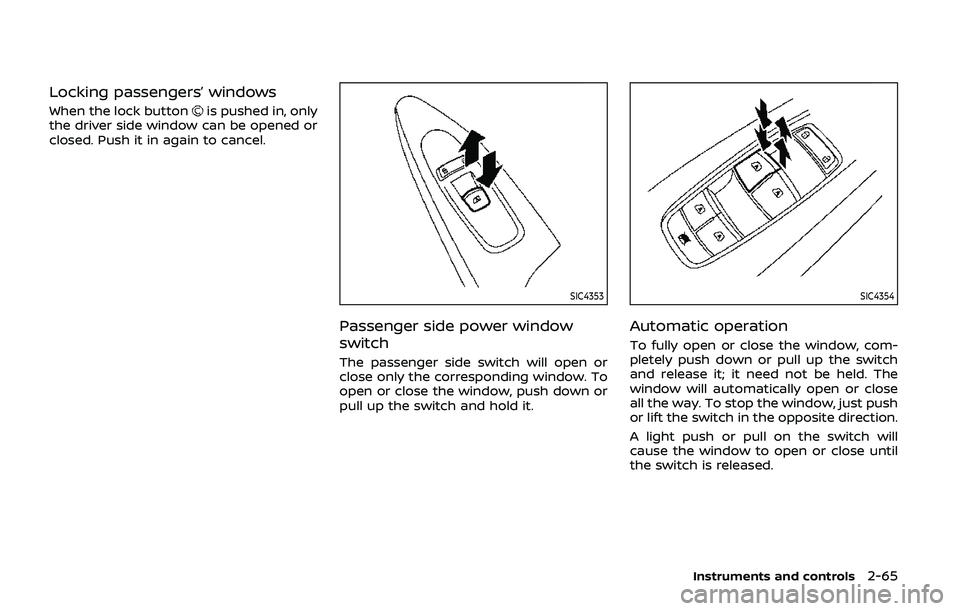
Locking passengers’ windows
When the lock buttonis pushed in, only
the driver side window can be opened or
closed. Push it in again to cancel.
SIC4353
Passenger side power window
switch
The passenger side switch will open or
close only the corresponding window. To
open or close the window, push down or
pull up the switch and hold it.
SIC4354
Automatic operation
To fully open or close the window, com-
pletely push down or pull up the switch
and release it; it need not be held. The
window will automatically open or close
all the way. To stop the window, just push
or lift the switch in the opposite direction.
A light push or pull on the switch will
cause the window to open or close until
the switch is released.
Instruments and controls2-65
Page 162 of 536
2-68Instruments and controls
matically when the auto reverse function
activates due to a malfunction, push and
hold the switch to the CLOSE
position.
Depending on the environment or driv-
ing conditions, the auto reverse func-
tion may be activated if an impact or
load similar to something being caught
in the moonroof occurs.
If the moonroof does not operate
If the moonroof does not operate prop-
erly, perform the following procedure to
initialize the moonroof operation system.
1. If the moonroof is open, close it fully by repeatedly pushing the moonroof
switch to the CLOSE
position.
2. Push and hold the switch to the CLOSE
position.
3. Release the moonroof switch after the moonroof moves slightly up and
down.
4. Push and hold the switch to the OPEN
position to fully tilt the moonroof
down.
5. Check if the moonroof switch oper- ates normally.
If the moonroof does not operate prop-
erly after performing the procedure
above, have your moonroof checked and
repaired. It is recommended you visit a
NISSAN dealer for this service.
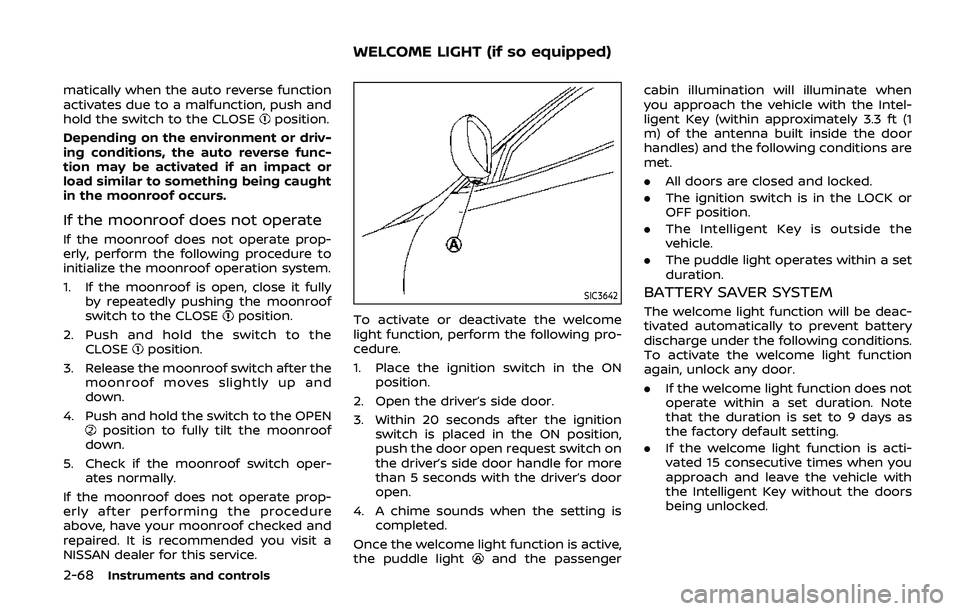
SIC3642
To activate or deactivate the welcome
light function, perform the following pro-
cedure.
1. Place the ignition switch in the ON position.
2. Open the driver’s side door.
3. Within 20 seconds after the ignition switch is placed in the ON position,
push the door open request switch on
the driver’s side door handle for more
than 5 seconds with the driver’s door
open.
4. A chime sounds when the setting is completed.
Once the welcome light function is active,
the puddle light
and the passenger cabin illumination will illuminate when
you approach the vehicle with the Intel-
ligent Key (within approximately 3.3 ft (1
m) of the antenna built inside the door
handles) and the following conditions are
met.
.
All doors are closed and locked.
. The ignition switch is in the LOCK or
OFF position.
. The Intelligent Key is outside the
vehicle.
. The puddle light operates within a set
duration.
BATTERY SAVER SYSTEM
The welcome light function will be deac-
tivated automatically to prevent battery
discharge under the following conditions.
To activate the welcome light function
again, unlock any door.
.If the welcome light function does not
operate within a set duration. Note
that the duration is set to 9 days as
the factory default setting.
. If the welcome light function is acti-
vated 15 consecutive times when you
approach and leave the vehicle with
the Intelligent Key without the doors
being unlocked.
WELCOME LIGHT (if so equipped)
Page 163 of 536
CAUTION
.Turn off the lights when you leave
the vehicle.
. Do not use the lights for extended
periods of time with the engine
stopped. This could result in a
discharged battery.
JVI0760X
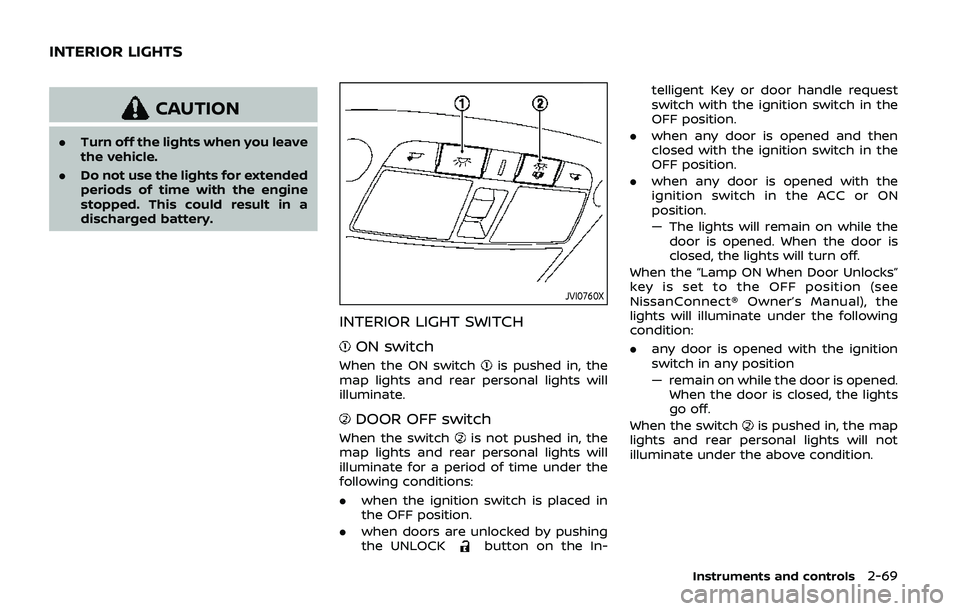
INTERIOR LIGHT SWITCH
ON switch
When the ON switchis pushed in, the
map lights and rear personal lights will
illuminate.
DOOR OFF switch
When the switchis not pushed in, the
map lights and rear personal lights will
illuminate for a period of time under the
following conditions:
. when the ignition switch is placed in
the OFF position.
. when doors are unlocked by pushing
the UNLOCK
button on the In- telligent Key or door handle request
switch with the ignition switch in the
OFF position.
. when any door is opened and then
closed with the ignition switch in the
OFF position.
. when any door is opened with the
ignition switch in the ACC or ON
position.
— The lights will remain on while the
door is opened. When the door is
closed, the lights will turn off.
When the “Lamp ON When Door Unlocks”
key is set to the OFF position (see
NissanConnect® Owner’s Manual), the
lights will illuminate under the following
condition:
. any door is opened with the ignition
switch in any position
— remain on while the door is opened.
When the door is closed, the lights
go off.
When the switch
is pushed in, the map
lights and rear personal lights will not
illuminate under the above condition.
Instruments and controls2-69
INTERIOR LIGHTS