engine NISSAN ARMADA 2020 Owner´s Manual
[x] Cancel search | Manufacturer: NISSAN, Model Year: 2020, Model line: ARMADA, Model: NISSAN ARMADA 2020Pages: 528, PDF Size: 2.1 MB
Page 275 of 528
1. Keep the foot brake pedal depressedand push the shift lever button to shift
into a driving gear.
2. Release the parking brake and foot brake, then gradually start the vehicle
in motion.
WARNING
.Do not depress the accelerator
pedal while shifting from P (Park)
or N (Neutral) to R (Reverse), D
(Drive) or manual shift mode. Al-
ways depress the brake pedal
until shifting is completed. Failure
to do so could cause you to lose
control and have an accident.
. Cold engine idle speed is high, so
use caution when shifting into a
forward or reverse gear before
the engine has warmed up.
. Never shift to either the P (Park)
or R (Reverse) position while the
vehicle is moving forward and P
(Park), D (Drive) position or man-
ual shift mode while the vehicle is
moving rearward. This could
cause an accident or damage
the transmission. .
Do not downshift abruptly on
slippery roads. This may cause a
loss of control.
CAUTION
.Except in an emergency, do not
shift to the N (Neutral) position
while driving. Coasting with the
transmission in the N (Neutral)
position may cause serious da-
mage to the transmission.
. To avoid possible damage to your
vehicle; when stopping the vehi-
cle on an uphill grade, do not hold
the vehicle by depressing the
accelerator pedal. The foot brake
should be used for this purpose.
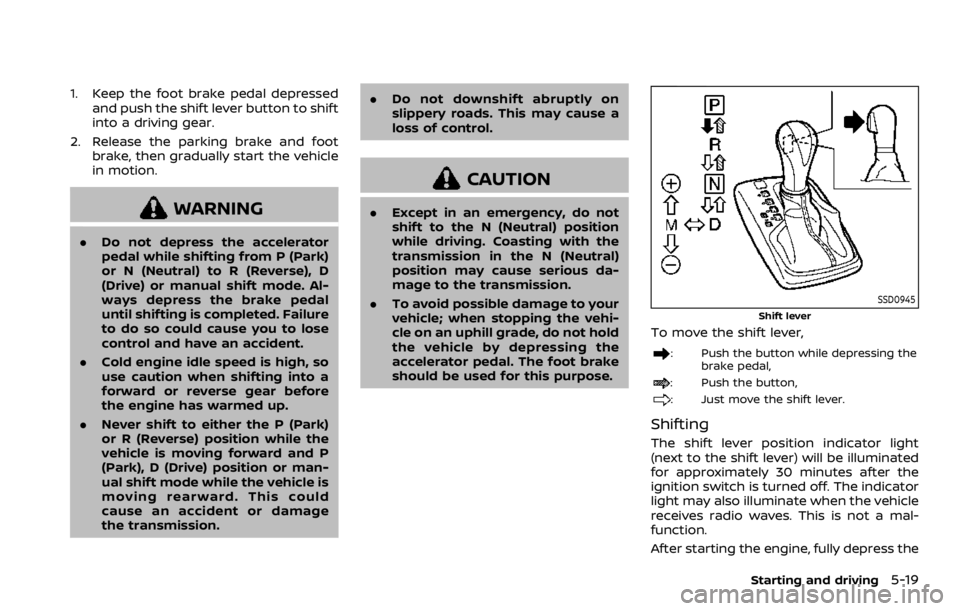
SSD0945
Shift lever
To move the shift lever,
: Push the button while depressing the
brake pedal,
: Push the button,
: Just move the shift lever.
Shifting
The shift lever position indicator light
(next to the shift lever) will be illuminated
for approximately 30 minutes after the
ignition switch is turned off. The indicator
light may also illuminate when the vehicle
receives radio waves. This is not a mal-
function.
After starting the engine, fully depress the
Starting and driving5-19
Page 276 of 528
5-20Starting and driving
brake pedal and shift the shift lever from
P (Park) to R (Reverse), N (Neutral), D
(Drive) or Manual shift mode position.
Push the button to shift into P (Park) or R
(Reverse). All other positions can be
selected without pushing the button.
WARNING
Apply the parking brake if the shift
lever is in any position while the
engine is not running. Failure to do
so could cause the vehicle to move
unexpectedly or roll away and result
in serious personal injury or property
damage.
CAUTION
Make sure the vehicle is completely
stopped and the transmission is in
the P (Park) position.
P (Park) position:
Use this position when the vehicle is
parked or when starting the engine. Make
sure the vehicle is completely stopped.
The brake pedal must be depressed and
the shift lever button pushed in to move the shift lever from the N (Neutral)
position or any drive position to the P
(Park) position.
Apply the parking brake.
When parking on a hill, apply the parking
brake first, then move the shift lever to
the P (Park) position.
CAUTION
Use this position only when the
vehicle is completely stopped.
R (Reverse):
Use this position to back up. Always be
sure the vehicle is completely stopped
before selecting the R (Reverse) position.
The brake pedal must be depressed and
the shift lever button pushed in to move
the shift lever from the P (Park) posi-
tion, the N (Neutral) position or any
drive position to the R (Reverse) posi-
tion.
N (Neutral):
Neither forward nor reverse gear is en-
gaged. The engine can be started in this
position. You may shift to the N (Neutral)
position and restart a stalled engine while
the vehicle is moving. D (Drive):
Use this position for all normal forward
driving.
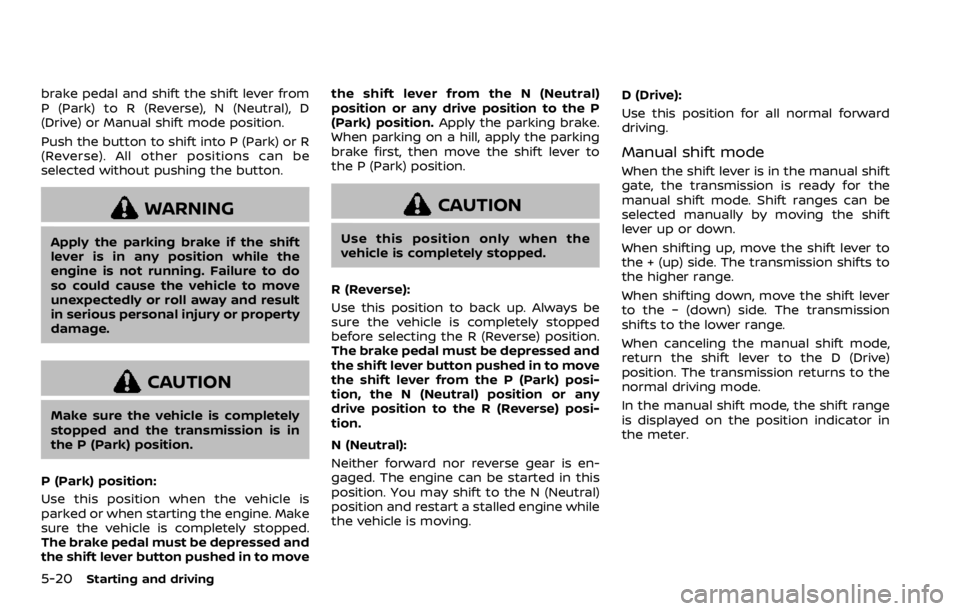
Manual shift mode
When the shift lever is in the manual shift
gate, the transmission is ready for the
manual shift mode. Shift ranges can be
selected manually by moving the shift
lever up or down.
When shifting up, move the shift lever to
the + (up) side. The transmission shifts to
the higher range.
When shifting down, move the shift lever
to the − (down) side. The transmission
shifts to the lower range.
When canceling the manual shift mode,
return the shift lever to the D (Drive)
position. The transmission returns to the
normal driving mode.
In the manual shift mode, the shift range
is displayed on the position indicator in
the meter.
Page 277 of 528

Shift ranges up or down one by one as
follows:
M1?
/M2 ?
/M3 ?
/M4 ?
/M5?
/M6 ?
/M7
M7 (7th):
Use this position for all normal forward
driving at highway speeds.
M6 (6th) andM5 (5th):
Use these positions when driving up long
slopes, or for engine braking when driving
down long slopes.
M4 (4th),M3 (3rd) andM2 (2nd):
Use these positions for hill climbing or
engine braking on downhill grades.
M1 (1st):
Use this position when climbing steep
hills slowly or driving slowly through deep
snow, or for maximum engine braking on
steep downhill grades.
. Remember not to drive at high speeds
for extended periods of time in lower
than 7th gear. This reduces fuel econ-
omy.
. Moving the shift lever rapidly to the
same side twice will shift the ranges in
succession.
. In the manual shift mode, the trans-
mission may not shift to the se-
lected gear or may automatically shift to the other gear. This helps
maintain driving performance and
reduces the chance of vehicle da-
mage or loss of control.
. When the transmission does not
shift to the selected gear, the Auto-
matic Transmission (AT) position in-
dicator light (in the vehicle
information display) will blink and
the buzzer will sound.
. In the manual shift mode, the trans-
mission automatically shifts down
to 1st gear before the vehicle comes
to a stop. When accelerating again, it
is necessary to shift up to the
desired range.
Accelerator downshift — In D (Drive)
position —
For passing or hill climbing, fully depress
the accelerator pedal to the floor. This
shifts the transmission down into the
lower gear, depending on the vehicle
speed.
Fail-safe
When the fail-safe operation occurs, note
that the transmission will be locked in any
of the forward gears according to the
condition.
If the vehicle is driven under extreme
conditions, such as excessive wheel spinning and subsequent hard braking,
the fail-safe system may be activated.
This will occur even if all electrical
circuits are functioning properly. In this
case, push the switch to the OFF posi-
tion and wait for 3 seconds. Then push
the ignition switch back to the ON
position. The vehicle should return to
its normal operating condition. If it does
not return to its normal operating con-
dition, have the transmission checked
and repaired, if necessary. It is recom-
mended you visit a NISSAN dealer for
this service.
Starting and driving5-21
Page 283 of 528

—When the accelerator pedal is
depressed while brake control
assist is provided.
— When the ICC, I-DC, I-BSI, BSW, I-
FCW or AEB warnings sound.
— When the hazard warning flashers
are operated.
— When driving on a curve at a high
speed.
. While the I-LI system is operating,
you may hear a sound of brake
operation. This is normal and indi-
cates that the I-LI system is operat-
ing properly.
JVS1095X
I-LI ON indicator light (green) (on the
instrument panel)
Dynamic driver assistance switchCenter multi-function control panel
TURNING THE I-LI SYSTEM ON/OFF
To turn on the I-LI system, push the
dynamic driver assistance switchon
the steering wheel after starting the
engine. The I-LI ON indicator light (green)
on the instrument panel will illuminate.
Push the dynamic driver assistance
Starting and driving5-27
Page 287 of 528

Action to take:
When the above conditions no longer
exist, the LDW system will resume auto-
matically.
For the I-LI system, push the dynamic
driver assistance switch
again to turn
the I-LI system back on.
SYSTEM MALFUNCTION
LDW system: When the LDW system
malfunctions, it will cancel automatically,
and the LDW indicator light (orange) will
illuminate.
I-LI system: When the I-LI system mal-
functions, it will be turned off automati-
cally, a beep will sound, and the LDW
indicator light (orange) will illuminate.
Action to take:
Stop the vehicle in a safe location, place
the vehicle in the P (Park) position, turn
the engine off and restart the engine. If
the LDW indicator light (orange) con-
tinues to illuminate, have the system
checked. It is recommended you visit a
NISSAN dealer for this service.
SSD0453
SYSTEM MAINTENANCE
The lane camera unitfor the LDW/I-LI
systems is located above the inside
mirror.
To keep the proper operation of the LDW/
I-LI systems and prevent a system mal-
function, be sure to observe the following:
. Always keep the windshield clean.
. Do not attach a sticker (including
transparent material) or install an
accessory near the camera unit.
. Do not place reflective materials, such
as white paper or a mirror, on the
instrument panel. The reflection of
sunlight may adversely affect the
camera unit’s capability of detecting the lane markers.
. Do not strike or damage the areas
around the camera unit. Do not touch
the camera lens or remove the screw
located on the camera unit. It is
recommended you contact a NISSAN
dealer if the camera unit is damaged
due to an accident.
Starting and driving5-31
Page 295 of 528

JVS0687X
BSW system warning light (orange)SYSTEM TEMPORARILY UNAVAIL-
ABLE
When radar blockage is detected, the
system will be turned off automatically,
a beep will sound and the BSW system
warning light (orange)
will blink. The
system is not available until the condi- tions no longer exist.
The radar sensors may be blocked by
temporary ambient conditions such as
splashing water, mist or fog. The blocked
condition may also be caused by objects
such as ice, frost or dirt obstructing the
radar sensors.
Action to take:
When the above conditions no longer
exist, the system will resume automati-
cally.
If the BSW system warning light (orange)
continues to blink, have the system
checked. It is recommended you visit a
NISSAN dealer for this service.
SYSTEM MALFUNCTION
When the system malfunctions, it will be
turned off automatically, a beep will
sound and the BSW system warning light
(orange) will illuminate.
Action to take:
Stop the vehicle in a safe location, place
the vehicle in the P (Park) position, turn
the engine off and restart the engine.
If the BSW system warning light continues
to illuminate, have the system checked. It
is recommended you visit a NISSAN dealer
for this service.
Starting and driving5-39
Page 299 of 528

JVS1098X
I-BSI ON indicator light (green)Dynamic driver assistance switchCenter multi-function control panel
TURNING THE I-BSI SYSTEM ON/
OFF
To turn on the I-BSI system, push the
dynamic driver assistance switchon
the steering wheel after starting the
engine. The I-BSI ON indicator light
(green)
on the instrumental panel will illuminate.
Push the dynamic driver assistance
switch
again to turn off the I-BSI
system. The I-BSI ON indicator light
(green)
will turn off.
The dynamic driver assistance switch
is
used for the I-BSI, I-LI and I-DC systems.
When the dynamic driver assistance
switch
is pushed, the I-LI and I-DC
systems will also turn on or off simulta-
neously. The I-BSI system can be indivi-
dually set to on or off on the center
display using the center multi-function
control panel
.
If the system is set to off, the system will
not turn on even if the dynamic driver
assistance switch
is pushed to on. To
set the system to on or off on the center
display, see “How to enable/disable the I-
BSI system” (P.5-44).
Starting and driving5-43
Page 308 of 528

5-52Starting and driving
after the I-BSI system is turned on again,
stop the vehicle in a safe location, place
the shift lever in the P (Park) position and
turn the engine off. Check for and remove
objects obscuring the radar sensors on
the rear bumper, and restart the engine.
If the I-BSI system warning light (orange)
continues to blink, have the I-BSI
system checked. It is recommended you
visit a NISSAN dealer for this service.
SYSTEM MALFUNCTION
When the I-BSI system malfunctions, it will
be turned off automatically, a chime will
sound and the I-BSI system warning light
(orange) will illuminate.
Action to take:
Stop the vehicle in a safe location, place
the shift lever in the P (Park) position, turn
the engine off and restart the engine.
If the warning light (orange) continues to
illuminate, have the I-BSI system checked.
It is recommended you visit a NISSAN
dealer for this service.
JVS0910X
SYSTEM MAINTENANCE
The two radar sensorsfor the I-BSI
system are located near the rear bumper.
Always keep the area near the radar
sensors clean.
The radar sensors may be blocked by
temporary ambient conditions such as
splashing water, mist or fog.
The blocked condition may also be
caused by objects such as ice, frost or
dirt obstructing the radar sensors.
Check for and remove objects obstruct-
ing the area around the radar sensors.
Do not attach stickers (including trans-
parent material), install accessories or apply additional paint near the radar
sensors.
Do not strike or damage the area around
the radar sensors.
It is recommended you visit a NISSAN
dealer if the area around the radar
sensors is damaged due to a collision.
The lane camera unit
for I-BSI system is
located above the inside mirror. To keep
the proper operation of I-BSI and prevent
a system malfunction, be sure to observe
the following:
. Always keep the windshield clean.
. Do not attach a sticker (including
transparent material) or install an
accessory near the camera unit.
. Do not place reflective materials, such
as white paper or a mirror, on the
instrument panel. The reflection of
sunlight may adversely affect the
camera unit’s capability of detecting
the lane markers.
. Do not strike or damage the areas
around the camera unit. Do not touch
the camera lens or remove the screw
located on the camera unit. It is
recommended you contact a NISSAN
dealer if the camera unit is damaged
due to an accident.
Page 318 of 528

5-62Starting and driving
SYSTEM MALFUNCTION
If the I-BI system malfunctions, it will turn
off automatically, a chime will sound and
“BCI MALFUNCTION” warning message will
appear in the vehicle information display
.
Action to take
Stop the vehicle in a safe location and
place the shift lever in the P (Park)
position. Turn the engine off and restart
the engine. If the warning message con-
tinues to appear, have the system
checked. It is recommended you visit a
NISSAN dealer for this service.
JVS0908X
SYSTEM MAINTENANCE
The two radar sensorsfor the I-BI
system are located near the rear bumper.
Always keep the area near the radar
sensors clean.
The radar sensors may be blocked by
temporary ambient conditions such as
splashing water, mist or fog.
The blocked condition may also be
caused by objects such as ice, frost or
dirt obstructing the radar sensors.
Check for and remove objects obstruct-
ing the area around the radar sensors.
Do not attach stickers (including trans-
parent material), install accessories or apply additional paint near the radar
sensors.
Do not strike or damage the area around
the radar sensors.
It is recommended you visit a NISSAN
dealer if the area around the radar
sensors is damaged due to a collision.
Radio frequency statement
This device complies with part 15 of the
FCC Rules and RSS-310 of Industry Cana-
da.
Operation is subject to the following two
conditions:
1. This device may not cause harmful
interference.
2. This device must accept any interfer- ence received, including interference
that may cause undesired operation.
Frequency of operation: 24.05GHz —
24.25GHz
Field Strength: Not greater than 2.5V/m
peak (0.25V/m average) at a distance of 3
m
The manufacturer is not responsible for
any radio or TV interference caused by
unauthorized modifications to this equip-
ment. Such modifications could void the
user’s authority to operate the equip-
ment.
Page 324 of 528

5-68Starting and driving
SSD1104
Vehicle-to-vehicle distance control
mode display and indicators
The display is located between the speed-
ometer and tachometer.
1. MAIN switch indicator:Indicates that the MAIN switch is ON.
2. Vehicle ahead detection indicator: Indicates whether it detects a vehicle
in front of you.
3. Set distance indicator: Displays the selected distance be-
tween vehicles set with the DISTANCE
switch. 4. Indicates your vehicle
5. Set vehicle speed indicator:
Indicates the set vehicle speed.
For Canadian models, the speed is
displayed in km/h.
6. ICC system warning light (orange): The light comes on if there is a
malfunction in the ICC system.
SSD0979
When the ignition switch is pushed to the
ON position, the indicators come on as
illustrated to check for a burned-out bulb,
and it turns off when the engine is
started.