Button NISSAN ARMADA 2020 Owner´s Manual
[x] Cancel search | Manufacturer: NISSAN, Model Year: 2020, Model line: ARMADA, Model: NISSAN ARMADA 2020Pages: 528, PDF Size: 2.1 MB
Page 15 of 528

JVC1093X
1. Side ventilator (P.4-34)
2. Meters and gauges (P.2-5)
3. Center ventilator (P.4-34)
4. Center multi-function control panel (SeeNissanConnect® Owner’s Manual)
5. Center display (See NissanConnect® Own- er’s Manual) — Intelligent Around View Monitor (if so
equipped) (P.4-10)
— RearView Monitor (if so equipped)
(P.4-3)
— Navigation system (if so equipped) (See
NissanConnect® Owner’s Manual)
6. Hazard warning flasher switch (P.6-2) 7. Defroster switch (P.2-36)/Deicer switch (if
so equipped) (P.2-36)
8. Front passenger supplemental air bag (P.1-54)
9. Fuse box (P.8-20)
10. Parking brake (P.5-22)
11. Hood release handle (P.3-21)
12. Steering wheel — Horn (P.2-42)
— Driver supplemental air bag (P.1-54)
— Power steering (P.5-130)
13. Push-button ignition switch (P.5-13)
14. Climate controlled seat switch (if so equipped) (P.2-45)/Heated seat switch (if
so equipped) (P.2-43)
15. Front passenger air bag status light (P.1-62)
16. Power outlet (P.2-50)
17. USB connection port (See NissanCon- nect® Owner’s Manual)
18. Cup holder (P.2-53)/Tray (P.2-58)
19. Heater and air conditioner (P.4-35)
20. Audio system (See NissanConnect® Own- er’s Manual)
21. Glove box (P.2-56)
Illustrated table of contents0-7
INSTRUMENT PANEL
Page 43 of 528

SSS0326
Unfastening the seat belts
To unfasten the seat belt, push the
button on the buckle. The seat belt
automatically retracts.
Checking seat belt operation
Seat belt retractors are designed to lock
seat belt movement by two separate
methods:
.When the belt is pulled quickly from
the retractor.
. When the vehicle slows down rapidly.
To increase your confidence in the seat
belts, check the operation as follows: .
Grasp the shoulder belt and pull for-
ward quickly. The retractor should
lock and restrict further belt move-
ment.
If the retractor does not lock during this
check, get the system checked. It is
recommended you visit a NISSAN dealer
for this service, or to learn more about
seat belt operation.
SSS1109
Center of 2nd row seat (if so
equipped)
Selecting correct set of seat belts:
The center seat belt buckle is identified by
the CENTER mark
. The center seat belt
tongue can be fastened onlyinto the
center seat belt buckle.
Safety — seats, seat belts and supplemental restraint system1-25
Page 46 of 528
1-28Safety — seats, seat belts and supplemental restraint system
.If the 3rd center seat belt con-
nector and the seatbacks are not
secured in the correct position,
serious personal injury may result
in an accident or sudden stop.
SSS1097
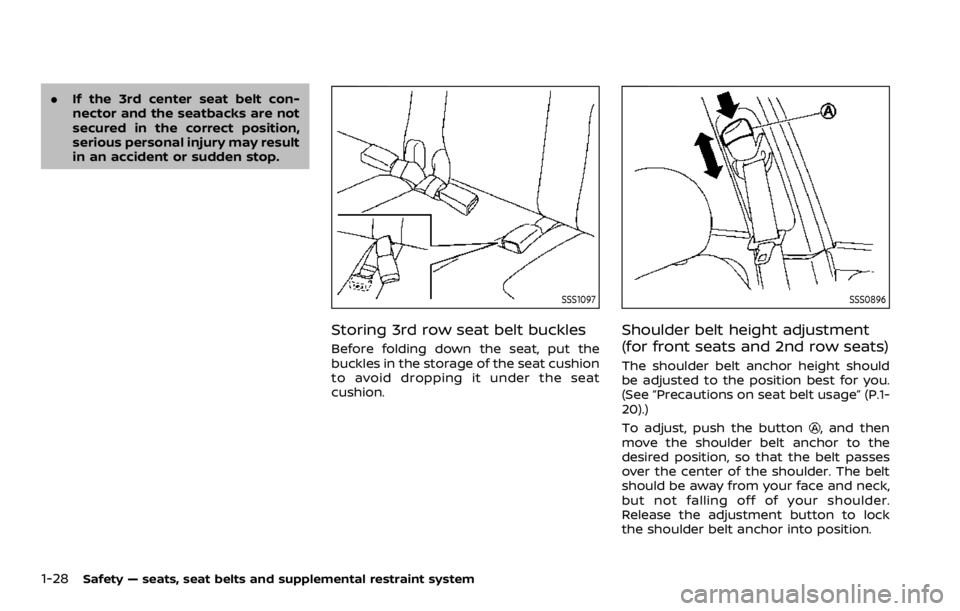
Storing 3rd row seat belt buckles
Before folding down the seat, put the
buckles in the storage of the seat cushion
to avoid dropping it under the seat
cushion.
SSS0896
Shoulder belt height adjustment
(for front seats and 2nd row seats)
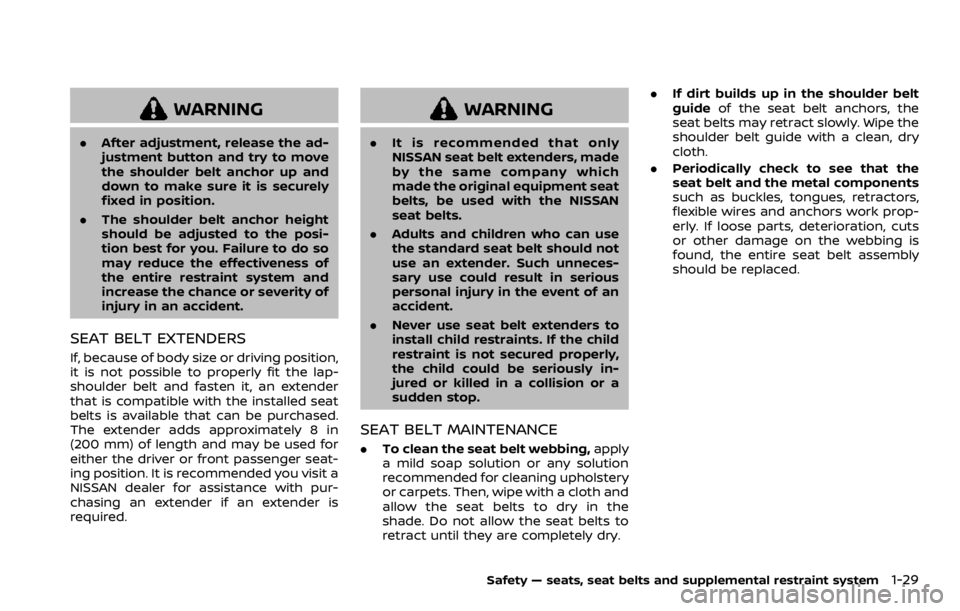
The shoulder belt anchor height should
be adjusted to the position best for you.
(See “Precautions on seat belt usage” (P.1-
20).)
To adjust, push the button
, and then
move the shoulder belt anchor to the
desired position, so that the belt passes
over the center of the shoulder. The belt
should be away from your face and neck,
but not falling off of your shoulder.
Release the adjustment button to lock
the shoulder belt anchor into position.
Page 47 of 528
WARNING
.After adjustment, release the ad-
justment button and try to move
the shoulder belt anchor up and
down to make sure it is securely
fixed in position.
. The shoulder belt anchor height
should be adjusted to the posi-
tion best for you. Failure to do so
may reduce the effectiveness of
the entire restraint system and
increase the chance or severity of
injury in an accident.
SEAT BELT EXTENDERS
If, because of body size or driving position,
it is not possible to properly fit the lap-
shoulder belt and fasten it, an extender
that is compatible with the installed seat
belts is available that can be purchased.
The extender adds approximately 8 in
(200 mm) of length and may be used for
either the driver or front passenger seat-
ing position. It is recommended you visit a
NISSAN dealer for assistance with pur-
chasing an extender if an extender is
required.
WARNING
.It is recommended that only
NISSAN seat belt extenders, made
by the same company which
made the original equipment seat
belts, be used with the NISSAN
seat belts.
. Adults and children who can use
the standard seat belt should not
use an extender. Such unneces-
sary use could result in serious
personal injury in the event of an
accident.
. Never use seat belt extenders to
install child restraints. If the child
restraint is not secured properly,
the child could be seriously in-
jured or killed in a collision or a
sudden stop.
SEAT BELT MAINTENANCE
.To clean the seat belt webbing, apply
a mild soap solution or any solution
recommended for cleaning upholstery
or carpets. Then, wipe with a cloth and
allow the seat belts to dry in the
shade. Do not allow the seat belts to
retract until they are completely dry. .
If dirt builds up in the shoulder belt
guide of the seat belt anchors, the
seat belts may retract slowly. Wipe the
shoulder belt guide with a clean, dry
cloth.
. Periodically check to see that the
seat belt and the metal components
such as buckles, tongues, retractors,
flexible wires and anchors work prop-
erly. If loose parts, deterioration, cuts
or other damage on the webbing is
found, the entire seat belt assembly
should be replaced.
Safety — seats, seat belts and supplemental restraint system1-29
Page 92 of 528

Rear door alert ........................................................................\
.... 2-48Turning the rear door alert system
ON/OFF ........................................................................\
............... 2-48
System operation ............................................................... 2-49
How to temporarily disable the rear door
alert system ........................................................................\
..... 2-49
Power outlet ........................................................................\
.......... 2-50 USB (Universal Serial Bus) charging
connector ........................................................................\
.......... 2-52
Storage ........................................................................\
...................... 2-53 Cup holders ........................................................................\
..... 2-53
Sunglasses holder .............................................................. 2-55
Glove box ........................................................................\
........... 2-56
Console box ........................................................................\
..... 2-56
Tray ........................................................................\
........................ 2-58
Coat hooks ........................................................................\
....... 2-59
Luggage hooks ..................................................................... 2-59
Cargo floor box .................................................................... 2-60
Roof rack ........................................................................\
........... 2-60
Rear bumper cover ........................................................... 2-61
Windows ........................................................................\
.................... 2-63
Power windows .................................................................... 2-63
Moonroof (if so equipped) .................................................. 2-65 Power moonroof ................................................................. 2-65
Welcome light (if so equipped) ....................................... 2-67 Battery saver system ..................................................... 2-67
Interior lights ........................................................................\
......... 2-68
Interior light switch ........................................................... 2-68
Console light ........................................................................\
... 2-69 Map lights ........................................................................\
....... 2-69
Rear personal lights ....................................................... 2-69
Vanity mirror lights ................................................................. 2-70
Cargo light ........................................................................\
............. 2-70
HomeLink® Universal Transceiver (Type A) (if
so equipped) ........................................................................\
......... 2-70 Programming HomeLink® ......................................... 2-71
Programming HomeLink® for Canadian
customers and gate openers ................................. 2-72
Operating the HomeLink® Universal
Transceiver ........................................................................\
.... 2-73
Programming troubleshooting ............................. 2-73
Clearing the programmed information .......... 2-73
Reprogramming a single HomeLink®
button ........................................................................\
................ 2-73
If your vehicle is stolen ................................................ 2-74
HomeLink® Universal Transceiver (Type B)
(if so equipped) ........................................................................\
... 2-74
Programming HomeLink® ......................................... 2-75
Using the garage door
two-way communication ........................................... 2-78
Programming HomeLink® for Canadian
customers and gate openers ................................. 2-78
Operating the HomeLink® Universal
Transceiver ........................................................................\
.... 2-79
Programming troubleshooting ............................. 2-79
Clearing the programmed information .......... 2-79
Reprogramming a single
HomeLink® button ........................................................... 2-79
If your vehicle is stolen ................................................ 2-80
Page 94 of 528

2-4Instruments and controls
JVC1093X
1. Side ventilator
2. Meters and gauges
3. Center ventilator
4. Center multi-function control panel
5. Center display— Intelligent Around View Monitor (if so
equipped) — RearView Monitor (if so equipped)
— Navigation system (if so equipped)
6. Hazard warning flasher switch
7. Defroster switch/Deicer switch (if so equipped)
8. Front passenger supplemental air bag
9. Fuse box 10. Parking brake
11. Hood release handle
12. Steering wheel
— Horn
— Driver supplemental air bag
— Power steering
13. Push-button ignition switch
14. Climate controlled seat switch (if so equipped)/Heated seat switch (if so
equipped)
15. Front passenger air bag status light
16. Power outlet
17. USB connection port
18. Cup holder/Tray
19. Heater and air conditioner
20. Audio system
21. Glove box
INSTRUMENT PANEL
Page 111 of 528

— “Intelligent Back-up Intervention (I-BI)” (P.5-53).
. Intelligent Cruise Control (ICC)
— “Intelligent Cruise Control (ICC)”
(P.5-63).
. Intelligent Distance Control (I-DC)
— “Intelligent Distance Control (I-DC)”
(P.5-85).
. Intelligent Key system
— “Intelligent Key system” (P.3-7).
— “Push-button ignition switch” (P.5-
13).
. Automatic Emergency Braking (AEB)
— “Automatic Emergency Braking
(AEB)” (P.5-98).
. Intelligent Forward Collision Warning
(I-FCW)
— “Intelligent Forward Collision Warn-
ing (I-FCW)” (P.5-106).
Instruments and controls2-21
Page 121 of 528

SIC2045
How to arm the vehicle security
system
1. Close all windows.The system can be armed even if the
windows are open.
2. Push the ignition switch to the OFF position.
3. Remove the Intelligent Key from the vehicle.
4. Close all doors, hood and liftgate. Lock all doors. The doors can be locked
with the Intelligent Key, door handle
request switch, power door lock
switch or mechanical key. 5. Confirm that the security indicator
light comes on. The security indicator
light stays on for about 30 seconds.
The vehicle security system is now
pre-armed. After about 30 seconds
the vehicle security system automati-
cally shifts into the armed phase. The
security light begins to flash once
every approximately 3 seconds. If,
during this 30-second pre-arm time
period, the door is unlocked, or the
ignition switch is pushed to ACC or
ON, the system will not arm.
Even when the driver and/or passen-
gers are in the vehicle, the system will
activate with all doors, hood, and lift-
gate locked with the ignition switch in
the LOCK position. When pushing the
ignition switch to the ACC or ON posi-
tion, the system will be released.
Vehicle security system activation
The vehicle security system will give the
following alarm:
. The headlights blink and the horn
sounds intermittently.
. The alarm automatically turns off
after approximately 50 seconds. How-
ever, the alarm reactivates if the
vehicle is tampered with again.
The alarm is activated by: .
Unlocking the door or opening the
liftgate without using the button on
the Intelligent Key, the door handle
request switch or the mechanical key.
(Even if the door is opened by releas-
ing the door inside lock knob, the
alarm will activate.)
. Opening the hood.
How to stop an activated alarm
The alarm will stop when a door is
unlocked by pushing the unlock button
on the Intelligent Key, the door handle
request switch or using the mechanical
key, or when the ignition switch is pushed
to the ACC or ON position.
If the system does not operate as
described above, it is recommended
you have it checked by a NISSAN dealer.
NISSAN VEHICLE IMMOBILIZER SYS-
TEM
The NISSAN Vehicle Immobilizer System
will not allow the engine to start without
the use of the registered Intelligent Key.
Never leave these keys in the vehicle.
FCC Notice:
For USA:
This device complies with Part 15 of the
FCC Rules. Operation is subject to the
following two conditions: (1) This device
may not cause harmful interference,
Instruments and controls2-31
Page 153 of 528
POWER WINDOWS
WARNING
.Make sure that all passengers
have their hands, etc. inside the
vehicle while it is in motion and
before closing the windows. Use
the window lock switch to pre-
vent unexpected use of the
power windows.
. To help avoid risk of injury or
death through unintended opera-
tion of the vehicle and or its
systems, including entrapment
in windows or inadvertent door
lock activation, do not leave chil-
dren, people who require the
assistance of others or pets un-
attended in your vehicle. Addi-
tionally, the temperature inside a
closed vehicle on a warm day can
quickly become high enough to
cause a significant risk of injury
or death to people and pets.
The power windows operate when the
ignition switch is in the ON position or for
about 45 seconds after the ignition
switch is pushed to the OFF position. If
the driver’s or front passenger’s door is
opened during this period of about 45 seconds, power to the windows is can-
celed.
SIC4352
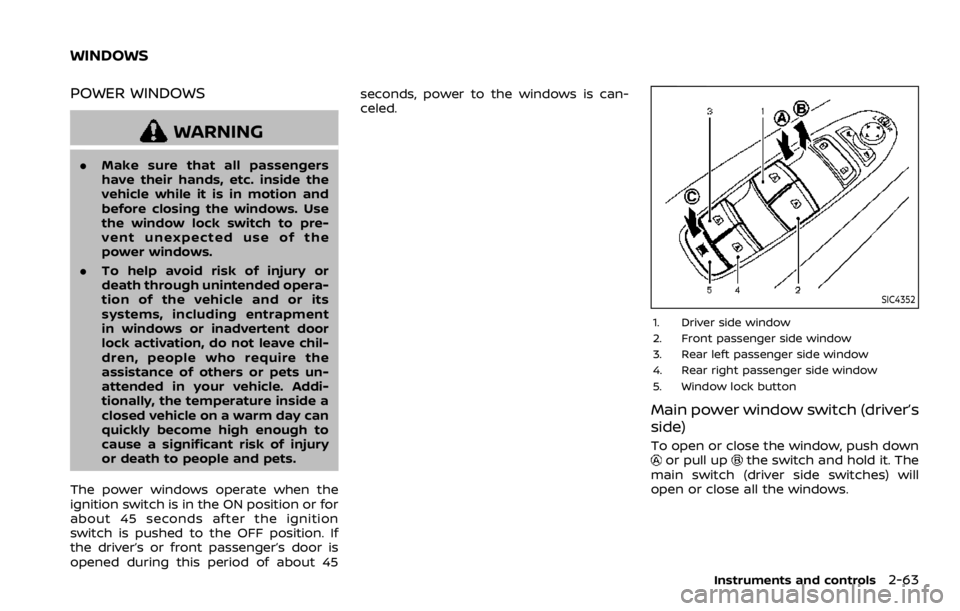
1. Driver side window
2. Front passenger side window
3. Rear left passenger side window
4. Rear right passenger side window
5. Window lock button
Main power window switch (driver’s
side)
To open or close the window, push downor pull upthe switch and hold it. The
main switch (driver side switches) will
open or close all the windows.
Instruments and controls2-63
WINDOWS
Page 154 of 528

2-64Instruments and controls
Locking passengers’ windows
When the lock buttonis pushed in, only
the driver side window can be opened or
closed. Push it in again to cancel.
SIC4353
Passenger side power window
switch
The passenger side switch will open or
close only the corresponding window. To
open or close the window, push down or
pull up the switch and hold it.
SIC4354
Automatic operation
To fully open or close the window, com-
pletely push down or pull up the switch
and release it; it need not be held. The
window will automatically open or close
all the way. To stop the window, just push
or lift the switch in the opposite direction.
A light push or pull on the switch will
cause the window to open or close until
the switch is released.