climate control NISSAN ARMADA 2020 Owner´s Manual
[x] Cancel search | Manufacturer: NISSAN, Model Year: 2020, Model line: ARMADA, Model: NISSAN ARMADA 2020Pages: 528, PDF Size: 2.1 MB
Page 15 of 528

JVC1093X
1. Side ventilator (P.4-34)
2. Meters and gauges (P.2-5)
3. Center ventilator (P.4-34)
4. Center multi-function control panel (SeeNissanConnect® Owner’s Manual)
5. Center display (See NissanConnect® Own- er’s Manual) — Intelligent Around View Monitor (if so
equipped) (P.4-10)
— RearView Monitor (if so equipped)
(P.4-3)
— Navigation system (if so equipped) (See
NissanConnect® Owner’s Manual)
6. Hazard warning flasher switch (P.6-2) 7. Defroster switch (P.2-36)/Deicer switch (if
so equipped) (P.2-36)
8. Front passenger supplemental air bag (P.1-54)
9. Fuse box (P.8-20)
10. Parking brake (P.5-22)
11. Hood release handle (P.3-21)
12. Steering wheel — Horn (P.2-42)
— Driver supplemental air bag (P.1-54)
— Power steering (P.5-130)
13. Push-button ignition switch (P.5-13)
14. Climate controlled seat switch (if so equipped) (P.2-45)/Heated seat switch (if
so equipped) (P.2-43)
15. Front passenger air bag status light (P.1-62)
16. Power outlet (P.2-50)
17. USB connection port (See NissanCon- nect® Owner’s Manual)
18. Cup holder (P.2-53)/Tray (P.2-58)
19. Heater and air conditioner (P.4-35)
20. Audio system (See NissanConnect® Own- er’s Manual)
21. Glove box (P.2-56)
Illustrated table of contents0-7
INSTRUMENT PANEL
Page 91 of 528

2 Instruments and controls
Cockpit ........................................................................\
.......................... 2-3
Instrument panel ........................................................................\
.. 2-4
Meters and gauges ..................................................................... 2-5Speedometer and odometer ........................................ 2-6
Tachometer ........................................................................\
........ 2-7
Engine coolant temperature gauge ....................... 2-7
Fuel gauge ........................................................................\
........... 2-8
Engine oil pressure gauge .............................................. 2-8
Voltmeter ........................................................................\
.............. 2-9
Meter/ring illumination and needle sweep ....... 2-9
Warning lights, indicator lights and audible
reminders ........................................................................\
................. 2-10 Checking lights ..................................................................... 2-11
Warning lights ........................................................................\
2-11
Indicator lights ...................................................................... 2-17
Audible reminders .............................................................. 2-20
Vehicle information display ............................................... 2-20 Operational indicators .................................................... 2-23
Maintenance indicators ................................................. 2-26
Trip computer ........................................................................\
2-28
Security systems ........................................................................\
2-30 Vehicle Security System ................................................ 2-30
NISSAN Vehicle Immobilizer System .................... 2-31 Wiper and washer switch ................................................... 2-33
Windshield wiper and washer operation ...... 2-34
Rain-sensing auto wiper system
(if so equipped) ................................................................... 2-34
Rear window wiper and
washer operation ............................................................. 2-36
Rear window and outside mirror defroster
switch ........................................................................\
......................... 2-36
Windshield deicer switch (if so equipped) ............. 2-36
Headlight and turn signal switch ................................ 2-37 Headlight switch ............................................................... 2-37
Instrument brightness control .............................. 2-40
Turn signal switch ........................................................... 2-41
Fog light switch (if so equipped) ......................... 2-41
Heated steering wheel (if so equipped) .................. 2-42
Horn ........................................................................\
............................. 2-42
Heated seats ........................................................................\
......... 2-43 Front (if so equipped) .................................................... 2-43
Rear (if so equipped) ...................................................... 2-44
Climate controlled seats (if so equipped) ............. 2-45
Warning systems switch (if so equipped) ............. 2-46
SNOW mode switch ................................................................ 2-46
TOW mode switch .................................................................... 2-47
Vehicle Dynamic Control (VDC) OFF switch ........ 2-47
Page 94 of 528

2-4Instruments and controls
JVC1093X
1. Side ventilator
2. Meters and gauges
3. Center ventilator
4. Center multi-function control panel
5. Center display— Intelligent Around View Monitor (if so
equipped) — RearView Monitor (if so equipped)
— Navigation system (if so equipped)
6. Hazard warning flasher switch
7. Defroster switch/Deicer switch (if so equipped)
8. Front passenger supplemental air bag
9. Fuse box 10. Parking brake
11. Hood release handle
12. Steering wheel
— Horn
— Driver supplemental air bag
— Power steering
13. Push-button ignition switch
14. Climate controlled seat switch (if so equipped)/Heated seat switch (if so
equipped)
15. Front passenger air bag status light
16. Power outlet
17. USB connection port
18. Cup holder/Tray
19. Heater and air conditioner
20. Audio system
21. Glove box
INSTRUMENT PANEL
Page 135 of 528
SIC4334
The climate controlled seat warms up or
cools down the front seats by built-in
heaters or blowing cool air from the
surface of the seat. The switches located
on the instrument panel can be operated
independently of each other.
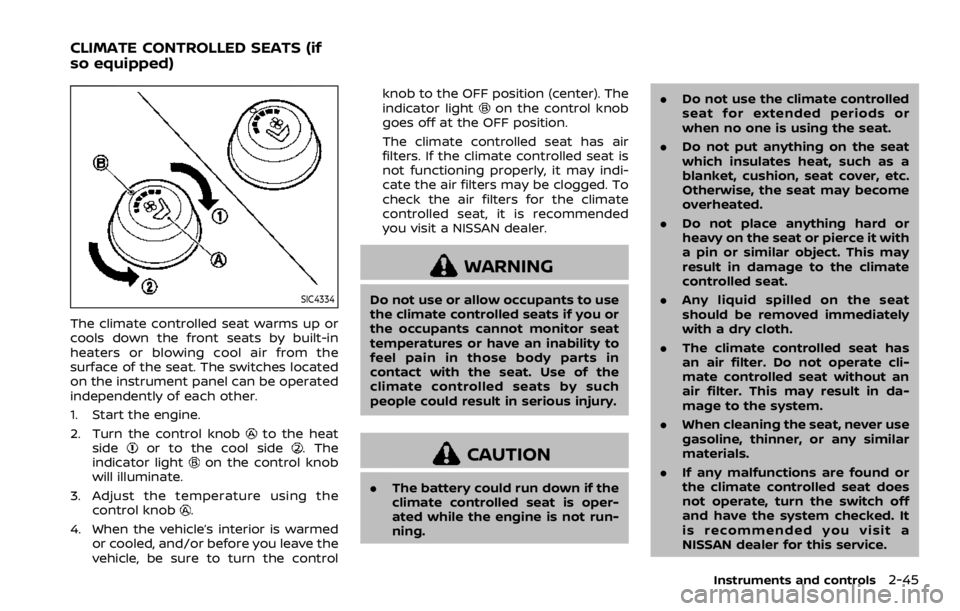
1. Start the engine.
2. Turn the control knob
to the heat
sideor to the cool side. The
indicator lighton the control knob
will illuminate.
3. Adjust the temperature using the control knob
.
4. When the vehicle’s interior is warmed or cooled, and/or before you leave the
vehicle, be sure to turn the control knob to the OFF position (center). The
indicator light
on the control knob
goes off at the OFF position.
The climate controlled seat has air
filters. If the climate controlled seat is
not functioning properly, it may indi-
cate the air filters may be clogged. To
check the air filters for the climate
controlled seat, it is recommended
you visit a NISSAN dealer.
WARNING
Do not use or allow occupants to use
the climate controlled seats if you or
the occupants cannot monitor seat
temperatures or have an inability to
feel pain in those body parts in
contact with the seat. Use of the
climate controlled seats by such
people could result in serious injury.
CAUTION
. The battery could run down if the
climate controlled seat is oper-
ated while the engine is not run-
ning. .
Do not use the climate controlled
seat for extended periods or
when no one is using the seat.
. Do not put anything on the seat
which insulates heat, such as a
blanket, cushion, seat cover, etc.
Otherwise, the seat may become
overheated.
. Do not place anything hard or
heavy on the seat or pierce it with
a pin or similar object. This may
result in damage to the climate
controlled seat.
. Any liquid spilled on the seat
should be removed immediately
with a dry cloth.
. The climate controlled seat has
an air filter. Do not operate cli-
mate controlled seat without an
air filter. This may result in da-
mage to the system.
. When cleaning the seat, never use
gasoline, thinner, or any similar
materials.
. If any malfunctions are found or
the climate controlled seat does
not operate, turn the switch off
and have the system checked. It
is recommended you visit a
NISSAN dealer for this service.
Instruments and controls2-45
CLIMATE CONTROLLED SEATS (if
so equipped)
Page 250 of 528
4-38Monitor, heater, air conditioner, audio, phone and voice recognition systems
vent “” button to turn the indicator
light off.
JVH1630X
Operations on touch panel screen
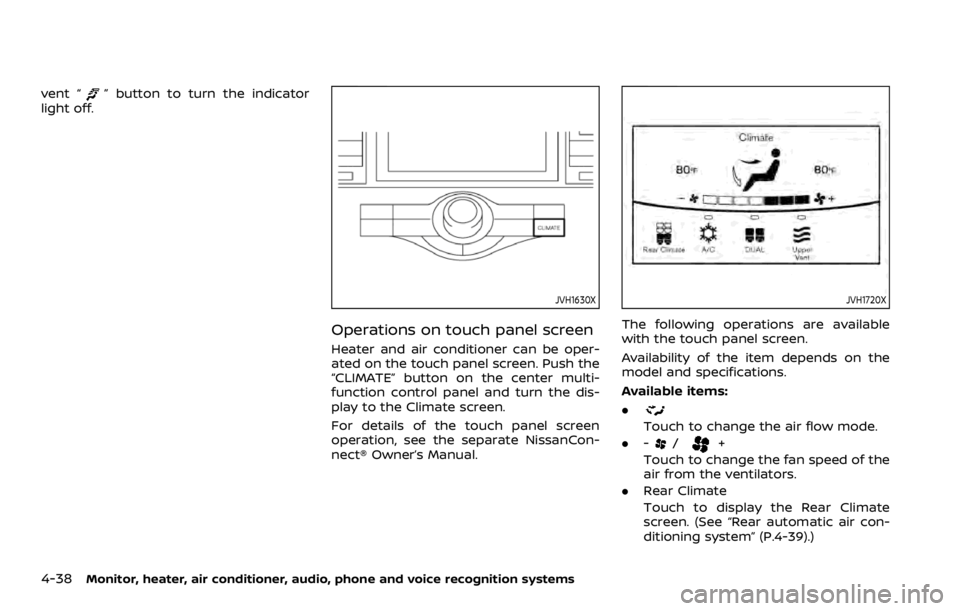
Heater and air conditioner can be oper-
ated on the touch panel screen. Push the
“CLIMATE” button on the center multi-
function control panel and turn the dis-
play to the Climate screen.
For details of the touch panel screen
operation, see the separate NissanCon-
nect® Owner’s Manual.
JVH1720X
The following operations are available
with the touch panel screen.
Availability of the item depends on the
model and specifications.
Available items:
.
Touch to change the air flow mode.
. -
/+
Touch to change the fan speed of the
air from the ventilators.
. Rear Climate
Touch to display the Rear Climate
screen. (See “Rear automatic air con-
ditioning system” (P.4-39).)
Page 251 of 528
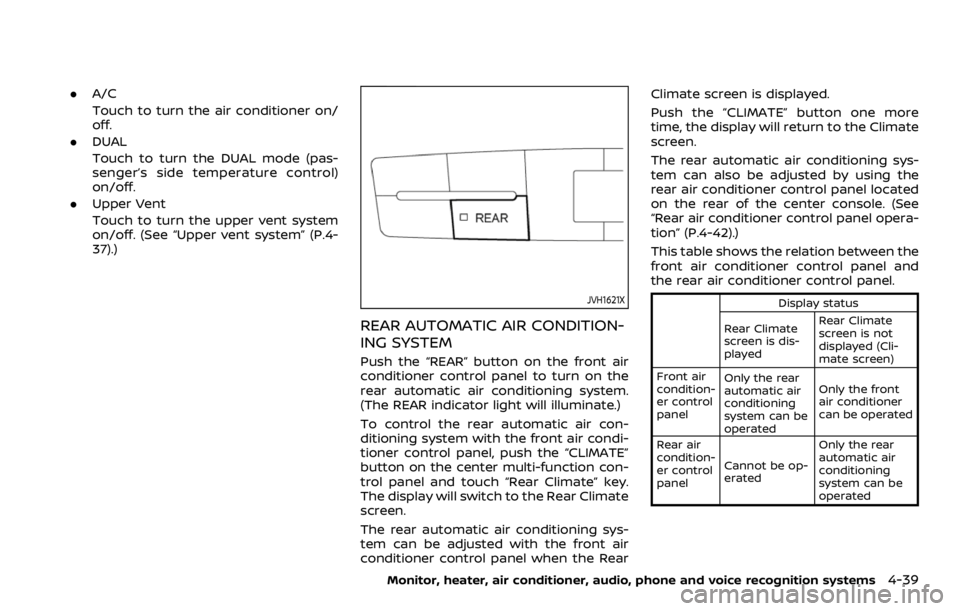
.A/C
Touch to turn the air conditioner on/
off.
. DUAL
Touch to turn the DUAL mode (pas-
senger’s side temperature control)
on/off.
. Upper Vent
Touch to turn the upper vent system
on/off. (See “Upper vent system” (P.4-
37).)
JVH1621X
REAR AUTOMATIC AIR CONDITION-
ING SYSTEM
Push the “REAR” button on the front air
conditioner control panel to turn on the
rear automatic air conditioning system.
(The REAR indicator light will illuminate.)
To control the rear automatic air con-
ditioning system with the front air condi-
tioner control panel, push the “CLIMATE”
button on the center multi-function con-
trol panel and touch “Rear Climate” key.
The display will switch to the Rear Climate
screen.
The rear automatic air conditioning sys-
tem can be adjusted with the front air
conditioner control panel when the Rear Climate screen is displayed.
Push the “CLIMATE” button one more
time, the display will return to the Climate
screen.
The rear automatic air conditioning sys-
tem can also be adjusted by using the
rear air conditioner control panel located
on the rear of the center console. (See
“Rear air conditioner control panel opera-
tion” (P.4-42).)
This table shows the relation between the
front air conditioner control panel and
the rear air conditioner control panel.
Display status
Rear Climate
screen is dis-
played Rear Climate
screen is not
displayed (Cli-
mate screen)
Front air
condition-
er control
panel Only the rear
automatic air
conditioning
system can be
operated Only the front
air conditioner
can be operated
Rear air
condition-
er control
panel Cannot be op-
erated Only the rear
automatic air
conditioning
system can be
operated
Monitor, heater, air conditioner, audio, phone and voice recognition systems4-39
Page 252 of 528

4-40Monitor, heater, air conditioner, audio, phone and voice recognition systems
Front air conditioner control panel
operation
Automatic operation:
1. Push the “REAR” button to turn on rearautomatic air conditioning system.
Push the “CLIMATE” button on the
center multi-function control panel
and select the “Rear Climate” key to
display the Rear Climate screen.
2. Push the “AUTO” button. (The AUTO indicator light will illuminate and
“AUTO” will appear on the display.)
3. Turn the temperature control dial (driver’s side) to set the desired tem-
perature.
Cooling and dehumidified heating:
1. Push the “REAR” button to turn on the rear automatic air conditioning sys-
tem. Push the “CLIMATE” button on
the center multi-function control pa-
nel and touch “Rear Climate” key to
display the Rear Climate screen.
2. Turn the temperature control dial (driver’s side) to set the desired tem-
perature.
3. Switch the air flow mode to
by
pushing the “MODE” button.
4. Push the “CLIMATE” button on the center multi-function control panel
one more time to return to the Climate screen. If the A/C indicator
light does not illuminate, push the
“A/C” button. (The A/C indicator light
will turn on.)
NOTE:
When the front air conditioner is off, the
rear automatic air conditioning system
only operates the fan. When you would
like to use the air conditioner, be sure to
push the “A/C” button on the front air
conditioner control panel to turn on the
A/C indicator light.
Manual operation:
. Temperature control
Turn the temperature control dial
(driver’s side) to set the desired tem-
perature.
. Fan speed control
Push the fan speed control “
”
button or “” button to manually
control the fan speed.
. Air flow control
Push the “MODE” button to change the
air flow mode.
: The air outlet is fixed at foot level.
: The air outlet is fixed at both the head
and foot levels.
: The air outlet is fixed at the head level.
Touch panel operation
The rear automatic air conditioning sys-
tem can also be controlled on the Rear
Climate screen.
Touch the “Rear Climate” key on the
Climate screen to display the Rear Cli-
mate screen.
Page 253 of 528

JVH1719X
Rear Climate screen
Available items:
.Temp Down
Touch to decrease the temperature
setting.
. Temp Up
Touch to increase the temperature
setting.
. ON/OFF
Touch to turn the rear automatic air
conditioning system on/off.
. Fan Down
The fan speed of the air from the
ventilators can be decreased. .
Fan Up
The fan speed of the air from the
ventilators can be increased.
. Auto
Touch to turn the auto mode on/off.
. Mode
Touch to select different air flow
mode.
SAA3327
1. “OFF” button
2. Fan speed control button
3. “AUTO” button
4. Display
5. “MODE” button
6. “TEMP” button
Monitor, heater, air conditioner, audio, phone and voice recognition systems4-41
Page 254 of 528

4-42Monitor, heater, air conditioner, audio, phone and voice recognition systems
Rear air conditioner control panel
operation
Rear control buttons:
The rear seat passengers can adjust the
rear automatic air conditioning system
using the control switches on the rear of
the center console.
The rear control buttons do not function
when the Rear Climate screen is shown
on the front display. To activate the rear
control buttons, push the “CLIMATE” but-
ton on the center multi-function control
panel and switch the screen to the
Climate screen.
.“OFF” button:
Rear automatic air conditioning sys-
tem off.
. “
” button:
Rear fan speed control up/down
. “AUTO” button:
Rear automatic air conditioning sys-
tem on, AUTO mode on
. “MODE” button:
Rear air flow control change
. “TEMP” button:
Rear temperature control up/down
Turning the system off
Use the following methods to turn the
rear automatic air conditioning system
off.
.Operating the front air conditioner
control panel:
Push the “OFF” button on the front air
conditioner control panel when the
Rear Climate screen is displayed.
. Operating the Rear Climate screen:
Touch the “ON/OFF” key on the Rear
Climate screen when the rear auto-
matic air conditioning system is on.
. Operating the rear air conditioner
control panel:
Push the “OFF” button on the rear air
conditioner control panel when the
Rear Climate screen is not displayed.
SAA3088
SAA3058
Page 512 of 528
10-30Technical and consumer information
DOT (Department Of Transportation)
Quality Grades: All passenger car tires
must conform to federal safety require-
ments in addition to these grades.
Quality grades can be found where ap-
plicable on the tire sidewall between
tread shoulder and maximum section
width. For example:
Treadwear 200 Traction AA Tempera-
ture A
TREADWEAR
The treadwear grade is a comparative
rating based on the wear rate of the tire
when tested under controlled conditions
on a specified government test course.
For example, a tire graded 150 would
wear one and one-half (1 1/2) times as
well on the government course as a tire
graded 100. The relative performance of
tires depends upon actual conditions of
their use, however, and may depart sig-
nificantly from the norm due to variations
in driving habits, service practices and
differences in road characteristics and
climate.
TRACTION AA, A, B AND C
The traction grades, from highest to low-
est, are AA, A, B and C. Those grades
represent the tire’s ability to stop on wet
pavement as measured under controlled
conditions on specified government test
surfaces of asphalt and concrete. A tire
marked C may have poor traction perfor-
mance.
WARNING
The traction grade assigned to this
tire is based on straight-ahead brak-
ing traction tests, and does not
include acceleration, cornering, hy-
droplaning, or peak traction charac-
teristics.
TEMPERATURE A, B AND C
The temperature grades A (the highest),
B, and C, representing the tire’s resistance
to the generation of heat and its ability to
dissipate heat when tested under con-
trolled conditions on a specified indoor
laboratory test wheel. Sustained high
temperature can cause the material of
the tire to degenerate and reduce tire life,
and excessive temperature can lead to
sudden tire failure. The grade C corre-
sponds to a level of performance whichall passenger car tires must meet under
the Federal Motor Vehicle Safety Stan-
dard No. 109. Grades B and A represent
higher levels of performance on the
laboratory test wheel than the minimum
required by law.
WARNING
The temperature grade for this tire is
established for a tire that is properly
inflated and not overloaded. Exces-
sive speed, under-inflation, or exces-
sive loading, either separately or in
combination, can cause heat build-
up and possible tire failure.
UNIFORM TIRE QUALITY GRADING