lock NISSAN ARMADA 2021 Owner´s Manual
[x] Cancel search | Manufacturer: NISSAN, Model Year: 2021, Model line: ARMADA, Model: NISSAN ARMADA 2021Pages: 603, PDF Size: 3.16 MB
Page 555 of 603

PhoneCar phone or CB radio ..................................... 4-42
Pocket........................................................................\
........... 2-70
Power Front seat adjustment ........................................ 1-4
Moonroof..................................................................... 2-76
Power door lock ....................................................... 3-4
Power outlet............................................................. 2-59
Power steering ................................................... 5-141
Power steering fluid .............................................. 8-8
Power windows ..................................................... 2-73
Precautions Braking precautions....................................... 5-142
Child restraints ....................................................... 1-33
Driving safety ........................................................... 5-10
Maintenance................................................................ 8-2
On-pavement and off-road driving .......... 5-9
Seat belt usage ...................................................... 1-20
Supplemental restraint system................. 1-54
When starting and driving................................ 5-4
Push starting................................................................\
... 6-14
Push-button ignition switch............................... 5-13
R
RAB system ................................................................... 5-116
Radio Car phone or CB radio ..................................... 4-42
Rain-sensing auto wiper system .................... 2-43
Rapid air pressure loss................................................ 5-9
Readiness for Inspection/Maintenance
(I/M) test........................................................................\
... 10-38
Rear Automatic Braking (RAB) ....................... 5-116
Rear Automatic Braking (RAB) system
warning light ................................................................... 2-17
Rear Cross Traffic Alert (RCTA)......................... 5-57
Rear Door Alert.............................................................. 2-58 Rear door lock, Child safety rear
door lock ........................................................................\
........ 3-6
Rear personal lights .................................................. 2-80
Rear view monitor settings..................................... 4-8
Rear window wiper and washer switch .... 2-44
Rear window wiper blades .................................. 8-17
RearView Monitor............................................................ 4-3
RearView Monitor system operation ............... 4-4
Recorders, Event data .......................................... 10-39
Registering your vehicle in
another country ........................................................ 10-11
Remote engine start................................................. 3-19
Remote keyless entry system ........................... 3-15
Reporting safety defects .................................... 10-37
Roadside assistance program .............................. 6-2
Rollover ........................................................................\
............ 5-8
Roof
Moonroof..................................................................... 2-77
Roof rack ..................................................................... 2-72
S
SafetyChild seat belts....................................................... 1-30
Towing safety...................................................... 10-24
Seat adjustment Front power seat adjustment ....................... 1-4
Front seats..................................................... 1-4, 1-11
Seat belt(s) Child safety................................................................ 1-30
Infants.................................................................\
........... 1-31
Injured persons ...................................................... 1-22
Larger children ....................................................... 1-31
Precautions on seat belt usage................ 1-20
Pregnant women.................................................. 1-22
Seat belt cleaning ................................................... 7-7
Seat belt extenders............................................. 1-29 Seat belt maintenance..................................... 1-29
Seat belt warning light and chime......... 2-13
Seat belts .................................................................... 1-20
Seat belts with pretensioners .................... 1-71
Small children .......................................................... 1-31
Three-point type ................................................... 1-22
Seat(s) Climate controlled seats................................. 2-55
Driver-side memory ............................................ 3-40
Heated seats ............................................................ 2-53
Seats ........................................................................\
.......... 1-3
Security system (NISSAN Vehicle
Immobilizer System), Engine start ................. 2-40
Security system, Vehicle
security system ............................................................. 2-38
Servicing air conditioner........................................ 4-41
Setting memory function,
memory seat................................................................... 3-42
Shift lever, Shift lock release............................... 5-22
Shift lock release Transmission............................................................ 5-22
Shifting, Automatic transmission ................... 5-18
SNOW mode.................................................................. 5-135
SNOW mode switch ................................................... 2-57
Sonar Rear Automatic Braking (RAB) ............... 5-116
SOS button (See Emergency Call
(SOS) button)................................................................... 2-64
Spare tire............................................................. 8-39, 10-9
Spark plugs....................................................................... 8-14
Speedometer ...................................................................... 2-6
Standard maintenance ............................................... 9-8
Starting Before starting the engine............................ 5-16
Jump starting .......................................................... 6-12
Precautions when starting
and driving.................................................................... 5-4
11-5
Page 556 of 603
11-6
Push starting............................................................ 6-14
Starting the engine............................................. 5-16
Status light, Front passenger air bag ......... 1-62
Steering Heated steering wheel ..................................... 2-52
Power steering ................................................... 5-141
Power steering fluid .............................................. 8-8
Tilt/telescopic steering .................................... 3-29
Storage ........................................................................\
........ 2-66
Sun visors ........................................................................\
.. 3-29
Sunglasses holder....................................................... 2-68
Supplemental air bag warning labels ......... 1-72
Supplemental air bag
warning light .................................................... 1-73, 2-13
Supplemental restraint system........................ 1-54 Precautions on supplemental
restraint system .................................................... 1-54
Switch Emergency Call (SOS) button ..................... 2-64
Fog light switch ..................................................... 2-52
Hazard warning flasher switch .................... 6-2
Headlight switch ................................................... 2-46
Ignition switch ........................................................ 5-18
Intelligent Auto Headlight switch ............ 2-46
Power door lock switch ..................................... 3-5
SNOW mode switch ............................................ 2-57
Turn signal switch ............................................... 2-51
Vehicle Dynamic Control (VDC)
OFF switch ................................................................. 2-57
T
Tachometer........................................................................\
.. 2-7
Temperature gauge, Engine coolant
temperature gauge ....................................................... 2-7
Theft (NISSAN Vehicle Immobilizer System),
Engine start...................................................................\
... 2-40 Three-way catalyst......................................................... 5-4
Tilt/telescopic steering ........................................... 3-29
Tire
Pressure, Low tire pressure
warning light ............................................................ 2-15
Tires Flat tire........................................................................\
..... 6-3
Tire and Loading
information label................................ 8-30, 10-13
Tire chains.................................................................. 8-35
Tire dressing................................................................ 7-4
Tire pressure ............................................................ 8-28
Tire Pressure Monitoring
System (TPMS) ................................................ 5-5, 6-3
Tire rotation.............................................................. 8-36
Types of tires ........................................................... 8-34
Uniform tire quality grading .................... 10-36
Wheel/tire size ........................................................ 10-9
Wheels and tires .................................................... 8-28
Top Tether strap child restraints........................ 1-37
TOW mode ..................................................................... 5-134
TOW mode switch....................................................... 2-57
Towing Flat towing............................................................. 10-35
Tow truck towing................................................. 6-16
Towing a trailer.................................................. 10-19
Towing safety...................................................... 10-24
TPMS, Tire Pressure
Monitoring System ............................................. 5-5, 6-3 TPMS with Easy Fill Tire Alert......................... 5-8
Traffic Sign Recognition (TSR)........................... 5-23
Trailer Brake Controller Unit (TBCU) ............ 2-58
Trailer towing .............................................................. 10-19
Transceiver HomeLink®
Universal Transceiver ......................... 2-81, 2-85 Transmission
Automatic Transmission Fluid (ATF) ........ 8-8
Driving with
automatic transmission .................................. 5-18
Transmission shift lever lock release ..... 5-22
Transmitter (See remote keyless
entry system) .................................................................. 3-15
Traveling or registering your vehicle in
another country ........................................................ 10-11
Trip computer ................................................................ 2-36
Trip odometer ................................................................ 2-36
Turn signal switch ...................................................... 2-51
U
Underbody cleaning ...................................................... 7-3
Uniform tire quality grading ............................ 10-36
USB (Universal Serial Bus)
charging connector................................................... 2-61
V
Vanity mirror ................................................................... 3-40
Vanity mirror lights .................................................... 2-80
Variable voltage control system ..................... 8-13
Vehicle Dimensions ............................................................ 10-10
Identification number (VIN)....................... 10-11
Loading information ...................................... 10-15
Recovery (freeing a stuck vehicle) .......... 6-19
Security system...................................................... 2-38
Vehicle Dynamic Control (VDC)
OFF switch ................................................................. 2-57
Vehicle Dynamic Control
(VDC) system ........................................................ 5-144
Vehicle Dynamic Control (VDC)
warning light ............................................................ 2-18
Page 557 of 603
Vehicle information display................................. 2-19How to use the vehicle
information display ............................................. 2-20
Settings........................................................................\
. 2-21
Vehicle speed.................................................................. 2-36
Ventilators ........................................................................\
. 4-34
Voltmeter ........................................................................\
....... 2-9
W
Warning Blind Spot Warning ............................................. 5-38
Hazard warning flasher switch .................... 6-2
Intelligent Forward Collision
Warning (I-FCW).................................................. 5-106
Lane Departure Warning (LDW) ................. 5-26
Lights..................................................................\
............ 2-11
Loose Fuel Cap warning................................. 2-30
Rear Door Alert....................................................... 2-58
Tire Pressure Low Add Air warning ....... 2-30
Tire Pressure Monitoring
System (TPMS) ................................................ 5-5, 6-3
Vehicle information display.......................... 2-19
Warning lights, indicator lights and
audible reminders ................................................ 2-10
Warning labels, Air bag warning labels...... 1-72
Warning light 4WD warning light ........................................... 5-130
Air bag warning light.......................... 1-73, 2-13
Anti-lock Braking System (ABS)
warning light ............................................................ 2-14
Automatic Emergency Braking (AEB)
system warning light......................................... 2-14
Brake warning light ............................................ 2-11
Low tire pressure warning light ............... 2-15
Seat belt warning light and chime......... 2-13 Warranty, Emission control
system warranty ....................................................... 10-37
Washer switch
Rear window wiper and
washer switch ......................................................... 2-44
Windshield wiper and
washer switch ......................................................... 2-41
Washing........................................................................\
........... 7-2
Waxing ........................................................................\
.............. 7-2
Welcome light................................................................. 2-77
Wheel/tire size ............................................................... 10-9
Wheels and tires ........................................................... 8-28 Care of wheels........................................................... 7-3
Cleaning aluminum alloy wheels ................ 7-3
Cleaning bright wheels....................................... 7-4
Window washer fluid ................................................ 8-10
Window(s) Cleaning ........................................................................\
.. 7-3
Power windows ..................................................... 2-73
Windshield wiper and washer switch.......... 2-41
Wiper Rain-sensing auto wiper system ............. 2-43
Rear window wiper and
washer switch ......................................................... 2-44
Windshield wiper and
washer switch ......................................................... 2-41
Wiper blades ............................................................. 8-16
Wireless charger ........................................................... 2-62
11-7
Page 567 of 603
• Full-Function Slimline Remote Control
• Monitor Screen Sharing
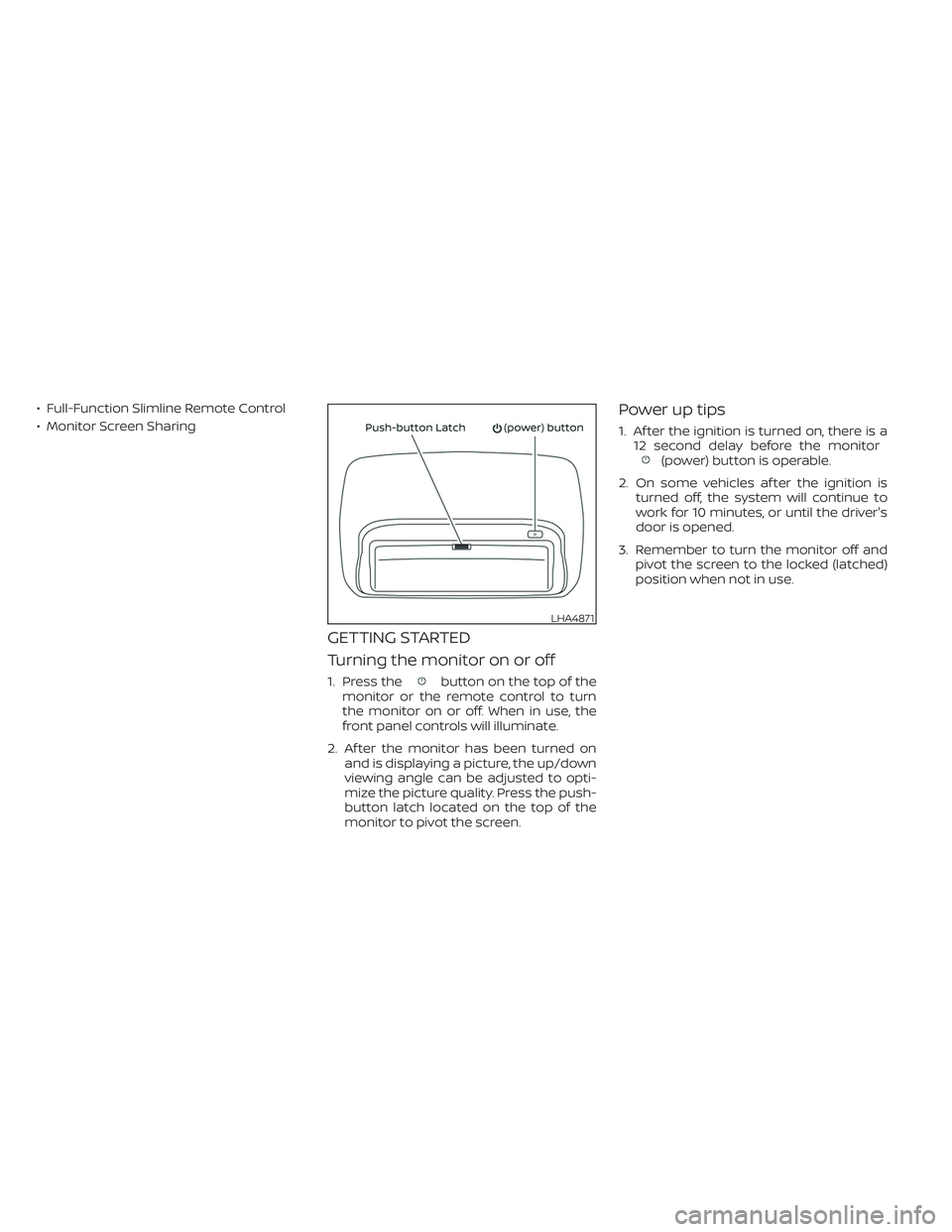
GETTING STARTED
Turning the monitor on or off
1. Press thebutton on the top of the
monitor or the remote control to turn
the monitor on or off. When in use, the
front panel controls will illuminate.
2. Af ter the monitor has been turned on
and is displaying a picture, the up/down
viewing angle can be adjusted to opti-
mize the picture quality. Press the push-
button latch located on the top of the
monitor to pivot the screen.
Power up tips
1. Af ter the ignition is turned on, there is a
12 second delay before the monitor
(power) button is operable.
2. On some vehicles af ter the ignition is
turned off, the system will continue to
work for 10 minutes, or until the driver's
door is opened.
3. Remember to turn the monitor off and
pivot the screen to the locked (latched)
position when not in use.
LHA4871
Page 570 of 603
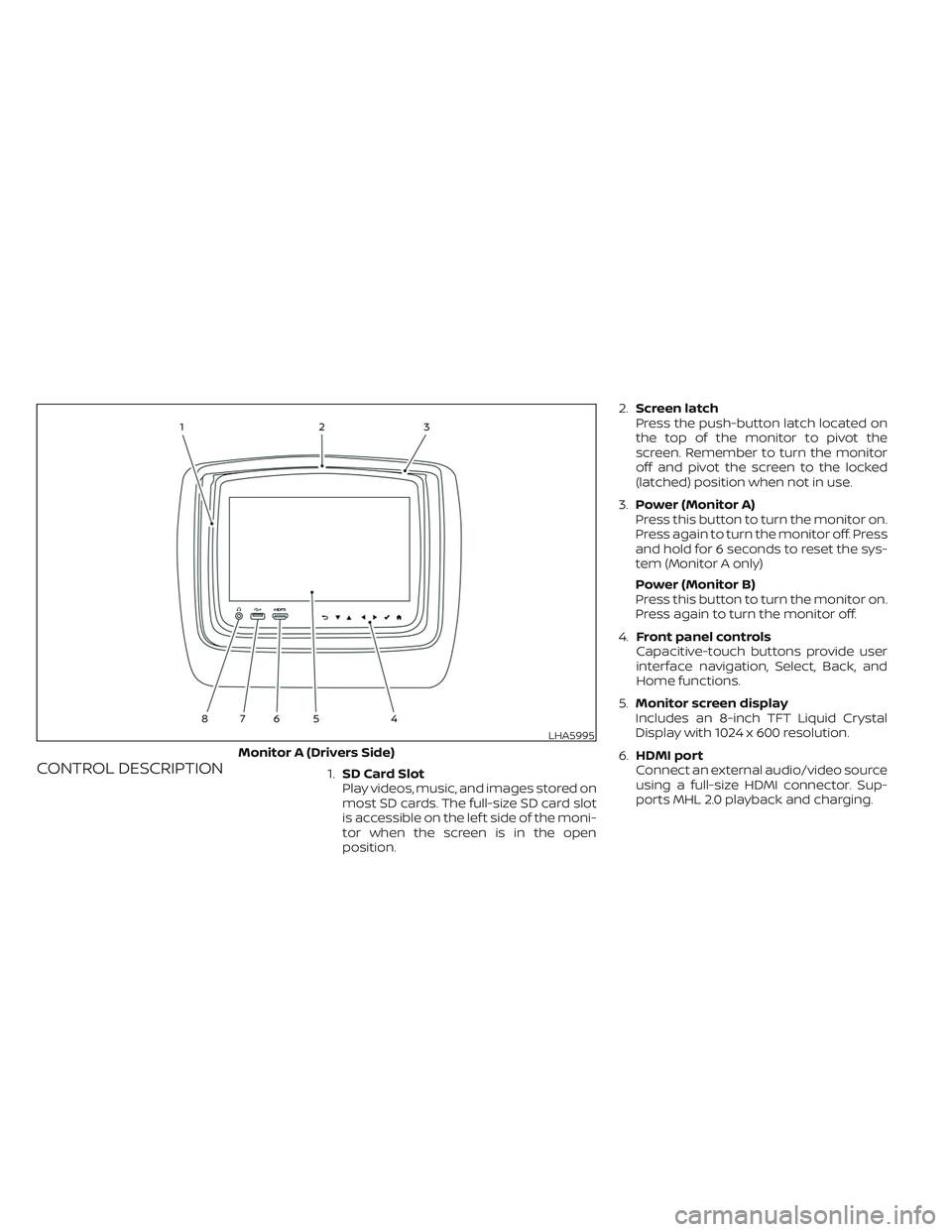
CONTROL DESCRIPTION1.SD Card Slot
Play videos, music, and images stored on
most SD cards. The full-size SD card slot
is accessible on the lef t side of the moni-
tor when the screen is in the open
position.2.Screen latch
Press the push-button latch located on
the top of the monitor to pivot the
screen. Remember to turn the monitor
off and pivot the screen to the locked
(latched) position when not in use.
3.Power (Monitor A)
Press this button to turn the monitor on.
Press again to turn the monitor off. Press
and hold for 6 seconds to reset the sys-
tem (Monitor A only)
Power (Monitor B)
Press this button to turn the monitor on.
Press again to turn the monitor off.
4.Front panel controls
Capacitive-touch buttons provide user
interface navigation, Select, Back, and
Home functions.
5.Monitor screen display
Includes an 8-inch TFT Liquid Crystal
Display with 1024 x 600 resolution.
6.HDMI port
Connect an external audio/video source
using a full-size HDMI connector. Sup-
ports MHL 2.0 playback and charging.
LHA5995
Monitor A (Drivers Side)
Page 572 of 603
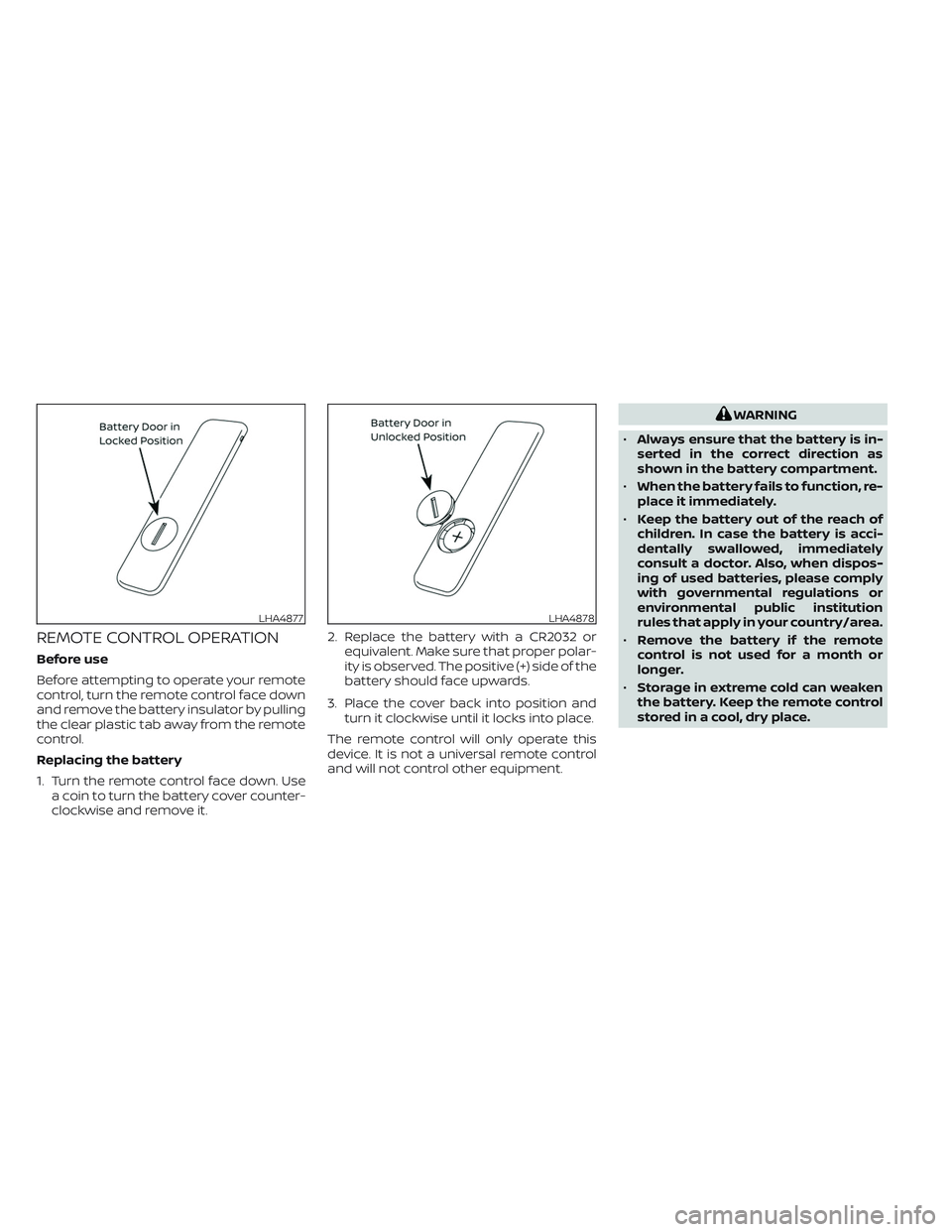
REMOTE CONTROL OPERATION
Before use
Before attempting to operate your remote
control, turn the remote control face down
and remove the battery insulator by pulling
the clear plastic tab away from the remote
control.
Replacing the battery
1. Turn the remote control face down. Use
a coin to turn the battery cover counter-
clockwise and remove it.2. Replace the battery with a CR2032 or
equivalent. Make sure that proper polar-
ity is observed. The positive (+) side of the
battery should face upwards.
3. Place the cover back into position and
turn it clockwise until it locks into place.
The remote control will only operate this
device. It is not a universal remote control
and will not control other equipment.
WARNING
•Always ensure that the battery is in-
serted in the correct direction as
shown in the battery compartment.
•When the battery fails to function, re-
place it immediately.
•Keep the battery out of the reach of
children. In case the battery is acci-
dentally swallowed, immediately
consult a doctor. Also, when dispos-
ing of used batteries, please comply
with governmental regulations or
environmental public institution
rules that apply in your country/area.
•Remove the battery if the remote
control is not used for a month or
longer.
•Storage in extreme cold can weaken
the battery. Keep the remote control
stored in a cool, dry place.
LHA4877LHA4878
Page 596 of 603
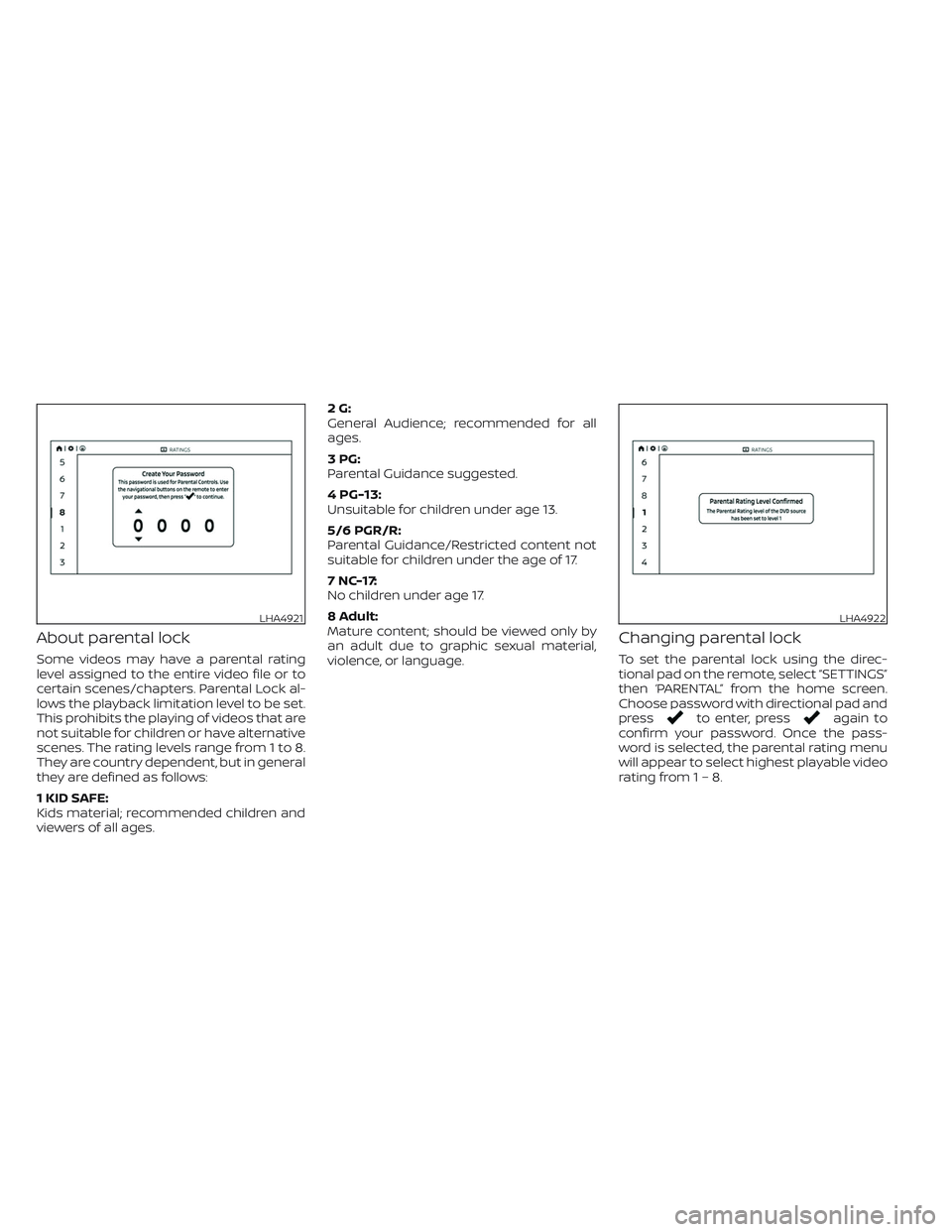
About parental lock
Some videos may have a parental rating
level assigned to the entire video file or to
certain scenes/chapters. Parental Lock al-
lows the playback limitation level to be set.
This prohibits the playing of videos that are
not suitable for children or have alternative
scenes. The rating levels range from 1 to 8.
They are country dependent, but in general
they are defined as follows:
1 KID SAFE:
Kids material; recommended children and
viewers of all ages.2G:
General Audience; recommended for all
ages.
3PG:
Parental Guidance suggested.
4 PG-13:
Unsuitable for children under age 13.
5/6 PGR/R:
Parental Guidance/Restricted content not
suitable for children under the age of 17.
7 NC-17:
No children under age 17.
8 Adult:
Mature content; should be viewed only by
an adult due to graphic sexual material,
violence, or language.
Changing parental lock
To set the parental lock using the direc-
tional pad on the remote, select “SETTINGS”
then ‘PARENTAL” from the home screen.
Choose password with directional pad and
press
to enter, pressagain to
confirm your password. Once the pass-
word is selected, the parental rating menu
will appear to select highest playable video
rating from1–8.
LHA4921LHA4922
Page 597 of 603
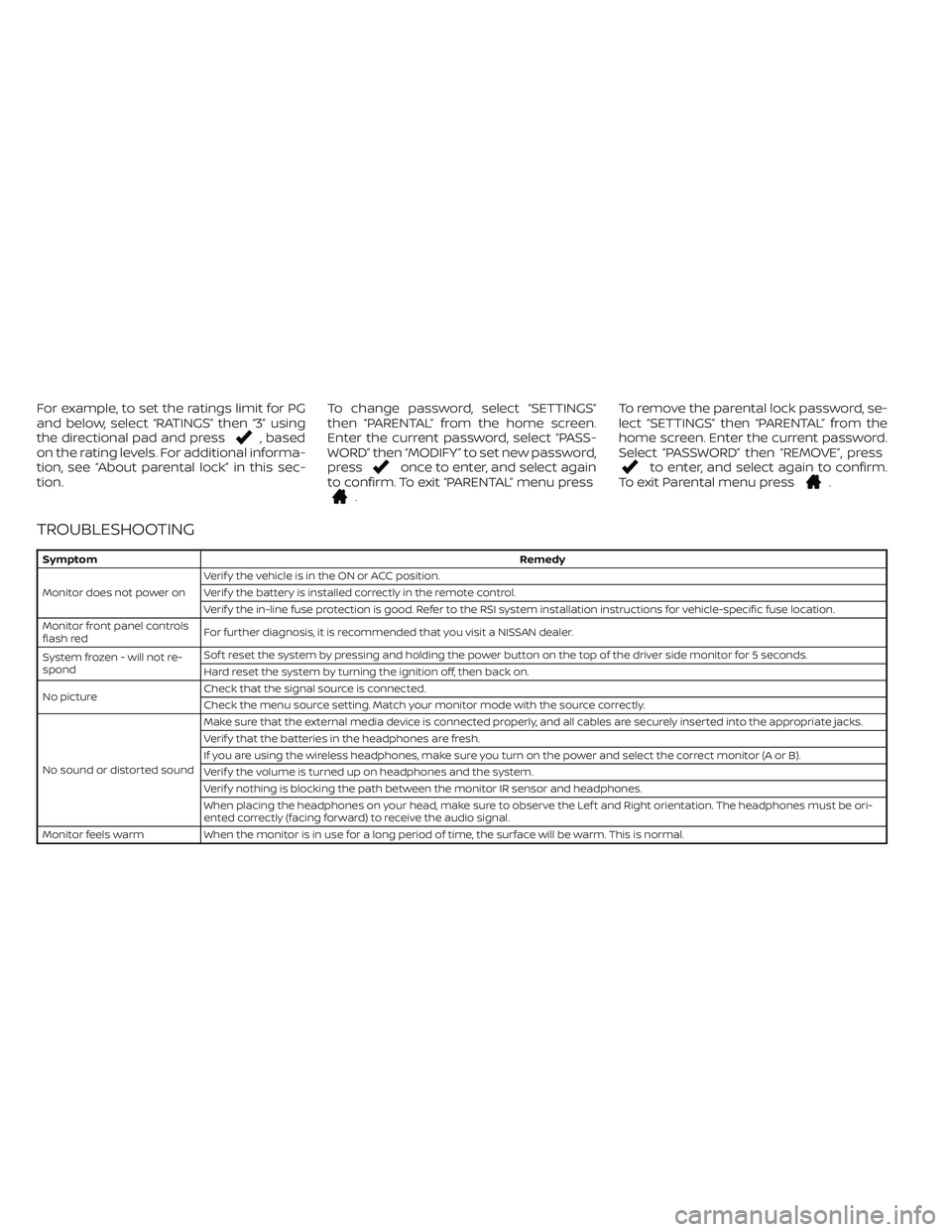
For example, to set the ratings limit for PG
and below, select “RATINGS” then “3” using
the directional pad and press
, based
on the rating levels. For additional informa-
tion, see “About parental lock” in this sec-
tion.To change password, select “SETTINGS”
then “PARENTAL” from the home screen.
Enter the current password, select “PASS-
WORD” then “MODIFY” to set new password,
press
once to enter, and select again
to confirm. To exit “PARENTAL” menu press
.To remove the parental lock password, se-
lect “SETTINGS” then “PARENTAL” from the
home screen. Enter the current password.
Select “PASSWORD” then “REMOVE”, press
to enter, and select again to confirm.
To exit Parental menu press.
TROUBLESHOOTING
SymptomRemedy
Monitor does not power onVerif y the vehicle is in the ON or ACC position.
Verif y the battery is installed correctly in the remote control.
Verif y the in-line fuse protection is good. Refer to the RSI system installation instructions for vehicle-specific fuse location.
Monitor front panel controls
flash redFor further diagnosis, it is recommended that you visit a NISSAN dealer.
System frozen - will not re-
spondSof t reset the system by pressing and holding the power button on the top of the driver side monitor for 5 seconds.
Hard reset the system by turning the ignition off, then back on.
No pictureCheck that the signal source is connected.
Check the menu source setting. Match your monitor mode with the source correctly.
No sound or distorted soundMake sure that the external media device is connected properly, and all cables are securely inserted into the appropriate jacks.
Verif y that the batteries in the headphones are fresh.
If you are using the wireless headphones, make sure you turn on the power and select the correct monitor (A or B).
Verif y the volume is turned up on headphones and the system.
Verif y nothing is blocking the path between the monitor IR sensor and headphones.
When placing the headphones on your head, make sure to observe the Lef t and Right orientation. The headphones must be ori-
ented correctly (facing forward) to receive the audio signal.
Monitor feels warm When the monitor is in use for a long period of time, the surface will be warm. This is normal.
Page 598 of 603
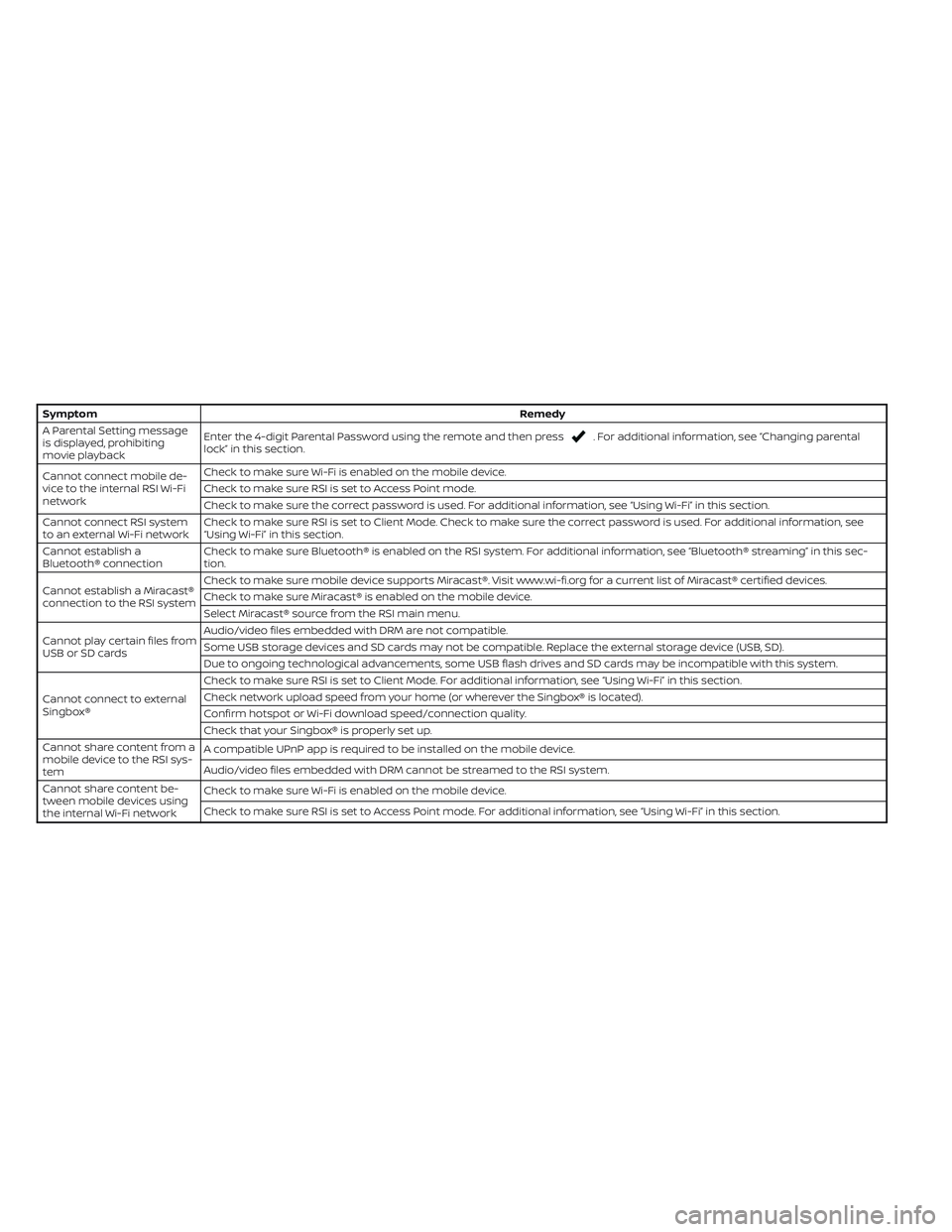
SymptomRemedy
A Parental Setting message
is displayed, prohibiting
movie playbackEnter the 4-digit Parental Password using the remote and then press
. For additional information, see “Changing parental
lock” in this section.
Cannot connect mobile de-
vice to the internal RSI Wi-Fi
networkCheck to make sure Wi-Fi is enabled on the mobile device.
Check to make sure RSI is set to Access Point mode.
Check to make sure the correct password is used. For additional information, see “Using Wi-Fi” in this section.
Cannot connect RSI system
to an external Wi-Fi networkCheck to make sure RSI is set to Client Mode. Check to make sure the correct password is used. For additional information, see
“Using Wi-Fi” in this section.
Cannot establish a
Bluetooth® connectionCheck to make sure Bluetooth® is enabled on the RSI system. For additional information, see “Bluetooth® streaming” in this sec-
tion.
Cannot establish a Miracast®
connection to the RSI systemCheck to make sure mobile device supports Miracast®. Visit www.wi-fi.org for a current list of Miracast® certified devices.
Check to make sure Miracast® is enabled on the mobile device.
Select Miracast® source from the RSI main menu.
Cannot play certain files from
USB or SD cardsAudio/video files embedded with DRM are not compatible.
Some USB storage devices and SD cards may not be compatible. Replace the external storage device (USB, SD).
Due to ongoing technological advancements, some USB flash drives and SD cards may be incompatible with this system.
Cannot connect to external
Singbox®Check to make sure RSI is set to Client Mode. For additional information, see “Using Wi-Fi” in this section.
Check network upload speed from your home (or wherever the Singbox® is located).
Confirm hotspot or Wi-Fi download speed/connection quality.
Check that your Singbox® is properly set up.
Cannot share content from a
mobile device to the RSI sys-
temA compatible UPnP app is required to be installed on the mobile device.
Audio/video files embedded with DRM cannot be streamed to the RSI system.
Cannot share content be-
tween mobile devices using
the internal Wi-Fi networkCheck to make sure Wi-Fi is enabled on the mobile device.
Check to make sure RSI is set to Access Point mode. For additional information, see “Using Wi-Fi” in this section.