air condition NISSAN ARMADA 2021 Owner´s Manual
[x] Cancel search | Manufacturer: NISSAN, Model Year: 2021, Model line: ARMADA, Model: NISSAN ARMADA 2021Pages: 603, PDF Size: 3.16 MB
Page 86 of 603
1-68Safety — seats, seat belts and supplemental restraint system
.A cracked windshield should be
replaced immediately by a quali-
fied repair facility. A cracked
windshield could affect the func-
tion of the supplemental air bag
system.
* The SRS wiring harness connectors are
yellow and orange for easy identifica-
tion.
When selling your vehicle, we request that
you inform the buyer about the front air
bag system and guide the buyer to the
appropriate sections in this Owner’s Man-
ual.
WAB0169X
Driver’s side
DRIVER AND FRONT PASSENGER
SUPPLEMENTAL KNEE AIR BAG
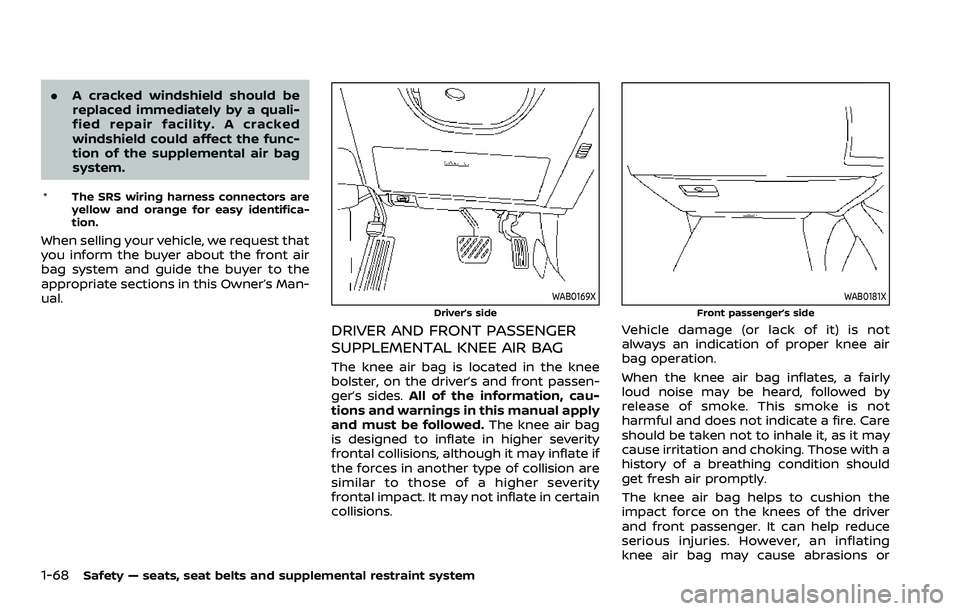
The knee air bag is located in the knee
bolster, on the driver’s and front passen-
ger’s sides. All of the information, cau-
tions and warnings in this manual apply
and must be followed. The knee air bag
is designed to inflate in higher severity
frontal collisions, although it may inflate if
the forces in another type of collision are
similar to those of a higher severity
frontal impact. It may not inflate in certain
collisions.
WAB0181X
Front passenger’s side
Vehicle damage (or lack of it) is not
always an indication of proper knee air
bag operation.
When the knee air bag inflates, a fairly
loud noise may be heard, followed by
release of smoke. This smoke is not
harmful and does not indicate a fire. Care
should be taken not to inhale it, as it may
cause irritation and choking. Those with a
history of a breathing condition should
get fresh air promptly.
The knee air bag helps to cushion the
impact force on the knees of the driver
and front passenger. It can help reduce
serious injuries. However, an inflating
knee air bag may cause abrasions or
Page 88 of 603
1-70Safety — seats, seat belts and supplemental restraint system
WAB0182X
FRONT SEAT-MOUNTED SIDE-IM-
PACT SUPPLEMENTAL AIR BAG AND
ROOF-MOUNTED CURTAIN SIDE-
IMPACT AND ROLLOVER SUPPLE-
MENTAL AIR BAG SYSTEMS
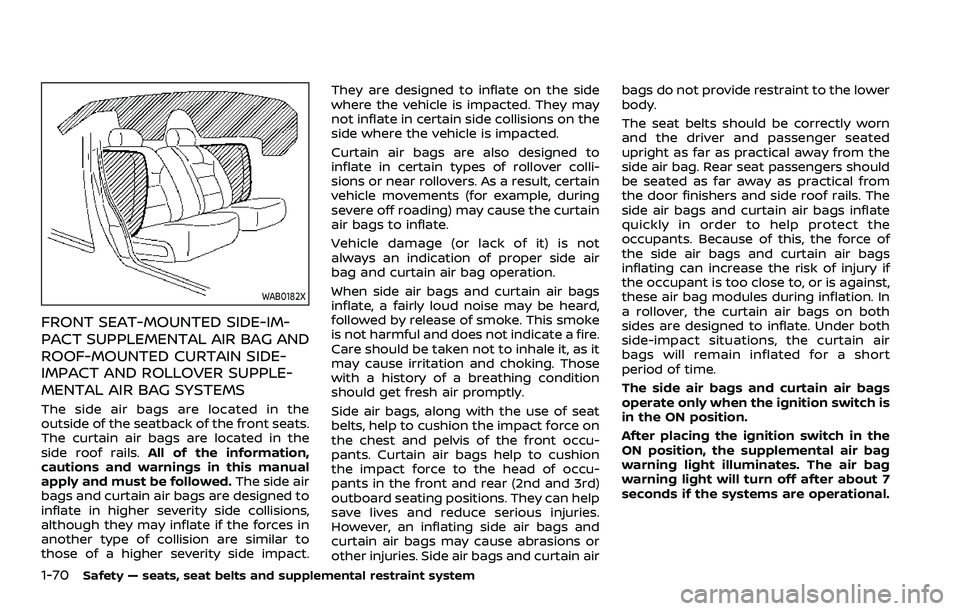
The side air bags are located in the
outside of the seatback of the front seats.
The curtain air bags are located in the
side roof rails.All of the information,
cautions and warnings in this manual
apply and must be followed. The side air
bags and curtain air bags are designed to
inflate in higher severity side collisions,
although they may inflate if the forces in
another type of collision are similar to
those of a higher severity side impact. They are designed to inflate on the side
where the vehicle is impacted. They may
not inflate in certain side collisions on the
side where the vehicle is impacted.
Curtain air bags are also designed to
inflate in certain types of rollover colli-
sions or near rollovers. As a result, certain
vehicle movements (for example, during
severe off roading) may cause the curtain
air bags to inflate.
Vehicle damage (or lack of it) is not
always an indication of proper side air
bag and curtain air bag operation.
When side air bags and curtain air bags
inflate, a fairly loud noise may be heard,
followed by release of smoke. This smoke
is not harmful and does not indicate a fire.
Care should be taken not to inhale it, as it
may cause irritation and choking. Those
with a history of a breathing condition
should get fresh air promptly.
Side air bags, along with the use of seat
belts, help to cushion the impact force on
the chest and pelvis of the front occu-
pants. Curtain air bags help to cushion
the impact force to the head of occu-
pants in the front and rear (2nd and 3rd)
outboard seating positions. They can help
save lives and reduce serious injuries.
However, an inflating side air bags and
curtain air bags may cause abrasions or
other injuries. Side air bags and curtain airbags do not provide restraint to the lower
body.
The seat belts should be correctly worn
and the driver and passenger seated
upright as far as practical away from the
side air bag. Rear seat passengers should
be seated as far away as practical from
the door finishers and side roof rails. The
side air bags and curtain air bags inflate
quickly in order to help protect the
occupants. Because of this, the force of
the side air bags and curtain air bags
inflating can increase the risk of injury if
the occupant is too close to, or is against,
these air bag modules during inflation. In
a rollover, the curtain air bags on both
sides are designed to inflate. Under both
side-impact situations, the curtain air
bags will remain inflated for a short
period of time.
The side air bags and curtain air bags
operate only when the ignition switch is
in the ON position.
After placing the ignition switch in the
ON position, the supplemental air bag
warning light illuminates. The air bag
warning light will turn off after about 7
seconds if the systems are operational.
Page 90 of 603
1-72Safety — seats, seat belts and supplemental restraint system
It is also recommended you visit a
NISSAN dealer for installation of
electrical equipment. Unauthor-
ized electrical test equipment
and probing devices should not
be used on the pretensioner sys-
tem.
. If you need to dispose of a pre-
tensioner or scrap the vehicle, it is
recommended you visit a NISSAN
dealer for this service. Correct
pretensioner disposal procedures
are set forth in the appropriate
NISSAN Service Manual. Incorrect
disposal procedures could cause
personal injury.
The pretensioner system may activate
with the supplemental air bag system in
certain types of collisions. Working with
the seat belt retractor, it helps tighten the
seat belt when the vehicle becomes
involved in certain types of collisions,
helping to restrain front and second row
outboard seats occupants.
The pretensioner is encased with the seat
belt retractor and buckle anchor. These
seat belts are used the same way as
conventional seat belts.
When a pretensioner activates, smoke is
released and a loud noise may be heard.
The smoke is not harmful, and it does not indicate a fire. Care should be taken not
to inhale it as it may cause irritation and
choking. Those with a history of a breath-
ing condition should get fresh air
promptly.
After pretensioner activation, load limiters
allow the seat belt to release webbing (if
necessary) to reduce forces against the
chest.
The supplemental air bag warning light
is used to indicate malfunctions in
the pretensioner system. (See “Supple-
mental air bag warning light” (P.1-73) for
more details.) If the operation of the
supplemental air bag warning light indi-
cates there is a malfunction, have the
system checked. It is recommended you
visit a NISSAN dealer for this service.
When selling your vehicle, we request that
you inform the buyer about the preten-
sioner system and guide the buyer to the
appropriate sections in this Owner’s Man-
ual.
SSS1016
SUPPLEMENTAL AIR BAG WARNING
LABELS
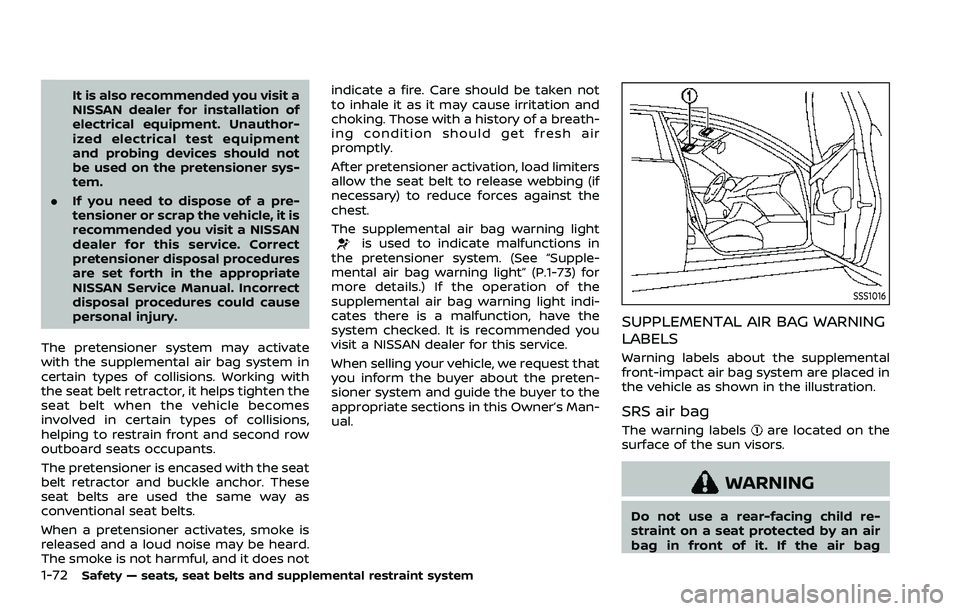
Warning labels about the supplemental
front-impact air bag system are placed in
the vehicle as shown in the illustration.
SRS air bag
The warning labelsare located on the
surface of the sun visors.
WARNING
Do not use a rear-facing child re-
straint on a seat protected by an air
bag in front of it. If the air bag
Page 91 of 603
deploys, it may cause serious injury
or death.
SPA1097
SUPPLEMENTAL AIR BAG WARNING
LIGHT
The supplemental air bag warning light,
displayingin the instrument panel,
monitors the circuits for the air bag
systems, pretensioners and all related
wiring.
When the ignition switch is in the ON
position, the supplemental air bag warn-
ing light illuminates for about 7 seconds
and then turns off. This means the system
is operational.
If any of the following conditions occur,
the air bag and/or pretensioner systems
need servicing: .
The supplemental air bag warning
light remains on after approximately
7 seconds.
. The supplemental air bag warning
light flashes intermittently.
. The supplemental air bag warning
light does not come on at all.
Under these conditions, the air bag and/
or pretensioner systems may not operate
properly. They must be checked and
repaired. It is recommended you visit a
NISSAN dealer for this service.
WARNING
If the supplemental air bag warning
light is on, it could mean that the
front air bag, knee air bag, side air
bag, curtain air bag and/or preten-
sioner systems will not operate in an
accident. To help avoid injury to
yourself or others, have your vehicle
checked as soon as possible. It is
recommended you visit a NISSAN
dealer for this service.
Safety — seats, seat belts and supplemental restraint system1-73
Page 96 of 603
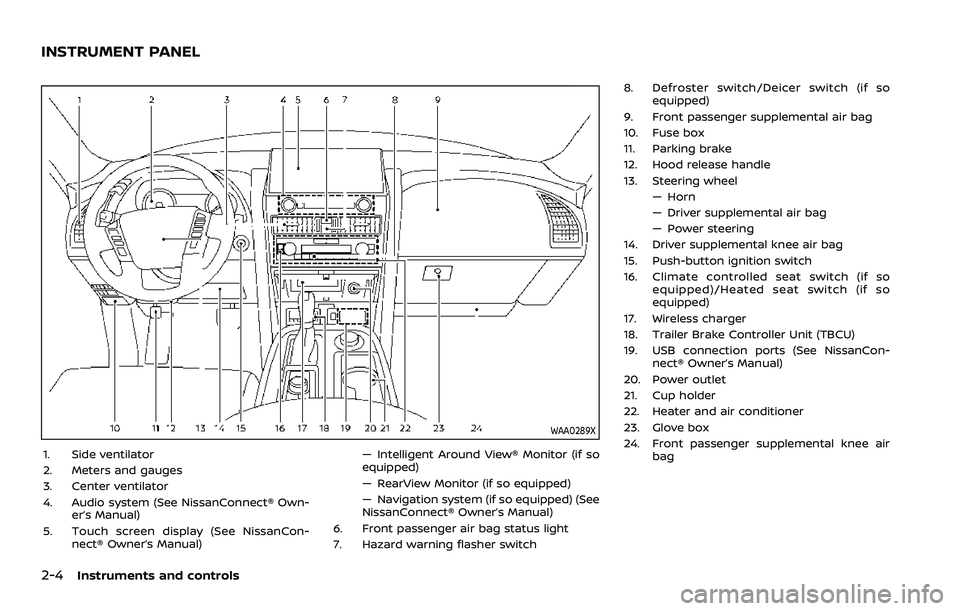
2-4Instruments and controls
WAA0289X
1. Side ventilator
2. Meters and gauges
3. Center ventilator
4. Audio system (See NissanConnect® Own-er’s Manual)
5. Touch screen display (See NissanCon- nect® Owner’s Manual) — Intelligent Around View® Monitor (if so
equipped)
— RearView Monitor (if so equipped)
— Navigation system (if so equipped) (See
NissanConnect® Owner’s Manual)
6. Front passenger air bag status light
7. Hazard warning flasher switch 8. Defroster switch/Deicer switch (if so
equipped)
9. Front passenger supplemental air bag
10. Fuse box
11. Parking brake
12. Hood release handle
13. Steering wheel — Horn
— Driver supplemental air bag
— Power steering
14. Driver supplemental knee air bag
15. Push-button ignition switch
16. Climate controlled seat switch (if so equipped)/Heated seat switch (if so
equipped)
17. Wireless charger
18. Trailer Brake Controller Unit (TBCU)
19. USB connection ports (See NissanCon- nect® Owner’s Manual)
20. Power outlet
21. Cup holder
22. Heater and air conditioner
23. Glove box
24. Front passenger supplemental knee air bag
INSTRUMENT PANEL
Page 99 of 603
WAC0610X
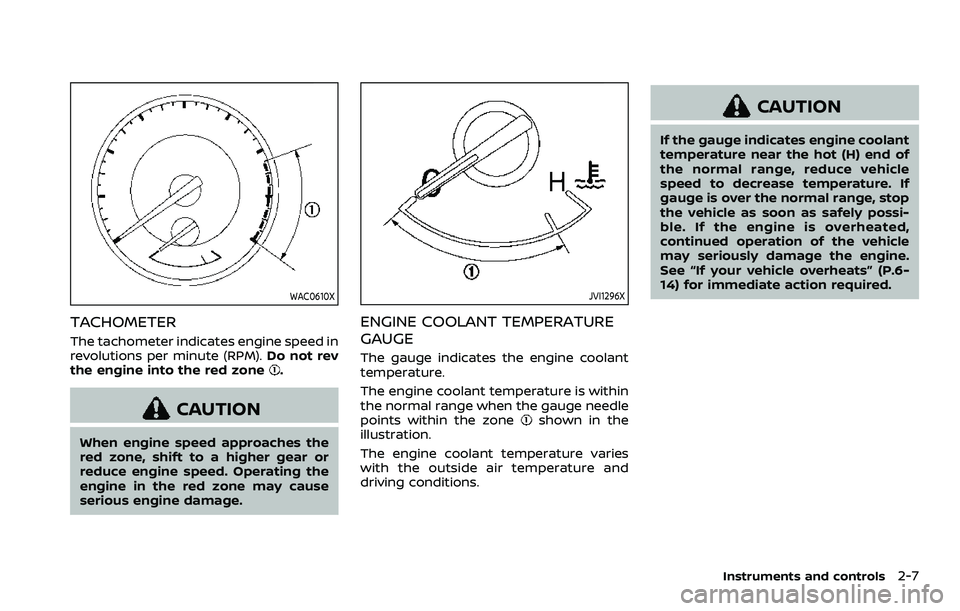
TACHOMETER
The tachometer indicates engine speed in
revolutions per minute (RPM).Do not rev
the engine into the red zone
.
CAUTION
When engine speed approaches the
red zone, shift to a higher gear or
reduce engine speed. Operating the
engine in the red zone may cause
serious engine damage.
JVI1296X
ENGINE COOLANT TEMPERATURE
GAUGE
The gauge indicates the engine coolant
temperature.
The engine coolant temperature is within
the normal range when the gauge needle
points within the zone
shown in the
illustration.
The engine coolant temperature varies
with the outside air temperature and
driving conditions.
CAUTION
If the gauge indicates engine coolant
temperature near the hot (H) end of
the normal range, reduce vehicle
speed to decrease temperature. If
gauge is over the normal range, stop
the vehicle as soon as safely possi-
ble. If the engine is overheated,
continued operation of the vehicle
may seriously damage the engine.
See “If your vehicle overheats” (P.6-
14) for immediate action required.
Instruments and controls2-7
Page 105 of 603
Master warning light
When the ignition switch is in the ON
position, the master warning light illumi-
nates when a warning message appears
in the vehicle information display.
See “Vehicle information display” (P.2-19).
Seat belt warning light and
chime
For driver and front passenger:
The light and chime remind you to fasten
the driver and front passenger seat belts.
The light illuminates whenever the igni-
tion switch is pushed to the ON position,
and will remain illuminated until the front
seat belts are fastened.
When the vehicle speed exceeds approxi-
mately 10 MPH (15 km/h), the light will
blink unless the front seat belts are
securely fastened.
When the ignition switch is pushed to the
ON position, the chime will sound for
approximately 6 seconds unless the dri-
ver’s seat belt is securely fastened.
When the vehicle speed exceeds approxi-
mately 10 MPH (15 km/h), the chime will
sound unless the front seat belts are
securely fastened. The chime will con-
tinue to sound for approximately 95 seconds until the front seat belts are
fastened.
For rear passengers:
The seat belt warning light for the rear
passengers will illuminate whenever the
ignition switch is pushed to the ON
position, and will remain illuminated until
the rear passenger’s seat belts are fas-
tened.
For approximately 65 seconds after the
ignition switch is in the ON position, the
system does not activate the warning
light for the rear passengers.
If a rear passenger seat belt is fastened
then unfastened at a vehicle speed less
than approximately 10 MPH (15 km/h), the
warning light will illuminate. When the
vehicle speed exceeds approximately 10
MPH (15 km/h), the warning light will blink
and the chime will sound.
The warning will turn off when a rear
passenger seat belt is fastened or auto-
matically turn off approximately 65 sec-
onds after the seat belt is unfastened.
See “Seat belts” (P.1-20) for precautions on
seat belt usage.
Security indicator light
The light blinks when the ignition switch
is in the ACC, OFF and LOCK position. This
function indicates the security system
equipped on the vehicle is operational.
If the security system is malfunctioning,
this light will remain on while the ignition
switch is in the ON position. For additional
information, see “Security systems” (P.2-
38).
Supplemental air bag warning
light
After placing the ignition switch in the ON
position, the supplemental air bag warn-
ing light will illuminate. The supplemental
air bag warning light will turn off after
about 7 seconds if the air bag and/or
pretensioner systems are operational.
If any of the following conditions occur,
the air bag and/or pretensioner systems
needs servicing.
. The supplemental air bag warning
light remains on after approximately
7 seconds.
. The supplemental air bag warning
light flashes intermittently.
. The supplemental air bag warning
light does not come on at all.
It is recommended you visit a NISSAN
Instruments and controls2-13
Page 117 of 603
15).)
Maintenance
The maintenance mode allows user to set
alerts for the reminding of maintenance
intervals. To change an item:
Select “Maintenance” using the
but-
tonsand press the OKbutton.
. Oil and Filter
. Tire
. Other
Oil and Filter:
This indicator appears when user set
distance comes for changing the engine
oil and filter. You can set or reset the
distance for checking or replacing these
items. For scheduled maintenance items
and intervals, refer to the “9. Maintenance
and schedules” section.
Tire:
This indicator appears when the user set
distance comes for replacing tires. You
can set or reset the distance for replacing
tires.
WARNING
The tire replacement indicator is not
a substitute for regular tire checks,
including tire pressure checks. (See “Changing wheels and tires” (P.8-
36).) Many factors including tire in-
flation, alignment, driving habits and
road conditions affect tire wear and
when tires should be replaced.
Setting the tire replacement indica-
tor for a certain driving distance
does not mean your tires will last
that long. Use the tire replacement
indicator as a guide only and always
perform regular tire checks. Failure
to perform regular tire checks, in-
cluding tire pressure checks could
result in tire failure. Serious vehicle
damage could occur and may lead to
a collision, which could result in
serious personal injury or death.
Other:
This indicator appears when the user set
distance comes for checking or replacing
maintenance items other than the engine
oil, oil filter and tires. Other maintenance
items can include such things as air filter
or tire rotation. You can set or reset the
distance for checking or replacing the
items.
Customize Display
The display settings allows user to
choose from the various meter selections.
The display settings can be changed
using the
buttons.
Main Menu Selection:
Displays available screens that can be
shown in the vehicle information display.
Route Guidance (if so equipped):
To change the setting, use the
buttonsand press the OKbutton.
. Alerts
The “Alerts” allows user to turn the Route
Guidance alerts on or off.
Welcome Effect:
The “Welcome Effect” displays the avail-
able welcome effect settings.
. gauges (if so equipped)
. Animation
Instruments and controls2-25
Page 129 of 603
button for longer than 1 second.
The display is updated every 30 seconds.
At about the first 1/3 mile (500 m) after a
reset, the display shows “——”.
8. Intelligent Cruise Control (ICC)
system
This mode shows the operating condition
for the Intelligent Cruise Control (ICC)
system. (See “Intelligent Cruise Control
(ICC)” (P.5-74).)
NOTE:
If the ICC system is in a standby state,
this screen is automatically displayed.
9. Driving aids (if so equipped)
The driving aids mode shows the operat-
ing condition for the following systems, if
the vehicle is equipped with them.
. Automatic Emergency Braking (AEB)
with pedestrian detection system
. Intelligent Forward Collision Warning
(I-FCW)
. Lane Departure Warning (LDW)
. Intelligent Lane Intervention (I-LI)
. Blind Spot Warning (BSW)
. Intelligent Blind Spot Intervention (I-
BSI)
For more details, see “Automatic Emer-
gency Braking (AEB) with pedestrian de-
tection system” (P.5-96), “Intelligent Forward Collision Warning (I-FCW)” (P.5-
106), “Lane Departure Warning (LDW)” (P.5-
26), “Intelligent Lane Intervention (I-LI)”
(P.5-31), “Blind Spot Warning (BSW)” (P.5-
38) or “Intelligent Blind Spot Intervention
(I-BSI)” (P.5-46).
10. Tire pressures
The tire pressure mode shows the pres-
sure of all four tires while the vehicle is
driven.
When the “Tire Pressure Low Add Air”
warning appears, the display can be
switched to the tire pressure mode by
pushing the left or right side of the
button.
The tire pressure unit can be changed
using the “TPMS Setting” menu displayed
in the vehicle information display. (See
“TPMS Setting” (P.2-22).)
NOTE:
After the ignition switch is placed in the
ON position, it may take a period of time
for the tire pressure to be displayed
while the vehicle is driven. Depending
on the radio wave circumstance, tire
pressure may not correctly be dis-
played.WAC0225X
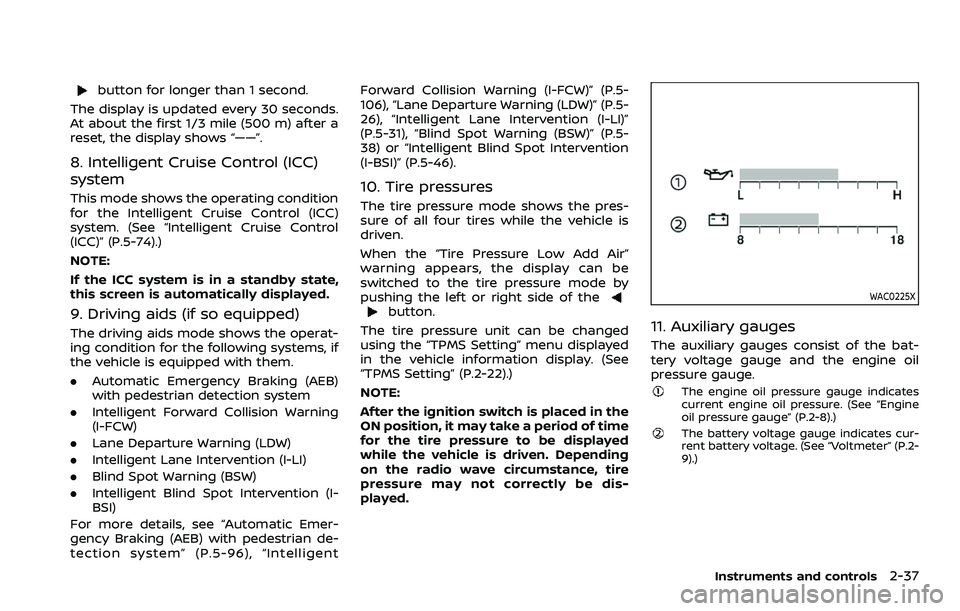
11. Auxiliary gauges
The auxiliary gauges consist of the bat-
tery voltage gauge and the engine oil
pressure gauge.
The engine oil pressure gauge indicates
current engine oil pressure. (See “Engine
oil pressure gauge” (P.2-8).)
The battery voltage gauge indicates cur-
rent battery voltage. (See “Voltmeter” (P.2-
9).)
Instruments and controls2-37
Page 130 of 603
2-38Instruments and controls
WAC0226X
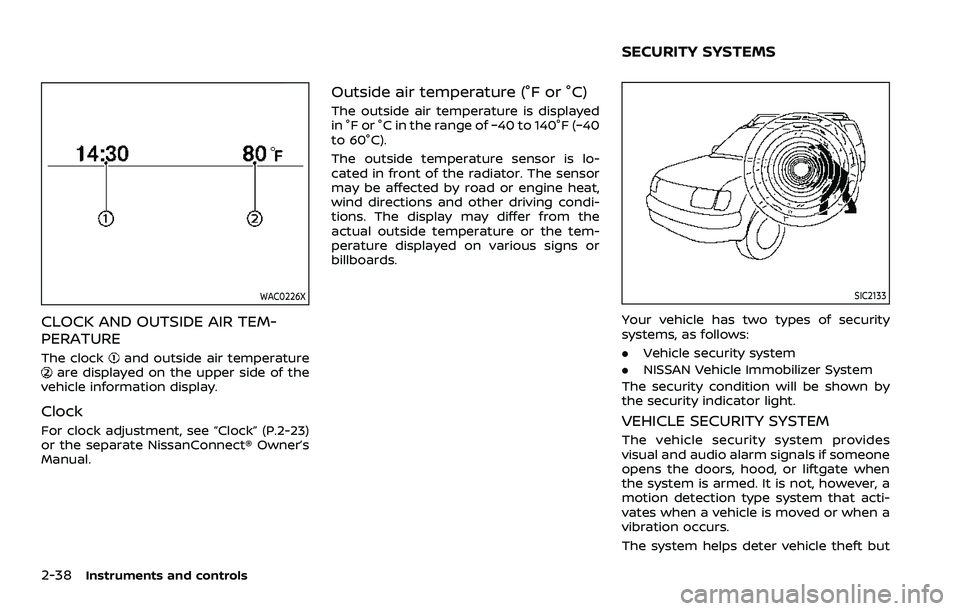
CLOCK AND OUTSIDE AIR TEM-
PERATURE
The clockand outside air temperatureare displayed on the upper side of the
vehicle information display.
Clock
For clock adjustment, see “Clock” (P.2-23)
or the separate NissanConnect® Owner’s
Manual.
Outside air temperature (°F or °C)
The outside air temperature is displayed
in °F or °C in the range of −40 to 140°F (−40
to 60°C).
The outside temperature sensor is lo-
cated in front of the radiator. The sensor
may be affected by road or engine heat,
wind directions and other driving condi-
tions. The display may differ from the
actual outside temperature or the tem-
perature displayed on various signs or
billboards.
SIC2133
Your vehicle has two types of security
systems, as follows:
. Vehicle security system
. NISSAN Vehicle Immobilizer System
The security condition will be shown by
the security indicator light.
VEHICLE SECURITY SYSTEM
The vehicle security system provides
visual and audio alarm signals if someone
opens the doors, hood, or liftgate when
the system is armed. It is not, however, a
motion detection type system that acti-
vates when a vehicle is moved or when a
vibration occurs.
The system helps deter vehicle theft but
SECURITY SYSTEMS