fuse NISSAN ARMADA 2021 Owner´s Manual
[x] Cancel search | Manufacturer: NISSAN, Model Year: 2021, Model line: ARMADA, Model: NISSAN ARMADA 2021Pages: 603, PDF Size: 3.16 MB
Page 449 of 603
could affect your warranty coverage.If in
doubt about any servicing, it is recom-
mended you have it done by a NISSAN
dealer.
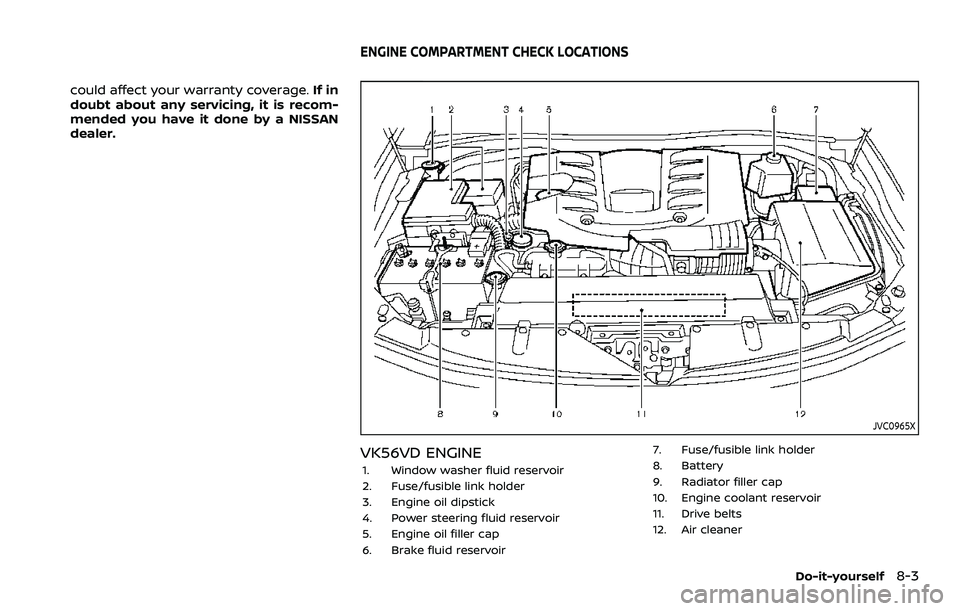
JVC0965X
VK56VD ENGINE
1. Window washer fluid reservoir
2. Fuse/fusible link holder
3. Engine oil dipstick
4. Power steering fluid reservoir
5. Engine oil filler cap
6. Brake fluid reservoir 7. Fuse/fusible link holder
8. Battery
9. Radiator filler cap
10. Engine coolant reservoir
11. Drive belts
12. Air cleaner
Do-it-yourself8-3
ENGINE COMPARTMENT CHECK LOCATIONS
Page 464 of 603

8-18Do-it-yourself
each depression as the hydraulic
pressure decreases.
If the brakes do not operate properly,
have the brakes checked. It is recom-
mended that you visit a NISSAN dealer for
repair.
SDI2518
SDI2532
ENGINE COMPARTMENT
WARNING
Never use a fuse of a higher or lower
amperage rating than that specified
on the fuse box cover. This could
damage the electrical system or
electronic control units or cause a
fire.
If any electrical equipment does not
operate, check for an open fuse.
1. Be sure the ignition switch is pushed to the OFF or LOCK position and the
headlight switch is turned to OFF.
2. Open the engine hood and remove the cover on the battery.
3. Remove the fuse/fusible link holder cover
,or.
4. Remove the fuse with the fuse puller.
FUSES
Page 465 of 603

SDI1753
Type A (if so equipped)
SDI1754Type B (if so equipped)
5. If the fuse is open, replace it with a
new fuse. Spare fuses are stored in
the passenger compartment fuse box.
6. If a new fuse also opens, have the electrical system checked and re-
paired. It is recommended you visit a
NISSAN dealer for this service.
Fusible links
If any electrical equipment does not
operate and fuses are in good condition,
check the fusible links. If any of these
fusible links are melted, replace only with
genuine NISSAN parts.
Do-it-yourself8-19
Page 466 of 603
8-20Do-it-yourself
JVM0200X
PASSENGER COMPARTMENT
WARNING
Never use a fuse of a higher or lower
amperage rating than that specified
on the fuse box cover. This could
damage the electrical system or
electronic control units or cause a
fire.
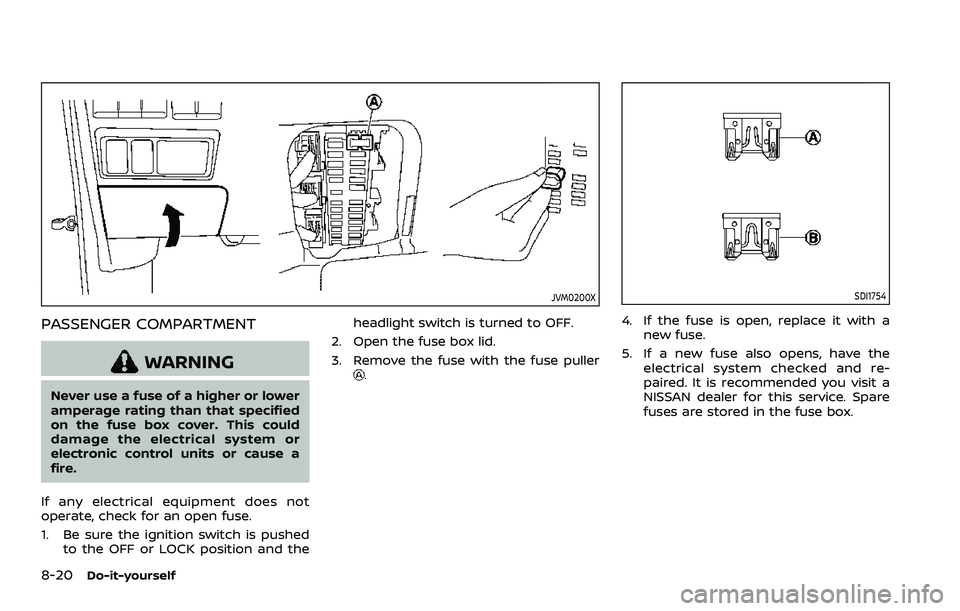
If any electrical equipment does not
operate, check for an open fuse.
1. Be sure the ignition switch is pushed to the OFF or LOCK position and the headlight switch is turned to OFF.
2. Open the fuse box lid.
3. Remove the fuse with the fuse puller
.
SDI1754
4. If the fuse is open, replace it with a new fuse.
5. If a new fuse also opens, have the electrical system checked and re-
paired. It is recommended you visit a
NISSAN dealer for this service. Spare
fuses are stored in the fuse box.
Page 467 of 603

SDI2704
Extended storage fuse switch (if so
equipped)
To reduce battery drain, the extended
storage fuse switch comes from the
factory switched off. Prior to delivery of
your vehicle, the switch is pushed in
(switched on) and should always remain
on.
If the extended storage fuse switch is not
pushed in (switched on), the “Shipping
Mode On, Push Storage Fuse” warning
may appear on the vehicle information
display (if so equipped). See “Vehicle
information display” (P.2-19).
If any electrical equipment does not
operate, remove the extended storagefuse switch and check for an open fuse.
NOTE:
If the extended storage fuse switch
malfunctions or if the fuse is open, it is
not necessary to replace the switch. In
this case, remove the extended storage
fuse switch and replace it with a new
fuse of the same rating.
How to remove the extended storage
fuse switch:
1. To remove the extended storage fuse
switch, be sure the ignition switch is in
the OFF or LOCK position.
2. Be sure the headlight switch is in the OFF position.
3. Remove the fuse box cover.
4. Pinch the locking tabsfound on
each side of the storage fuse switch.
5. Pull the storage fuse switch straight out from the fuse box
.
CAUTION
Be careful not to allow children to
swallow the battery and removed
parts.
Do-it-yourself8-21
INTELLIGENT KEY BATTERY REPLACEMENT
Page 553 of 603
Front seatFront seat adjustment ......................... 1-4, 1-11
Front-seat active head restraint..................... 1-19
Fuel Capacities and
recommended fluids/lubricants............... 10-2
Fuel economy...................................................... 5-124
Fuel information.................................................... 10-4
Fuel octane rating ............................................... 10-4
Fuel-filler cap............................................................ 3-26
Fuel-filler door......................................................... 3-26
Gauge........................................................................\
........ 2-8
Loose Fuel Cap warning................................. 3-28
Fuel efficient driving tips .................................... 5-123
Fuses........................................................................\
.............. 8-18
Fusible links...................................................................... 8-19
G
Garage door opener HomeLink®
Universal Transceiver ......................... 2-81, 2-85
Gas cap........................................................................\
........ 3-26
Gauge........................................................................\
................ 2-5 Engine coolant temperature gauge......... 2-7
Engine oil pressure gauge ............................... 2-8
Fuel gauge .................................................................... 2-8
Odometer....................................................................... 2-6
Speedometer .............................................................. 2-6
Tachometer.................................................................. 2-7
Trip computer ......................................................... 2-36
General maintenance................................................... 9-2
Glove box ........................................................................\
... 2-69
H
Hazard warning flasher switch ............................ 6-2
Head restraints/headrests................................... 1-14
Headlights Bulb replacement ................................................. 8-26
Headlight switch ................................................... 2-46
Heated seats ................................................................... 2-53
Heated steering wheel ............................................ 2-52
Heater Automatic air conditioner ............................. 4-36
Engine block heater ....................................... 5-148
Heater and air
conditioner operation....................................... 4-35
High beam assist ......................................................... 2-47
Hill start assist system ......................................... 5-132
HomeLink® Universal Transceiver ..... 2-81, 2-85
Hood release ................................................................... 3-21
Hook Coat hooks ................................................................ 2-70
Luggage hook ......................................................... 2-71
Horn........................................................................\
................ 2-53
I
Ignition switch (Push-button)............................ 5-13
Immobilizer system.................................................... 2-40
In-cabin microfilter ..................................................... 4-41
Indicator Lights..................................................................\
............ 2-14
Vehicle information display.......................... 2-19
Inside mirror .................................................................... 3-30
Inspection/Maintenance (I/M) test............. 10-38
Instrument brightness control ......................... 2-50
Instrument panel ............................................................. 2-4
Intelligent Around View® Monitor................... 4-10
Intelligent Auto Headlight system ................. 2-46 Intelligent Back-up Intervention (I-BI) ......... 5-63
Intelligent Blind Spot
Intervention (I-BSI) ...................................................... 5-46
Intelligent Cruise Control (ICC) ........................ 5-74
Intelligent Driver Alertness (I-DA) ................. 5-114
Intelligent Forward Collision
Warning (I-FCW).......................................................... 5-106
Intelligent Key..................................................................... 3-2
Intelligent Key system ................................................. 3-7
Battery replacement.......................................... 8-21
Key operating range ............................................. 3-9
Key operation .......................................................... 3-10
Warning signals...................................................... 3-12
Intelligent Lane Intervention (I-LI) .................. 5-31
Intelligent Rear View Mirror................................. 3-31
Interior light replacement..................................... 8-26
Interior light switch.................................................... 2-78
Interior lights................................................................... 2-78
ISOFIX child restraint ................................................ 1-35
J
Jump starting ................................................................. 6-12
K
Keyless entry (See remote keyless
entry system) .................................................................. 3-15
Keys ........................................................................\
.................... 3-2 For Intelligent Key system................................ 3-7
L
LabelsAir bag warning labels ..................................... 1-72
Air conditioner specification label....... 10-13
Emission control information label .... 10-12
11-3
Page 597 of 603
For example, to set the ratings limit for PG
and below, select “RATINGS” then “3” using
the directional pad and press
, based
on the rating levels. For additional informa-
tion, see “About parental lock” in this sec-
tion.To change password, select “SETTINGS”
then “PARENTAL” from the home screen.
Enter the current password, select “PASS-
WORD” then “MODIFY” to set new password,
press
once to enter, and select again
to confirm. To exit “PARENTAL” menu press
.To remove the parental lock password, se-
lect “SETTINGS” then “PARENTAL” from the
home screen. Enter the current password.
Select “PASSWORD” then “REMOVE”, press
to enter, and select again to confirm.
To exit Parental menu press.
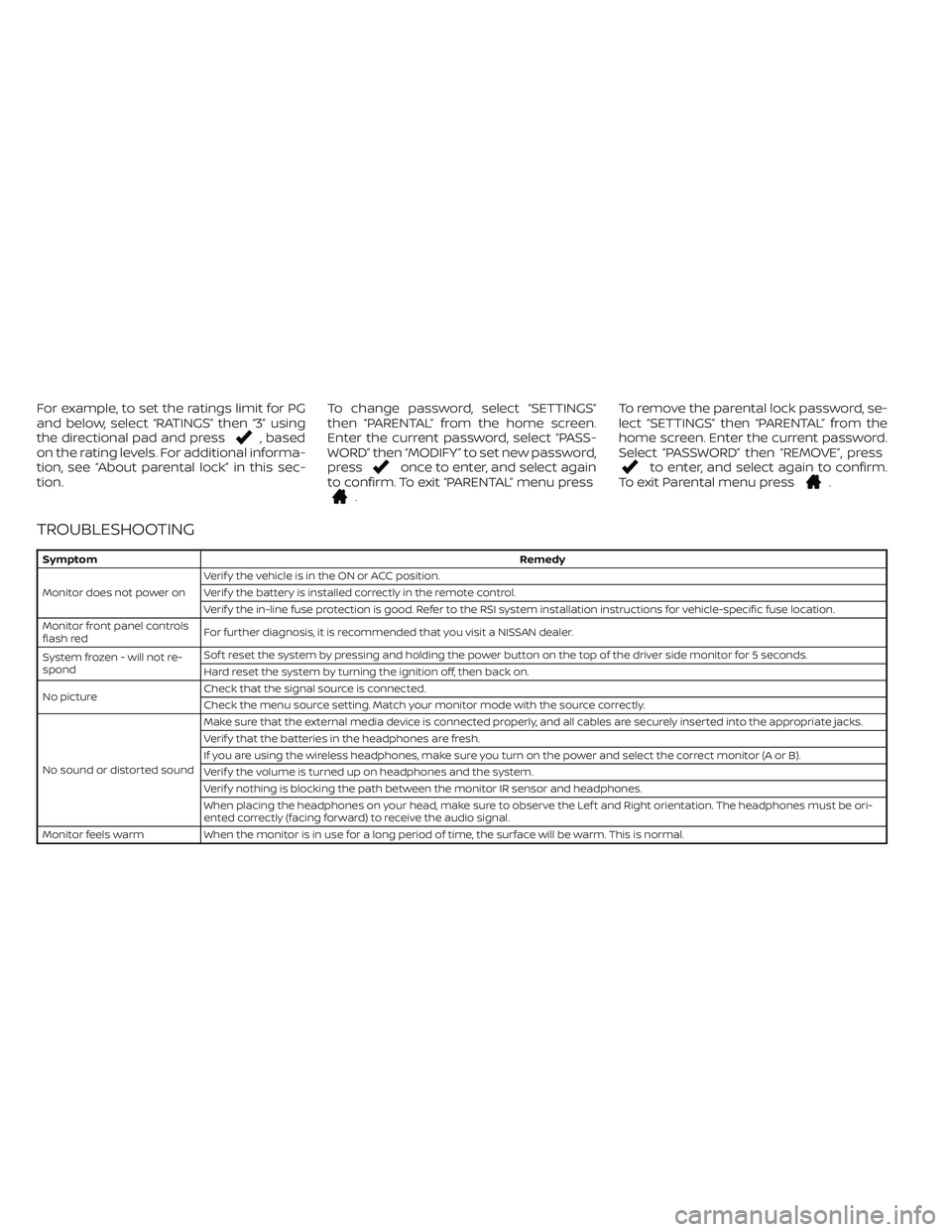
TROUBLESHOOTING
SymptomRemedy
Monitor does not power onVerif y the vehicle is in the ON or ACC position.
Verif y the battery is installed correctly in the remote control.
Verif y the in-line fuse protection is good. Refer to the RSI system installation instructions for vehicle-specific fuse location.
Monitor front panel controls
flash redFor further diagnosis, it is recommended that you visit a NISSAN dealer.
System frozen - will not re-
spondSof t reset the system by pressing and holding the power button on the top of the driver side monitor for 5 seconds.
Hard reset the system by turning the ignition off, then back on.
No pictureCheck that the signal source is connected.
Check the menu source setting. Match your monitor mode with the source correctly.
No sound or distorted soundMake sure that the external media device is connected properly, and all cables are securely inserted into the appropriate jacks.
Verif y that the batteries in the headphones are fresh.
If you are using the wireless headphones, make sure you turn on the power and select the correct monitor (A or B).
Verif y the volume is turned up on headphones and the system.
Verif y nothing is blocking the path between the monitor IR sensor and headphones.
When placing the headphones on your head, make sure to observe the Lef t and Right orientation. The headphones must be ori-
ented correctly (facing forward) to receive the audio signal.
Monitor feels warm When the monitor is in use for a long period of time, the surface will be warm. This is normal.