change time NISSAN ARMADA 2021 Owner´s Manual
[x] Cancel search | Manufacturer: NISSAN, Model Year: 2021, Model line: ARMADA, Model: NISSAN ARMADA 2021Pages: 603, PDF Size: 3.16 MB
Page 283 of 603
fuel cut mode.
5. To stop the engine, shift the shift lever to the P (Park) position and push the
ignition switch to the OFF position.
In preparation for the next engine start,
the engine may have a slightly delayed
shutoff after placing the ignition switch in
the OFF position, depending on the driv-
ing conditions.
NOTE:
Care should be taken to avoid situations
that can lead to potential battery dis-
charge and potential no-start condi-
tions such as:
1. Installation or extended use of elec-
tronic accessories that consume
battery power when the engine is
not running (Phone chargers, GPS,
DVD players, etc.)
2. Vehicle is not driven regularly and/
or only driven short distances.
In these cases, the battery may need to
be charged to maintain battery health.
REMOTE ENGINE START (if so
equipped)
Vehicles started with the remote engine
start function require the ignition switch
to be placed in the ON position before the
shift lever can be moved from the P (Park)
position. To place the ignition switch in the ON position, perform the following
steps:
1. Make sure that the Intelligent Key is
on you.
2. Firmly depress the brake pedal.
3. Push the ignition switch once to the ON position.
For additional information about the
remote engine start function, see “Re-
mote engine start” (P.3-19).
ENGINE PROTECTION MODE
The engine has an engine protection
mode to reduce the chance of damage
if the coolant temperature becomes too
high (for example, when climbing steep
grades in high temperature with heavy
loads, such as when towing a trailer).
When the engine temperature reaches a
certain level:
. The engine coolant temperature
gauge will move toward the H posi-
tion.
. Engine power may be reduced.
. The air conditioning cooling function
may be automatically turned OFF for a
short time (the blower will continue to
operate).
Engine power and, under some condi-
tions, vehicle speed will decrease. Vehicle
speed can be controlled with the accel-
erator pedal, but the vehicle may not
accelerate at the desired speed. The
transmission will downshift or upshift as
it reaches prescribed shift points. You can
also shift manually.
As driving conditions change and engine
coolant temperature is reduced, vehicle
speed can be increased using the accel-
erator pedal, and air conditioning cooling
function will automatically be turned
back ON.
Starting and driving5-17
DRIVING THE VEHICLE
Page 290 of 603
5-24Starting and driving
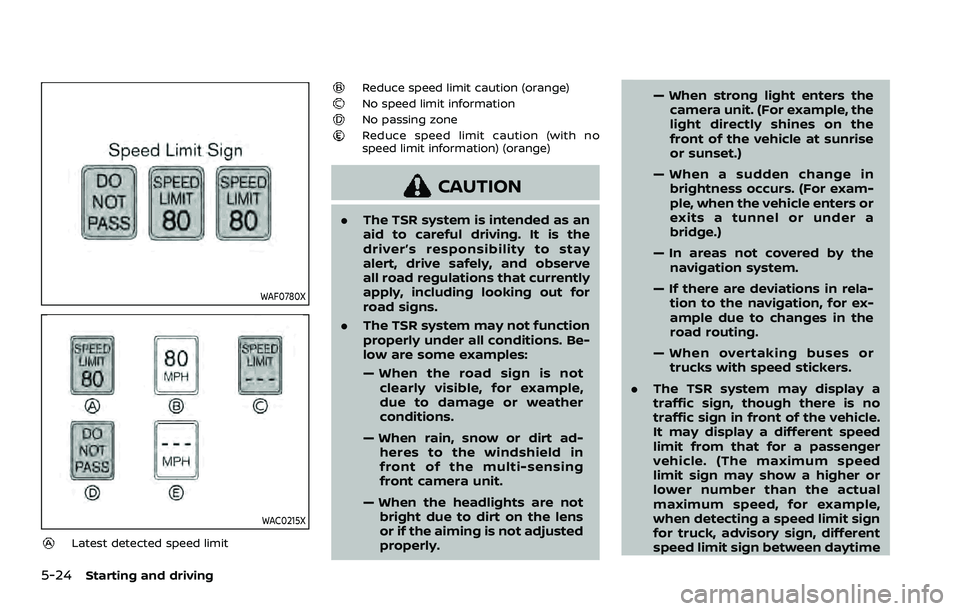
WAF0780X
WAC0215X
Latest detected speed limit
Reduce speed limit caution (orange)No speed limit informationNo passing zoneReduce speed limit caution (with no
speed limit information) (orange)
CAUTION
.The TSR system is intended as an
aid to careful driving. It is the
driver’s responsibility to stay
alert, drive safely, and observe
all road regulations that currently
apply, including looking out for
road signs.
. The TSR system may not function
properly under all conditions. Be-
low are some examples:
— When the road sign is not
clearly visible, for example,
due to damage or weather
conditions.
— When rain, snow or dirt ad- heres to the windshield in
front of the multi-sensing
front camera unit.
— When the headlights are not bright due to dirt on the lens
or if the aiming is not adjusted
properly. — When strong light enters the
camera unit. (For example, the
light directly shines on the
front of the vehicle at sunrise
or sunset.)
— When a sudden change in brightness occurs. (For exam-
ple, when the vehicle enters or
exits a tunnel or under a
bridge.)
— In areas not covered by the navigation system.
— If there are deviations in rela- tion to the navigation, for ex-
ample due to changes in the
road routing.
— When overtaking buses or trucks with speed stickers.
. The TSR system may display a
traffic sign, though there is no
traffic sign in front of the vehicle.
It may display a different speed
limit from that for a passenger
vehicle. (The maximum speed
limit sign may show a higher or
lower number than the actual
maximum speed, for example,
when detecting a speed limit sign
for truck, advisory sign, different
speed limit sign between daytime
Page 301 of 603
activating your turn signal or, for
example, if a construction zone
directs traffic to cross an existing
lane marker. If this occurs you
may need to apply corrective
steering to complete your lane
change.
. Because the I-LI may not activate
under the road, weather, and lane
marker conditions described in
this section, it may not activate
every time your vehicle begins to
leave its lane and you will need to
apply corrective steering.
. The I-LI system will not operate at
speeds below approximately 37
MPH (60 km/h) or if it cannot
detect lane markers.
. When the I-LI system is operating,
avoid excessive or sudden steer-
ing maneuvers. Otherwise, you
could lose control of the vehicle.
. Do not use the I-LI system under
the following conditions as it may
not function properly:
— During bad weather (rain, fog,
snow, etc.).
— When driving on slippery roads, such as on ice or snow. — When driving on winding or
uneven roads.
— When there is a lane closure due to road repairs.
— When driving in a makeshift or temporary lane.
— When driving on roads where the lane width is too narrow.
— When driving without normal tire conditions (for example,
tire wear, low tire pressure,
installation of spare tire, tire
chains, non-standard wheels).
— When the vehicle is equipped with non-original brake parts
or suspension parts.
— When towing a trailer or other vehicle.
— On roads where there are multiple parallel lane markers;
lane markers that are faded or
not painted clearly; yellow
painted lane markers; non-
standard lane markers; or
lane markers covered with
water, dirt, snow, etc.
— On roads where discontinued lane markers are still detect-
able. — On roads where there are
sharp curves.
— On roads where there are sharply contrasting objects,
such as shadows, snow,
water, wheel ruts, seams or
lines remaining after road re-
pairs. (The I-LI system could
detect these items as lane
markers.)
— On roads where the traveling lane merges or separates.
— When the vehicle’s traveling direction does not align with
the lane marker.
— When traveling close to the vehicle in front of you, which
obstructs the lane camera
unit detection range.
— When rain, snow or dirt ad- heres to the windshield in
front of the lane camera unit.
— When the headlights are not bright due to dirt on the lens
or if the aiming is not adjusted
properly.
— When strong light enters the lane camera unit. (For exam-
ple, the light directly shines on
Starting and driving5-35
Page 348 of 603
5-82Starting and driving
ahead, the ICC system gradually acceler-
ates your vehicle to resume the pre-
viously set vehicle speed. The ICC
system then maintains the set speed.
When a vehicle is no longer detected the
vehicle ahead detection indicator turns
off.
If a vehicle ahead appears during accel-
eration to the set vehicle speed or any
time the ICC system is in operation, the
system controls the distance to that
vehicle.
When a vehicle is no longer detected
under approximately 15 MPH (25 km/h),
the system will be canceled.
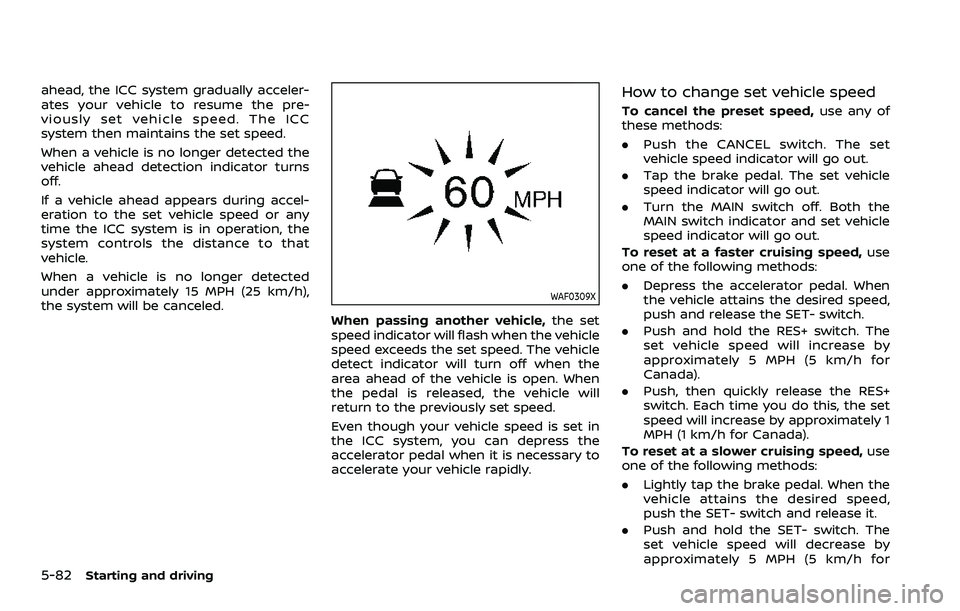
WAF0309X
When passing another vehicle,the set
speed indicator will flash when the vehicle
speed exceeds the set speed. The vehicle
detect indicator will turn off when the
area ahead of the vehicle is open. When
the pedal is released, the vehicle will
return to the previously set speed.
Even though your vehicle speed is set in
the ICC system, you can depress the
accelerator pedal when it is necessary to
accelerate your vehicle rapidly.
How to change set vehicle speed
To cancel the preset speed, use any of
these methods:
. Push the CANCEL switch. The set
vehicle speed indicator will go out.
. Tap the brake pedal. The set vehicle
speed indicator will go out.
. Turn the MAIN switch off. Both the
MAIN switch indicator and set vehicle
speed indicator will go out.
To reset at a faster cruising speed, use
one of the following methods:
. Depress the accelerator pedal. When
the vehicle attains the desired speed,
push and release the SET- switch.
. Push and hold the RES+ switch. The
set vehicle speed will increase by
approximately 5 MPH (5 km/h for
Canada).
. Push, then quickly release the RES+
switch. Each time you do this, the set
speed will increase by approximately 1
MPH (1 km/h for Canada).
To reset at a slower cruising speed, use
one of the following methods:
. Lightly tap the brake pedal. When the
vehicle attains the desired speed,
push the SET- switch and release it.
. Push and hold the SET- switch. The
set vehicle speed will decrease by
approximately 5 MPH (5 km/h for
Page 349 of 603
Canada).
. Push, then quickly release the SET-
switch. Each time you do this, the set
speed will decrease by approximately
1 MPH (1 km/h for Canada).
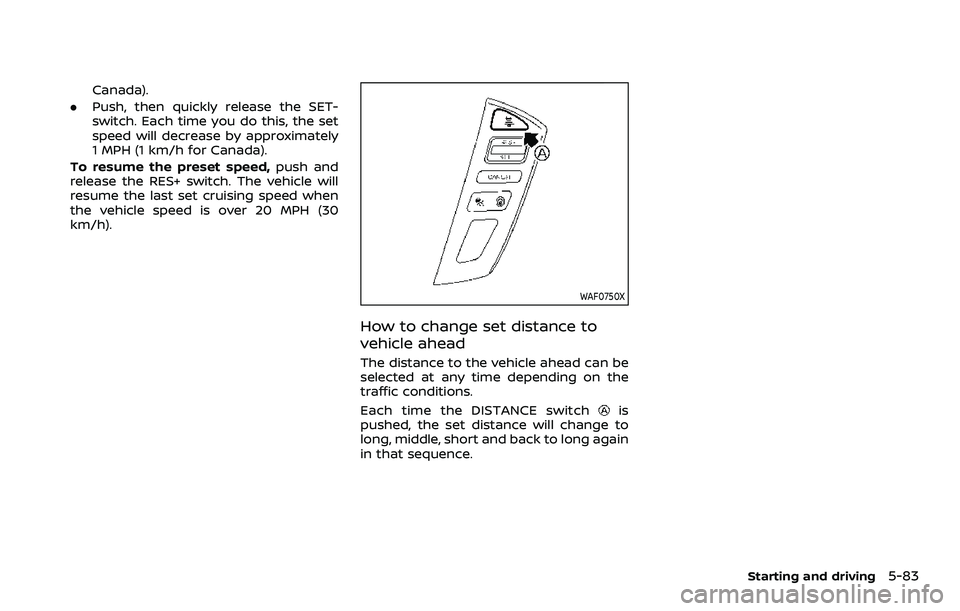
To resume the preset speed, push and
release the RES+ switch. The vehicle will
resume the last set cruising speed when
the vehicle speed is over 20 MPH (30
km/h).
WAF0750X
How to change set distance to
vehicle ahead
The distance to the vehicle ahead can be
selected at any time depending on the
traffic conditions.
Each time the DISTANCE switch
is
pushed, the set distance will change to
long, middle, short and back to long again
in that sequence.
Starting and driving5-83
Page 350 of 603
5-84Starting and driving
WAF0310X
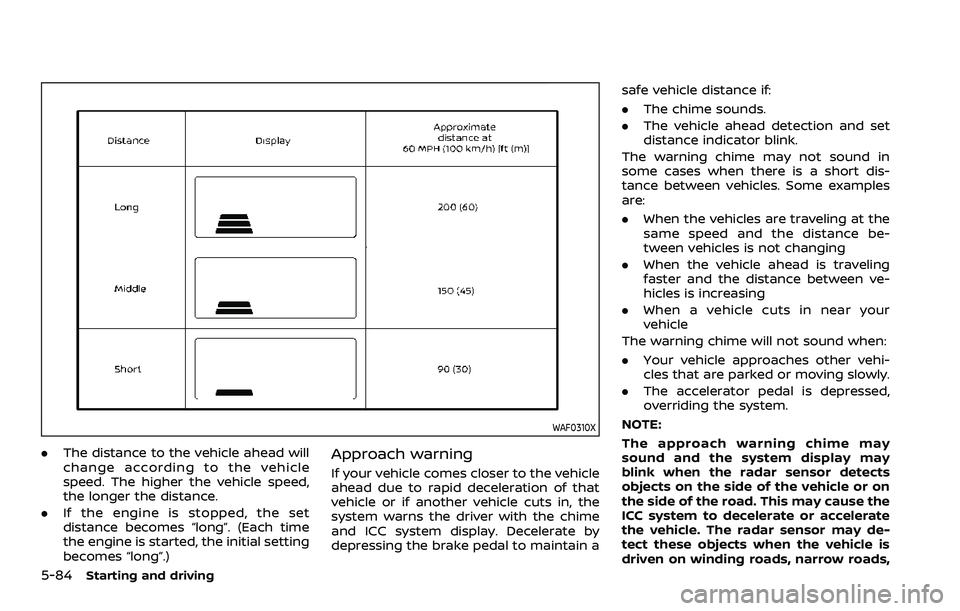
.The distance to the vehicle ahead will
change according to the vehicle
speed. The higher the vehicle speed,
the longer the distance.
. If the engine is stopped, the set
distance becomes “long”. (Each time
the engine is started, the initial setting
becomes “long”.)Approach warning
If your vehicle comes closer to the vehicle
ahead due to rapid deceleration of that
vehicle or if another vehicle cuts in, the
system warns the driver with the chime
and ICC system display. Decelerate by
depressing the brake pedal to maintain a safe vehicle distance if:
.
The chime sounds.
. The vehicle ahead detection and set
distance indicator blink.
The warning chime may not sound in
some cases when there is a short dis-
tance between vehicles. Some examples
are:
. When the vehicles are traveling at the
same speed and the distance be-
tween vehicles is not changing
. When the vehicle ahead is traveling
faster and the distance between ve-
hicles is increasing
. When a vehicle cuts in near your
vehicle
The warning chime will not sound when:
. Your vehicle approaches other vehi-
cles that are parked or moving slowly.
. The accelerator pedal is depressed,
overriding the system.
NOTE:
The approach warning chime may
sound and the system display may
blink when the radar sensor detects
objects on the side of the vehicle or on
the side of the road. This may cause the
ICC system to decelerate or accelerate
the vehicle. The radar sensor may de-
tect these objects when the vehicle is
driven on winding roads, narrow roads,
Page 351 of 603
hilly roads or when entering or exiting a
curve. In these cases you will have to
manually control the proper distance
ahead of your vehicle.
Also, the sensor sensitivity can be af-
fected by vehicle operation (steering
maneuver or driving position in the lane)
or traffic or vehicle condition (for example,
if a vehicle is being driven with some
damage).
Acceleration when passing
When the ICC system is engaged above
44 MPH (70 km/h) and following a slower
vehicle (below the vehicle set speed), and
the turn signal is activated to the left, the
ICC system will automatically start to
accelerate the vehicle to help initiate
passing on the left and will begin to
reduce the distance to vehicle directly
ahead. Only the left side turn signal
operates this feature. As the driver steers
the vehicle and moves into the passing
lane, if no vehicle is detected ahead the
ICC system will continue to accelerate to
the vehicle set speed. If another vehicle is
detected ahead, then the vehicle will
accelerate up to the following speed of
that vehicle. If the vehicle is not steered
into the left lane to pass, the acceleration
will stop after a short time and regain the
set following distance. Acceleration can
be stopped at any point by depressingthe brake pedal or the CANCEL switch on
the steering wheel.
WARNING
In order to reduce the risk of a
collision that may result in serious
injury or death, please be aware of
the following:
.
This function is only activated
with the left turn signal and will
briefly accelerate the vehicle even
if a lane change is not initiated.
This can include non-passing si-
tuations such as left side exits.
. Ensure that when passing an-
other vehicle, the adjacent lane
is clear before initiating the pass.
Sudden changes in traffic may
occur while passing. Always
manually steer or brake as
needed. Never solely rely on the
system.
Automatic cancellation
A chime sounds under the following
conditions and the control is automati-
cally canceled.
.When the vehicle ahead is not de-
tected and your vehicle is traveling
below the speed of 15 MPH (25 km/h)
. When the system judges the vehicle is
at standstill
. When the shift lever is not in the D
(Drive) or manual shift mode
. When the parking brake is applied
. When the SNOW mode switch is
pushed on.
. When the 4WD shift switch is in the 4H
or 4L position (for 4WD models)
. When the VDC system is turned off
. When the VDC (including the traction
control system) operates
. When distance measurement be-
comes impaired due to adhesion of
dirt or obstruction to the sensor
. When a wheel slips
. When the radar signal is temporarily
interrupted
Starting and driving5-85
Page 361 of 603
WAF0754X
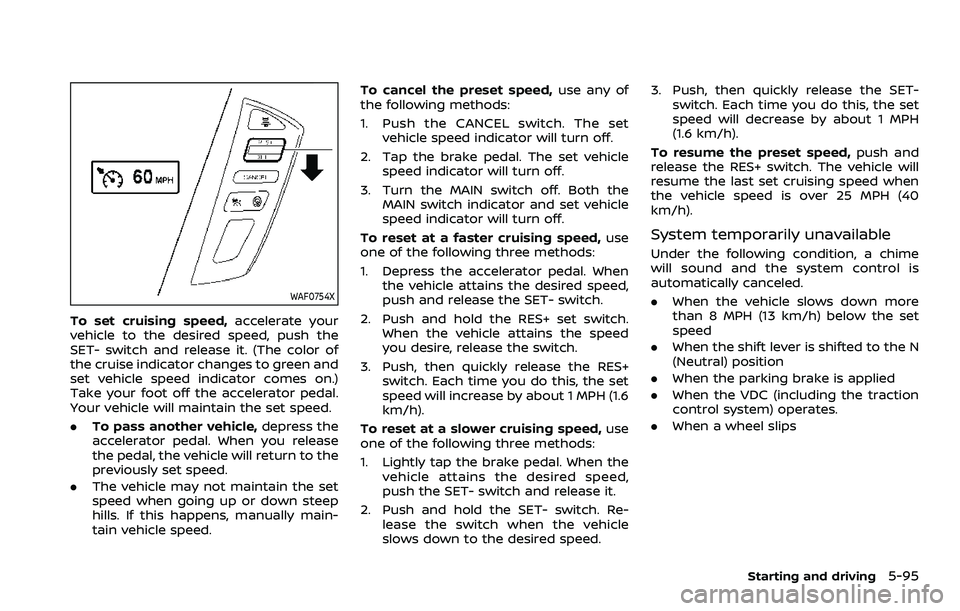
To set cruising speed,accelerate your
vehicle to the desired speed, push the
SET- switch and release it. (The color of
the cruise indicator changes to green and
set vehicle speed indicator comes on.)
Take your foot off the accelerator pedal.
Your vehicle will maintain the set speed.
. To pass another vehicle, depress the
accelerator pedal. When you release
the pedal, the vehicle will return to the
previously set speed.
. The vehicle may not maintain the set
speed when going up or down steep
hills. If this happens, manually main-
tain vehicle speed. To cancel the preset speed,
use any of
the following methods:
1. Push the CANCEL switch. The set vehicle speed indicator will turn off.
2. Tap the brake pedal. The set vehicle speed indicator will turn off.
3. Turn the MAIN switch off. Both the MAIN switch indicator and set vehicle
speed indicator will turn off.
To reset at a faster cruising speed, use
one of the following three methods:
1. Depress the accelerator pedal. When the vehicle attains the desired speed,
push and release the SET- switch.
2. Push and hold the RES+ set switch. When the vehicle attains the speed
you desire, release the switch.
3. Push, then quickly release the RES+ switch. Each time you do this, the set
speed will increase by about 1 MPH (1.6
km/h).
To reset at a slower cruising speed, use
one of the following three methods:
1. Lightly tap the brake pedal. When the
vehicle attains the desired speed,
push the SET- switch and release it.
2. Push and hold the SET- switch. Re- lease the switch when the vehicle
slows down to the desired speed. 3. Push, then quickly release the SET-
switch. Each time you do this, the set
speed will decrease by about 1 MPH
(1.6 km/h).
To resume the preset speed, push and
release the RES+ switch. The vehicle will
resume the last set cruising speed when
the vehicle speed is over 25 MPH (40
km/h).
System temporarily unavailable
Under the following condition, a chime
will sound and the system control is
automatically canceled.
. When the vehicle slows down more
than 8 MPH (13 km/h) below the set
speed
. When the shift lever is shifted to the N
(Neutral) position
. When the parking brake is applied
. When the VDC (including the traction
control system) operates.
. When a wheel slips
Starting and driving5-95
Page 380 of 603
5-114Starting and driving
tion.
. Do not alter, remove or paint the front
bumper. It is recommended you con-
tact a NISSAN dealer before customiz-
ing or restoring the front bumper.
Radio frequency statement
Model: ARS4–A
IC: 4135A-ARS4A
FCC ID: OAYARS4A
This device complies with Part 15 of the
FCC Rules and with Industry Canada
licence exempt RSS standard(s). Opera-
tion is subject to the following two con-
ditions:
(1) This device may not cause harmful inter-
ference, and
(2) This device must accept any interference received, including interference that may
cause undesired operation.
WARNING
Failure to follow the warnings and
instructions for proper use of the I-
DA system could result in serious
injury or death.
.The I–DA system is only a warning
to inform the driver of a potential
lack of driver attention or drowsi-
ness. It will not steer the vehicle
or prevent loss of control.
. The I–DA system does not detect
and provide an alert of the dri-
ver’s lack of attention or fatigue
in every situation.
. It is the driver’s responsibility to:
— Stay alert.
— Drive safely.
— Keep the vehicle in the travel- ing lane.
— Be in control of the vehicle at all times.
— Avoid driving when tired.
— Avoid distractions (texting, etc). The I–DA system helps alert the driver if
the system detects a lack of attention or
driving fatigue.
The system monitors driving style and
steering behavior over a period of time,
and it detects changes from the normal
pattern. If the system detects that driver
attention is decreasing over a period of
time, the system uses audible and visual
warnings to suggest that the driver take a
break.
INTELLIGENT DRIVER ALERTNESS (I-DA)
Page 382 of 603
5-116Starting and driving
to select “Driver Assistance.” Then
push the OK.
2. Select “Driver Attention Alert” and push the OK to turn the system on
or off.
NOTE:
The setting will be retained even if the
engine is restarted.
I-DA SYSTEM LIMITATIONS
WARNING
Listed below are the system limita-
tions for the I–DA system. Failure to
operate the vehicle in accordance
with these system limitations could
result in serious injury or death.
. The I-DA system may not operate
properly and may not provide an
alert in the following conditions:
— Poor road conditions such as
an uneven road surface or pot
holes.
— Strong side wind.
— If you have adopted a sporty driving style with higher cor-
nering speeds or higher rates
of acceleration. — Frequent lane changes or
changes to vehicle speed.
. The I–DA system will not provide
an alert in the following condi-
tions:
— Vehicle speeds lower than 37
MPH (60 km/h).
— Short lapses of attention.
— Instantaneous distractions such as dropping an object.SYSTEM MALFUNCTION
If the I–DA system malfunctions, the
“Driver Attention Alert Malfunction” warn-
ing message will appear in the vehicle
information display and the function will
be stopped automatically.
Action to take
Stop the vehicle in a safe location, place
the vehicle in P (Park) position, turn the
engine off and restart the engine. If the
warning message continues to appear,
have the system checked. It is recom-
mended that you visit a NISSAN dealer for
this service.
WARNING
Failure to follow the warnings and
instructions for proper use of the
RAB system could result in serious
injury or death.
. The RAB system is a supplemen-
tal aid to the driver. It is not a
replacement for proper driving
procedures. Always use the side
and rear mirrors and turn and
look in the direction you will
move before and while backing
up. Never rely solely on the RAB
system. It is the driver’s respon-
sibility to stay alert, drive safely,
and be in control of the vehicle at
all times.
. There is a limitation to the RAB
system capability. The RAB sys-
tem is not effective in all situa-
tions.
The RAB system can assist the driver
when the vehicle is backing up and
approaching objects directly behind the
vehicle.
REAR AUTOMATIC BRAKING (RAB)