USB NISSAN ARMADA 2021 Owner´s Manual
[x] Cancel search | Manufacturer: NISSAN, Model Year: 2021, Model line: ARMADA, Model: NISSAN ARMADA 2021Pages: 603, PDF Size: 3.16 MB
Page 13 of 603
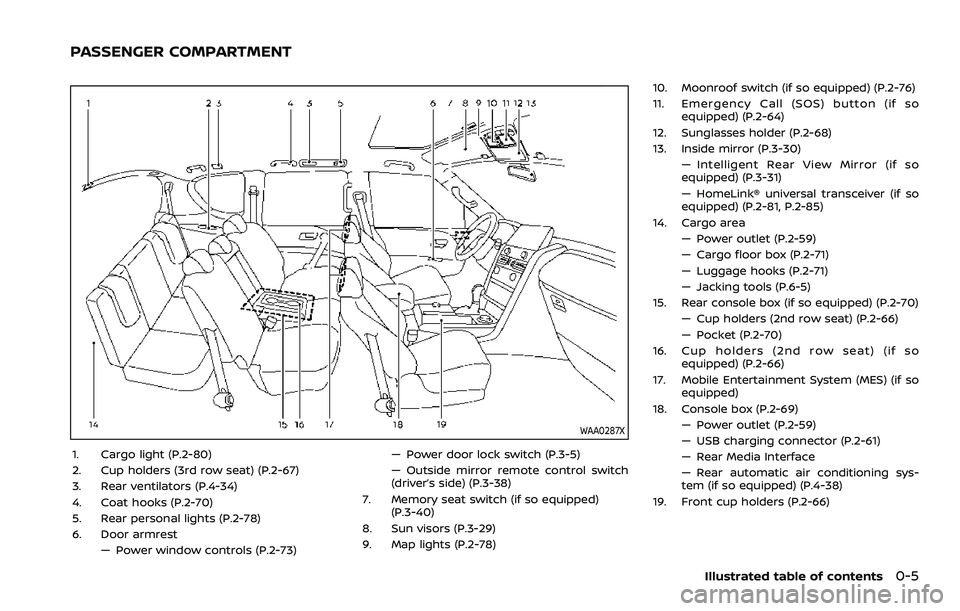
WAA0287X
1. Cargo light (P.2-80)
2. Cup holders (3rd row seat) (P.2-67)
3. Rear ventilators (P.4-34)
4. Coat hooks (P.2-70)
5. Rear personal lights (P.2-78)
6. Door armrest— Power window controls (P.2-73) — Power door lock switch (P.3-5)
— Outside mirror remote control switch
(driver’s side) (P.3-38)
7. Memory seat switch (if so equipped) (P.3-40)
8. Sun visors (P.3-29)
9. Map lights (P.2-78) 10. Moonroof switch (if so equipped) (P.2-76)
11. Emergency Call (SOS) button (if so
equipped) (P.2-64)
12. Sunglasses holder (P.2-68)
13. Inside mirror (P.3-30) — Intelligent Rear View Mirror (if so
equipped) (P.3-31)
— HomeLink® universal transceiver (if so
equipped) (P.2-81, P.2-85)
14. Cargo area — Power outlet (P.2-59)
— Cargo floor box (P.2-71)
— Luggage hooks (P.2-71)
— Jacking tools (P.6-5)
15. Rear console box (if so equipped) (P.2-70)
— Cup holders (2nd row seat) (P.2-66)
— Pocket (P.2-70)
16. Cup holders (2nd row seat) (if so equipped) (P.2-66)
17. Mobile Entertainment System (MES) (if so equipped)
18. Console box (P.2-69) — Power outlet (P.2-59)
— USB charging connector (P.2-61)
— Rear Media Interface
— Rear automatic air conditioning sys-
tem (if so equipped) (P.4-38)
19. Front cup holders (P.2-66)
Illustrated table of contents0-5
PASSENGER COMPARTMENT
Page 15 of 603
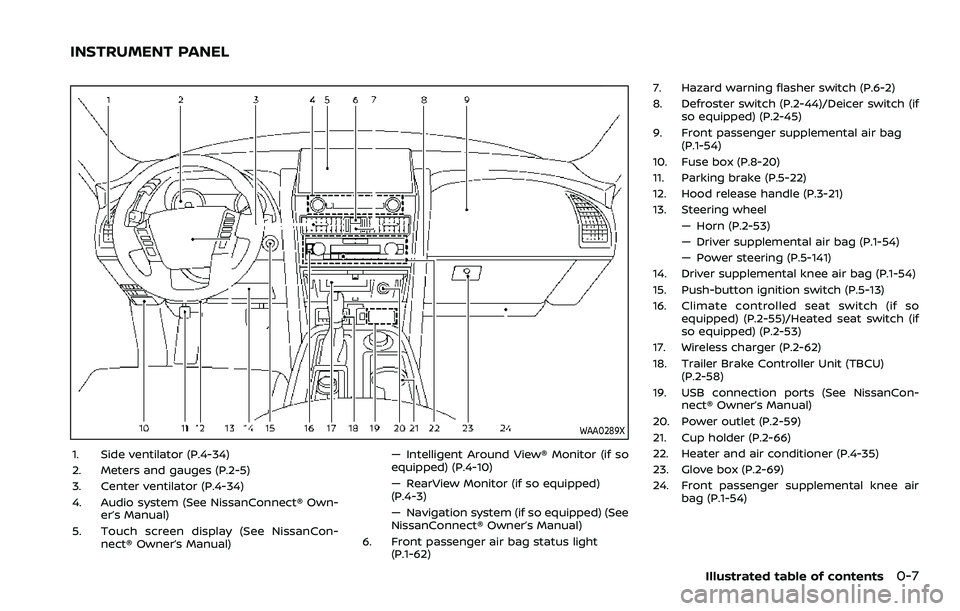
WAA0289X
1. Side ventilator (P.4-34)
2. Meters and gauges (P.2-5)
3. Center ventilator (P.4-34)
4. Audio system (See NissanConnect® Own-er’s Manual)
5. Touch screen display (See NissanCon- nect® Owner’s Manual) — Intelligent Around View® Monitor (if so
equipped) (P.4-10)
— RearView Monitor (if so equipped)
(P.4-3)
— Navigation system (if so equipped) (See
NissanConnect® Owner’s Manual)
6. Front passenger air bag status light (P.1-62) 7. Hazard warning flasher switch (P.6-2)
8. Defroster switch (P.2-44)/Deicer switch (if
so equipped) (P.2-45)
9. Front passenger supplemental air bag (P.1-54)
10. Fuse box (P.8-20)
11. Parking brake (P.5-22)
12. Hood release handle (P.3-21)
13. Steering wheel — Horn (P.2-53)
— Driver supplemental air bag (P.1-54)
— Power steering (P.5-141)
14. Driver supplemental knee air bag (P.1-54)
15. Push-button ignition switch (P.5-13)
16. Climate controlled seat switch (if so equipped) (P.2-55)/Heated seat switch (if
so equipped) (P.2-53)
17. Wireless charger (P.2-62)
18. Trailer Brake Controller Unit (TBCU) (P.2-58)
19. USB connection ports (See NissanCon- nect® Owner’s Manual)
20. Power outlet (P.2-59)
21. Cup holder (P.2-66)
22. Heater and air conditioner (P.4-35)
23. Glove box (P.2-69)
24. Front passenger supplemental knee air bag (P.1-54)
Illustrated table of contents0-7
INSTRUMENT PANEL
Page 94 of 603
TOW mode switch ..................................................................... 2-57
Vehicle Dynamic Control (VDC) OFF switch ......... 2-57
Trailer Brake Controller Unit (TBCU) .......................... 2-58
Rear door alert ........................................................................\
.... 2-58
Power outlet ........................................................................\
.......... 2-59USB (Universal Serial Bus)
charging connector .......................................................... 2-61
Wireless charger (if so equipped) ........................... 2-62
Emergency Call (SOS) button (if
so equipped) ........................................................................\
.......... 2-64 Emergency support .......................................................... 2-64
Storage ........................................................................\
...................... 2-66 Cup holders ........................................................................\
..... 2-66
Sunglasses holder .............................................................. 2-68
Glove box ........................................................................\
........... 2-69
Console box ........................................................................\
..... 2-69
Coat hooks ........................................................................\
....... 2-70
Luggage hooks ..................................................................... 2-71
Cargo floor box .................................................................... 2-71
Roof rack ........................................................................\
........... 2-72
Windows ........................................................................\
.................... 2-73
Power windows .................................................................... 2-73
Moonroof (if so equipped) .................................................. 2-76 Power moonroof ................................................................. 2-76
Welcome light (if so equipped) ....................................... 2-77 Battery saver system ..................................................... 2-78
Interior lights ........................................................................\
......... 2-78
Interior light switch ........................................................... 2-78
Console light ........................................................................\
... 2-79 Map lights ........................................................................\
....... 2-79
Rear personal lights ....................................................... 2-80
Vanity mirror lights ................................................................. 2-80
Cargo light ........................................................................\
............. 2-80
HomeLink® Universal Transceiver (Type A) (if
so equipped) ........................................................................\
......... 2-81 Programming HomeLink® ......................................... 2-81
Programming HomeLink® for Canadian
customers and gate openers ................................. 2-83
Operating the HomeLink®
Universal Transceiver .................................................... 2-83
Programming troubleshooting ............................. 2-83
Clearing the programmed information .......... 2-84
Reprogramming a single
HomeLink® button ........................................................... 2-84
If your vehicle is stolen ................................................ 2-84
HomeLink® Universal Transceiver (Type B) (if
so equipped) ........................................................................\
......... 2-85
Programming HomeLink® ......................................... 2-85
Using the garage door
two-way communication ........................................... 2-88
Programming HomeLink® for Canadian
customers and gate openers ................................. 2-89
Operating the HomeLink®
Universal Transceiver .................................................... 2-89
Programming troubleshooting ............................. 2-89
Clearing the programmed information .......... 2-89
Reprogramming a single
HomeLink® button ........................................................... 2-90
If your vehicle is stolen ................................................ 2-90
Page 96 of 603
2-4Instruments and controls
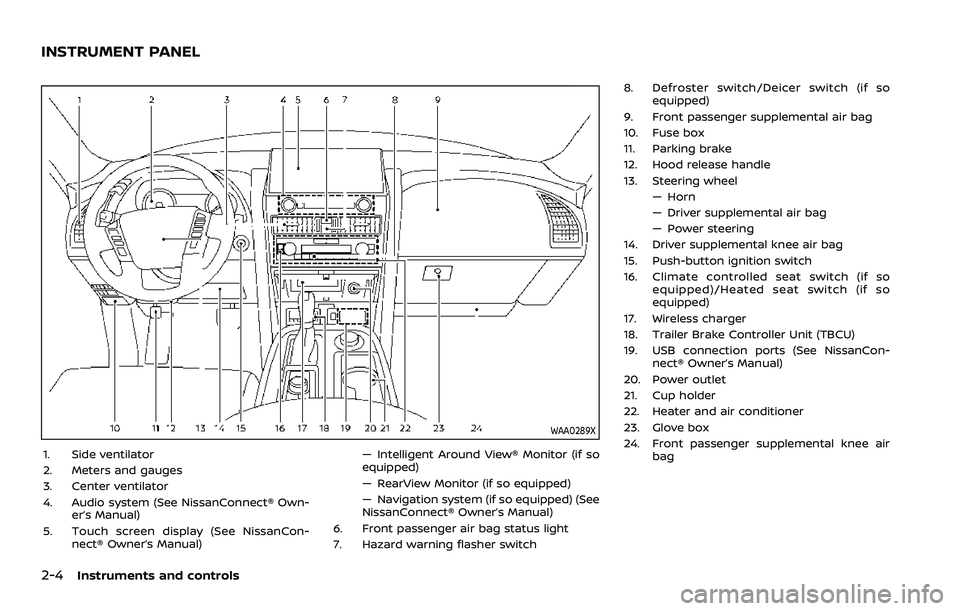
WAA0289X
1. Side ventilator
2. Meters and gauges
3. Center ventilator
4. Audio system (See NissanConnect® Own-er’s Manual)
5. Touch screen display (See NissanCon- nect® Owner’s Manual) — Intelligent Around View® Monitor (if so
equipped)
— RearView Monitor (if so equipped)
— Navigation system (if so equipped) (See
NissanConnect® Owner’s Manual)
6. Front passenger air bag status light
7. Hazard warning flasher switch 8. Defroster switch/Deicer switch (if so
equipped)
9. Front passenger supplemental air bag
10. Fuse box
11. Parking brake
12. Hood release handle
13. Steering wheel — Horn
— Driver supplemental air bag
— Power steering
14. Driver supplemental knee air bag
15. Push-button ignition switch
16. Climate controlled seat switch (if so equipped)/Heated seat switch (if so
equipped)
17. Wireless charger
18. Trailer Brake Controller Unit (TBCU)
19. USB connection ports (See NissanCon- nect® Owner’s Manual)
20. Power outlet
21. Cup holder
22. Heater and air conditioner
23. Glove box
24. Front passenger supplemental knee air bag
INSTRUMENT PANEL
Page 153 of 603

SIC2648
Main switch
Type B (if so equipped)
The power outlet (plug type) is located on
the back side of the front console. It can
operate when the ignition switch in the
ON position and the main switch (located
in the console box) is ON.
The specification of this power outlet is
for use of a 120 volt, 150W (1.25A) power
draw.
To turn on or off the power supply to the
outlet, push the ON
or OFFside of the
main switch. When the switch is turned to
the ON position, the indicator light
will
illuminate.
JVI1638X
Power outlet
Pull up the cover and plug in.
After using the power outlet, be sure to
turn off the main switch.
CAUTION
. Do not use with accessories that
exceed a 120 volt, 150W (1.25A)
power draw.
. Use this power outlet with the
engine running. (If the engine is
stopped, this could result in a
discharged battery.)
WAC0630X
USB (Universal Serial Bus) CHAR-
GING CONNECTOR
The USB charging connector is located on
the back of the center console box.
The USB charging connector can be used
only for charging an external device.
Connect a USB device into the connector.
Charging will start automatically (max-
imum output up to 5volt, 12W, 2.4A (Type-
A) and 5volt, 15W, 3A (Type-C)).
The external device will be charged con-
tinuously while the ignition switch is in
the ON position.
Some mobile devices cannot be charged
depending on their specifications.
Instruments and controls2-61
Page 154 of 603
2-62Instruments and controls
CAUTION
.Do not force a USB device into the
connector. Inserting the USB de-
vice tilted or up-side-down into
the connector may damage the
connector. Make sure that the
USB device is connected correctly
into the connector.
. Do not use a reversible USB cable.
Using the reversible USB cable
may damage the connector.
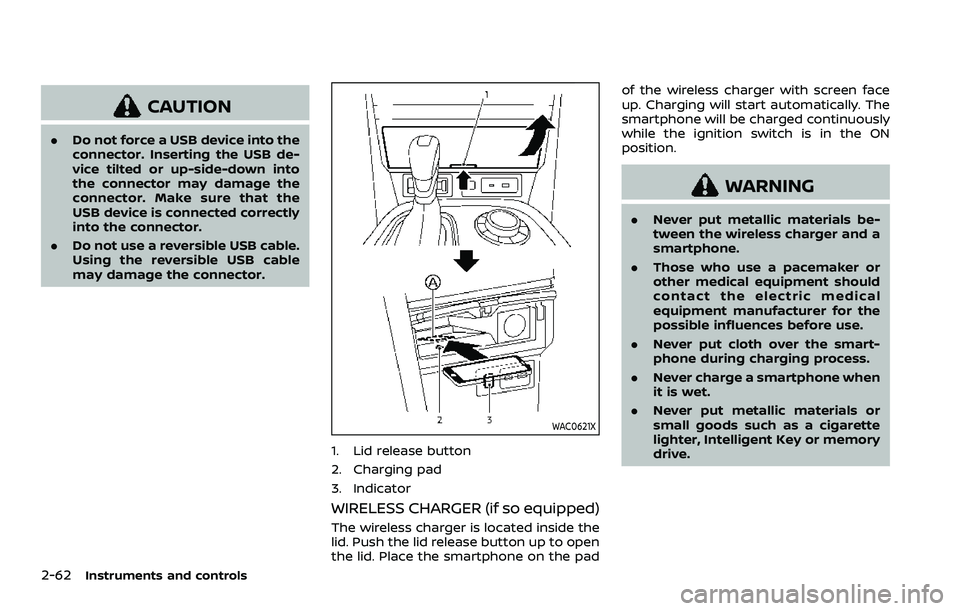
WAC0621X
1. Lid release button
2. Charging pad
3. Indicator
WIRELESS CHARGER (if so equipped)
The wireless charger is located inside the
lid. Push the lid release button up to open
the lid. Place the smartphone on the pad of the wireless charger with screen face
up. Charging will start automatically. The
smartphone will be charged continuously
while the ignition switch is in the ON
position.
WARNING
.
Never put metallic materials be-
tween the wireless charger and a
smartphone.
. Those who use a pacemaker or
other medical equipment should
contact the electric medical
equipment manufacturer for the
possible influences before use.
. Never put cloth over the smart-
phone during charging process.
. Never charge a smartphone when
it is wet.
. Never put metallic materials or
small goods such as a cigarette
lighter, Intelligent Key or memory
drive.
Page 155 of 603

CAUTION
.Do not put an RFID/NFC/credit
card between the wireless char-
ger and a smartphone. This could
cause data corruption in the card.
. Do not use the wireless charger
with dust accumulated or dirt on
the pad.
. Do not hit the surface of the
wireless charger.
. Do not spill liquid (water, drinks,
etc.) on the charging pad.
. Do not use grease, oil or alcohol
for cleaning charging pad.
Wireless charger Indicator
The indicatorwill illuminate in orange
when the charging process is started.
When the charging has completed, the
indicator illuminates in green.
If a malfunction occurs or the charging
process has stopped, the indicator will
blink in orange for 8 seconds then turn
off.
Operation of the wireless charger
To use the wireless charger, it is neces-
sary to properly position the smartphone
on the charging pad with the screen
facing up. To maximize charging perfor-
mance, ensure the smartphone is fully
seated on the center of the charging pad
over the
logo. Because the location
of the power receiver may vary depend-
ing on the smartphone, you will need to
try and find the area that suits your
smartphone.
Because some smartphone cases or ac-
cessories may adversely affect charging,
remove them before wireless charging.
Turn off the vibration function of the
smartphone before wireless charging.
NOTE:
. Only a Qi compatible smartphone
can be used.
. The smartphone may be warmed
during charging process and the
charging may stop by the protection
function of the wireless charger. This
is not a malfunction. If this occurs,
restart charging after the smart-
phone cooled down. The indicator
will blink in orange then turn off.
. The wireless charging process may
be stopped by the status of the
smartphone (battery temperature, etc.).
. If a radio noise interference occurs
during charging process, put the
smartphone onto the center (
logo) position of the wireless char-
ger.
. The wireless charging process will
stop during process of searching the
Intelligent Key.
. The wireless charging process will
not be started when a USB (Univer-
sal Serial Bus) cable is connected to
the smartphone. The indicator may
illuminate in orange or blink if the
smartphone is put on the wireless
charger with a USB cable connected.
However, charging is not performed.
. Depending on the type of the smart-
phone, the indicator may remain
illuminated in orange even when
the charging process has been com-
pleted.
FCC ID: BEJWC500MNM
IC: 2703H-WC500MNM
This device complies with part 15 of the
FCC Rules and RSS-Gen of IC Rules.
Operation is subject to the following
two conditions:
(1) This device may not cause harmful
interference, and
Instruments and controls2-63
Page 556 of 603
11-6
Push starting............................................................ 6-14
Starting the engine............................................. 5-16
Status light, Front passenger air bag ......... 1-62
Steering Heated steering wheel ..................................... 2-52
Power steering ................................................... 5-141
Power steering fluid .............................................. 8-8
Tilt/telescopic steering .................................... 3-29
Storage ........................................................................\
........ 2-66
Sun visors ........................................................................\
.. 3-29
Sunglasses holder....................................................... 2-68
Supplemental air bag warning labels ......... 1-72
Supplemental air bag
warning light .................................................... 1-73, 2-13
Supplemental restraint system........................ 1-54 Precautions on supplemental
restraint system .................................................... 1-54
Switch Emergency Call (SOS) button ..................... 2-64
Fog light switch ..................................................... 2-52
Hazard warning flasher switch .................... 6-2
Headlight switch ................................................... 2-46
Ignition switch ........................................................ 5-18
Intelligent Auto Headlight switch ............ 2-46
Power door lock switch ..................................... 3-5
SNOW mode switch ............................................ 2-57
Turn signal switch ............................................... 2-51
Vehicle Dynamic Control (VDC)
OFF switch ................................................................. 2-57
T
Tachometer........................................................................\
.. 2-7
Temperature gauge, Engine coolant
temperature gauge ....................................................... 2-7
Theft (NISSAN Vehicle Immobilizer System),
Engine start...................................................................\
... 2-40 Three-way catalyst......................................................... 5-4
Tilt/telescopic steering ........................................... 3-29
Tire
Pressure, Low tire pressure
warning light ............................................................ 2-15
Tires Flat tire........................................................................\
..... 6-3
Tire and Loading
information label................................ 8-30, 10-13
Tire chains.................................................................. 8-35
Tire dressing................................................................ 7-4
Tire pressure ............................................................ 8-28
Tire Pressure Monitoring
System (TPMS) ................................................ 5-5, 6-3
Tire rotation.............................................................. 8-36
Types of tires ........................................................... 8-34
Uniform tire quality grading .................... 10-36
Wheel/tire size ........................................................ 10-9
Wheels and tires .................................................... 8-28
Top Tether strap child restraints........................ 1-37
TOW mode ..................................................................... 5-134
TOW mode switch....................................................... 2-57
Towing Flat towing............................................................. 10-35
Tow truck towing................................................. 6-16
Towing a trailer.................................................. 10-19
Towing safety...................................................... 10-24
TPMS, Tire Pressure
Monitoring System ............................................. 5-5, 6-3 TPMS with Easy Fill Tire Alert......................... 5-8
Traffic Sign Recognition (TSR)........................... 5-23
Trailer Brake Controller Unit (TBCU) ............ 2-58
Trailer towing .............................................................. 10-19
Transceiver HomeLink®
Universal Transceiver ......................... 2-81, 2-85 Transmission
Automatic Transmission Fluid (ATF) ........ 8-8
Driving with
automatic transmission .................................. 5-18
Transmission shift lever lock release ..... 5-22
Transmitter (See remote keyless
entry system) .................................................................. 3-15
Traveling or registering your vehicle in
another country ........................................................ 10-11
Trip computer ................................................................ 2-36
Trip odometer ................................................................ 2-36
Turn signal switch ...................................................... 2-51
U
Underbody cleaning ...................................................... 7-3
Uniform tire quality grading ............................ 10-36
USB (Universal Serial Bus)
charging connector................................................... 2-61
V
Vanity mirror ................................................................... 3-40
Vanity mirror lights .................................................... 2-80
Variable voltage control system ..................... 8-13
Vehicle Dimensions ............................................................ 10-10
Identification number (VIN)....................... 10-11
Loading information ...................................... 10-15
Recovery (freeing a stuck vehicle) .......... 6-19
Security system...................................................... 2-38
Vehicle Dynamic Control (VDC)
OFF switch ................................................................. 2-57
Vehicle Dynamic Control
(VDC) system ........................................................ 5-144
Vehicle Dynamic Control (VDC)
warning light ............................................................ 2-18
Page 566 of 603
WARNING
•It is unlawful in most jurisdictions for
a person to drive a motor vehicle
which is equipped with a television
monitor or screen that is visible, di-
rectly or indirectly, to the driver while
operating the vehicle. In the interest
of safety, the unit should never be
installed where it will be directly or
indirectly visible, by the operator of
the motor vehicle.
•If your vehicle is equipped with a
wireless rear seat audio system or
any other wireless infrared device,
make sure it is powered off when op-
erating the RSI system. If both sys-
tems are powered on at the same
time, the two systems may obstruct
each other, possibly creating unde-
sirable audio interference through
the wireless headphones.
•For safety reasons when changing
discs, it is recommended that the ve-
hicle is not in motion, and that you do
not allow children to unfasten safety
belts to change discs or make any
adjustments to the system. System
adjustments can be accomplished
using the remote control, while
safety belts remain fastened.•Enjoy your RSI system but remember
that safety of all passengers remains
the number one priority. Devices in-
stalled in the USB, HDMI, or head-
phone jack may protrude and create
a potential eye impact hazard for un-
belted passengers during a vehicle
accident. To reduce the risk of injury,
use only SD cards (hidden on lef t side
of driver side monitor) or low-profile
USB storage devices.
CAUTION
•Do not touch the inner pins of the
jacks on the front panel. Electrostatic
discharge may cause permanent
damage to the device.
•The LCD display screen is not touch-
screen. Do not put pressure or add
suction cups on the screen.
•Caution children to avoid touching or
scratching the screen, as it may be-
come dirty or damaged.•Be sure to run the vehicle engine
while using the system. Using this
system without running the engine
can result in battery drain. To avoid
the risk of battery drain, please re-
member to turn off the system when
the vehicle is not in use.
WELCOME
Thank you for purchasing this advanced
Rear Seat Infotainment (RSI) system with
built-in Wi-Fi. Before operating this system,
read this section thoroughly and retain it
for future reference.
System features
• Twin 8-inch Color TFT-LCD Panels with
1024x600 Resolution
• Internal Wi-Fi Network
• Bluetooth® 4.1 Audio Streaming
• Miracast®/Smart View Capability
• SmartStream Content Sharing
• USB 2.0 Port, SDXC Card Input
• HDMI 1.4 Input with MHL 2.0 Support
• Exclusive Slingplayer® Application
• 3.5mm Stereo Headphone Output
• Front Panel Capacitive Touch Controls
• Infrared Wireless Headphones
REAR SEAT INFOTAINMENT (RSI) (if
so equipped)
Page 568 of 603
Audio options
Wireless headphones
Each monitor includes a built-in dual chan-
nel infrared transmitter for use with wire-
less headphones. The wireless head-
phones must be used within a line of sight
from the transmitter as infrared signals, like
visible light, travel only in a straight line.
How to use the wireless headphones
When placing the headphones on your
head, make sure to observe the lef t and
right orientation. The headphones must be
oriented correctly (facing forward) to re-
ceive the audio signal. Press the
(power) button on the headphones,
then select channel “A” to listen to monitor
A, or channel “B” to listen to monitor B. Ad-
just the audio level using the volume con-
trol on each headphone.
Wired headphones
There is a 3.5mm stereo headphone out-
put on each monitor which can be used
with most standard stereo headphones
(wired headphones sold separately).
Bluetooth® streaming audio
To listen to audio throughout the entire ve-
hicle, the system includes the ability tostream audio over a Bluetooth® connec-
tion to the vehicle’s stereo system.
When monitor A is selected as the source
to stream from, the audio output to the
wireless and wired headphones will be dis-
abled (only on monitor A). To use the wire-
less or wired headphones with monitor A,
you must turn off the Bluetooth® stream-
ing feature. To enable/disable Bluetooth®
streaming, navigate to the “SETTINGS”
menu, or press
on the remote control
during content playback. For additional in-
formation, see “Settings” in this section.
Media compatibility
For a list of compatible media formats for
this system, see “Storage device format-
ting” in this section.
• The metadata or file information of some
audio and video files may not be correctly
displayed.
• It is not possible to play content that is
protected by DRM (Digital Rights Manage-
ment).
• There may be a delay before playback
begins when using USB flash drives or SD
cards with complex folder hierarchies or
many files.• Some audio, video, and image files may
be incompatible with this system due to
file characteristics, file format, recording
sof tware used, directory structure,
and/or the type of audio/video encoding
used.
Storage device formatting
This system is compatible with several
types of formatting for USB flash drives and
SD cards. Refer to the documentation that
comes with your storage device for more
details on how to format.
FAT32 - USB and SDHC
Good for smaller capacity storage devices,
but individual files on the drive must be
<4GB. This format is good for music and
images.
EX-FAT - USB and SDXC
Better choice for larger capacity storage
devices with files that are >4GB. This format
is better for larger files such as full-length
movies.
NTFS - USB and SDXC
Best choice for very large capacity storage
devices - with no limitations on file size. This
format can be used for all file sizes.