engine NISSAN ARMADA 2022 Owner´s Manual
[x] Cancel search | Manufacturer: NISSAN, Model Year: 2022, Model line: ARMADA, Model: NISSAN ARMADA 2022Pages: 604, PDF Size: 2.97 MB
Page 411 of 604
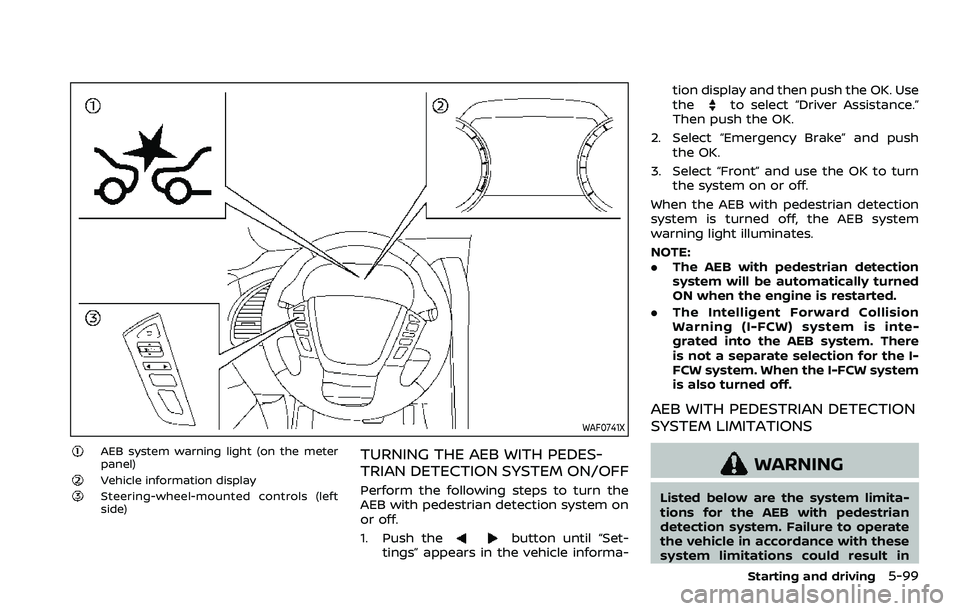
WAF0741X
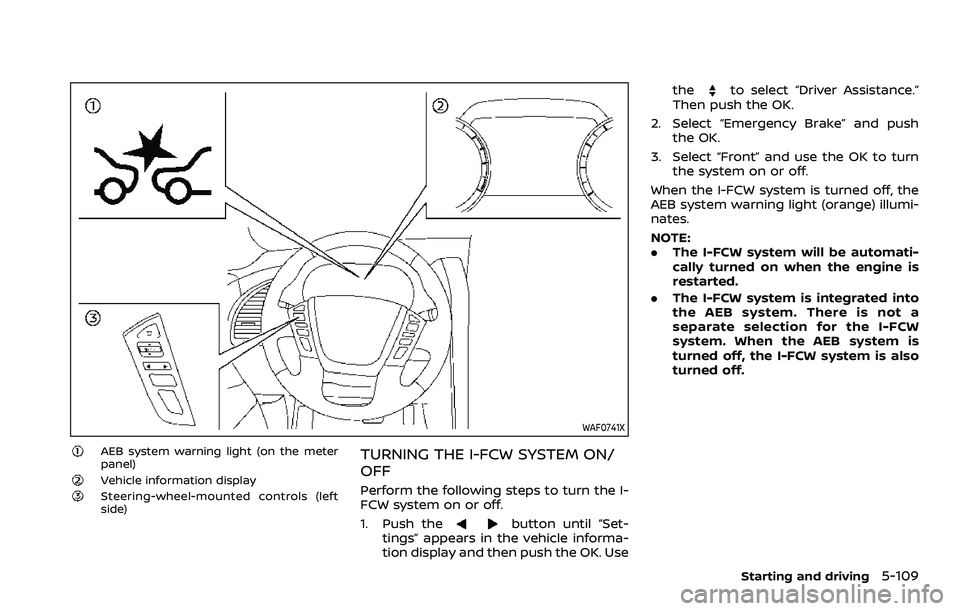
AEB system warning light (on the meter
panel)
Vehicle information displaySteering-wheel-mounted controls (left
side)
TURNING THE AEB WITH PEDES-
TRIAN DETECTION SYSTEM ON/OFF
Perform the following steps to turn the
AEB with pedestrian detection system on
or off.
1. Push the
button until “Set-
tings” appears in the vehicle informa- tion display and then push the OK. Use
the
to select “Driver Assistance.”
Then push the OK.
2. Select “Emergency Brake” and push the OK.
3. Select “Front” and use the OK to turn the system on or off.
When the AEB with pedestrian detection
system is turned off, the AEB system
warning light illuminates.
NOTE:
. The AEB with pedestrian detection
system will be automatically turned
ON when the engine is restarted.
. The Intelligent Forward Collision
Warning (I-FCW) system is inte-
grated into the AEB system. There
is not a separate selection for the I-
FCW system. When the I-FCW system
is also turned off.
AEB WITH PEDESTRIAN DETECTION
SYSTEM LIMITATIONS
WARNING
Listed below are the system limita-
tions for the AEB with pedestrian
detection system. Failure to operate
the vehicle in accordance with these
system limitations could result in
Starting and driving5-99
Page 413 of 604
— When your vehicle or the ve-hicle or pedestrian ahead
moves quickly or significantly
such that the system cannot
detect and react in time (for
example, pedestrian moving
quickly toward the vehicle at
close range, vehicle cutting in,
changing lanes, making a
turn, steering abruptly, sud-
den acceleration or decelera-
tion).
— When the vehicle or pedes- trian is offset from the vehi-
cle’s forward path.
— If the speed difference be- tween the two vehicles is
small.
— The pedestrian’s profile is par- tially obscured or unidentifi-
able; for example, due to
transporting luggage, push-
ing a stroller, wearing bulky
or very loose-fitting clothing
or accessories, or being in a
unique posture (such as rais-
ing hands).
— There is poor contrast of a person to the background,
such as having clothing color
or pattern which is similar to the background.
— For approximately 15 seconds after starting the engine
— If the vehicle ahead has a unique or unusual shape, ex-
tremely low or high clearance
heights, or unusual cargo
loading or is narrow (for ex-
ample, a motorcycle).
— When the vehicle or pedes- trian is located near a traffic
sign, a reflective area (for ex-
ample, water on road), or is in
a shadow.
— When multiple pedestrians are grouped together.
— When the view of the pedes- trian is obscured by a vehicle
or other object.
— While towing a trailer or other vehicle.
. The system performance may be
degraded in the following condi-
tions:
— The vehicle is driven on a
slippery road.
— The vehicle is driven on a slope. — Excessively heavy baggage is
loaded in the rear seat or the
cargo area of your vehicle.
. The system is designed to auto-
matically check the sensor (radar
and camera)’s functionality, with-
in certain limitations. The system
may not detect some forms of
obstruction of the sensor area
such as ice, snow or stickers, for
example. In these cases, the sys-
tem may not be able to warn the
driver properly. Be sure that you
check, clean and clear sensor
areas regularly.
. In some road and traffic condi-
tions, the AEB with pedestrian
detection system may unexpect-
edly apply partial braking. When
acceleration is necessary, de-
press the accelerator pedal to
override the system.
. The AEB with pedestrian detec-
tion system may operate when a
pattern, object, shadow or lights
are detected that are similar to
the outline of vehicles or pedes-
trians, or if they are the same size
and position as a vehicle or mo-
torcycle’s tail lights.
Starting and driving5-101
Page 416 of 604
5-104Starting and driving
.The camera area of windshield glass is
continuously covered with dirt, etc.
Action to take:
When the above conditions no longer
exist, the AEB with pedestrian detection
system will resume automatically.
NOTE:
When the inside of the windshield on
camera area is misted or frozen, it will
take a period of time to remove it after
air conditioner turns on. If dirt appears
on this area, it is recommended you
visit a NISSAN dealer.
Condition B
When the radar sensor picks up interfer-
ence from another radar source, making
it impossible to detect a vehicle ahead,
the AEB system is automatically turned
off. The AEB system warning light (or-
ange) will illuminate.
Action to take:
When the above conditions no longer
exist, the AEB system will resume auto-
matically.
Condition C
Under the following conditions, making it
impossible to detect a vehicle ahead, the
AEB with pedestrian detection system is
automatically turned off.
The AEB system warning light (orange)
will illuminate and the “Forward Driving
Aids temporarily disabled Front Sensor
blocked See Owner’s Manual” warning
message will appear in the vehicle infor-
mation display.
. When the sensor area of the front
bumper is covered with dirt or is
obstructed
Action to take:
If the AEB system warning light (orange)
comes on, stop the vehicle in a safe place,
place the shift lever in the P (Park)
position and turn the engine off. Clean
the radar cover below the front bumper
with a soft cloth, and restart the engine. If
the AEB system warning light continues
to illuminate, have the AEB with pedes-
trian detection system checked. It is
recommended you visit a NISSAN dealer
for this service.
. When driving on roads with limited
road structures or buildings (for ex-
ample, long bridges, deserts, snow
fields, driving next to long walls) Action to take:
When the above conditions no longer
exist, the AEB with pedestrian detection
system will resume automatically.
Condition D
When the accelerator pedal actuator
detects that the internal motor tempera-
ture is high, the AEB with pedestrian
detection system is automatically turned
off. The AEB system warning light (or-
ange) will illuminate.
Action to take:
When the above conditions no longer
exist, the AEB with pedestrian detection
system will resume automatically.
Condition E
When VDC system is OFF, the AEB brake
will not operate. In this case only visible
and audible warning operates. The AEB
system warning light (orange) will illumi-
nate.
Action to take:
When VDC system is ON, the AEB with
pedestrian detection system will resume
automatically.
Page 417 of 604
SYSTEM MALFUNCTION
If the AEB with pedestrian detection
system malfunctions, it will be turned off
automatically, a chime will sound, the AEB
system warning light will (orange) will
illuminate and the “Malfunction” warning
message will appear in the vehicle infor-
mation display.
Action to take:
If the warning light (orange) comes on,
stop the vehicle in a safe location. Turn
the engine off and restart the engine. If
the warning light continues to illuminate,
have the AEB with pedestrian detection
system checked. It is recommended that
you visit a NISSAN dealer for this service.
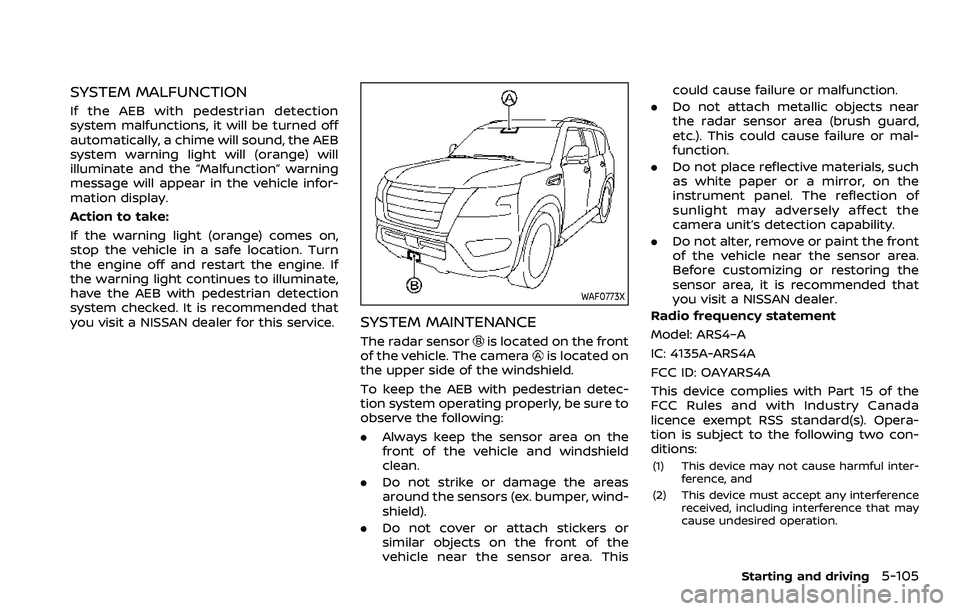
WAF0773X
SYSTEM MAINTENANCE
The radar sensoris located on the front
of the vehicle. The camerais located on
the upper side of the windshield.
To keep the AEB with pedestrian detec-
tion system operating properly, be sure to
observe the following:
. Always keep the sensor area on the
front of the vehicle and windshield
clean.
. Do not strike or damage the areas
around the sensors (ex. bumper, wind-
shield).
. Do not cover or attach stickers or
similar objects on the front of the
vehicle near the sensor area. This could cause failure or malfunction.
. Do not attach metallic objects near
the radar sensor area (brush guard,
etc.). This could cause failure or mal-
function.
. Do not place reflective materials, such
as white paper or a mirror, on the
instrument panel. The reflection of
sunlight may adversely affect the
camera unit’s detection capability.
. Do not alter, remove or paint the front
of the vehicle near the sensor area.
Before customizing or restoring the
sensor area, it is recommended that
you visit a NISSAN dealer.
Radio frequency statement
Model: ARS4–A
IC: 4135A-ARS4A
FCC ID: OAYARS4A
This device complies with Part 15 of the
FCC Rules and with Industry Canada
licence exempt RSS standard(s). Opera-
tion is subject to the following two con-
ditions:
(1) This device may not cause harmful inter- ference, and
(2) This device must accept any interference received, including interference that may
cause undesired operation.
Starting and driving5-105
Page 421 of 604
WAF0741X
AEB system warning light (on the meter
panel)
Vehicle information displaySteering-wheel-mounted controls (left
side)
TURNING THE I-FCW SYSTEM ON/
OFF
Perform the following steps to turn the I-
FCW system on or off.
1. Push the
button until “Set-
tings” appears in the vehicle informa-
tion display and then push the OK. Use the
to select “Driver Assistance.”
Then push the OK.
2. Select “Emergency Brake” and push the OK.
3. Select “Front” and use the OK to turn the system on or off.
When the I-FCW system is turned off, the
AEB system warning light (orange) illumi-
nates.
NOTE:
. The I-FCW system will be automati-
cally turned on when the engine is
restarted.
. The I-FCW system is integrated into
the AEB system. There is not a
separate selection for the I-FCW
system. When the AEB system is
turned off, the I-FCW system is also
turned off.
Starting and driving5-109
Page 425 of 604
Condition B
Under the following conditions, making it
impossible to detect a vehicle ahead, the
I-FCW system is automatically turned off.
The AEB system warning light (orange)
will illuminate and the “Forward Driving
Aids temporarily disabled Front Sensor
blocked See Owner’s Manual” warning
message will appear in the vehicle infor-
mation display.
.When the sensor area of the front of
the vehicle is covered with dirt or is
obstructed
Action to take:
If the warning light (orange) flashes, stop
the vehicle in a safe place, push the park
button to engage the P (Park) position
and turn the engine off. Clean the radar
cover on the front of the vehicle with a
soft cloth, and restart the engine. If the
warning light continues to illuminate,
have the I-FCW system checked. It is
recommended you visit a NISSAN dealer
for this service.
. When driving on roads with limited
road structures or buildings (for ex-
ample, long bridges, deserts, snow
fields, driving next to long walls)
Action to take:
When the above conditions no longer
exist, the I-FCW system will resume auto- matically.SYSTEM MALFUNCTION
If the I-FCW system malfunctions, it will be
turned off automatically, a chime will
sound, the AEB system warning light
(orange) will illuminate and the "Malfunc-
tion" warning message will appear in the
vehicle information display.
Action to take:
If the warning light (orange) illuminates,
stop the vehicle in a safe location. Turn
the engine off and restart the engine. If
the warning light continues to illuminate,
have the I-FCW system checked. It is
recommended you visit a NISSAN dealer
for this service.
WAF0724X
SYSTEM MAINTENANCE
The radar sensoris located on the front
of the vehicle.
To keep the system operating properly,
be sure to observe the following:
. Always keep the sensor area on the
front of the vehicle clean.
. Do not strike or damage the areas
around the sensor.
. Do not cover or attach stickers or
similar objects on the front bumper
near the sensor area. This could cause
failure or malfunction.
. Do not attach metallic objects near
the sensor area (brush guard, etc.).
This could cause failure or malfunc-
Starting and driving5-113
Page 428 of 604
5-116Starting and driving
to select “Driver Assistance.” Then
push the OK.
2. Select “Driver Attention Alert” and push the OK to turn the system on
or off.
NOTE:
The setting will be retained even if the
engine is restarted.
I-DA SYSTEM LIMITATIONS
WARNING
Listed below are the system limita-
tions for the I–DA system. Failure to
operate the vehicle in accordance
with these system limitations could
result in serious injury or death.
. The I-DA system may not operate
properly and may not provide an
alert in the following conditions:
— Poor road conditions such as
an uneven road surface or pot
holes.
— Strong side wind.
— If you have adopted a sporty driving style with higher cor-
nering speeds or higher rates
of acceleration. — Frequent lane changes or
changes to vehicle speed.
. The I–DA system will not provide
an alert in the following condi-
tions:
— Vehicle speeds lower than 37
MPH (60 km/h).
— Short lapses of attention.
— Instantaneous distractions such as dropping an object.SYSTEM MALFUNCTION
If the I–DA system malfunctions, the
“Driver Attention Alert Malfunction” warn-
ing message will appear in the vehicle
information display and the function will
be stopped automatically.
Action to take
Stop the vehicle in a safe location, place
the vehicle in P (Park) position, turn the
engine off and restart the engine. If the
warning message continues to appear,
have the system checked. It is recom-
mended that you visit a NISSAN dealer for
this service.
WARNING
Failure to follow the warnings and
instructions for proper use of the
RAB system could result in serious
injury or death.
. The RAB system is a supplemen-
tal aid to the driver. It is not a
replacement for proper driving
procedures. Always use the side
and rear mirrors and turn and
look in the direction you will
move before and while backing
up. Never rely solely on the RAB
system. It is the driver’s respon-
sibility to stay alert, drive safely,
and be in control of the vehicle at
all times.
. There is a limitation to the RAB
system capability. The RAB sys-
tem is not effective in all situa-
tions.
The RAB system can assist the driver
when the vehicle is backing up and
approaching objects directly behind the
vehicle.
REAR AUTOMATIC BRAKING (RAB)
Page 431 of 604
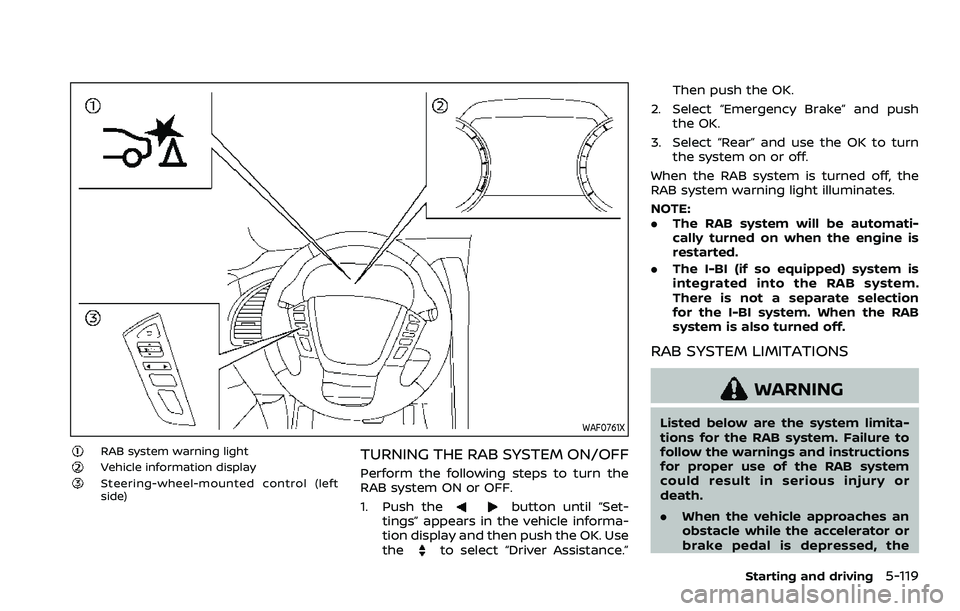
WAF0761X
RAB system warning lightVehicle information displaySteering-wheel-mounted control (left
side)
TURNING THE RAB SYSTEM ON/OFF
Perform the following steps to turn the
RAB system ON or OFF.
1. Push the
button until “Set-
tings” appears in the vehicle informa-
tion display and then push the OK. Use
the
to select “Driver Assistance.” Then push the OK.
2. Select “Emergency Brake” and push the OK.
3. Select “Rear” and use the OK to turn the system on or off.
When the RAB system is turned off, the
RAB system warning light illuminates.
NOTE:
. The RAB system will be automati-
cally turned on when the engine is
restarted.
. The I-BI (if so equipped) system is
integrated into the RAB system.
There is not a separate selection
for the I-BI system. When the RAB
system is also turned off.
RAB SYSTEM LIMITATIONS
WARNING
Listed below are the system limita-
tions for the RAB system. Failure to
follow the warnings and instructions
for proper use of the RAB system
could result in serious injury or
death.
.When the vehicle approaches an
obstacle while the accelerator or
brake pedal is depressed, the
Starting and driving5-119
Page 433 of 604
the same obstacle.
. The automatic brake control can
only operate for a short period of
time. Therefore, the driver must
depress the brake pedal.
. In the following situations, the
RAB system may not operate
properly or may not function
sufficiently:
— The vehicle is driven in bad
weather (rain, fog, snow, etc.).
— The vehicle is driven on a steep hill.
— The vehicle’s posture is chan- ged (e.g., when driving over a
bump).
— The vehicle is driven on a slippery road.
— The vehicle is turned sharply by turning the steering wheel
fully.
— Snow chains are used.
— Wheels or tires other than NISSAN recommended are
used.
— The brakes are cold at low ambient temperatures or im-
mediately after driving has
started. — The braking force becomes
poor due to wet brakes after
driving through a puddle or
washing the vehicle.
. Turn the RAB system off in the
following conditions to prevent
the occurrence of an unexpected
accident resulting from sudden
system operation:
— The vehicle is towed.
— The vehicle is carried on a
flatbed truck.
— The vehicle is on the chassis dynamometer.
— The vehicle drives on an un- even road surface.
— Suspension parts other than those designated as genuine
parts are used. (If the vehicle
height or the vehicle body
inclination is changed, the
system may not detect an
obstacle correctly.)
. When towing a trailer or other
vehicle, turn the RAB system off
to prevent the occurrence of an
unexpected accident resulting
from sudden system operation.
(See “RAB system operation” (P.5-
118).) .
Excessive noise (e.g., audio sys-
tem volume, an open vehicle win-
dow) will interfere with the chime
sound, and it may not be heard.
SYSTEM MALFUNCTION
If the RAB system malfunctions, it will be
turned off automatically, the RAB system
warning light will illuminate, and the
“System fault See Owner’s Manual” warn-
ing message will appear in the vehicle
information display.
Action to take
If the warning light illuminates, park the
vehicle in a safe location, turn the engine
off, and restart the engine. If the warning
light continues to illuminate, have the
RAB system checked. It is recommended
that you visit a NISSAN dealer for this
service.
NOTE:
If the RAB system cannot be operated
temporarily, the RAB system warning
light blinks.
Starting and driving5-121
Page 434 of 604
5-122Starting and driving
WAF0760X
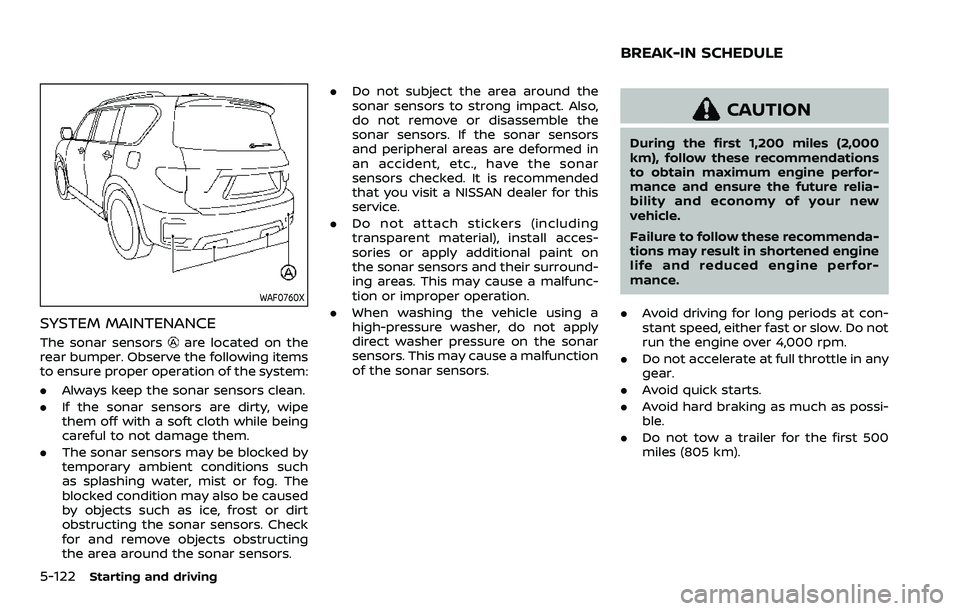
SYSTEM MAINTENANCE
The sonar sensorsare located on the
rear bumper. Observe the following items
to ensure proper operation of the system:
. Always keep the sonar sensors clean.
. If the sonar sensors are dirty, wipe
them off with a soft cloth while being
careful to not damage them.
. The sonar sensors may be blocked by
temporary ambient conditions such
as splashing water, mist or fog. The
blocked condition may also be caused
by objects such as ice, frost or dirt
obstructing the sonar sensors. Check
for and remove objects obstructing
the area around the sonar sensors. .
Do not subject the area around the
sonar sensors to strong impact. Also,
do not remove or disassemble the
sonar sensors. If the sonar sensors
and peripheral areas are deformed in
an accident, etc., have the sonar
sensors checked. It is recommended
that you visit a NISSAN dealer for this
service.
. Do not attach stickers (including
transparent material), install acces-
sories or apply additional paint on
the sonar sensors and their surround-
ing areas. This may cause a malfunc-
tion or improper operation.
. When washing the vehicle using a
high-pressure washer, do not apply
direct washer pressure on the sonar
sensors. This may cause a malfunction
of the sonar sensors.
CAUTION
During the first 1,200 miles (2,000
km), follow these recommendations
to obtain maximum engine perfor-
mance and ensure the future relia-
bility and economy of your new
vehicle.
Failure to follow these recommenda-
tions may result in shortened engine
life and reduced engine perfor-
mance.
. Avoid driving for long periods at con-
stant speed, either fast or slow. Do not
run the engine over 4,000 rpm.
. Do not accelerate at full throttle in any
gear.
. Avoid quick starts.
. Avoid hard braking as much as possi-
ble.
. Do not tow a trailer for the first 500
miles (805 km).
BREAK-IN SCHEDULE