Emergency brake NISSAN ARMADA 2022 Owner´s Manual
[x] Cancel search | Manufacturer: NISSAN, Model Year: 2022, Model line: ARMADA, Model: NISSAN ARMADA 2022Pages: 604, PDF Size: 2.97 MB
Page 331 of 604
1. Keep the foot brake pedal depressedand push the shift lever button to shift
into a driving gear.
2. Release the parking brake and foot brake, then gradually start the vehicle
in motion.
WARNING
.Do not depress the accelerator
pedal while shifting from P (Park)
or N (Neutral) to R (Reverse), D
(Drive) or manual shift mode. Al-
ways depress the brake pedal
until shifting is completed. Failure
to do so could cause you to lose
control and have an accident.
. Cold engine idle speed is high, so
use caution when shifting into a
forward or reverse gear before
the engine has warmed up.
. Never shift to either the P (Park)
or R (Reverse) position while the
vehicle is moving forward and P
(Park), D (Drive) position or man-
ual shift mode while the vehicle is
moving rearward. This could
cause an accident or damage
the transmission. .
Do not downshift abruptly on
slippery roads. This may cause a
loss of control.
CAUTION
.Except in an emergency, do not
shift to the N (Neutral) position
while driving. Coasting with the
transmission in the N (Neutral)
position may cause serious da-
mage to the transmission.
. To avoid possible damage to your
vehicle; when stopping the vehi-
cle on an uphill grade, do not hold
the vehicle by depressing the
accelerator pedal. The foot brake
should be used for this purpose.
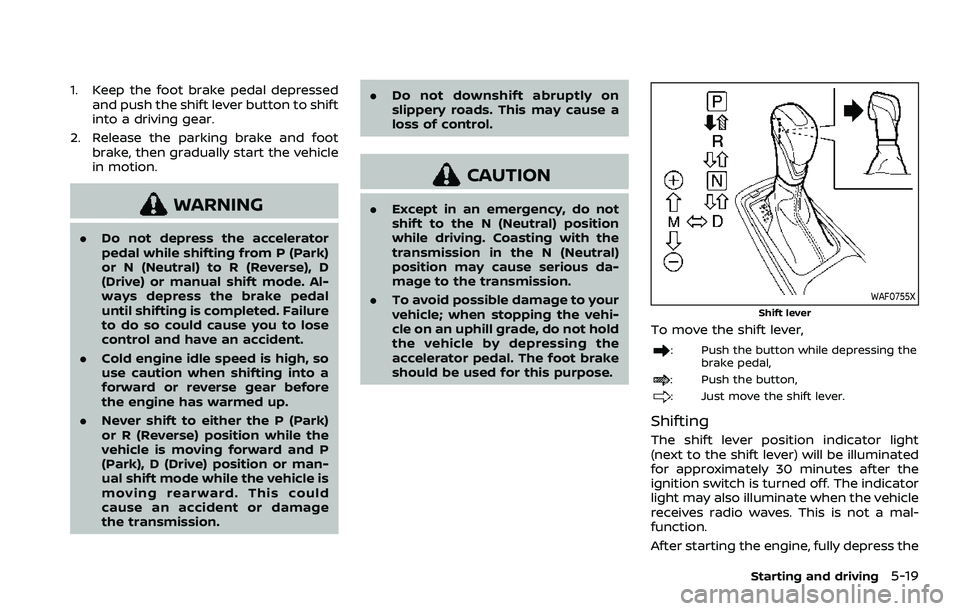
WAF0755X
Shift lever
To move the shift lever,
: Push the button while depressing the
brake pedal,
: Push the button,
: Just move the shift lever.
Shifting
The shift lever position indicator light
(next to the shift lever) will be illuminated
for approximately 30 minutes after the
ignition switch is turned off. The indicator
light may also illuminate when the vehicle
receives radio waves. This is not a mal-
function.
After starting the engine, fully depress the
Starting and driving5-19
Page 382 of 604
5-70Starting and driving
2. Select “Emergency Brake” and pushthe OK.
3. Select “Rear” and use the OK to turn the system on or off.
NOTE:
. The I-BI system will be automatically
turned on when the engine is re-
started.
. The I-BI system is integrated into the
RAB system. There is not a separate
selection for the I-BI system. When
the RAB system is also turned off.
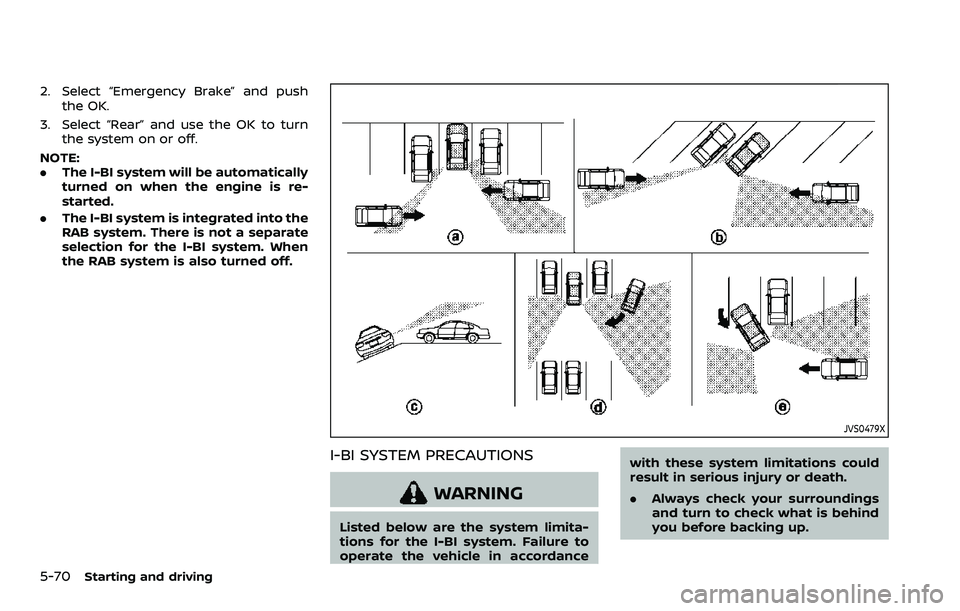
JVS0479X
I-BI SYSTEM PRECAUTIONS
WARNING
Listed below are the system limita-
tions for the I-BI system. Failure to
operate the vehicle in accordance with these system limitations could
result in serious injury or death.
.
Always check your surroundings
and turn to check what is behind
you before backing up.
Page 386 of 604
5-74Starting and driving
WARNING
Failure to follow the warnings and
instructions for proper use of the ICC
system could result in serious injury
or death.
.ICC is not a collision avoidance or
warning device. For highway use
only and it is not intended for
congested areas or city driving.
Failure to apply the brakes could
result in an accident.
. Always observe posted speed
limits and do not set the speed
over them.
. Always drive carefully and atten-
tively when using either cruise
control mode. Read and under-
stand the Owner’s Manual thor-
oughly before using the cruise
control. To avoid serious injury
or death, do not rely on the
system to prevent accidents or
to control the vehicle’s speed in
emergency situations. Do not use
cruise control except in appropri-
ate road and traffic conditions.
. In the conventional (fixed speed)
cruise control mode, a warning
chime will not sound to warn you if you are too close to the vehicle
ahead. Pay special attention to
the distance between your vehi-
cle and the vehicle ahead of you
or a collision could occur.
The ICC system maintains a selected
distance from the vehicle in front of you
within the speed range of 0 to 90 MPH (0
to 144 km/h) up to the set speed. The set
speed can be selected by the driver
between 20 to 90 MPH (30 to 144 km/h).
The vehicle travels at a set speed when
the road ahead is clear.
The ICC system can be set to one of two
cruise control modes.
. Vehicle-to-vehicle distance control
mode:
For maintaining a selected distance
between your vehicle and the vehicle
in front of you up to the preset speed.
. Conventional (fixed speed) cruise con-
trol mode:
For cruising at a preset speed.
INTELLIGENT CRUISE CONTROL (ICC)
Page 411 of 604
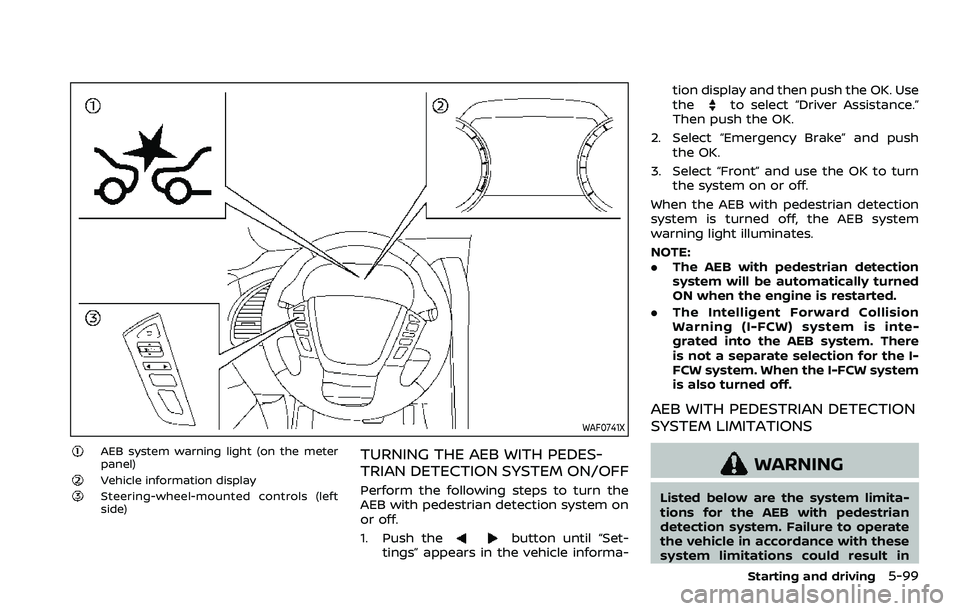
WAF0741X
AEB system warning light (on the meter
panel)
Vehicle information displaySteering-wheel-mounted controls (left
side)
TURNING THE AEB WITH PEDES-
TRIAN DETECTION SYSTEM ON/OFF
Perform the following steps to turn the
AEB with pedestrian detection system on
or off.
1. Push the
button until “Set-
tings” appears in the vehicle informa- tion display and then push the OK. Use
the
to select “Driver Assistance.”
Then push the OK.
2. Select “Emergency Brake” and push the OK.
3. Select “Front” and use the OK to turn the system on or off.
When the AEB with pedestrian detection
system is turned off, the AEB system
warning light illuminates.
NOTE:
. The AEB with pedestrian detection
system will be automatically turned
ON when the engine is restarted.
. The Intelligent Forward Collision
Warning (I-FCW) system is inte-
grated into the AEB system. There
is not a separate selection for the I-
FCW system. When the I-FCW system
is also turned off.
AEB WITH PEDESTRIAN DETECTION
SYSTEM LIMITATIONS
WARNING
Listed below are the system limita-
tions for the AEB with pedestrian
detection system. Failure to operate
the vehicle in accordance with these
system limitations could result in
Starting and driving5-99
Page 421 of 604
WAF0741X
AEB system warning light (on the meter
panel)
Vehicle information displaySteering-wheel-mounted controls (left
side)
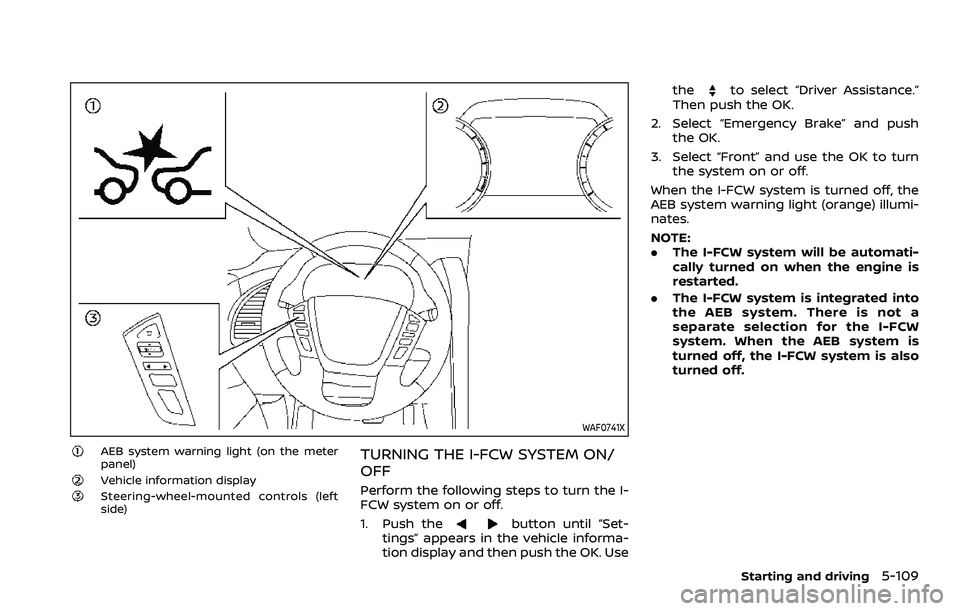
TURNING THE I-FCW SYSTEM ON/
OFF
Perform the following steps to turn the I-
FCW system on or off.
1. Push the
button until “Set-
tings” appears in the vehicle informa-
tion display and then push the OK. Use the
to select “Driver Assistance.”
Then push the OK.
2. Select “Emergency Brake” and push the OK.
3. Select “Front” and use the OK to turn the system on or off.
When the I-FCW system is turned off, the
AEB system warning light (orange) illumi-
nates.
NOTE:
. The I-FCW system will be automati-
cally turned on when the engine is
restarted.
. The I-FCW system is integrated into
the AEB system. There is not a
separate selection for the I-FCW
system. When the AEB system is
turned off, the I-FCW system is also
turned off.
Starting and driving5-109
Page 431 of 604
WAF0761X
RAB system warning lightVehicle information displaySteering-wheel-mounted control (left
side)
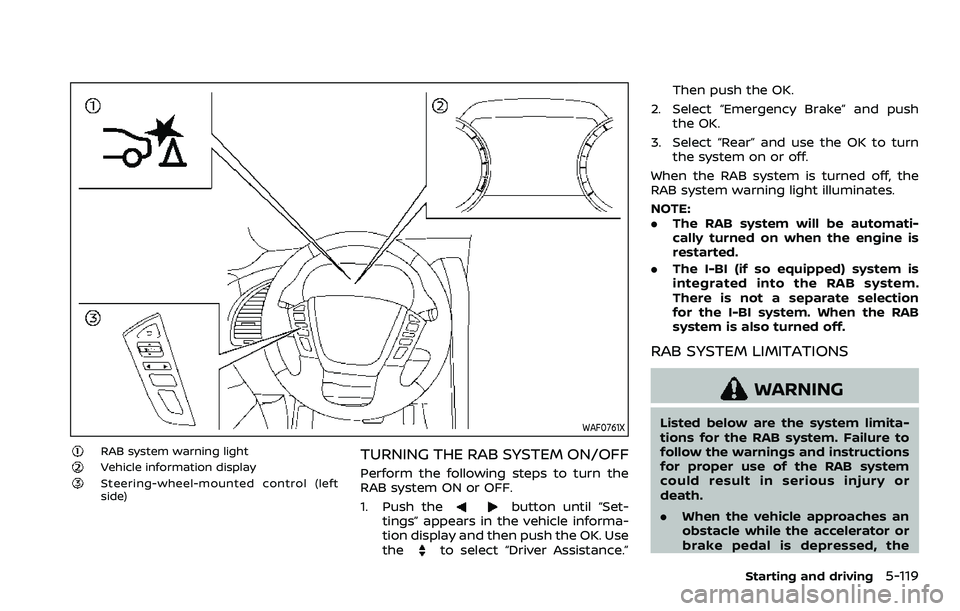
TURNING THE RAB SYSTEM ON/OFF
Perform the following steps to turn the
RAB system ON or OFF.
1. Push the
button until “Set-
tings” appears in the vehicle informa-
tion display and then push the OK. Use
the
to select “Driver Assistance.” Then push the OK.
2. Select “Emergency Brake” and push the OK.
3. Select “Rear” and use the OK to turn the system on or off.
When the RAB system is turned off, the
RAB system warning light illuminates.
NOTE:
. The RAB system will be automati-
cally turned on when the engine is
restarted.
. The I-BI (if so equipped) system is
integrated into the RAB system.
There is not a separate selection
for the I-BI system. When the RAB
system is also turned off.
RAB SYSTEM LIMITATIONS
WARNING
Listed below are the system limita-
tions for the RAB system. Failure to
follow the warnings and instructions
for proper use of the RAB system
could result in serious injury or
death.
.When the vehicle approaches an
obstacle while the accelerator or
brake pedal is depressed, the
Starting and driving5-119
Page 464 of 604
6-4In case of emergency
could affect the proper operation
of the TPMS.
. Do not inject any tire liquid or
aerosol tire sealant into the tires,
as this may cause a malfunction
of the tire pressure sensors.
CHANGING A FLAT TIRE
If you have a flat tire, follow the instruc-
tions below.
Stopping the vehicle
1. Safely move the vehicle off the road
and away from traffic.
2. Turn on the hazard warning flashers.
3. Park on a level surface and apply the parking brake. Move the shift lever to
the P (Park) position.
4. Turn off the engine.
5. Raise the hood to warn other traffic, and to signal professional road assis-
tance personnel that you need assis-
tance.
6. Have all passengers get out of the vehicle and stand in a safe place, away
from traffic and clear of the vehicle.
WARNING
.Make sure the parking brake is
securely applied and the auto-
matic transmission is in the P
(Park) position.
. Never change tires when the ve-
hicle is on a slope, ice or slippery
areas. This is hazardous.
. Never change tires if oncoming
traffic is close to your vehicle.
Wait for professional road assis-
tance.
MCE0001A
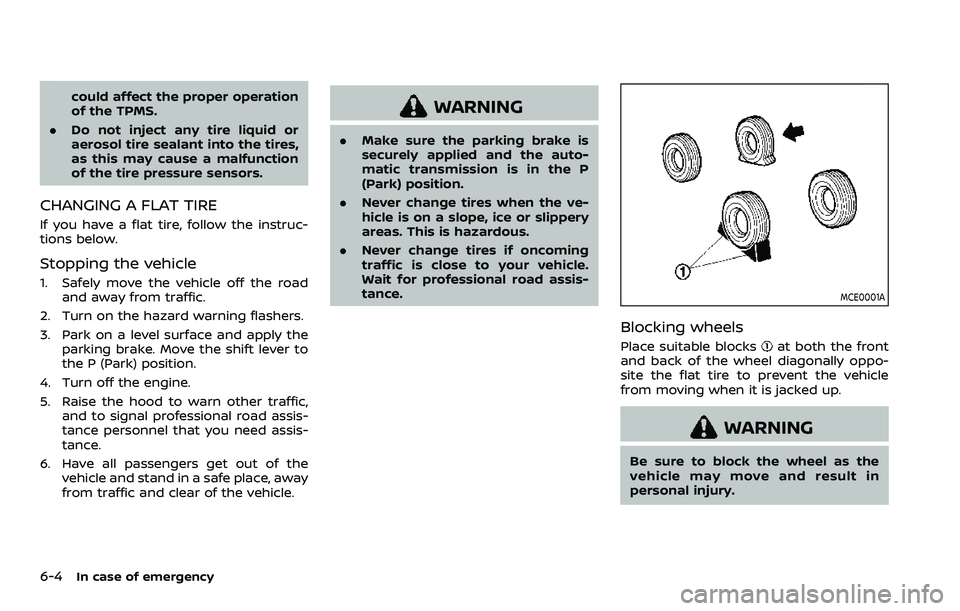
Blocking wheels
Place suitable blocksat both the front
and back of the wheel diagonally oppo-
site the flat tire to prevent the vehicle
from moving when it is jacked up.
WARNING
Be sure to block the wheel as the
vehicle may move and result in
personal injury.
Page 473 of 604
WAG0119X
WARNING
Always follow the instructions below.
Failure to do so could result in
damage to the charging system and
cause personal injury.
1. Remove the engine compartment cover, if necessary. See “Engine com-
partment check locations” (P.8-3).
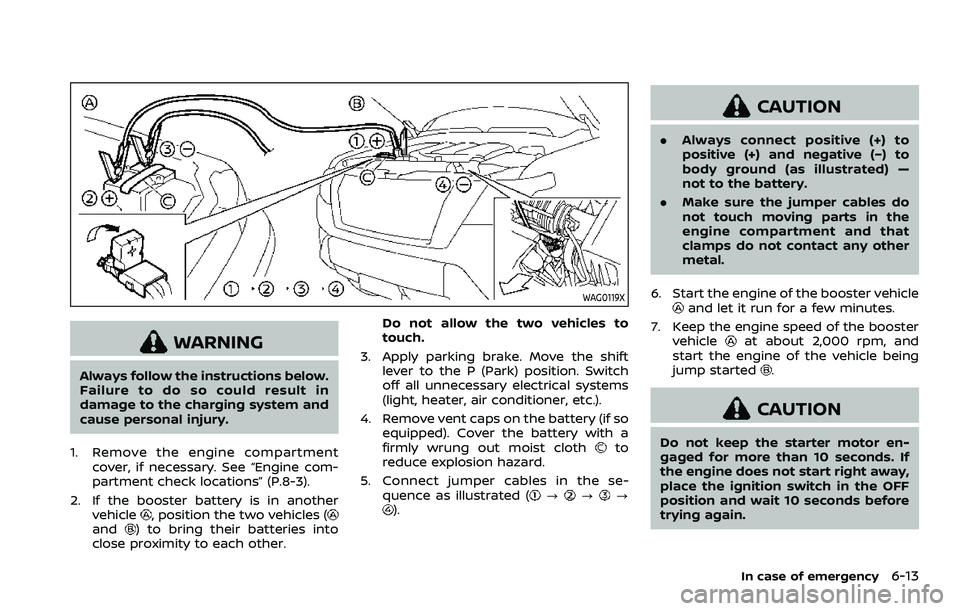
2. If the booster battery is in another vehicle
, position the two vehicles (and) to bring their batteries into
close proximity to each other. Do not allow the two vehicles to
touch.
3. Apply parking brake. Move the shift lever to the P (Park) position. Switch
off all unnecessary electrical systems
(light, heater, air conditioner, etc.).
4. Remove vent caps on the battery (if so equipped). Cover the battery with a
firmly wrung out moist cloth
to
reduce explosion hazard.
5. Connect jumper cables in the se- quence as illustrated (
???).
CAUTION
.Always connect positive (+) to
positive (+) and negative (−) to
body ground (as illustrated) —
not to the battery.
. Make sure the jumper cables do
not touch moving parts in the
engine compartment and that
clamps do not contact any other
metal.
6. Start the engine of the booster vehicle
and let it run for a few minutes.
7. Keep the engine speed of the booster vehicle
at about 2,000 rpm, and
start the engine of the vehicle being
jump started
.
CAUTION
Do not keep the starter motor en-
gaged for more than 10 seconds. If
the engine does not start right away,
place the ignition switch in the OFF
position and wait 10 seconds before
trying again.
In case of emergency6-13
Page 474 of 604
6-14In case of emergency
8. After starting your engine, carefullydisconnect the negative cable and
then the positive cable (
???).
9. Replace the vent caps (if so equipped). Be sure to dispose of the cloth used to
cover the vent holes as it may be
contaminated with corrosive acid.
10. Put the battery cover on. Do not attempt to start the engine by
pushing.CAUTION
.
Automatic transmission models
cannot be push-started or tow-
started. Attempting to do so may
cause transmission damage.
. Three way catalyst equipped
models should not be started by
pushing since the three way cat-
alyst may be damaged.
. Never try to start the vehicle by
towing it; when the engine starts,
the forward surge could cause
the vehicle to collide with the
tow vehicle.
CAUTION
.Do not continue to drive if your
vehicle overheats. Doing so could
cause engine damage or a vehicle
fire.
. To avoid the danger of being
scalded, never remove the radia-
tor cap or coolant reservoir cap
while the engine is still hot. When
the radiator cap or coolant reser-
voir cap is removed, pressurized
hot water will spurt out, possibly
causing serious injury.
. Do not open the hood if steam is
coming out.
If your vehicle is overheating (indicated by
an extremely high temperature gauge
reading), or if you feel a lack of engine
power, detect abnormal noise, etc., take
the following steps:
1. Move the vehicle safely off the road, apply the parking brake and move the
shift lever to the P (Park) position.
Do not stop the engine.
2. Turn off the heater and air condi- tioner. Open all the windows, move
the heater or air conditioner tempera-
ture control to maximum hot and fan
PUSH STARTING IF YOUR VEHICLE OVERHEATS
Page 479 of 604
VEHICLE RECOVERY (freeing a stuck
vehicle)
WARNING
.Stand clear of a stuck vehicle.
. Do not spin your tires at high
speed. This could cause them to
explode and result in serious in-
jury. Parts of your vehicle could
also overheat and be damaged.
Pulling a stuck vehicle
If your vehicle is stuck in sand, snow, mud,
etc., use a tow strap or other device
designed specifically for vehicle recovery.
Always follow the manufacturer’s instruc-
tions for the recovery device.
Attach the tow strap to the towing hook.
CAUTION
.Tow chains or cables must be
attached only to the main struc-
tural members of the vehicle or
the towing hooks. Otherwise, the
vehicle body will be damaged.
. Use the towing hook only to free
a vehicle stuck in sand, snow, mud, etc. Never tow the vehicle
for a long distance using only the
towing hook.
. The towing hook is under tre-
mendous force when used to free
a stuck vehicle. Never pull the
hook at an angle.
. Always pull the cable straight out
from the front or rear of the
vehicle.
. Pulling devices should be routed
so they do not touch any part of
the suspension, steering, brake or
cooling systems.
. Pulling devices such as ropes or
canvas straps are not recom-
mended for use in vehicle towing
or recovery.
Rocking a stuck vehicle
If your vehicle is stuck in sand, snow, mud,
etc., use the following procedure:
1. Turn off the Vehicle Dynamic Control
(VDC) system.
2. Make sure the area in front and behind the vehicle is clear of obstruc-
tions.
3. Turn the steering wheel right and left to clear an area around the front tires. 4. Slowly rock the vehicle forward and
backward.
.Shift back and forth between R(Reverse) and D (Drive).
.Apply the accelerator as little as possible to maintain the rocking
motion.
.Release the accelerator pedal be-
fore shifting between R and D.
.Do not spin the tires above 35 MPH(55 km/h).
5. If the vehicle cannot be freed after a few tries, contact a professional tow-
ing service to remove the vehicle.
In case of emergency6-19