remove seats NISSAN ARMADA 2022 Owner´s Manual
[x] Cancel search | Manufacturer: NISSAN, Model Year: 2022, Model line: ARMADA, Model: NISSAN ARMADA 2022Pages: 604, PDF Size: 2.97 MB
Page 66 of 604
1-48Safety — seats, seat belts and supplemental restraint system
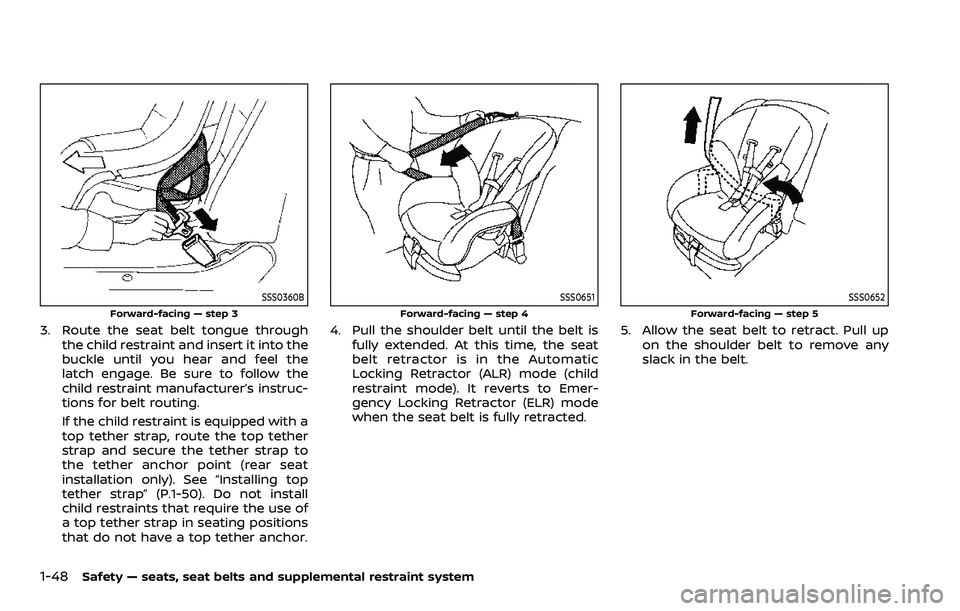
SSS0360B
Forward-facing — step 3
3. Route the seat belt tongue throughthe child restraint and insert it into the
buckle until you hear and feel the
latch engage. Be sure to follow the
child restraint manufacturer’s instruc-
tions for belt routing.
If the child restraint is equipped with a
top tether strap, route the top tether
strap and secure the tether strap to
the tether anchor point (rear seat
installation only). See “Installing top
tether strap” (P.1-50). Do not install
child restraints that require the use of
a top tether strap in seating positions
that do not have a top tether anchor.
SSS0651
Forward-facing — step 4
4. Pull the shoulder belt until the belt isfully extended. At this time, the seat
belt retractor is in the Automatic
Locking Retractor (ALR) mode (child
restraint mode). It reverts to Emer-
gency Locking Retractor (ELR) mode
when the seat belt is fully retracted.
SSS0652
Forward-facing — step 5
5. Allow the seat belt to retract. Pull up on the shoulder belt to remove any
slack in the belt.
Page 67 of 604
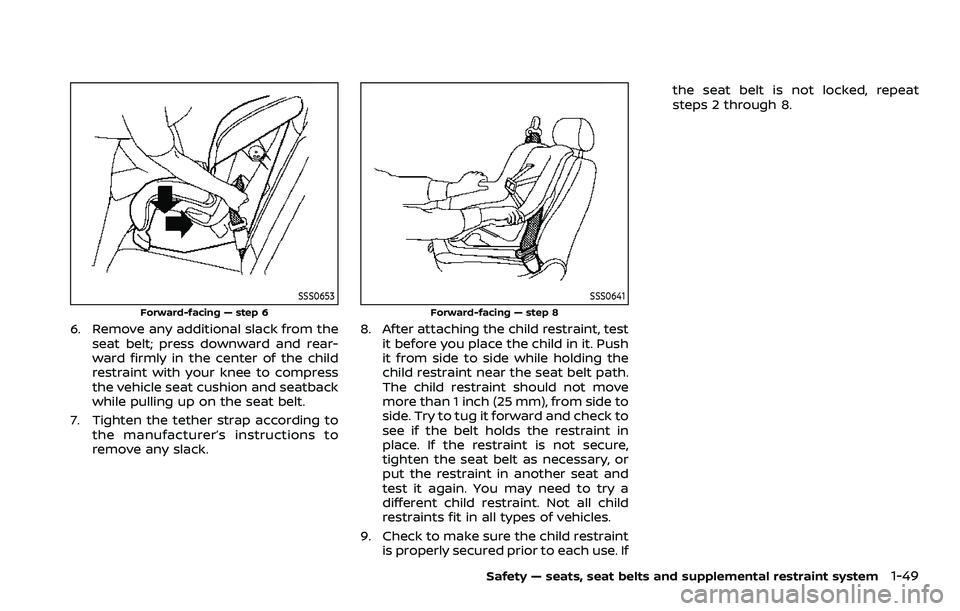
SSS0653
Forward-facing — step 6
6. Remove any additional slack from theseat belt; press downward and rear-
ward firmly in the center of the child
restraint with your knee to compress
the vehicle seat cushion and seatback
while pulling up on the seat belt.
7. Tighten the tether strap according to the manufacturer’s instructions to
remove any slack.
SSS0641
Forward-facing — step 8
8. After attaching the child restraint, testit before you place the child in it. Push
it from side to side while holding the
child restraint near the seat belt path.
The child restraint should not move
more than 1 inch (25 mm), from side to
side. Try to tug it forward and check to
see if the belt holds the restraint in
place. If the restraint is not secure,
tighten the seat belt as necessary, or
put the restraint in another seat and
test it again. You may need to try a
different child restraint. Not all child
restraints fit in all types of vehicles.
9. Check to make sure the child restraint is properly secured prior to each use. If the seat belt is not locked, repeat
steps 2 through 8.
Safety — seats, seat belts and supplemental restraint system1-49
Page 68 of 604
1-50Safety — seats, seat belts and supplemental restraint system
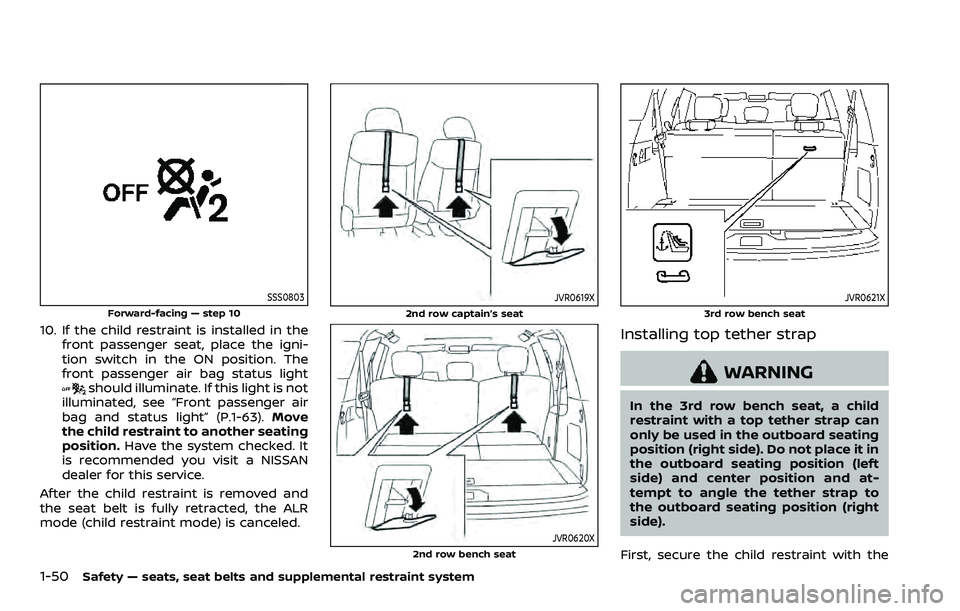
SSS0803
Forward-facing — step 10
10. If the child restraint is installed in thefront passenger seat, place the igni-
tion switch in the ON position. The
front passenger air bag status light
should illuminate. If this light is not
illuminated, see “Front passenger air
bag and status light” (P.1-63). Move
the child restraint to another seating
position. Have the system checked. It
is recommended you visit a NISSAN
dealer for this service.
After the child restraint is removed and
the seat belt is fully retracted, the ALR
mode (child restraint mode) is canceled.
JVR0619X
2nd row captain’s seat
JVR0620X2nd row bench seat
JVR0621X
3rd row bench seat
Installing top tether strap
WARNING
In the 3rd row bench seat, a child
restraint with a top tether strap can
only be used in the outboard seating
position (right side). Do not place it in
the outboard seating position (left
side) and center position and at-
tempt to angle the tether strap to
the outboard seating position (right
side).
First, secure the child restraint with the
Page 69 of 604
seat belt.
1. If necessary, raise or remove the headrestraint or headrest to position the
top tether strap over the top of the
seatback. If the head restraint or
headrest is removed, store it in a
secure place. Be sure to reinstall the
head restraint or headrest when the
child restraint is removed. See “Head
restraints/headrests” (P.1-15) for head
restraint or headrest adjustment, re-
moval and installation information.
2. Secure the tether strap to the tether anchor point on the back of each
seatback (2nd row seat) or right side
seatback (3rd row seat) behind the
child restraint.
3. Tighten the tether strap according to the manufacturer’s instructions to
remove any slack. Make sure the head
restraint or headrest does not contact
the top tether strap.
If you have any questions when instal-
ling a top tether strap on the rear seat,
it is recommended you visit a NISSAN
dealer for this service.BOOSTER SEATS
Precautions on booster seats
WARNING
If a booster seat and seat belt are not
used properly, the risk of a child
being injured in a sudden stop or
collision greatly increases:
. Make sure the shoulder portion of
the belt is away from the child’s
face and neck and the lap portion
of the belt does not cross the
stomach.
. Make sure the shoulder belt is not
behind the child or under the
child’s arm.
. A booster seat must only be
installed in a seating position that
has a lap/shoulder belt.
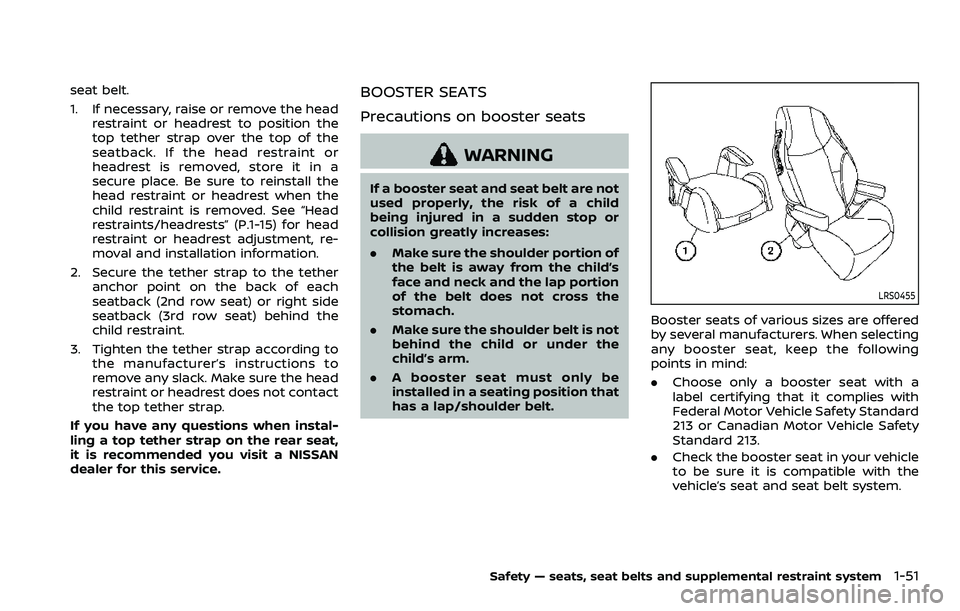
LRS0455
Booster seats of various sizes are offered
by several manufacturers. When selecting
any booster seat, keep the following
points in mind:
.Choose only a booster seat with a
label certifying that it complies with
Federal Motor Vehicle Safety Standard
213 or Canadian Motor Vehicle Safety
Standard 213.
. Check the booster seat in your vehicle
to be sure it is compatible with the
vehicle’s seat and seat belt system.
Safety — seats, seat belts and supplemental restraint system1-51
Page 71 of 604
with the seat belts.
Refer to all Warnings and Cautions in the
“Child safety”, “Child restraints” and “Boos-
ter seats” sections earlier in this section
before installing a child restraint.
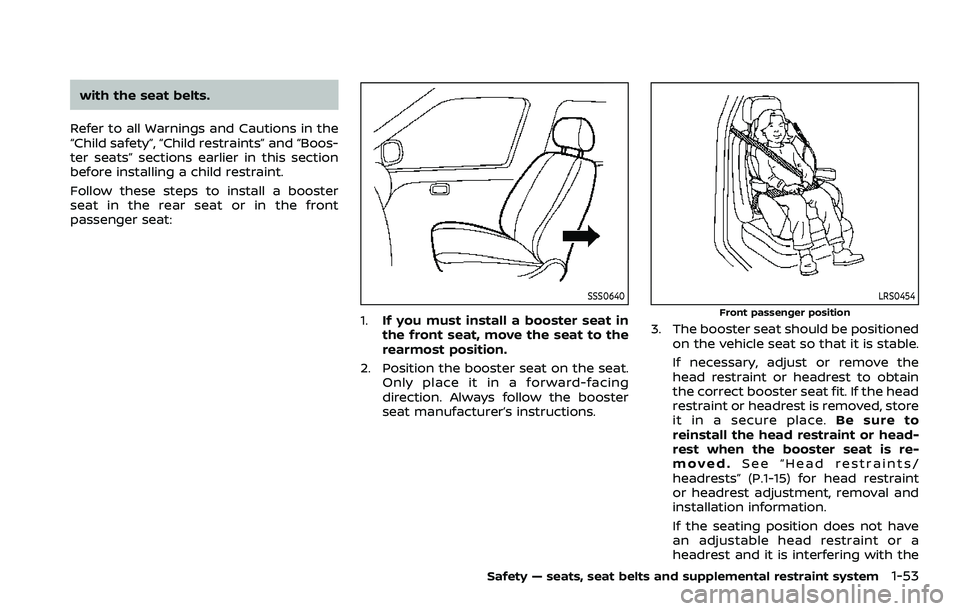
Follow these steps to install a booster
seat in the rear seat or in the front
passenger seat:
SSS0640
1. If you must install a booster seat in
the front seat, move the seat to the
rearmost position.
2. Position the booster seat on the seat. Only place it in a forward-facing
direction. Always follow the booster
seat manufacturer’s instructions.
LRS0454
Front passenger position
3. The booster seat should be positioned
on the vehicle seat so that it is stable.
If necessary, adjust or remove the
head restraint or headrest to obtain
the correct booster seat fit. If the head
restraint or headrest is removed, store
it in a secure place. Be sure to
reinstall the head restraint or head-
rest when the booster seat is re-
moved. See “Head restraints/
headrests” (P.1-15) for head restraint
or headrest adjustment, removal and
installation information.
If the seating position does not have
an adjustable head restraint or a
headrest and it is interfering with the
Safety — seats, seat belts and supplemental restraint system1-53
Page 150 of 604
2-56Instruments and controls
.Any liquid spilled on the heated
seat should be removed immedi-
ately with a dry cloth.
. When cleaning the seat, never use
gasoline, thinner, or any similar
materials.
. If any malfunctions are found or
the heated seat does not operate,
turn the switch off and have the
system checked. It is recom-
mended you visit a NISSAN dealer
for this service.
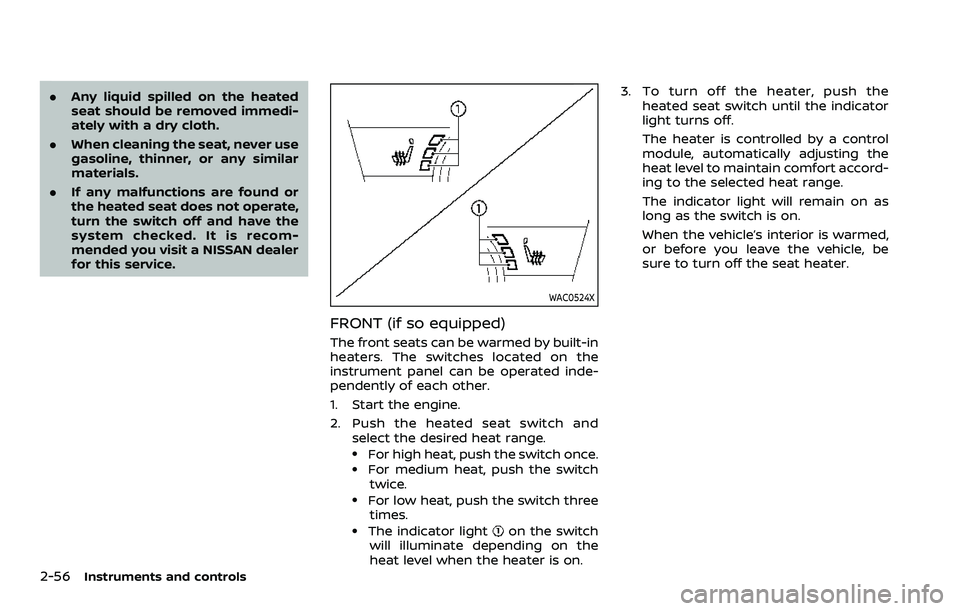
WAC0524X
FRONT (if so equipped)
The front seats can be warmed by built-in
heaters. The switches located on the
instrument panel can be operated inde-
pendently of each other.
1. Start the engine.
2. Push the heated seat switch and
select the desired heat range.
.For high heat, push the switch once..For medium heat, push the switch
twice.
.For low heat, push the switch threetimes.
.The indicator lighton the switch
will illuminate depending on the
heat level when the heater is on. 3. To turn off the heater, push the
heated seat switch until the indicator
light turns off.
The heater is controlled by a control
module, automatically adjusting the
heat level to maintain comfort accord-
ing to the selected heat range.
The indicator light will remain on as
long as the switch is on.
When the vehicle’s interior is warmed,
or before you leave the vehicle, be
sure to turn off the seat heater.
Page 152 of 604
2-58Instruments and controls
4. When the vehicle’s interior is warmedor cooled, or before you leave the
vehicle, be sure to turn off the climate
controlled seats. To turn off the cli-
mate controlled seats, push the
switch until the indicator light turns
off.
To check the air filters for the climate
controlled seat, it is recommended
you visit a NISSAN dealer.
WARNING
Do not use or allow occupants to use
the climate controlled seats if you or
the occupants cannot monitor seat
temperatures or have an inability to
feel pain in those body parts in
contact with the seat. Use of the
climate controlled seats by such
people could result in serious injury.
CAUTION
.The battery could run down if the
climate controlled seat is oper-
ated while the engine is not run-
ning. .
Do not use the climate controlled
seat for extended periods or
when no one is using the seat.
. Do not put anything on the seat
which insulates heat, such as a
blanket, cushion, seat cover, etc.
Otherwise, the seat may become
overheated.
. Do not place anything hard or
heavy on the seat or pierce it with
a pin or similar object. This may
result in damage to the climate
controlled seat.
. Any liquid spilled on the seat
should be removed immediately
with a dry cloth.
. The climate controlled seat has
an air filter. Do not operate cli-
mate controlled seat without an
air filter. This may result in da-
mage to the system.
. When cleaning the seat, never use
gasoline, thinner, or any similar
materials.
. If any malfunctions are found or
the climate controlled seat does
not operate, turn the switch off
and have the system checked. It
is recommended you visit a
NISSAN dealer for this service.
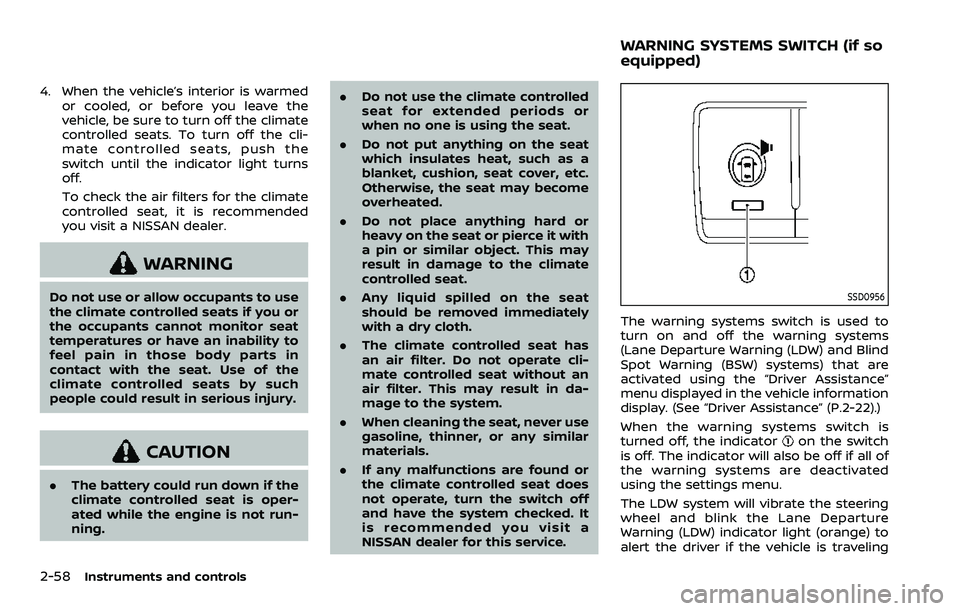
SSD0956
The warning systems switch is used to
turn on and off the warning systems
(Lane Departure Warning (LDW) and Blind
Spot Warning (BSW) systems) that are
activated using the “Driver Assistance”
menu displayed in the vehicle information
display. (See “Driver Assistance” (P.2-22).)
When the warning systems switch is
turned off, the indicator
on the switch
is off. The indicator will also be off if all of
the warning systems are deactivated
using the settings menu.
The LDW system will vibrate the steering
wheel and blink the Lane Departure
Warning (LDW) indicator light (orange) to
alert the driver if the vehicle is traveling
WARNING SYSTEMS SWITCH (if so
equipped)
Page 489 of 604
Occasionally remove loose dust from the
interior trim, plastic parts and seats using
a vacuum cleaner or soft bristled brush.
Wipe the vinyl and leather surfaces with a
clean, soft cloth dampened in mild soap
solution, then wipe clean with a dry soft
cloth.
Regular care and cleaning is required in
order to maintain the appearance of the
leather.
Before using any fabric protector, read
the manufacturer’s recommendations.
Some fabric protectors contain chemicals
that may stain or bleach the seat materi-
al.
Use a cloth dampened only with water, to
clean the meter and gauge lens.
WARNING
Do not use water or acidic cleaners
(hot steam cleaners) on the seat. This
can damage the seat or occupant
classification sensors. This can also
affect the operation of the air bag
system and result in serious perso-
nal injury.
CAUTION
.Never use benzine, thinner, or any
similar material.
. For cleaning, use a soft cloth,
dampened with water. Never use
a rough cloth, alcohol, benzine,
thinner or any kind of solvent or
paper towel with a chemical
cleaning agent. They will scratch
or cause discoloration to the lens.
. Do not spray any liquid such as
water on the meter lens. Spraying
liquid may cause the system to
malfunction.
. Small dirt particles can be abra-
sive and damaging to the leather
surfaces and should be removed
promptly. Do not use saddle soap,
car waxes, polishes, oils, cleaning
fluids, solvents, detergents or
ammonia-based cleaners as they
may damage the leather’s natural
finish.
. Only use fabric protectors ap-
proved by NISSAN.
. Do not use glass or plastic cleaner
on meter or gauge lens covers. It
may damage the lens cover. .
Do not spill on or make contact
with interior surfaces while hand-
ling air fresheners, aroma agents,
cosmetics, sunscreen, etc. They
may cause permanent discolora-
tion, stain, crack, paint peeling,
etc. depending on the ingredi-
ents. If they contact the interior
surface, wipe them off immedi-
ately using a soft cloth.
. Do not use the chlorine-based
cleaning liquid such as chlorine
dioxide and hypochlorous acid,
which may cause the paint peel-
ing, corrosion, etc. If it is unavoid-
able to clean or sterilize interior
surfaces, use less than 75% etha-
nol. Wipe the interior parts with a
dry cloth dampened with ethanol.
Wipe off ethanol completely. If
you leave it uncleaned, it may
cause paint peeling, discolora-
tion, etc. Since ethanol is flam-
mable, be careful of fire.
Appearance and care7-5
CLEANING INTERIOR