steering wheel NISSAN ARMADA 2022 Owner´s Manual
[x] Cancel search | Manufacturer: NISSAN, Model Year: 2022, Model line: ARMADA, Model: NISSAN ARMADA 2022Pages: 604, PDF Size: 2.97 MB
Page 99 of 604
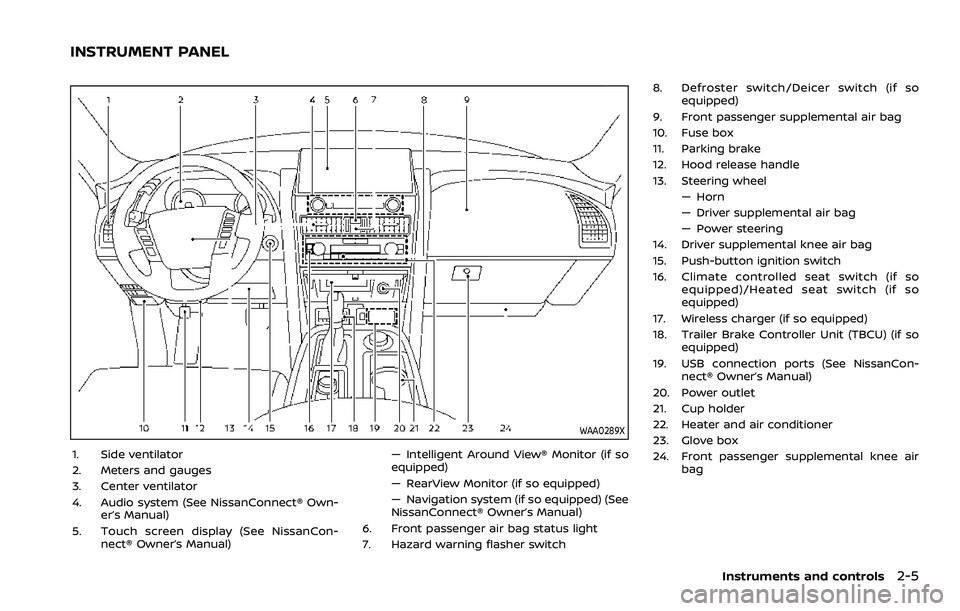
WAA0289X
1. Side ventilator
2. Meters and gauges
3. Center ventilator
4. Audio system (See NissanConnect® Own-er’s Manual)
5. Touch screen display (See NissanCon- nect® Owner’s Manual) — Intelligent Around View® Monitor (if so
equipped)
— RearView Monitor (if so equipped)
— Navigation system (if so equipped) (See
NissanConnect® Owner’s Manual)
6. Front passenger air bag status light
7. Hazard warning flasher switch 8. Defroster switch/Deicer switch (if so
equipped)
9. Front passenger supplemental air bag
10. Fuse box
11. Parking brake
12. Hood release handle
13. Steering wheel — Horn
— Driver supplemental air bag
— Power steering
14. Driver supplemental knee air bag
15. Push-button ignition switch
16. Climate controlled seat switch (if so equipped)/Heated seat switch (if so
equipped)
17. Wireless charger (if so equipped)
18. Trailer Brake Controller Unit (TBCU) (if so equipped)
19. USB connection ports (See NissanCon- nect® Owner’s Manual)
20. Power outlet
21. Cup holder
22. Heater and air conditioner
23. Glove box
24. Front passenger supplemental knee air bag
Instruments and controls2-5
INSTRUMENT PANEL
Page 111 of 604
TPMS malfunction:
If the TPMS is not functioning properly,
the low tire pressure warning light will
flash for approximately 1 minute when the
ignition switch is placed in the ON posi-
tion. The light will remain on after 1
minute. Have the system checked. It is
recommended you visit a NISSAN dealer
for this service. The “Tire Pressure Low -
Add Air” warning does not appear if the
low tire pressure warning light illuminates
to indicate a TPMS malfunction.
For additional information, see “Tire Pres-
sure Monitoring System (TPMS)” (P.5-5).
WARNING
.If the light does not illuminate
with the ignition switch placed in
the ON position, have the vehicle
checked as soon as possible. It is
recommended you visit a NISSAN
dealer for this service.
. If the light illuminates or Low
Pressure information is displayed
on the monitor screen while driv-
ing, avoid sudden steering man-
euvers or abrupt braking, reduce
vehicle speed, pull off the road to
a safe location and stop the
vehicle as soon as possible. Driv- ing with under-inflated tires may
permanently damage the tires
and increase the likelihood of tire
failure. Serious vehicle damage
could occur and may lead to an
accident and could result in ser-
ious personal injury. Check the
tire pressure for all four tires.
Adjust the tire pressure to the
recommended COLD tire pressure
shown on the Tire and Loading
Information label to turn the low
tire pressure warning light OFF. If
the light still illuminates while
driving after adjusting the tire
pressure, a tire may be flat or
the TPMS may be malfunctioning.
If you have a flat tire, replace it
with a spare tire as soon as
possible. If no tire is flat and all
tires are properly inflated, it is
recommended you consult a
NISSAN dealer.
. Since the spare tire is not
equipped with the TPMS, when a
spare tire is mounted or a wheel
is replaced, the TPMS will not
function and the low tire pressure
warning light will flash for ap-
proximately 1 minute. The light
will remain on after 1 minute.
Have your tires replaced and/or TPMS system reset as soon as
possible. It is recommended you
visit a NISSAN dealer for these
services.
. Replacing tires with those not
originally specified by NISSAN
could affect the proper operation
of the TPMS.
CAUTION
.The TPMS is not a substitute for
the regular tire pressure check.
Be sure to check the tire pressure
regularly.
. If the vehicle is being driven at
speeds of less than 16 MPH (25
km/h), the TPMS may not operate
correctly.
. Be sure to install the specified
size of tires to the four wheels
correctly.
Instruments and controls2-17
Page 115 of 604
— “NISSAN all-mode 4WD®” (P.5-124).
. Intelligent Back-up Intervention (I-BI)
— “Intelligent Back-up Intervention (I-
BI)” (P.5-63).
. Intelligent Cruise Control (ICC)
— “Intelligent Cruise Control (ICC)”
(P.5-74).
. Intelligent Key system
— “Intelligent Key system” (P.3-7).
— “Push-button ignition switch” (P.5-
13).
. Automatic Emergency Braking (AEB)
with pedestrian detection
— “Automatic Emergency Braking
(AEB) with pedestrian detection
system” (P.5-96).
. Intelligent Forward Collision Warning
(I-FCW)
— “Intelligent Forward Collision Warn-
ing (I-FCW)” (P.5-106).
. Lane Departure Warning (LDW)
— “Lane Departure Warning (LDW)”
(P.5-26).
. Intelligent Lane Intervention (I-LI)
— “Intelligent Lane Intervention (I-LI)”
(P.5-31).
. Intelligent Blind Spot Intervention (I-
BSI)
— “Intelligent Blind Spot Intervention
(I-BSI)” (P.5-46). .
Blind Spot Warning (BSW)
— “Blind Spot Warning (BSW)” (P.5-38).
. Rear Automatic Braking (RAB)
— “Rear Automatic Braking (RAB)” (P.5-
116).
. Intelligent Driver Alertness (I-DA)
— “Intelligent Driver Alertness (I-DA)”
(P.5-114).
. Traffic Sign Recognition (TSR)
— “Traffic Sign Recognition (TSR)” (P.5-
23).
. Rear Cross Traffic Alert (RCTA)
— “Rear Cross Traffic Alert (RCTA)”
(P.5-57).
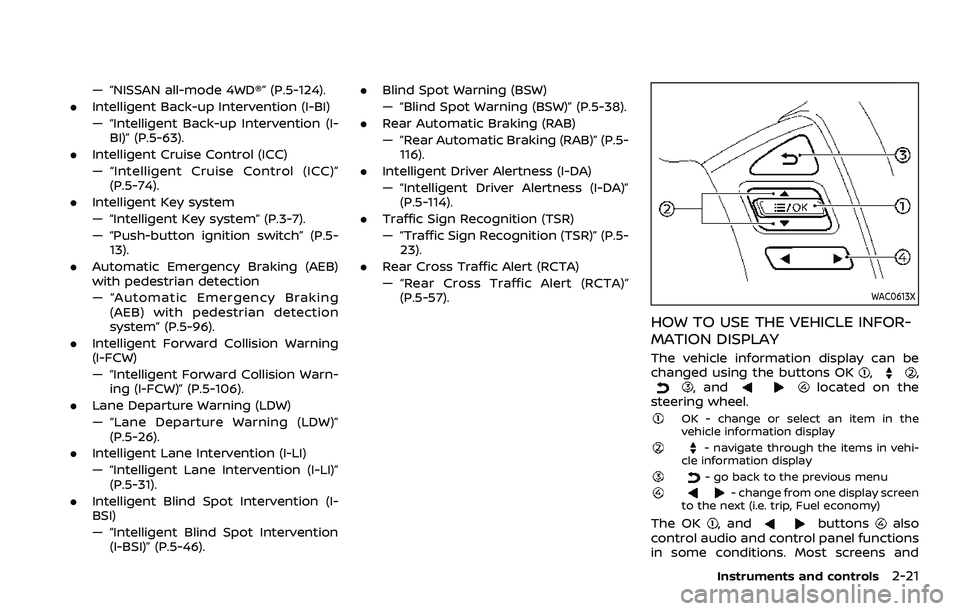
WAC0613X
HOW TO USE THE VEHICLE INFOR-
MATION DISPLAY
The vehicle information display can be
changed using the buttons OK,,, andlocated on the
steering wheel.
OK - change or select an item in the
vehicle information display
- navigate through the items in vehi-
cle information display
- go back to the previous menu- change from one display screen
to the next (i.e. trip, Fuel economy)
The OK, andbuttonsalso
control audio and control panel functions
in some conditions. Most screens and
Instruments and controls2-21
Page 128 of 604
2-34Instruments and controls
35. Shipping Mode On Push Storage
Fuse (if so equipped)
This warning may appear if the extended
storage fuse switch is not pushed in
(switched on). When this warning ap-
pears, push in (switch on) the extended
storage fuse switch to turn off the warn-
ing. For more information, see “Extended
storage fuse switch” (P.8-21).
36. Headlight System Error
This warning appears if the LED head-
lights are malfunctioning. It is recom-
mended you have the system checked
by a NISSAN dealer.
37. Intelligent Lane Intervention (I-
LI)/Intelligent Blind Spot Interven-
tion (I-BSI) ON indicator
This indicator appears when one or more
of the following systems is activated.
.Intelligent Lane Intervention (I-LI)
. Intelligent Blind Spot Intervention (I-
BSI)
For more details, see “Intelligent Lane
Intervention (I-LI)” (P.5-31) or “Intelligent
Blind Spot Intervention (I-BSI)” (P.5-46).
38. Not Available: Poor Road Con-
ditions (if so equipped)
This warning may appear when the
Intelligent Blind Spot Intervention (I-BSI),
the Intelligent Lane Intervention (I-LI) or
the Intelligent Cruise Control (ICC) system
is engaged.
Under the following conditions, the I-BSI,
I-LI or the ICC system is automatically
canceled:
. When the Vehicle Dynamic Control
(VDC) or ABS operates
. When a wheel slips
The above system cannot be used in
some situations. (VDC operates and a
wheel slips.)
39-40. Currently unavailable/Cur-
rently not available (if so equipped)
This message appears and the Intelligent
Blind Spot Intervention (I-BSI) system, the
Intelligent Lane Intervention (I-LI) system
and Intelligent Cruise Control (ICC) sys-
tem will be turned off automatically under
the following conditions:
. When the VDC system is turned off.
. When the SNOW mode is selected.
. When the 4WD shift switch is in the 4H
or 4L position. (4WD models).
“Vehicle Dynamic Control (VDC) system” (P.5-144), “SNOW mode” (P.5-135), “NISSAN
all-mode 4WD®” (P.5-124), “Intelligent Blind
Spot Intervention (I-BSI)” (P.5-46), “Intelli-
gent Lane Intervention (I-LI)” (P.5-31) and
“Intelligent Cruise Control (ICC)” (P.5-74).
41. Automatic Transmission (AT)
position indicator
This indicator shows the transmission
shift position.
See “Automatic transmission” (P.5-18) for
further details.
42. Rear Door Alert is activated
When the system is enabled, this message
appears when the Rear Door Alert system
is active and can remind the driver to
check the rear seat.
.
Using the steering switch, the driver
can select “Dismiss Message” to clear
the display for a period of time.
. Using the steering switch, the driver
can select “Disable Alert” to disable the
horn alert for the remainder of the
current trip.
For additional information, see “Rear door
alert” (P.2-61).
Page 131 of 604
WAC0616X
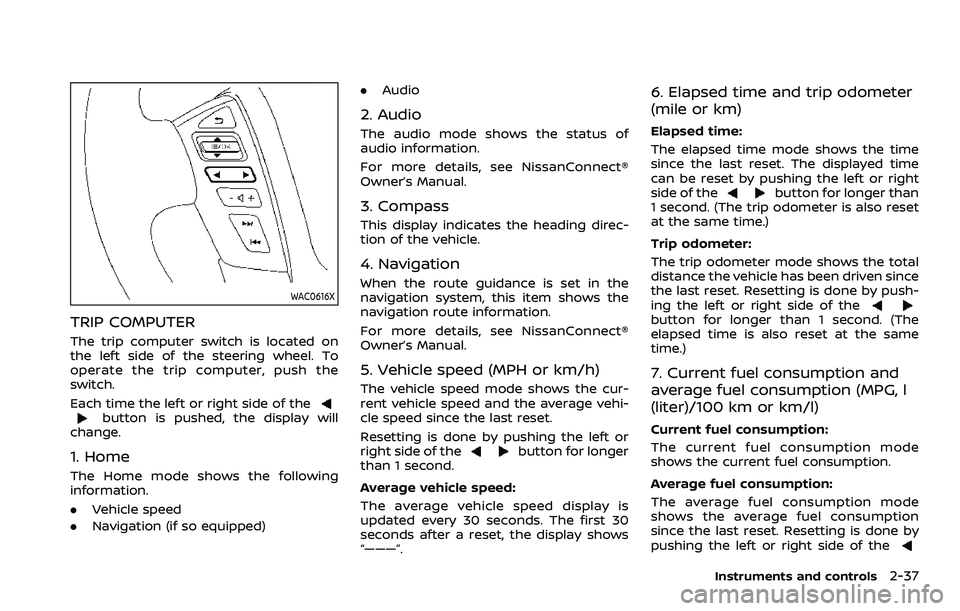
TRIP COMPUTER
The trip computer switch is located on
the left side of the steering wheel. To
operate the trip computer, push the
switch.
Each time the left or right side of the
button is pushed, the display will
change.
1. Home
The Home mode shows the following
information.
. Vehicle speed
. Navigation (if so equipped) .
Audio
2. Audio
The audio mode shows the status of
audio information.
For more details, see NissanConnect®
Owner’s Manual.
3. Compass
This display indicates the heading direc-
tion of the vehicle.
4. Navigation
When the route guidance is set in the
navigation system, this item shows the
navigation route information.
For more details, see NissanConnect®
Owner’s Manual.
5. Vehicle speed (MPH or km/h)
The vehicle speed mode shows the cur-
rent vehicle speed and the average vehi-
cle speed since the last reset.
Resetting is done by pushing the left or
right side of the
button for longer
than 1 second.
Average vehicle speed:
The average vehicle speed display is
updated every 30 seconds. The first 30
seconds after a reset, the display shows
“———”.
6. Elapsed time and trip odometer
(mile or km)
Elapsed time:
The elapsed time mode shows the time
since the last reset. The displayed time
can be reset by pushing the left or right
side of the
button for longer than
1 second. (The trip odometer is also reset
at the same time.)
Trip odometer:
The trip odometer mode shows the total
distance the vehicle has been driven since
the last reset. Resetting is done by push-
ing the left or right side of the
button for longer than 1 second. (The
elapsed time is also reset at the same
time.)
7. Current fuel consumption and
average fuel consumption (MPG, l
(liter)/100 km or km/l)
Current fuel consumption:
The current fuel consumption mode
shows the current fuel consumption.
Average fuel consumption:
The average fuel consumption mode
shows the average fuel consumption
since the last reset. Resetting is done by
pushing the left or right side of the
Instruments and controls2-37
Page 148 of 604
2-54Instruments and controls
lever does not latch, and release the
lever. The turn signal will automati-
cally flash three times.
Choose the appropriate method to signal
a lane change based on road and traffic
conditions.
SIC3672
Example
FOG LIGHT SWITCH (if so equipped)
To turn the fog lights on, turn the head-
light switch to theposition, then turn
the switch to theposition. To turn
them off, turn the switch to the OFF
position.
The headlights must be on with the low
beams selected for the fog lights to
operate. The fog lights automatically turn
off when the high beam headlights are
selected.
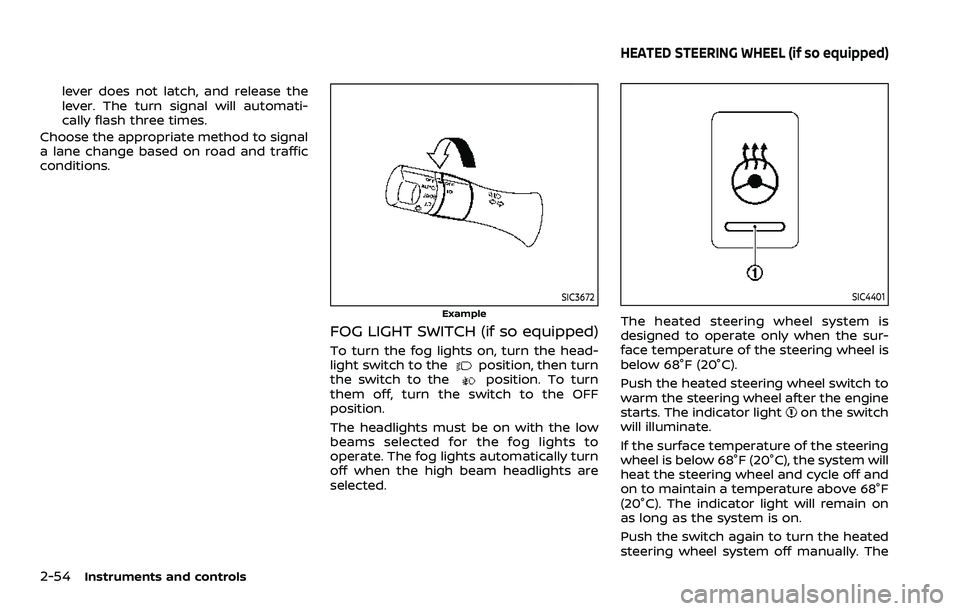
SIC4401
The heated steering wheel system is
designed to operate only when the sur-
face temperature of the steering wheel is
below 68°F (20°C).
Push the heated steering wheel switch to
warm the steering wheel after the engine
starts. The indicator light
on the switch
will illuminate.
If the surface temperature of the steering
wheel is below 68°F (20°C), the system will
heat the steering wheel and cycle off and
on to maintain a temperature above 68°F
(20°C). The indicator light will remain on
as long as the system is on.
Push the switch again to turn the heated
steering wheel system off manually. The
HEATED STEERING WHEEL (if so equipped)
Page 149 of 604
indicator light will turn off.
NOTE:
If the surface temperature of the steer-
ing wheel is above 68°F (20°C) when the
switch is turned on, the system will not
heat the steering wheel. This is not a
malfunction.
SIC4444
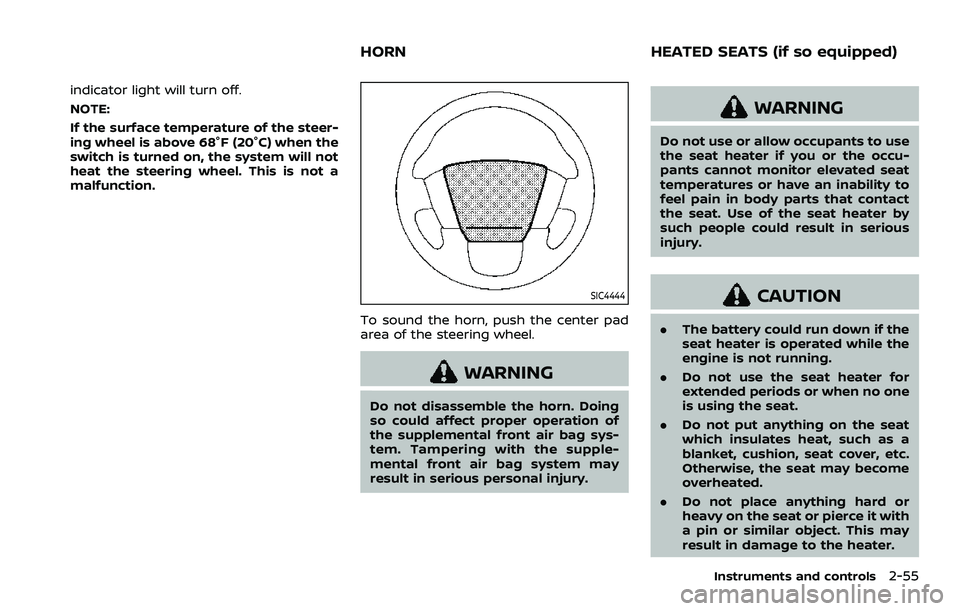
To sound the horn, push the center pad
area of the steering wheel.
WARNING
Do not disassemble the horn. Doing
so could affect proper operation of
the supplemental front air bag sys-
tem. Tampering with the supple-
mental front air bag system may
result in serious personal injury.
WARNING
Do not use or allow occupants to use
the seat heater if you or the occu-
pants cannot monitor elevated seat
temperatures or have an inability to
feel pain in body parts that contact
the seat. Use of the seat heater by
such people could result in serious
injury.
CAUTION
.The battery could run down if the
seat heater is operated while the
engine is not running.
. Do not use the seat heater for
extended periods or when no one
is using the seat.
. Do not put anything on the seat
which insulates heat, such as a
blanket, cushion, seat cover, etc.
Otherwise, the seat may become
overheated.
. Do not place anything hard or
heavy on the seat or pierce it with
a pin or similar object. This may
result in damage to the heater.
Instruments and controls2-55
HORN HEATED SEATS (if so equipped)
Page 152 of 604
2-58Instruments and controls
4. When the vehicle’s interior is warmedor cooled, or before you leave the
vehicle, be sure to turn off the climate
controlled seats. To turn off the cli-
mate controlled seats, push the
switch until the indicator light turns
off.
To check the air filters for the climate
controlled seat, it is recommended
you visit a NISSAN dealer.
WARNING
Do not use or allow occupants to use
the climate controlled seats if you or
the occupants cannot monitor seat
temperatures or have an inability to
feel pain in those body parts in
contact with the seat. Use of the
climate controlled seats by such
people could result in serious injury.
CAUTION
.The battery could run down if the
climate controlled seat is oper-
ated while the engine is not run-
ning. .
Do not use the climate controlled
seat for extended periods or
when no one is using the seat.
. Do not put anything on the seat
which insulates heat, such as a
blanket, cushion, seat cover, etc.
Otherwise, the seat may become
overheated.
. Do not place anything hard or
heavy on the seat or pierce it with
a pin or similar object. This may
result in damage to the climate
controlled seat.
. Any liquid spilled on the seat
should be removed immediately
with a dry cloth.
. The climate controlled seat has
an air filter. Do not operate cli-
mate controlled seat without an
air filter. This may result in da-
mage to the system.
. When cleaning the seat, never use
gasoline, thinner, or any similar
materials.
. If any malfunctions are found or
the climate controlled seat does
not operate, turn the switch off
and have the system checked. It
is recommended you visit a
NISSAN dealer for this service.
SSD0956
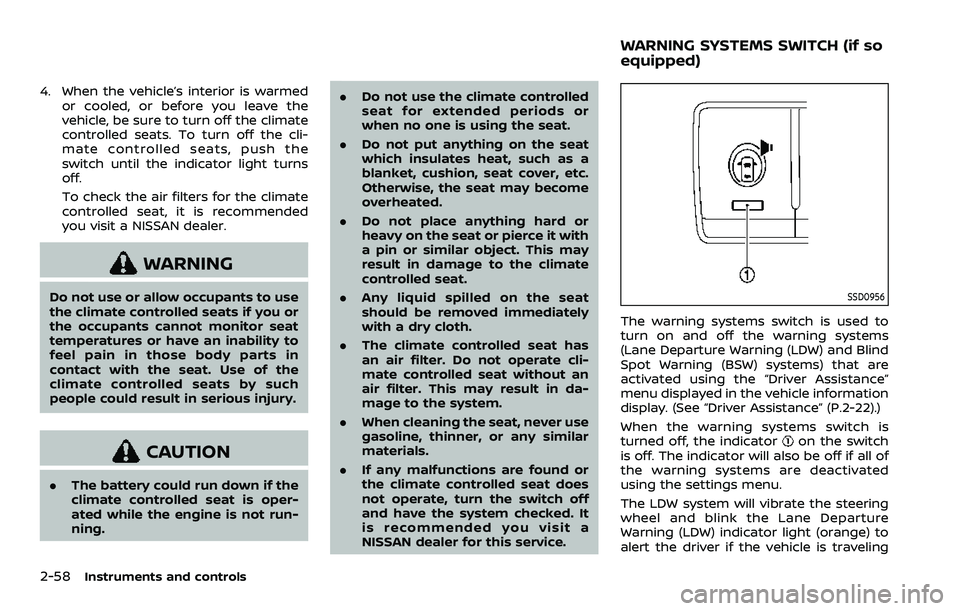
The warning systems switch is used to
turn on and off the warning systems
(Lane Departure Warning (LDW) and Blind
Spot Warning (BSW) systems) that are
activated using the “Driver Assistance”
menu displayed in the vehicle information
display. (See “Driver Assistance” (P.2-22).)
When the warning systems switch is
turned off, the indicator
on the switch
is off. The indicator will also be off if all of
the warning systems are deactivated
using the settings menu.
The LDW system will vibrate the steering
wheel and blink the Lane Departure
Warning (LDW) indicator light (orange) to
alert the driver if the vehicle is traveling
WARNING SYSTEMS SWITCH (if so
equipped)
Page 216 of 604
3-28Pre-driving checks and adjustments
SPA2753
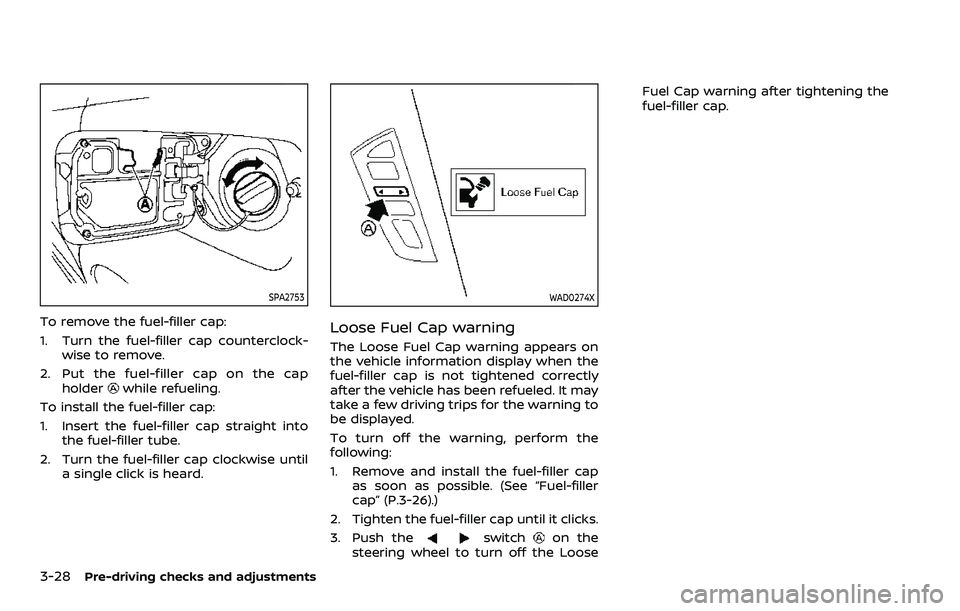
To remove the fuel-filler cap:
1. Turn the fuel-filler cap counterclock-wise to remove.
2. Put the fuel-filler cap on the cap holder
while refueling.
To install the fuel-filler cap:
1. Insert the fuel-filler cap straight into the fuel-filler tube.
2. Turn the fuel-filler cap clockwise until a single click is heard.
WAD0274X
Loose Fuel Cap warning
The Loose Fuel Cap warning appears on
the vehicle information display when the
fuel-filler cap is not tightened correctly
after the vehicle has been refueled. It may
take a few driving trips for the warning to
be displayed.
To turn off the warning, perform the
following:
1. Remove and install the fuel-filler capas soon as possible. (See “Fuel-filler
cap” (P.3-26).)
2. Tighten the fuel-filler cap until it clicks.
3. Push the
switchon the
steering wheel to turn off the Loose Fuel Cap warning after tightening the
fuel-filler cap.
Page 217 of 604
WARNING
.Do not adjust the steering wheel
while driving. You could lose con-
trol of your vehicle and cause an
accident.
. Do not adjust the steering wheel
any closer to you than is neces-
sary for proper steering opera-
tion and comfort. The driver’s air
bag inflates with great force. If
you are unrestrained, leaning for-
ward, sitting sideways or out of
position in any way, you are at
greater risk of injury or death in a
crash. You may also receive ser-
ious or fatal injuries from the air
bag if you are up against it when
it inflates. Always sit back against
the seatback and as far away as
practical from the steering wheel.
Always use the seat belts.
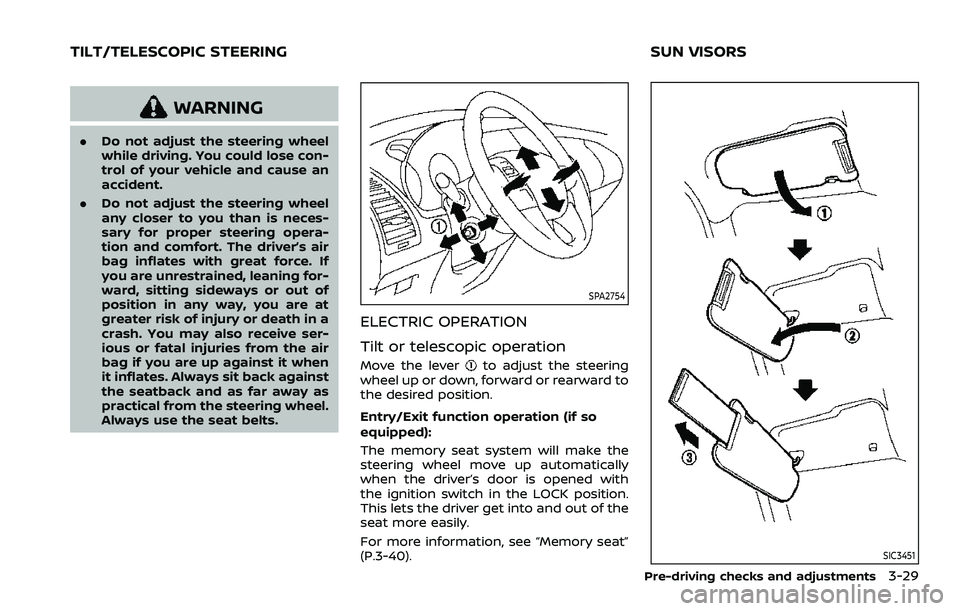
SPA2754
ELECTRIC OPERATION
Tilt or telescopic operation
Move the leverto adjust the steering
wheel up or down, forward or rearward to
the desired position.
Entry/Exit function operation (if so
equipped):
The memory seat system will make the
steering wheel move up automatically
when the driver’s door is opened with
the ignition switch in the LOCK position.
This lets the driver get into and out of the
seat more easily.
For more information, see “Memory seat”
(P.3-40).
SIC3451
Pre-driving checks and adjustments3-29
TILT/TELESCOPIC STEERING SUN VISORS