seat adjustment NISSAN ARMADA 2022 Owner´s Manual
[x] Cancel search | Manufacturer: NISSAN, Model Year: 2022, Model line: ARMADA, Model: NISSAN ARMADA 2022Pages: 604, PDF Size: 2.97 MB
Page 201 of 604
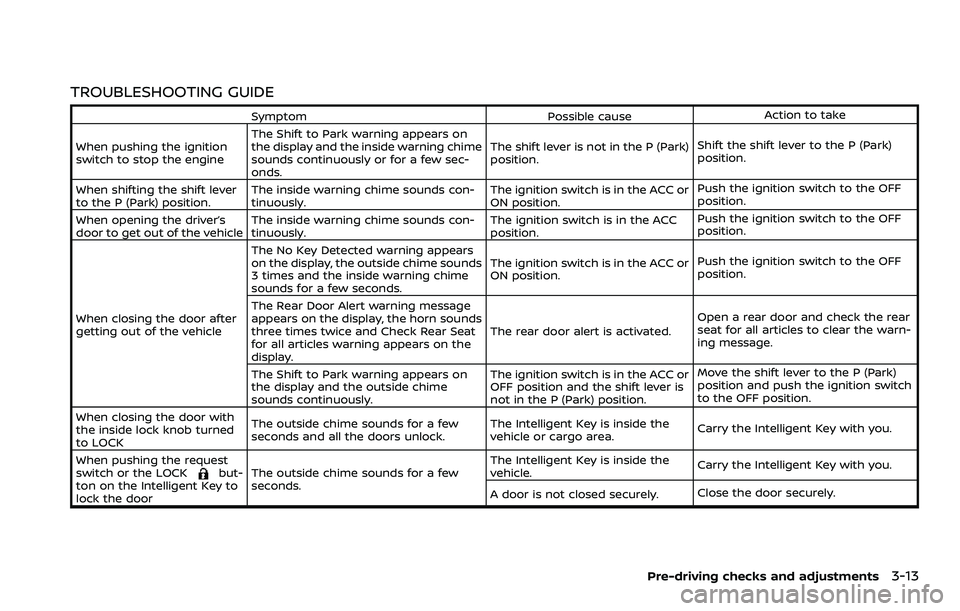
TROUBLESHOOTING GUIDE
SymptomPossible causeAction to take
When pushing the ignition
switch to stop the engine The Shift to Park warning appears on
the display and the inside warning chime
sounds continuously or for a few sec-
onds. The shift lever is not in the P (Park)
position.
Shift the shift lever to the P (Park)
position.
When shifting the shift lever
to the P (Park) position. The inside warning chime sounds con-
tinuously. The ignition switch is in the ACC or
ON position.Push the ignition switch to the OFF
position.
When opening the driver’s
door to get out of the vehicle The inside warning chime sounds con-
tinuously. The ignition switch is in the ACC
position.Push the ignition switch to the OFF
position.
When closing the door after
getting out of the vehicle The No Key Detected warning appears
on the display, the outside chime sounds
3 times and the inside warning chime
sounds for a few seconds.
The ignition switch is in the ACC or
ON position.
Push the ignition switch to the OFF
position.
The Rear Door Alert warning message
appears on the display, the horn sounds
three times twice and Check Rear Seat
for all articles warning appears on the
display. The rear door alert is activated.
Open a rear door and check the rear
seat for all articles to clear the warn-
ing message.
The Shift to Park warning appears on
the display and the outside chime
sounds continuously. The ignition switch is in the ACC or
OFF position and the shift lever is
not in the P (Park) position.Move the shift lever to the P (Park)
position and push the ignition switch
to the OFF position.
When closing the door with
the inside lock knob turned
to LOCK The outside chime sounds for a few
seconds and all the doors unlock.
The Intelligent Key is inside the
vehicle or cargo area.
Carry the Intelligent Key with you.
When pushing the request
switch or the LOCK
but-
ton on the Intelligent Key to
lock the door The outside chime sounds for a few
seconds. The Intelligent Key is inside the
vehicle.
Carry the Intelligent Key with you.
A door is not closed securely. Close the door securely.
Pre-driving checks and adjustments3-13
Page 217 of 604
WARNING
.Do not adjust the steering wheel
while driving. You could lose con-
trol of your vehicle and cause an
accident.
. Do not adjust the steering wheel
any closer to you than is neces-
sary for proper steering opera-
tion and comfort. The driver’s air
bag inflates with great force. If
you are unrestrained, leaning for-
ward, sitting sideways or out of
position in any way, you are at
greater risk of injury or death in a
crash. You may also receive ser-
ious or fatal injuries from the air
bag if you are up against it when
it inflates. Always sit back against
the seatback and as far away as
practical from the steering wheel.
Always use the seat belts.
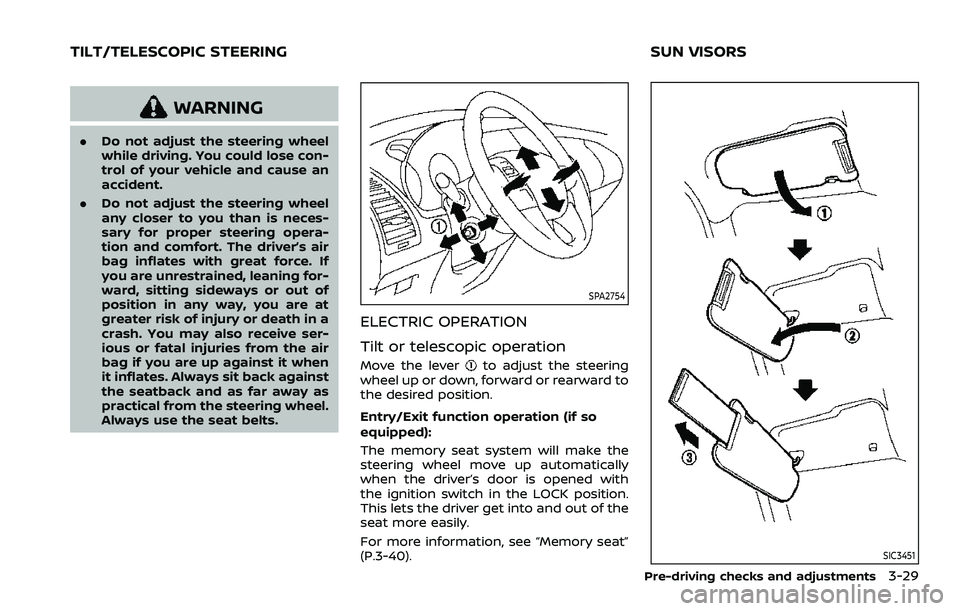
SPA2754
ELECTRIC OPERATION
Tilt or telescopic operation
Move the leverto adjust the steering
wheel up or down, forward or rearward to
the desired position.
Entry/Exit function operation (if so
equipped):
The memory seat system will make the
steering wheel move up automatically
when the driver’s door is opened with
the ignition switch in the LOCK position.
This lets the driver get into and out of the
seat more easily.
For more information, see “Memory seat”
(P.3-40).
SIC3451
Pre-driving checks and adjustments3-29
TILT/TELESCOPIC STEERING SUN VISORS
Page 219 of 604
SPA2450-A
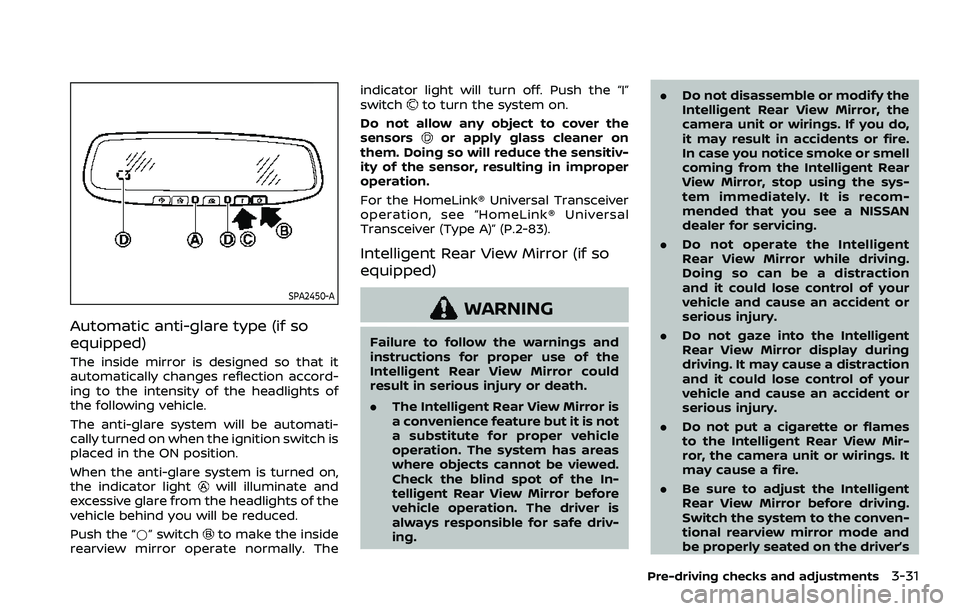
Automatic anti-glare type (if so
equipped)
The inside mirror is designed so that it
automatically changes reflection accord-
ing to the intensity of the headlights of
the following vehicle.
The anti-glare system will be automati-
cally turned on when the ignition switch is
placed in the ON position.
When the anti-glare system is turned on,
the indicator light
will illuminate and
excessive glare from the headlights of the
vehicle behind you will be reduced.
Push the “*” switch
to make the inside
rearview mirror operate normally. The indicator light will turn off. Push the “I”
switch
to turn the system on.
Do not allow any object to cover the
sensors
or apply glass cleaner on
them. Doing so will reduce the sensitiv-
ity of the sensor, resulting in improper
operation.
For the HomeLink® Universal Transceiver
operation, see “HomeLink® Universal
Transceiver (Type A)” (P.2-83).
Intelligent Rear View Mirror (if so
equipped)
WARNING
Failure to follow the warnings and
instructions for proper use of the
Intelligent Rear View Mirror could
result in serious injury or death.
. The Intelligent Rear View Mirror is
a convenience feature but it is not
a substitute for proper vehicle
operation. The system has areas
where objects cannot be viewed.
Check the blind spot of the In-
telligent Rear View Mirror before
vehicle operation. The driver is
always responsible for safe driv-
ing. .
Do not disassemble or modify the
Intelligent Rear View Mirror, the
camera unit or wirings. If you do,
it may result in accidents or fire.
In case you notice smoke or smell
coming from the Intelligent Rear
View Mirror, stop using the sys-
tem immediately. It is recom-
mended that you see a NISSAN
dealer for servicing.
. Do not operate the Intelligent
Rear View Mirror while driving.
Doing so can be a distraction
and it could lose control of your
vehicle and cause an accident or
serious injury.
. Do not gaze into the Intelligent
Rear View Mirror display during
driving. It may cause a distraction
and it could lose control of your
vehicle and cause an accident or
serious injury.
. Do not put a cigarette or flames
to the Intelligent Rear View Mir-
ror, the camera unit or wirings. It
may cause a fire.
. Be sure to adjust the Intelligent
Rear View Mirror before driving.
Switch the system to the conven-
tional rearview mirror mode and
be properly seated on the driver’s
Pre-driving checks and adjustments3-31
Page 220 of 604
3-32Pre-driving checks and adjustments
seat. Then adjust the mirror so as
to see the rear window properly.
Driving without adjusting the mir-
ror may cause difficulty in watch-
ing the display at Intelligent Rear
View Mirror mode (camera view
mode) due to the reflection from
the surface of the mirror.
. If the Intelligent Rear View Mirror
malfunctions, immediately switch
the system to the conventional
rearview mirror mode.
. When strong light (for example,
sunlight or high beams from fol-
lowing vehicles) enters the cam-
era, a light beam or a glaring light
may appear on the monitor
screen of the Intelligent Rear
View Mirror. In that case, switch
the system to the conventional
rearview mirror mode appropri-
ately.
. If dirt, rain or snow accumulates
on the exterior glass surface cov-
ering the camera, the Intelligent
Rear View Mirror may not display
objects clearly. Use of the rear
window wiper/washer may im-
prove visibility, but if not, switch
the Intelligent Rear View Mirror to
the conventional rearview mirror
mode until a time the glass cov- ering the camera can be cleaned.
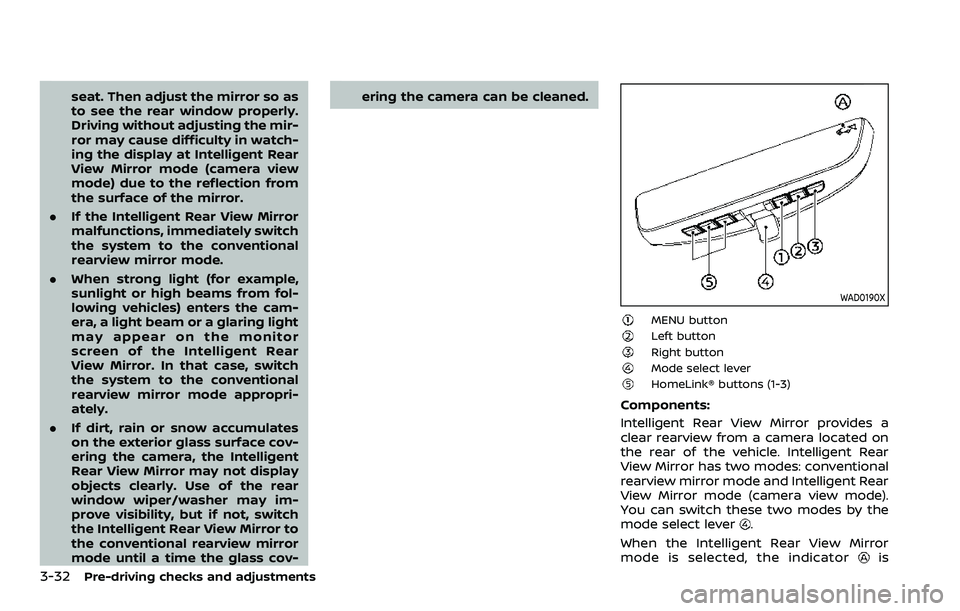
WAD0190X
MENU buttonLeft buttonRight buttonMode select leverHomeLink® buttons (1-3)
Components:
Intelligent Rear View Mirror provides a
clear rearview from a camera located on
the rear of the vehicle. Intelligent Rear
View Mirror has two modes: conventional
rearview mirror mode and Intelligent Rear
View Mirror mode (camera view mode).
You can switch these two modes by the
mode select lever
.
When the Intelligent Rear View Mirror
mode is selected, the indicator
is
Page 228 of 604
3-40Pre-driving checks and adjustments
SIC4448
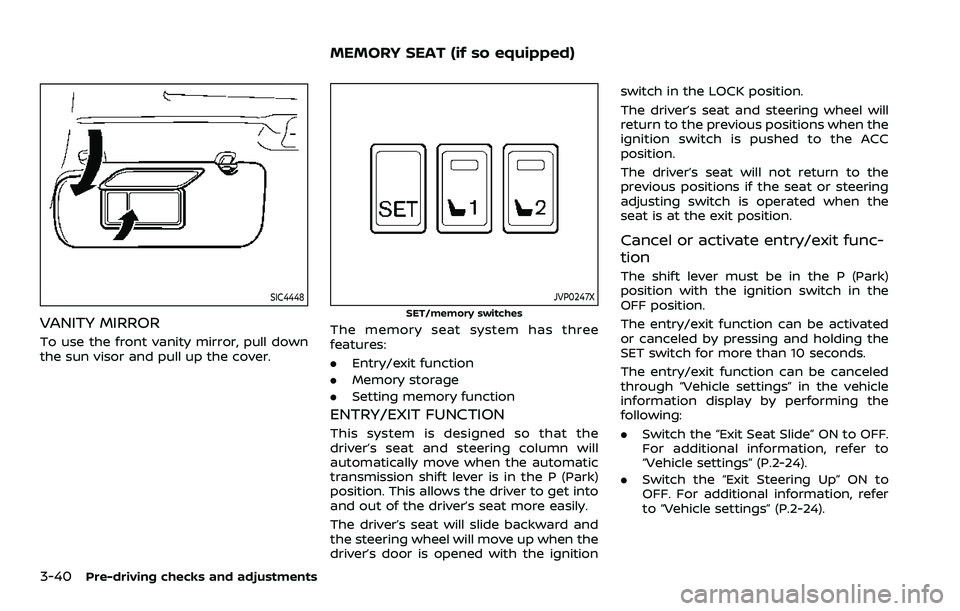
VANITY MIRROR
To use the front vanity mirror, pull down
the sun visor and pull up the cover.
JVP0247X
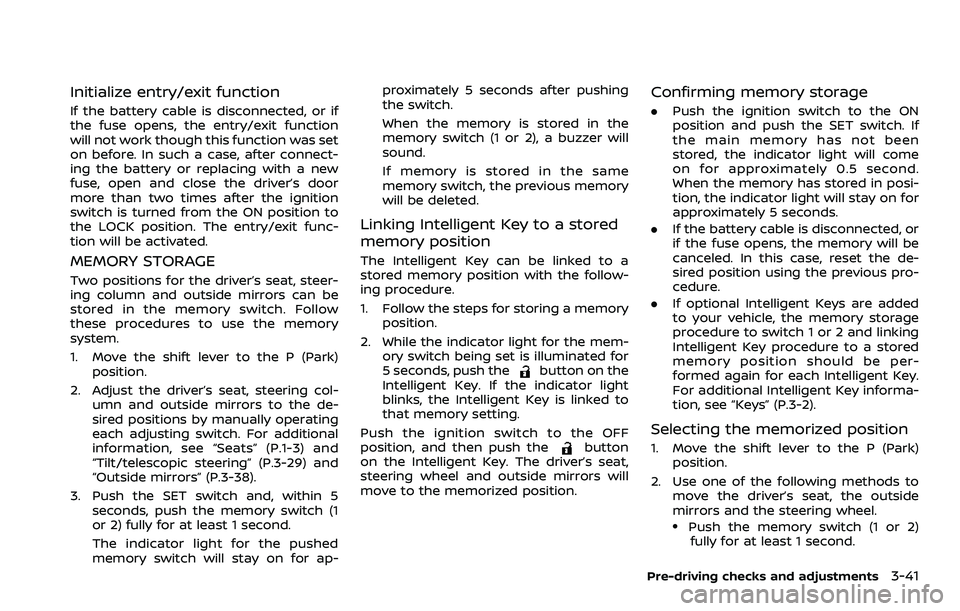
SET/memory switches
The memory seat system has three
features:
.Entry/exit function
. Memory storage
. Setting memory function
ENTRY/EXIT FUNCTION
This system is designed so that the
driver’s seat and steering column will
automatically move when the automatic
transmission shift lever is in the P (Park)
position. This allows the driver to get into
and out of the driver’s seat more easily.
The driver’s seat will slide backward and
the steering wheel will move up when the
driver’s door is opened with the ignition switch in the LOCK position.
The driver’s seat and steering wheel will
return to the previous positions when the
ignition switch is pushed to the ACC
position.
The driver’s seat will not return to the
previous positions if the seat or steering
adjusting switch is operated when the
seat is at the exit position.
Cancel or activate entry/exit func-
tion
The shift lever must be in the P (Park)
position with the ignition switch in the
OFF position.
The entry/exit function can be activated
or canceled by pressing and holding the
SET switch for more than 10 seconds.
The entry/exit function can be canceled
through “Vehicle settings” in the vehicle
information display by performing the
following:
.
Switch the “Exit Seat Slide” ON to OFF.
For additional information, refer to
“Vehicle settings” (P.2-24).
. Switch the “Exit Steering Up” ON to
OFF. For additional information, refer
to “Vehicle settings” (P.2-24).
MEMORY SEAT (if so equipped)
Page 229 of 604
Initialize entry/exit function
If the battery cable is disconnected, or if
the fuse opens, the entry/exit function
will not work though this function was set
on before. In such a case, after connect-
ing the battery or replacing with a new
fuse, open and close the driver’s door
more than two times after the ignition
switch is turned from the ON position to
the LOCK position. The entry/exit func-
tion will be activated.
MEMORY STORAGE
Two positions for the driver’s seat, steer-
ing column and outside mirrors can be
stored in the memory switch. Follow
these procedures to use the memory
system.
1. Move the shift lever to the P (Park)position.
2. Adjust the driver’s seat, steering col- umn and outside mirrors to the de-
sired positions by manually operating
each adjusting switch. For additional
information, see “Seats” (P.1-3) and
“Tilt/telescopic steering” (P.3-29) and
“Outside mirrors” (P.3-38).
3. Push the SET switch and, within 5 seconds, push the memory switch (1
or 2) fully for at least 1 second.
The indicator light for the pushed
memory switch will stay on for ap- proximately 5 seconds after pushing
the switch.
When the memory is stored in the
memory switch (1 or 2), a buzzer will
sound.
If memory is stored in the same
memory switch, the previous memory
will be deleted.
Linking Intelligent Key to a stored
memory position
The Intelligent Key can be linked to a
stored memory position with the follow-
ing procedure.
1. Follow the steps for storing a memory
position.
2. While the indicator light for the mem- ory switch being set is illuminated for
5 seconds, push the
button on the
Intelligent Key. If the indicator light
blinks, the Intelligent Key is linked to
that memory setting.
Push the ignition switch to the OFF
position, and then push the
button
on the Intelligent Key. The driver’s seat,
steering wheel and outside mirrors will
move to the memorized position.
Confirming memory storage
. Push the ignition switch to the ON
position and push the SET switch. If
the main memory has not been
stored, the indicator light will come
on for approximately 0.5 second.
When the memory has stored in posi-
tion, the indicator light will stay on for
approximately 5 seconds.
. If the battery cable is disconnected, or
if the fuse opens, the memory will be
canceled. In this case, reset the de-
sired position using the previous pro-
cedure.
. If optional Intelligent Keys are added
to your vehicle, the memory storage
procedure to switch 1 or 2 and linking
Intelligent Key procedure to a stored
memory position should be per-
formed again for each Intelligent Key.
For additional Intelligent Key informa-
tion, see “Keys” (P.3-2).
Selecting the memorized position
1. Move the shift lever to the P (Park)
position.
2. Use one of the following methods to move the driver’s seat, the outside
mirrors and the steering wheel.
.Push the memory switch (1 or 2)fully for at least 1 second.
Pre-driving checks and adjustments3-41
Page 230 of 604
3-42Pre-driving checks and adjustments
The driver’s seat, steering column and
outside mirrors will move to the
memorized position or to the exit
position when the entry/exit function
is set to active with the indicator light
flashing, and then the light will stay on
for approximately 5 seconds.
SETTING MEMORY FUNCTION
The status of the following settings can
be linked to the Intelligent Key and the
memorized settings can be available for
each Intelligent Key.
.Air conditioner system
. Navigation system (if so equipped)
. Audio system
To use the memory function, lock the
doors with the Intelligent Key that is
linked to the settings.
To enable the memorized settings:
1. Carry the Intelligent Key that is linked to the settings, and unlock the doors
by pushing the driver’s door handle
request switch or “UNLOCK”
but-
ton on the Intelligent Key.
2. Place the ignition switch in the ON position. “Connection with the key has
been done” will be displayed on the
screen and the memorized settings
are available (only when a new Intel-
ligent Key is used).
SYSTEM OPERATION
The memory seat system will not work or
will stop operating under the following
conditions:
.When the vehicle speed is above 0
MPH (0 km/h) or 4 MPH (7 km/h) for
some limited functions such linking an
Intelligent Key to the vehicle when the
power source is turned on from off or
during the Exit function.
. When any of the memory switches are
pushed while the memory seat is
operating.
. When the adjusting switch for the
driver’s seat and steering column is
turned on while the memory seat is
operating.
. When the seat has already been
moved to the memorized position.
. When no seat position is stored in the
memory switch.
. When the shift lever is moved from the
P (Park) position to any other position.
Page 275 of 604
WARNING
.It is unlawful in most jurisdictions
for a person to drive a motor
vehicle which is equipped with a
television monitor or screen that
is visible, directly or indirectly, to
the driver while operating the
vehicle. In the interest of safety,
the unit should never be installed
where it will be directly or indir-
ectly visible, by the operator of
the motor vehicle.
. For safety reasons when chan-
ging discs, it is recommended
that the vehicle is not in motion,
and that you do not allow chil-
dren to unfasten safety belts to
change discs or make any adjust-
ments to the system. System
adjustments can be accom-
plished using the remote control,
while safety belts remain fas-
tened.
. Enjoy your RSI system but re-
member that safety of all pas-
sengers remains the number one
priority. Devices installed in the
USB, HDMI, or headphone jack
may protrude and create a po-
tential eye impact hazard for un- belted passengers during a vehi-
cle accident. To reduce the risk of
injury, use only SD cards (hidden
on left side of driver side monitor)
or low-profile USB storage de-
vices.
CAUTION
.
If your vehicle is equipped with a
wireless rear seat audio system
or any other wireless infrared
device, make sure it is powered
off when operating the RSI sys-
tem. If both systems are powered
on at the same time, the two
systems may obstruct each other,
possibly creating undesirable
audio interference through the
wireless headphones.
. Do not touch the inner pins of the
jacks on the front panel. Electro-
static discharge may cause per-
manent damage to the device.
. The LCD display screen is not
touchscreen. Do not put pressure
or add suction cups on the
screen. .
Caution children to avoid touch-
ing or scratching the screen, as it
may become dirty or damaged.
. Be sure to run the vehicle engine
while using the system. Using this
system without running the en-
gine can result in battery drain.
To avoid the risk of battery drain,
please remember to turn off the
system when the vehicle is not in
use.
WELCOME
This Rear Seat Infotainment (RSI) system,
with built-in Wi-Fi, has some advanced
features. Before operating this system,
read this section thoroughly and retain it
for future reference.
System features
.Twin 8-inch Color TFT-LCD Panels
with 1024 x 600 Resolution
. Internal Wi-Fi Network
. Bluetooth® 4.1 Audio Streaming
. Miracast®/Smart View Capability
. SmartStream Content Sharing
. USB 2.0 Port, SDXC Card Input
. HDMI 1.4 Input with MHL 2.0 Support
. Exclusive Slingplayer® Application
Monitor, heater, air conditioner, audio, phone and voice recognition systems4-45
REAR SEAT INFOTAINMENT (RSI) (if
so equipped)
Page 596 of 604
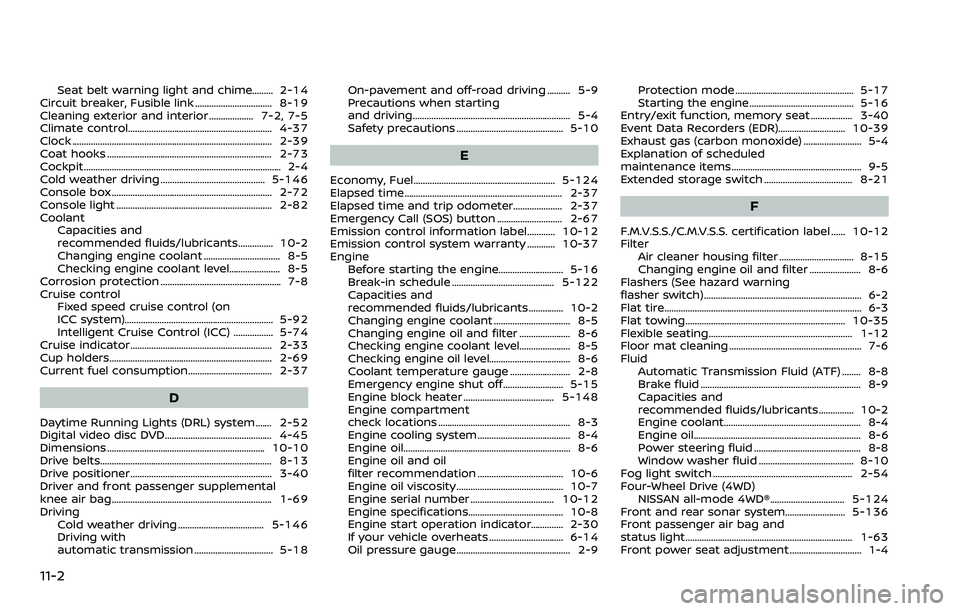
11-2
Seat belt warning light and chime......... 2-14
Circuit breaker, Fusible link ................................. 8-19
Cleaning exterior and interior ................... 7-2, 7-5
Climate control.............................................................. 4-37
Clock ........................................................................\
.............. 2-39
Coat hooks ....................................................................... 2-73
Cockpit ........................................................................\
............. 2-4
Cold weather driving ............................................. 5-146
Console box ..................................................................... 2-72
Console light ................................................................... 2-82
Coolant Capacities and
recommended fluids/lubricants............... 10-2
Changing engine coolant ................................. 8-5
Checking engine coolant level...................... 8-5
Corrosion protection .................................................... 7-8
Cruise control Fixed speed cruise control (on
ICC system)................................................................ 5-92
Intelligent Cruise Control (ICC) ................. 5-74
Cruise indicator............................................................. 2-33
Cup holders...................................................................... 2-69
Current fuel consumption.................................... 2-37
D
Daytime Running Lights (DRL) system....... 2-52
Digital video disc DVD.............................................. 4-45
Dimensions .................................................................... 10-10
Drive belts...................................................................\
....... 8-13
Drive positioner............................................................. 3-40
Driver and front passenger supplemental
knee air bag..................................................................... 1-69
Driving Cold weather driving ..................................... 5-146
Driving with
automatic transmission .................................. 5-18 On-pavement and off-road driving .......... 5-9
Precautions when starting
and driving.................................................................... 5-4
Safety precautions .............................................. 5-10
E
Economy, Fuel............................................................. 5-124
Elapsed time.................................................................... 2-37
Elapsed time and trip odometer..................... 2-37
Emergency Call (SOS) button ............................ 2-67
Emission control information label............ 10-12
Emission control system warranty ............ 10-37
Engine
Before starting the engine............................ 5-16
Break-in schedule ............................................ 5-122
Capacities and
recommended fluids/lubricants............... 10-2
Changing engine coolant ................................. 8-5
Changing engine oil and filter ...................... 8-6
Checking engine coolant level...................... 8-5
Checking engine oil level................................... 8-6
Coolant temperature gauge .......................... 2-8
Emergency engine shut off.......................... 5-15
Engine block heater ....................................... 5-148
Engine compartment
check locations ......................................................... 8-3
Engine cooling system ........................................ 8-4
Engine oil.....................................................................\
... 8-6
Engine oil and oil
filter recommendation ..................................... 10-6
Engine oil viscosity .............................................. 10-7
Engine serial number .................................... 10-12
Engine specifications......................................... 10-8
Engine start operation indicator.............. 2-30
If your vehicle overheats ................................ 6-14
Oil pressure gauge ................................................. 2-9 Protection mode ................................................... 5-17
Starting the engine............................................. 5-16
Entry/exit function, memory seat .................. 3-40
Event Data Recorders (EDR)............................. 10-39
Exhaust gas (carbon monoxide) ......................... 5-4
Explanation of scheduled
maintenance items ........................................................ 9-5
Extended storage switch ...................................... 8-21
F
F.M.V.S.S./C.M.V.S.S. certification label ...... 10-12
Filter Air cleaner housing filter ................................ 8-15
Changing engine oil and filter ...................... 8-6
Flashers (See hazard warning
flasher switch).................................................................... 6-2
Flat tire........................................................................\
............. 6-3
Flat towing..................................................................... 10-35
Flexible seating.............................................................. 1-12
Floor mat cleaning ......................................................... 7-6
Fluid Automatic Transmission Fluid (ATF) ........ 8-8
Brake fluid ..................................................................... 8-9
Capacities and
recommended fluids/lubricants............... 10-2
Engine coolant........................................................... 8-4
Engine oil.....................................................................\
... 8-6
Power steering fluid .............................................. 8-8
Window washer fluid ......................................... 8-10
Fog light switch ............................................................ 2-54
Four-Wheel Drive (4WD) NISSAN all-mode 4WD®................................ 5-124
Front and rear sonar system.......................... 5-136
Front passenger air bag and
status light........................................................................\
1-63
Front power seat adjustment ............................... 1-4
Page 597 of 604
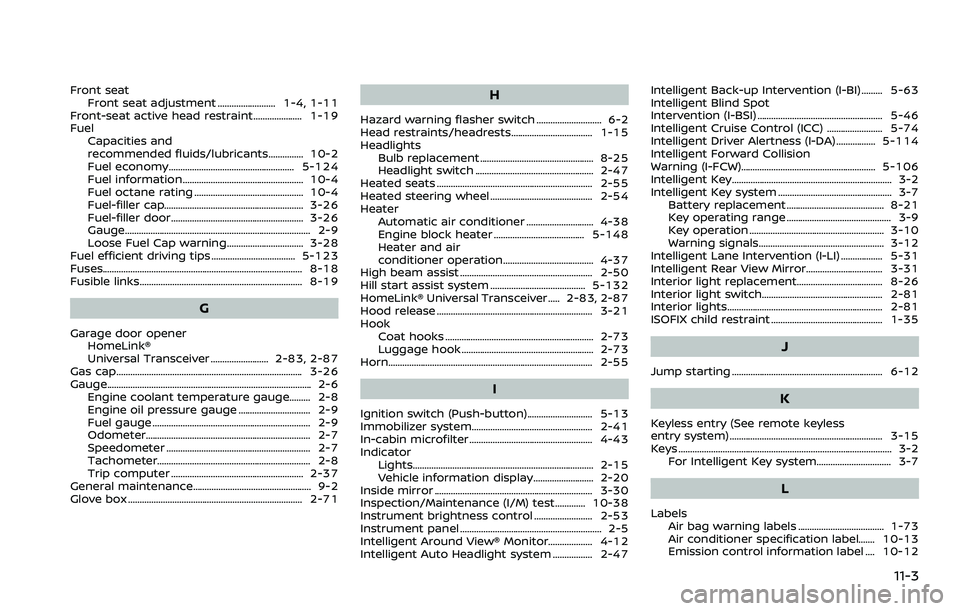
Front seatFront seat adjustment ......................... 1-4, 1-11
Front-seat active head restraint..................... 1-19
Fuel Capacities and
recommended fluids/lubricants............... 10-2
Fuel economy...................................................... 5-124
Fuel information.................................................... 10-4
Fuel octane rating ............................................... 10-4
Fuel-filler cap............................................................ 3-26
Fuel-filler door......................................................... 3-26
Gauge........................................................................\
........ 2-9
Loose Fuel Cap warning................................. 3-28
Fuel efficient driving tips .................................... 5-123
Fuses........................................................................\
.............. 8-18
Fusible links...................................................................... 8-19
G
Garage door opener HomeLink®
Universal Transceiver ......................... 2-83, 2-87
Gas cap........................................................................\
........ 3-26
Gauge........................................................................\
................ 2-6 Engine coolant temperature gauge......... 2-8
Engine oil pressure gauge ............................... 2-9
Fuel gauge .................................................................... 2-9
Odometer....................................................................... 2-7
Speedometer .............................................................. 2-7
Tachometer.................................................................. 2-8
Trip computer ......................................................... 2-37
General maintenance................................................... 9-2
Glove box ........................................................................\
... 2-71
H
Hazard warning flasher switch ............................ 6-2
Head restraints/headrests................................... 1-15
Headlights Bulb replacement ................................................. 8-25
Headlight switch ................................................... 2-47
Heated seats ................................................................... 2-55
Heated steering wheel ............................................ 2-54
Heater Automatic air conditioner ............................. 4-38
Engine block heater ....................................... 5-148
Heater and air
conditioner operation....................................... 4-37
High beam assist ......................................................... 2-50
Hill start assist system ......................................... 5-132
HomeLink® Universal Transceiver ..... 2-83, 2-87
Hood release ................................................................... 3-21
Hook Coat hooks ................................................................ 2-73
Luggage hook ......................................................... 2-73
Horn........................................................................\
................ 2-55
I
Ignition switch (Push-button)............................ 5-13
Immobilizer system.................................................... 2-41
In-cabin microfilter ..................................................... 4-43
Indicator Lights..................................................................\
............ 2-15
Vehicle information display.......................... 2-20
Inside mirror .................................................................... 3-30
Inspection/Maintenance (I/M) test............. 10-38
Instrument brightness control ......................... 2-53
Instrument panel ............................................................. 2-5
Intelligent Around View® Monitor................... 4-12
Intelligent Auto Headlight system ................. 2-47 Intelligent Back-up Intervention (I-BI) ......... 5-63
Intelligent Blind Spot
Intervention (I-BSI) ...................................................... 5-46
Intelligent Cruise Control (ICC) ........................ 5-74
Intelligent Driver Alertness (I-DA) ................. 5-114
Intelligent Forward Collision
Warning (I-FCW).......................................................... 5-106
Intelligent Key..................................................................... 3-2
Intelligent Key system ................................................. 3-7
Battery replacement.......................................... 8-21
Key operating range ............................................. 3-9
Key operation .......................................................... 3-10
Warning signals...................................................... 3-12
Intelligent Lane Intervention (I-LI) .................. 5-31
Intelligent Rear View Mirror................................. 3-31
Interior light replacement..................................... 8-26
Interior light switch.................................................... 2-81
Interior lights................................................................... 2-81
ISOFIX child restraint ................................................ 1-35
J
Jump starting ................................................................. 6-12
K
Keyless entry (See remote keyless
entry system) .................................................................. 3-15
Keys ........................................................................\
.................... 3-2 For Intelligent Key system................................ 3-7
L
LabelsAir bag warning labels ..................................... 1-73
Air conditioner specification label....... 10-13
Emission control information label .... 10-12
11-3