ECO mode NISSAN ARMADA 2023 Owners Manual
[x] Cancel search | Manufacturer: NISSAN, Model Year: 2023, Model line: ARMADA, Model: NISSAN ARMADA 2023Pages: 604, PDF Size: 2.97 MB
Page 509 of 604
It is recommended you visit a NISSAN
dealer if checking or replacement is
required.If the brakes do not operate properly,
have the brakes checked. It is recom-
mended that you visit a NISSAN dealer for
this service.
SELF-ADJUSTING BRAKES
Your vehicle is equipped with self-adjust-
ing brakes.
The disc-type brakes self-adjust every
time the brake pedal is applied.
WARNING
Have your brake system checked if
the brake pedal height does not
return to normal. It is recommended
you visit a NISSAN dealer for this
service.
BRAKE PAD WEAR WARNING
The disc brake pads have audible wear
warnings. When a brake pad requires
replacement, it will make a high pitched
scraping sound when the vehicle is in
motion. This scraping sound will first
occur only when the brake pedal is
depressed. After more wear of the brake
pad, the sound will always be heard even
if the brake pedal is not depressed. Have
the brakes checked as soon as possible if
the wear warning sound is heard.Under some driving or climate conditions,
occasional brake squeak, squeal or other
noise may be heard. Occasional brake
noise during light to moderate stops is
normal and does not affect the function
or performance of the brake system.
Proper brake inspection intervals
should be followed.
For additional infor-
mation, see the maintenance schedule
shown in the “9. Maintenance and sche-
dules” section.
BRAKE BOOSTER
Check the brake booster function as
follows:
1. With the engine off, depress and release the foot brake pedal more
than 20 times. When the foot brake
pedal movement (distance of travel)
remains the same from one pedal
application to the next, continue on
to the next step.
2. While depressing the foot brake pedal, start the engine.
3. With the foot brake pedal depressed, stop the engine. Keep the pedal de-
pressed for about 30 seconds.
4. Run the engine for 1 minute without depressing the foot brake pedal, then
turn it off. Depress the foot brake
pedal several times. The pedal travel
distance will decrease gradually with
Do-it-yourself8-17
REAR WINDOW WIPER BLADES BRAKES
Page 520 of 604
8-28Do-it-yourself
If you have a flat tire, see “Flat tire” (P.6-
3).
TIRE PRESSURE
Tire Pressure Monitoring System
(TPMS)
This vehicle is equipped with the Tire
Pressure Monitoring System (TPMS). It
monitors tire pressure of all tires except
the spare. When the low tire pressure
warning light is lit and the “Tire Pressure
Low Add Air” warning appears in the
vehicle information display, one or more
of your tires is significantly under-inflated.
The TPMS will activate only when the
vehicle is driven at speeds above 16 MPH
(25 km/h). Also, this system may not
detect a sudden drop in tire pressure
(for example, a flat tire while driving).
For more details, see “Low tire pressure
warning light” (P.2-16), “Tire Pressure Mon-
itoring System (TPMS)” (P.5-5) and “Tire
Pressure Monitoring System (TPMS) ” (P.6-
3).
Tire inflation pressure
Check the pressure of the tires
(including the spare) often and al-
ways prior to long distance trips.
The recommended tire pressure
specifications are shown on the
Tire and Loading Information label
under the “Cold Tire Pressure”
heading. The Tire and Loading In-
formation label is affixed to the
driver side center pillar. Tire pres-
sures should be checked regularly
because:
.Most tires naturally lose air over
time.
. Tires can lose air suddenly when
driven over potholes or other
objects or if the vehicle strikes
a curb while parking.
The tire pressures should be
checked when the tires are cold.
The tires are considered COLD after
the vehicle has been parked for 3 or
more hours, or driven less than 1
mile (1.6 km) at moderate speeds.
TPMS with Easy Fill Tire Alert pro-
vides visual and audible signals outside the vehicle for inflating the
tires to the recommended COLD
tire pressure. (See “TPMS with Easy
Fill Tire Alert” (P.5-8).)
Incorrect tire pressure, including
under inflation, may adversely
affect tire life and vehicle hand-
ling.
WARNING
.
Improperly inflated tires can
fail suddenly and cause an
accident.
. The Gross Vehicle Weight
rating (GVWR) is located on
the F.M.V.S.S./C.M.V.S.S. cer-
tification label. The vehicle
weight capacity is indicated
on the Tire and Loading In-
formation label. Do not load
your vehicle beyond this ca-
pacity. Overloading your ve-
hicle may result in reduced
tire life, unsafe operating
conditions due to premature
tire failure, or unfavorable
WHEELS AND TIRES
Page 522 of 604
8-30Do-it-yourself
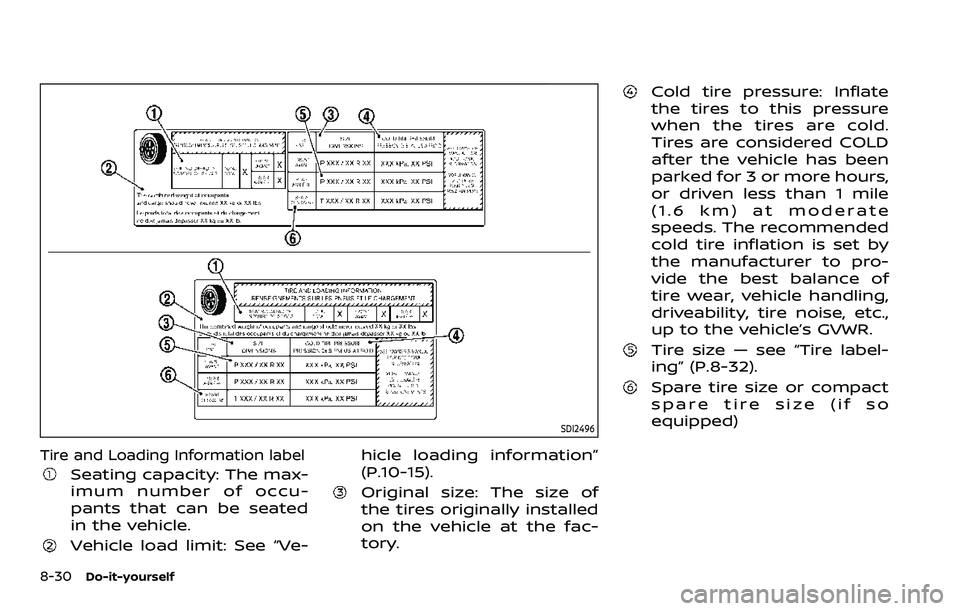
SDI2496
Tire and Loading Information label
Seating capacity: The max-
imum number of occu-
pants that can be seated
in the vehicle.
Vehicle load limit: See “Ve-hicle loading information”
(P.10-15).
Original size: The size of
the tires originally installed
on the vehicle at the fac-
tory.
Cold tire pressure: Inflate
the tires to this pressure
when the tires are cold.
Tires are considered COLD
after the vehicle has been
parked for 3 or more hours,
or driven less than 1 mile
(1.6 km) at moderate
speeds. The recommended
cold tire inflation is set by
the manufacturer to pro-
vide the best balance of
tire wear, vehicle handling,
driveability, tire noise, etc.,
up to the vehicle’s GVWR.
Tire size — see “Tire label-
ing” (P.8-32).
Spare tire size or compact
spare tire size (if so
equipped)
Page 527 of 604
.Replacement tires may have a
lower speed rating than the fac-
tory equipped tires, and may not
match the potential maximum
vehicle speed. Never exceed the
maximum speed rating of the
tire.
. Replacing tires with those not
originally specified by NISSAN
could affect the proper operation
of the TPMS.
. For additional information re-
garding tires, refer to “Important
Tire Safety Information” (US) or
“Tire Safety Information” (Cana-
da) in the Warranty Information
Booklet.
All season tires
NISSAN specifies all season tires on some
models to provide good performance all
year, including snowy and icy road con-
ditions. All Season tires are identified by
ALL SEASON and/or M&S (Mud and Snow)
on the tire sidewall. Snow tires have
better snow traction than All Season tires
and may be more appropriate in some
areas.
Summer tires
NISSAN specifies summer tires on some
models to provide superior performance
on dry roads. Summer tire performance is
substantially reduced in snow and ice.
Summer tires do not have the tire trac-
tion rating M&S on the tire sidewall.
If you plan to operate your vehicle in
snowy or icy conditions, NISSAN recom-
mends the use of SNOW tires or ALL
SEASON tires on all four wheels.
Snow tires
If snow tires are needed, it is necessary to
select tires equivalent in size and load
rating to the original equipment tires. If
you do not, it can adversely affect the
safety and handling of your vehicle.
Generally, snow tires will have lower
speed ratings than factory equipped tires
and may not match the potential max-
imum vehicle speed. Never exceed the
maximum speed rating of the tire.
If you install snow tires, they must be the
same size, brand, construction and tread
pattern on all four wheels.
For additional traction on icy roads,
studded tires may be used. However,
some U.S. states and Canadian provinces
prohibit their use. Check local, state and
provincial laws before installing studded tires. Skid and traction capabilities of
studded snow tires, on wet or dry sur-
faces, may be poorer than that of non-
studded snow tires.
TIRE CHAINS
Use of tire chains may be prohibited
according to location. Check the local
laws before installing tire chains. When
installing tire chains, make sure they are
the proper size for the tires on your
vehicle and are installed according to
the chain manufacturer’s suggestions.
Use only SAE Class S chains.
Class “S”
chains are used on vehicles with re-
stricted tire to vehicle clearance. Vehicles
that can use Class “S” chains are designed
to meet the SAE standard minimum
clearances between the tire and the
closest vehicle suspension or body com-
ponent required to accommodate the
use of a winter traction device (tire chains
or cables). The minimum clearances are
determined using the factory equipped
tire size. Other types may damage your
vehicle. Use chain tensioners when re-
commended by the tire chain manufac-
turer to ensure a tight fit. Loose end links
of the tire chain must be secured or
removed to prevent the possibility of
whipping action damage to the fenders
or underbody. If possible, avoid fully load-
ing your vehicle when using tire chains. In
Do-it-yourself8-35
Page 530 of 604
8-38Do-it-yourself
the same size and you are only
replacing 2 of the 4 tires, install
the new tires on the rear axle.
Placing new tires on the front
axle may cause loss of vehicle
control in some driving condi-
tions and cause an accident and
personal injury.
. If the wheels are changed for any
reason, always replace with
wheels which have the same off-
set dimension. Wheels of a differ-
ent off-set could cause prema-
ture tire wear, degrade vehicle
handling characteristics and/or
interference with the brake
discs/drums. Such interference
can lead to decreased braking
efficiency and/or early brake
pad/shoe wear. See “Wheels and
tires” (P.10-9) for wheel off-set
dimensions.
. Since the spare tire is not
equipped with the TPMS, when a
spare tire is mounted or a wheel
is replaced, the TPMS will not
function and the low tire pressure
warning light will flash for ap-
proximately 1 minute. The light
will remain on after 1 minute.
Have your tires replaced and/or
TPMS system reset as soon as possible. It is recommended you
visit a NISSAN dealer for these
services.
. Replacing tires with those not
originally specified by NISSAN
could affect the proper operation
of the TPMS.
. The TPMS sensor may be da-
maged if it is not handled cor-
rectly. Be careful when handling
the TPMS sensor.
. When replacing the TPMS sensor,
the ID registration may be re-
quired. It is recommended you
visit a NISSAN dealer for ID regis-
tration.
. Do not use a valve stem cap that
is not specified by NISSAN. The
valve stem cap may become
stuck.
. Be sure that the valve stem caps
are correctly fitted. Otherwise the
valve may be clogged up with dirt
and cause a malfunction or loss
of pressure.
. Do not install a damaged or
deformed wheel or tire even if it
has been repaired. Such wheels
or tires could have structural
damage and could fail without
warning. .
The use of retread tire is not
recommended.
. For additional information re-
garding tires, refer to “Important
Tire Safety Information” (US) or
“Tire Safety Information” (Cana-
da) in the Warranty Information
Booklet.
Four-Wheel Drive (4WD) models
CAUTION
.Always use tires of the same type,
size, brand, construction (bias,
bias-belted or radial), and tread
pattern on all four wheels. Failure
to do so may result in a circum-
ference difference between tires
on the front and rear axles which
will cause excessive tire wear and
may damage the transmission,
transfer case and differential
gears.
. ONLY use spare tires specified for
the 4WD model.
If excessive tire wear is found, it is
recommended that all four tires be re-
placed with tires of the same size, brand,
Page 538 of 604
9-6Maintenance and schedules
Replace engine oil and oil filter at the
specified intervals. For recommended oil
grade and viscosity refer to “Capacities
and recommended fluids/lubricants”
(P.10-2).
Engine valve clearance*:
Inspect only if valve noise increases.
Adjust valve clearance if necessary.
Evaporative Emissions Control Vapor
Lines*:
Check vapor lines for leaks or looseness.
Tighten connections or replace parts as
necessary.
Fuel filter:
Periodic maintenance is not required. (in-
tank type filter)
Fuel lines*:
Check the fuel hoses, piping and connec-
tions for leaks, looseness, or deterioration.
Tighten connections or replace parts as
necessary.
Spark plugs:
Replace at specified intervals. Install new
plugs of the type as originally equipped.CHASSIS AND BODY MAINTENANCE
Brake lines and cables:
Visually inspect for proper installation.
Check for chafing, cracks, deterioration,
and signs of leaking. Replace any deterio-
rated or damaged parts immediately.
Brake pads and rotors:
Check for wear, deterioration and fluid
leaks. Replace any deteriorated or da-
maged parts immediately.
Exhaust system:
Visually inspect the exhaust pipes, muffler
and hangers for leaks, cracks, deteriora-
tion, and damage. Tighten connections or
replace parts as necessary.
Propeller shaft(s):
Check for damage, looseness, and grease
leakage.
In-cabin microfilter:
Replace at specified intervals. When driv-
ing for prolonged periods in dusty condi-
tions, replace the filter more frequently.
Steering gear and linkage, axle and
suspension parts:
Check for damage, looseness, and leak-
age of oil or grease. Under severe driving
conditions, inspect more frequently.
Tire rotation:
Rotate tires at the specified interval. Whenrotating tires, check for damage and
uneven wear. Replace if necessary.
Transmission fluid/oil, differential oil:
Visually inspect for signs of leakage at
specified intervals.
Off-road maintenance:
Check the following items frequently
whenever you drive off-road through
deep sand, mud or water:
.
Brake pads and rotors
. Brake linings and drums
. Brake lines and hoses
. Differential, transmission and transfer
case oil
. Steering linkage
. Propeller shaft(s) and front drive
shafts
. Engine air filter
. Clutch housing drain (4WD models
only)
Page 582 of 604
10-28Technical and consumer information
Several types of braking systems are
available.
Surge Brakes -The surge brake actuator
is mounted on the trailer tongue with a
hydraulic line running to each trailer
wheel. Surge brakes are activated by the
trailer pushing against the hitch ball
when the tow vehicle is braking. Hydraulic
surge brakes are common on rental
trailers and some boat trailers. In this
type of system, there is no hydraulic or
electric connection for brake operation
between the tow vehicle and the trailer.
Electric Trailer Brakes - Electric braking
systems are activated by an electronic
signal sent from a trailer brake controller
(special brake sensing module).
Have a professional supplier of towing
equipment make sure the trailer brakes
are properly installed and demonstrate
proper brake function testing.
WARNING
Never connect a trailer brake system
directly to the vehicle brake system.
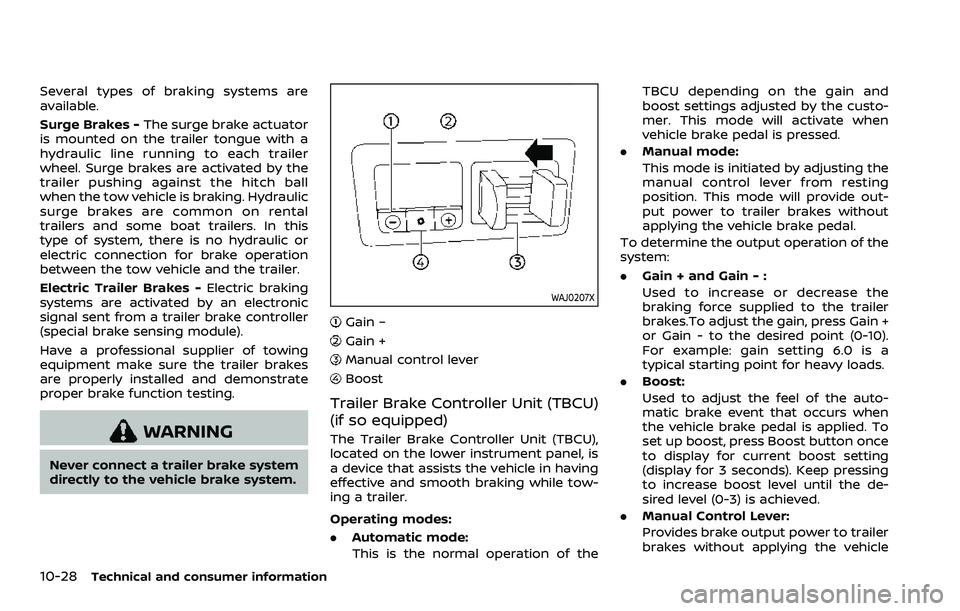
WAJ0207X
Gain –
Gain +
Manual control lever
Boost
Trailer Brake Controller Unit (TBCU)
(if so equipped)
The Trailer Brake Controller Unit (TBCU),
located on the lower instrument panel, is
a device that assists the vehicle in having
effective and smooth braking while tow-
ing a trailer.
Operating modes:
. Automatic mode:
This is the normal operation of the TBCU depending on the gain and
boost settings adjusted by the custo-
mer. This mode will activate when
vehicle brake pedal is pressed.
. Manual mode:
This mode is initiated by adjusting the
manual control lever from resting
position. This mode will provide out-
put power to trailer brakes without
applying the vehicle brake pedal.
To determine the output operation of the
system:
. Gain + and Gain - :
Used to increase or decrease the
braking force supplied to the trailer
brakes.To adjust the gain, press Gain +
or Gain - to the desired point (0-10).
For example: gain setting 6.0 is a
typical starting point for heavy loads.
. Boost:
Used to adjust the feel of the auto-
matic brake event that occurs when
the vehicle brake pedal is applied. To
set up boost, press Boost button once
to display for current boost setting
(display for 3 seconds). Keep pressing
to increase boost level until the de-
sired level (0-3) is achieved.
. Manual Control Lever:
Provides brake output power to trailer
brakes without applying the vehicle
Page 586 of 604
10-32Technical and consumer information
Pre-towing tips
.Be certain your vehicle maintains a
level position when a loaded or un-
loaded trailer is hitched. Do not drive
the vehicle if it has an abnormal nose-
up or nose-down condition; check for
improper tongue load, overload, worn
suspension or other possible causes
of either condition.
. Always secure items in the trailer to
prevent load shift while driving.
. Keep the cargo load as low as possible
in the trailer to keep the trailer center
of gravity low.
. Load the trailer so approximately 60%
of the trailer load is in the front half
and 40% is in the back half. Also make
sure the load is balanced side to side.
. Check your hitch, trailer tire pressure,
vehicle tire pressure, trailer light op-
eration, and trailer wheel lug nuts
every time you attach a trailer to the
vehicle.
. Be certain your rearview mirrors con-
form to all federal, state or local
regulations. If not, install any mirrors
required for towing before driving the
vehicle.
. Determine the overall height of the
vehicle and trailer so the required
clearance is known.
Trailer towing tips
In order to gain skill and an understand-
ing of the vehicle’s behavior, you should
practice turning, stopping and backing up
in an area which is free from traffic.
Steering stability, and braking perfor-
mance will be somewhat different than
under normal driving conditions.
.Always secure items in the trailer to
prevent load shift while driving.
. Lock the trailer hitch coupler with a
pin or lock to prevent the coupler from
inadvertently becoming unlatched.
. Avoid abrupt starts, acceleration or
stops.
. Avoid sharp turns or lane changes.
. Always drive your vehicle at a moder-
ate speed. Some states or provinces
have specific speed limits for vehicles
that are towing trailers. Obey the local
speed limits.
. When backing up, hold the bottom of
the steering wheel with one hand.
Move your hand in the direction in
which you want the trailer to go. Make
small corrections and back up slowly.
If possible, have someone guide you
when you are backing up.
Always block the wheels on both vehicle
and trailer when parking. Parking on a
slope is not recommended; however, if you must do so:
CAUTION
If you move the shift lever to the P
(Park) position before blocking the
wheels and applying the parking
brake, transmission damage could
occur.
1. Apply and hold the brake pedal.
2. Have someone place blocks on the downhill side of the vehicle and trailer
wheels.
3. After the wheel blocks are in place, slowly release the brake pedal until
the blocks absorb the vehicle load.
4. Apply the parking brake.
5. Shift the transmission into P (Park).
6. Four-Wheel Drive (4WD) models:
Make sure that the 4WD shift switch is
engaged in the AUTO, 4HI or 4LO
position and the Automatic Transmis-
sion (AT) park warning light is turned
off.
7. Turn off the engine.
To drive away:
1. Apply and hold the brake pedal.
Page 587 of 604
2. Start the engine.
3. Shift the transmission into gear.
4. Release the parking brake.
5. Drive slowly until the vehicle andtrailer are clear from the blocks.
6. Apply and hold the brake pedal.
7. Have someone retrieve and store the blocks.
. While going downhill, the weight of the
trailer pushing on the tow vehicle may
decrease overall stability. Therefore, to
maintain adequate control, reduce
your speed and shift to a lower gear.
Avoid long or repeated use of the
brakes when descending a hill, as this
reduces their effectiveness and could
cause overheating. Shifting to a lower
gear instead provides “engine braking”
and reduces the need to brake as
frequently.
. If the engine coolant temperature
rises to a high temperature, see “If
your vehicle overheats” (P.6-14).
. Trailer towing requires more fuel than
normal circumstances.
. Avoid towing a trailer for your vehicle’s
first 500 miles (800 km).
. Have your vehicle serviced more often
than at intervals specified in the
recommended maintenance schedule
shown in the "9. Maintenance and schedules" section.
. When making a turn, your trailer
wheels will be closer to the inside of
the turn than your vehicle wheels. To
compensate for this, make a larger
than normal turning radius during the
turn.
. Crosswinds and rough roads will ad-
versely affect vehicle/trailer handling,
possibly causing vehicle sway. When
being passed by larger vehicles, be
prepared for possible changes in
crosswinds that could affect vehicle
handling.
Do the following if the trailer begins to
sway:
1. Take your foot off the accelerator pedal to allow the vehicle to coast
and steer as straight ahead as the
road conditions allow. This combina-
tion will help stabilize the vehicle.
.Do not correct trailer sway bysteering or applying the brakes.
2. When the trailer sway stops, gently apply the brakes and pull to the side
of the road in a safe area.
3. Try to rearrange the trailer load so it is balanced as described earlier in this
section.
. Be careful when passing other vehi-
cles. Passing while towing a trailer requires considerably more distance
than normal passing. Remember the
length of the trailer must also pass the
other vehicle before you can safely
change lanes.
. Use the Tow mode or downshift the
transmission to a lower gear for en-
gine braking when driving down steep
or long hills. This will help slow the
vehicle without applying the brakes.
. Avoid holding the brake pedal down
too long or too frequently. This could
cause the brakes to overheat, result-
ing in reduced braking efficiency.
. Increase your following distance to
allow for greater stopping distances
while towing a trailer. Anticipate stops
and brake gradually.
. NISSAN recommends that the cruise
control not be used while towing a
trailer.
. While towing a trailer, do not use the
following systems (if so equipped):
— the Lane Departure Warning (LDW)
system
(See “How to enable/disable the
LDW system” (P.5-28).)
— the Intelligent Lane Intervention (I- LI) system
(See “How to enable/disable the I-LI
system” (P.5-34).)
Technical and consumer information10-33
Page 588 of 604
10-34Technical and consumer information
— the Blind Spot Warning (BSW) sys-tem
(See “How to enable/disable the I-
BSI system” (P.5-48).)
— the Intelligent Blind Spot Interven- tion (I-BSI) system
(See “How to enable/disable the I-
BSI system” (P.5-48).)
— the Intelligent Back-up Intervention (I-BI) system
(See “I-BI system operation” (P.5-
65).)
— the Intelligent Cruise Control (ICC) system
(See “Intelligent Cruise Control
(ICC)” (P.5-74).)
— the Rear Automatic Braking (RAB) system
(See “RAB system operation” (P.5-
118).)
— the Rear Cross Traffic Alert (RCTA) system
(See “How to enable/disable the
RCTA system” (P.5-59).)
. Some states or provinces have speci-
fic regulations and speed limits for
vehicles that are towing trailers. Obey
the local speed limits.
. Check your hitch, trailer wiring har-
ness connections, and trailer wheel
lug nuts after 50 miles (80 km) of travel and at every break.
. When launching a boat, do not allow
the water level to go over the exhaust
tail pipe or rear bumper.
. Make sure you disconnect the trailer
lights (if so equipped) before backing
the trailer into the water or the trailer
lights may burn out.
When towing a trailer, the transmission
fluid should be changed more fre-
quently. For additional information,
see the "9. Maintenance and schedules"
section.
TOW mode
Using TOW mode is recommended when
pulling a heavy trailer or hauling a heavy
load. Push the TOW MODE switch to
activate tow mode. The TOW MODE
indicator light in the meter illuminates
when TOW mode is selected. Push the
TOW MODE switch again to turn TOW
mode off. TOW mode is automatically
cancelled when the ignition switch is
placed in the OFF position.
TOW mode includes the following fea-
tures:
. Grade logic — Adjusts transmission
shifts when pulling a trailer or hauling
a load up a grade. .
Downhill Speed Control (DSC) — auto-
matically downshifts when driving
down a grade with a trailer or heavy
load to help control vehicle speed.
Driving the vehicle in the TOW mode with
no trailer/load or light trailer/light load
will not cause any damage. However, fuel
economy may be reduced and the trans-
mission/engine driving characteristics
may feel unusual.
When towing a trailer, the transmission
fluid should be changed more fre-
quently. For additional information,
see the "9. Maintenance and schedules"
section.Trailer Sway Control
To minimize trailer sway, your vehicle may
apply braking to individual wheels based
on input from your vehicle sensors and
vehicle speed. Trailer Sway Control is a
function of the Vehicle Dynamic Control
(VDC) system and is active when the VDC
function is enabled.
CAUTION
If the VDC OFF switch is on (meaning
VDC system OFF), the Trailer Sway
Control is also disabled.