audio NISSAN ARMADA 2023 Owners Manual
[x] Cancel search | Manufacturer: NISSAN, Model Year: 2023, Model line: ARMADA, Model: NISSAN ARMADA 2023Pages: 604, PDF Size: 2.97 MB
Page 310 of 604
4-80Monitor, heater, air conditioner, audio, phone and voice recognition systems
application which is used to encode.
FLAC
Copyright © 2000-2009 Josh Coalson
Copyright © 2011-2013 Xiph.Org Founda-
tion
Redistribution and use in source and
binary forms, with or without modifica-
tion, are permitted provided that the
following conditions are met:
Redistributions of source code must re-
tain the above copyright notice, this list of
conditions and the following disclaimer.
Redistributions in binary form must re-
produce the above copyright notice, this
list of conditions and the following dis-
claimer in the documentation and/or
other materials provided with the distri-
bution.
Neither the name of the Xiph.org Founda-
tion nor the names of its contributors
may be used to endorse or promote
products derived from this software with-
out specific prior written permission.
THIS SOFTWARE IS PROVIDED BY THE
COPYRIGHT HOLDERS AND CONTRIBU-
TORS “AS IS” AND ANY EXPRESS OR
IMPLIED WARRANTIES, INCLUDING, BUT
NOT LIMITED TO, THE IMPLIED WARRAN-
TIES OF MERCHANTABILITY AND FITNESS
FOR A PARTICULAR PURPOSE ARE DIS-CLAIMED. IN NO EVENT SHALL THE FOUN-
DATION OR CONTRIBUTORS BE LIABLE
FOR ANY DIRECT, INDIRECT, INCIDENTAL,
SPECIAL, EXEMPLARY, OR CONSEQUEN-
TIAL DAMAGES (INCLUDING, BUT NOT
LIMITED TO, PROCUREMENT OF SUBSTI-
TUTE GOODS OR SERVICES; LOSS OF USE,
DATA, OR PROFITS; OR BUSINESS INTER-
RUPTION) HOWEVER CAUSED AND ON ANY
THEORY OF LIABILITY, WHETHER IN CON-
TRACT, STRICT LIABILITY, OR TORT (IN-
CLUDING NEGLIGENCE OR OTHERWISE)
ARISING IN ANY WAY OUT OF THE USE OF
THIS SOFTWARE, EVEN IF ADVISED OF THE
POSSIBILITY OF SUCH DAMAGE.
WMA/WMV
Windows Media is either a registered
trademark or trademark of Microsoft
Corporation in the United States and/or
other countries. This product includes
technology owned by Microsoft Corpora-
tion and cannot be used or distributed
without a license from Microsoft Licen-
sing, Inc.
SD/SDHC/SDXC
SD, SDHC and SDXC Logos are trade-
marks or registered trademarks of SD-
3C LLC in the United States, other coun-
tries or both.
WAE0753X
HDMI
The terms HDMI and HDMI High-Definition
Multimedia Interface, and the HDMI Logo
are trademarks or registered trademarks
of HDMI Licensing, LLC in the United
States and other countries.
MHL
MHL, the MHL Logo, and Mobile High-
Definition Link are trademarks or regis-
tered trademarks of MHL, LLC in the
United States and other countries.
Page 311 of 604
WAE0754X
Dolby Digital
This product will down-mix Dolby Digital
signals internally and the sound will be
output in stereo. Manufactured under
license from Dolby Laboratories. Dolby
and the double-D symbol are trademarks
of Dolby Laboratories.
European Waste Electrical and
Electronic Equipment (WEEE) Notice
In accordance with Directive 2012/19/EU
of the European Parliament on waste
electrical and electronic equipment
(WEEE):
WAE0755X
The symbol above indicates that separate
collection of electrical and electronic
equipment is required. When this product
has reached the end of its serviceable life,
it cannot be disposed of as unsorted
municipal waste. It must be collected
and treated separately. It has been de-
termined by the European Parliament
that there are potential negative effects
on the environment and human health as
a result of the presence of hazardous
substances in electrical and electronic
equipment. It is the users‘ responsibility
to utilize the available collection system
to ensure WEEE is properly treated.
All other trademarks and their respective
logos cited herein are the property oftheir respective owners.
Monitor, heater, air conditioner, audio, phone and voice recognition systems4-81
Page 312 of 604
4-82Monitor, heater, air conditioner, audio, phone and voice recognition systems
MEMO
Page 353 of 604
.The radar sensors may not be
able to detect and activate BSW
when certain objects are present
such as:
— Pedestrians, bicycles, animals.
— Vehicles such as motorcycles,
low height vehicles, or high
ground clearance vehicles.
— Oncoming vehicles.
— Vehicles remaining in the de- tection zone when you accel-
erate from a stop.
— A vehicle merging into an adjacent lane at a speed ap-
proximately the same as your
vehicle.
— A vehicle approaching rapidly from behind.
— A vehicle which your vehicle overtakes rapidly.
— A vehicle that passes through the detection zone quickly.
— When overtaking several vehi- cles in a row, the vehicles after
the first vehicle may not be
detected if they are traveling
close together. .
The radar sensor’s detection zone
is designed based on a standard
lane width. When driving in a
wider lane, the radar sensors
may not detect vehicles in an
adjacent lane. When driving in a
narrow lane, the radar sensors
may detect vehicles driving two
lanes away.
. The radar sensors are designed
to ignore most stationary objects,
however objects such as guard-
rails, walls, foliage and parked
vehicles may occasionally be de-
tected. This is a normal operation
condition.
. The following conditions may re-
duce the ability of the radar to
detect other vehicles:
— Severe weather
— Road spray
— Ice/frost/dirt build-up on the
vehicle
. Do not attach stickers (including
transparent material), install ac-
cessories or apply additional
paint near the radar sensors.
These conditions may reduce the
ability of the radar to detect other
vehicles. .
When towing a trailer or other
vehicle, turn the BSW system off
to prevent the occurrence of an
unexpected accident resulting
from sudden system operation.
. Excessive noise (for example,
audio system volume, open vehi-
cle window) will interfere with the
chime sound, and it may not be
heard.
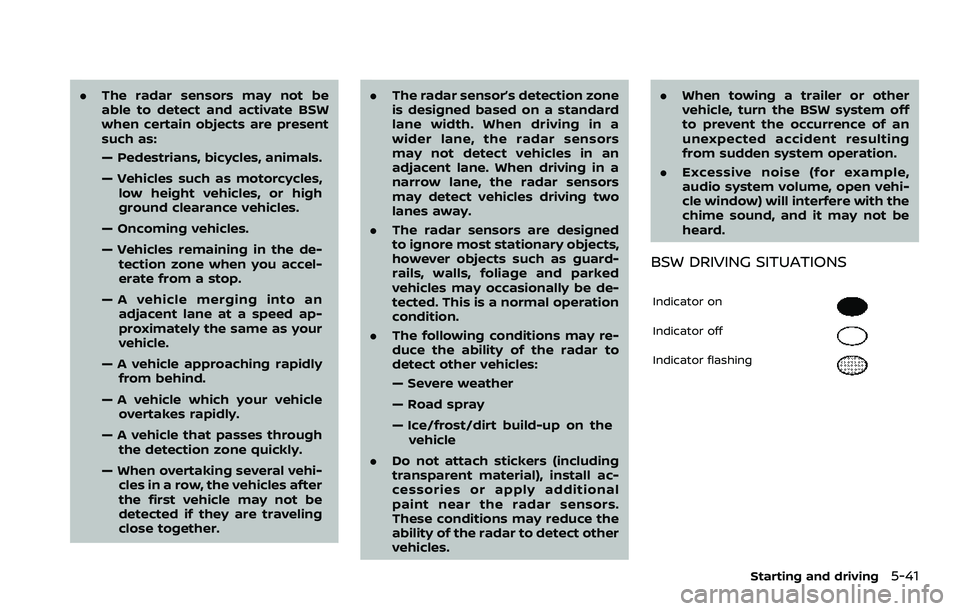
BSW DRIVING SITUATIONS
Indicator on
Indicator off
Indicator flashing
Starting and driving5-41
Page 362 of 604
5-50Starting and driving
standard lane markers; lane
markers covered with water,
dirt, snow, etc.
— On roads where discontinued lane markers are still detect-
able.
— On roads where there are sharp curves.
— On roads where there are sharply contrasting objects,
such as shadows, snow,
water, wheel ruts, seams or
lines remaining after road re-
pairs.
— On roads where the traveling lane merges or separates.
— When the vehicle’s traveling direction does not align with
the lane markers.
— When traveling close to the vehicle in front of you, which
obstructs the lane camera
unit detection range.
— When rain, snow or dirt ad- heres to the windshield in
front of a lane camera unit.
— When the headlights are not bright due to dirt on the lens
or if aiming is not adjusted properly.
— When strong light enters a lane camera unit. (For exam-
ple: light directly shines on the
front of the vehicle at sunrise
or sunset.)
— When a sudden change in brightness occurs. (For exam-
ple: when the vehicle enters or
exits a tunnel or under a
bridge.)
. Do not use the I-BSI system under
the following conditions because
the system may not function
properly.
— During bad weather. (For ex-
ample: rain, fog, snow, etc.)
— When driving on slippery roads, such as on ice or snow,
etc.
— When driving on winding or uneven roads.
— When there is a lane closure due to road repairs.
— When driving in a makeshift or temporary lane.
— When driving on roads where the lane width is too narrow. — When driving with a tire that is
not within normal tire condi-
tions (for example, tire wear,
low tire pressure, installation
of spare tire, tire chains, non-
standard wheels).
— When the vehicle is equipped with non-original steering
parts or suspension parts.
— When towing a trailer or other vehicle.
. Excessive noise (for example,
audio system volume, open vehi-
cle window) will interfere with the
chime sound, and it may not be
heard.
Page 373 of 604
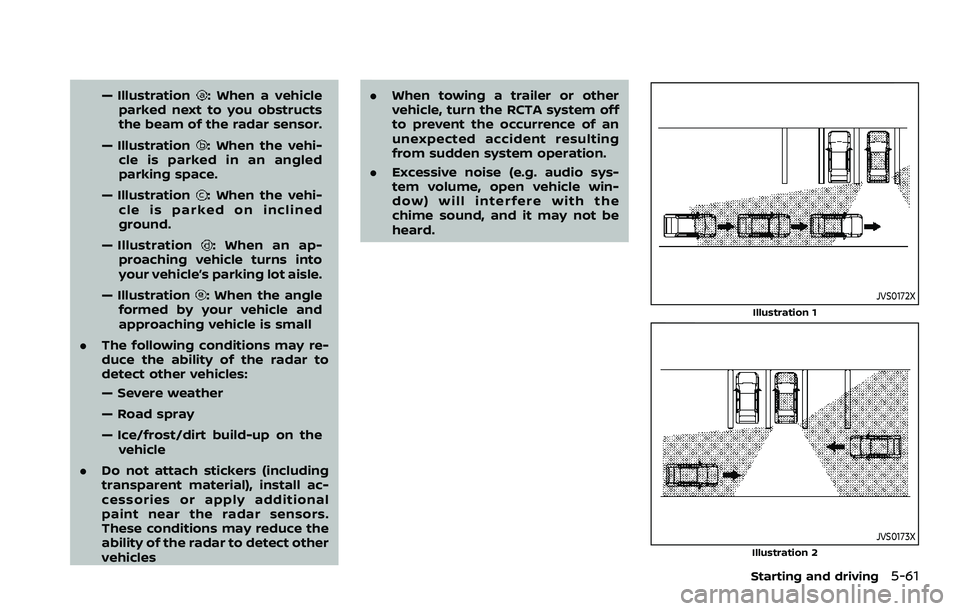
— Illustration: When a vehicle
parked next to you obstructs
the beam of the radar sensor.
— Illustration
: When the vehi-
cle is parked in an angled
parking space.
— Illustration
: When the vehi-
cle is parked on inclined
ground.
— Illustration
: When an ap-
proaching vehicle turns into
your vehicle’s parking lot aisle.
— Illustration
: When the angle
formed by your vehicle and
approaching vehicle is small
. The following conditions may re-
duce the ability of the radar to
detect other vehicles:
— Severe weather
— Road spray
— Ice/frost/dirt build-up on the
vehicle
. Do not attach stickers (including
transparent material), install ac-
cessories or apply additional
paint near the radar sensors.
These conditions may reduce the
ability of the radar to detect other
vehicles .
When towing a trailer or other
vehicle, turn the RCTA system off
to prevent the occurrence of an
unexpected accident resulting
from sudden system operation.
. Excessive noise (e.g. audio sys-
tem volume, open vehicle win-
dow) will interfere with the
chime sound, and it may not be
heard.JVS0172X
Illustration 1
JVS0173XIllustration 2
Starting and driving5-61
Page 383 of 604
.The radar sensors detect ap-
proaching (moving) vehicles. The
radar sensors cannot detect
every object such as:
— Pedestrians, bicycles, animals
or child operated toy vehicles
— A vehicle that passing at speeds greater than approxi-
mately 15 MPH (24 km/h)
. The radar sensors may not detect
approaching vehicles in certain
situations:
— Illustration a. When a vehicle
parked next to you obstructs
the beam of the radar sensor.
— Illustration b. When the vehicle is parked in an angled parking
space.
— Illustration c. When the vehicle is parked on inclined ground.
— Illustration d. When an ap- proaching vehicle turns into
your vehicle’s parking lot aisle.
— Illustration e. When the angle formed by your vehicle and
approaching vehicle is small.
. The following conditions may re-
duce the ability of the radar
sensors to detect other vehicles: — Severe weather
— Road spray
— Ice/frost/dirt build up on the
vehicle
. Do not attach stickers (including
transparent material), install ac-
cessories or apply additional
paint near the radar sensors.
These conditions may reduce the
ability of the radar sensors to
detect other vehicles.
. The sonar sensors detect station-
ary objects behind the vehicle.
The sonar sensor may not detect:
— Small or moving objects
— Wedge-shaped objects
— Object close to the bumper
(less than approximately 1 ft
(30 cm))
— Thin objects such as rope, wire and chain, etc.
. The brake engagement by the I-
BI system is not as effective on a
slope as it is on flat ground. When
on a steep slope the system may
not function properly.
. Do not use the I-BI system under
the following conditions because
the system may not function properly.
— When driving with a tire that is
not within normal tire condi-
tions (for example, tire wear,
low tire pressure, installation
of spare tire, tire chains, non-
standard wheels).
— When the vehicle is equipped with non-original brake parts
or suspension parts.
. When towing a trailer or other
vehicle, turn the I-BI system off to
prevent the occurrence of an un-
expected accident resulting from
sudden system operation. (See “I-
BI system operation” (P.5-65).)
. Excessive noise (for example,
audio system volume, open vehi-
cle window) will interfere with the
chime sound, and it may not be
heard.
Starting and driving5-71
Page 433 of 604
the same obstacle.
. The automatic brake control can
only operate for a short period of
time. Therefore, the driver must
depress the brake pedal.
. In the following situations, the
RAB system may not operate
properly or may not function
sufficiently:
— The vehicle is driven in bad
weather (rain, fog, snow, etc.).
— The vehicle is driven on a steep hill.
— The vehicle’s posture is chan- ged (e.g., when driving over a
bump).
— The vehicle is driven on a slippery road.
— The vehicle is turned sharply by turning the steering wheel
fully.
— Snow chains are used.
— Wheels or tires other than NISSAN recommended are
used.
— The brakes are cold at low ambient temperatures or im-
mediately after driving has
started. — The braking force becomes
poor due to wet brakes after
driving through a puddle or
washing the vehicle.
. Turn the RAB system off in the
following conditions to prevent
the occurrence of an unexpected
accident resulting from sudden
system operation:
— The vehicle is towed.
— The vehicle is carried on a
flatbed truck.
— The vehicle is on the chassis dynamometer.
— The vehicle drives on an un- even road surface.
— Suspension parts other than those designated as genuine
parts are used. (If the vehicle
height or the vehicle body
inclination is changed, the
system may not detect an
obstacle correctly.)
. When towing a trailer or other
vehicle, turn the RAB system off
to prevent the occurrence of an
unexpected accident resulting
from sudden system operation.
(See “RAB system operation” (P.5-
118).) .
Excessive noise (e.g., audio sys-
tem volume, an open vehicle win-
dow) will interfere with the chime
sound, and it may not be heard.
SYSTEM MALFUNCTION
If the RAB system malfunctions, it will be
turned off automatically, the RAB system
warning light will illuminate, and the
“System fault See Owner’s Manual” warn-
ing message will appear in the vehicle
information display.
Action to take
If the warning light illuminates, park the
vehicle in a safe location, turn the engine
off, and restart the engine. If the warning
light continues to illuminate, have the
RAB system checked. It is recommended
that you visit a NISSAN dealer for this
service.
NOTE:
If the RAB system cannot be operated
temporarily, the RAB system warning
light blinks.
Starting and driving5-121
Page 449 of 604
If your vehicle sustains damage to the
bumper fascia, leaving it misaligned or
bent, the sensing zone may be altered
causing inaccurate measurement of ob-
stacles or false alarms.
CAUTION
.Excessive noise (such as audio
system volume or an open vehi-
cle window) will interfere with the
tone and it may not be heard.
. Keep the sonar sensors (located
on the bumper fascia) free from
snow, ice and large accumula-
tions of dirt. Do not clean the
sonar sensors with sharp objects.
If the sensors are covered, the
accuracy of the sonar function
will be diminished.
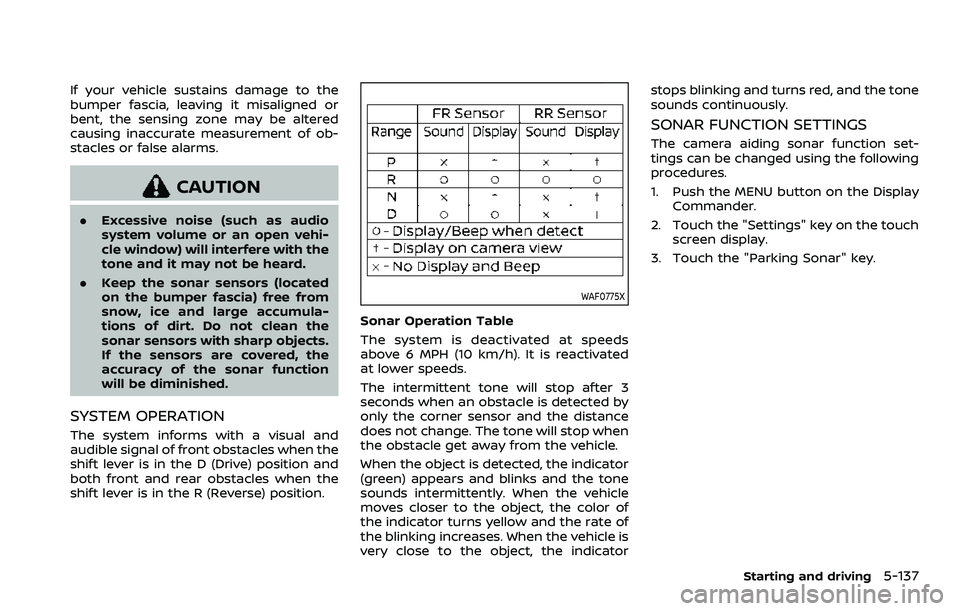
SYSTEM OPERATION
The system informs with a visual and
audible signal of front obstacles when the
shift lever is in the D (Drive) position and
both front and rear obstacles when the
shift lever is in the R (Reverse) position.
WAF0775X
Sonar Operation Table
The system is deactivated at speeds
above 6 MPH (10 km/h). It is reactivated
at lower speeds.
The intermittent tone will stop after 3
seconds when an obstacle is detected by
only the corner sensor and the distance
does not change. The tone will stop when
the obstacle get away from the vehicle.
When the object is detected, the indicator
(green) appears and blinks and the tone
sounds intermittently. When the vehicle
moves closer to the object, the color of
the indicator turns yellow and the rate of
the blinking increases. When the vehicle is
very close to the object, the indicator stops blinking and turns red, and the tone
sounds continuously.
SONAR FUNCTION SETTINGS
The camera aiding sonar function set-
tings can be changed using the following
procedures.
1. Push the MENU button on the Display
Commander.
2. Touch the "Settings" key on the touch screen display.
3. Touch the "Parking Sonar" key.
Starting and driving5-137