Jack NISSAN ARMADA 2023 Owners Manual
[x] Cancel search | Manufacturer: NISSAN, Model Year: 2023, Model line: ARMADA, Model: NISSAN ARMADA 2023Pages: 604, PDF Size: 2.97 MB
Page 13 of 604
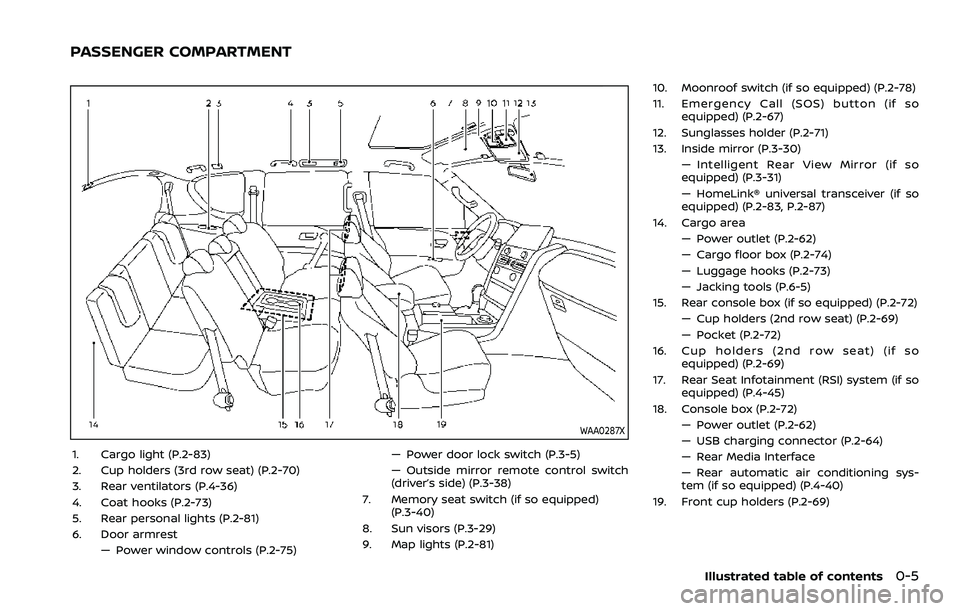
WAA0287X
1. Cargo light (P.2-83)
2. Cup holders (3rd row seat) (P.2-70)
3. Rear ventilators (P.4-36)
4. Coat hooks (P.2-73)
5. Rear personal lights (P.2-81)
6. Door armrest— Power window controls (P.2-75) — Power door lock switch (P.3-5)
— Outside mirror remote control switch
(driver’s side) (P.3-38)
7. Memory seat switch (if so equipped) (P.3-40)
8. Sun visors (P.3-29)
9. Map lights (P.2-81) 10. Moonroof switch (if so equipped) (P.2-78)
11. Emergency Call (SOS) button (if so
equipped) (P.2-67)
12. Sunglasses holder (P.2-71)
13. Inside mirror (P.3-30) — Intelligent Rear View Mirror (if so
equipped) (P.3-31)
— HomeLink® universal transceiver (if so
equipped) (P.2-83, P.2-87)
14. Cargo area — Power outlet (P.2-62)
— Cargo floor box (P.2-74)
— Luggage hooks (P.2-73)
— Jacking tools (P.6-5)
15. Rear console box (if so equipped) (P.2-72)
— Cup holders (2nd row seat) (P.2-69)
— Pocket (P.2-72)
16. Cup holders (2nd row seat) (if so equipped) (P.2-69)
17. Rear Seat Infotainment (RSI) system (if so equipped) (P.4-45)
18. Console box (P.2-72) — Power outlet (P.2-62)
— USB charging connector (P.2-64)
— Rear Media Interface
— Rear automatic air conditioning sys-
tem (if so equipped) (P.4-40)
19. Front cup holders (P.2-69)
Illustrated table of contents0-5
PASSENGER COMPARTMENT
Page 275 of 604
WARNING
.It is unlawful in most jurisdictions
for a person to drive a motor
vehicle which is equipped with a
television monitor or screen that
is visible, directly or indirectly, to
the driver while operating the
vehicle. In the interest of safety,
the unit should never be installed
where it will be directly or indir-
ectly visible, by the operator of
the motor vehicle.
. For safety reasons when chan-
ging discs, it is recommended
that the vehicle is not in motion,
and that you do not allow chil-
dren to unfasten safety belts to
change discs or make any adjust-
ments to the system. System
adjustments can be accom-
plished using the remote control,
while safety belts remain fas-
tened.
. Enjoy your RSI system but re-
member that safety of all pas-
sengers remains the number one
priority. Devices installed in the
USB, HDMI, or headphone jack
may protrude and create a po-
tential eye impact hazard for un- belted passengers during a vehi-
cle accident. To reduce the risk of
injury, use only SD cards (hidden
on left side of driver side monitor)
or low-profile USB storage de-
vices.
CAUTION
.
If your vehicle is equipped with a
wireless rear seat audio system
or any other wireless infrared
device, make sure it is powered
off when operating the RSI sys-
tem. If both systems are powered
on at the same time, the two
systems may obstruct each other,
possibly creating undesirable
audio interference through the
wireless headphones.
. Do not touch the inner pins of the
jacks on the front panel. Electro-
static discharge may cause per-
manent damage to the device.
. The LCD display screen is not
touchscreen. Do not put pressure
or add suction cups on the
screen. .
Caution children to avoid touch-
ing or scratching the screen, as it
may become dirty or damaged.
. Be sure to run the vehicle engine
while using the system. Using this
system without running the en-
gine can result in battery drain.
To avoid the risk of battery drain,
please remember to turn off the
system when the vehicle is not in
use.
WELCOME
This Rear Seat Infotainment (RSI) system,
with built-in Wi-Fi, has some advanced
features. Before operating this system,
read this section thoroughly and retain it
for future reference.
System features
.Twin 8-inch Color TFT-LCD Panels
with 1024 x 600 Resolution
. Internal Wi-Fi Network
. Bluetooth® 4.1 Audio Streaming
. Miracast®/Smart View Capability
. SmartStream Content Sharing
. USB 2.0 Port, SDXC Card Input
. HDMI 1.4 Input with MHL 2.0 Support
. Exclusive Slingplayer® Application
Monitor, heater, air conditioner, audio, phone and voice recognition systems4-45
REAR SEAT INFOTAINMENT (RSI) (if
so equipped)
Page 281 of 604
6.HDMI port
Connect an external audio/video
source using a full-size HDMI connec-
tor. Supports MHL 2.0 playback and
charging.
7. USB 2.0 port
Play videos, music, and images stored
on most USB devices. Provides up to 2
amps of output to charge most mo-
bile devices.
8. Headphone output jack
Connect wired headphones using a
1/8 in (3.5 mm) stereo connector.
CAUTION
.Do not use any harsh solvents or
chemicals when cleaning the
monitor.
. Do not use any abrasive cleaners
that may scratch the screen. Use
only a lightly dampened lint free
cloth to wipe the screen if it is
dirty.
. The LCD display screen is not
touchscreen. Do not put pressure
or add suction cups on the
screen. .
Caution children to avoid touch-
ing or scratching the screen, as it
may become dirty or damaged.
. Place the monitor in the fully
closed position when not in use.
WAE0715X
Battery door in locked position
WAE0716X
Battery door in unlocked position
Monitor, heater, air conditioner, audio, phone and voice recognition systems4-51
Page 306 of 604
4-76Monitor, heater, air conditioner, audio, phone and voice recognition systems
TROUBLESHOOTING
SymptomRemedy
Monitor does not power on Verify the vehicle is in the ON or ACC position.
Verify the battery is installed correctly in the remote control.
Verify the in-line fuse protection is good. Refer to the RSI system installation instructions for vehicle-
specific fuse location.
Monitor front panel controls flash red For further diagnosis, it is recommended that you visit a NISSAN dealer.
System frozen - will not respond Soft reset the system by pressing and holding the power button on the top of the driver side monitor
for 5 seconds.
Hard reset the system by turning the ignition off, then back on.
No picture Check that the signal source is connected.
Check the menu source setting. Match your monitor mode with the source correctly.
No sound or distorted sound Make sure that the external media device is connected properly, and all cables are securely inserted
into the appropriate jacks.
Verify that the batteries in the headphones are fresh.
If you are using the wireless headphones, make sure you turn on the power and select the correct
monitor (A or B).
Verify the volume is turned up on headphones and the system.
Verify nothing is blocking the path between the monitor IR sensor and headphones.
When placing the headphones on your head, make sure to observe the Left and Right orientation. The
headphones must be oriented correctly (facing forward) to receive the audio signal.
Monitor feels warm When the monitor is in use for a long period of time, the surface will be warm. This is normal.
Cannot connect mobile device to the
internal RSI Wi-Fi network Check to make sure Wi-Fi is enabled on the mobile device.
Check to make sure RSI is set to Access Point mode.
Check to make sure the correct password is used. For additional information, see “Using Wi-Fi” (P.4-70).
Cannot connect RSI system to an external
Wi-Fi network Check to make sure RSI is set to Client Mode. Check to make sure the correct password is used. For
additional information, see “Using Wi-Fi” (P.4-70).
Cannot establish a Bluetooth
®connection Check to make sure Bluetooth®is enabled on the RSI system. For additional information, see
“Bluetooth® streaming” (P.4-74).
Page 459 of 604
TIRE EQUIPMENT
SUMMER tires have a tread designed to
provide superior performance on dry
pavement. However, the performance of
these tires will be substantially reduced in
snowy and icy conditions. If you operate
your vehicle on snowy or icy roads,
NISSAN recommends the use of MUD &
SNOW or ALL SEASON tires on all four
wheels. It is recommended you consult a
NISSAN dealer for the tire type, size, speed
rating and availability information.
For additional traction on icy roads,
studded tires may be used. However,
some U.S. states and Canadian provinces
prohibit their use. Check local, state and
provincial laws before installing studded
tires.
Skid and traction capabilities of
studded snow tires, on wet or dry
surfaces, may be poorer than that of
non-studded snow tires.
Tire chains may be used. For details, see
“Tire chains” (P.8-35).
For four-wheel drive
If you install snow tires, they must also be
the same size, brand, construction and
tread pattern on all four wheels.
SPECIAL WINTER EQUIPMENT
It is recommended that the following
items be carried in the vehicle during
winter:
.A scraper and stiff-bristled brush to
remove ice and snow from the win-
dows and wiper blades.
. A sturdy, flat board to be placed under
the jack to give it firm support.
. A shovel to dig the vehicle out of
snowdrifts.
. Extra window washer fluid to refill the
reservoir tank.
DRIVING ON SNOW OR ICE
WARNING
. Wet ice (32°F, 0°C and freezing
rain), very cold snow or ice can be
slick and very hard to drive on.
The vehicle will have much less
traction or “grip” under these
conditions. Try to avoid driving
on wet ice until the road is salted
or sanded. .
Whatever the condition, drive
with caution. Accelerate and slow
down with care. If accelerating or
downshifting too fast, the drive
wheels will lose even more trac-
tion.
. Allow more stopping distance
under these conditions. Braking
should be started sooner than on
dry pavement.
. Allow greater following distances
on slippery roads.
. Watch for slippery spots (glare
ice). These may appear on an
otherwise clear road in shaded
areas. If a patch of ice is seen
ahead, brake before reaching it.
Try not to brake while on the ice,
and avoid any sudden steering
maneuvers.
. Do not use the cruise control on
slippery roads.
. Snow can trap dangerous ex-
haust gases under your vehicle.
Keep snow clear of the exhaust
pipe and from around your vehi-
cle.
Starting and driving5-147
Page 464 of 604
6-4In case of emergency
could affect the proper operation
of the TPMS.
. Do not inject any tire liquid or
aerosol tire sealant into the tires,
as this may cause a malfunction
of the tire pressure sensors.
CHANGING A FLAT TIRE
If you have a flat tire, follow the instruc-
tions below.
Stopping the vehicle
1. Safely move the vehicle off the road
and away from traffic.
2. Turn on the hazard warning flashers.
3. Park on a level surface and apply the parking brake. Move the shift lever to
the P (Park) position.
4. Turn off the engine.
5. Raise the hood to warn other traffic, and to signal professional road assis-
tance personnel that you need assis-
tance.
6. Have all passengers get out of the vehicle and stand in a safe place, away
from traffic and clear of the vehicle.
WARNING
.Make sure the parking brake is
securely applied and the auto-
matic transmission is in the P
(Park) position.
. Never change tires when the ve-
hicle is on a slope, ice or slippery
areas. This is hazardous.
. Never change tires if oncoming
traffic is close to your vehicle.
Wait for professional road assis-
tance.
MCE0001A
Blocking wheels
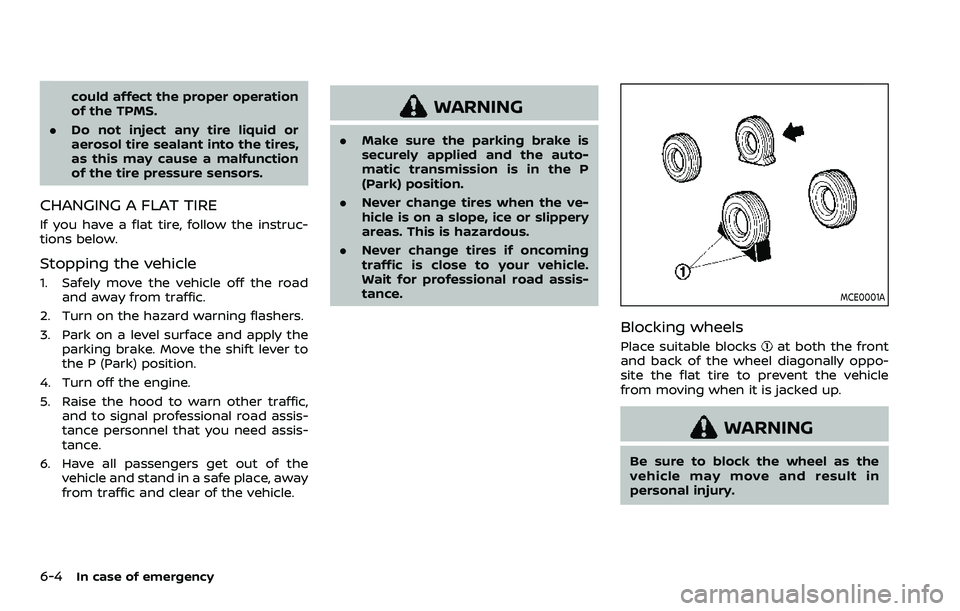
Place suitable blocksat both the front
and back of the wheel diagonally oppo-
site the flat tire to prevent the vehicle
from moving when it is jacked up.
WARNING
Be sure to block the wheel as the
vehicle may move and result in
personal injury.
Page 465 of 604
JVE0219X
Getting the spare tire and tools
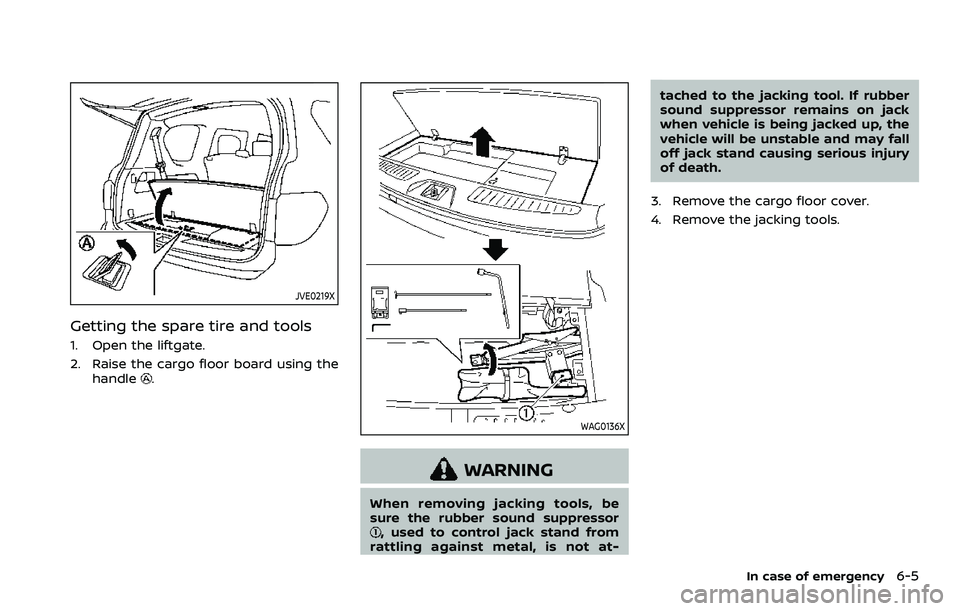
1. Open the liftgate.
2. Raise the cargo floor board using thehandle
.
WAG0136X
WARNING
When removing jacking tools, be
sure the rubber sound suppressor
, used to control jack stand from
rattling against metal, is not at- tached to the jacking tool. If rubber
sound suppressor remains on jack
when vehicle is being jacked up, the
vehicle will be unstable and may fall
off jack stand causing serious injury
of death.
3. Remove the cargo floor cover.
4. Remove the jacking tools.
In case of emergency6-5
Page 466 of 604
6-6In case of emergency
JVE0423X
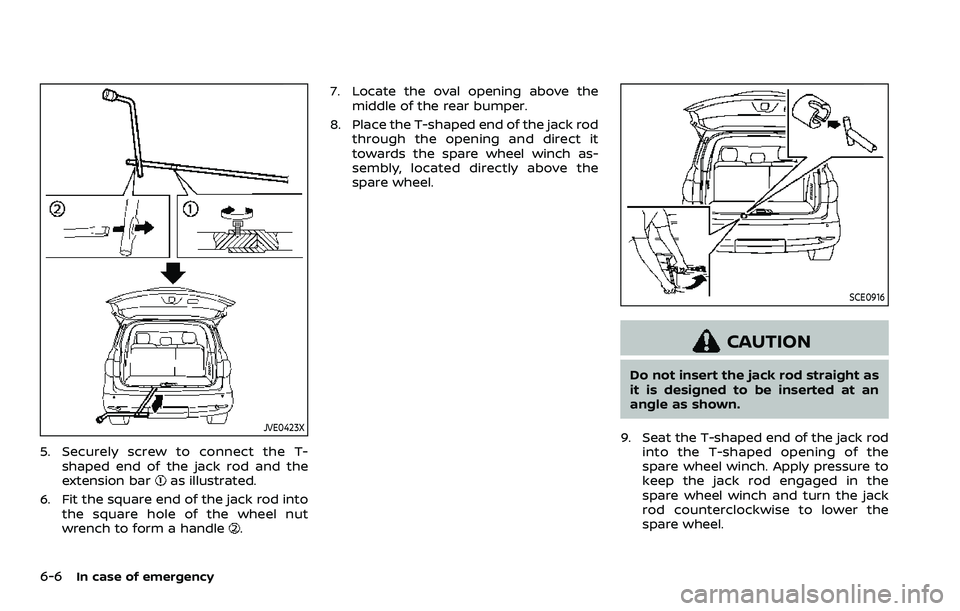
5. Securely screw to connect the T-shaped end of the jack rod and the
extension bar
as illustrated.
6. Fit the square end of the jack rod into the square hole of the wheel nut
wrench to form a handle
. 7. Locate the oval opening above the
middle of the rear bumper.
8. Place the T-shaped end of the jack rod through the opening and direct it
towards the spare wheel winch as-
sembly, located directly above the
spare wheel.
SCE0916
CAUTION
Do not insert the jack rod straight as
it is designed to be inserted at an
angle as shown.
9. Seat the T-shaped end of the jack rod into the T-shaped opening of the
spare wheel winch. Apply pressure to
keep the jack rod engaged in the
spare wheel winch and turn the jack
rod counterclockwise to lower the
spare wheel.
Page 467 of 604
SCE0377
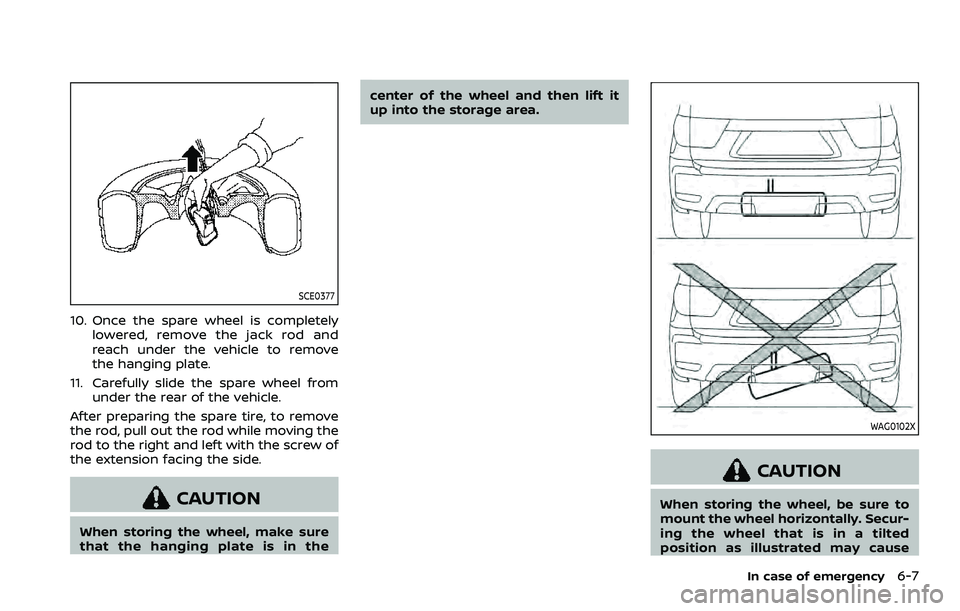
10. Once the spare wheel is completelylowered, remove the jack rod and
reach under the vehicle to remove
the hanging plate.
11. Carefully slide the spare wheel from under the rear of the vehicle.
After preparing the spare tire, to remove
the rod, pull out the rod while moving the
rod to the right and left with the screw of
the extension facing the side.
CAUTION
When storing the wheel, make sure
that the hanging plate is in the center of the wheel and then lift it
up into the storage area.
WAG0102X
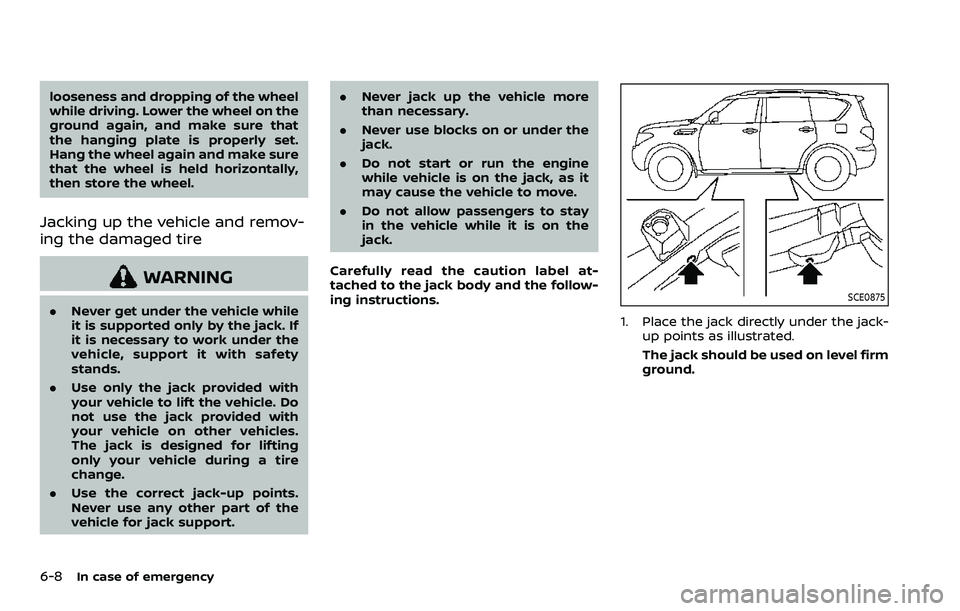
CAUTION
When storing the wheel, be sure to
mount the wheel horizontally. Secur-
ing the wheel that is in a tilted
position as illustrated may cause
In case of emergency6-7
Page 468 of 604
6-8In case of emergency
looseness and dropping of the wheel
while driving. Lower the wheel on the
ground again, and make sure that
the hanging plate is properly set.
Hang the wheel again and make sure
that the wheel is held horizontally,
then store the wheel.
Jacking up the vehicle and remov-
ing the damaged tire
WARNING
.Never get under the vehicle while
it is supported only by the jack. If
it is necessary to work under the
vehicle, support it with safety
stands.
. Use only the jack provided with
your vehicle to lift the vehicle. Do
not use the jack provided with
your vehicle on other vehicles.
The jack is designed for lifting
only your vehicle during a tire
change.
. Use the correct jack-up points.
Never use any other part of the
vehicle for jack support. .
Never jack up the vehicle more
than necessary.
. Never use blocks on or under the
jack.
. Do not start or run the engine
while vehicle is on the jack, as it
may cause the vehicle to move.
. Do not allow passengers to stay
in the vehicle while it is on the
jack.
Carefully read the caution label at-
tached to the jack body and the follow-
ing instructions.SCE0875
1. Place the jack directly under the jack- up points as illustrated.
The jack should be used on level firm
ground.