brake NISSAN ARMADA PLATINUM 2017 Owner's Manual
[x] Cancel search | Manufacturer: NISSAN, Model Year: 2017, Model line: ARMADA PLATINUM, Model: NISSAN ARMADA PLATINUM 2017Pages: 2472, PDF Size: 2.55 MB
Page 337 of 2472

safe distance between vehicles.
. The system may not detect the
vehicle in front of you in certain
road or weather conditions. To avoid
accidents, never use the DCA sys-
tem under the following conditions:
— On roads with sharp curves
— On slippery road surfaces such
as on ice or snow, etc.
— On off-road surfaces such as on sand or rock, etc.
— During bad weather (rain, fog, snow, etc.)
— When rain, snow or dirt adhere to the system sensor
— On steep downhill roads (fre- quent braking may result in
overheating the brakes)
— On repeated uphill and downhill roads
— When towing a trailer or other vehicle
. In some road or traffic conditions, a
vehicle or object can unexpectedly
come into the sensor detection
zone and cause automatic braking. You may need to control the dis-
tance from other vehicles using the
accelerator pedal. Always stay alert
and avoid using the DCA system
when it is not recommended in this
section.
The radar sensor will not detect the following
objects:
. Stationary and slow moving vehicles
. Pedestrians or objects in the roadway
. Oncoming vehicles in the same lane
. Motorcycles traveling offset in the travel lane
The following are some conditions in which the
sensor cannot detect the signals:
. When the snow or road spray from traveling
vehicles reduces the sensor’s visibility
. When excessively heavy baggage is loaded
in the rear seat or the luggage room of your
vehicle
Starting and driving5-99
Page 348 of 2472
JVM0728X
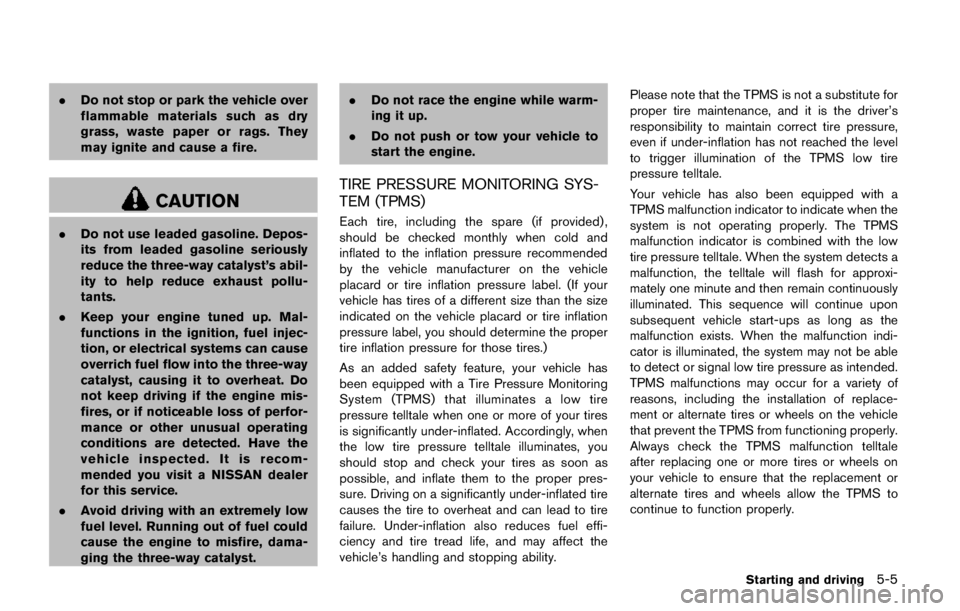
CHECKING ENGINE OIL LEVEL
1. Park the vehicle on a level surface and applythe parking brake.
2. Run the engine until it reaches operating temperature.
3. Turn off the engine. Wait more than 15
minutes for the oil to drain back into
the oil pan.
4. Remove the dipstick and wipe it clean. Reinsert it all the way.
5. Remove the dipstick again and check the oil level. It should be within the range
*1. If the
oil level is below
*2, remove the oil filler cap
and pour recommended oil through the opening.
Do not overfill
*3.
6. Recheck oil level with the dipstick.
It is normal to add some oil between oil
maintenance intervals or during the break-
in period, depending on the severity of
operating conditions.
Page 351 of 2472

CAUTION
.Do not overfill.
. Use Genuine NISSAN PSF or
equivalent. For further brake fluid specification information,
see “Capacities and recommended fluids/lubri-
cants” (P.10-2) .
Page 352 of 2472

SDI2513
Check the fluid level in the reservoir. If the fluid is
below the MIN line
*1or the brake warning
light comes on, add Genuine NISSAN Super
Heavy Duty Brake Fluid or equivalent DOT 3
fluid up to the MAX line
*2.
To add brake fluid:
1. Be sure the ignition switch is in the OFF or LOCK position.
2. Depress and release the foot brake pedal more than 40 times.
3. Open the reservoir filler cap and add brake fluid up to the MAX line
*2. (See “Capa-
cities and recommended fluids/lubricants”
(P.10-2) for the recommended types of brake fluid.)
NOTE:
When the ignition switch is placed in the
ON position after adding brake fluid up to
the MAX line
*2in the reservoir, the
brake fluid decreases below the MAX line
*2. This is normal.
If fluid must be added frequently, the system
should be checked. It is recommended you visit
a NISSAN dealer for this service.
Page 359 of 2472
SDI2516
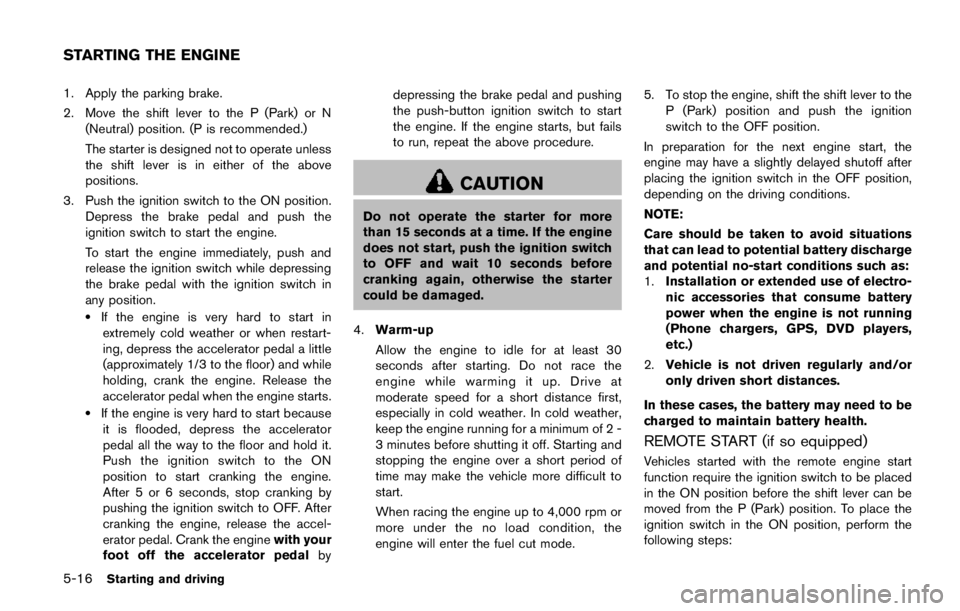
Be careful not to clog the washer nozzle*A.
This may cause improper windshield washer
operation. If the nozzle is clogged, remove any
objects with a needle or small pin
*B.Be
careful not to damage the nozzle. It is recommended you visit a NISSAN dealer if
checking or replacement is required.
If the brakes do not operate properly, it is
recommended you have the brakes checked by
a NISSAN dealer.
SELF-ADJUSTING BRAKES
Your vehicle is equipped with self-adjusting
brakes.
The disc-type brakes self-adjust every time the
brake pedal is applied.
Page 384 of 2472

.As there is a performance limit to
the distance control function, never
rely solely on the ICC system. This
system does not correct careless,
inattentive or absent-minded driv-
ing, or overcome poor visibility in
rain, fog, or other bad weather.
Decelerate the vehicle speed by
depressing the brake pedal, de-
pending on the distance to the
vehicle ahead and the surrounding
circumstances in order to maintain a
safe distance between vehicles.
. If the vehicle ahead comes to a stop,
the vehicle decelerates to a stand-
still within the limitations of the
system. The system will cancel once
it judges that the vehicle has come
to a standstill and sound a warning
chime. To prevent the vehicle from
moving, the driver must depress the
brake pedal.
. Always pay attention to the opera-
tion of the vehicle and be ready to
manually control the proper follow-
ing distance. The vehicle-to-vehicle
distance control mode of the ICC
system may not be able to maintain
the selected distance between ve- hicles (following distance) or se-
lected vehicle speed under some
circumstances.
. The system may not detect the
vehicle in front of you in certain
road or weather conditions. To avoid
accidents, never use the ICC system
under the following conditions:
— On roads where the traffic is heavy or there are sharp curves
— On slippery road surfaces such as on ice or snow, etc.
— During bad weather (rain, fog, snow, etc.)
— When rain, snow or dirt adhere to the system sensor
— On steep downhill roads (the vehicle may go beyond the set
vehicle speed and frequent
braking may result in overheat-
ing the brakes)
— On repeated uphill and downhill roads
— When traffic conditions make it difficult to keep a proper dis-
tance between vehicles because
of frequent acceleration or de- celeration
. Do not use the ICC system if you are
towing a trailer. The system may not
detect a vehicle ahead.
. In some road or traffic conditions, a
vehicle or object can unexpectedly
come into the sensor detection
zone and cause automatic braking.
You may need to control the dis-
tance from other vehicles using the
accelerator pedal. Always stay alert
and avoid using the ICC system
when it is not recommended in this
section.
The radar sensor will not detect the following
objects:
. Stationary and slow moving vehicles
. Pedestrians or objects in the roadway
. Oncoming vehicles in the same lane
. Motorcycles traveling offset in the travel lane
The sensor generally detects the signals re-
turned from the vehicle ahead. Therefore, if the
sensor cannot detect the reflection from the
vehicle ahead, the ICC system may not maintain
the selected distance.
Starting and driving5-81
Page 403 of 2472

JVM0728X
CHECKING ENGINE OIL LEVEL
1. Park the vehicle on a level surface and applythe parking brake.
2. Run the engine until it reaches operating temperature.
3. Turn off the engine. Wait more than 15
minutes for the oil to drain back into
the oil pan.
4. Remove the dipstick and wipe it clean. Reinsert it all the way.
5. Remove the dipstick again and check the oil level. It should be within the range
*1. If the
oil level is below
*2, remove the oil filler cap
and pour recommended oil through the opening.
Do not overfill
*3.
6. Recheck oil level with the dipstick.
It is normal to add some oil between oil
maintenance intervals or during the break-
in period, depending on the severity of
operating conditions.
Page 407 of 2472
WARNING
Failure to follow the warnings and
instructions for proper use of the ICC
system could result in serious injury or
death.
.ICC is not a collision avoidance or
warning device. For highway use
only and it is not intended for
congested areas or city driving. Fail-
ure to apply the brakes could result
in an accident.
. Always observe posted speed limits
and do not set the speed over them.
. Always drive carefully and atten-
tively when using either cruise con-
trol mode. Read and understand the
Owner’s Manual thoroughly before
using the cruise control. To avoid
serious injury or death, do not rely
on the system to prevent accidents
or to control the vehicle’s speed in
emergency situations. Do not use
cruise control except in appropriate
road and traffic conditions.
. In the conventional (fixed speed)
cruise control mode, a warning chime will not sound to warn you if
you are too close to the vehicle
ahead. Pay special attention to the
distance between your vehicle and
the vehicle ahead of you or a
collision could occur.
The ICC system maintains a selected distance
from the vehicle in front of you within the speed
range of 0 to 90 MPH (0 to 144 km/h) up to the
set speed. The set speed can be selected by the
driver between 20 to 90 MPH (32 to 144 km/h) .
The vehicle travels at a set speed when the road
ahead is clear.
The ICC system can be set to one of two cruise
control modes.
. Vehicle-to-vehicle distance control mode:
For maintaining a selected distance be-
tween your vehicle and the vehicle in front
of you up to the preset speed.
. Conventional (fixed speed) cruise control
mode:
For cruising at a preset speed.
Starting and driving5-69
INTELLIGENT CRUISE CONTROL
(ICC) (if so equipped)
Page 455 of 2472
WARNING
.Do not disassemble or modify this
system. If you do, it may result in
accidents, fire, or electric shock.
. Do not use this system if you notice
any abnormality, such as a frozen
screen or lack of sound. Continued
use of the system may result in
accident, fire or electric shock.
. In case you notice any foreign
object in the system hardware, spill
liquid on it, or notice smoke or smell
coming from it, stop using the
system immediately. It is recom-
mended you visit a NISSAN dealer
for servicing. Ignoring such condi-
tions may lead to accidents, fire, or
electric shock.
. Park the vehicle in a safe location
and apply the parking brake to view
the images on the front center dis-
play screen.
Do not attempt to operate the system in
extreme temperature conditions [below
í 48F( í208 C) and above 1588 F (708C)].
Operating this system under these condi- tions may result in system malfunctions.
Monitor, heater, air conditioner, audio, phone and voice recognition systems4-3
SAFETY NOTE
Page 461 of 2472
11 Index
A
ABS (Anti-lock Braking System) ......................... 5-137
Advanced Air Bag System ....................................... 1-58
Aiming controlHeadlights ............................................................. 2-39
Air bag system Advanced Air Bag System ................................ 1-58
Front passenger air bag and status light ...... 1-60
Front-seat mounted side-impact
supplemental air bag system ............................ 1-65
Roof-mounted curtain side-impact and
rollover supplemental air bag system ............. 1-65
Air bag warning labels .............................................. 1-68
Air bag warning light ..................................... 1-68, 2-16
Air cleaner housing filter ........................................... 8-15
Air conditioner Air conditioner operation ................................... 4-52
Air conditioner service ....................................... 4-58
Air conditioner specification label ................. 10-12
Air conditioning system refrigerant and
lubricant recommendations .................... 4-58, 10-7
Automatic air conditioner .................................. 4-54
In-cabin microfilter ............................................... 4-58
Alarm, How to stop alarm (see vehicle
security system) .......................................................... 2-31
Alcohol, drugs and driving ....................................... 5-10
Antenna ......................................................................... 4-92
Anti-lock Braking System (ABS) ......................... 5-137
Anti-lock Braking System (ABS) warning light .... 2-11
Appearance care Exterior appearance care ..................................... 7-2
Interior appearance care ....................................... 7-4
Armrest .......................................................................... 1-10
Around View
ŠMonitor .............................................. 4-29 Audible reminders ...................................................... 2-20
Audio operation precautions ................................... 4-59
Audio system ............................................................... 4-59
Steering wheel audio controls ......................... 4-91
Auto closure ................................................................. 3-25
Autolight system ......................................................... 2-37
Automatic Air conditioner ...................................................... 4-54
Automatic Transmission Fluid (ATF) .................. 8-8
Door locks ................................................................ 3-6
Drive positioner .................................................... 3-33
Driving with automatic transmission ............... 5-18
Seat positioner ..................................................... 3-33
Average fuel consumption and speed .................. 2-28
Avoiding collision and rollover .................................. 5-8
B
Back door (See liftgate) ........................................... 3-22
Back-up Collision Intervention (BCI) ..................... 5-56
Battery ........................................................................... 8-11 Battery saver system ............................... 2-39, 2-64
Intelligent Key ....................................................... 8-21
Variable voltage control system ....................... 8-13
Before starting the engine ....................................... 5-15
Belts (See drive belts) .............................................. 8-13
Blind Spot Intervention
Š(BSI) ................................ 5-43
Blind Spot Intervention (BSI) ON
indicator light ............................................................... 2-17
Blind Spot Warning (BSW) .................................... 5-33
Blind Spot Warning (BSW)/Blind Spot
Intervention (BSI) system warning light ................ 2-12
Bluetooth
ŠHands-Free Phone System ............. 4-106
BluetoothŠstreaming audio ..................................... 4-81
Booster seats .............................................................. 1-48 Brake
Anti-lock Braking System (ABS) ................... 5-137
Brake booster ....................................................... 8-18
Brake fluid ................................................................ 8-9
Brake system ...................................................... 5-136
Parking brake operation ..................................... 5-22
Warning light ........................................................ 2-12
Break-in schedule .................................................... 5-121
Brightness control Display ON/OFF button ........................................ 4-8
Instrument panel .................................................. 2-40
Bulb check/instrument panel ................................... 2-11
Bulb replacement ....................................................... 8-24
C
Cabin air filter .............................................................. 4-58
CAMERA button ........................................................... 4-8
Capacities and
recommended fluids/lubricants ............................... 10-2
Car phone or CB radio .......................................... 4-106
Cargo floor box ........................................................... 2-56
Cargo light ................................................................... 2-67
Catalytic converter, Three way catalyst .................. 5-4
CD/DVD/USB memory care and cleaning .......... 4-90
Center multi-function control panel ......................... 4-4
Chassis and body maintenance ............................. 9-11
Child restraints ............................................................ 1-31 Booster seats ....................................................... 1-48
LATCH system ..................................................... 1-33
Precautions on child restraints ........................ 1-31
Top tether strap ................................................... 1-36
Child safety .................................................................. 1-28
Child safety rear door lock ........................................ 3-6
Chimes
Audible reminders ............................................... 2-20