clock NISSAN CUBE 2009 User Guide
[x] Cancel search | Manufacturer: NISSAN, Model Year: 2009, Model line: CUBE, Model: NISSAN CUBE 2009Pages: 321, PDF Size: 4.99 MB
Page 165 of 321
Black plate (163,1)
Model "Z12-D" EDITED: 2009/ 1/ 28
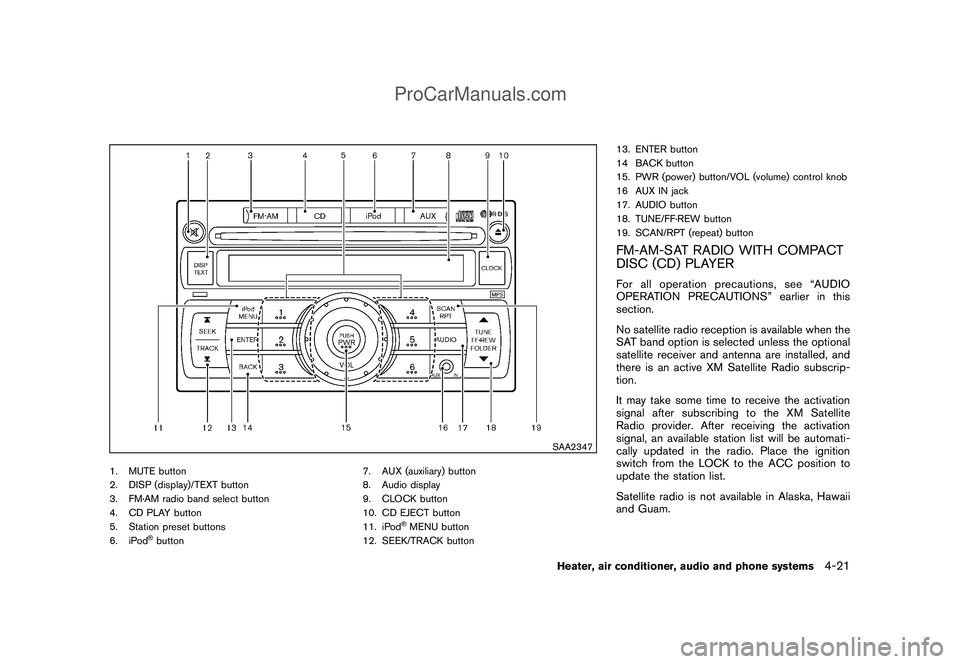
SAA2347
1. MUTE button
2. DISP (display)/TEXT button
3. FM·AM radio band select button
4. CD PLAY button
5. Station preset buttons
6. iPod
®button7. AUX (auxiliary) button
8. Audio display
9. CLOCK button
10. CD EJECT button
11. iPod
®MENU button
12. SEEK/TRACK button13. ENTER button
14 BACK button
15. PWR (power) button/VOL (volume) control knob
16 AUX IN jack
17. AUDIO button
18. TUNE/FF·REW button
19. SCAN/RPT (repeat) button
FM-AM-SAT RADIO WITH COMPACT
DISC (CD) PLAYERFor all operation precautions, see “AUDIO
OPERATION PRECAUTIONS” earlier in this
section.
No satellite radio reception is available when the
SAT band option is selected unless the optional
satellite receiver and antenna are installed, and
there is an active XM Satellite Radio subscrip-
tion.
It may take some time to receive the activation
signal after subscribing to the XM Satellite
Radio provider. After receiving the activation
signal, an available station list will be automati-
cally updated in the radio. Place the ignition
switch from the LOCK to the ACC position to
update the station list.
Satellite radio is not available in Alaska, Hawaii
and Guam.
Heater, air conditioner, audio and phone systems
4-21
ProCarManuals.com
Page 166 of 321
Black plate (164,1)
Model "Z12-D" EDITED: 2009/ 1/ 28
Audio main operationHead unit:
The auto loudness circuit enhances the low and
high frequency ranges automatically in both
radio reception and CD playback.
ON·OFF/Volume control:
Place the ignition switch in the ACC or ON
position, and then push the PWR button while
the system is off to call up the normal mode
(radio, CD, AUX and iPod) which was playing
immediately before the system was turned off.
While the system is on, pushing the PWR button
turns the system off.
Turn the VOL control knob to adjust the volume.
MUTE button:
Push the
button to mute the audio sound.
Push thebutton again to release the mute
setting.
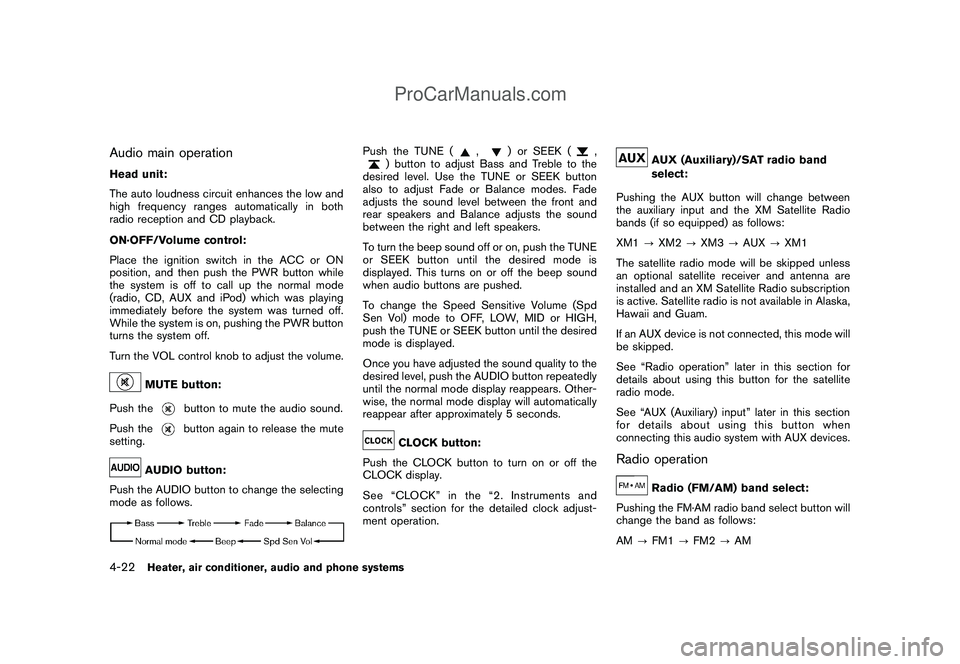
AUDIO button:
Push the AUDIO button to change the selecting
mode as follows.
Push the TUNE (
,
) or SEEK (
,
) button to adjust Bass and Treble to the
desired level. Use the TUNE or SEEK button
also to adjust Fade or Balance modes. Fade
adjusts the sound level between the front and
rear speakers and Balance adjusts the sound
between the right and left speakers.
To turn the beep sound off or on, push the TUNE
or SEEK button until the desired mode is
displayed. This turns on or off the beep sound
when audio buttons are pushed.
To change the Speed Sensitive Volume (Spd
Sen Vol) mode to OFF, LOW, MID or HIGH,
push the TUNE or SEEK button until the desired
mode is displayed.
Once you have adjusted the sound quality to the
desired level, push the AUDIO button repeatedly
until the normal mode display reappears. Other-
wise, the normal mode display will automatically
reappear after approximately 5 seconds.CLOCK button:
Push the CLOCK button to turn on or off the
CLOCK display.
See “CLOCK” in the “2. Instruments and
controls” section for the detailed clock adjust-
ment operation.
AUX (Auxiliary)/SAT radio band
select:
Pushing the AUX button will change between
the auxiliary input and the XM Satellite Radio
bands (if so equipped) as follows:
XM1?XM2?XM3?AUX?XM1
The satellite radio mode will be skipped unless
an optional satellite receiver and antenna are
installed and an XM Satellite Radio subscription
is active. Satellite radio is not available in Alaska,
Hawaii and Guam.
If an AUX device is not connected, this mode will
be skipped.
See “Radio operation” later in this section for
details about using this button for the satellite
radio mode.
See “AUX (Auxiliary) input” later in this section
for details about using this button when
connecting this audio system with AUX devices.
Radio operation
Radio (FM/AM) band select:
Pushing the FM·AM radio band select button will
change the band as follows:
AM?FM1?FM2?AM
4-22
Heater, air conditioner, audio and phone systems
ProCarManuals.com
Page 174 of 321
Black plate (172,1)
Model "Z12-D" EDITED: 2009/ 1/ 28
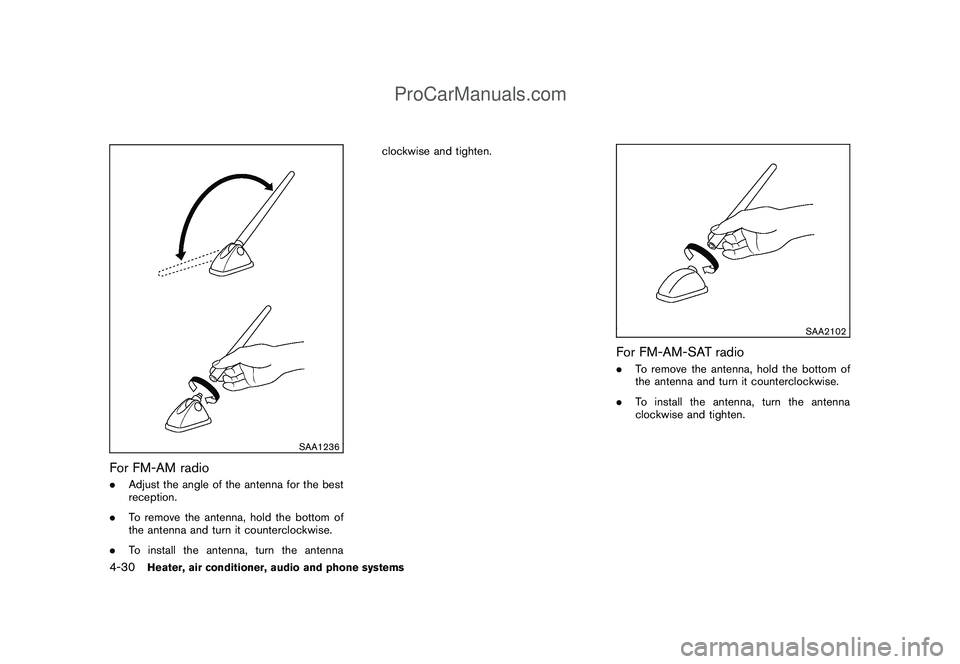
SAA1236
For FM-AM radio.Adjust the angle of the antenna for the best
reception.
.To remove the antenna, hold the bottom of
the antenna and turn it counterclockwise.
.To install the antenna, turn the antennaclockwise and tighten.
SAA2102
For FM-AM-SAT radio.To remove the antenna, hold the bottom of
the antenna and turn it counterclockwise.
.To install the antenna, turn the antenna
clockwise and tighten.
4-30
Heater, air conditioner, audio and phone systems
ProCarManuals.com
Page 198 of 321
Black plate (196,1)
Model "Z12-D" EDITED: 2009/ 1/ 28
1. Move the selector lever to the P (Park)
position.
2. Turn the ignition switch slightly in the ON
direction.
3. TurntheignitionswitchtotheLOCK
position.
4. Remove the key.
If the ignition switch is turned to the LOCK
position, the selector lever cannot be moved
from the P (Park) position. The selector lever can
be moved if the ignition switch is in the ON
position with the foot brake pedal depressed.
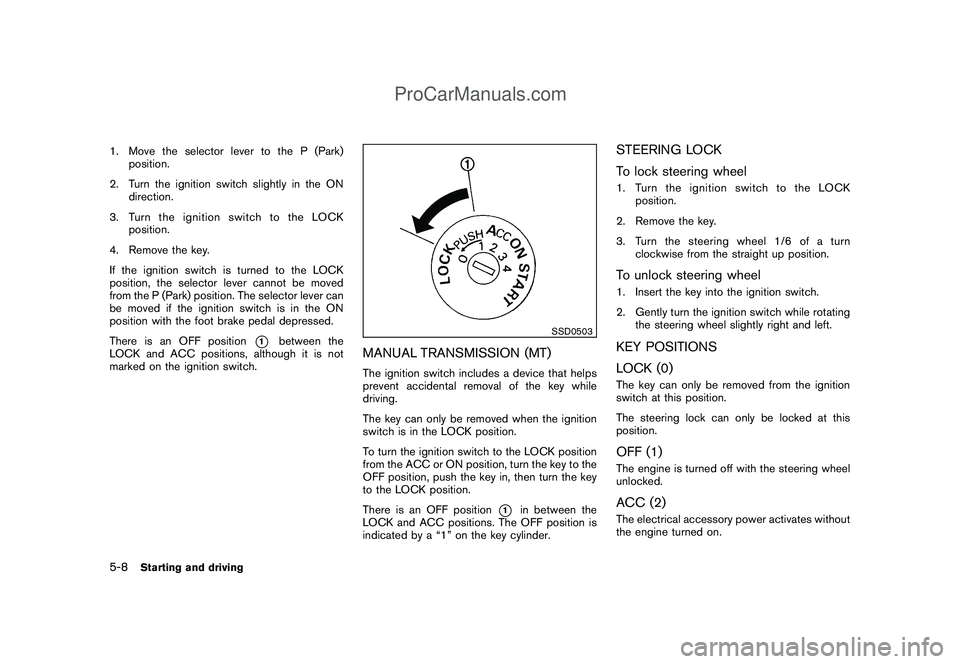
There is an OFF position
*1
between the
LOCK and ACC positions, although it is not
marked on the ignition switch.
SSD0503
MANUAL TRANSMISSION (MT)The ignition switch includes a device that helps
prevent accidental removal of the key while
driving.
The key can only be removed when the ignition
switch is in the LOCK position.
To turn the ignition switch to the LOCK position
from the ACC or ON position, turn the key to the
OFF position, push the key in, then turn the key
to the LOCK position.
There is an OFF position
*1
in between the
LOCK and ACC positions. The OFF position is
indicated by a “1” on the key cylinder.
STEERING LOCK
To lock steering wheel1. Turn the ignition switch to the LOCK
position.
2. Remove the key.
3. Turn the steering wheel 1/6 of a turn
clockwise from the straight up position.To unlock steering wheel1. Insert the key into the ignition switch.
2. Gently turn the ignition switch while rotating
the steering wheel slightly right and left.KEY POSITIONS
LOCK (0)The key can only be removed from the ignition
switch at this position.
The steering lock can only be locked at this
position.OFF (1)The engine is turned off with the steering wheel
unlocked.ACC (2)The electrical accessory power activates without
the engine turned on.
5-8
Starting and driving
ProCarManuals.com
Page 228 of 321
Black plate (226,1)
Model "Z12-D" EDITED: 2009/ 1/ 28
SCE0811
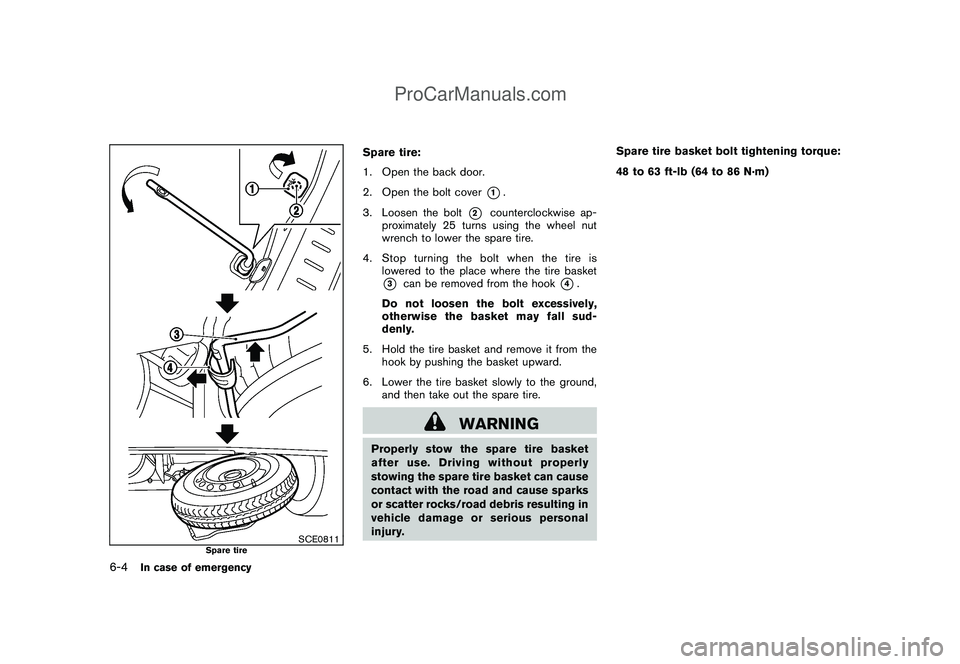
Spare tire
Spare tire:
1. Open the back door.
2. Open the bolt cover
*1.
3. Loosen the bolt
*2
counterclockwise ap-
proximately 25 turns using the wheel nut
wrench to lower the spare tire.
4. Stop turning the bolt when the tire is
lowered to the place where the tire basket
*3
can be removed from the hook
*4.
Do not loosen the bolt excessively,
otherwise the basket may fall sud-
denly.
5. Hold the tire basket and remove it from the
hook by pushing the basket upward.
6. Lower the tire basket slowly to the ground,
and then take out the spare tire.
WARNING
Properly stow the spare tire basket
after use. Driving without properly
stowing the spare tire basket can cause
contact with the road and cause sparks
or scatter rocks/road debris resulting in
vehicle damage or serious personal
injury.Spare tire basket bolt tightening torque:
48 to 63 ft-lb (64 to 86 N·m)
6-4
In case of emergency
ProCarManuals.com
Page 230 of 321
Black plate (228,1)
Model "Z12-D" EDITED: 2009/ 1/ 28
SCE0812
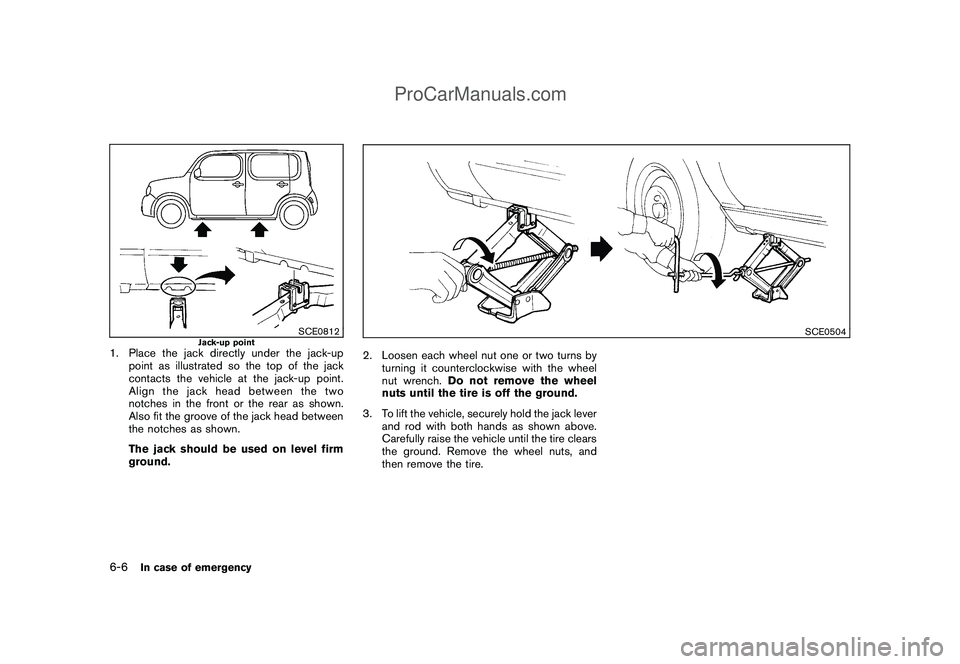
Jack-up point
1. Place the jack directly under the jack-up
point as illustrated so the top of the jack
contacts the vehicle at the jack-up point.
Align the jack head between the two
notches in the front or the rear as shown.
Also fit the groove of the jack head between
the notches as shown.
The jack should be used on level firm
ground.
SCE0504
2. Loosen each wheel nut one or two turns by
turning it counterclockwise with the wheel
nut wrench.Do not remove the wheel
nuts until the tire is off the ground.
3. To lift the vehicle, securely hold the jack lever
and rod with both hands as shown above.
Carefully raise the vehicle until the tire clears
the ground. Remove the wheel nuts, and
then remove the tire.
6-6
In case of emergency
ProCarManuals.com
Page 260 of 321

Black plate (258,1)
Model "Z12-D" EDITED: 2009/ 1/ 29
.Waste oil must be disposed of
properly.
. Check your local regulations.
(Perform steps 4 to 8 only when the engine
oil filter change is needed.)
4. Remove the engine under cover under the oil filter location by removing the bolts and
small plastic clips.
5. Loosen the oil filter with an oil filter wrench. Remove the oil filter by turning it by hand.
6. Wipe the engine oil filter mounting surface with a clean rag.
CAUTION
Be sure to remove any old gasket
material remaining on the mounting
surface of the engine. Failure to do so
could lead to engine damage.
7. Coat the gasket on the new filter with clean engine oil.
8. Screw in the oil filter clockwise until a slight resistance is felt, then tighten additionally
more than 2/3 turn.
Oil filter tightening torque:11 to 15 ft-lb
(14.7 to 20.5 N·m) 9. Clean and re-install the drain plug with a
new washer. Securely tighten the drain plug
with a wrench.
Drain plug tightening torque:22 to 29 ft-lb
(29 to 39 N·m)
Do not use excessive force.
10. Refill the engine with the recommended oil through the oil filler opening, and install the
oil filler cap securely.
See “CAPACITIES AND RECOMMENDED
FUEL/LUBRICANTS” in the “9. Technical
and consumer information” section for drain
and refill capacity. The drain and refill
capacity depends on the oil temperature
and drain time. Use these specifications for
reference only. Always use the dipstick to
determine the proper amount of oil in the
engine.
11. Start the engine and check for leakage around the drain plug and the oil filter.
Correct as required.
12. Turn the engine off and wait more than 10 minutes. Check the oil level with the dipstick.
Add engine oil if necessary.
After the operation1. Install the engine undercover into position asthe following steps. a. Pull the center of the small plastic clips
out.
b. Hold the engine undercover into posi- tion.
c. Insert the clips through the undercover into the holes in the frame, then push the
center of the clips in to lock the clips in
place.
d. Install the bolts that hold the undercover in place. Be careful not to strip the bolts
or over-tighten them.
2. Lower the vehicle carefully to the ground.
3. Dispose of waste oil and filter properly.
WARNING
. Prolonged and repeated contact
with used engine oil may cause skin
cancer.
. Try to avoid direct skin contact with
used oil. If skin contact is made,
wash thoroughly with soap or hand
cleaner as soon as possible.
. Keep used engine oil out of reach of
children.
8-10
Maintenance and do-it-yourself
ProCarManuals.com
Page 313 of 321
Black plate (1,1)
10 Index
A
ABS (Anti-lock Braking System).................. 5-28
Advanced air bag system......................... 1-46
Air bag system
Advanced air bag system..................... 1-46
Front passenger air bag and status light.... 1-47
Front-seat mounted side-impact
supplemental air bag system.................. 1-50
Roof-mounted curtain side-impact
supplemental air bag system.................. 1-50
Air bag warning labels............................. 1-53
Air bag warning light....................... 1-53, 2-14
Air cleaner housing filter.......................... 8-16
Air conditioner
Air conditioner operation........................ 4-2
Air conditioner service........................... 4-9
Air conditioner specification label............ 9-10
Air conditioning system refrigerant and
lubricant recommendations............... 4-9, 9-6
In-cabin microfilter............................... 4-8
Alarm, How to stop alarm
(see vehicle security system)..................... 2-19
Alcohol, drugs and driving.......................... 5-6
Antenna............................................. 4-29
Anti-lock Braking System (ABS).................. 5-28
Anti-lock braking system (ABS) warning light . . . 2-10
Appearance care
Exterior appearance care........................ 7-2
Interior appearance care........................ 7-5
Armrest............................................... 1-8
Audible reminders ................................. 2-17
Audio operation precautions........................ 4-9Audio system......................................... 4-9
Steering wheel audio controls................ 4-28
Autolight system................................... 2-24
Automatic
Air conditioner.................................... 4-6
Door locks........................................ 3-5
Average fuel consumption........................... 2-9
Average speed....................................... 2-9
Avoiding collision and rollover...................... 5-5
B
Back door .......................................... 3-22
Battery.............................................. 8-13
Battery replacement, Intelligent Key.......... 8-23
Battery replacement, Keyfob.................. 8-22
Battery saver system.......................... 2-25
Variable voltage control system............... 8-14
Before starting the engine........................ 5-12
Bluetooth
®Hands-Free Phone System.......... 4-31
Booster seats...................................... 1-35
Brake
Anti-lock Braking System (ABS).............. 5-28
Brake and clutch fluid......................... 8-11
Brake system................................... 5-27
Parking brake operation....................... 5-20
Warning light................................... 2-11
Break-in schedule.................................. 5-23
Brightness control, Instrument panel............. 2-26
Bulb check/instrument panel...................... 2-10
Bulb replacement.................................. 8-25C
Cabin air filter........................................ 4-8
Capacities and recommended fuel/lubricants..... 9-2
Car phone or CB radio............................ 4-31
Cargo cover........................................ 2-34
Cargo light......................................... 2-41
Catalytic converter, Three way catalyst............ 5-2
CD care and cleaning............................. 4-27
Ceiling light......................................... 2-40
Child restraints..................................... 1-19
Booster seats .................................. 1-35
Installation using LATCH...................... 1-24
Installation using the seat belts............... 1-29
Precautions on child restraints................ 1-19
Top tether strap................................ 1-22
Child safety......................................... 1-11
Child safety rear door lock.......................... 3-6
Chimes, Audible reminders....................... 2-17
Circuit breaker, Fusible link ....................... 8-20
Cleaning exterior and interior................. 7-2, 7-5
Clock............................................... 2-28
Clutch fluid......................................... 8-11
Cockpit............................................... 2-2
Cold weather driving.............................. 5-30
Command (See Bluetooth
®Hands-Free
Phone System)..................................... 4-37
Compact Disc (CD) player (See audio
system)...................................... 4-18, 4-24
Continuously Variable Transmission (CVT)
fluid................................................. 8-11
Controls, Steering wheel audio controls......... 4-28
Model "MASTER" EDITED: 2009/ 1/ 28
ProCarManuals.com