parking brake NISSAN CUBE 2009 User Guide
[x] Cancel search | Manufacturer: NISSAN, Model Year: 2009, Model line: CUBE, Model: NISSAN CUBE 2009Pages: 321, PDF Size: 4.99 MB
Page 202 of 321

Black plate (200,1)
Model "Z12-D" EDITED: 2009/ 1/ 28
chime sounds. The engine will start.
After step 3 is performed, when the ignition
switch is pushed without depressing the brake
pedal, the ignition switch position will change to
ACC.
NOTE:
.When the ignition switch is pushed to
the ACC or ON position or the engine is
started by the above procedures, the
Intelligent Key system warning light
may blink in yellow even if the Intelli-
gent Key is inside the vehicle. This is
not a malfunction. To stop the warning
light from blinking, touch the ignition
switch with the Intelligent Key again.
.If the Intelligent Key system warning
light in the meter is blinking in green,
replace the battery as soon as possible.
(See “KEY BATTERY REPLACEMENT”
in the “8. Maintenance and do-it-your-
self” section.).Make sure the area around the vehicle is
clear.
.Check fluid levels such as engine oil, cool-
ant, brake fluid, and window washer fluid as
frequently as possible, or at least whenever
you refuel.
.Check that all windows and lights are clean.
.Visually inspect tires for their appearance
and condition. Also check tires for proper
inflation.
.Lock all doors.
.Position seat and adjust head restraints.
.Adjust inside and outside mirrors.
.Fasten seat belts and ask all passengers to
do likewise.
.Check the operation of warning lights when
the ignition switch is placed in the ON
position. (See “WARNING/INDICATOR
LIGHTS AND AUDIBLE REMINDERS” in
the “2. Instruments and controls” section.)
MODELS WITHOUT INTELLIGENT KEY
SYSTEM1. Apply the parking brake.
2.Continuously Variable Transmission
(CVT) models:
Move the selector lever to the P (Park) or N
(Neutral) position. (P is recommended.)
The starter is designed so that it does not
operate unless the selector lever is in either
of the above positions.
Manual Transmission (MT) models:
Move the shift lever to the N (Neutral)
position. Depress the clutch pedal fully to
the floor.
The starter is designed not to operate unless
the clutch pedal is fully depressed.
3. Crank the enginewith your foot off the
accelerator pedalby turning the ignition
switch to START. Release the switch when
the engine starts. If the engine starts, but
fails to run, repeat the above procedure.
.If the engine is very hard to start in
extremely cold weather or when restart-
ing, depress the accelerator pedal a little
(approximately 1/3 to the floor) and hold
it and then crank the engine. Release the
accelerator pedal when the engine
BEFORE STARTING THE ENGINE STARTING THE ENGINE
5-12
Starting and driving
ProCarManuals.com
Page 203 of 321

Black plate (201,1)
Model "Z12-D" EDITED: 2009/ 1/ 28
starts.
.If the engine is very hard to start
because it is flooded, depress the
accelerator pedal all the way to the floor
and hold it. Crank the engine for 5 - 6
seconds. After cranking the engine,
release the accelerator pedal. Crank
the enginewith your foot off the
accelerator pedalby turning the igni-
tion switch to START. Release the
ignition switch when the engine starts.
If the engine starts, but fails to run,
repeat the above procedure.
CAUTION
Do not operate the starter for more
than 15 seconds at a time. If the engine
does not start, turn the ignition switch
off and wait 10 seconds before cranking
again, otherwise the starter could be
damaged.
4.Warm-up
Allow the engine to idle for at least 30
seconds after starting. Do not race the
engine while warming it up. Drive at
moderate speed for a short distance first,
especially in cold weather. In cold weather,
keep the engine running for a minimum of 2 -3 minutes before shutting it off. Starting and
stopping the engine over a short period of
time may make the vehicle more difficult to
start.
5. To stop the engine, move the selector lever
to the P (Park) position (CVT model) or move
the shift lever to the N (Neutral) position (MT
model) , and turn the ignition switch to the
OFF position.
MODELS WITH INTELLIGENT KEY
SYSTEM1. Apply the parking brake.
2. Move the selector lever to the P (Park) or N
(Neutral) position. (P is recommended.)
The starter is designed not to operate unless
the selector lever is in either of the above
positions.
The Intelligent Key must be carried
when operating the ignition switch.
3. Push the ignition switch to the ON position.
Depress the brake pedal and push the
ignition switch to start the engine.
To start the engine immediately, push and
release the ignition switch while depressing
the brake pedal with the ignition switch in
any position.
.If the engine is very hard to start inextremely cold weather or when restart-
ing, depress the accelerator pedal a little
(approximately 1/3 to the floor) and
while holding, crank the engine. Release
the accelerator pedal when the engine
starts.
.If the engine is very hard to start
because it is flooded, depress the
accelerator pedal all the way to the floor
and hold it. Push the ignition switch to
the ON position to start cranking the
engine. After 5 or 6 seconds, stop
cranking by pushing the ignition switch
to OFF. After cranking the engine,
release the accelerator pedal. Crank
the enginewith your foot off the
accelerator pedalby depressing the
brake pedal and pushing the push-
button ignition switch to start the engine.
If the engine starts, but fails to run,
repeat the above procedure.
CAUTION
Do not operate the starter for more
than 15 seconds at a time. If the engine
does not start, push the ignition switch
to OFF and wait 10 seconds before
cranking again, otherwise the starter
could be damaged.
Starting and driving
5-13
ProCarManuals.com
Page 204 of 321

Black plate (202,1)
Model "Z12-D" EDITED: 2009/ 1/ 28
4.Warm-up
Allow the engine to idle for at least 30
seconds after starting. Do not race the
engine while warming it up. Drive at
moderate speed for a short distance first,
especially in cold weather. In cold weather,
keep the engine running for a minimum of 2 -
3 minutes before shutting it off. Starting and
stopping the engine over a short period of
time may make the vehicle more difficult to
start.
When racing the engine up to 4,000 rpm or
more under no load condition, the engine
will enter the fuel cut mode.
5. To stop the engine, move the selector lever
to the P (Park) position, and push the
ignition switch to the OFF position.
CONTINUOUSLY VARIABLE TRANS-
MISSION (CVT)The Continuously Variable Transmission (CVT)
in your vehicle is electronically controlled to
produce maximum power and smooth operation.
The recommended operating procedures for this
transmission are shown on the following pages.
Follow these procedures for maximum vehicle
performance and driving enjoyment.
Engine power may be automatically re-
duced to protect the CVT if the engine
speed increases quickly when driving on
slippery roads or while being tested on
some dynamometers.Starting the vehicle1. After starting the engine, fully depress the
foot brake pedal before moving the selector
lever out of the P (Park) position.
This CVT is designed so that the foot
brake pedal must be depressed before
shifting from P (Park) to any driving
position while the ignition switch is in
the ON position.
The selector lever cannot be moved out
of the P (Park) position and into any of
the other positions if the ignition
switch is placed in the LOCK, OFF or
ACC position or if the key is removed.2. Keep the foot brake pedal depressed, push
the selector lever button and move the
selector lever to a driving position.
3. Release the parking brake and foot brake
pedal, and then gradually start the vehicle in
motion.
WARNING
.Do not depress the accelerator
pedal while shifting from P (Park)
or N (Neutral) to R (Reverse) , D
(Drive) or L (Low) . Always depress
the brake pedal until shifting is
completed. Failure to do so could
cause you to lose control and have
an accident.
.Cold engine idle speed is high, so
use caution when shifting into a
forward or reverse gear before the
engine has warmed up.
.Never shift to P (Park) or R (Re-
verse) while vehicle is moving. Fail-
ure to do so could cause you to lose
control and have an accident.
DRIVING THE VEHICLE
5-14
Starting and driving
ProCarManuals.com
Page 205 of 321

Black plate (203,1)
Model "Z12-D" EDITED: 2009/ 1/ 28
CAUTION
.When stopping the vehicle on an
uphill grade, do not hold the vehicle
by depressing the accelerator pedal.
The foot brake should be used for
this purpose.
.Do not downshift abruptly on slip-
pery roads. This may cause a loss of
control.
SSD0862
ShiftingTo move the selector lever,
: Push the button
*A
while depressing
the brake pedal.
: Push the button
*A
.
: Just move the selector lever.
After starting the engine, fully depress the brake
pedal, push the selector lever button and move
the selector lever from the P (Park) position to
any of the desired shift positions.
WARNING
Apply the parking brake if the selector
lever is in any position while the engine
is not running. Failure to do so could
cause the vehicle to move unexpectedly
or roll away and result in serious
personal injury or property damage.
If the ignition switch is placed in the OFF or
ACC position for any reason while the selector
lever is in any positions other than the P (Park) ,
the ignition switch cannot be placed in the
LOCK position.
If the ignition switch cannot be placed in the
LOCK position, perform the following steps:
1. Apply the parking brake when the vehicle is
stopped.
2. Place the ignition switch in the ON position
while depressing the foot brake pedal.
3. Move the selector lever to the P (Park)
position.
4.Models with Intelligent Key system:
Place the ignition switch in the OFF position.
Models without Intelligent Key system:
Place the ignition switch in the LOCK
Starting and driving
5-15
ProCarManuals.com
Page 206 of 321

Black plate (204,1)
Model "Z12-D" EDITED: 2009/ 1/ 28
position.
CAUTION
To prevent transmission damage, move
the selector lever to the P (Park) or R
(Reverse) position only when the vehi-
cle is completely stopped.
P (Park):
Use this selector position when the vehicle is
parked or when starting the engine. Make sure
the vehicle is completely stopped.The brake
pedal must be depressed and the selector
lever button pushed in to move the selec-
tor lever from N (Neutral) or any drive
position to P (Park) .Apply the parking brake.
When parking on a hill, apply the parking brake
first, then move the selector lever to the P (Park)
position.
R (Reverse):
Use this position to back up. Make sure the
vehicle is completely stopped before selecting
the R (Reverse) position.The brake pedal
must be depressed and the selector lever
button pushed in to move the selector
lever from P (Park) , N (Neutral) or any
driving position to R (Reverse) .N (Neutral):
Neither forward nor reverse gear is engaged.
The engine can be started in this position. You
may shift to N (Neutral) and restart a stalled
engine while the vehicle is moving.
D (Drive):
Use this position for all normal forward driving.
L (Low):
Use this position for maximum engine braking on
steep downhill gradients/climbing steep slopes
and whenever approaching sharp bends. Do not
use the L (Low) position in any other circum-
stances.
SSD0863
Overdrive (O/D) OFF switch (if so
equipped)When the O/D OFF switch is pushed with the
selector lever in the D (Drive) position, theindicator light in the instrument panel illuminates.
Use the overdrive off mode when you need
improved engine braking.
To turn off the overdrive off mode, push the O/D
OFF switch again. The
indicator light will
turn off.
Each time the engine is started, or when the
selector lever is shifted to any position other
than the D (Drive) position, the overdrive off
mode will be automatically turned off.
5-16
Starting and driving
ProCarManuals.com
Page 208 of 321

Black plate (206,1)
Model "Z12-D" EDITED: 2009/ 1/ 28
2. Apply the parking brake.
3. Remove the shift lock release cover
*A
using a suitable tool.
4. Push down the shift lock release using a
suitable tool.
5. Push the selector lever button and move the
selector lever to the N (Neutral) position
while holding down the shift lock release.
Place the ignition switch in the ON position to
unlock the steering wheel. The vehicle may be
moved to the desired location.
Replace the removed shift lock release cover
after the operation.
For models with Intelligent Key system: If the
battery is discharged completely, the steering
wheel cannot be unlocked. Do not move the
vehicle with the steering wheel locked.
If the selector lever cannot be moved out of the
P (Park) position, have a NISSAN dealer check
the CVT system as soon as possible.
WARNING
If the selector lever cannot be moved
from the P (Park) position while the
engine is running and the brake pedal
is depressed, the stop lights may notwork. Malfunctioning stop lights could
cause an accident injuring yourself and
others.
MANUAL TRANSMISSION (MT)
WARNING
.Do not downshift abruptly on slip-
pery roads. This may cause a loss of
control.
.Do not over-rev the engine when
shifting to a lower gear. This may
cause a loss of control or engine
damage.
CAUTION
.Do not rest your foot on the clutch
pedal while driving. This may da-
mage the clutch.
.Fully depress the clutch pedal be-
fore shifting to help prevent trans-
mission damage.
.Stop your vehicle completely before
shifting into R (Reverse) .
.When the vehicle is stopped for a
period of time, for example at a stoplight, shift to N (Neutral) and release
the clutch pedal with the foot brake
applied.
5-18
Starting and driving
ProCarManuals.com
Page 210 of 321
Black plate (208,1)
Model "Z12-D" EDITED: 2009/ 1/ 28
Suggested maximum speed in each gearDownshift to a lower gear if the engine is not
running smoothly, or if you need to accelerate.
Do not exceed the maximum suggested speed
(shown below) in any gear. For level road
driving, use the highest gear suggested for that
speed. Always observe posted speed limits, and
drive according to the road conditions, which
will ensure safe operation. Do not over-rev the
engine when shifting to a lower gear as it may
cause engine damage or loss of vehicle control.
Gear MPH (km/h)
1st 28 (46)
2nd 50 (82)
3rd 73 (119)
4th —
5th —
6th
—
WARNING
.Be sure the parking brake is fully
released before driving. Failure to
do so can cause brake failure and
lead to an accident.
.Do not release the parking brake
from outside the vehicle.
.Do not use the gear shift in place of
the parking brake. When parking, be
sure the parking brake is fully
engaged.
.Do not leave children unattended in
a vehicle. They could release the
parking brake and cause an acci-
dent.
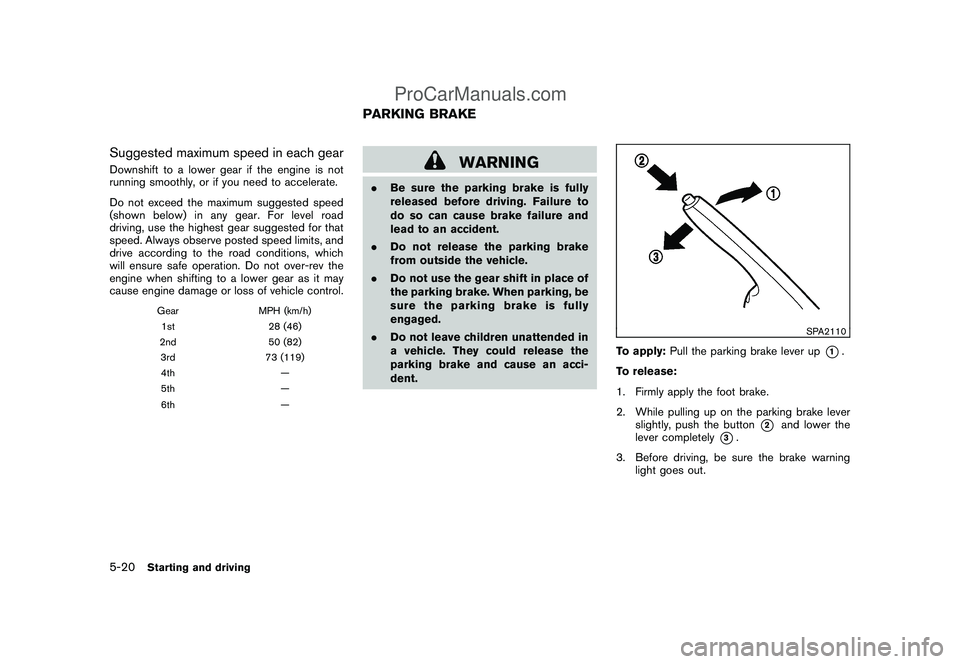
SPA2110
To apply:Pull the parking brake lever up
*1.
To release:
1. Firmly apply the foot brake.
2. While pulling up on the parking brake lever
slightly, push the button
*2
and lower the
lever completely
*3.
3. Before driving, be sure the brake warning
light goes out.
PARKING BRAKE
5-20
Starting and driving
ProCarManuals.com
Page 215 of 321

Black plate (213,1)
Model "Z12-D" EDITED: 2009/ 1/ 28
tions of dirt (do not clean the sensors with sharp
objects) . If the sensors are covered, it will affect
the accuracy of the sonar system.
If the sonar system malfunctions, the beep
sounds for 3 seconds when the ignition
switch is placed in the ON position. Have
the system checked by a NISSAN dealer.
SSD0488
WARNING
.Do not stop or park the vehicle over
flammable materials such as dry
grass, waste paper or rags. They
may ignite and cause a fire.
.Never leave the engine running
while the vehicle is unattended.
.Do not leave children unattended
inside the vehicle. They could un-
knowingly activate switches or con-
trols. Unattended children could
become involved in serious acci-dents.
.Safe parking procedures require
that both the parking brake be
applied and the transmission placed
into P (Park) for Continuously Vari-
able Transmission (CVT) model or in
an appropriate gear for Manual
Transmission (MT) model. Failure
to do so could cause the vehicle to
move unexpectedly or roll away and
result in an accident.
.Make sure the continuously variable
transmission selector lever has
been pushed as far forward as itPARKING/PARKING ON HILLS
Starting and driving
5-25
ProCarManuals.com
Page 216 of 321
Black plate (214,1)
Model "Z12-D" EDITED: 2009/ 1/ 28
can go and cannot be moved with-
out depressing the foot brake pedal.
1. Firmly apply the parking brake.
2.Continuously Variable Transmission
(CVT) models:
Move the selector lever to the P (Park)
position.
Manual Transmission (MT) models:
Move the shift lever to the R (Reverse) gear.
When parking on an uphill grade, place the
shift lever in the 1st gear.
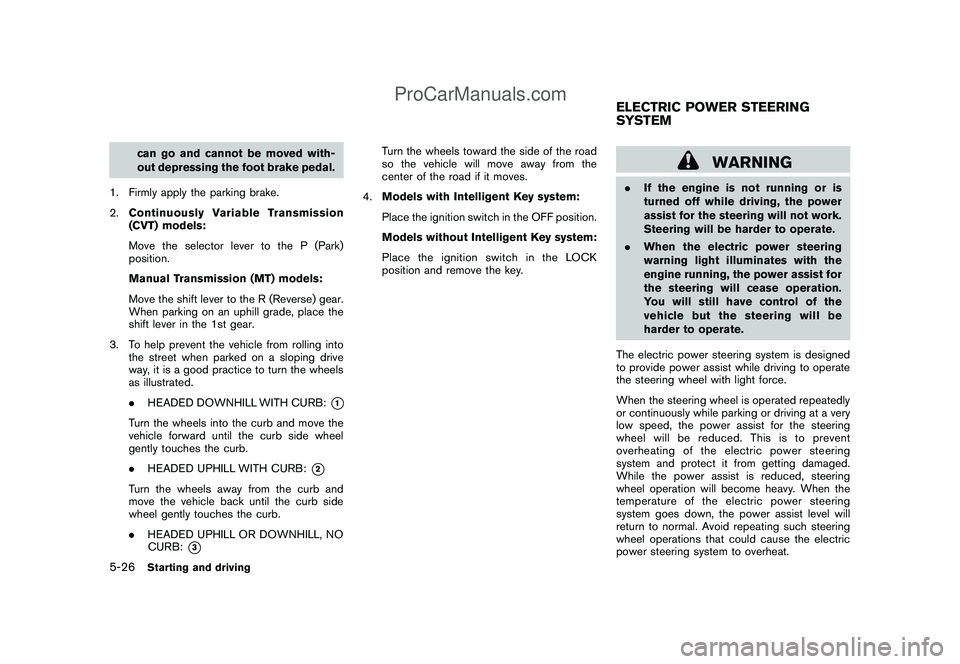
3. To help prevent the vehicle from rolling into
the street when parked on a sloping drive
way, it is a good practice to turn the wheels
as illustrated.
.HEADED DOWNHILL WITH CURB:
*1
Turn the wheels into the curb and move the
vehicle forward until the curb side wheel
gently touches the curb.
.HEADED UPHILL WITH CURB:
*2
Turn the wheels away from the curb and
move the vehicle back until the curb side
wheel gently touches the curb.
.HEADED UPHILL OR DOWNHILL, NO
CURB:
*3
Turn the wheels toward the side of the road
so the vehicle will move away from the
center of the road if it moves.
4.Models with Intelligent Key system:
Place the ignition switch in the OFF position.
Models without Intelligent Key system:
Place the ignition switch in the LOCK
position and remove the key.
WARNING
.If the engine is not running or is
turned off while driving, the power
assist for the steering will not work.
Steering will be harder to operate.
.When the electric power steering
warning light illuminates with the
engine running, the power assist for
the steering will cease operation.
You will still have control of the
vehicle but the steering will be
harder to operate.
The electric power steering system is designed
to provide power assist while driving to operate
the steering wheel with light force.
When the steering wheel is operated repeatedly
or continuously while parking or driving at a very
low speed, the power assist for the steering
wheel will be reduced. This is to prevent
overheating of the electric power steering
system and protect it from getting damaged.
While the power assist is reduced, steering
wheel operation will become heavy. When the
temperature of the electric power steering
system goes down, the power assist level will
return to normal. Avoid repeating such steering
wheel operations that could cause the electric
power steering system to overheat.ELECTRIC POWER STEERING
SYSTEM
5-26
Starting and driving
ProCarManuals.com
Page 226 of 321

Black plate (224,1)
Model "Z12-D" EDITED: 2009/ 1/ 28
TIRE PRESSURE MONITORING SYS-
TEM (TPMS)This vehicle is equipped with the Tire Pressure
Monitoring System (TPMS) . It monitors tire
pressure of all tires except the spare. When
the low tire pressure warning light is lit, one or
more of your tires is significantly under-inflated.
If the vehicle is being driven with low tire
pressure, the TPMS will activate and warn you
of it by the low tire pressure warning light. This
system will activate only when the vehicle is
driven at speeds above 16 MPH (25 km/h) . For
more details, see “WARNING/INDICATOR
LIGHTS AND AUDIBLE REMINDERS” in the
“2. Instruments and controls” section and “TIRE
PRESSURE MONITORING SYSTEM (TPMS)”
in the “5. Starting and driving” section.
WARNING
.If the low tire pressure warning light
illuminates while driving, avoid sud-
den steering maneuvers or abrupt
braking, reduce vehicle speed, pull
off the road to a safe location and
stop the vehicle as soon as possi-
ble. Driving with under-inflated tires
may permanently damage the tires
and increase the likelihood of tire
failure. Serious vehicle damagecould occur and may lead to an
accident and could result in serious
personal injury. Check the tire pres-
sure for all four tires. Adjust the tire
pressure to the recommended COLD
tire pressure shown on the Tire and
Loading Information label to turn
the low tire pressure warning light
OFF. If you have a flat tire, replace it
with a spare tire as soon as possi-
ble.
.When a spare tire is mounted or a
wheel is replaced, the TPMS will not
function and the low tire pressure
warning light will flash for approxi-
mately 1 minute. The light will
remain on after 1 minute. Contact
your NISSAN dealer as soon as
possible for tire replacement and/
or system resetting.
.Replacing tires with those not ori-
ginally specified by NISSAN could
affect the proper operation of the
TPMS.
.Do not inject any tire liquid or
aerosol tire sealant into the tires,
as this may cause a malfunction of
the tire pressure sensors.
CHANGING A FLAT TIREIf you have a flat tire, follow the instructions
below.Stopping the vehicle1. Safely move the vehicle off the road and
away from traffic.
2. Turn on the hazard warning flashers.
3. Park on a level surface and apply the parking
brake.
4.Continuously Variable Transmission
(CVT) models:
Move the selector lever to the P (Park)
position.
Manual Transmission (MT) models:
Move the shift lever to the R (Reverse)
position.
5. Turn off the engine.
6. Raise the hood to warn other traffic, and to
signal professional road assistance person-
nel that you need assistance.
7. Have all passengers get out of the vehicle
and stand in a safe place, away from traffic
and clear of the vehicle.
FLAT TIRE6-2
In case of emergency
ProCarManuals.com