reset NISSAN CUBE 2009 User Guide
[x] Cancel search | Manufacturer: NISSAN, Model Year: 2009, Model line: CUBE, Model: NISSAN CUBE 2009Pages: 321, PDF Size: 4.99 MB
Page 162 of 321

Black plate (160,1)
Model "Z12-D" EDITED: 2009/ 1/ 28
Push the TUNE
or
or SEEK
or
button to adjust Bass, Treble, Fade and
Balance to the desired level. Fade adjusts the
sound level between the front and rear speakers
and Balance adjusts the sound between the
right and left speakers.
Once you have adjusted the sound quality to the
desired level, push the MENU button repeatedly
until the radio or CD display reappears (normal
mode) . Otherwise, the radio or CD display will
automatically reappear after approximately 10
seconds.
For information about adjusting the clock dis-
play, see “CLOCK” in the “2. Instruments and
controls” section.
FM-AM radio operation
Radio (FM/AM) band select:
Pushing the radio band select button will
change the band as follows:
AM?FM1?FM2?AM
When the radio band select button is pushed
while the ignition switch is in the ACC or ON
position, the radio will come on at the station last
played.The last station played will also come on when
the PWR button is pushed to ON.
If another audio source is playing when the radio
band select button is pushed, the audio source
will automatically be turned off and the last radio
station played will come on.
When the stereo broadcast signal is weak, the
radio will automatically change from stereo to
monaural reception.
TUNE (Tuning):
Push the TUNE button
or
for manual
tuning.
SEEK tuning:
Push the SEEK button
or
to tune from
low to high or high to low frequencies and to
stop at the next broadcasting station.
SCAN tuning:
Push the SCAN tuning button to tune from low
to high frequencies and stops at each broad-
casting station for 5 seconds. Pushing the
button again during this 5 seconds period will
stop SCAN tuning and the radio will remain
tuned to that station.
If the SCAN tuning button is not pushed within 5
seconds, SCAN tuning moves to the nextstation.
to
Station memory operations:
Twelve stations can be set for the FM band (6
each for FM1 and FM2) and 6 stations can be
set for the AM band.
1. Choose the radio band AM, FM1 or FM2
using the radio band select button.
2. Tune to the desired station using the SEEK,
SCAN or TUNE button.
3. Select the desired station and push and
hold the desired station preset buttons 1 to
6 until a beep sound is heard. (The radio
mutes when the select button is pushed.)
4. The station indicator will then come on and
the sound will resume. Memorizing is now
complete.
5. Other buttons can be set in the same
manner.
If the battery cable is disconnected, or if the fuse
blows, the radio memory will be erased. In that
case, reset the desired stations.
Compact Disc (CD) player operationPlace the ignition switch in the ACC or ON
position, and insert the CD into the slot with the
label side facing up. The CD will be guided
automatically into the slot and start playing.
4-18
Heater, air conditioner, audio and phone systems
ProCarManuals.com
Page 165 of 321
Black plate (163,1)
Model "Z12-D" EDITED: 2009/ 1/ 28
SAA2347
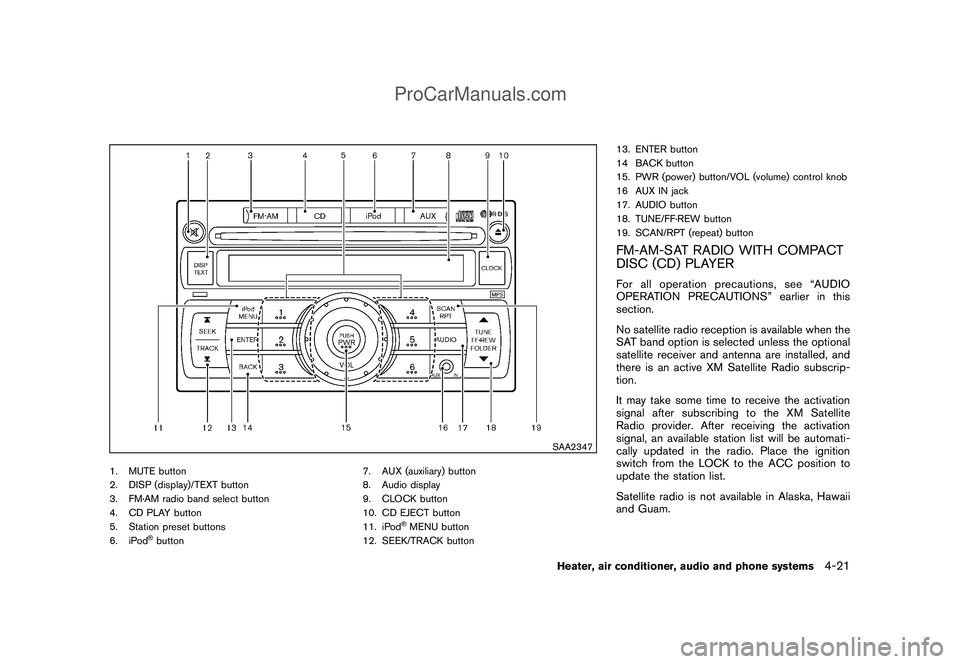
1. MUTE button
2. DISP (display)/TEXT button
3. FM·AM radio band select button
4. CD PLAY button
5. Station preset buttons
6. iPod
®button7. AUX (auxiliary) button
8. Audio display
9. CLOCK button
10. CD EJECT button
11. iPod
®MENU button
12. SEEK/TRACK button13. ENTER button
14 BACK button
15. PWR (power) button/VOL (volume) control knob
16 AUX IN jack
17. AUDIO button
18. TUNE/FF·REW button
19. SCAN/RPT (repeat) button
FM-AM-SAT RADIO WITH COMPACT
DISC (CD) PLAYERFor all operation precautions, see “AUDIO
OPERATION PRECAUTIONS” earlier in this
section.
No satellite radio reception is available when the
SAT band option is selected unless the optional
satellite receiver and antenna are installed, and
there is an active XM Satellite Radio subscrip-
tion.
It may take some time to receive the activation
signal after subscribing to the XM Satellite
Radio provider. After receiving the activation
signal, an available station list will be automati-
cally updated in the radio. Place the ignition
switch from the LOCK to the ACC position to
update the station list.
Satellite radio is not available in Alaska, Hawaii
and Guam.
Heater, air conditioner, audio and phone systems
4-21
ProCarManuals.com
Page 167 of 321

Black plate (165,1)
Model "Z12-D" EDITED: 2009/ 1/ 28
When the stereo broadcast signal is weak, the
radio will automatically change from stereo to
monaural reception.
When the radio band select button is pushed
while the ignition switch is in the ACC or ON
position, the radio will come on at the station last
played.
SAT radio band select:
The last station played will also come on when
the PWR button is pushed to ON.
If another audio source is playing when the
satellite radio band select button is turned to
ON, the audio source will automatically be
turned off and the last radio station played will
come on.
TUNE (Tuning):
Push the TUNE button
or
for manual
tuning. To move quickly through the stations,
push and hold the TUNE button.
SEEK tuning:
.For AM and FM radio
Push the SEEK button
or
to tune
from low to high or high to low frequencies
and to stop at the next broadcasting station..For XM Satellite Radio (if so equipped)
Push the SEEK button
or
to tune
to the first channel of the next or previous
category.
SCAN tuning:
Push the SCAN button to tune from low to high
frequencies and stops at each broadcasting
station for 5 seconds. Pushing the button again
during this 5 seconds period will stop SCAN
tuning and the radio will remain tuned to that
station.
If the SCAN tuning button is not pushed within 5
seconds, SCAN tuning moves to the next
station.
to
Station memory operations:
Eighteen channels can be set for the SAT (if so
equipped) band (6 each for XM1, XM2 and
XM3) , 12 stations can be set for the FM band (6
each for FM1 and FM2) , and 6 can be set for the
AM band for easy access.
1. Choose the radio band using the radio band
select button.
2. Tune to the desired station using the SEEK,
SCAN or TUNE button.
3. Push and hold the desired radio station
preset button
to
until a beep sound isheard. (The radio mutes when the radio
station preset button is pushed.)
4. The station indicator will then come on and
the sound will resume. Memorizing is now
complete.
5. Other buttons can be set in the same
manner.
If the battery cable is disconnected, or if the fuse
opens, the radio memory will be erased. In that
case, reset the desired stations.
Radio Data System (RDS):
RDS stands for Radio Data System, and is a
data information service transmitted by some
radio stations on the FM band (not AM band)
encoded within a regular radio broadcast.
Currently, most RDS stations are in large cities,
but many stations are now considering broad-
casting RDS data.
RDS can display:
.Station call sign, such as “WHFR 98.3”.
.Station name, such as “The Groove”.
.Music or programming type such as “Clas-
sical”, “Country” or “Rock”.
.Traffic reports about delays or construction.
If the station broadcasts RDS information, the
RDS icon is displayed.
Heater, air conditioner, audio and phone systems
4-23
ProCarManuals.com
Page 172 of 321
Black plate (170,1)
Model "Z12-D" EDITED: 2009/ 1/ 28
rubbing the inner and outer edges with the
side of a pen or pencil as illustrated.
SAA2348
Without Hands-Free Phone System
SAA2349
With Hands-Free Phone System
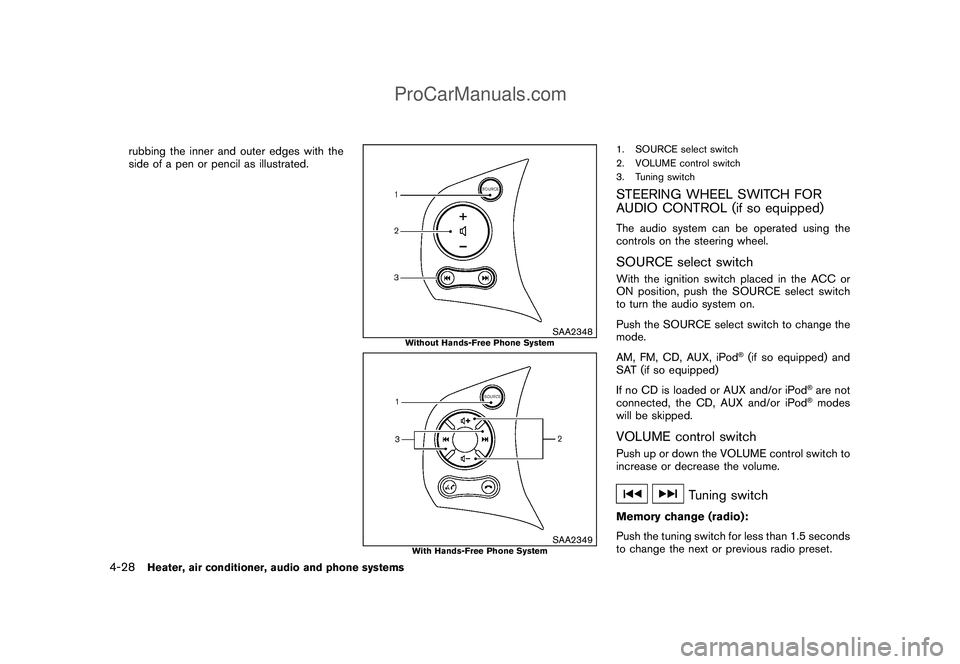
1. SOURCE select switch
2. VOLUME control switch
3. Tuning switchSTEERING WHEEL SWITCH FOR
AUDIO CONTROL (if so equipped)The audio system can be operated using the
controls on the steering wheel.SOURCE select switchWith the ignition switch placed in the ACC or
ON position, push the SOURCE select switch
to turn the audio system on.
Push the SOURCE select switch to change the
mode.
AM, FM, CD, AUX, iPod
®(if so equipped) and
SAT (if so equipped)
If no CD is loaded or AUX and/or iPod
®are not
connected, the CD, AUX and/or iPod®modes
will be skipped.
VOLUME control switchPush up or down the VOLUME control switch to
increase or decrease the volume.
Tuning switch
Memory change (radio):
Push the tuning switch for less than 1.5 seconds
to change the next or previous radio preset.
4-28
Heater, air conditioner, audio and phone systems
ProCarManuals.com
Page 182 of 321
Black plate (180,1)
Model "Z12-D" EDITED: 2009/ 1/ 28
entering a phone number” earlier in this section
for more details.)
“Redial”
*C
Use the Redial command to call the last number
that was dialed within the vehicle.
NOTE:
The system will not redial the last number
dialed by the handset keypad.
If a redial number does not exist, the system
announces, “There is no number to redial” and
ends the VR session.
“Call Back”
*D
Use the Call Back command to dial the number
of the last incoming call within the vehicle.
The system acknowledges the command, re-
peats the number and begins dialing.
If a call back number does not exist, the system
announces, “There is no number to call back”
and ends the VR session.
International
When you would like to enter a phone number
other than in 3-3-4 digit format, say “interna-
tional”. When the system acknowledges this
command, the system will prompt you to speak
the number you wish to enter.
During a callDuring a call there are several command options
available. Push the
button on the steering
wheel to mute the receiving voice and enter
commands.
.“Help” — The system announces the avail-
able commands.
.“Go back/Correction” — The system an-
nounces “Go back,” ends the VR session
and returns to the call.
.“Cancel/Quit” — The system announces
“Cancel,” ends the VR session and returns
to the call.
.“Send/Enter/Call/Dial” — Use the Send
command to enter numbers during a call.
For example, if you were directed to dial an
extension by an automated system:
Say: “Send one two three four.”
The system acknowledges the command
and sends the tones associated with the
numbers. The system then ends the VR
session and returns to the call.
.“Transfer Call” — Use the Transfer Call
command to transfer the call from the
Bluetooth
®Hands-Free Phone System to
the cellular phone when privacy is desired.
The system announces, “Transfer call. Calltransferred to privacy mode.” The system
then ends the VR session.
You can also issue the Transfer Call
command again to return to a hands-free
call through the vehicle.
.“Mute” — Use the Mute command to mute
your voice so the other party cannot hear it.
Use the mute command again to unmute
your voice.
NOTE:
If the other party ends the call or the
cellular phone network connection is lost
while the Mute feature is on, the Mute
feature may need to be reset to “off.”
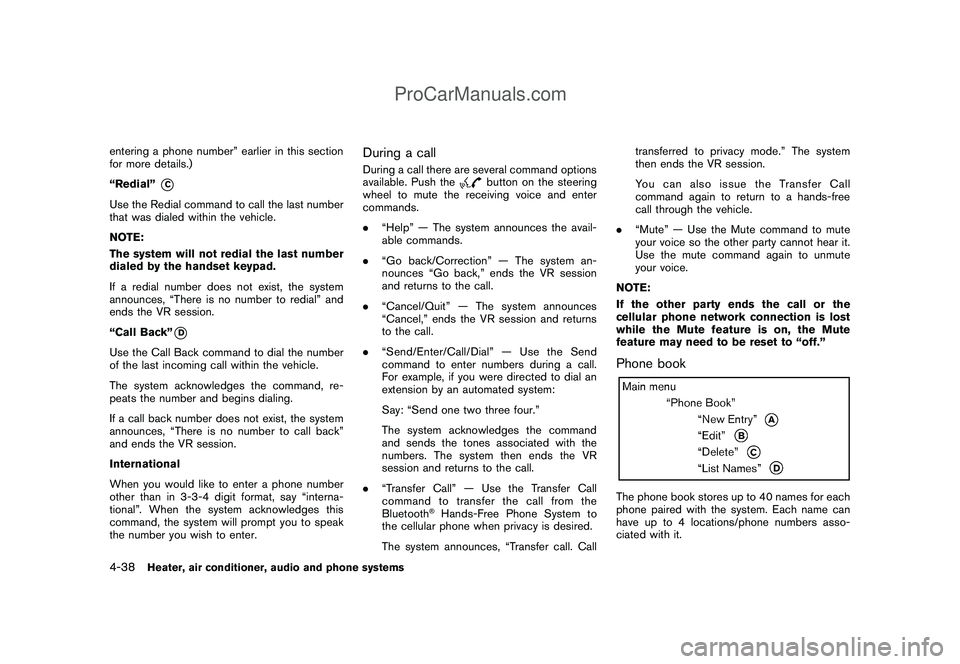
Phone bookThe phone book stores up to 40 names for each
phone paired with the system. Each name can
have up to 4 locations/phone numbers asso-
ciated with it.
4-38
Heater, air conditioner, audio and phone systems
ProCarManuals.com
Page 194 of 321

Black plate (192,1)
Model "Z12-D" EDITED: 2009/ 1/ 28
alternate tires and wheels allow the TPMS to
continue to function properly.Additional information.The TPMS does not monitor the tire
pressure of the spare tire.
.The TPMS will activate only when the
vehicle is driven at speeds above 16 MPH
(25 km/h) . Also, this system may not detect
a sudden drop in tire pressure (for example a
flat tire while driving) .
.The low tire pressure warning light does not
automatically turn off when the tire pressure
is adjusted. After the tire is inflated to the
recommended pressure, the vehicle must be
driven at speeds above 16 MPH (25 km/h)
to activate the TPMS and turn off the low tire
pressure warning light. Use a tire pressure
gauge to check the tire pressure.
.Tire pressure rises and falls depending on
the heat caused by the vehicle’s operation
and the outside temperature. Low outside
temperature can lower the temperature of
the air inside the tire which can cause a
lower tire inflation pressure. This may cause
the low tire pressure warning light to
illuminate. If the warning light illuminates in
low ambient temperature, check the tire
pressure for all four tires.
For additional information, see “Low tire pres-sure warning light” in the “2. Instruments and
controls” section and “TIRE PRESSURE MON-
ITORING SYSTEM (TPMS)” in the “6. In case of
emergency” section.
WARNING
.If the low tire pressure warning light
illuminates while driving, avoid sud-
den steering maneuvers or abrupt
braking, reduce vehicle speed, pull
off the road to a safe location and
stop the vehicle as soon as possi-
ble. Driving with under-inflated tires
may permanently damage the tires
and increase the likelihood of tire
failure. Serious vehicle damage
could occur and may lead to an
accident and could result in serious
personal injury. Check the tire pres-
sure for all four tires. Adjust the tire
pressure to the recommended COLD
tire pressure shown on the Tire and
Loading Information label to turn
the low tire pressure warning light
OFF. If you have a flat tire, replace it
with a spare tire as soon as possi-
ble. (See “FLAT TIRE” in the “6. In
case of emergency” section for
changing a flat tire.).When a spare tire is mounted or a
wheel is replaced, the TPMS will not
function and the low tire pressure
warning light will flash for approxi-
mately 1 minute. The light will
remain on after 1 minute. Contact
your NISSAN dealer as soon as
possible for tire replacement and/
or system resetting.
.Replacing tires with those not ori-
ginally specified by NISSAN could
affect the proper operation of the
TPMS.
.Do not inject any tire liquid or
aerosol tire sealant into the tires,
as this may cause a malfunction of
the tire pressure sensors.
CAUTION
.The TPMS may not function properly
when the wheels are equipped with
tire chains or the wheels are buried
in snow.
.Do not place metalized film or any
metal parts (antenna, etc.) on the
windows. This may cause poor re-
ception of the signals from the tire
5-4
Starting and driving
ProCarManuals.com
Page 212 of 321
Black plate (210,1)
Model "Z12-D" EDITED: 2009/ 1/ 28
switch and release it. Take your foot off the
accelerator pedal. Your vehicle will maintain the
set speed.
.To pass another vehicle,depress the
accelerator pedal. When you release the
pedal, the vehicle will return to the previously
set speed.
.The vehicle may not maintain the set speed
on winding or hilly roads. If this happens,
drive without the cruise control.
To cancel the preset speed,use one of the
following methods:
a) Push the CANCEL switch.
b) Tap the brake pedal.
c) Turn the MAIN switch off. The CRUISE light
will turn off.
.If you depress the brake pedal while pushing
the RESUME/ACCELERATE or SET/
COAST switch and reset at the cruising
speed, the cruise control will disengage.
Turn the MAIN switch off once and then turn
it on again.
.The cruise control will automatically cancel if
the vehicle slows more than 8 MPH (12
km/h) below the set speed.
.If you move the selector lever to the N
(Neutral) position (Continuously VariableTransmission models) or depressing the
clutch pedal (Manual Transmission models) ,
the cruise control will be canceled.
To reset at a faster cruising speed,use one
of the following methods:
.Depress the accelerator pedal. When the
vehicle attains the desired speed, push and
release the SET/COAST switch.
.Push and hold the RESUME/ACCELERATE
switch. When the vehicle attains the desired
speed, release the switch.
.Push, then quickly release the RESUME/
ACCELERATE switch. Each time you do
this, the set speed will increase by about 1
MPH (1.6 km/h) .
To reset at a slower cruising speed,use one
of the following methods:
.Lightly tap the brake pedal. When the
vehicle attains the desired speed, push the
SET/COAST switch and release it.
.Push and hold the SET/COAST switch.
Release the switch when the vehicle slows
down to the desired speed.
.Push, then quickly release the SET/COAST
switch. Each time you do this, the set speed
will decrease by about 1 MPH (1.6 km/h) .
To resume the preset speed,push andrelease the RESUME/ACCELERATE switch.
The vehicle will resume the last set cruising
speed when the vehicle speed is over 25 MPH
(40 km/h) .5-22
Starting and driving
ProCarManuals.com
Page 226 of 321

Black plate (224,1)
Model "Z12-D" EDITED: 2009/ 1/ 28
TIRE PRESSURE MONITORING SYS-
TEM (TPMS)This vehicle is equipped with the Tire Pressure
Monitoring System (TPMS) . It monitors tire
pressure of all tires except the spare. When
the low tire pressure warning light is lit, one or
more of your tires is significantly under-inflated.
If the vehicle is being driven with low tire
pressure, the TPMS will activate and warn you
of it by the low tire pressure warning light. This
system will activate only when the vehicle is
driven at speeds above 16 MPH (25 km/h) . For
more details, see “WARNING/INDICATOR
LIGHTS AND AUDIBLE REMINDERS” in the
“2. Instruments and controls” section and “TIRE
PRESSURE MONITORING SYSTEM (TPMS)”
in the “5. Starting and driving” section.
WARNING
.If the low tire pressure warning light
illuminates while driving, avoid sud-
den steering maneuvers or abrupt
braking, reduce vehicle speed, pull
off the road to a safe location and
stop the vehicle as soon as possi-
ble. Driving with under-inflated tires
may permanently damage the tires
and increase the likelihood of tire
failure. Serious vehicle damagecould occur and may lead to an
accident and could result in serious
personal injury. Check the tire pres-
sure for all four tires. Adjust the tire
pressure to the recommended COLD
tire pressure shown on the Tire and
Loading Information label to turn
the low tire pressure warning light
OFF. If you have a flat tire, replace it
with a spare tire as soon as possi-
ble.
.When a spare tire is mounted or a
wheel is replaced, the TPMS will not
function and the low tire pressure
warning light will flash for approxi-
mately 1 minute. The light will
remain on after 1 minute. Contact
your NISSAN dealer as soon as
possible for tire replacement and/
or system resetting.
.Replacing tires with those not ori-
ginally specified by NISSAN could
affect the proper operation of the
TPMS.
.Do not inject any tire liquid or
aerosol tire sealant into the tires,
as this may cause a malfunction of
the tire pressure sensors.
CHANGING A FLAT TIREIf you have a flat tire, follow the instructions
below.Stopping the vehicle1. Safely move the vehicle off the road and
away from traffic.
2. Turn on the hazard warning flashers.
3. Park on a level surface and apply the parking
brake.
4.Continuously Variable Transmission
(CVT) models:
Move the selector lever to the P (Park)
position.
Manual Transmission (MT) models:
Move the shift lever to the R (Reverse)
position.
5. Turn off the engine.
6. Raise the hood to warn other traffic, and to
signal professional road assistance person-
nel that you need assistance.
7. Have all passengers get out of the vehicle
and stand in a safe place, away from traffic
and clear of the vehicle.
FLAT TIRE6-2
In case of emergency
ProCarManuals.com
Page 286 of 321

Black plate (284,1)
Model "Z12-D" EDITED: 2009/ 1/ 28
wear indicators are visible, the
tire(s) should be replaced.
.
Tires degrade with age and use.
Have tires, including the spare,
over 6 years old checked by a
qualified technician, because
some tire damage may not be
obvious. Replace the tires as
necessary to prevent tire failure
and possible personal injury.
.
Improper service of the spare
tire may result in serious perso-
nal injury. If it is necessary to
repair the spare tire, contact a
NISSAN dealer.
.
For additional information re-
garding tires, refer to “Important
Tire Safety Information” (US) or
“Tire Safety Information” (Cana-
da) in the Warranty Information
Booklet.
Replacing wheels and tiresWhen replacing a tire, use the same size, tread
design, speed rating and load carrying capacity
as originally equipped. (See “SPECIFICA-
TIONS” in the “9. Technical and consumer
information” section for recommended types
and sizes of tires and wheels.)
WARNING
.The use of tires other than those
recommended or the mixed use of
tires of different brands, construc-
tion (bias, bias-belted or radial) , or
tread patterns can adversely affect
the ride, braking, handling, ground
clearance, body-to-tire clearance,
tire chain clearance, speedometer
calibration, headlight aim and bum-
per height. Some of these effects
may lead to accidents and could
result in serious personal injury.
.If the wheels are changed for any
reason, always replace with wheels
which have the same off-set dimen-
sion. Wheels of a different off-set
could cause premature tire wear,
degrade vehicle handling character-
istics and/or interference with the
brake discs/drums. Such interfer-
ence can lead to decreased braking
efficiency and/or early brake pad/
shoe wear. See “WHEELS AND
TIRES” in the “9. Technical and
consumer information” section of
this manual for wheel off-set dimen-
sions..When a spare tire is mounted or a
wheel is replaced, the TPMS will not
function and the low tire pressure
warning light will flash for approxi-
mately 1 minute. The light will
remain on after 1 minute. Contact
your NISSAN dealer as soon as
possible for tire replacement and/
or system resetting.
.Replacing tires with those not ori-
ginally specified by NISSAN could
affect the proper operation of the
TPMS.
.Do not install a damaged or de-
formed wheel or tire even if it has
been repaired. Such wheels or tires
could have structural damage and
could fail without warning.
.The use of retread tire is not re-
commended.
.For additional information regard-
ing tires, refer to “Important Tire
Safety Information” (US) or “Tire
Safety Information” (Canada) in the
Warranty Information Booklet.
8-36
Maintenance and do-it-yourself
ProCarManuals.com
Page 309 of 321

Black plate (307,1)
Model "Z12-D" EDITED: 2009/ 1/ 28
Due to legal requirements in some states/areas
or provinces, your vehicle may be required to be
in what is called the “ready condition” for an
Inspection/Maintenance (I/M) test of the emis-
sion control system.
The vehicle is set to the “ready condition” when
it is driven through certain driving patterns.
Usually, the “ready condition” can be obtained
by ordinary usage of the vehicle.
If a powertrain system component is repaired or
the battery is disconnected, the vehicle may be
reset to a “not ready condition”. Before taking
the I/M test, check the vehicle’s inspection/
maintenance test readiness condition. Place the
ignition switch in the ON position without
starting the engine. If the Malfunction Indicator
Light (MIL) comes on steady for 20 seconds and
then blinks for 10 seconds, the I/M test
condition is “not ready”. If the MIL does not
blink after 20 seconds, the I/M test condition is
“ready”.
If the MIL indicates the vehicle is in a “not ready”
condition, drive the vehicle through the following
pattern to set the vehicle to the “ready condi-
tion”. If you cannot or do not want to perform the
driving pattern, a NISSAN dealer can conduct it
for you.
WARNING
Always drive the vehicle in a safe and
prudent manner according to traffic
conditions and obey all traffic laws.
1. Start the engine. Allow the engine to idle
until the engine coolant temperature gauge
needle points between the C and H (normal
operating temperature) .
2. Accelerate the vehicle to 55 MPH (88
km/h) , then quickly release the accelerator
pedal completely and keep it released for at
least 10 seconds.
3. Quickly depress the accelerator pedal for a
moment, then drive the vehicle at a speed of
53 to 60 MPH (86 to 96 km/h) for at least 9
minutes.
4. Stop the vehicle. Leave the engine running.
5. Accelerate the vehicle to 35 MPH (55 km/h)
and maintain the speed for 20 seconds.
6. Repeat steps 4 and 5 at least 10 times.
7. Accelerate the vehicle to 55 MPH (88 km/h)
and maintain the speed for at least 3
minutes.
8. Stop the vehicle. Place the transmission
selector lever in the P (Park) position (forContinuously Variable Transmission models)
or the shift lever in the N (Neutral) position
(for Manual Transmission models) .
9. Turn the engine off.
10. Repeat steps 1 through 8 at least one more
time.
If step 1 through 7 is interrupted, repeat the
preceding step. Any safe driving mode is
acceptable between steps. Do not stop the
engine until step 7 is completed.
READINESS FOR INSPECTION/
MAINTENANCE (I/M) TEST
Technical and consumer information
9-21
ProCarManuals.com