transmission NISSAN CUBE 2009 User Guide
[x] Cancel search | Manufacturer: NISSAN, Model Year: 2009, Model line: CUBE, Model: NISSAN CUBE 2009Pages: 321, PDF Size: 4.99 MB
Page 88 of 321

Black plate (86,1)
Model "Z12-D" EDITED: 2009/ 1/ 28
— An emission control system and/or CVT
malfunction has been detected. Check the
fuel-filler cap. If the fuel-filler cap is loose or
missing, tighten or install the cap and
continue to drive the vehicle. The
light
should turn off after a few driving trips. If the
light does not turn off after a few
driving trips, have the vehicle inspected by a
NISSAN dealer. You do not need to have
your vehicle towed to the dealer.
.Malfunction indicator light blinking — An
engine misfire has been detected which may
damage the emission control system.
To reduce or avoid emission control system
damage:
a) Do not drive at speeds above 45 MPH
(72 km/h) .
b) Avoid hard acceleration or deceleration.
c) Avoid steep uphill grades.
d) If possible, reduce the amount of cargo
being hauled or towed.
The malfunction indicator light may stop
blinking and remain illuminated.
Have the vehicle inspected by a NISSAN
dealer. You do not need to have your vehicle
towed to the dealer.
CAUTION
Continued vehicle operation without
having the emission control system
and/or CVT system checked and re-
paired as necessary could lead to poor
driveability, reduced fuel economy, and
possible damage to the emission con-
trol system.
Overdrive off indicator light (if so
equipped)
The overdrive off indicator light illuminates when
the overdrive off mode is selected.
For additional information, see ““CONTINU-
OUSLY VARIABLE TRANSMISSION (CVT)” in
the “5. Starting and driving” section of this
manual.
Security indicator light
The light blinks when the ignition switch is in the
ACC, OFF or LOCK position. This function
indicates the security system equipped on the
vehicle is operational.
If the security system is malfunctioning, this light
will remain on while the ignition switch is in the
ON position. For additional information, see“SECURITY SYSTEMS” later in this section.
Slip indicator light
The light will blink when the Vehicle Dynamic
Control (VDC) system is operating, thus alerting
the driver to the fact that the road surface is
slippery and the vehicle is nearing its traction
limits.
Small light indicator light
The light illuminates when the headlight switch is
turned to the
position.
Turn signal/hazard indicator lights
The light flashes when the turn signal switch
lever or hazard switch is turned on.
Vehicle Dynamic Control (VDC) off
indicator light
The light illuminates when the Vehicle Dynamic
Control (VDC) off switch is pushed to OFF. This
indicates that the VDC system is not operating.
When the VDC off indicator light and slip
indicator light illuminate with the VDC system
turned on, this light alerts the driver to the fact
that the VDC system’s fail-safe mode is operat-
ing, for example the VDC system may not be
2-16
Instruments and controls
ProCarManuals.com
Page 186 of 321
Black plate (184,1)
Model "Z12-D" EDITED: 2009/ 1/ 28
For example, if the current priority levels are:
Priority Level 1 = Phone A
Priority Level 2 = Phone B
Priority Level 3 = Phone C
and you change the priority level of Phone C to
Level 1, then:
Priority Level 1 = Phone C
Priority Level 2 = Phone B
Priority Level 3 = Phone A
“Delete Phone”
*E
Use the Delete Phone command to delete a
specific phone or all phones from the Bluetooth
®
Hands-Free Phone System.
The system announces the names of the phones
already paired with the system and their priority
level. The system then gives you the option to
delete a specific phone, all phones or listen to
the list again.
Once you chose to delete a phone or all phones,
the system asks you to confirm this action.
NOTE:
When you delete a phone, the associated
phone book for that phone will also be
deleted.
“Select Ringtone”
*F
Use the Select Ringtone command to select thetone heard in the vehicle when an incoming call
is received.
The system announces the name of the active
phoneandasksyoutochoosefromthe
following commands:
.“Ringtone” — The system plays a ringtone
and asks if you would like to select that tone.
If you say no, the system plays the next
ringtone available and continues to cycle
through the ringtones until you select one or
quit.
.“Silent” — The system asks you to confirm
your wish to disable the ringtone.
“Bluetooth Off”
*G
Use the Bluetooth
®Off command to turn off the
Bluetooth Hands-Free Phone System.
When Bluetooth
®Hands-Free Phone System is
off, you will not be able to make or receive calls
using NISSAN Voice Recognition. Also, you will
not have access to the Phone Book.
You can still use the Memo Pad and access
Setup.
SPEAKER ADAPTATION (SA) MODESpeaker Adaptation allows up to two out-of
dialect users to train the system to improve
recognition accuracy. By repeating a number of
commands, the users can create a voice modelof their own voice that is stored in the system.
The system is capable of storing a different
speaker adaptation model for memory A and
memory B.
If memory A is available, the system will use
memory A to store the model. If memory A is in
use and memory B is available, the system will
use memory B to store the model. If both of the
memory locations are in use, the system will ask
the user to select which memory location should
be overwritten.
Training procedureThe procedure for training a voice is as follows.
1. Position the vehicle in a reasonably quiet
outdoor location.
2. Sit in the driver’s seat with the engine
running, the parking brake applied, and the
transmission in P (Park) position.
3. Push and hold the
button for more than
5 seconds.
4. The system announces: “Press the PHONE
SEND (
) button for the hands-free
phone system to enter the speaker adapta-
tion mode or press the PHONE END (
)
button to select a different language”.
5. Push the
button.
For information about selecting a different
4-42
Heater, air conditioner, audio and phone systems
ProCarManuals.com
Page 191 of 321
Black plate (16,1)
5 Starting and driving
Model "Z12-D" EDITED: 2009/ 1/ 28
Precautions when starting and driving..................... 5-2
Exhaust gas (carbon monoxide)......................... 5-2
Three-way catalyst.......................................... 5-2
Tire Pressure Monitoring System (TPMS)............. 5-3
Avoiding collision and rollover........................... 5-5
Off-road recovery........................................... 5-5
Rapid air pressure loss.................................... 5-6
Drinking alcohol/drugs and driving...................... 5-6
Ignition switch
(models without Intelligent Key system)................... 5-7
Continuously Variable Transmission (CVT)............ 5-7
Manual Transmission (MT)................................ 5-8
Steering lock................................................. 5-8
Key positions................................................ 5-8
Push-button ignition switch
(models with Intelligent Key system)....................... 5-9
Operating range for engine start function............. 5-9
Push-button ignition switch operation................ 5-10
Push-button ignition switch positions................ 5-11
Intelligent Key battery discharge...................... 5-11
Before starting the engine.................................. 5-12
Starting the engine........................................... 5-12
Models without Intelligent Key system............... 5-12
Models with Intelligent Key system................... 5-13
Driving the vehicle............................................ 5-14Continuously Variable Transmission (CVT).......... 5-14
Manual Transmission (MT).............................. 5-18
Parking brake.................................................. 5-20
Cruise control (if so equipped)............................ 5-21
Precautions on cruise control.......................... 5-21
Cruise control operations............................... 5-21
Break-in schedule............................................ 5-23
Increasing fuel economy.................................... 5-23
Sonar system (if so equipped)............................. 5-24
Parking/parking on hills...................................... 5-25
Electric power steering system............................ 5-26
Brake system.................................................. 5-27
Braking precautions...................................... 5-27
Anti-lock Braking System (ABS)...................... 5-28
Vehicle Dynamic Control (VDC) system................. 5-29
Cold weather driving......................................... 5-30
Freeing a frozen door lock.............................. 5-30
Anti-freeze.................................................. 5-30
Battery...................................................... 5-30
Draining of coolant water............................... 5-30
Tire equipment............................................ 5-31
Special winter equipment............................... 5-31
Driving on snow or ice.................................. 5-31
Engine block heater (if so equipped)................. 5-31
ProCarManuals.com
Page 198 of 321
Black plate (196,1)
Model "Z12-D" EDITED: 2009/ 1/ 28
1. Move the selector lever to the P (Park)
position.
2. Turn the ignition switch slightly in the ON
direction.
3. TurntheignitionswitchtotheLOCK
position.
4. Remove the key.
If the ignition switch is turned to the LOCK
position, the selector lever cannot be moved
from the P (Park) position. The selector lever can
be moved if the ignition switch is in the ON
position with the foot brake pedal depressed.
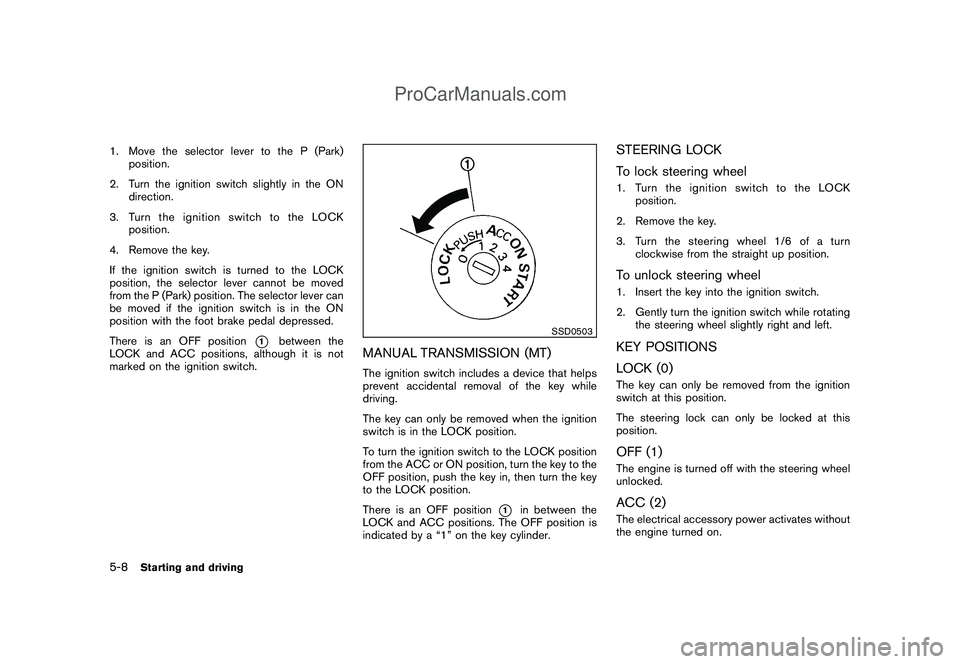
There is an OFF position
*1
between the
LOCK and ACC positions, although it is not
marked on the ignition switch.
SSD0503
MANUAL TRANSMISSION (MT)The ignition switch includes a device that helps
prevent accidental removal of the key while
driving.
The key can only be removed when the ignition
switch is in the LOCK position.
To turn the ignition switch to the LOCK position
from the ACC or ON position, turn the key to the
OFF position, push the key in, then turn the key
to the LOCK position.
There is an OFF position
*1
in between the
LOCK and ACC positions. The OFF position is
indicated by a “1” on the key cylinder.
STEERING LOCK
To lock steering wheel1. Turn the ignition switch to the LOCK
position.
2. Remove the key.
3. Turn the steering wheel 1/6 of a turn
clockwise from the straight up position.To unlock steering wheel1. Insert the key into the ignition switch.
2. Gently turn the ignition switch while rotating
the steering wheel slightly right and left.KEY POSITIONS
LOCK (0)The key can only be removed from the ignition
switch at this position.
The steering lock can only be locked at this
position.OFF (1)The engine is turned off with the steering wheel
unlocked.ACC (2)The electrical accessory power activates without
the engine turned on.
5-8
Starting and driving
ProCarManuals.com
Page 202 of 321

Black plate (200,1)
Model "Z12-D" EDITED: 2009/ 1/ 28
chime sounds. The engine will start.
After step 3 is performed, when the ignition
switch is pushed without depressing the brake
pedal, the ignition switch position will change to
ACC.
NOTE:
.When the ignition switch is pushed to
the ACC or ON position or the engine is
started by the above procedures, the
Intelligent Key system warning light
may blink in yellow even if the Intelli-
gent Key is inside the vehicle. This is
not a malfunction. To stop the warning
light from blinking, touch the ignition
switch with the Intelligent Key again.
.If the Intelligent Key system warning
light in the meter is blinking in green,
replace the battery as soon as possible.
(See “KEY BATTERY REPLACEMENT”
in the “8. Maintenance and do-it-your-
self” section.).Make sure the area around the vehicle is
clear.
.Check fluid levels such as engine oil, cool-
ant, brake fluid, and window washer fluid as
frequently as possible, or at least whenever
you refuel.
.Check that all windows and lights are clean.
.Visually inspect tires for their appearance
and condition. Also check tires for proper
inflation.
.Lock all doors.
.Position seat and adjust head restraints.
.Adjust inside and outside mirrors.
.Fasten seat belts and ask all passengers to
do likewise.
.Check the operation of warning lights when
the ignition switch is placed in the ON
position. (See “WARNING/INDICATOR
LIGHTS AND AUDIBLE REMINDERS” in
the “2. Instruments and controls” section.)
MODELS WITHOUT INTELLIGENT KEY
SYSTEM1. Apply the parking brake.
2.Continuously Variable Transmission
(CVT) models:
Move the selector lever to the P (Park) or N
(Neutral) position. (P is recommended.)
The starter is designed so that it does not
operate unless the selector lever is in either
of the above positions.
Manual Transmission (MT) models:
Move the shift lever to the N (Neutral)
position. Depress the clutch pedal fully to
the floor.
The starter is designed not to operate unless
the clutch pedal is fully depressed.
3. Crank the enginewith your foot off the
accelerator pedalby turning the ignition
switch to START. Release the switch when
the engine starts. If the engine starts, but
fails to run, repeat the above procedure.
.If the engine is very hard to start in
extremely cold weather or when restart-
ing, depress the accelerator pedal a little
(approximately 1/3 to the floor) and hold
it and then crank the engine. Release the
accelerator pedal when the engine
BEFORE STARTING THE ENGINE STARTING THE ENGINE
5-12
Starting and driving
ProCarManuals.com
Page 204 of 321

Black plate (202,1)
Model "Z12-D" EDITED: 2009/ 1/ 28
4.Warm-up
Allow the engine to idle for at least 30
seconds after starting. Do not race the
engine while warming it up. Drive at
moderate speed for a short distance first,
especially in cold weather. In cold weather,
keep the engine running for a minimum of 2 -
3 minutes before shutting it off. Starting and
stopping the engine over a short period of
time may make the vehicle more difficult to
start.
When racing the engine up to 4,000 rpm or
more under no load condition, the engine
will enter the fuel cut mode.
5. To stop the engine, move the selector lever
to the P (Park) position, and push the
ignition switch to the OFF position.
CONTINUOUSLY VARIABLE TRANS-
MISSION (CVT)The Continuously Variable Transmission (CVT)
in your vehicle is electronically controlled to
produce maximum power and smooth operation.
The recommended operating procedures for this
transmission are shown on the following pages.
Follow these procedures for maximum vehicle
performance and driving enjoyment.
Engine power may be automatically re-
duced to protect the CVT if the engine
speed increases quickly when driving on
slippery roads or while being tested on
some dynamometers.Starting the vehicle1. After starting the engine, fully depress the
foot brake pedal before moving the selector
lever out of the P (Park) position.
This CVT is designed so that the foot
brake pedal must be depressed before
shifting from P (Park) to any driving
position while the ignition switch is in
the ON position.
The selector lever cannot be moved out
of the P (Park) position and into any of
the other positions if the ignition
switch is placed in the LOCK, OFF or
ACC position or if the key is removed.2. Keep the foot brake pedal depressed, push
the selector lever button and move the
selector lever to a driving position.
3. Release the parking brake and foot brake
pedal, and then gradually start the vehicle in
motion.
WARNING
.Do not depress the accelerator
pedal while shifting from P (Park)
or N (Neutral) to R (Reverse) , D
(Drive) or L (Low) . Always depress
the brake pedal until shifting is
completed. Failure to do so could
cause you to lose control and have
an accident.
.Cold engine idle speed is high, so
use caution when shifting into a
forward or reverse gear before the
engine has warmed up.
.Never shift to P (Park) or R (Re-
verse) while vehicle is moving. Fail-
ure to do so could cause you to lose
control and have an accident.
DRIVING THE VEHICLE
5-14
Starting and driving
ProCarManuals.com
Page 206 of 321

Black plate (204,1)
Model "Z12-D" EDITED: 2009/ 1/ 28
position.
CAUTION
To prevent transmission damage, move
the selector lever to the P (Park) or R
(Reverse) position only when the vehi-
cle is completely stopped.
P (Park):
Use this selector position when the vehicle is
parked or when starting the engine. Make sure
the vehicle is completely stopped.The brake
pedal must be depressed and the selector
lever button pushed in to move the selec-
tor lever from N (Neutral) or any drive
position to P (Park) .Apply the parking brake.
When parking on a hill, apply the parking brake
first, then move the selector lever to the P (Park)
position.
R (Reverse):
Use this position to back up. Make sure the
vehicle is completely stopped before selecting
the R (Reverse) position.The brake pedal
must be depressed and the selector lever
button pushed in to move the selector
lever from P (Park) , N (Neutral) or any
driving position to R (Reverse) .N (Neutral):
Neither forward nor reverse gear is engaged.
The engine can be started in this position. You
may shift to N (Neutral) and restart a stalled
engine while the vehicle is moving.
D (Drive):
Use this position for all normal forward driving.
L (Low):
Use this position for maximum engine braking on
steep downhill gradients/climbing steep slopes
and whenever approaching sharp bends. Do not
use the L (Low) position in any other circum-
stances.
SSD0863
Overdrive (O/D) OFF switch (if so
equipped)When the O/D OFF switch is pushed with the
selector lever in the D (Drive) position, theindicator light in the instrument panel illuminates.
Use the overdrive off mode when you need
improved engine braking.
To turn off the overdrive off mode, push the O/D
OFF switch again. The
indicator light will
turn off.
Each time the engine is started, or when the
selector lever is shifted to any position other
than the D (Drive) position, the overdrive off
mode will be automatically turned off.
5-16
Starting and driving
ProCarManuals.com
Page 207 of 321
Black plate (205,1)
Model "Z12-D" EDITED: 2009/ 1/ 28
Accelerator downshift
— In D position —For passing or hill climbing, fully depress the
accelerator pedal to the floor. This shifts the
transmission down into a lower gear, depending
on the vehicle speed.High fluid temperature protection modeThis transmission has a high fluid temperature
protection mode. If the fluid temperature be-
comes too high (for example, when climbing
steep grades in high temperature with heavy
loads) , engine power and, under some condi-
tions, vehicle speed will be decreased auto-
matically to reduce the chance of transmission
damage. Vehicle speed can be controlled with
the accelerator pedal, but the engine and vehicle
speed may be limited.Fail-safeIf the vehicle is driven under extreme
conditions, such as excessive wheel spin-
ning and subsequent hard braking, the
fail-safe system may be activated. The MIL
may illuminate to indicate the fail-safe
mode is activated. (See “Malfunction In-
dicator Light (MIL)” in the “2. Instruments
and controls” section.) This will occur even
if all electrical circuits are functioning
properly. In this case, place the ignition
switch in the OFF position and wait for 10
seconds. Then turn the switch back to theON position. The vehicle should return to
its normal operating condition. If it does
not return to its normal operating condi-
tion, have a NISSAN dealer check the
transmission and repair if necessary.
WARNING
When the high fluid temperature pro-
tection mode or fail-safe operation
occurs, vehicle speed may be gradually
reduced. The reduced speed may be
lower than other traffic, which could
increase the chance of a collision. Be
especially careful when driving. If ne-
cessary, pull to the side of the road at a
safe place and allow the transmission
to return to normal operation, or have it
repaired if necessary.
SSD0864
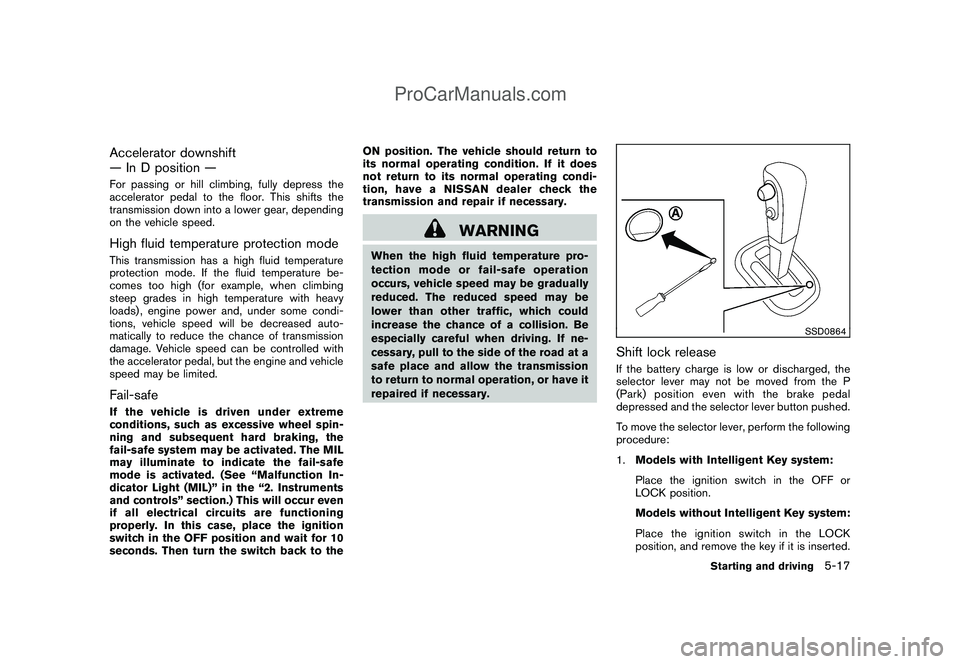
Shift lock releaseIf the battery charge is low or discharged, the
selector lever may not be moved from the P
(Park) position even with the brake pedal
depressed and the selector lever button pushed.
To move the selector lever, perform the following
procedure:
1.Models with Intelligent Key system:
Place the ignition switch in the OFF or
LOCK position.
Models without Intelligent Key system:
Place the ignition switch in the LOCK
position, and remove the key if it is inserted.
Starting and driving
5-17
ProCarManuals.com
Page 208 of 321

Black plate (206,1)
Model "Z12-D" EDITED: 2009/ 1/ 28
2. Apply the parking brake.
3. Remove the shift lock release cover
*A
using a suitable tool.
4. Push down the shift lock release using a
suitable tool.
5. Push the selector lever button and move the
selector lever to the N (Neutral) position
while holding down the shift lock release.
Place the ignition switch in the ON position to
unlock the steering wheel. The vehicle may be
moved to the desired location.
Replace the removed shift lock release cover
after the operation.
For models with Intelligent Key system: If the
battery is discharged completely, the steering
wheel cannot be unlocked. Do not move the
vehicle with the steering wheel locked.
If the selector lever cannot be moved out of the
P (Park) position, have a NISSAN dealer check
the CVT system as soon as possible.
WARNING
If the selector lever cannot be moved
from the P (Park) position while the
engine is running and the brake pedal
is depressed, the stop lights may notwork. Malfunctioning stop lights could
cause an accident injuring yourself and
others.
MANUAL TRANSMISSION (MT)
WARNING
.Do not downshift abruptly on slip-
pery roads. This may cause a loss of
control.
.Do not over-rev the engine when
shifting to a lower gear. This may
cause a loss of control or engine
damage.
CAUTION
.Do not rest your foot on the clutch
pedal while driving. This may da-
mage the clutch.
.Fully depress the clutch pedal be-
fore shifting to help prevent trans-
mission damage.
.Stop your vehicle completely before
shifting into R (Reverse) .
.When the vehicle is stopped for a
period of time, for example at a stoplight, shift to N (Neutral) and release
the clutch pedal with the foot brake
applied.
5-18
Starting and driving
ProCarManuals.com
Page 211 of 321
Black plate (209,1)
Model "Z12-D" EDITED: 2009/ 1/ 28
PRECAUTIONS ON CRUISE CON-
TROL.If the cruise control system malfunctions, it
will cancel automatically. The CRUISE in-
dicator light on the meter panel will then
blink to warn the driver.
.If the engine coolant temperature becomes
excessively high, the cruise control system
will cancel automatically.
.If the CRUISE indicator light blinks, turn the
cruise control MAIN switch off and have the
system checked by a NISSAN dealer.
.The CRUISE indicator light may blink when
the cruise control MAIN switch is turned ON
while pushing the RESUME/ACCELERATE,
SET/COAST or CANCEL switch. To prop-
erly set the cruise control system, perform
the following procedures.
WARNING
Do not use the cruise control when
driving under the following conditions:
.when it is not possible to keep the
vehicle at a set speed
.in heavy traffic or in traffic that
varies in speed
.on winding or hilly roads.on slippery roads (rain, snow, ice,
etc.)
.in very windy areas
Doing so could cause a loss of vehicle
control and result in an accident.
CAUTION
On Manual Transmission (MT) models,
do not shift into N (Neutral) without
depressing the clutch pedal when the
cruise control is set. Should this occur,
depress the clutch pedal and turn the
MAIN switch off immediately. Failure to
do so may cause engine damage.
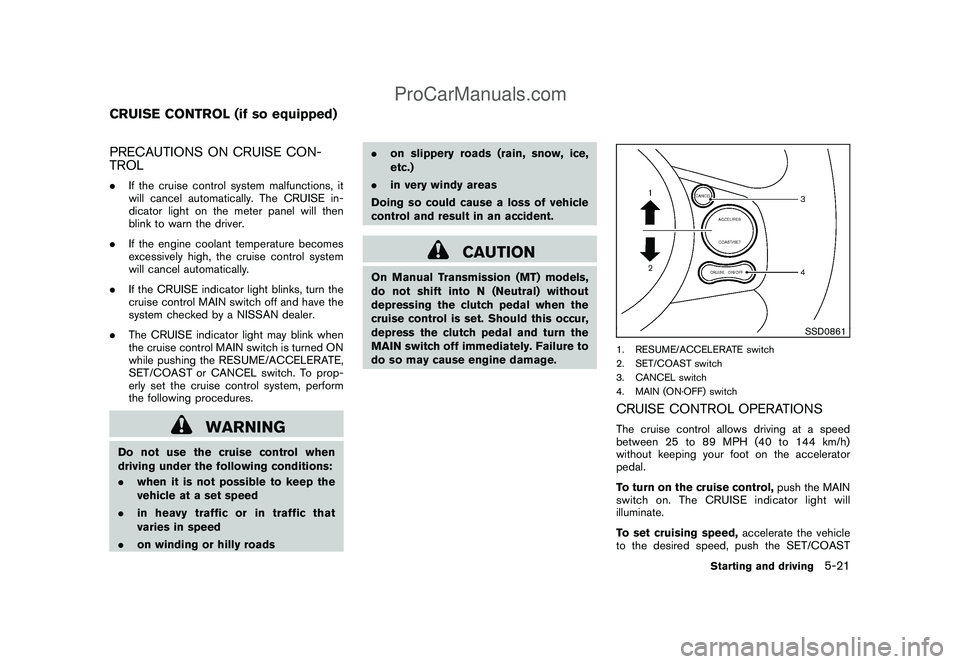
SSD0861
1. RESUME/ACCELERATE switch
2. SET/COAST switch
3. CANCEL switch
4. MAIN (ON·OFF) switchCRUISE CONTROL OPERATIONSThe cruise control allows driving at a speed
between 25 to 89 MPH (40 to 144 km/h)
without keeping your foot on the accelerator
pedal.
To turn on the cruise control,push the MAIN
switch on. The CRUISE indicator light will
illuminate.
To set cruising speed,accelerate the vehicle
to the desired speed, push the SET/COAST
CRUISE CONTROL (if so equipped)
Starting and driving
5-21
ProCarManuals.com