maintenance NISSAN CUBE 2009 Service Manual
[x] Cancel search | Manufacturer: NISSAN, Model Year: 2009, Model line: CUBE, Model: NISSAN CUBE 2009Pages: 321, PDF Size: 4.99 MB
Page 269 of 321

Black plate (267,1)
Model "Z12-D" EDITED: 2009/ 1/ 28
affect the function or performance of the brake
system.
Proper brake inspection intervals should
be followed.For additional information, see the
maintenance log section of your “NISSAN
Service and Maintenance Guide”.
SDI1959
ENGINE COMPARTMENT
CAUTION
Never use a fuse of a higher or lower
amperage rating than that specified on
the fuse box cover. This could damage
the electrical system or cause a fire.
If any electrical equipment does not operate,
check for an open fuse.
1. Be sure the ignition switch and the headlight
switch are turned off.
2. Open the engine hood.3. Remove the resonator. (See “ENGINE
COMPARTMENT CHECK LOCATIONS”
earlier in this section.)
4. Remove the fuse/fusible link holder cover by
pushing the tab
*1
and lifting the cover
from the right side*2, then the left side
*3.
5. Locate the fuse that needs to be replaced.
6. Remove the fuse using the fuse puller
located in the passenger compartment fuse
box.
FUSES
Maintenance and do-it-yourself
8-19
ProCarManuals.com
Page 270 of 321
Black plate (268,1)
Model "Z12-D" EDITED: 2009/ 1/ 28
SDI1753
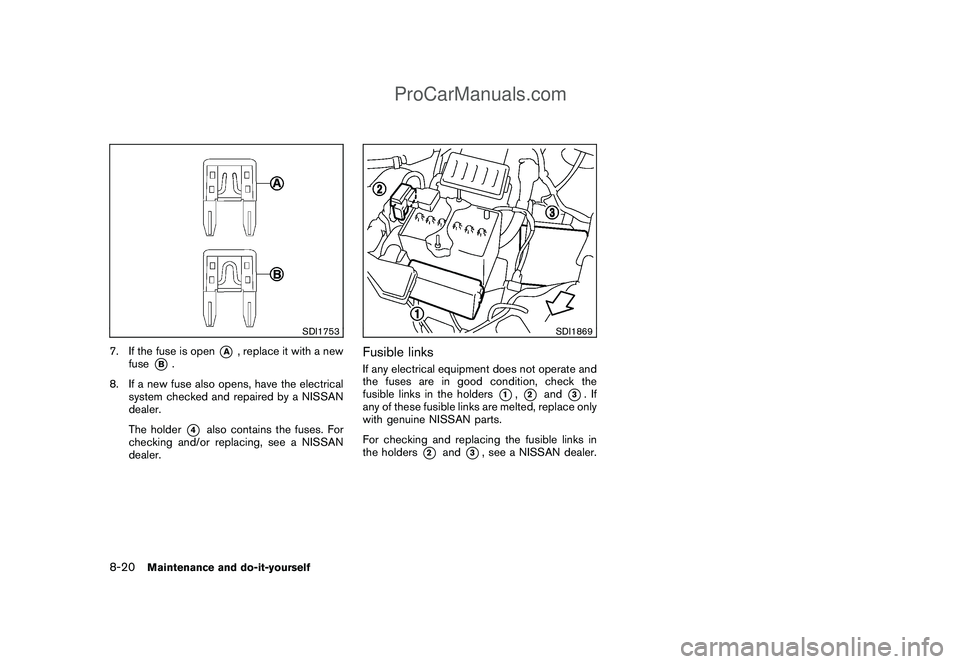
7. If the fuse is open
*A
, replace it with a new
fuse
*B.
8. If a new fuse also opens, have the electrical
system checked and repaired by a NISSAN
dealer.
The holder*4
also contains the fuses. For
checking and/or replacing, see a NISSAN
dealer.
SDI1869
Fusible linksIf any electrical equipment does not operate and
the fuses are in good condition, check the
fusible links in the holders
*1,*2
and
*3.If
any of these fusible links are melted, replace only
with genuine NISSAN parts.
For checking and replacing the fusible links in
the holders
*2
and
*3, see a NISSAN dealer.
8-20
Maintenance and do-it-yourself
ProCarManuals.com
Page 271 of 321
Black plate (269,1)
Model "Z12-D" EDITED: 2009/ 1/ 28
SDI2389
PASSENGER COMPARTMENT
CAUTION
Never use a fuse of a higher or lower
amperage rating than that specified on
the fuse box cover. This could damage
the electrical system or cause a fire.
If any electrical equipment does not operate,
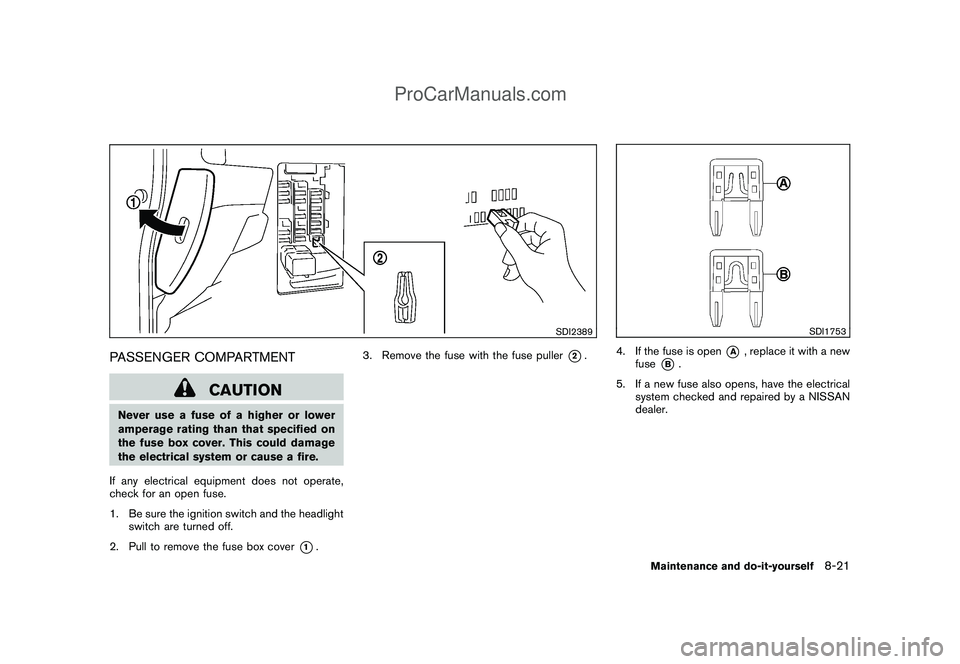
check for an open fuse.
1. Be sure the ignition switch and the headlight
switch are turned off.
2. Pull to remove the fuse box cover
*1.3. Remove the fuse with the fuse puller
*2.
SDI1753
4. If the fuse is open
*A
, replace it with a new
fuse
*B.
5. If a new fuse also opens, have the electrical
system checked and repaired by a NISSAN
dealer.
Maintenance and do-it-yourself
8-21
ProCarManuals.com
Page 272 of 321
Black plate (270,1)
Model "Z12-D" EDITED: 2009/ 1/ 28
CAUTION
Be careful not to allow children to
swallow the battery and removed parts.
SDI2134
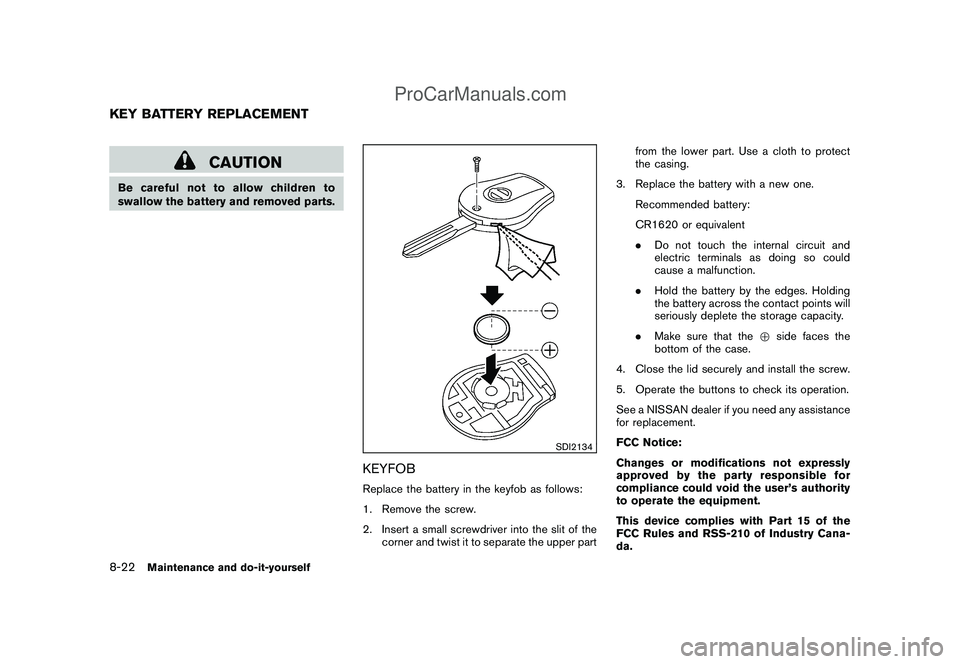
KEYFOBReplace the battery in the keyfob as follows:
1. Remove the screw.
2. Insert a small screwdriver into the slit of the
corner and twist it to separate the upper partfrom the lower part. Use a cloth to protect
the casing.
3. Replace the battery with a new one.
Recommended battery:
CR1620 or equivalent
.Do not touch the internal circuit and
electric terminals as doing so could
cause a malfunction.
.Hold the battery by the edges. Holding
the battery across the contact points will
seriously deplete the storage capacity.
.Make sure that the+side faces the
bottom of the case.
4. Close the lid securely and install the screw.
5. Operate the buttons to check its operation.
See a NISSAN dealer if you need any assistance
for replacement.
FCC Notice:
Changes or modifications not expressly
approved by the party responsible for
compliance could void the user’s authority
to operate the equipment.
This device complies with Part 15 of the
FCC Rules and RSS-210 of Industry Cana-
da.
KEY BATTERY REPLACEMENT8-22
Maintenance and do-it-yourself
ProCarManuals.com
Page 273 of 321
Black plate (271,1)
Model "Z12-D" EDITED: 2009/ 1/ 28
Operation is subject to the following two
conditions: (1) This device may not cause
harmful interference, and (2) this device
must accept any interference received,
including interference that may cause un-
desired operation of the device.
SDI2294
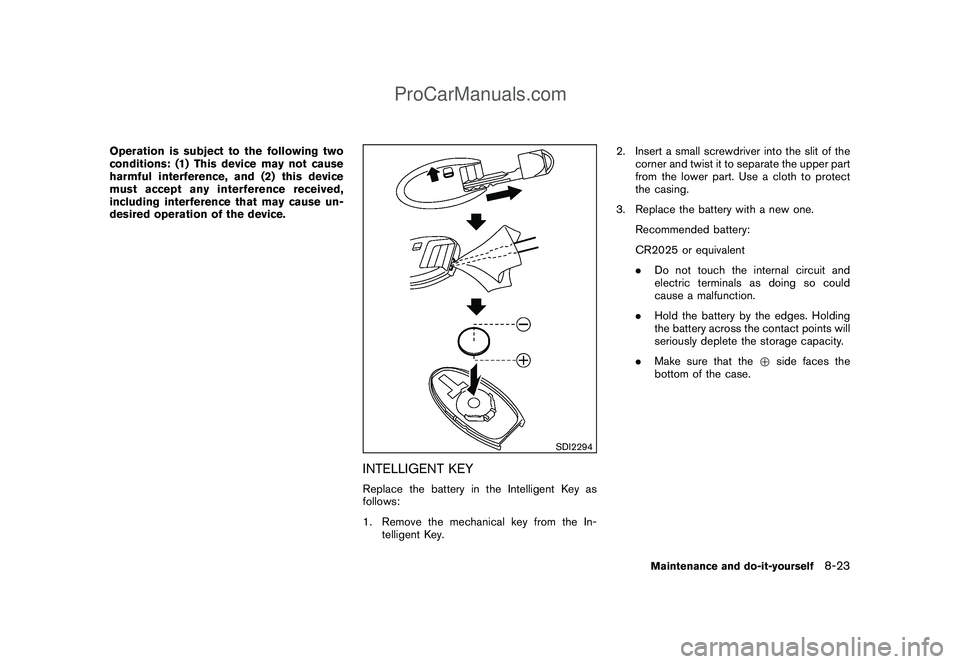
INTELLIGENT KEYReplace the battery in the Intelligent Key as
follows:
1. Remove the mechanical key from the In-
telligent Key.2. Insert a small screwdriver into the slit of the
corner and twist it to separate the upper part
from the lower part. Use a cloth to protect
the casing.
3. Replace the battery with a new one.
Recommended battery:
CR2025 or equivalent
.Do not touch the internal circuit and
electric terminals as doing so could
cause a malfunction.
.Hold the battery by the edges. Holding
the battery across the contact points will
seriously deplete the storage capacity.
.Make sure that the+side faces the
bottom of the case.
Maintenance and do-it-yourself
8-23
ProCarManuals.com
Page 274 of 321
Black plate (272,1)
Model "Z12-D" EDITED: 2009/ 1/ 28
SDI1889
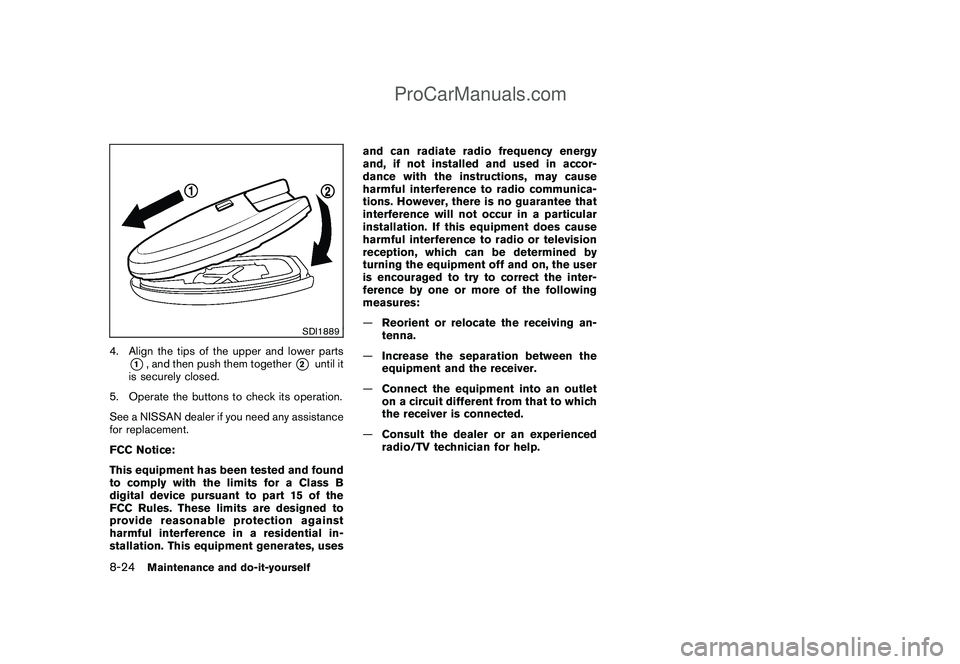
4. Align the tips of the upper and lower parts
*1, and then push them together
*2
until it
is securely closed.
5. Operate the buttons to check its operation.
See a NISSAN dealer if you need any assistance
for replacement.
FCC Notice:
This equipment has been tested and found
to comply with the limits for a Class B
digital device pursuant to part 15 of the
FCC Rules. These limits are designed to
provide reasonable protection against
harmful interference in a residential in-
stallation. This equipment generates, usesand can radiate radio frequency energy
and, if not installed and used in accor-
dance with the instructions, may cause
harmful interference to radio communica-
tions. However, there is no guarantee that
interference will not occur in a particular
installation. If this equipment does cause
harmful interference to radio or television
reception, which can be determined by
turning the equipment off and on, the user
is encouraged to try to correct the inter-
ference by one or more of the following
measures:
—Reorient or relocate the receiving an-
tenna.
—Increase the separation between the
equipment and the receiver.
—Connect the equipment into an outlet
on a circuit different from that to which
the receiver is connected.
—Consult the dealer or an experienced
radio/TV technician for help.
8-24
Maintenance and do-it-yourself
ProCarManuals.com
Page 275 of 321
Black plate (273,1)
Model "Z12-D" EDITED: 2009/ 1/ 28
SDI2395
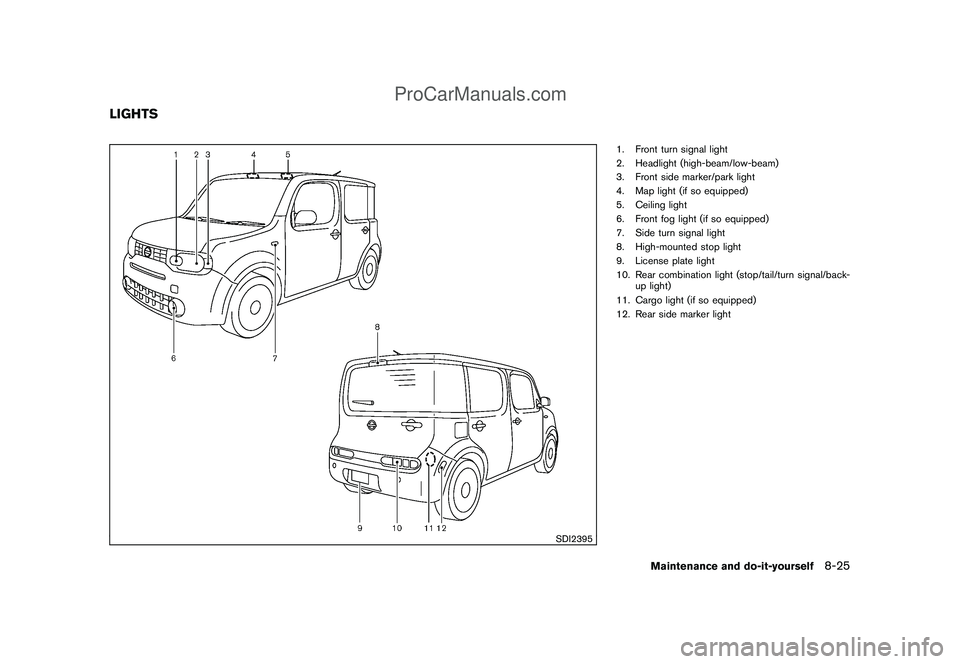
1. Front turn signal light
2. Headlight (high-beam/low-beam)
3. Front side marker/park light
4. Map light (if so equipped)
5. Ceiling light
6. Front fog light (if so equipped)
7. Side turn signal light
8. High-mounted stop light
9. License plate light
10. Rear combination light (stop/tail/turn signal/back-
up light)
11. Cargo light (if so equipped)
12. Rear side marker light
LIGHTS
Maintenance and do-it-yourself
8-25
ProCarManuals.com
Page 276 of 321
Black plate (274,1)
Model "Z12-D" EDITED: 2009/ 1/ 28
HEADLIGHTSFog may temporarily form inside the lens of the
exterior lights in the rain or in a car wash. A
temperature difference between the inside and
the outside of the lens causes the fog. This is
not a malfunction. If large drops of water collect
inside the lens, contact a NISSAN dealer.ReplacingHalogen headlight model:
The headlight is a semi-sealed beam type which
uses a replaceable headlight (halogen) bulb.
CAUTION
.Do not leave the bulb out of the
headlight reflector for a long period
of time. Dust, moisture, smoke, etc.
entering the headlight body may
affect bulb performance.
.High pressure halogen gas is sealed
inside the halogen bulb. The bulb
may break if the glass envelope is
scratched or the bulb is dropped.
.Only touch the base when handling
the bulb. Never touch the glass
envelope. Touching the glass envel-
ope could significantly affect bulb
life and/or headlight performance..Aiming is not necessary after repla-
cing the bulb. When aiming adjust-
ment is necessary, contact a
NISSAN dealer.
Use the same number and wattage as originally
installed as shown in the chart.
SDI2396
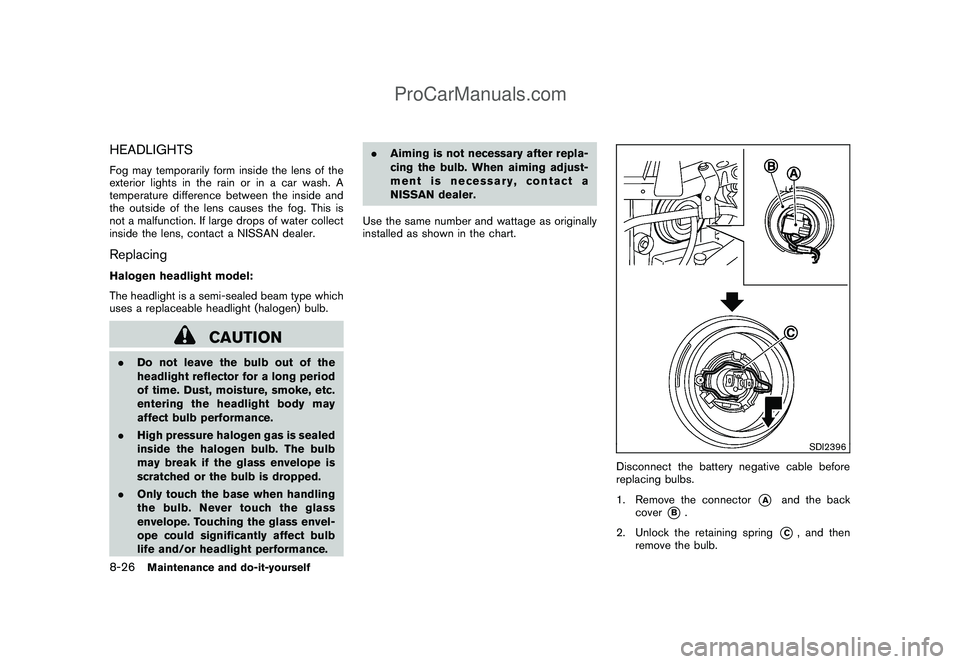
Disconnect the battery negative cable before
replacing bulbs.
1. Remove the connector
*A
and the back
cover
*B.
2. Unlock the retaining spring
*C, and then
remove the bulb.
8-26
Maintenance and do-it-yourself
ProCarManuals.com
Page 277 of 321
Black plate (275,1)
Model "Z12-D" EDITED: 2009/ 1/ 28
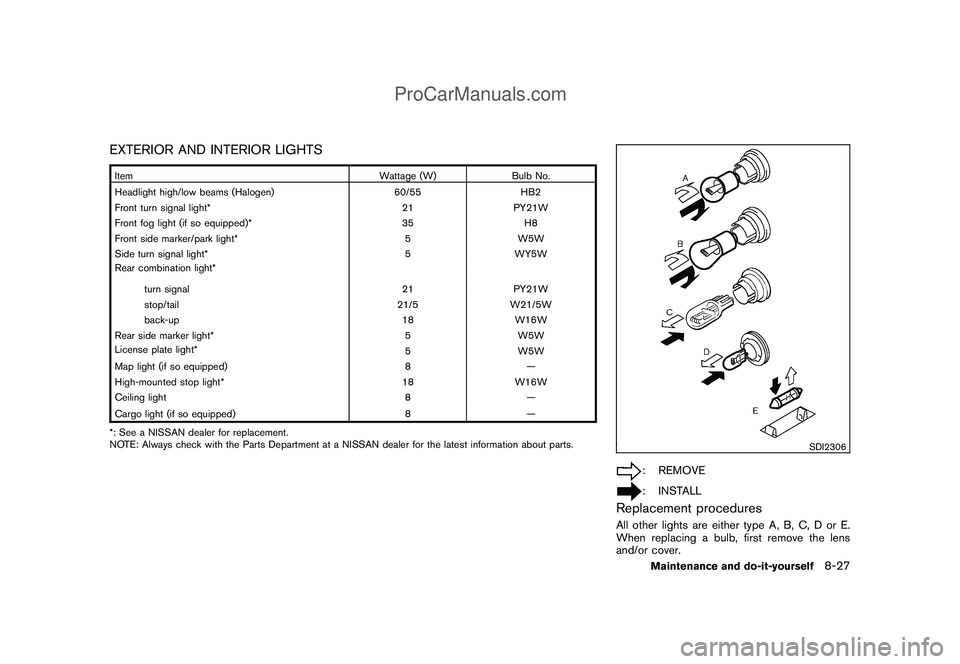
EXTERIOR AND INTERIOR LIGHTSItem Wattage (W) Bulb No.
Headlight high/low beams (Halogen) 60/55 HB2
Front turn signal light* 21 PY21W
Front fog light (if so equipped)* 35 H8
Front side marker/park light* 5 W5W
Side turn signal light* 5 WY5W
Rear combination light*
turn signal 21 PY21W
stop/tail 21/5 W21/5W
back-up 18 W16W
Rear side marker light* 5 W5W
License plate light*
5W5W
Map light (if so equipped) 8 —
High-mounted stop light* 18 W16W
Ceiling light 8 —
Cargo light (if so equipped) 8
—
*: See a NISSAN dealer for replacement.
NOTE: Always check with the Parts Department at a NISSAN dealer for the latest information about parts.
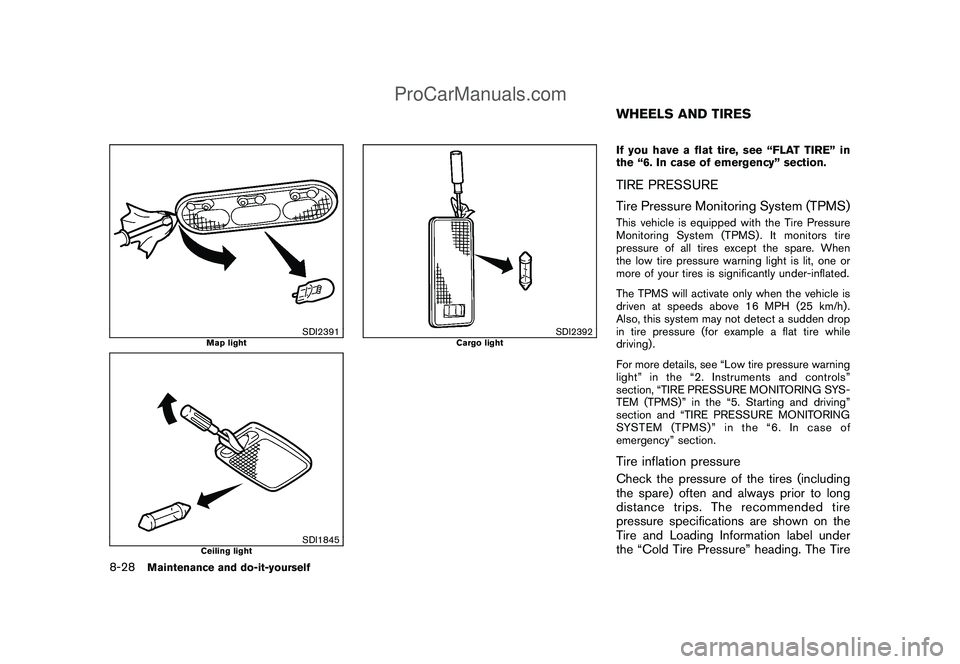
SDI2306
: REMOVE: INSTALL
Replacement proceduresAll other lights are either type A, B, C, D or E.
When replacing a bulb, first remove the lens
and/or cover.
Maintenance and do-it-yourself
8-27
ProCarManuals.com
Page 278 of 321
Black plate (276,1)
Model "Z12-D" EDITED: 2009/ 1/ 28
SDI2391
Map light
SDI1845
Ceiling light
SDI2392
Cargo light
If you have a flat tire, see “FLAT TIRE” in
the “6. In case of emergency” section.TIRE PRESSURE
Tire Pressure Monitoring System (TPMS)This vehicle is equipped with the Tire Pressure
Monitoring System (TPMS) . It monitors tire
pressure of all tires except the spare. When
the low tire pressure warning light is lit, one or
more of your tires is significantly under-inflated.
The TPMS will activate only when the vehicle is
driven at speeds above 16 MPH (25 km/h) .
Also, this system may not detect a sudden drop
in tire pressure (for example a flat tire while
driving) .
For more details, see “Low tire pressure warning
light” in the “2. Instruments and controls”
section, “TIRE PRESSURE MONITORING SYS-
TEM (TPMS)” in the “5. Starting and driving”
section and “TIRE PRESSURE MONITORING
SYSTEM (TPMS)” in the “6. In case of
emergency” section.Tire inflation pressureCheck the pressure of the tires (including
the spare) often and always prior to long
distance trips. The recommended tire
pressure specifications are shown on the
Tire and Loading Information label under
the “Cold Tire Pressure” heading. The TireWHEELS AND TIRES
8-28
Maintenance and do-it-yourself
ProCarManuals.com