ECO mode NISSAN CUBE 2009 Workshop Manual
[x] Cancel search | Manufacturer: NISSAN, Model Year: 2009, Model line: CUBE, Model: NISSAN CUBE 2009Pages: 321, PDF Size: 4.99 MB
Page 124 of 321
Black plate (122,1)
Model "Z12-D" EDITED: 2009/ 1/ 28
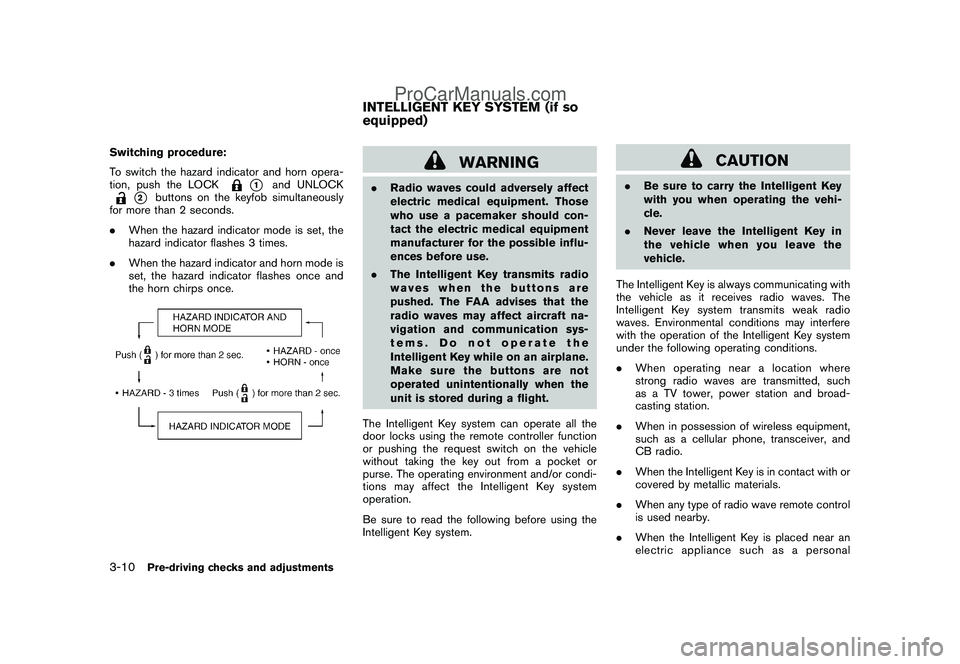
Switching procedure:
To switch the hazard indicator and horn opera-
tion, push the LOCK
*1
and UNLOCK
*2
buttons on the keyfob simultaneously
for more than 2 seconds.
.When the hazard indicator mode is set, the
hazard indicator flashes 3 times.
.When the hazard indicator and horn mode is
set, the hazard indicator flashes once and
the horn chirps once.
WARNING
.Radio waves could adversely affect
electric medical equipment. Those
who use a pacemaker should con-
tact the electric medical equipment
manufacturer for the possible influ-
ences before use.
.The Intelligent Key transmits radio
waves when the buttons are
pushed. The FAA advises that the
radio waves may affect aircraft na-
vigation and communication sys-
tems. Do not operate the
Intelligent Key while on an airplane.
Makesurethebuttonsarenot
operated unintentionally when the
unit is stored during a flight.
The Intelligent Key system can operate all the
door locks using the remote controller function
or pushing the request switch on the vehicle
without taking the key out from a pocket or
purse. The operating environment and/or condi-
tions may affect the Intelligent Key system
operation.
Be sure to read the following before using the
Intelligent Key system.
CAUTION
.Be sure to carry the Intelligent Key
with you when operating the vehi-
cle.
.Never leave the Intelligent Key in
the vehicle when you leave the
vehicle.
The Intelligent Key is always communicating with
the vehicle as it receives radio waves. The
Intelligent Key system transmits weak radio
waves. Environmental conditions may interfere
with the operation of the Intelligent Key system
under the following operating conditions.
.When operating near a location where
strong radio waves are transmitted, such
as a TV tower, power station and broad-
casting station.
.When in possession of wireless equipment,
such as a cellular phone, transceiver, and
CB radio.
.When the Intelligent Key is in contact with or
covered by metallic materials.
.When any type of radio wave remote control
is used nearby.
.When the Intelligent Key is placed near an
electric appliance such as a personal
INTELLIGENT KEY SYSTEM (if so
equipped)
3-10
Pre-driving checks and adjustments
ProCarManuals.com
Page 125 of 321
Black plate (123,1)
Model "Z12-D" EDITED: 2009/ 1/ 28
computer.
.When the vehicle is parked near a parking
meter.
In such cases, correct the operating conditions
before using the Intelligent Key function or use
the mechanical key.
Although the life of the battery varies depending
on the operating conditions, the battery’s life is
approximately 2 years. If the battery is dis-
charged, replace it with a new one.
Since the Intelligent Key is continuously receiv-
ing radio waves, if the key is left near equipment
which transmits strong radio waves, such as
signals from a TV and personal computer, the
battery life may become shorter.
For information regarding replacement of a
battery, see “KEY BATTERY REPLACEMENT”
in the “8. Maintenance and do-it-yourself”
section.
Because the steering wheel is locked electri-
cally, unlocking the steering wheel with the
ignition switch in the LOCK position is impos-
sible when the vehicle battery is completely
discharged. Always be careful that the vehicle
battery is not completely discharged.
As many as 4 Intelligent Keys can be registered
and used with one vehicle. For information about
the purchase and use of additional IntelligentKeys, contact a NISSAN dealer.
CAUTION
.Do not allow the Intelligent Key,
which contains electrical compo-
nents, to come into contact with
water or salt water. This could affect
the system function.
.Do not drop the Intelligent Key.
.Do not strike the Intelligent Key
sharply against another object.
.Do not change or modify the Intel-
ligent Key.
.Wetting may damage the Intelligent
Key. If the Intelligent Key gets wet,
immediately wipe until it is comple-
tely dry.
.Do not place the Intelligent Key for
an extended period in an area where
temperatures exceed 1408F (608C) .
.Do not attach the Intelligent Key
with a key holder that contains a
magnet.
.Do not place the Intelligent Key near
equipment that produces a mag-
netic field, such as a TV, audio
equipment, personal computers orcellular phone.
If an Intelligent Key is lost or stolen, NISSAN
recommends erasing the ID code of that
Intelligent Key from the vehicle. This may prevent
the unauthorized use of the Intelligent Key to
operate the vehicle. For information regarding
the erasing procedure, contact a NISSAN deal-
er.
The Intelligent Key function can be disabled. For
information about disabling the Intelligent Key
function, contact a NISSAN dealer.
Pre-driving checks and adjustments
3-11
ProCarManuals.com
Page 126 of 321
Black plate (124,1)
Model "Z12-D" EDITED: 2009/ 1/ 28
SPA2612
INTELLIGENT KEY OPERATING
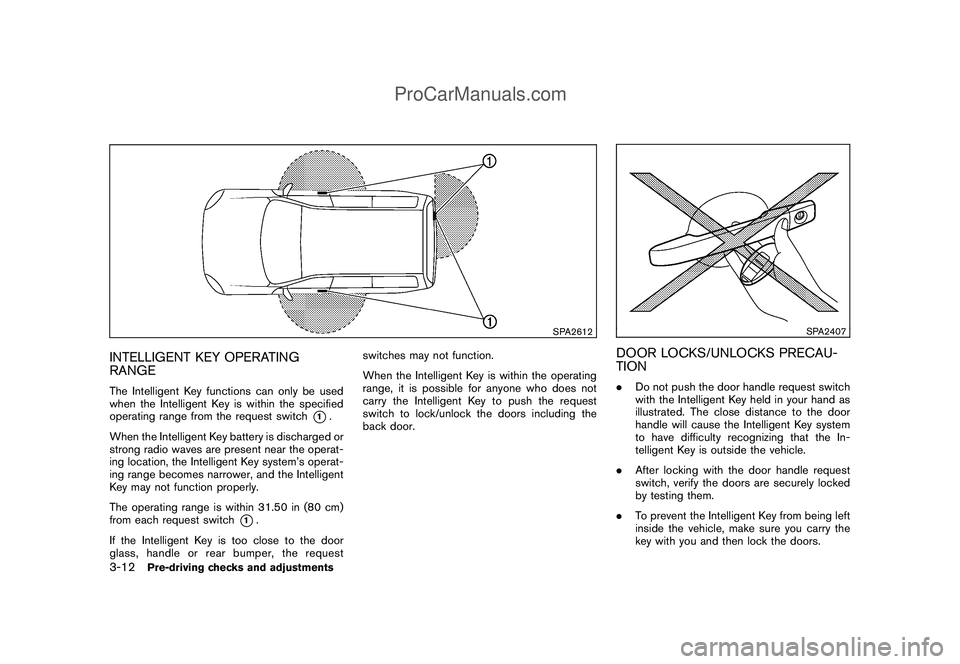
RANGEThe Intelligent Key functions can only be used
when the Intelligent Key is within the specified
operating range from the request switch
*1.
When the Intelligent Key battery is discharged or
strong radio waves are present near the operat-
ing location, the Intelligent Key system’s operat-
ing range becomes narrower, and the Intelligent
Key may not function properly.
The operating range is within 31.50 in (80 cm)
from each request switch
*1.
If the Intelligent Key is too close to the door
glass, handle or rear bumper, the requestswitches may not function.
When the Intelligent Key is within the operating
range, it is possible for anyone who does not
carry the Intelligent Key to push the request
switch to lock/unlock the doors including the
back door.
SPA2407
DOOR LOCKS/UNLOCKS PRECAU-
TION.Do not push the door handle request switch
with the Intelligent Key held in your hand as
illustrated. The close distance to the door
handle will cause the Intelligent Key system
to have difficulty recognizing that the In-
telligent Key is outside the vehicle.
.After locking with the door handle request
switch, verify the doors are securely locked
by testing them.
.To prevent the Intelligent Key from being left
inside the vehicle, make sure you carry the
key with you and then lock the doors.
3-12
Pre-driving checks and adjustments
ProCarManuals.com
Page 129 of 321

Black plate (127,1)
Model "Z12-D" EDITED: 2009/ 1/ 28
TROUBLESHOOTING GUIDE
Symptom Possible cause Action to take
When pushing the ignition switch
to stop the engineThe P position selecting warning light in the
meter illuminates and the inside warning chime
sounds continuously.The selector lever is not in the P (Park)
position.Shift the selector lever to the P (Park)
position.
When shifting the selector lever
to the P (Park) position.The inside warning chime sounds continuously.The ignition switch is in the ACC or ON
position.Push the ignition switch to the OFF posi-
tion.
When opening the driver’s door
to get out of the vehicleThe inside warning chime sounds continuously.The ignition switch is in the ACC
position.Push the ignition switch to the OFF posi-
tion.
When closing the door after get-
ting out of the vehicleThe Intelligent Key system warning light in the
meter blinks in yellow, and the outside chime
sounds 3 times and the inside warning chime
sounds for a few seconds.The ignition switch is in the ACC or ON
position.Push the ignition switch to the OFF posi-
tion.
The P position selecting warning light in the
meter illuminates and the outside chime
sounds continuously.The ignition switch is in the ACC or OFF
position and the selector lever is not in
the P (Park) position.Move the selector lever to the P (Park)
position and push the ignition switch to the
OFF position.
When closing the door with the
inside lock knob turned to LOCKThe outside chime sounds for a few seconds
and all the doors unlock.The Intelligent Key is inside the vehicle. Carry the Intelligent Key with you.
When pushing the request switch
or the LOCK
button on the
Intelligent Key to lock the doorThe outside chime sounds for a few seconds.The Intelligent Key is inside the vehicle. Carry the Intelligent Key with you.
A door is not closed securely. Close the door securely.
When pushing the ignition switch
to start the engineThe Intelligent Key system warning light in the
meter blinks in green.The battery charge is low.Replace the battery with a new one. (See
“KEY BATTERY REPLACEMENT” in the “8.
Maintenance and do-it-yourself” section.)
The Intelligent Key system warning light in the
meter blinks in yellow and the inside warning
chime sounds for a few seconds.The Intelligent Key is not in the vehicle. Carry the Intelligent Key with you.
Pre-driving checks and adjustments
3-15
ProCarManuals.com
Page 132 of 321
Black plate (130,1)
Model "Z12-D" EDITED: 2009/ 1/ 28
SPA2252
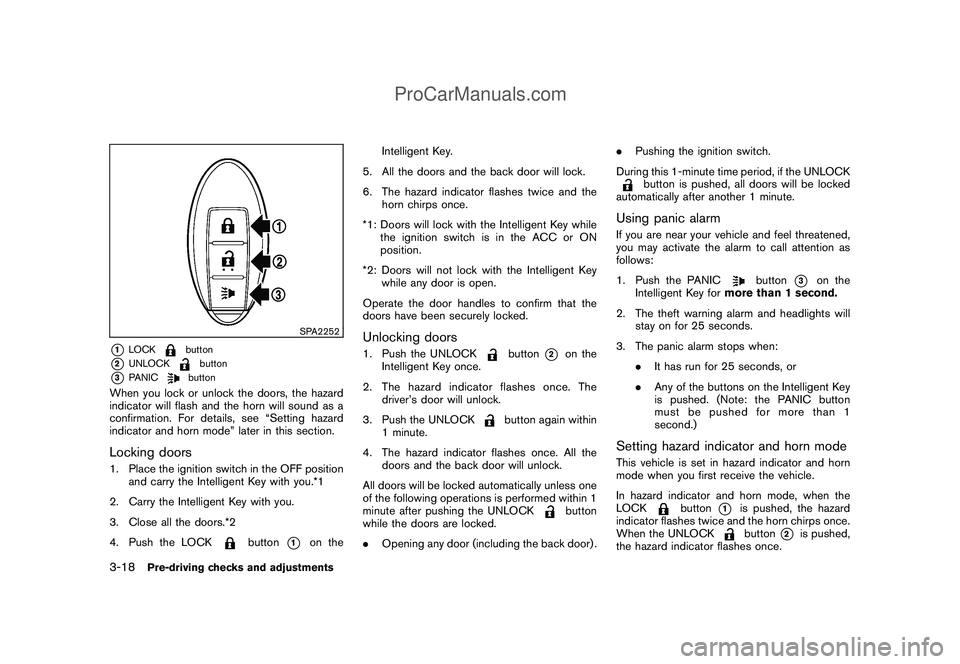
*1
LOCK
button
*2
UNLOCK
button
*3
PANIC
button
When you lock or unlock the doors, the hazard
indicator will flash and the horn will sound as a
confirmation. For details, see “Setting hazard
indicator and horn mode” later in this section.Locking doors1. Place the ignition switch in the OFF position
and carry the Intelligent Key with you.*1
2. Carry the Intelligent Key with you.
3. Close all the doors.*2
4. Push the LOCK
button
*1
on theIntelligent Key.
5. All the doors and the back door will lock.
6. The hazard indicator flashes twice and the
horn chirps once.
*1: Doors will lock with the Intelligent Key while
the ignition switch is in the ACC or ON
position.
*2: Doors will not lock with the Intelligent Key
while any door is open.
Operate the door handles to confirm that the
doors have been securely locked.
Unlocking doors1. Push the UNLOCK
button
*2
on the
Intelligent Key once.
2. The hazard indicator flashes once. The
driver’s door will unlock.
3. Push the UNLOCK
button again within
1 minute.
4. The hazard indicator flashes once. All the
doors and the back door will unlock.
All doors will be locked automatically unless one
of the following operations is performed within 1
minute after pushing the UNLOCK
button
while the doors are locked.
.Opening any door (including the back door) ..Pushing the ignition switch.
During this 1-minute time period, if the UNLOCK
button is pushed, all doors will be locked
automatically after another 1 minute.
Using panic alarmIf you are near your vehicle and feel threatened,
you may activate the alarm to call attention as
follows:
1. Push the PANIC
button
*3
on the
Intelligent Key formore than 1 second.
2. The theft warning alarm and headlights will
stay on for 25 seconds.
3. The panic alarm stops when:
.It has run for 25 seconds, or
.Any of the buttons on the Intelligent Key
is pushed. (Note: the PANIC button
must be pushed for more than 1
second.)
Setting hazard indicator and horn modeThis vehicle is set in hazard indicator and horn
mode when you first receive the vehicle.
In hazard indicator and horn mode, when the
LOCK
button
*1
is pushed, the hazard
indicator flashes twice and the horn chirps once.
When the UNLOCKbutton
*2
is pushed,
the hazard indicator flashes once.
3-18
Pre-driving checks and adjustments
ProCarManuals.com
Page 134 of 321
Black plate (132,1)
Model "Z12-D" EDITED: 2009/ 1/ 28
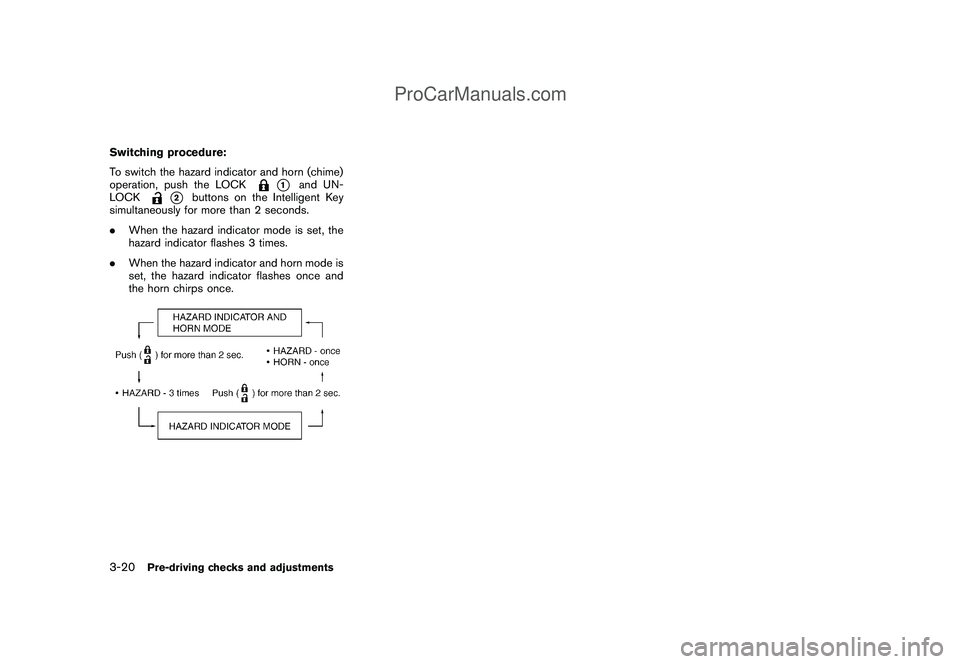
Switching procedure:
To switch the hazard indicator and horn (chime)
operation, push the LOCK
*1
and UN-
LOCK
*2
buttons on the Intelligent Key
simultaneously for more than 2 seconds.
.When the hazard indicator mode is set, the
hazard indicator flashes 3 times.
.When the hazard indicator and horn mode is
set, the hazard indicator flashes once and
the horn chirps once.
3-20
Pre-driving checks and adjustments
ProCarManuals.com
Page 145 of 321
Black plate (13,1)
4 Heater, air conditioner, audio and phone
systems
Model "Z12-D" EDITED: 2009/ 1/ 28
Ventilators........................................................ 4-2
Center ventilators........................................... 4-2
Side ventilators.............................................. 4-2
Heater and air conditioner.................................... 4-2
Manual air conditioner..................................... 4-3
Automatic air conditioner................................. 4-6
Operating tips............................................... 4-8
In-cabin microfilter.......................................... 4-8
Servicing air conditioner.................................. 4-9
Audio system.................................................... 4-9
Audio operation precautions............................. 4-9
FM-AM radio with Compact Disc (CD) player..... 4-17FM-AM-SAT radio with Compact Disc (CD)
player........................................................ 4-21
CD care and cleaning................................... 4-27
Steering wheel switch for audio control
(if so equipped)........................................... 4-28
Antenna..................................................... 4-29
Car phone or CB radio...................................... 4-31
Bluetooth
®Hands-Free Phone System with
NISSAN voice recognition (if so equipped)............ 4-31
Using system.............................................. 4-33
Speaker Adaptation (SA) mode....................... 4-42
Troubleshooting guide................................... 4-45
ProCarManuals.com
Page 146 of 321
Black plate (144,1)
Model "Z12-D" EDITED: 2009/ 1/ 28
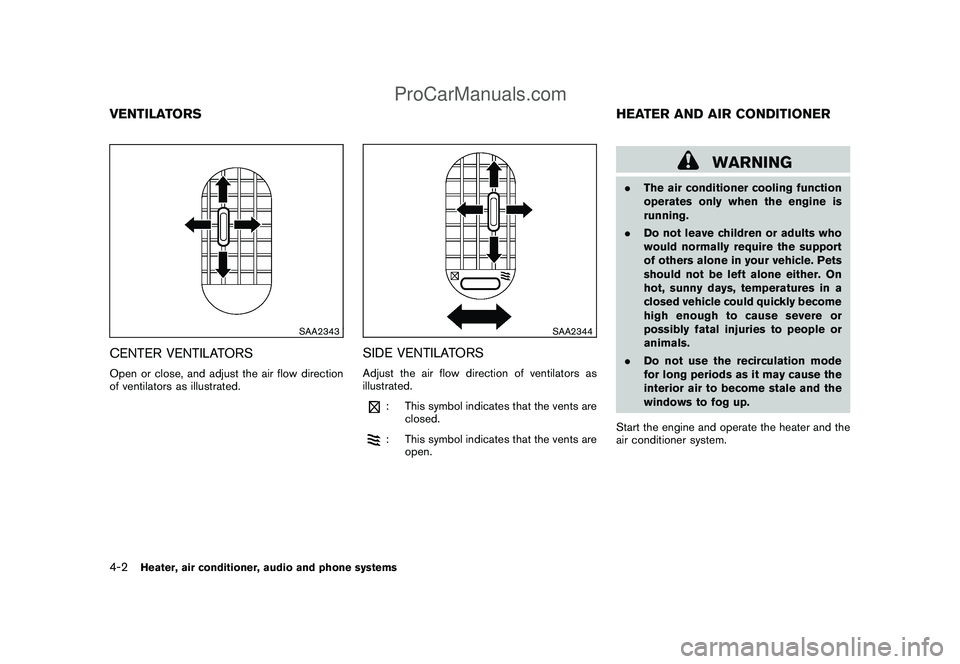
SAA2343
CENTER VENTILATORSOpen or close, and adjust the air flow direction
of ventilators as illustrated.
SAA2344
SIDE VENTILATORSAdjust the air flow direction of ventilators as
illustrated.
: This symbol indicates that the vents are
closed.: This symbol indicates that the vents are
open.
WARNING
.The air conditioner cooling function
operates only when the engine is
running.
.Do not leave children or adults who
would normally require the support
of others alone in your vehicle. Pets
should not be left alone either. On
hot, sunny days, temperatures in a
closed vehicle could quickly become
high enough to cause severe or
possibly fatal injuries to people or
animals.
.Do not use the recirculation mode
for long periods as it may cause the
interior air to become stale and the
windows to fog up.
Start the engine and operate the heater and the
air conditioner system.
VENTILATORS HEATER AND AIR CONDITIONER4-2
Heater, air conditioner, audio and phone systems
ProCarManuals.com
Page 151 of 321
Black plate (149,1)
Model "Z12-D" EDITED: 2009/ 1/ 28
3. Push the temperature control
,
button to set the desired temperature. The
temperature range is between 608F (188C)
and 908F (328C) .
4. To set the automatic control mode, perform
one of the following operations.
.When the outside air circulation mode is
on, push and hold the outside air
circulation
button for more than
1.5 seconds.
.When the air recirculation mode is on,
push and hold the air recirculation
button for more than 1.5 seconds.
When setting the automatic control mode,
both indicator lights will blink twice indicat-
ing that the system is in the automatic
control mode.
A visible mist may be seen coming from the
ventilators in hot, humid conditions as the air is
cooled rapidly. This does not indicate a mal-
function.
Heating (A/C off):
1. Push the AUTO button. (The AUTO indicator
will be displayed.)
2. If the A/C indicator light illuminates, push the
A/C button. (The A/C indicator light will turn
off.)3. Push the temperature control
,
button to set the desired temperature. The
temperature range is between 608F (188C)
and 908F (328C) .
.Do not set the temperature lower than
the outside air temperature. Doing so
may cause the temperature to not be
controlled properly.
.If the windows fog up, use dehumidified
heating instead of the A/C off heating.
Dehumidified defrosting/defogging:
1. Push the front defroster
button. (The
indicator light will illuminate.)
2. Turn the temperature control
,
button to set the desired temperature.
.To remove moisture or fog on the front
window quickly, set the temperature to
the high temperature and the fan speed
to their maximum level.
.After the windshield is cleared, push the
front defroster
button again. (The
indicator light will turn off.)
.When the front defroster
button is
pushed, the air conditioner will auto-
matically turn on to defog the wind-
shield. The outside air circulation mode
will be selected to improve the defog-ging performance.
Manual operationThe manual mode can be used to control the
heater and air conditioner to your desired
settings.
To turn off the heater and air conditioner, push
the OFF button.
Fan speed control:
Turn the fan speed control
,
dial to
adjust the fan speed.
Air flow control:
Push the MODE button to change the air flow
mode.
— Air flows from the center and side
ventilators.— Air flows from the center and side
ventilators and foot outlets.— Air flows mainly from the foot outlets.— Air flows from the defroster outlets and
foot outlets.
Temperature control:
Push the temperature control
,
button
to set the desired temperature.
The temperature range is between 608F (188C)
Heater, air conditioner, audio and phone systems
4-7
ProCarManuals.com
Page 152 of 321

Black plate (150,1)
Model "Z12-D" EDITED: 2009/ 1/ 28
and 908F (328C) .
Air recirculation:
Push the air recirculation
button to change
the air circulation mode. When the indicator light
illuminates, the flowing air is recirculated inside
the vehicle.
Outside air circulation:
Push the outside air circulation
button to
change the air circulation mode. When the
indicator light illuminates, the flowing air is
drawn from outside the vehicle.
Automatic air intake control:
To set the automatic control mode, perform one
of the following operations.
.When the outside air circulation mode is on,
push and hold the outside air circulation
button for more than 1.5 seconds.
.When the air recirculation mode is on, push
and hold the air recirculation
button for
more than 1.5 seconds.
When setting the automatic control mode, both
indicator lights will blink twice indicating that the
system is in the automatic control mode.
SAA2368SAA2369
OPERATING TIPS.When the engine coolant temperature and
outside air temperature are low, the air flow
from the foot outlets may not operate for a
maximum of 150 seconds. This is not a
malfunction. After the coolant temperature
warms up, air will flow normally from the foot
outlets.
.The automatic air conditioner (if so
equipped) is equipped with sensors as
illustrated. The sensors
*A
and
*B
on
the instrument panel help maintain a con-
stant temperature. Do not put anything on or
around these sensors.
IN-CABIN MICROFILTERThe air conditioning system is equipped with an
in-cabin microfilter which collects dirt, pollen,
dust, etc. To make sure the air conditioner heats,
defogs, and ventilates efficiently, replace the
filter according to the specified maintenance log
shown in the NISSAN Service and Maintenance
Guide. To replace the filter, contact a NISSAN
dealer.
The filter should be replaced if the air flow
decreases significantly or if windows fog
up easily when operating the heater or air
conditioning system.
4-8
Heater, air conditioner, audio and phone systems
ProCarManuals.com