change time NISSAN CUBE 2011 3.G User Guide
[x] Cancel search | Manufacturer: NISSAN, Model Year: 2011, Model line: CUBE, Model: NISSAN CUBE 2011 3.GPages: 345, PDF Size: 2.97 MB
Page 197 of 345
Black plate (195,1)
Model "Z12-D" EDITED: 2010/ 9/ 27
SAA3647
USB memory operationAudio main operation:
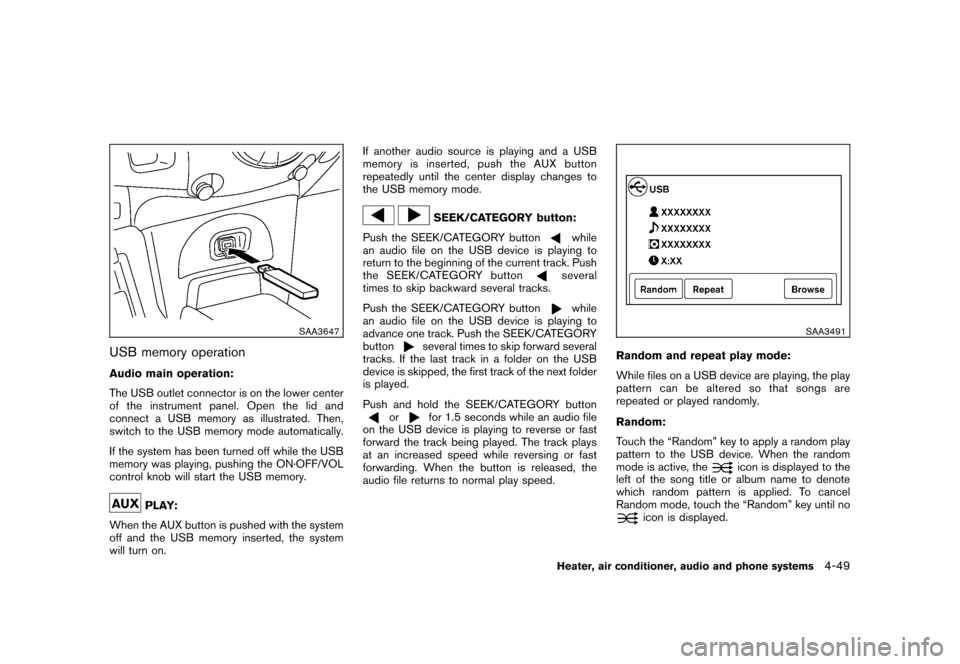
The USB outlet connector is on the lower center
of the instrument panel. Open the lid and
connect a USB memory as illustrated. Then,
switch to the USB memory mode automatically.
If the system has been turned off while the USB
memory was playing, pushing the ON·OFF/VOL
control knob will start the USB memory.
PLAY:
When the AUX button is pushed with the system
off and the USB memory inserted, the system
will turn on. If another audio source is playing and a USB
memory is inserted, push the AUX button
repeatedly until the center display changes to
the USB memory mode.
SEEK/CATEGORY button:
Push the SEEK/CATEGORY button
while
an audio file on the USB device is playing to
return to the beginning of the current track. Push
the SEEK/CATEGORY buttonseveral
times to skip backward several tracks.
Push the SEEK/CATEGORY buttonwhile
an audio file on the USB device is playing to
advance one track. Push the SEEK/CATEGORY
button
several times to skip forward several
tracks. If the last track in a folder on the USB
device is skipped, the first track of the next folder
is played.
Push and hold the SEEK/CATEGORY button
or
for 1.5 seconds while an audio file
on the USB device is playing to reverse or fast
forward the track being played. The track plays
at an increased speed while reversing or fast
forwarding. When the button is released, the
audio file returns to normal play speed.
SAA3491
Random and repeat play mode:
While files on a USB device are playing, the play
pattern can be altered so that songs are
repeated or played randomly.
Random:
Touch the “Random” key to apply a random play
pattern to the USB device. When the random
mode is active, the
icon is displayed to the
left of the song title or album name to denote
which random pattern is applied. To cancel
Random mode, touch the “Random” key until no
icon is displayed.
Heater, air conditioner, audio and phone systems
4-49
Page 201 of 345
Black plate (199,1)
Model "Z12-D" EDITED: 2010/ 9/ 27
SAA2349
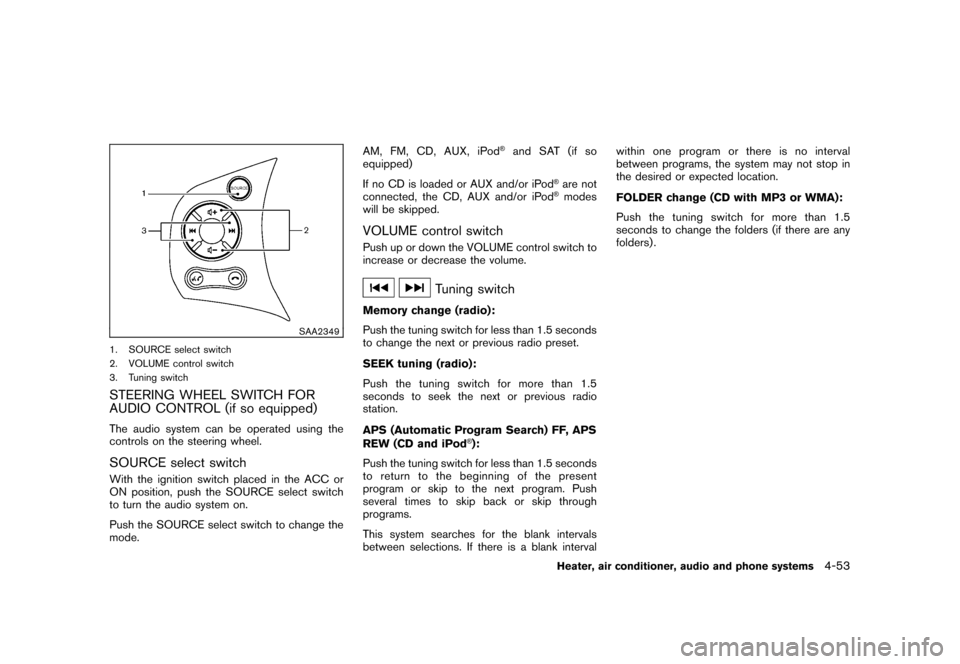
1. SOURCE select switch
2. VOLUME control switch
3. Tuning switchSTEERING WHEEL SWITCH FOR
AUDIO CONTROL (if so equipped)The audio system can be operated using the
controls on the steering wheel.SOURCE select switchWith the ignition switch placed in the ACC or
ON position, push the SOURCE select switch
to turn the audio system on.
Push the SOURCE select switch to change the
mode.AM,FM,CD,AUX,iPod
®and SAT (if so
equipped)
If no CD is loaded or AUX and/or iPod
®are not
connected, the CD, AUX and/or iPod®modes
will be skipped.
VOLUME control switchPush up or down the VOLUME control switch to
increase or decrease the volume.
Tuning switch
Memory change (radio):
Push the tuning switch for less than 1.5 seconds
to change the next or previous radio preset.
SEEK tuning (radio):
Push the tuning switch for more than 1.5
seconds to seek the next or previous radio
station.
APS (Automatic Program Search) FF, APS
REW (CD and iPod
®):
Push the tuning switch for less than 1.5 seconds
to return to the beginning of the present
program or skip to the next program. Push
several times to skip back or skip through
programs.
This system searches for the blank intervals
between selections. If there is a blank interval within one program or there is no interval
between programs, the system may not stop in
the desired or expected location.
FOLDER change (CD with MP3 or WMA):
Push the tuning switch for more than 1.5
seconds to change the folders (if there are any
folders) .
Heater, air conditioner, audio and phone systems
4-53
Page 208 of 345
Black plate (206,1)
Model "Z12-D" EDITED: 2010/ 9/ 27
PHONE END
While the voice recognition system is active,
press the
button to go back one step.
Press and hold the
button for 5 seconds to
quit the voice recognition system at any time.
GETTING STARTEDThe following procedures will help you get
started using the Bluetooth
®Hands-Free Phone
System with NISSAN Voice Recognition. For
additional command options, refer to “LIST OF
VOICE COMMANDS” later in this section.
Choosing a languageYou can interact with the Bluetooth
®Hands-Free
Phone System using English, Spanish or French.
To change the language, perform the following.
1. Press and hold the
button for more
than 5 seconds.
2. The system announces: “Press the PHONE SEND (
) button for the hands-free
phone system to enter the speaker adapta-
tion mode or press the PHONE END (
)
button to select a different language.”
3. Push the
button.
For information on speaker adaptation, see
“SPEAKER ADAPTATION (SA) MODE”
later in this section. 4. The system announces the current language
and gives you the option to change the
language to Spanish (in Spanish) or French
(in French) . Use the following chart to select
the language.
NOTE:
You must push the
button or the
button within 5 seconds to change
the language.
Current lan-
guage Push
(TALK/PHONE
SEND) to select Push
(MODE/
PHONE END) to select
English Spanish French
Spanish English French
French English Spanish
5. If you decide not to change the language, do
not press either button. After 5 seconds, the
VR session will end, and the language will
not be changed.Connecting procedureNOTE:
The connecting procedure must be per-
formed when the vehicle is stationary. If
the vehicle starts moving during the pro-
cedure, the procedure will be cancelled.
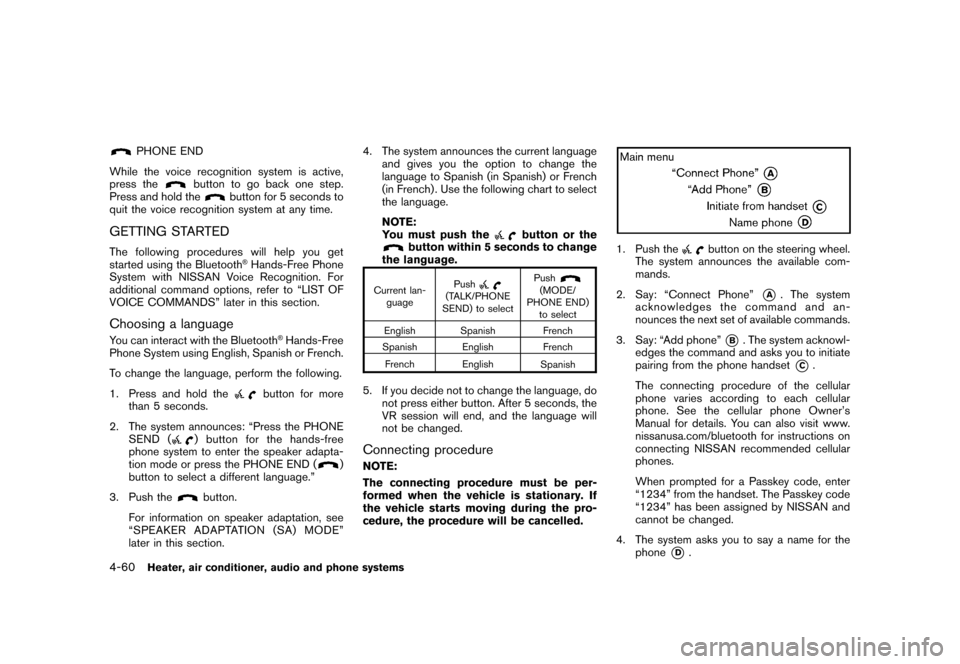
1. Push the
button on the steering wheel.
The system announces the available com-
mands.
2. Say: “Connect Phone”
*A
. The system
acknowledges the command and an-
nounces the next set of available commands.
3. Say: “Add phone”
*B. The system acknowl-
edges the command and asks you to initiate
pairing from the phone handset
*C.
The connecting procedure of the cellular
phone varies according to each cellular
phone. See the cellular phone Owner’s
Manual for details. You can also visit www.
nissanusa.com/bluetooth for instructions on
connecting NISSAN recommended cellular
phones.
When prompted for a Passkey code, enter
“1234” from the handset. The Passkey code
“1234” has been assigned by NISSAN and
cannot be changed.
4. The system asks you to say a name for the phone
*D
.
4-60
Heater, air conditioner, audio and phone systems
Page 218 of 345
Black plate (216,1)
Model "Z12-D" EDITED: 2010/ 9/ 27
WARNING
.Do not leave children or adults who
would normally require the support
of others alone in your vehicle. Pets
should not be left alone either. They
could accidentally injure themselves
or others through inadvertent op-
eration of the vehicle. Also, on hot,
sunny days, temperatures in a
closed vehicle could quickly become
high enough to cause severe or
possibly fatal injuries to people or
animals.
. Properly secure all cargo with ropes
or straps to help prevent it from
sliding or shifting. Do not place
cargo higher than the seatbacks. In
a sudden stop or collision, unse-
cured cargo could cause personal
injury.EXHAUST GAS (carbon monoxide)
WARNING
.Do not breathe exhaust gases; they
contain colorless and odorless car-
bon monoxide. Carbon monoxide is dangerous. It can cause uncon-
sciousness or death.
. If you suspect that exhaust fumes
are entering the vehicle, drive with
all windows fully open, and have the
vehicle inspected immediately.
. Do not run the engine in closed
spaces such as a garage.
. Do not park the vehicle with the
engine running for any extended
length of time.
. Keep the back door closed while
driving, otherwise exhaust gases
could be drawn into the passenger
compartment. If you must drive with
the back door open, follow these
precautions:
1. Open all the windows.
2. Set the
air recirculation to off
and the fan control to high to
circulate the air.
. If electrical wiring or other cable
connections must pass to a trailer
through the seal on the back door or
the body, follow the manufacturer’s
recommendation to prevent carbon
monoxide entry into the vehicle. .
If a special body, camper or other
equipment is added for recreational
or other usage, follow the manufac-
turer’s recommendation to prevent
carbon monoxide entry into the
vehicle. (Some recreational vehicle
appliances such as stoves, refrig-
erators, heaters, etc. may also gen-
erate carbon monoxide.)
. The exhaust system and body
should be inspected by a qualified
mechanic whenever:
— The vehicle is raised for service.
— You suspect that exhaust fumes
are entering into the passenger
compartment.
— You notice a change in the sound of the exhaust system.
— You have had an accident invol- ving damage to the exhaust
system, underbody, or rear of
the vehicle.
THREE-WAY CATALYSTThe three-way catalyst is an emission control
device installed in the exhaust system. Exhaust
gases in the three-way catalyst are burned at
high temperatures to help reduce pollutants.
PRECAUTIONS WHEN STARTING
AND DRIVING5-2
Starting and driving
Page 221 of 345
Black plate (219,1)
Model "Z12-D" EDITED: 2010/ 9/ 27
pressure sensors, and the TPMS will
not function properly.
Some devices and transmitters may temporarily
interfere with the operation of the TPMS and
cause the low tire pressure warning light to
illuminate. Some examples are:
. Facilities or electric devices using similar
radio frequencies are near the vehicle.
. If a transmitter set to similar frequencies is
being used in or near the vehicle.
. If a computer (or similar equipment) or a DC/
AC converter is being used in or near the
vehicle.
FCC Notice:
For USA:
This device complies with Part 15 of the
FCC Rules. Operation is subject to the
following two conditions:
(1) This device may not cause harmful
interference, and (2) this device must
accept any interference received, including
interference that may cause undesired
operation.
Note: Changes or modifications not ex-
pressly approved by the party responsible
for compliance could void the user’s authority to operate the equipment.
For Canada:
This device complies with RSS-210 of
Industry Canada. Operation is subject to
the following two conditions:
(1) this device may not cause interference,
and (2) this device must accept any inter-
ference, including interference that may
cause undesired operation of the device.
AVOIDING COLLISION AND ROLL-
OVER
WARNING
Failure to operate this vehicle in a safe
and prudent manner may result in loss
of control or an accident.
Be alert and drive defensively at all times. Obey
all traffic regulations. Avoid excessive speed,
high speed cornering, or sudden steering
maneuvers, because these driving practices
could cause you to lose control of your vehicle.
As with any vehicle, a loss of control could
result in a collision with other vehicles or
objects, or cause the vehicle to rollover,
particularly if the loss of control causes the
vehicle to slide sideways. Be attentive at all
times, and avoid driving when tired. Never drive when under the influence of alcohol or drugs
(including prescription or over-the-counter
drugs which may cause drowsiness) . Always
wear your seat belt as outlined in the “SEAT
BELTS” in the “1. Safety — Seats, seat belts and
supplemental restraint system” section of this
manual, and also instruct your passengers to do
so.
Seat belts help reduce the risk of injury in
collisions and rollovers.
In a rollover crash, an
unbelted or improperly belted person is
significantly more likely to be injured or
killed than a person properly wearing a
seat belt.
OFF-ROAD RECOVERYWhile driving, the right side or left side wheels
may unintentionally leave the road surface. If this
occurs, maintain control of the vehicle by
following the procedure below. Please note that
this procedure is only a general guide. The
vehicle must be driven as appropriate based on
the conditions of the vehicle, road and traffic.
1. Remain calm and do not overreact.
2. Do not apply the brakes.
3. Maintain a firm grip on the steering wheel with both hands and try to hold a straight
course.
4. When appropriate, slowly release the accel-
Starting and driving
5-5
Page 222 of 345
Black plate (220,1)
Model "Z12-D" EDITED: 2010/ 9/ 27
erator pedal to gradually slow the vehicle.
5. If there is nothing in the way, steer the vehicle to follow the road while the vehicle
speed is reduced. Do not attempt to drive
the vehicle back onto the road surface until
vehicle speed is reduced.
6. When it is safe to do so, gradually turn the steering wheel until both tires return to the
road surface. When all tires are on the road
surface, steer the vehicle to stay in the
appropriate driving lane.
— If you decide that it is not safe to returnthe vehicle to the road surface based on
vehicle, road or traffic conditions, gra-
dually slow the vehicle to a stop in a safe
place off the road.
RAPID AIR PRESSURE LOSSRapid air pressure loss or a “blow-out” can
occur if the tire is punctured or is damaged due
to hitting a curb or pothole. Rapid air pressure
loss can also be caused by driving on under-
inflated tires.
Rapid air pressure loss can affect the handling
and stability of the vehicle, especially at highway
speeds.
Help prevent rapid air pressure loss by main-
taining the correct air pressure and visually
inspect the tires for wear and damage. See “WHEELS AND TIRES” in the “8. Maintenance
and do-it-yourself” section of this manual.
If a tire rapidly loses air pressure or “blows-out”
while driving maintain control of the vehicle by
following the procedure below. Please note that
this procedure is only a general guide. The
vehicle must be driven as appropriate based on
the conditions of the vehicle, road and traffic.
WARNING
The following actions can increase the
chance of losing control of the vehicle if
there is a sudden loss of tire air
pressure. Losing control of the vehicle
may cause a collision and result in
personal injury.
.
The vehicle generally moves or pulls
in the direction of the flat tire.
. Do not rapidly apply the brakes.
. Do not rapidly release the accelera-
tor pedal.
. Do not rapidly turn the steering
wheel.
1. Remain calm and do not overreact.
2. Maintain a firm grip on the steering wheel with both hands and try to hold a straight
course. 3. When appropriate, slowly release the accel-
erator pedal to gradually slow the vehicle.
4. Gradually steer the vehicle to a safe location off the road and away from traffic if possible.
5. Lightly apply the brake pedal to gradually stop the vehicle.
6. Turn on the hazard warning flashers and either contact a roadside emergency service
to change the tire or see “CHANGING A
FLAT TIRE” in the “6. In case of emergency”
section of this Owner’s Manual.
DRINKING ALCOHOL/DRUGS AND
DRIVING
WARNING
Never drive under the influence of
alcohol or drugs. Alcohol in the blood-
stream reduces coordination, delays
reaction time and impairs judgement.
Driving after drinking alcohol increases
the likelihood of being involved in an
accident injuring yourself and others.
Additionally, if you are injured in an
accident, alcohol can increase the se-
verity of the injury.
NISSAN is committed to safe driving. However,
5-6
Starting and driving
Page 226 of 345
Black plate (224,1)
Model "Z12-D" EDITED: 2010/ 9/ 29
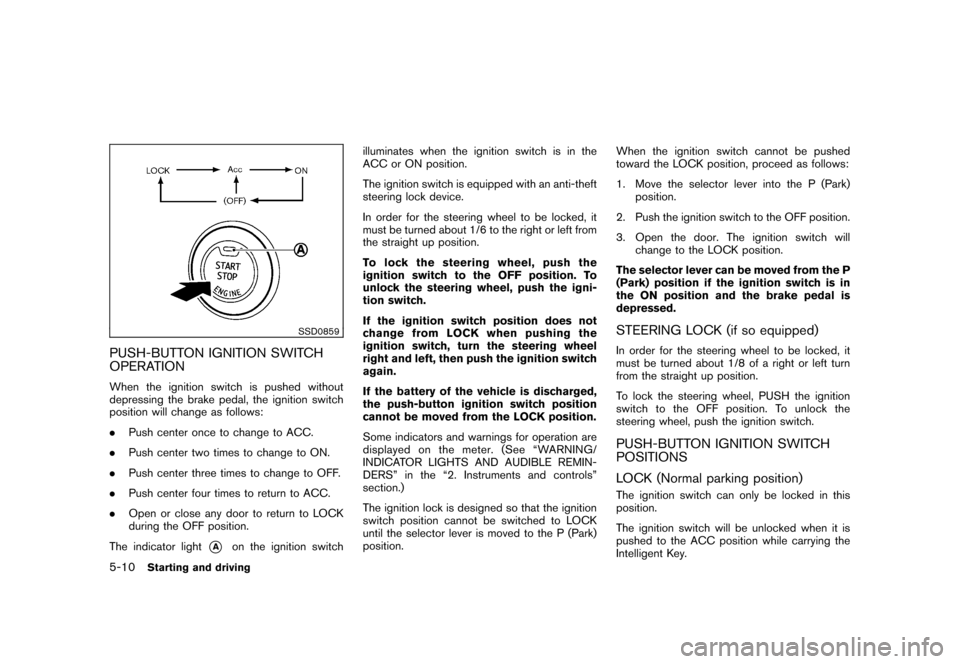
SSD0859
PUSH-BUTTON IGNITION SWITCH
OPERATIONWhen the ignition switch is pushed without
depressing the brake pedal, the ignition switch
position will change as follows:
.Push center once to change to ACC.
. Push center two times to change to ON.
. Push center three times to change to OFF.
. Push center four times to return to ACC.
. Open or close any door to return to LOCK
during the OFF position.
The indicator light
*A
on the ignition switch illuminates when the ignition switch is in the
ACC or ON position.
The ignition switch is equipped with an anti-theft
steering lock device.
In order for the steering wheel to be locked, it
must be turned about 1/6 to the right or left from
the straight up position.
To lock the steering wheel, push the
ignition switch to the OFF position. To
unlock the steering wheel, push the igni-
tion switch.
If the ignition switch position does not
change from LOCK when pushing the
ignition switch, turn the steering wheel
right and left, then push the ignition switch
again.
If the battery of the vehicle is discharged,
the push-button ignition switch position
cannot be moved from the LOCK position.
Some indicators and warnings for operation are
displayed on the meter. (See “WARNING/
INDICATOR LIGHTS AND AUDIBLE REMIN-
DERS” in the “2. Instruments and controls”
section.)
The ignition lock is designed so that the ignition
switch position cannot be switched to LOCK
until the selector lever is moved to the P (Park)
position.
When the ignition switch cannot be pushed
toward the LOCK position, proceed as follows:
1. Move the selector lever into the P (Park)
position.
2. Push the ignition switch to the OFF position.
3. Open the door. The ignition switch will change to the LOCK position.
The selector lever can be moved from the P
(Park) position if the ignition switch is in
the ON position and the brake pedal is
depressed.
STEERING LOCK (if so equipped)In order for the steering wheel to be locked, it
must be turned about 1/8 of a right or left turn
from the straight up position.
To lock the steering wheel, PUSH the ignition
switch to the OFF position. To unlock the
steering wheel, push the ignition switch.PUSH-BUTTON IGNITION SWITCH
POSITIONS
LOCK (Normal parking position)The ignition switch can only be locked in this
position.
The ignition switch will be unlocked when it is
pushed to the ACC position while carrying the
Intelligent Key.
5-10
Starting and driving
Page 284 of 345
Black plate (282,1)
Model "Z12-D" EDITED: 2010/ 9/ 27
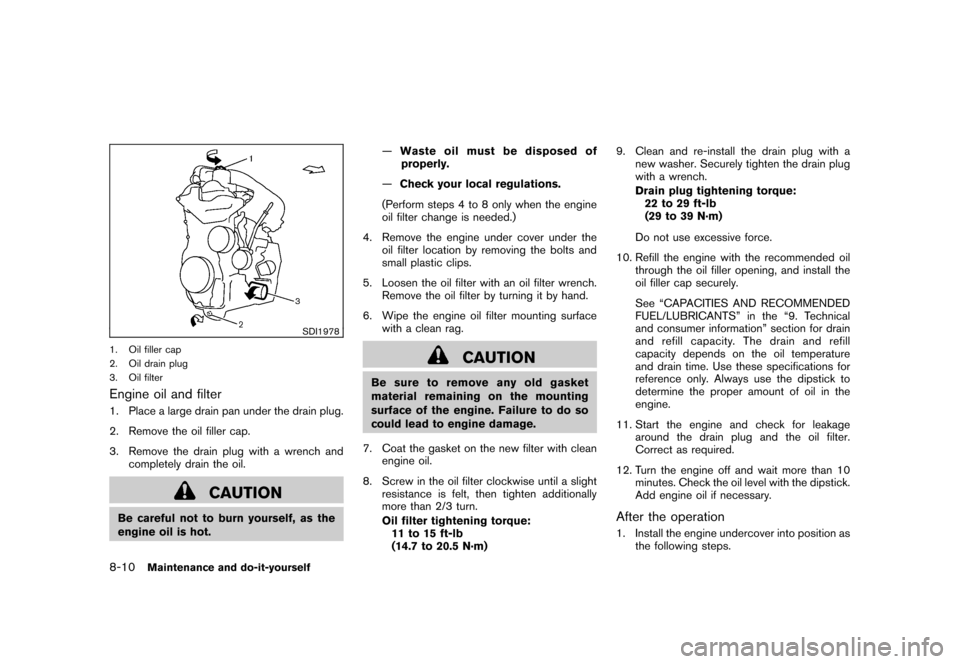
SDI1978
1. Oil filler cap
2. Oil drain plug
3. Oil filterEngine oil and filter1. Place a large drain pan under the drain plug.
2. Remove the oil filler cap.
3. Remove the drain plug with a wrench andcompletely drain the oil.
CAUTION
Be careful not to burn yourself, as the
engine oil is hot. —
Waste oil must be disposed of
properly.
— Check your local regulations.
(Perform steps 4 to 8 only when the engine
oil filter change is needed.)
4. Remove the engine under cover under the oil filter location by removing the bolts and
small plastic clips.
5. Loosen the oil filter with an oil filter wrench. Remove the oil filter by turning it by hand.
6. Wipe the engine oil filter mounting surface with a clean rag.
CAUTION
Be sure to remove any old gasket
material remaining on the mounting
surface of the engine. Failure to do so
could lead to engine damage.
7. Coat the gasket on the new filter with clean engine oil.
8. Screw in the oil filter clockwise until a slight resistance is felt, then tighten additionally
more than 2/3 turn.
Oil filter tightening torque:11 to 15 ft-lb
(14.7 to 20.5 N·m) 9. Clean and re-install the drain plug with a
new washer. Securely tighten the drain plug
with a wrench.
Drain plug tightening torque:22 to 29 ft-lb
(29 to 39 N·m)
Do not use excessive force.
10. Refill the engine with the recommended oil through the oil filler opening, and install the
oil filler cap securely.
See “CAPACITIES AND RECOMMENDED
FUEL/LUBRICANTS” in the “9. Technical
and consumer information” section for drain
and refill capacity. The drain and refill
capacity depends on the oil temperature
and drain time. Use these specifications for
reference only. Always use the dipstick to
determine the proper amount of oil in the
engine.
11. Start the engine and check for leakage around the drain plug and the oil filter.
Correct as required.
12. Turn the engine off and wait more than 10 minutes. Check the oil level with the dipstick.
Add engine oil if necessary.
After the operation1. Install the engine undercover into position asthe following steps.
8-10
Maintenance and do-it-yourself
Page 317 of 345
Black plate (315,1)
Model "Z12-D" EDITED: 2010/ 9/ 27
FUEL RECOMMENDATIONUse unleaded regular gasoline with an octane
rating of at least 87 AKI (Anti-Knock Index)
number (Research octane number 91) .
CAUTION
.Using a fuel other than that speci-
fied could adversely affect the emis-
sion control system, and may also
affect warranty coverage.
. Under no circumstances should a
leaded gasoline be used, because
this will damage the three-way cat-
alyst.
. Do not use E-85 fuel in your vehicle.
Your vehicle is not designed to run
on E-85 fuel. Using E-85 fuel can
damage the fuel system compo-
nents and is not covered by the
NISSAN new vehicle limited war-
ranty.Gasoline specificationsNISSAN recommends using gasoline that meets
the World-Wide Fuel Charter (WWFC) speci-
fications where it is available. Many of the
automobile manufacturers developed this spe-
cification to improve emission control system and vehicle performance. Ask your service
station manager if the gasoline meets the
WWFC specifications.
Reformulated gasolineSome fuel suppliers are now producing refor-
mulated gasolines. These gasolines are specially
designed to reduce vehicle emissions. NISSAN
supports efforts towards cleaner air and sug-
gests that you use reformulated gasoline when
available.Gasoline containing oxygenatesSome fuel suppliers sell gasoline containing
oxygenates such as ethanol, MTBE and metha-
nol with or without advertising their presence.
NISSAN does not recommend the use of fuels
of which the oxygenate content and the fuel
compatibility for your NISSAN cannot be readily
determined. If in doubt, ask your service station
manager.
If you use oxygenate-blend gasoline, please take
the following precautions as the usage of such
fuels may cause vehicle performance problems
and/or fuel system damage.
.
The fuel should be unleaded and have
an octane rating no lower than that
recommended for unleaded gasoline.
. If an oxygenate-blend, other than
methanol blend is used, it should
contain no more than 10% oxygenate. (MTBE may, however, be added up to
15%.)
. If a methanol blend is used, it should
contain no more than 5% methanol
(methyl alcohol, wood alcohol) . It
should also contain a suitable amount
of appropriate cosolvents and corro-
sion inhibitors. If not properly formu-
lated with appropriate cosolvents and
corrosion inhibitors, such methanol
blends may cause fuel system damage
and/or vehicle performance problems.
At this time, sufficient data is not
available to ensure that all methanol
blends are suitable for use in NISSAN
vehicles.
If any driveability problems such as engine
stalling and difficult hot-starting are experienced
after using oxygenate-blend fuels, immediately
change to a non-oxygenate fuel or a fuel with a
low blend of MTBE.
Take care not to spill gasoline during
refueling. Gasoline containing oxygenates
can cause paint damage.
E-85 fuelE-85 fuel is a mixture of approximately 85% fuel
ethanol and 15% unleaded gasoline. E-85 can
only be used in a Flexible Fuel Vehicle (FFV) . Do
not use E-85 fuel in your vehicle. U.S. govern-
ment regulations require fuel ethanol dispensing
Technical and consumer information
9-3