buttons NISSAN CUBE 2011 3.G Owner's Manual
[x] Cancel search | Manufacturer: NISSAN, Model Year: 2011, Model line: CUBE, Model: NISSAN CUBE 2011 3.GPages: 345, PDF Size: 2.97 MB
Page 199 of 345
Black plate (197,1)
Model "Z12-D" EDITED: 2010/ 9/ 27
Audio main operation:
Place the ignition switch in the ACC or ON
position. Then, push the
button repeatedly
to switch to the iPod
®mode.
If the system has been turned off while the iPod
®
was playing, pushing the ON·OFF button will
start the iPod
®.
PLAY:
When the
button is pushed with the
system off and the iPod
®connected, the system
will turn on. If another audio source is playing
and the iPod
®is connected, push the
button repeatedly to switch to the iPod
®mode.
Interface:
The interface for iPod
®operation shown on the
vehicle center display is similar to the iPod
®
interface. Use the touchscreen, BACK button
or the TUNE/SCROLL knob to navigate the
menus on the screen.
The following items can be chosen from the
menu list screen. For further information about
each item, see the iPod
®Owner’s Manual.
. Playlists
. Artists
. Songs .
Composers
. Audiobooks
. Podcasts
The following touch-panel buttons shown on the
screen are also available:
.
: returns to the previous screen.
.: plays/pauses the music selected.
SEEK/CATEGORY button:
Push the FF or REW button for more than 1.5
seconds while an iPod
®is playing to fast-
forward or rewind through the track. When the
button is released, the iPod®will return to the
normal play speed.
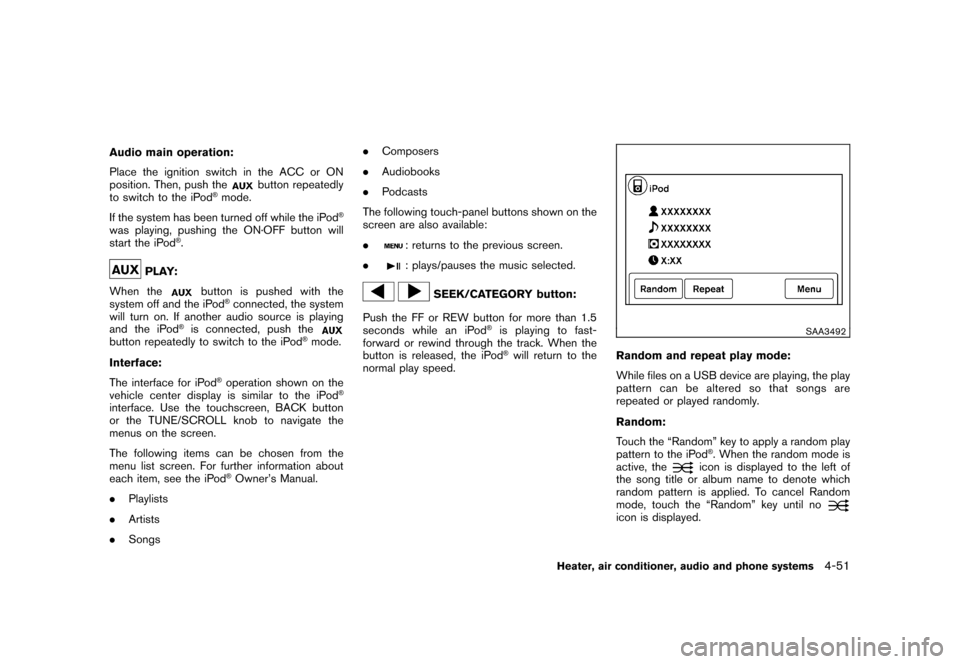
SAA3492
Random and repeat play mode:
While files on a USB device are playing, the play
pattern can be altered so that songs are
repeated or played randomly.
Random:
Touch the “Random” key to apply a random play
pattern to the iPod
®. When the random mode is
active, the
icon is displayed to the left of
the song title or album name to denote which
random pattern is applied. To cancel Random
mode, touch the “Random” key until no
icon is displayed.
Heater, air conditioner, audio and phone systems
4-51
Page 207 of 345
Black plate (205,1)
Model "Z12-D" EDITED: 2010/ 9/ 27
prompts you to enter more.
— “six six two” The system repeats the numbers and
prompts you to enter more.
— “six two zero zero”
. You can say “Star” for “*” and “Pound” for
“#” at any time in any position of the phone
number. (Available only when using the
“Special Dialing” command.)
Example: 1-555-1212 *123
— “One five five five one two one two star one two three”
. Say “pound” for “#”. Say “star” for “*”
(available when using the “Special Dialing”
command and the “Send” command during
a call) .
. Say “plus” for “+” (available only when using
the “Special Dialing” command) .
. Say “pause” for a 2 second pause (available
only when storing a phone book number) .
See “Making a call by entering a phone
number” later in this section and “LIST OF
VOICE COMMANDS” later in this section
for more information. NOTE:
For best results, say phone numbers as
single digits.
The voice command “Help” is available at any
time. Please say the “Help” command to get
information about how to use the system.
INFO
.
If you are controlling the telephone system
by voice command for the first time or do not
know the appropriate voice command,
speak “Help”. The system announces the
available commands.
. When you speak numbers, you can speak
both “zero” or “oh” for “0”.
Manual command selectionCommands can be selected manually. While the
commands are displayed on the audio screen,
select a command by operating the audio tuning
switch, and then push the
switch. Once a
command is manually selected, the voice
command function is cancelled. To return to
voice command mode, push the
switch to
cancel the current operation, and then perform
the first procedure of voice command.
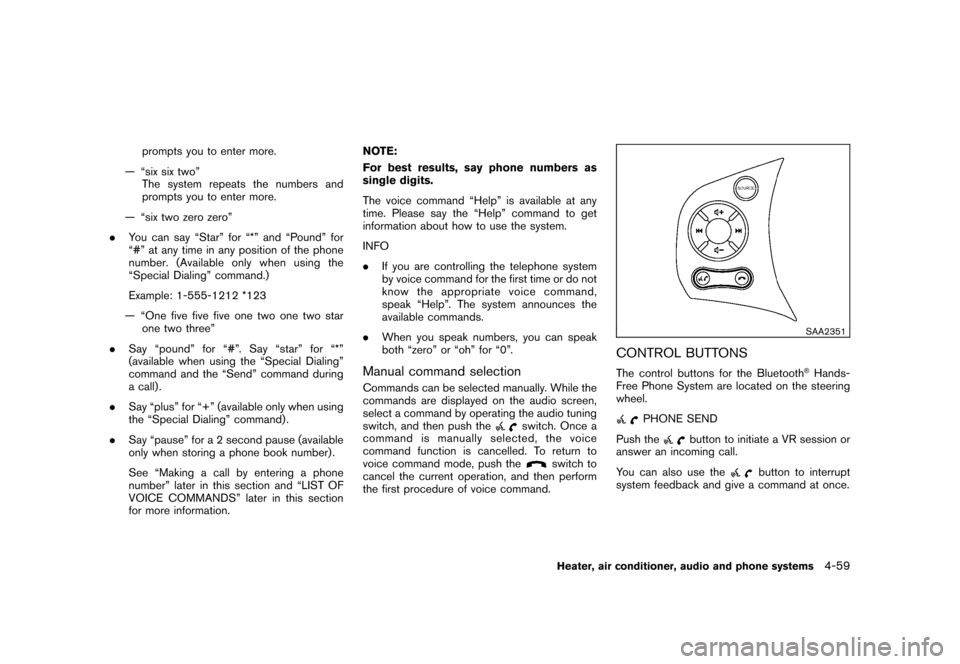
SAA2351
CONTROL BUTTONSThe control buttons for the Bluetooth
®Hands-
Free Phone System are located on the steering
wheel.
PHONE SEND
Push the
button to initiate a VR session or
answer an incoming call.
You can also use the
button to interrupt
system feedback and give a command at once.
Heater, air conditioner, audio and phone systems
4-59
Page 297 of 345
Black plate (295,1)
Model "Z12-D" EDITED: 2010/ 9/ 27
CAUTION
Be careful not to allow children to
swallow the battery and removed parts.
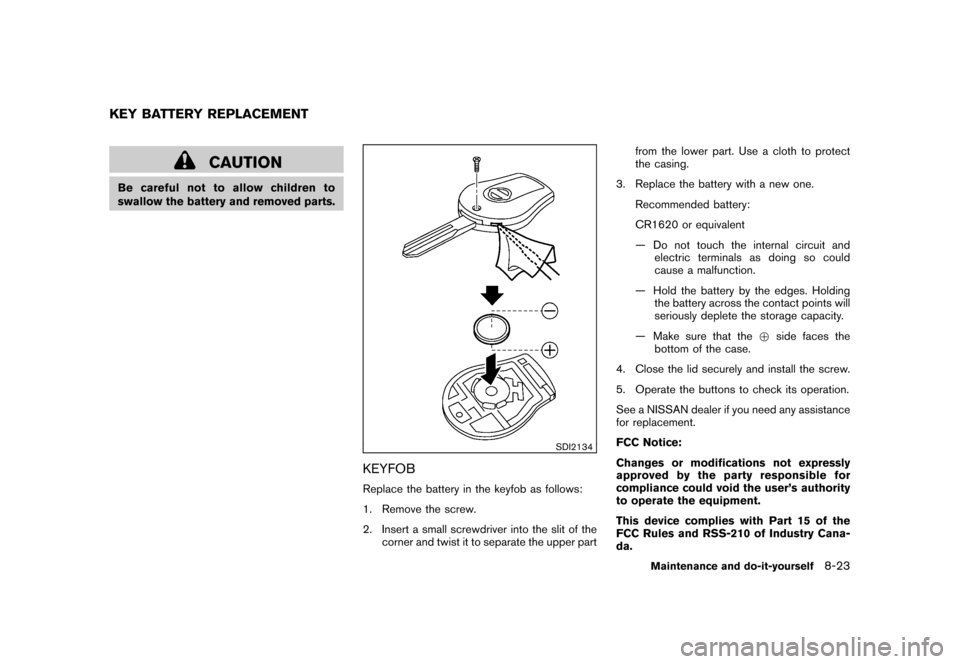
SDI2134
KEYFOBReplace the battery in the keyfob as follows:
1. Remove the screw.
2. Insert a small screwdriver into the slit of thecorner and twist it to separate the upper part from the lower part. Use a cloth to protect
the casing.
3. Replace the battery with a new one. Recommended battery:
CR1620 or equivalent
— Do not touch the internal circuit andelectric terminals as doing so could
cause a malfunction.
— Hold the battery by the edges. Holding the battery across the contact points will
seriously deplete the storage capacity.
— Make sure that the +side faces the
bottom of the case.
4. Close the lid securely and install the screw.
5. Operate the buttons to check its operation.
See a NISSAN dealer if you need any assistance
for replacement.
FCC Notice:
Changes or modifications not expressly
approved by the party responsible for
compliance could void the user’s authority
to operate the equipment.
This device complies with Part 15 of the
FCC Rules and RSS-210 of Industry Cana-
da.
KEY BATTERY REPLACEMENT
Maintenance and do-it-yourself
8-23
Page 299 of 345
Black plate (297,1)
Model "Z12-D" EDITED: 2010/ 9/ 27
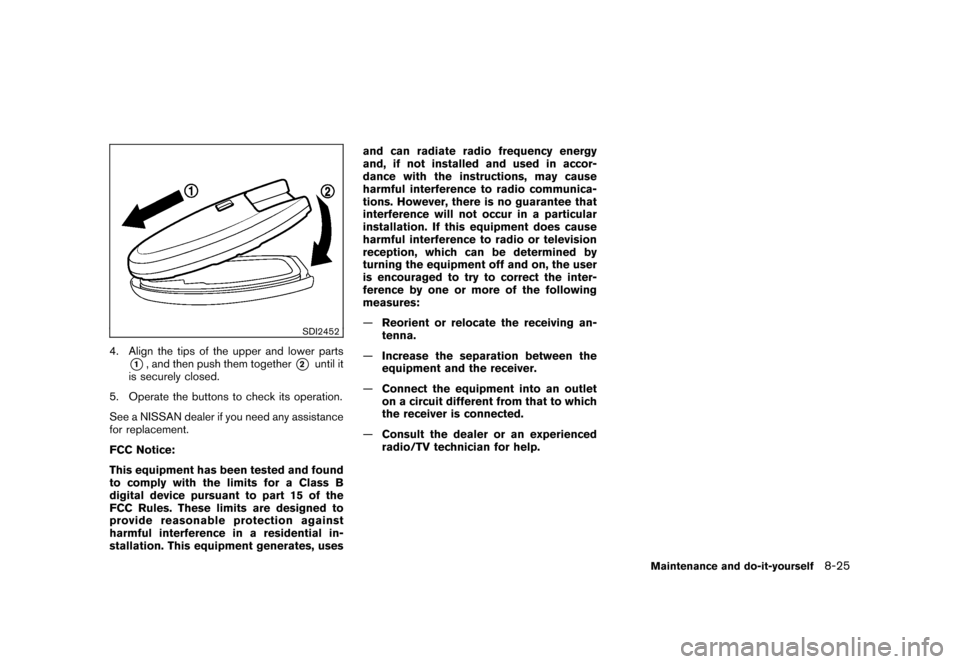
SDI2452
4. Align the tips of the upper and lower parts
*1, and then push them together
*2
until it
is securely closed.
5. Operate the buttons to check its operation.
See a NISSAN dealer if you need any assistance
for replacement.
FCC Notice:
This equipment has been tested and found
to comply with the limits for a Class B
digital device pursuant to part 15 of the
FCC Rules. These limits are designed to
provide reasonable protection against
harmful interference in a residential in-
stallation. This equipment generates, uses and can radiate radio frequency energy
and, if not installed and used in accor-
dance with the instructions, may cause
harmful interference to radio communica-
tions. However, there is no guarantee that
interference will not occur in a particular
installation. If this equipment does cause
harmful interference to radio or television
reception, which can be determined by
turning the equipment off and on, the user
is encouraged to try to correct the inter-
ference by one or more of the following
measures:
—
Reorient or relocate the receiving an-
tenna.
— Increase the separation between the
equipment and the receiver.
— Connect the equipment into an outlet
on a circuit different from that to which
the receiver is connected.
— Consult the dealer or an experienced
radio/TV technician for help.
Maintenance and do-it-yourself
8-25
Page 338 of 345
Black plate (2,1)
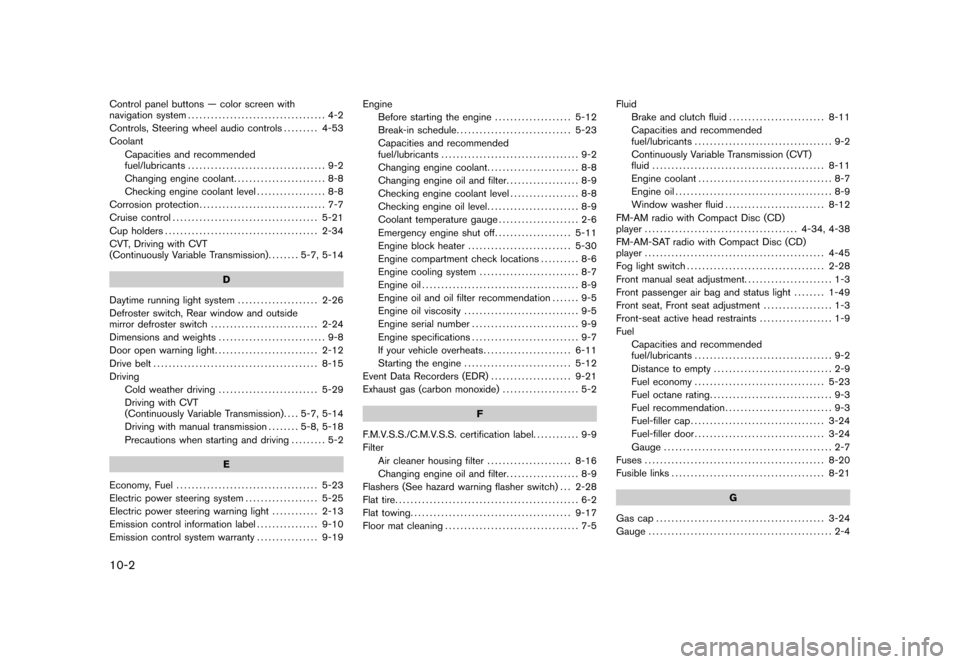
10-2Control panel buttons — color screen with
navigation system.................................... 4-2
Controls, Steering wheel audio controls ......... 4-53
Coolant Capacities and recommended
fuel/lubricants .................................... 9-2
Changing engine coolant ........................ 8-8
Checking engine coolant level .................. 8-8
Corrosion protection ................................. 7-7
Cruise control ...................................... 5-21
Cup holders ........................................ 2-34
CVT, Driving with CVT
(Continuously Variable Transmission) ........ 5-7, 5-14
D
Daytime running light system ..................... 2-26
Defroster switch, Rear window and outside
mirror defroster switch ............................ 2-24
Dimensions and weights ............................ 9-8
Door open warning light ........................... 2-12
Drive belt ........................................... 8-15
Driving Cold weather driving .......................... 5-29
Driving with CVT
(Continuously Variable Transmission) .... 5-7, 5-14
Driving with manual transmission ........ 5-8, 5-18
Precautions when starting and driving ......... 5-2
E
Economy, Fuel ..................................... 5-23
Electric power steering system ................... 5-25
Electric power steering warning light ............ 2-13
Emission control information label ................ 9-10
Emission control system warranty ................ 9-19Engine
Before starting the engine .................... 5-12
Break-in schedule .............................. 5-23
Capacities and recommended
fuel/lubricants .................................... 9-2
Changing engine coolant ........................ 8-8
Changing engine oil and filter ................... 8-9
Checking engine coolant level .................. 8-8
Checking engine oil level ........................ 8-9
Coolant temperature gauge ..................... 2-6
Emergency engine shut off .................... 5-11
Engine block heater ........................... 5-30
Engine compartment check locations .......... 8-6
Engine cooling system .......................... 8-7
Engine oil ......................................... 8-9
Engine oil and oil filter recommendation ....... 9-5
Engine oil viscosity .............................. 9-5
Engine serial number ............................ 9-9
Engine specifications ............................ 9-7
If your vehicle overheats ....................... 6-11
Starting the engine ............................ 5-12
Event Data Recorders (EDR) ..................... 9-21
Exhaust gas (carbon monoxide) .................... 5-2
F
F.M.V.S.S./C.M.V.S.S. certification label. ........... 9-9
Filter Air cleaner housing filter ...................... 8-16
Changing engine oil and filter ................... 8-9
Flashers (See hazard warning flasher switch) . . . 2-28
Flat tire ................................................ 6-2
Flat towing .......................................... 9-17
Floor mat cleaning ................................... 7-5 Fluid
Brake and clutch fluid ......................... 8-11
Capacities and recommended
fuel/lubricants .................................... 9-2
Continuously Variable Transmission (CVT)
fluid ............................................. 8-11
Engine coolant ................................... 8-7
Engine oil ......................................... 8-9
Window washer fluid .......................... 8-12
FM-AM radio with Compact Disc (CD)
player ........................................ 4-34, 4-38
FM-AM-SAT radio with Compact Disc (CD)
player ............................................... 4-45
Fog light switch .................................... 2-28
Front manual seat adjustment. ...................... 1-3
Front passenger air bag and status light ........ 1-49
Front seat, Front seat adjustment .................. 1-3
Front-seat active head restraints ................... 1-9
Fuel Capacities and recommended
fuel/lubricants .................................... 9-2
Distance to empty ............................... 2-9
Fuel economy .................................. 5-23
Fuel octane rating ................................ 9-3
Fuel recommendation ............................ 9-3
Fuel-filler cap ................................... 3-24
Fuel-filler door .................................. 3-24
Gauge ............................................ 2-7
Fuses ............................................... 8-20
Fusible links ........................................ 8-21
G
Gas cap ............................................ 3-24
Gauge ................................................ 2-4
Model "Z12-D" EDITED: 2010/ 9/ 27