phone NISSAN CUBE 2011 3.G Manual PDF
[x] Cancel search | Manufacturer: NISSAN, Model Year: 2011, Model line: CUBE, Model: NISSAN CUBE 2011 3.GPages: 345, PDF Size: 2.97 MB
Page 210 of 345
Black plate (208,1)
Model "Z12-D" EDITED: 2010/ 9/ 27
you can say “Go back” or “Correction” anytime
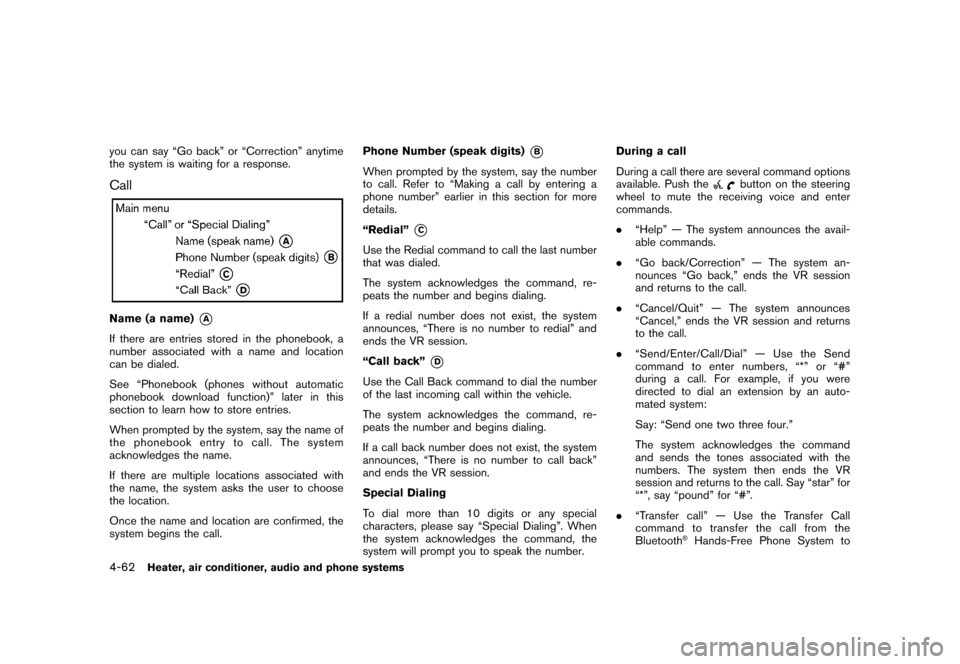
the system is waiting for a response.CallName (a name)
*A
If there are entries stored in the phonebook, a
number associated with a name and location
can be dialed.
See “Phonebook (phones without automatic
phonebook download function)” later in this
section to learn how to store entries.
When prompted by the system, say the name of
the phonebook entry to call. The system
acknowledges the name.
If there are multiple locations associated with
the name, the system asks the user to choose
the location.
Once the name and location are confirmed, the
system begins the call.Phone Number (speak digits)
*B
When prompted by the system, say the number
to call. Refer to “Making a call by entering a
phone number” earlier in this section for more
details.
“Redial”
*C
Use the Redial command to call the last number
that was dialed.
The system acknowledges the command, re-
peats the number and begins dialing.
If a redial number does not exist, the system
announces, “There is no number to redial” and
ends the VR session.
“Call back”
*D
Use the Call Back command to dial the number
of the last incoming call within the vehicle.
The system acknowledges the command, re-
peats the number and begins dialing.
If a call back number does not exist, the system
announces, “There is no number to call back”
and ends the VR session.
Special Dialing
To dial more than 10 digits or any special
characters, please say “Special Dialing”. When
the system acknowledges the command, the
system will prompt you to speak the number.During a call
During a call there are several command options
available. Push the
button on the steering
wheel to mute the receiving voice and enter
commands.
. “Help” — The system announces the avail-
able commands.
. “Go back/Correction” — The system an-
nounces “Go back,” ends the VR session
and returns to the call.
. “Cancel/Quit” — The system announces
“Cancel,” ends the VR session and returns
to the call.
. “Send/Enter/Call/Dial” — Use the Send
command to enter numbers, “*” or “#”
during a call. For example, if you were
directed to dial an extension by an auto-
mated system:
Say: “Send one two three four.”
The system acknowledges the command
and sends the tones associated with the
numbers. The system then ends the VR
session and returns to the call. Say “star” for
“*”, say “pound” for “#”.
. “Transfer call” — Use the Transfer Call
command to transfer the call from the
Bluetooth
®Hands-Free Phone System to
4-62
Heater, air conditioner, audio and phone systems
Page 211 of 345
Black plate (209,1)
Model "Z12-D" EDITED: 2010/ 9/ 27
the cellular phone when privacy is desired.
The system announces, “Transfer call. Call
transferred to privacy mode.” The system
then ends the VR session.
To reconnect a call from the cellular phone
to the Bluetooth
®Hands-Free Phone sys-
tem, push thebutton.
. “Mute” — Use the Mute command to mute
your voice so the other party cannot hear it.
Use the mute command again to unmute
your voice.
NOTE:
If a call is ended or the cellular phone
network connection is lost while the Mute
feature is on, the Mute feature will be reset
to “off” for the next call so the other party
can hear your voice.
Phonebook (phones without automatic
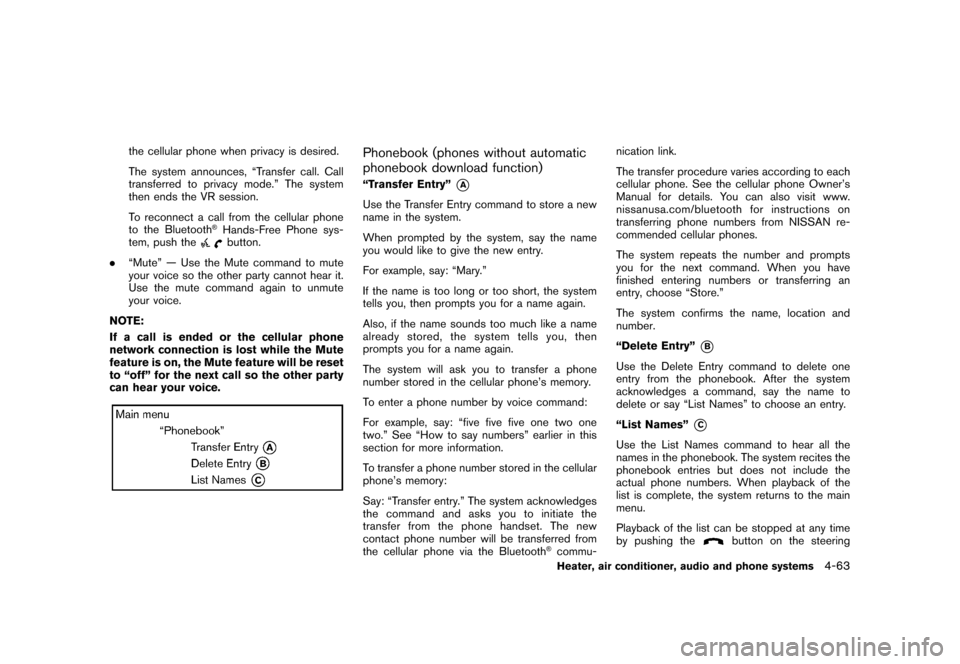
phonebook download function)“Transfer Entry”
*A
Use the Transfer Entry command to store a new
name in the system.
When prompted by the system, say the name
you would like to give the new entry.
For example, say: “Mary.”
If the name is too long or too short, the system
tells you, then prompts you for a name again.
Also, if the name sounds too much like a name
already stored, the system tells you, then
prompts you for a name again.
The system will ask you to transfer a phone
number stored in the cellular phone’s memory.
To enter a phone number by voice command:
For example, say: “five five five one two one
two.” See “How to say numbers” earlier in this
section for more information.
To transfer a phone number stored in the cellular
phone’s memory:
Say: “Transfer entry.” The system acknowledges
the command and asks you to initiate the
transfer from the phone handset. The new
contact phone number will be transferred from
the cellular phone via the Bluetooth
®commu- nication link.
The transfer procedure varies according to each
cellular phone. See the cellular phone Owner’s
Manual for details. You can also visit www.
nissanusa.com/bluetooth for instructions on
transferring phone numbers from NISSAN re-
commended cellular phones.
The system repeats the number and prompts
you for the next command. When you have
finished entering numbers or transferring an
entry, choose “Store.”
The system confirms the name, location and
number.
“Delete Entry”
*B
Use the Delete Entry command to delete one
entry from the phonebook. After the system
acknowledges a command, say the name to
delete or say “List Names” to choose an entry.
“List Names”
*C
Use the List Names command to hear all the
names in the phonebook. The system recites the
phonebook entries but does not include the
actual phone numbers. When playback of the
list is complete, the system returns to the main
menu.
Playback of the list can be stopped at any time
by pushing the
button on the steering
Heater, air conditioner, audio and phone systems
4-63
Page 212 of 345
Black plate (210,1)
Model "Z12-D" EDITED: 2010/ 9/ 27
wheel. The system ends the VR session.Phonebook (phones with automatic
phonebook download function)NOTE:
Phonebook commands are not available
when the vehicle is moving.For phones that support automatic download of
the phonebook (PBAP Bluetooth
®profile) , the
“Phonebook” command is used to manage
entries to the vehicle phonebook. You can say
the name of an entry at this menu to initiate
dialing of that entry.
The phonebook stores up to 1000 names for
each phone paired with the system. Each name
can have up to 4 locations/phone numbers
associated with it.
When a phone is connected to the system, the
phonebook is automatically downloaded to the
vehicle. This feature allows you to access your
phonebook from the Bluetooth system and call
contacts by name. You can record a custom
voice tag for contact names that the system has
difficulty recognizing. For more information see
“Record Name” in this section. NOTE:
Each phone has its own separate phone-
book. You cannot access Phone A’s phone-
book if you are currently connected with
Phone B.
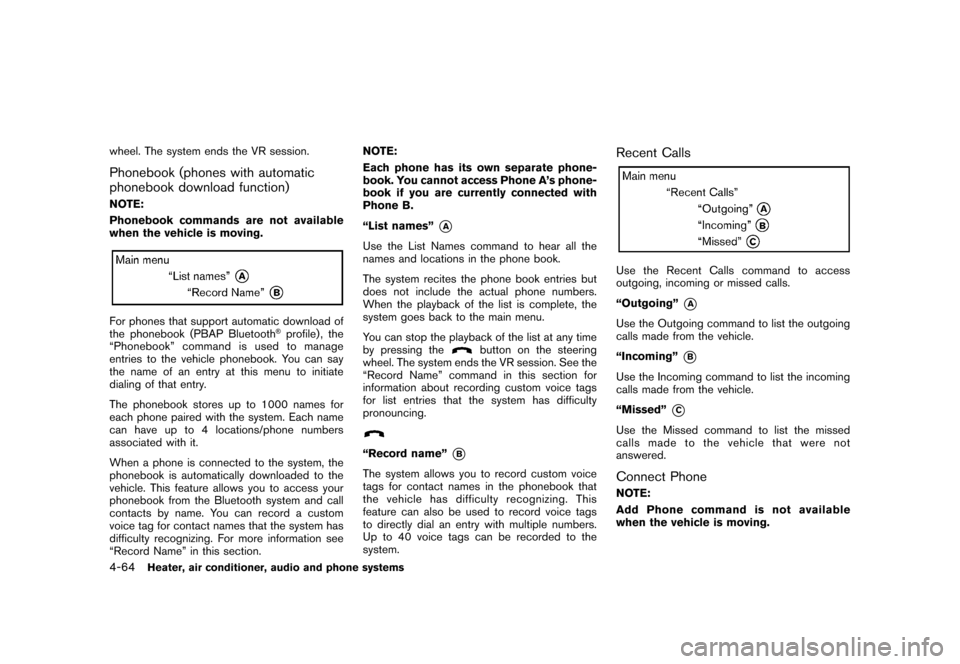
“List names”
*A
Use the List Names command to hear all the
names and locations in the phone book.
The system recites the phone book entries but
does not include the actual phone numbers.
When the playback of the list is complete, the
system goes back to the main menu.
You can stop the playback of the list at any time
by pressing the
button on the steering
wheel. The system ends the VR session. See the
“Record Name” command in this section for
information about recording custom voice tags
for list entries that the system has difficulty
pronouncing.
“Record name”
*B
The system allows you to record custom voice
tags for contact names in the phonebook that
the vehicle has difficulty recognizing. This
feature can also be used to record voice tags
to directly dial an entry with multiple numbers.
Up to 40 voice tags can be recorded to the
system.
Recent CallsUse the Recent Calls command to access
outgoing, incoming or missed calls.
“Outgoing”
*A
Use the Outgoing command to list the outgoing
calls made from the vehicle.
“Incoming”
*B
Use the Incoming command to list the incoming
calls made from the vehicle.
“Missed”
*C
Use the Missed command to list the missed
calls made to the vehicle that were not
answered.Connect PhoneNOTE:
Add Phone command is not available
when the vehicle is moving.
4-64
Heater, air conditioner, audio and phone systems
Page 213 of 345
Black plate (211,1)
Model "Z12-D" EDITED: 2010/ 9/ 27
Use the Connect Phone commands to manage
the phones connecting to the vehicle or to
enable the Bluetooth
®function on the vehicle.
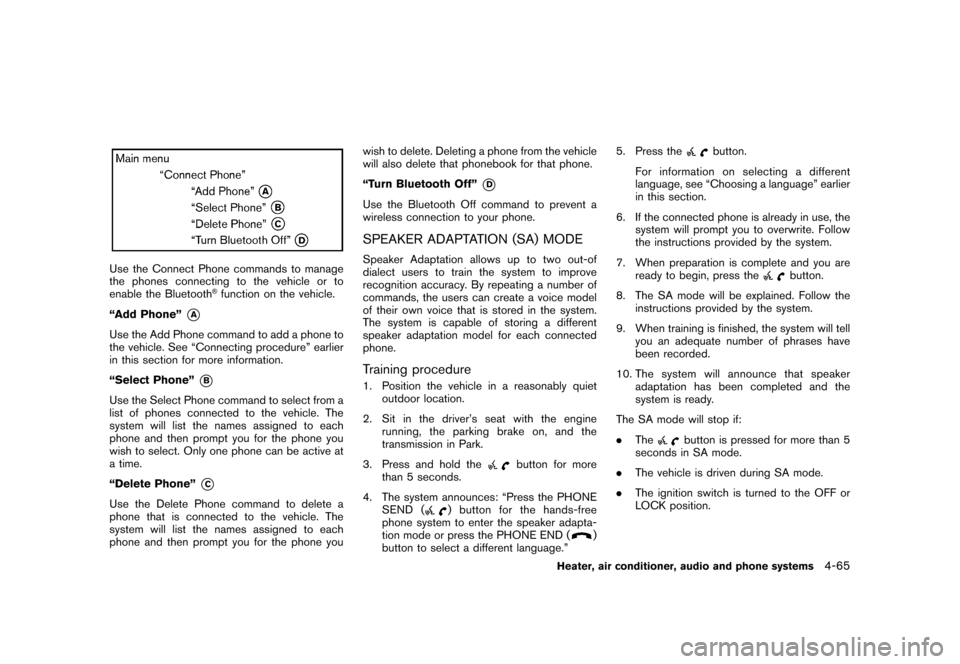
“Add Phone”
*A
Use the Add Phone command to add a phone to
the vehicle. See “Connecting procedure” earlier
in this section for more information.
“Select Phone”
*B
Use the Select Phone command to select from a
list of phones connected to the vehicle. The
system will list the names assigned to each
phone and then prompt you for the phone you
wish to select. Only one phone can be active at
a time.
“Delete Phone”
*C
Use the Delete Phone command to delete a
phone that is connected to the vehicle. The
system will list the names assigned to each
phone and then prompt you for the phone you wish to delete. Deleting a phone from the vehicle
will also delete that phonebook for that phone.
“Turn Bluetooth Off”
*D
Use the Bluetooth Off command to prevent a
wireless connection to your phone.SPEAKER ADAPTATION (SA) MODESpeaker Adaptation allows up to two out-of
dialect users to train the system to improve
recognition accuracy. By repeating a number of
commands, the users can create a voice model
of their own voice that is stored in the system.
The system is capable of storing a different
speaker adaptation model for each connected
phone.Training procedure1. Position the vehicle in a reasonably quiet
outdoor location.
2. Sit in the driver’s seat with the engine running, the parking brake on, and the
transmission in Park.
3. Press and hold the
button for more
than 5 seconds.
4. The system announces: “Press the PHONE SEND (
) button for the hands-free
phone system to enter the speaker adapta-
tion mode or press the PHONE END (
)
button to select a different language.” 5. Press the
button.
For information on selecting a different
language, see “Choosing a language” earlier
in this section.
6. If the connected phone is already in use, the system will prompt you to overwrite. Follow
the instructions provided by the system.
7. When preparation is complete and you are ready to begin, press the
button.
8. The SA mode will be explained. Follow the instructions provided by the system.
9. When training is finished, the system will tell you an adequate number of phrases have
been recorded.
10. The system will announce that speaker adaptation has been completed and the
system is ready.
The SA mode will stop if:
. The
button is pressed for more than 5
seconds in SA mode.
. The vehicle is driven during SA mode.
. The ignition switch is turned to the OFF or
LOCK position.
Heater, air conditioner, audio and phone systems
4-65
Page 214 of 345
Black plate (212,1)
Model "Z12-D" EDITED: 2010/ 9/ 27
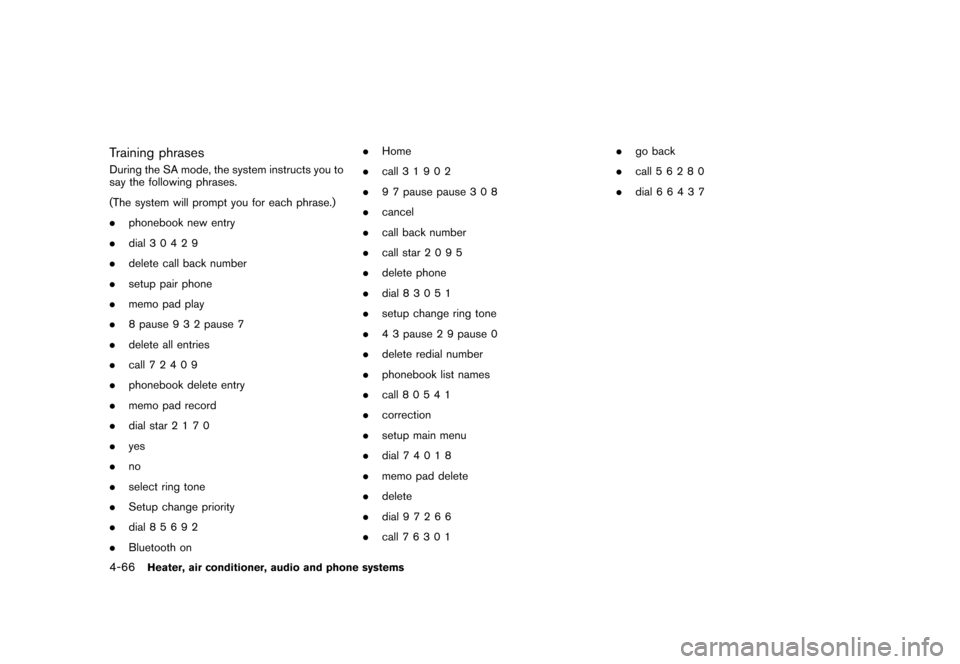
Training phrasesDuring the SA mode, the system instructs you to
say the following phrases.
(The system will prompt you for each phrase.)
.phonebook new entry
. dial 30429
. delete call back number
. setup pair phone
. memo pad play
. 8 pause 9 3 2 pause 7
. delete all entries
. call 7 2409
. phonebook delete entry
. memo pad record
. dial star 2170
. yes
. no
. select ring tone
. Setup change priority
. dial 85692
. Bluetooth on .
Home
. call 3 1902
. 9 7 pause pause 3 0 8
. cancel
. call back number
. call star 2095
. delete phone
. dial 83051
. setup change ring tone
. 4 3 pause 2 9 pause 0
. delete redial number
. phonebook list names
. call 8 0541
. correction
. setup main menu
. dial 74018
. memo pad delete
. delete
. dial 97266
. call 7 6301 .
go back
. call 5 6280
. dial 664374-66
Heater, air conditioner, audio and phone systems
Page 215 of 345
Black plate (213,1)
Model "Z12-D" EDITED: 2010/ 9/ 27
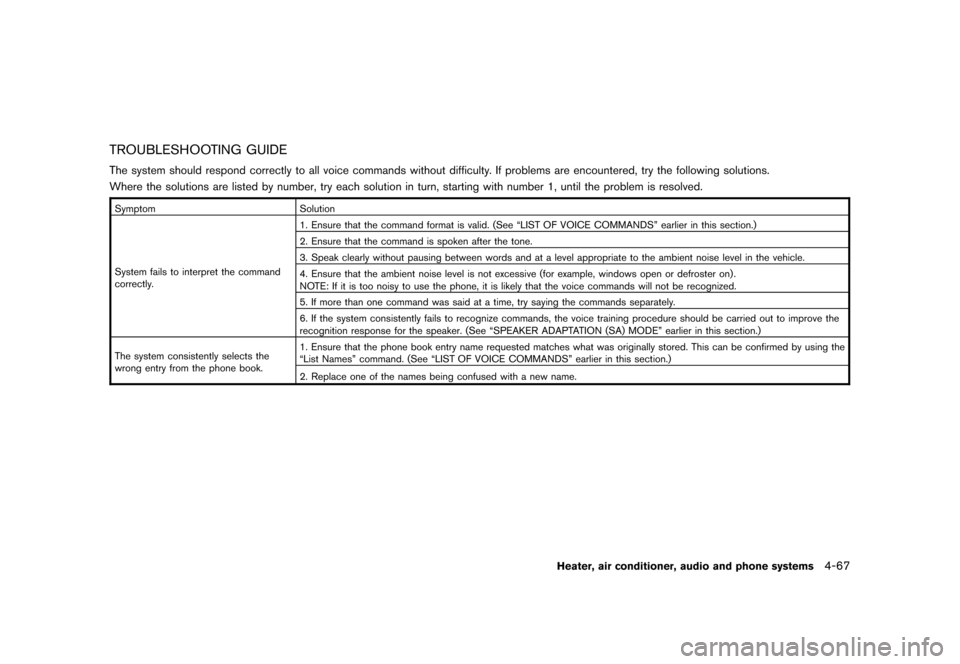
TROUBLESHOOTING GUIDEThe system should respond correctly to all voice commands without difficulty. If problems are encountered, try the following solutions.
Where the solutions are listed by number, try each solution in turn, starting with number 1, until the problem is resolved.SymptomSolution
System fails to interpret the command
correctly. 1. Ensure that the command format is valid. (See “LIST OF VOICE COMMANDS” earlier in this section.)
2. Ensure that the command is spoken after the tone.
3. Speak clearly without pausing between words and at a level appropriate to the ambient noise level in the vehicle.
4. Ensure that the ambient noise level is not excessive (for example, windows open or defroster on) .
NOTE: If it is too noisy to use the phone, it is likely that the voice commands will not be recognized.
5. If more than one command was said at a time, try saying the commands separately.
6. If the system consistently fails to recognize commands, the voice training procedure should be carried out to improve the
recognition response for the speaker. (See “SPEAKER ADAPTATION (SA) MODE” earlier in this section.)
The system consistently selects the
wrong entry from the phone book. 1. Ensure that the phone book entry name requested matches what was originally stored. This can be confirmed by using the
“List Names” command. (See “LIST OF VOICE COMMANDS” earlier in this section.)
2. Replace one of the names being confused with a new name.
Heater, air conditioner, audio and phone systems
4-67
Page 216 of 345

Black plate (214,1)
Model "Z12-D" EDITED: 2010/ 9/ 27
MEMO4-68
Heater, air conditioner, audio and phone systems
Page 335 of 345
Black plate (333,1)
Model "Z12-D" EDITED: 2010/ 9/ 27
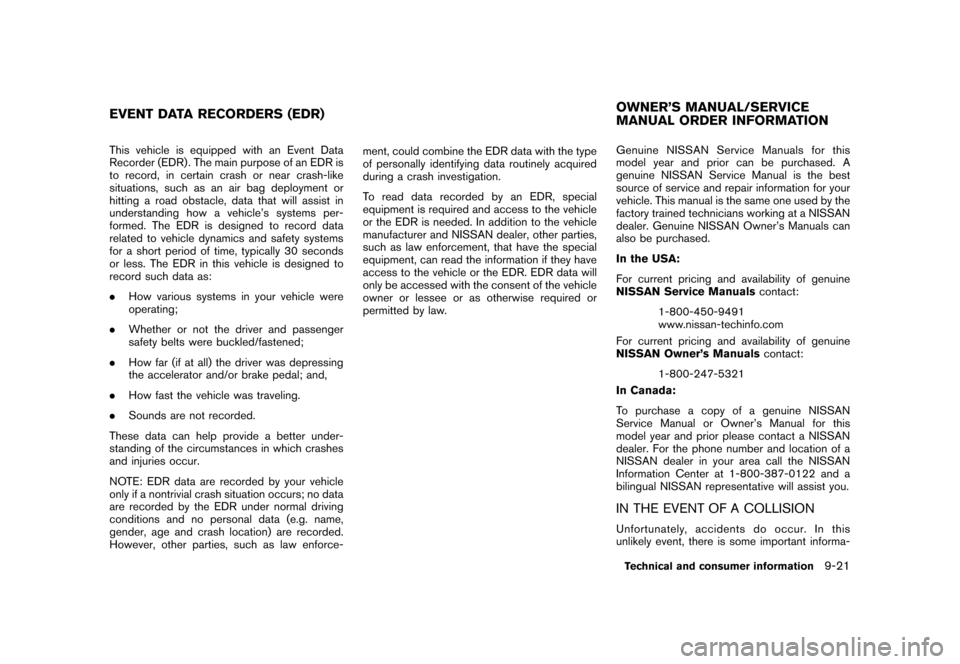
This vehicle is equipped with an Event Data
Recorder (EDR) . The main purpose of an EDR is
to record, in certain crash or near crash-like
situations, such as an air bag deployment or
hitting a road obstacle, data that will assist in
understanding how a vehicle’s systems per-
formed. The EDR is designed to record data
related to vehicle dynamics and safety systems
for a short period of time, typically 30 seconds
or less. The EDR in this vehicle is designed to
record such data as:
.How various systems in your vehicle were
operating;
. Whether or not the driver and passenger
safety belts were buckled/fastened;
. How far (if at all) the driver was depressing
the accelerator and/or brake pedal; and,
. How fast the vehicle was traveling.
. Sounds are not recorded.
These data can help provide a better under-
standing of the circumstances in which crashes
and injuries occur.
NOTE: EDR data are recorded by your vehicle
only if a nontrivial crash situation occurs; no data
are recorded by the EDR under normal driving
conditions and no personal data (e.g. name,
gender, age and crash location) are recorded.
However, other parties, such as law enforce- ment, could combine the EDR data with the type
of personally identifying data routinely acquired
during a crash investigation.
To read data recorded by an EDR, special
equipment is required and access to the vehicle
or the EDR is needed. In addition to the vehicle
manufacturer and NISSAN dealer, other parties,
such as law enforcement, that have the special
equipment, can read the information if they have
access to the vehicle or the EDR. EDR data will
only be accessed with the consent of the vehicle
owner or lessee or as otherwise required or
permitted by law.
Genuine NISSAN Service Manuals for this
model year and prior can be purchased. A
genuine NISSAN Service Manual is the best
source of service and repair information for your
vehicle. This manual is the same one used by the
factory trained technicians working at a NISSAN
dealer. Genuine NISSAN Owner’s Manuals can
also be purchased.
In the USA:
For current pricing and availability of genuine
NISSAN Service Manuals
contact:
1-800-450-9491
www.nissan-techinfo.com
For current pricing and availability of genuine
NISSAN Owner’s Manuals contact:
1-800-247-5321
In Canada:
To purchase a copy of a genuine NISSAN
Service Manual or Owner’s Manual for this
model year and prior please contact a NISSAN
dealer. For the phone number and location of a
NISSAN dealer in your area call the NISSAN
Information Center at 1-800-387-0122 and a
bilingual NISSAN representative will assist you.
IN THE EVENT OF A COLLISIONUnfortunately, accidents do occur. In this
unlikely event, there is some important informa-
EVENT DATA RECORDERS (EDR) OWNER’S MANUAL/SERVICE
MANUAL ORDER INFORMATION
Technical and consumer information
9-21
Page 337 of 345
Black plate (1,1)
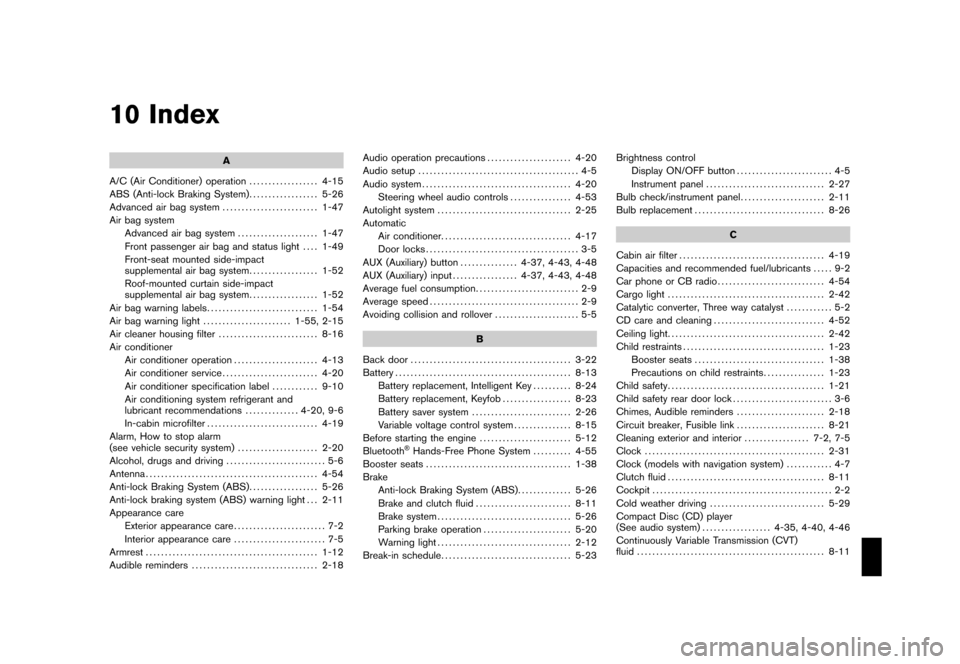
10 Index
A
A/C (Air Conditioner) operation .................. 4-15
ABS (Anti-lock Braking System) .................. 5-26
Advanced air bag system ......................... 1-47
Air bag system Advanced air bag system ..................... 1-47
Front passenger air bag and status light .... 1-49
Front-seat mounted side-impact
supplemental air bag system .................. 1-52
Roof-mounted curtain side-impact
supplemental air bag system .................. 1-52
Air bag warning labels ............................. 1-54
Air bag warning light ....................... 1-55, 2-15
Air cleaner housing filter .......................... 8-16
Air conditioner Air conditioner operation ...................... 4-13
Air conditioner service ......................... 4-20
Air conditioner specification label ............ 9-10
Air conditioning system refrigerant and
lubricant recommendations .............. 4-20, 9-6
In-cabin microfilter ............................. 4-19
Alarm, How to stop alarm
(see vehicle security system) ..................... 2-20
Alcohol, drugs and driving .......................... 5-6
Antenna ............................................. 4-54
Anti-lock Braking System (ABS) .................. 5-26
Anti-lock braking system (ABS) warning light . . . 2-11
Appearance care Exterior appearance care ........................ 7-2
Interior appearance care ........................ 7-5
Armrest ............................................. 1-12
Audible reminders ................................. 2-18 Audio operation precautions
...................... 4-20
Audio setup .......................................... 4-5
Audio system ....................................... 4-20
Steering wheel audio controls ................ 4-53
Autolight system ................................... 2-25
Automatic Air conditioner. ................................. 4-17
Door locks ........................................ 3-5
AUX (Auxiliary) button ............... 4-37, 4-43, 4-48
AUX (Auxiliary) input ................. 4-37, 4-43, 4-48
Average fuel consumption ........................... 2-9
Average speed ....................................... 2-9
Avoiding collision and rollover ...................... 5-5
B
Back door .......................................... 3-22
Battery .............................................. 8-13
Battery replacement, Intelligent Key .......... 8-24
Battery replacement, Keyfob .................. 8-23
Battery saver system .......................... 2-26
Variable voltage control system ............... 8-15
Before starting the engine ........................ 5-12
Bluetooth
®Hands-Free Phone System .......... 4-55
Booster seats ...................................... 1-38
Brake Anti-lock Braking System (ABS) .............. 5-26
Brake and clutch fluid ......................... 8-11
Brake system ................................... 5-26
Parking brake operation ....................... 5-20
Warning light ................................... 2-12
Break-in schedule .................................. 5-23 Brightness control
Display ON/OFF button ......................... 4-5
Instrument panel ............................... 2-27
Bulb check/instrument panel ...................... 2-11
Bulb replacement .................................. 8-26
C
Cabin air filter ...................................... 4-19
Capacities and recommended fuel/lubricants ..... 9-2
Car phone or CB radio ............................ 4-54
Cargo light ......................................... 2-42
Catalytic converter, Three way catalyst ............ 5-2
CD care and cleaning ............................. 4-52
Ceiling light ......................................... 2-42
Child restraints ..................................... 1-23
Booster seats .................................. 1-38
Precautions on child restraints ................ 1-23
Child safety ......................................... 1-21
Child safety rear door lock .......................... 3-6
Chimes, Audible reminders ....................... 2-18
Circuit breaker, Fusible link ....................... 8-21
Cleaning exterior and interior ................. 7-2, 7-5
Clock ............................................... 2-31
Clock (models with navigation system) ............ 4-7
Clutch fluid ......................................... 8-11
Cockpit ............................................... 2-2
Cold weather driving .............................. 5-29
Compact Disc (CD) player
(See audio system) .................. 4-35, 4-40, 4-46
Continuously Variable Transmission (CVT)
fluid ................................................. 8-11
Model "Z12-D" EDITED: 2010/ 9/ 27
Page 339 of 345
Black plate (3,1)
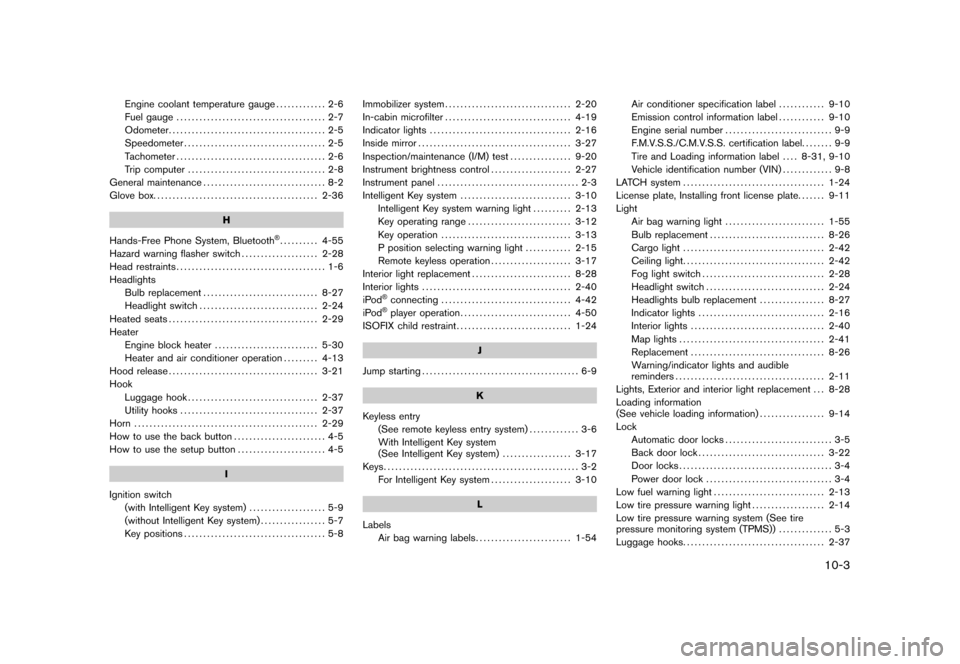
Engine coolant temperature gauge............. 2-6
Fuel gauge ....................................... 2-7
Odometer ......................................... 2-5
Speedometer ..................................... 2-5
Tachometer ....................................... 2-6
Trip computer .................................... 2-8
General maintenance ................................ 8-2
Glove box. .......................................... 2-36
H
Hands-Free Phone System, Bluetooth
®.......... 4-55
Hazard warning flasher switch .................... 2-28
Head restraints ....................................... 1-6
Headlights Bulb replacement .............................. 8-27
Headlight switch ............................... 2-24
Heated seats ....................................... 2-29
Heater Engine block heater ........................... 5-30
Heater and air conditioner operation ......... 4-13
Hood release ....................................... 3-21
Hook Luggage hook .................................. 2-37
Utility hooks .................................... 2-37
Horn ................................................ 2-29
How to use the back button ........................ 4-5
How to use the setup button ....................... 4-5
I
Ignition switch (with Intelligent Key system) .................... 5-9
(without Intelligent Key system) ................. 5-7
Key positions ..................................... 5-8 Immobilizer system
................................. 2-20
In-cabin microfilter ................................. 4-19
Indicator lights ..................................... 2-16
Inside mirror ........................................ 3-27
Inspection/maintenance (I/M) test ................ 9-20
Instrument brightness control ..................... 2-27
Instrument panel ..................................... 2-3
Intelligent Key system ............................. 3-10
Intelligent Key system warning light .......... 2-13
Key operating range ........................... 3-12
Key operation .................................. 3-13
P position selecting warning light ............ 2-15
Remote keyless operation ..................... 3-17
Interior light replacement .......................... 8-28
Interior lights ....................................... 2-40
iPod
®connecting .................................. 4-42
iPod®player operation ............................. 4-50
ISOFIX child restraint .............................. 1-24
J
Jump starting ......................................... 6-9
K
Keyless entry (See remote keyless entry system) ............. 3-6
With Intelligent Key system
(See Intelligent Key system) .................. 3-17
Keys................................................... 3-2 For Intelligent Key system ..................... 3-10
L
Labels Air bag warning labels ......................... 1-54 Air conditioner specification label
............ 9-10
Emission control information label ............ 9-10
Engine serial number ............................ 9-9
F.M.V.S.S./C.M.V.S.S. certification label. ....... 9-9
Tire and Loading information label .... 8-31, 9-10
Vehicle identification number (VIN) ............. 9-8
LATCH system ..................................... 1-24
License plate, Installing front license plate. ...... 9-11
Light Air bag warning light .......................... 1-55
Bulb replacement .............................. 8-26
Cargo light ..................................... 2-42
Ceiling light ..................................... 2-42
Fog light switch ................................ 2-28
Headlight switch ............................... 2-24
Headlights bulb replacement ................. 8-27
Indicator lights ................................. 2-16
Interior lights ................................... 2-40
Map lights ...................................... 2-41
Replacement ................................... 8-26
Warning/indicator lights and audible
reminders ....................................... 2-11
Lights, Exterior and interior light replacement . . . 8-28
Loading information
(See vehicle loading information) ................. 9-14
Lock Automatic door locks ............................ 3-5
Back door lock ................................. 3-22
Door locks ........................................ 3-4
Power door lock ................................. 3-4
Low fuel warning light ............................. 2-13
Low tire pressure warning light ................... 2-14
Low tire pressure warning system (See tire
pressure monitoring system (TPMS)) .............. 5-3
Luggage hooks ..................................... 2-37
10-3
Model "Z12-D" EDITED: 2010/ 9/ 27