brake light NISSAN CUBE 2011 3.G Owners Manual
[x] Cancel search | Manufacturer: NISSAN, Model Year: 2011, Model line: CUBE, Model: NISSAN CUBE 2011 3.GPages: 345, PDF Size: 2.97 MB
Page 13 of 345
Black plate (9,1)
Model "Z12-D" EDITED: 2010/ 9/ 27
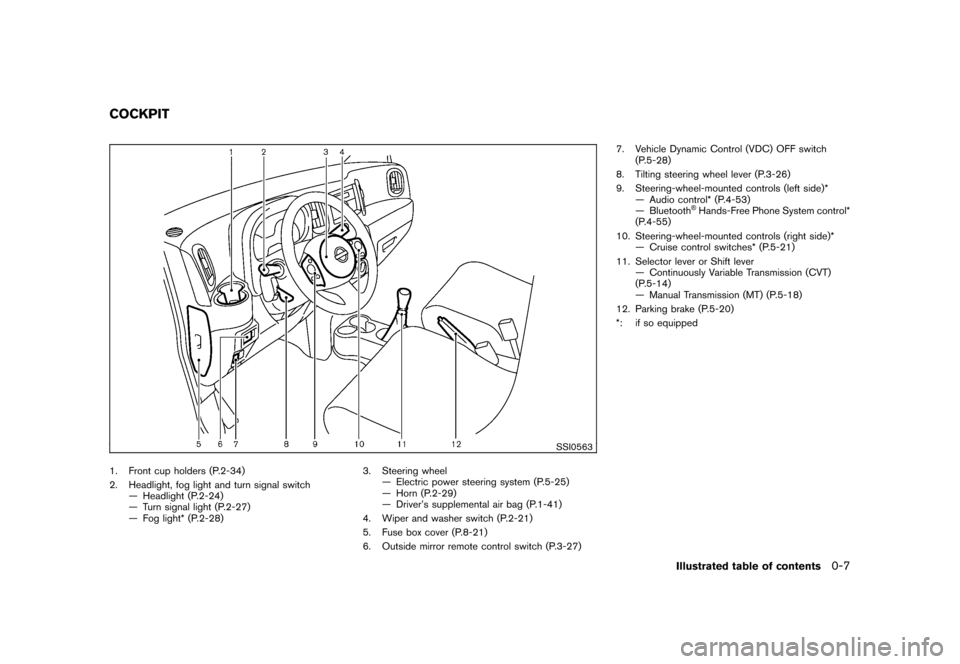
SSI0563
1. Front cup holders (P.2-34)
2. Headlight, fog light and turn signal switch— Headlight (P.2-24)
— Turn signal light (P.2-27)
— Fog light* (P.2-28) 3. Steering wheel
— Electric power steering system (P.5-25)
— Horn (P.2-29)
— Driver’s supplemental air bag (P.1-41)
4. Wiper and washer switch (P.2-21)
5. Fuse box cover (P.8-21)
6. Outside mirror remote control switch (P.3-27) 7. Vehicle Dynamic Control (VDC) OFF switch
(P.5-28)
8. Tilting steering wheel lever (P.3-26)
9. Steering-wheel-mounted controls (left side)* — Audio control* (P.4-53)
— Bluetooth
®Hands-Free Phone System control*
(P.4-55)
10. Steering-wheel-mounted controls (right side)* — Cruise control switches* (P.5-21)
11. Selector lever or Shift lever — Continuously Variable Transmission (CVT)
(P.5-14)
— Manual Transmission (MT) (P.5-18)
12. Parking brake (P.5-20)
*: if so equipped
COCKPIT
Illustrated table of contents
0-7
Page 17 of 345
Black plate (13,1)
Model "Z12-D" EDITED: 2010/ 9/ 27
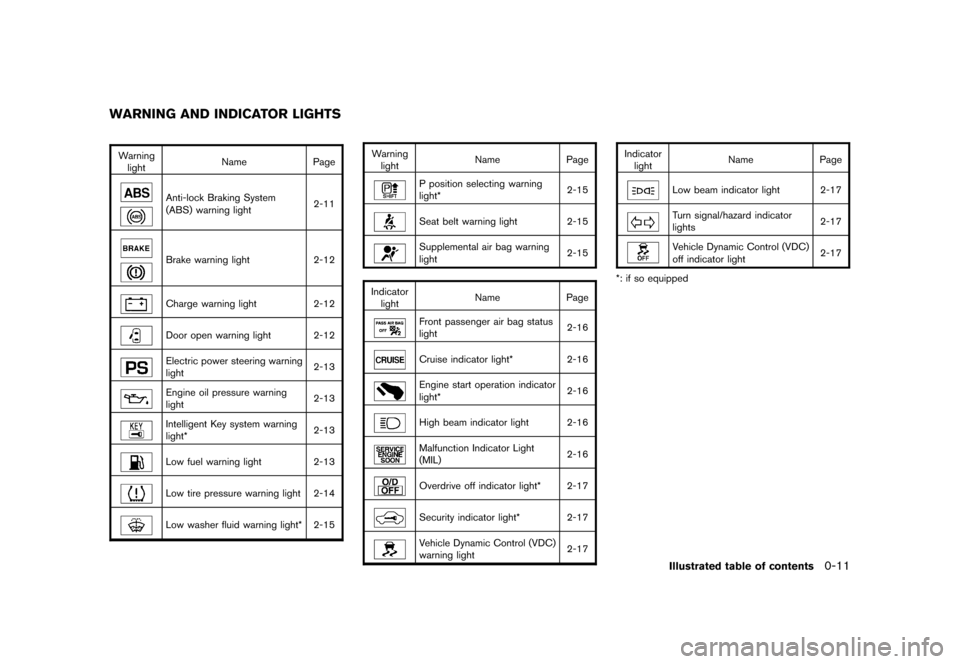
Warninglight Name
Page
Anti-lock Braking System
(ABS) warning light 2-11Brake warning light
2-12Charge warning light2-12Door open warning light 2-12Electric power steering warning
light 2-13Engine oil pressure warning
light2-13Intelligent Key system warning
light*2-13Low fuel warning light
2-13Low tire pressure warning light 2-14Low washer fluid warning light* 2-15 Warning
light Name
Page
P position selecting warning
light* 2-15Seat belt warning light 2-15Supplemental air bag warning
light
2-15
Indicator light Name
PageFront passenger air bag status
light 2-16Cruise indicator light*
2-16Engine start operation indicator
light* 2-16High beam indicator light 2-16Malfunction Indicator Light
(MIL)2-16Overdrive off indicator light* 2-17Security indicator light* 2-17Vehicle Dynamic Control (VDC)
warning light2-17Indicator
light Name
Page
Low beam indicator light 2-17Turn signal/hazard indicator
lights 2-17Vehicle Dynamic Control (VDC)
off indicator light
2-17
*: if so equipped
WARNING AND INDICATOR LIGHTS
Illustrated table of contents
0-11
Page 76 of 345
Black plate (74,1)
Model "Z12-D" EDITED: 2010/ 9/ 27
SSI0563
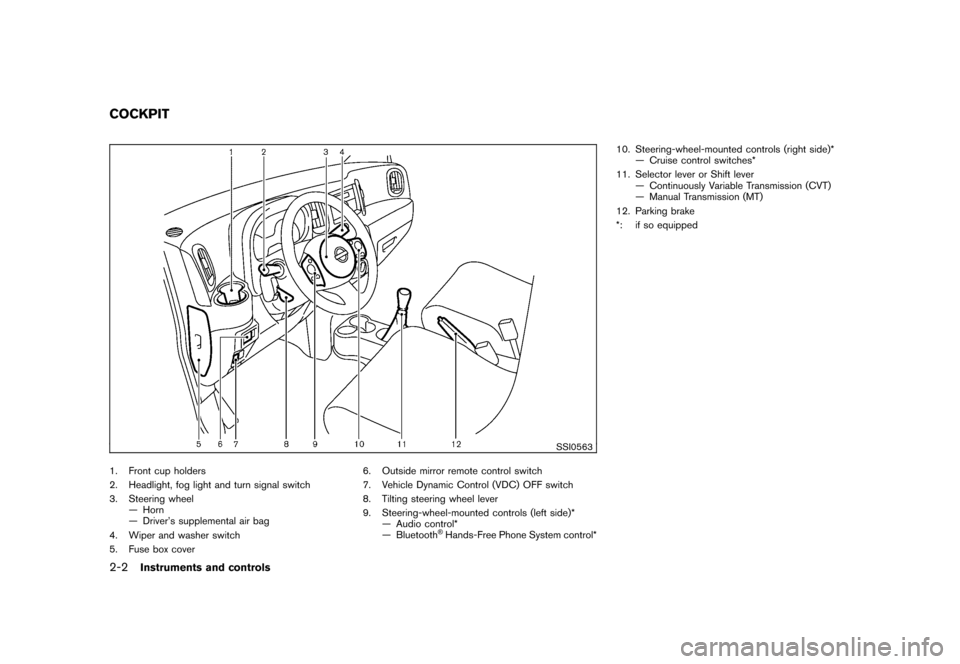
1. Front cup holders
2. Headlight, fog light and turn signal switch
3. Steering wheel— Horn
— Driver’s supplemental air bag
4. Wiper and washer switch
5. Fuse box cover 6. Outside mirror remote control switch
7. Vehicle Dynamic Control (VDC) OFF switch
8. Tilting steering wheel lever
9. Steering-wheel-mounted controls (left side)*
— Audio control*
— Bluetooth
®Hands-Free Phone System control* 10. Steering-wheel-mounted controls (right side)*
— Cruise control switches*
11. Selector lever or Shift lever — Continuously Variable Transmission (CVT)
— Manual Transmission (MT)
12. Parking brake
*: if so equipped
COCKPIT2-2
Instruments and controls
Page 85 of 345
Black plate (83,1)
Model "Z12-D" EDITED: 2010/ 9/ 27
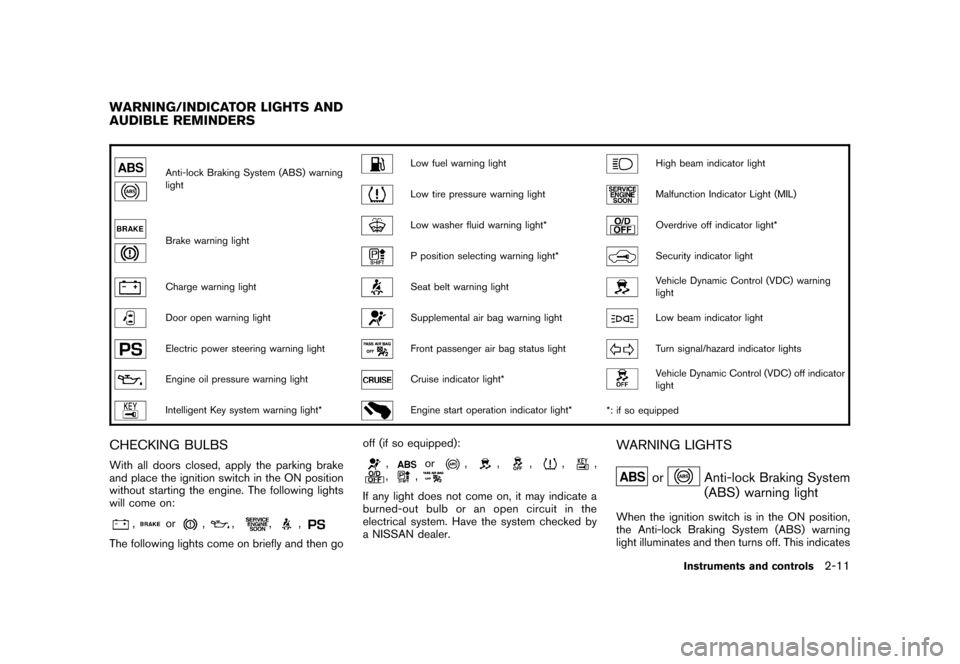
Anti-lock Braking System (ABS) warning
light
Low fuel warning light
High beam indicator light
Low tire pressure warning light
Malfunction Indicator Light (MIL)
Brake warning light
Low washer fluid warning light*
Overdrive off indicator light*
P position selecting warning light*
Security indicator light
Charge warning light
Seat belt warning light
Vehicle Dynamic Control (VDC) warning
light
Door open warning light
Supplemental air bag warning light
Low beam indicator light
Electric power steering warning light
Front passenger air bag status light
Turn signal/hazard indicator lights
Engine oil pressure warning light
Cruise indicator light*
Vehicle Dynamic Control (VDC) off indicator
light
Intelligent Key system warning light*
Engine start operation indicator light**: if so equipped
CHECKING BULBSWith all doors closed, apply the parking brake
and place the ignition switch in the ON position
without starting the engine. The following lights
will come on:
,
or
,
,
,
,
The following lights come on briefly and then go off (if so equipped):
,
or
,
,
,
,
,
,
,
If any light does not come on, it may indicate a
burned-out bulb or an open circuit in the
electrical system. Have the system checked by
a NISSAN dealer.
WARNING LIGHTS
or
Anti-lock Braking System
(ABS) warning light
When the ignition switch is in the ON position,
the Anti-lock Braking System (ABS) warning
light illuminates and then turns off. This indicates
WARNING/INDICATOR LIGHTS AND
AUDIBLE REMINDERS
Instruments and controls
2-11
Page 86 of 345
Black plate (84,1)
Model "Z12-D" EDITED: 2010/ 9/ 27
the ABS is operational.
If the ABS warning light illuminates while the
engine is running, or while driving, it may
indicate the ABS is not functioning properly.
Have the system checked by a NISSAN dealer.
If an ABS malfunction occurs, the anti-lock
function is turned off. The brake system then
operates normally, but without anti-lock assis-
tance. (See “BRAKE SYSTEM” in the “5.
Starting and driving” section.)
or
Brake warning light
This light functions for both the parking brake
and the foot brake systems.
Parking brake indicator:
When the ignition switch is in the ON position,
the light illuminates when the parking brake is
applied.
Low brake fluid warning light:
When the ignition switch is in the ON position,
the light warns of a low brake fluid level. If the
light illuminates while the engine is running with
the parking brake not applied, stop the vehicle
and perform the following:
1. Check the brake fluid level. If brake fluid isnecessary, add fluid and have the system
checked by a NISSAN dealer. (See “BRAKE AND CLUTCH FLUID” in the “8. Mainte-
nance and do-it-yourself” section.)
2. If the brake fluid level is correct, have the warningsystemcheckedbyaNISSAN
dealer.
Anti-lock Braking System (ABS) warning
indicator:
When the parking brake is released and the
brake fluid level is sufficient, if both the brake
warning light and the Anti-lock Braking System
(ABS) warning light illuminate, it may indicate
the ABS is not functioning properly. Have the
brake system checked, and if necessary re-
paired, by a NISSAN dealer promptly. (See
“Anti-lock Braking System (ABS) warning light”
earlier in this section.)
WARNING
. Your brake system may not be
working properly if the warning light
is on. Driving could be dangerous. If
you judge it to be safe, drive care-
fully to the nearest service station
for repairs. Otherwise, have your
vehicle towed because driving it
could be dangerous.
. Pressing the brake pedal with the
engine stopped and/or low brake fluid level may increase your stop-
ping distance and braking will re-
quire greater pedal effort as well as
pedal travel.
. If the brake fluid level is below the
minimum or MIN mark on the brake
fluid reservoir, do not drive until the
brake system has been checked at a
NISSAN dealer.
Charge warning light
If the light illuminates while the engine is running,
it may indicate the charging system is not
functioning properly. Turn the engine off and
check the alternator belt. If the belt is loose,
broken, missing or if the light remains on, see a
NISSAN dealer immediately.
CAUTION
Do not continue driving if the alternator
belt is loose, broken or missing.
Door open warning light
This light illuminates when any of the doors and/
or back door are not closed securely while the
ignition switch is in the ON position.
2-12
Instruments and controls
Page 90 of 345
Black plate (88,1)
Model "Z12-D" EDITED: 2010/ 9/ 27
WARNING
If the supplemental air bag warning
light is on, it could mean that the front
air bag, side air bag, curtain air bag
and/or pretensioner systems will not
operate in an accident. To help avoid
injury to yourself or others, have your
vehicle checked by a NISSAN dealer as
soon as possible.INDICATOR LIGHTS
Cruise indicator light (if so
equipped)
Cruise main switch indicator:
This light illuminates when the cruise control
main switch is pushed. The light turns off when
the main switch is pushed again. When the
cruise indicator light illuminates, the cruise
control system is operational.
Cruise malfunction:
If the cruise indicator light blinks while the
engine is running, it may indicate the cruise
control system is not functioning properly. Have
the system checked by a NISSAN dealer.See “CRUISE CONTROL” in the “5. Starting
and driving” section.
Front passenger air bag status
light
The front passenger air bag status light (located
on the center of the instrument panel) will be lit
and the passenger front air bag will be OFF
depending on how the front passenger seat is
being used.
For front passenger air bag status light opera-
tion,see“NISSANADVANCEDAIRBAG
SYSTEM (front seats)” in the “1. Safety —
Seats, seat belts and supplemental restraint
system” section of this manual.
Engine start operation indicator
light (if so equipped)
This light appears when the selector lever is in
the P (Park) position. This light means that the
engine will start by pushing the ignition switch
with the brake pedal depressed. You can start
the engine directly in any position.
High beam indicator light
This light illuminates when the headlight high
beam is on and goes out when the low beam is
selected.
Malfunction Indicator Light (MIL)
If the malfunction indicator light illuminates
steady or blinks while the engine is running, it
may indicate a potential emission control and/or
Continuously Variable Transmission (CVT) mal-
function.
The malfunction indicator light may also illumi-
nate steady if the fuel-filler cap is loose or
missing, or if the vehicle runs out of fuel. Check
to make sure the fuel-filler cap is installed and
closed tightly, and that the vehicle has at least 3
US gallons (11.4 liters) of fuel in the fuel tank.
After a few driving trips, the
light should
turn off if no other potential emission control
system malfunction exists.
If this indicator light remains on for 20 seconds
and then blinks for 10 seconds when the engine
is not running, it indicates that the vehicle is not
ready for an emission control system inspection/
maintenance test. (See “READINESS FOR
INSPECTION/MAINTENANCE (I/M) TEST” in
the “9. Technical and consumer information”
section.)
Operation:
The malfunction indicator light will illuminate in
one of two ways:
. Malfunction indicator light illuminated steady
2-16
Instruments and controls
Page 92 of 345
Black plate (90,1)
Model "Z12-D" EDITED: 2010/ 9/ 27
that the VDC system’s fail-safe mode is operat-
ing, for example the VDC system may not be
functioning properly. Have the system checked
by a NISSAN dealer. If a malfunction occurs in
the system, the VDC system function will be
canceled but the vehicle is still driveable. For
additional information, see “VEHICLE DYNAMIC
CONTROL (VDC) SYSTEM” in the “5. Starting
and driving” section of this manual.AUDIBLE REMINDERS
Key reminder chimeModels with Intelligent Key system:
A chime will sound if the driver side door is
opened while the ignition switch is pushed to
the ACC position.
Make sure the ignition switch is pushed to the
OFF position, and take the Intelligent Key with
you when leaving the vehicle.
Models without Intelligent Key system:
The key reminder chime sounds if the driver’s
side door is opened while the key is left in the
ignition switch and the ignition switch is in the
ACC, OFF or LOCK position. Remove the key
and take it with you when leaving the vehicle.Light reminder chimeThe light reminder chime will sound when the
driver side door is opened with the light switchin the
or
position, and the ignition
switch is in the ACC, OFF or LOCK position.
Turn the light switch off when you leave the
vehicle.
Brake pad wear warningThe disc brake pads have audible wear warn-
ings. When a brake pad requires replacement, it
will make a high pitched scraping sound when
the vehicle is in motion. This scraping sound will
first occur only when the brake pedal is
depressed. After more wear of the brake pad,
the sound will always be heard even if the brake
pedal is not depresse d. Have the brakes
checked as soon as possible if the warning
sound is heard.Parking brake reminder chimeThe parking brake reminder chime will sound if
the vehicle is driven at more than 4 MPH (7
km/h) with the parking brake applied. Stop the
vehicle and release the parking brake.Seat belt warning chimeThe seat belt warning chime will sound for about
6 seconds unless the driver’s seat belt is
securely fastened.
SIC4160
Your vehicle has two types of security systems,
as follows:
. Vehicle security system
. NISSAN Vehicle Immobilizer System
The security condition will be shown by the
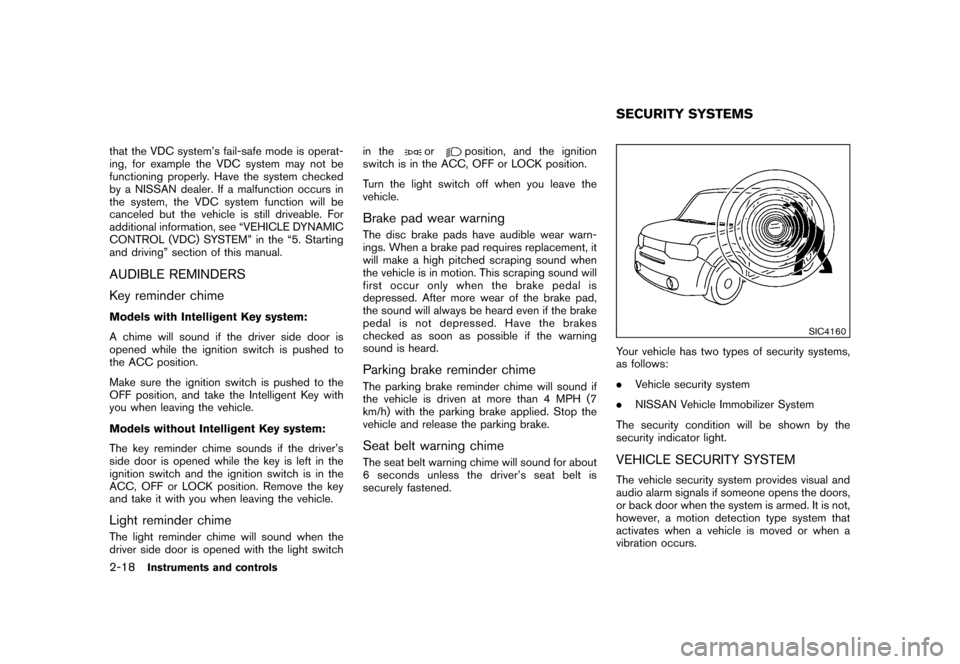
security indicator light.VEHICLE SECURITY SYSTEMThe vehicle security system provides visual and
audio alarm signals if someone opens the doors,
or back door when the system is armed. It is not,
however, a motion detection type system that
activates when a vehicle is moved or when a
vibration occurs.SECURITY SYSTEMS
2-18
Instruments and controls
Page 100 of 345
Black plate (98,1)
Model "Z12-D" EDITED: 2010/ 9/ 27
SIC3670
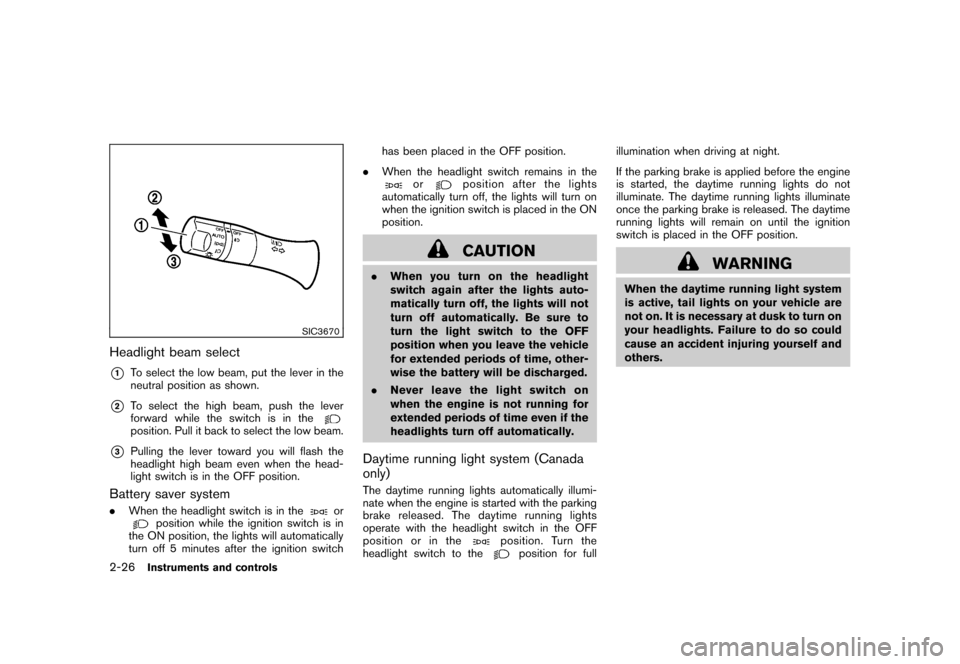
Headlight beam select*1
To select the low beam, put the lever in the
neutral position as shown.
*2
To select the high beam, push the lever
forward while the switch is in theposition. Pull it back to select the low beam.
*3
Pulling the lever toward you will flash the
headlight high beam even when the head-
light switch is in the OFF position.
Battery saver system.When the headlight switch is in the
or
position while the ignition switch is in
the ON position, the lights will automatically
turn off 5 minutes after the ignition switch has been placed in the OFF position.
. When the headlight switch remains in the
or
position after the lights
automatically turn off, the lights will turn on
when the ignition switch is placed in the ON
position.CAUTION
. When you turn on the headlight
switch again after the lights auto-
matically turn off, the lights will not
turn off automatically. Be sure to
turn the light switch to the OFF
position when you leave the vehicle
for extended periods of time, other-
wise the battery will be discharged.
. Never leave the light switch on
when the engine is not running for
extended periods of time even if the
headlights turn off automatically.Daytime running light system (Canada
only)The daytime running lights automatically illumi-
nate when the engine is started with the parking
brake released. The daytime running lights
operate with the headlight switch in the OFF
position or in the
position. Turn the
headlight switch to the
position for full illumination when driving at night.
If the parking brake is applied before the engine
is started, the daytime running lights do not
illuminate. The daytime running lights illuminate
once the parking brake is released. The daytime
running lights will remain on until the ignition
switch is placed in the OFF position.
WARNING
When the daytime running light system
is active, tail lights on your vehicle are
not on. It is necessary at dusk to turn on
your headlights. Failure to do so could
cause an accident injuring yourself and
others.
2-26
Instruments and controls
Page 221 of 345
Black plate (219,1)
Model "Z12-D" EDITED: 2010/ 9/ 27
pressure sensors, and the TPMS will
not function properly.
Some devices and transmitters may temporarily
interfere with the operation of the TPMS and
cause the low tire pressure warning light to
illuminate. Some examples are:
. Facilities or electric devices using similar
radio frequencies are near the vehicle.
. If a transmitter set to similar frequencies is
being used in or near the vehicle.
. If a computer (or similar equipment) or a DC/
AC converter is being used in or near the
vehicle.
FCC Notice:
For USA:
This device complies with Part 15 of the
FCC Rules. Operation is subject to the
following two conditions:
(1) This device may not cause harmful
interference, and (2) this device must
accept any interference received, including
interference that may cause undesired
operation.
Note: Changes or modifications not ex-
pressly approved by the party responsible
for compliance could void the user’s authority to operate the equipment.
For Canada:
This device complies with RSS-210 of
Industry Canada. Operation is subject to
the following two conditions:
(1) this device may not cause interference,
and (2) this device must accept any inter-
ference, including interference that may
cause undesired operation of the device.
AVOIDING COLLISION AND ROLL-
OVER
WARNING
Failure to operate this vehicle in a safe
and prudent manner may result in loss
of control or an accident.
Be alert and drive defensively at all times. Obey
all traffic regulations. Avoid excessive speed,
high speed cornering, or sudden steering
maneuvers, because these driving practices
could cause you to lose control of your vehicle.
As with any vehicle, a loss of control could
result in a collision with other vehicles or
objects, or cause the vehicle to rollover,
particularly if the loss of control causes the
vehicle to slide sideways. Be attentive at all
times, and avoid driving when tired. Never drive when under the influence of alcohol or drugs
(including prescription or over-the-counter
drugs which may cause drowsiness) . Always
wear your seat belt as outlined in the “SEAT
BELTS” in the “1. Safety — Seats, seat belts and
supplemental restraint system” section of this
manual, and also instruct your passengers to do
so.
Seat belts help reduce the risk of injury in
collisions and rollovers.
In a rollover crash, an
unbelted or improperly belted person is
significantly more likely to be injured or
killed than a person properly wearing a
seat belt.
OFF-ROAD RECOVERYWhile driving, the right side or left side wheels
may unintentionally leave the road surface. If this
occurs, maintain control of the vehicle by
following the procedure below. Please note that
this procedure is only a general guide. The
vehicle must be driven as appropriate based on
the conditions of the vehicle, road and traffic.
1. Remain calm and do not overreact.
2. Do not apply the brakes.
3. Maintain a firm grip on the steering wheel with both hands and try to hold a straight
course.
4. When appropriate, slowly release the accel-
Starting and driving
5-5
Page 222 of 345
Black plate (220,1)
Model "Z12-D" EDITED: 2010/ 9/ 27
erator pedal to gradually slow the vehicle.
5. If there is nothing in the way, steer the vehicle to follow the road while the vehicle
speed is reduced. Do not attempt to drive
the vehicle back onto the road surface until
vehicle speed is reduced.
6. When it is safe to do so, gradually turn the steering wheel until both tires return to the
road surface. When all tires are on the road
surface, steer the vehicle to stay in the
appropriate driving lane.
— If you decide that it is not safe to returnthe vehicle to the road surface based on
vehicle, road or traffic conditions, gra-
dually slow the vehicle to a stop in a safe
place off the road.
RAPID AIR PRESSURE LOSSRapid air pressure loss or a “blow-out” can
occur if the tire is punctured or is damaged due
to hitting a curb or pothole. Rapid air pressure
loss can also be caused by driving on under-
inflated tires.
Rapid air pressure loss can affect the handling
and stability of the vehicle, especially at highway
speeds.
Help prevent rapid air pressure loss by main-
taining the correct air pressure and visually
inspect the tires for wear and damage. See “WHEELS AND TIRES” in the “8. Maintenance
and do-it-yourself” section of this manual.
If a tire rapidly loses air pressure or “blows-out”
while driving maintain control of the vehicle by
following the procedure below. Please note that
this procedure is only a general guide. The
vehicle must be driven as appropriate based on
the conditions of the vehicle, road and traffic.
WARNING
The following actions can increase the
chance of losing control of the vehicle if
there is a sudden loss of tire air
pressure. Losing control of the vehicle
may cause a collision and result in
personal injury.
.
The vehicle generally moves or pulls
in the direction of the flat tire.
. Do not rapidly apply the brakes.
. Do not rapidly release the accelera-
tor pedal.
. Do not rapidly turn the steering
wheel.
1. Remain calm and do not overreact.
2. Maintain a firm grip on the steering wheel with both hands and try to hold a straight
course. 3. When appropriate, slowly release the accel-
erator pedal to gradually slow the vehicle.
4. Gradually steer the vehicle to a safe location off the road and away from traffic if possible.
5. Lightly apply the brake pedal to gradually stop the vehicle.
6. Turn on the hazard warning flashers and either contact a roadside emergency service
to change the tire or see “CHANGING A
FLAT TIRE” in the “6. In case of emergency”
section of this Owner’s Manual.
DRINKING ALCOHOL/DRUGS AND
DRIVING
WARNING
Never drive under the influence of
alcohol or drugs. Alcohol in the blood-
stream reduces coordination, delays
reaction time and impairs judgement.
Driving after drinking alcohol increases
the likelihood of being involved in an
accident injuring yourself and others.
Additionally, if you are injured in an
accident, alcohol can increase the se-
verity of the injury.
NISSAN is committed to safe driving. However,
5-6
Starting and driving