engine NISSAN CUBE 2011 3.G Owners Manual
[x] Cancel search | Manufacturer: NISSAN, Model Year: 2011, Model line: CUBE, Model: NISSAN CUBE 2011 3.GPages: 345, PDF Size: 2.97 MB
Page 3 of 345
Black plate (3,1)
Model "Z12-D" EDITED: 2010/ 9/ 27
IMPORTANT INFORMATION ABOUT
THIS MANUALYou will see various symbols in this manual. They
are used in the following ways:
WARNING
This is used to indicate the presence of
a hazard that could cause death or
serious personal injury. To avoid or
reduce the risk, the procedures must
be followed precisely.
CAUTION
This is used to indicate the presence of
a hazard that could cause minor or
moderate personal injury or damage to
your vehicle. To avoid or reduce the risk,
the procedures must be followed care-
fully.
SIC0697
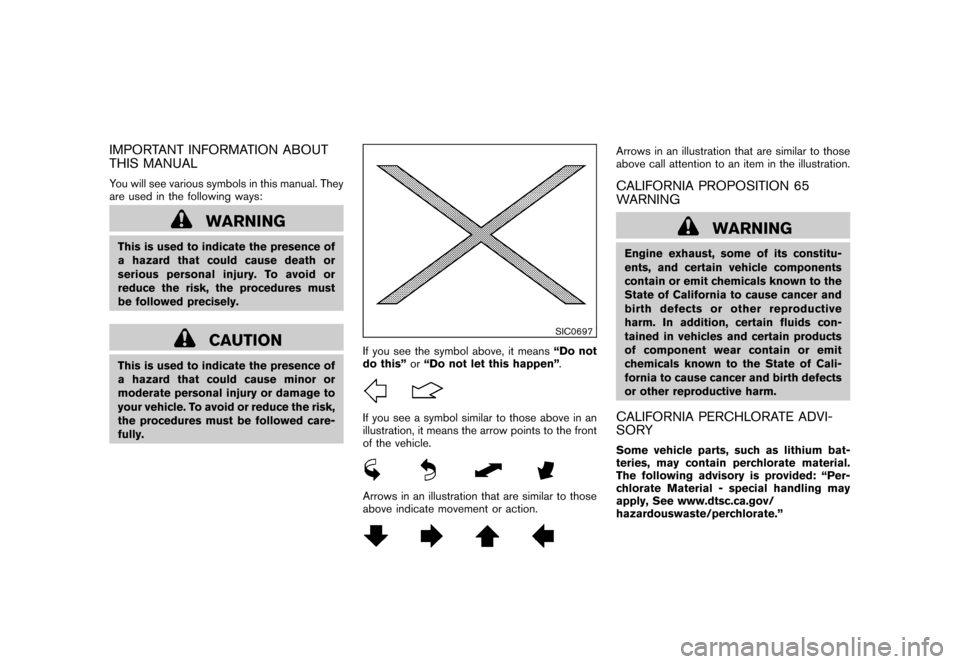
If you see the symbol above, it means“Do not
do this” or“Do not let this happen” .If you see a symbol similar to those above in an
illustration, it means the arrow points to the front
of the vehicle.Arrows in an illustration that are similar to those
above indicate movement or action.
Arrows in an illustration that are similar to those
above call attention to an item in the illustration.CALIFORNIA PROPOSITION 65
WARNING
WARNING
Engine exhaust, some of its constitu-
ents, and certain vehicle components
contain or emit chemicals known to the
State of California to cause cancer and
birth defects or other reproductive
harm. In addition, certain fluids con-
tained in vehicles and certain products
of component wear contain or emit
chemicals known to the State of Cali-
fornia to cause cancer and birth defects
or other reproductive harm.CALIFORNIA PERCHLORATE ADVI-
SORYSome vehicle parts, such as lithium bat-
teries, may contain perchlorate material.
The following advisory is provided: “Per-
chlorate Material - special handling may
apply, See www.dtsc.ca.gov/
hazardouswaste/perchlorate.”
Page 7 of 345
Black plate (1,1)
Seats, seat belts and Supplemental Restraint
System (SRS)................................................... 0-2
Exterior front ..................................................... 0-3
Exterior rear ...................................................... 0-4
Exterior (Kro ¯
m models) ........................................ 0-5
Passenger compartment ...................................... 0-6
Cockpit ............................................................ 0-7 Instrument panel
................................................ 0-8
Meters and gauges ............................................. 0-9
Engine compartment ......................................... 0-10
MR18DE engine .......................................... 0-10
Warning and indicator lights ............................... 0-110 Illustrated table of contents
Model "Z12-D" EDITED: 2010/ 9/ 27
Page 15 of 345
Black plate (11,1)
Model "Z12-D" EDITED: 2010/ 9/ 27
SIC4119
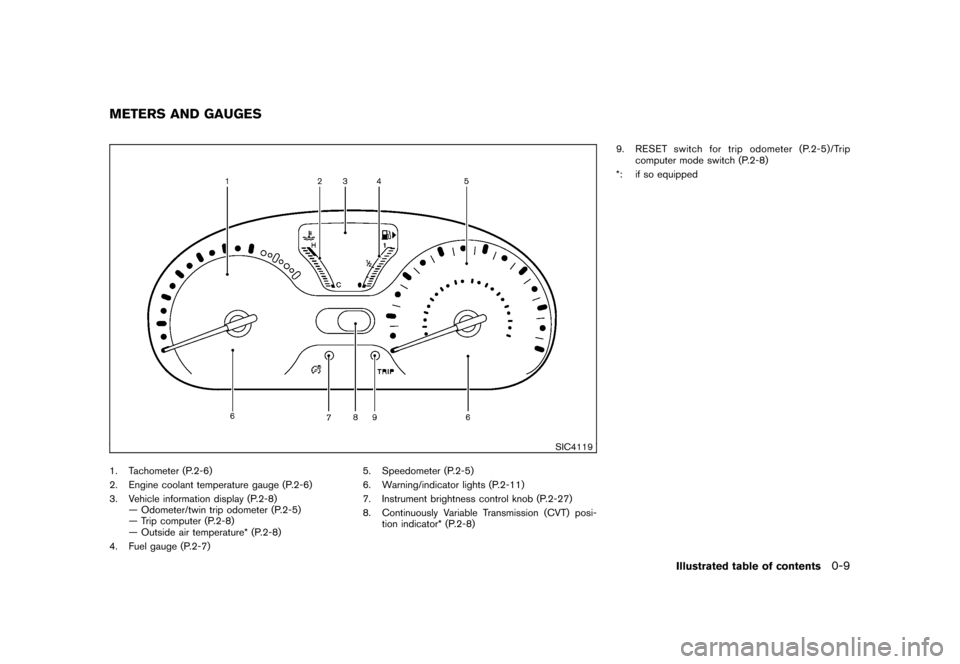
1. Tachometer (P.2-6)
2. Engine coolant temperature gauge (P.2-6)
3. Vehicle information display (P.2-8)— Odometer/twin trip odometer (P.2-5)
— Trip computer (P.2-8)
— Outside air temperature* (P.2-8)
4. Fuel gauge (P.2-7) 5. Speedometer (P.2-5)
6. Warning/indicator lights (P.2-11)
7. Instrument brightness control knob (P.2-27)
8. Continuously Variable Transmission (CVT) posi-
tion indicator* (P.2-8) 9. RESET switch for trip odometer (P.2-5)/Trip
computer mode switch (P.2-8)
*: if so equippedMETERS AND GAUGES
Illustrated table of contents
0-9
Page 16 of 345
Black plate (12,1)
Model "Z12-D" EDITED: 2010/ 9/ 27
SSI0564
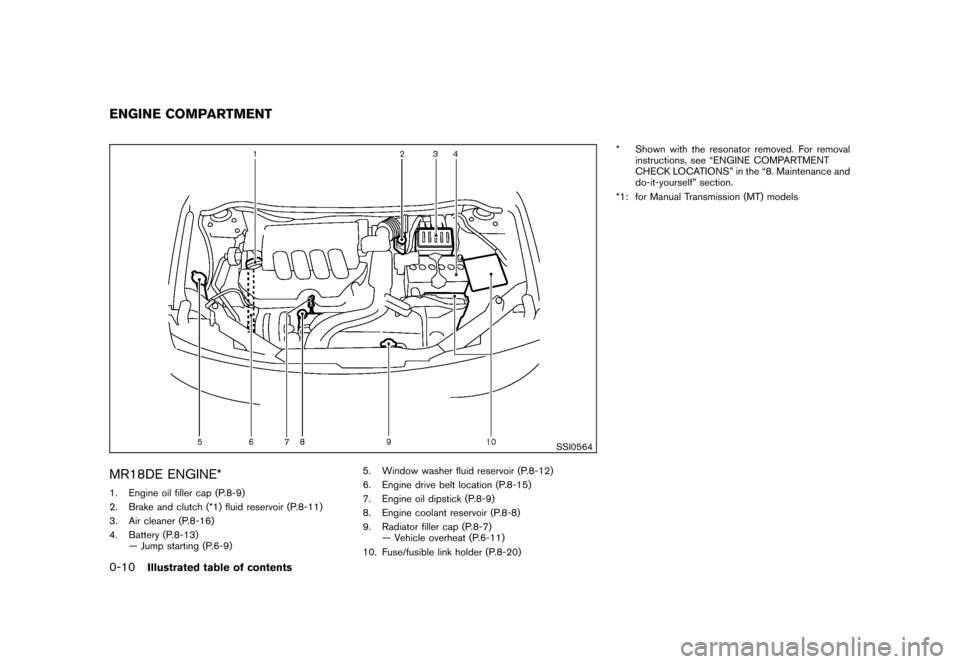
MR18DE ENGINE*1. Engine oil filler cap (P.8-9)
2. Brake and clutch (*1) fluid reservoir (P.8-11)
3. Air cleaner (P.8-16)
4. Battery (P.8-13)— Jump starting (P.6-9) 5. Window washer fluid reservoir (P.8-12)
6. Engine drive belt location (P.8-15)
7. Engine oil dipstick (P.8-9)
8. Engine coolant reservoir (P.8-8)
9. Radiator filler cap (P.8-7)
— Vehicle overheat (P.6-11)
10. Fuse/fusible link holder (P.8-20) * Shown with the resonator removed. For removal
instructions, see “ENGINE COMPARTMENT
CHECK LOCATIONS” in the “8. Maintenance and
do-it-yourself” section.
*1: for Manual Transmission (MT) modelsENGINE COMPARTMENT0-10
Illustrated table of contents
Page 17 of 345
Black plate (13,1)
Model "Z12-D" EDITED: 2010/ 9/ 27
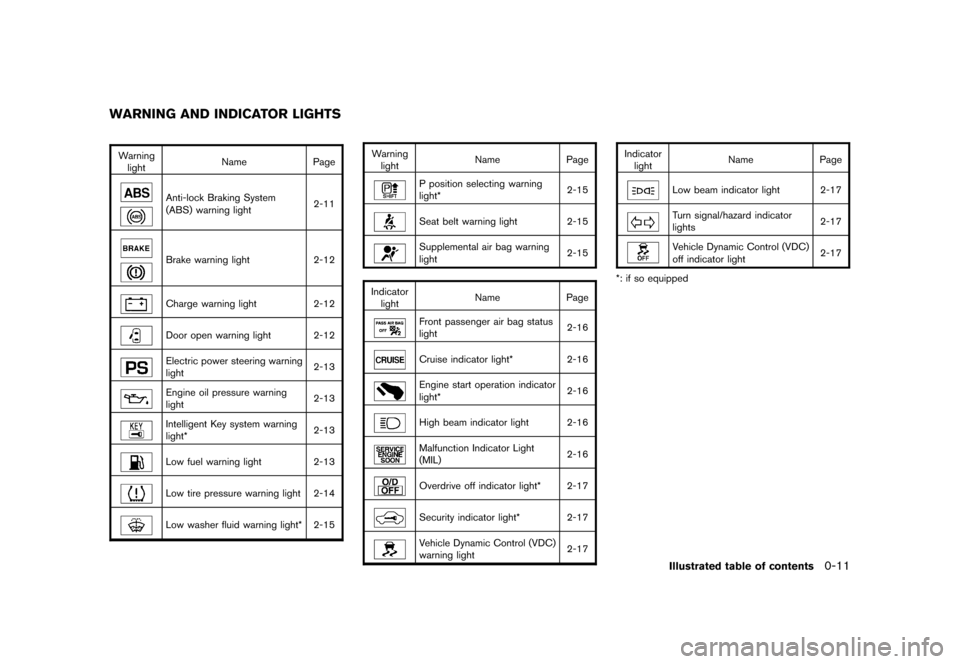
Warninglight Name
Page
Anti-lock Braking System
(ABS) warning light 2-11Brake warning light
2-12Charge warning light2-12Door open warning light 2-12Electric power steering warning
light 2-13Engine oil pressure warning
light2-13Intelligent Key system warning
light*2-13Low fuel warning light
2-13Low tire pressure warning light 2-14Low washer fluid warning light* 2-15 Warning
light Name
Page
P position selecting warning
light* 2-15Seat belt warning light 2-15Supplemental air bag warning
light
2-15
Indicator light Name
PageFront passenger air bag status
light 2-16Cruise indicator light*
2-16Engine start operation indicator
light* 2-16High beam indicator light 2-16Malfunction Indicator Light
(MIL)2-16Overdrive off indicator light* 2-17Security indicator light* 2-17Vehicle Dynamic Control (VDC)
warning light2-17Indicator
light Name
Page
Low beam indicator light 2-17Turn signal/hazard indicator
lights 2-17Vehicle Dynamic Control (VDC)
off indicator light
2-17
*: if so equipped
WARNING AND INDICATOR LIGHTS
Illustrated table of contents
0-11
Page 75 of 345
Black plate (7,1)
2 Instruments and controls
Model "Z12-D" EDITED: 2010/ 9/ 27
Cockpit............................................................ 2-2
Instrument panel ................................................ 2-3
Meters and gauges ............................................. 2-4
Speedometer and odometer ............................. 2-5
Tachometer ................................................... 2-6
Engine coolant temperature gauge ..................... 2-6
Fuel gauge ................................................... 2-7
Vehicle information display ................................ 2-8
Outside air temperature (if so equipped) .............. 2-8
Continuously Variable Transmission (CVT)
position indicator (if so equipped) ...................... 2-8
Trip computer ................................................ 2-8
Warning/indicator lights and audible reminders ....... 2-11
Checking bulbs ........................................... 2-11
Warning lights ............................................. 2-11
Indicator lights ............................................. 2-16
Audible reminders ........................................ 2-18
Security systems .............................................. 2-18
Vehicle Security System. ................................ 2-18
NISSAN Vehicle Immobilizer System ................. 2-20
Windshield wiper and washer switch .................... 2-21
Rear window wiper and washer switch .................. 2-23
Rear window and outside mirror defroster switch ..... 2-24
Headlight and turn signal switch .......................... 2-24
Headlight switch .......................................... 2-24 Turn signal switch
........................................ 2-27
Fog light switch (if so equipped) ...................... 2-28
Hazard warning flasher switch ............................. 2-28
Horn ............................................................. 2-29
Vehicle Dynamic Control (VDC) OFF switch ........... 2-29
Heated seats (if so equipped) ............................. 2-29
Clock (if so equipped) ....................................... 2-31
Adjusting the time ........................................ 2-31
Resetting the time (Type B) ............................ 2-33
Power outlet ................................................... 2-33
Storage ......................................................... 2-34
Cup holders ................................................ 2-34
Glove box .................................................. 2-36
Rear pillar pocket ......................................... 2-36
Luggage hooks ............................................ 2-37
Utility hooks (if so equipped) ........................... 2-37
Windows ....................................................... 2-38
Power windows ........................................... 2-38
Interior lights ................................................... 2-40
Map lights (if so equipped) ............................. 2-41
Map light control switch (if so equipped) ........... 2-41
Ceiling light ................................................ 2-42
Cargo light (if so equipped) ................................ 2-42
Page 78 of 345
Black plate (76,1)
Model "Z12-D" EDITED: 2010/ 9/ 27
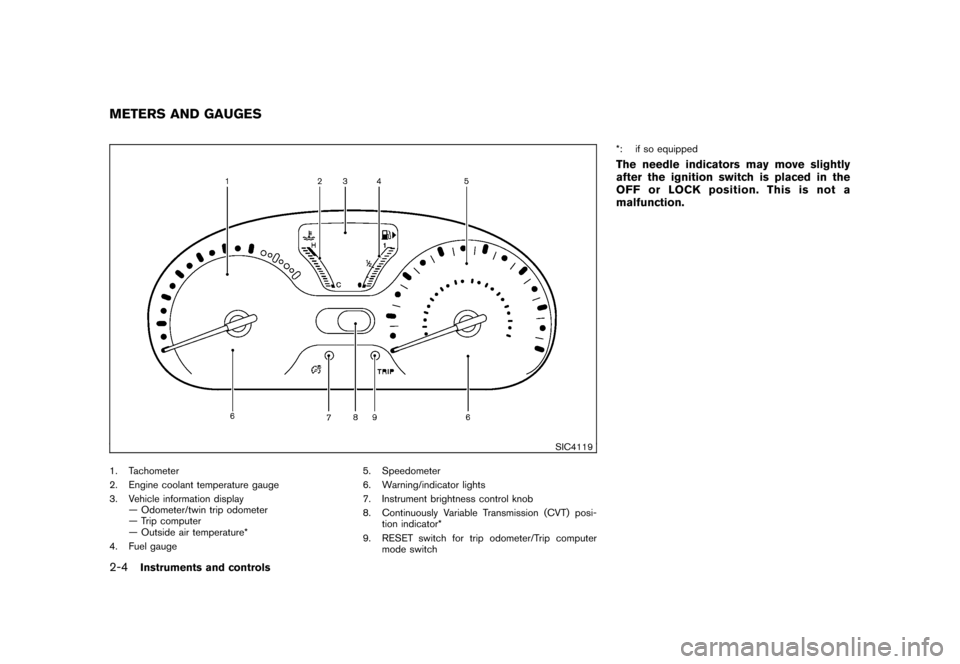
SIC4119
1. Tachometer
2. Engine coolant temperature gauge
3. Vehicle information display— Odometer/twin trip odometer
— Trip computer
— Outside air temperature*
4. Fuel gauge 5. Speedometer
6. Warning/indicator lights
7. Instrument brightness control knob
8. Continuously Variable Transmission (CVT) posi-
tion indicator*
9. RESET switch for trip odometer/Trip computer mode switch *: if so equipped
The needle indicators may move slightly
after the ignition switch is placed in the
OFF or LOCK position. This is not a
malfunction.
METERS AND GAUGES2-4
Instruments and controls
Page 80 of 345
Black plate (78,1)
Model "Z12-D" EDITED: 2010/ 9/ 27
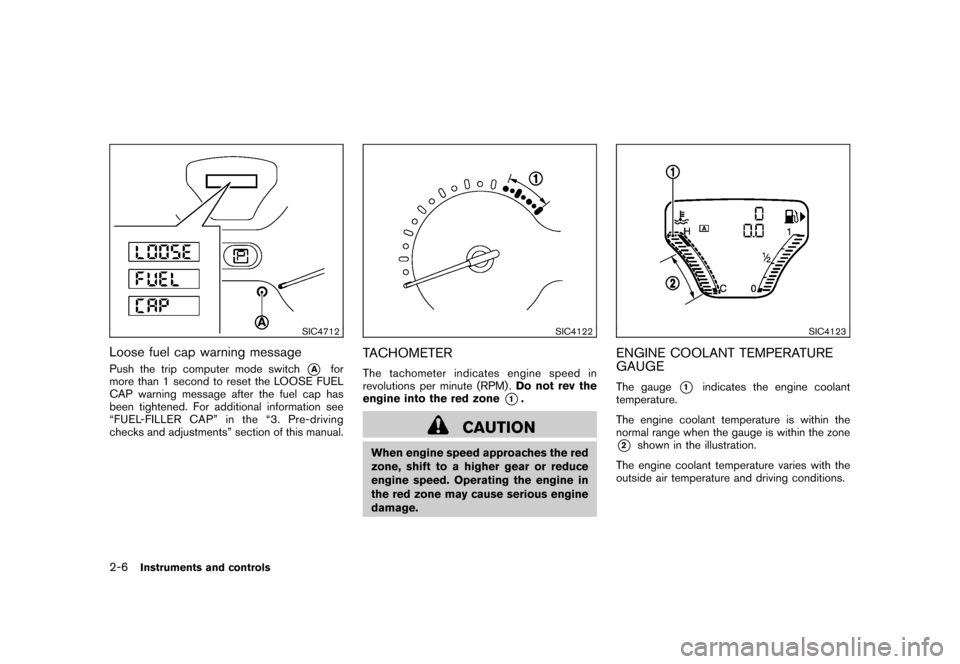
SIC4712
Loose fuel cap warning messagePush the trip computer mode switch
*A
for
more than 1 second to reset the LOOSE FUEL
CAP warning message after the fuel cap has
been tightened. For additional information see
“FUEL-FILLER CAP” in the “3. Pre-driving
checks and adjustments” section of this manual.
SIC4122
TACHOMETERThe tachometer indicates engine speed in
revolutions per minute (RPM) . Do not rev the
engine into the red zone
*1.
CAUTION
When engine speed approaches the red
zone, shift to a higher gear or reduce
engine speed. Operating the engine in
the red zone may cause serious engine
damage.
SIC4123
ENGINE COOLANT TEMPERATURE
GAUGEThe gauge
*1
indicates the engine coolant
temperature.
The engine coolant temperature is within the
normal range when the gauge is within the zone
*2
shown in the illustration.
The engine coolant temperature varies with the
outside air temperature and driving conditions.
2-6
Instruments and controls
Page 81 of 345
Black plate (79,1)
Model "Z12-D" EDITED: 2010/ 9/ 27
CAUTION
If the gauge indicates engine coolant
temperature near the hot (H) end of the
normal range, reduce vehicle speed to
decrease temperature. If gauge is over
the normal range, stop the vehicle as
soon as safely possible. If the engine is
overheated, continued operation of the
vehicle may seriously damage the en-
gine. See “IF YOUR VEHICLE OVER-
HEATS” in the “6. In case of emergency”
section for immediate action required.
SIC4124
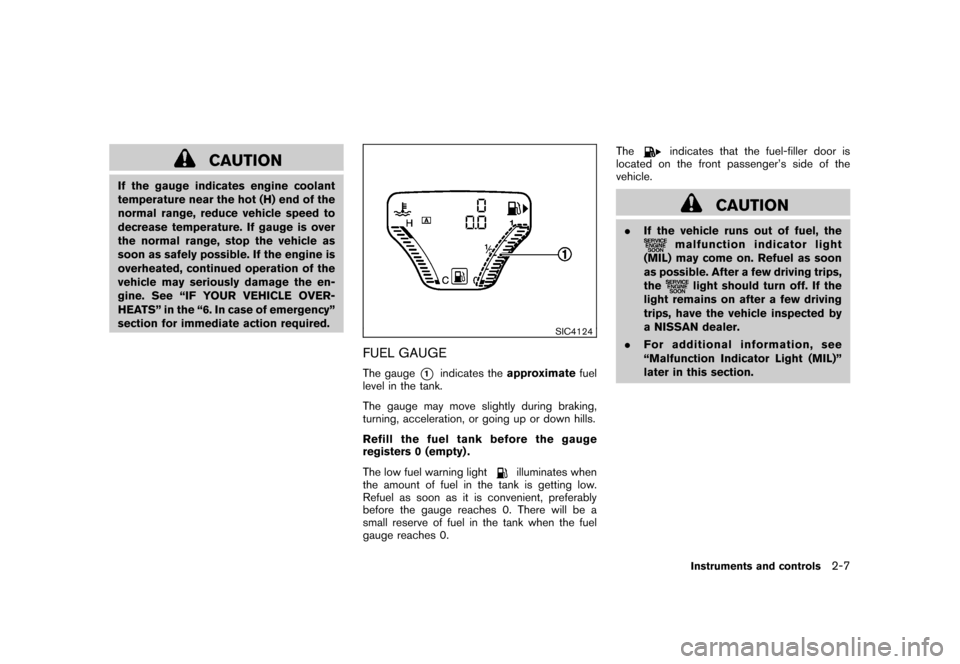
FUEL GAUGEThe gauge
*1
indicates theapproximate fuel
level in the tank.
The gauge may move slightly during braking,
turning, acceleration, or going up or down hills.
Refill the fuel tank before the gauge
registers 0 (empty) .
The low fuel warning light
illuminates when
the amount of fuel in the tank is getting low.
Refuel as soon as it is convenient, preferably
before the gauge reaches 0. There will be a
small reserve of fuel in the tank when the fuel
gauge reaches 0. The
indicates that the fuel-filler door is
located on the front passenger’s side of the
vehicle.
CAUTION
. If the vehicle runs out of fuel, the
malfunction indicator light
(MIL) may come on. Refuel as soon
as possible. After a few driving trips,
the
light should turn off. If the
light remains on after a few driving
trips, have the vehicle inspected by
a NISSAN dealer.
. For additional information, see
“Malfunction Indicator Light (MIL)”
later in this section.Instruments and controls
2-7
Page 83 of 345
Black plate (81,1)
Model "Z12-D" EDITED: 2010/ 9/ 27
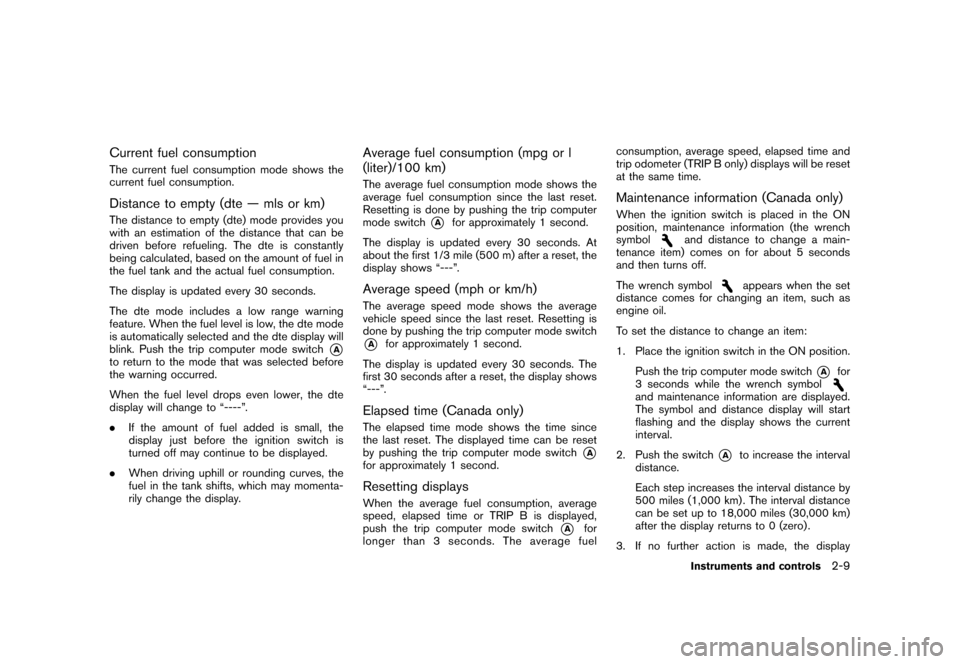
Current fuel consumptionThe current fuel consumption mode shows the
current fuel consumption.Distance to empty (dte — mls or km)The distance to empty (dte) mode provides you
with an estimation of the distance that can be
driven before refueling. The dte is constantly
being calculated, based on the amount of fuel in
the fuel tank and the actual fuel consumption.
The display is updated every 30 seconds.
The dte mode includes a low range warning
feature. When the fuel level is low, the dte mode
is automatically selected and the dte display will
blink. Push the trip computer mode switch
*A
to return to the mode that was selected before
the warning occurred.
When the fuel level drops even lower, the dte
display will change to “----”.
.If the amount of fuel added is small, the
display just before the ignition switch is
turned off may continue to be displayed.
. When driving uphill or rounding curves, the
fuel in the tank shifts, which may momenta-
rily change the display.
Average fuel consumption (mpg or l
(liter)/100 km)The average fuel consumption mode shows the
average fuel consumption since the last reset.
Resetting is done by pushing the trip computer
mode switch
*A
for approximately 1 second.
The display is updated every 30 seconds. At
about the first 1/3 mile (500 m) after a reset, the
display shows “---”.
Average speed (mph or km/h)The average speed mode shows the average
vehicle speed since the last reset. Resetting is
done by pushing the trip computer mode switch*A
for approximately 1 second.
The display is updated every 30 seconds. The
first 30 seconds after a reset, the display shows
“---”.
Elapsed time (Canada only)The elapsed time mode shows the time since
the last reset. The displayed time can be reset
by pushing the trip computer mode switch
*A
for approximately 1 second.Resetting displaysWhen the average fuel consumption, average
speed, elapsed time or TRIP B is displayed,
push the trip computer mode switch
*A
for
longer than 3 seconds. The average fuel consumption, average speed, elapsed time and
trip odometer (TRIP B only) displays will be reset
at the same time.
Maintenance information (Canada only)When the ignition switch is placed in the ON
position, maintenance information (the wrench
symbol
and distance to change a main-
tenance item) comes on for about 5 seconds
and then turns off.
The wrench symbol
appears when the set
distance comes for changing an item, such as
engine oil.
To set the distance to change an item:
1. Place the ignition switch in the ON position.
Push the trip computer mode switch
*A
for
3 seconds while the wrench symbol
and maintenance information are displayed.
The symbol and distance display will start
flashing and the display shows the current
interval.
2. Push the switch
*A
to increase the interval
distance.
Each step increases the interval distance by
500 miles (1,000 km) . The interval distance
can be set up to 18,000 miles (30,000 km)
after the display returns to 0 (zero) .
3. If no further action is made, the display
Instruments and controls
2-9