buttons NISSAN CUBE 2014 3.G User Guide
[x] Cancel search | Manufacturer: NISSAN, Model Year: 2014, Model line: CUBE, Model: NISSAN CUBE 2014 3.GPages: 332, PDF Size: 2.59 MB
Page 174 of 332
setting.
AUDIO button:
Push the AUDIO button to change the selecting
mode as follows.
Push the TUNE (,) or SEEK (,)
button to adjust Bass and Treble to the desired
level. Use the TUNE or SEEK button also to
adjust Fade or Balance modes. Fade adjusts the
sound level between the front and rear speakers
and Balance adjusts the sound between the
right and left speakers.
To turn the beep sound off or on, push the TUNE
or SEEK button until the desired mode is
displayed. This turns on or off the beep sound
when audio buttons are pushed.
To change the Speed Sensitive Volume (Spd
Sen Vol) mode to OFF, LOW, MID or HIGH,
push the TUNE or SEEK button until the desired
mode is displayed.
Once you have adjusted the sound quality to the
desired level, push the AUDIO button repeatedly
until the normal mode display reappears. Other-
wise, the normal mode display will automatically
reappear after approximately 5 seconds.
CLOCK button:
Push the CLOCK button to turn on or off the
CLOCK display.
SIC4131
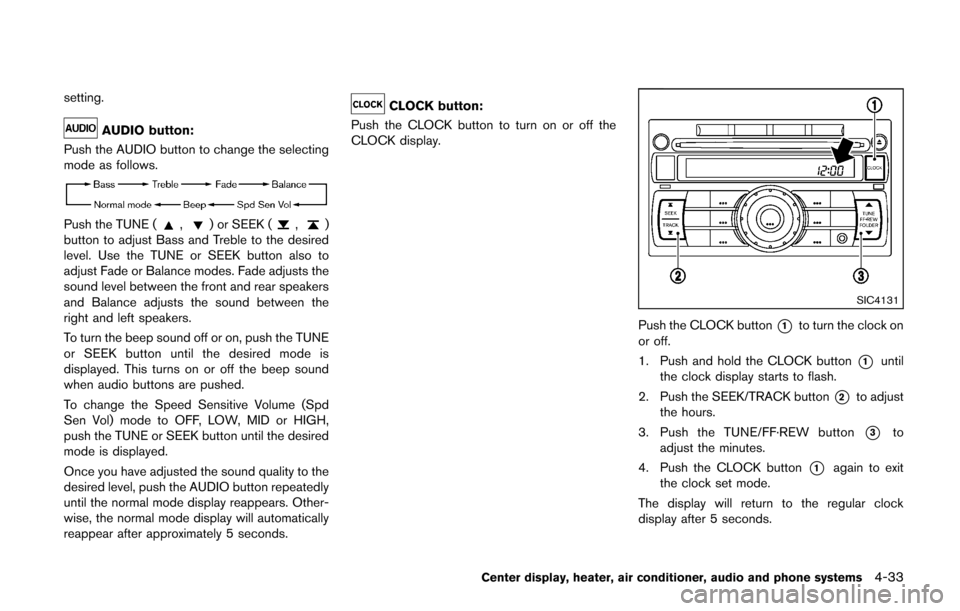
Push the CLOCK button*1to turn the clock on
or off.
1. Push and hold the CLOCK button
*1until
the clock display starts to flash.
2. Push the SEEK/TRACK button
*2to adjust
the hours.
3. Push the TUNE/FF·REW button
*3to
adjust the minutes.
4. Push the CLOCK button
*1again to exit
the clock set mode.
The display will return to the regular clock
display after 5 seconds.
Center display, heater, air conditioner, audio and phone systems4-33
Page 175 of 332
4-34Center display, heater, air conditioner, audio and phone systems
Radio operation
Radio (FM/AM) band select:
Pushing the FM·AM radio band select button will
change the band as follows:
AM ?FM1 ?FM2 ?AM
When the stereo broadcast signal is weak, the
radio will automatically change from stereo to
monaural reception.
When the radio band select button is pushed
while the ignition switch is in the ACC or ON
position, the radio will come on at the station last
played.
TUNE (Tuning):
Push the TUNE button
orfor manual
tuning. To move quickly through the stations,
push and hold the TUNE button.
SEEK tuning:
Push the SEEK button
orto tune from
low to high or high to low frequencies and to
stop at the next broadcasting station.
SCAN tuning:
Push the SCAN button to tune from low to high
frequencies and stops at each broadcasting
station for 5 seconds. Pushing the button again during this 5 seconds period will stop SCAN
tuning and the radio will remain tuned to that
station.
If the SCAN tuning button is not pushed within 5
seconds, SCAN tuning moves to the next
station.
toStation memory operations:
12 stations can be set for the FM band (6 each
for FM1 and FM2), and 6 can be set for the AM
band for easy access.
1. Choose the radio band using the radio band select button.
2. Tune to the desired station using the SEEK, SCAN or TUNE button.
3. Push and hold the desired radio station preset button
tountil a beep sound is
heard. (The radio mutes when the radio
station preset button is pushed.)
4. The station indicator will then come on and the sound will resume. Memorizing is now
complete.
5. Other buttons can be set in the same manner.
If the battery cable is disconnected, or if the fuse
opens, the radio memory will be erased. In that
case, reset the desired stations. Radio Data System (RDS):
RDS stands for Radio Data System, and is a
data information service transmitted by some
radio stations on the FM band (not AM band)
encoded within a regular radio broadcast.
Currently, most RDS stations are in large cities,
but many stations are now considering broad-
casting RDS data.
RDS can display:
.
Station call sign, such as “WHFR 98.3”.
. Station name, such as “The Groove”.
. Music or programming type such as “Clas-
sical”, “Country” or “Rock”.
. Traffic reports about delays or construction.
If the station broadcasts RDS information, the
RDS icon is displayed.
RADIO DISPLAY change:
When the DISP button is pushed during the FM
radio mode, the radio display will change in the
following order.
FM radio:
Frequency ↔PS/PTY
In the FM radio mode, pressing the DISP button
will switch the frequency display to the PTY
display (if available) , and if the DISP button is
not pushed again within 5 seconds, it will
automatically switch to the PS display. If PTY
Page 177 of 332
4-36Center display, heater, air conditioner, audio and phone systems
RANDOM (RDM)/REPEAT (RPT):
When the RPT button is pushed for less than
1.5 seconds while the CD is being played, the
play pattern can be changed as follows:
CD:
CD with MP3 or WMA:
CD EJECT:
When the CD EJECT button is pushed with the
CD loaded, the CD will be ejected.
When this button is pushed while the CD is
being played, the CD will be ejected and the
system will turn off.
If the CD is ejected and is not removed, it
will be pulled back into the slot to protect
it.SAA2352
Interface system for iPod®operation
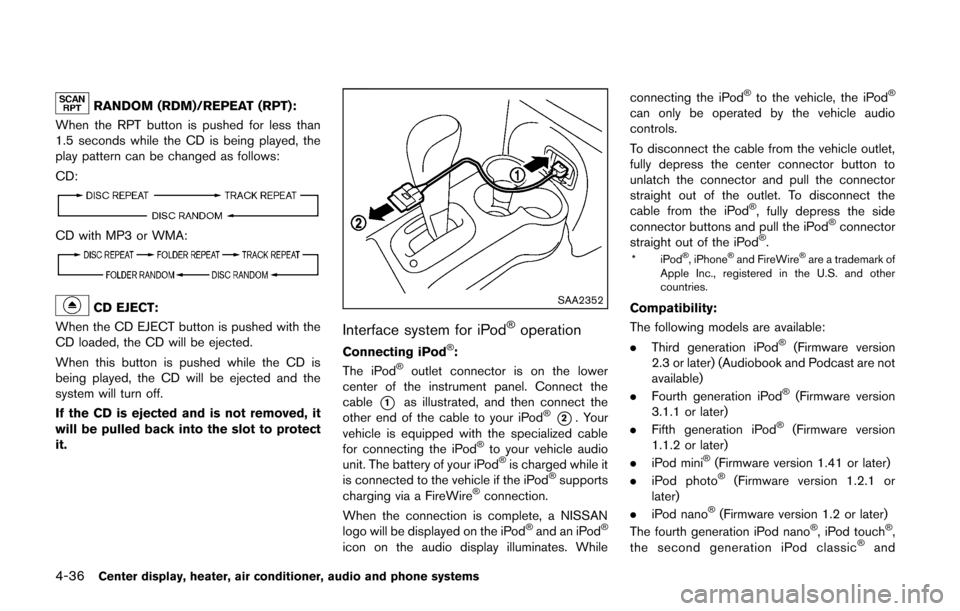
Connecting iPod®:
The iPod®outlet connector is on the lower
center of the instrument panel. Connect the
cable
*1as illustrated, and then connect the
other end of the cable to your iPod®*2. Your
vehicle is equipped with the specialized cable
for connecting the iPod
®to your vehicle audio
unit. The battery of your iPod®is charged while it
is connected to the vehicle if the iPod®supports
charging via a FireWire®connection.
When the connection is complete, a NISSAN
logo will be displayed on the iPod
®and an iPod®
icon on the audio display illuminates. While connecting the iPod
®to the vehicle, the iPod®
can only be operated by the vehicle audio
controls.
To disconnect the cable from the vehicle outlet,
fully depress the center connector button to
unlatch the connector and pull the connector
straight out of the outlet. To disconnect the
cable from the iPod
®, fully depress the side
connector buttons and pull the iPod®connector
straight out of the iPod®.
*iPod®, iPhone®and FireWire®are a trademark of
Apple Inc., registered in the U.S. and other
countries.
Compatibility:
The following models are available:
. Third generation iPod
®(Firmware version
2.3 or later) (Audiobook and Podcast are not
available)
. Fourth generation iPod
®(Firmware version
3.1.1 or later)
. Fifth generation iPod
®(Firmware version
1.1.2 or later)
. iPod mini
®(Firmware version 1.41 or later)
. iPod photo®(Firmware version 1.2.1 or
later)
. iPod nano
®(Firmware version 1.2 or later)
The fourth generation iPod nano®, iPod touch®,
the second generation iPod classic®and
Page 179 of 332
4-38Center display, heater, air conditioner, audio and phone systems
AUX (Auxiliary) input
AUX IN jack:
The AUX IN jack is located on the audio unit.
The AUX IN audio input jack accepts any
standard analog audio input such as from a
portable cassette tape/CD player, MP3 player or
laptop computer.
AUX (Auxiliary) button:
With an AUX device plugged in, push the AUX
button repeatedly until the display changes to
the AUX mode.
When the AUX button is pushed with no device
plugged into the jack, the audio system does not
change to the AUX mode.
NISSAN strongly recommends using a stereo
mini plug cable when connecting your music
device to the audio system. Music may not play
properly when a monaural cable is used.
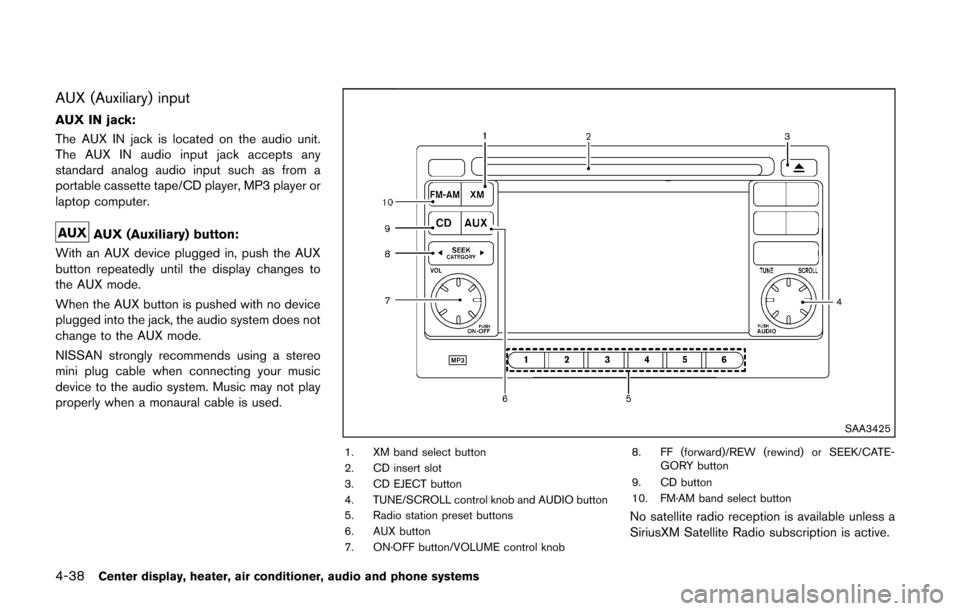
SAA3425
1. XM band select button
2. CD insert slot
3. CD EJECT button
4. TUNE/SCROLL control knob and AUDIO button
5. Radio station preset buttons
6. AUX button
7. ON·OFF button/VOLUME control knob 8. FF (forward)/REW (rewind) or SEEK/CATE-
GORY button
9. CD button
10. FM·AM band select button
No satellite radio reception is available unless a
SiriusXM Satellite Radio subscription is active.
Page 181 of 332
4-40Center display, heater, air conditioner, audio and phone systems
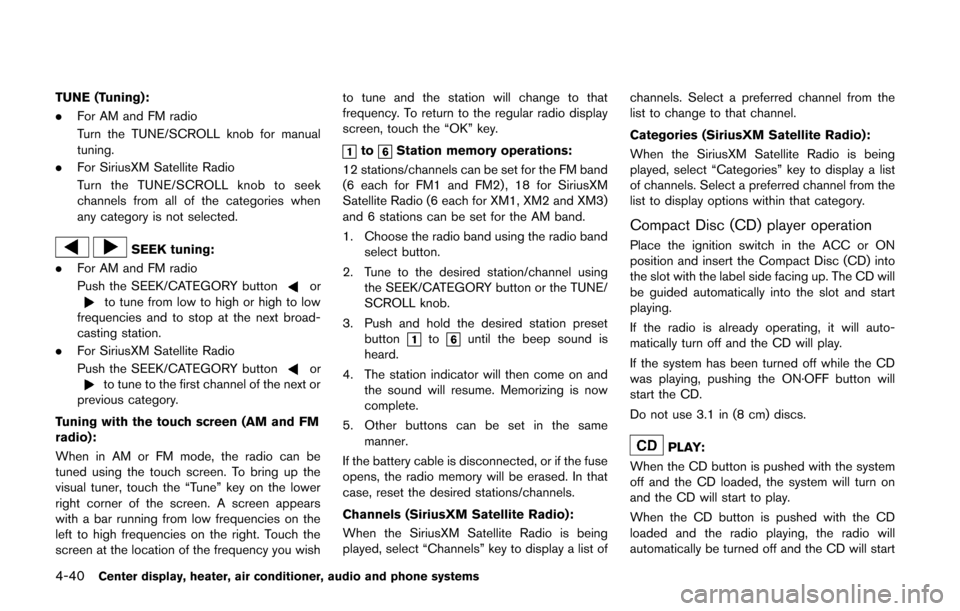
TUNE (Tuning):
.For AM and FM radio
Turn the TUNE/SCROLL knob for manual
tuning.
. For SiriusXM Satellite Radio
Turn the TUNE/SCROLL knob to seek
channels from all of the categories when
any category is not selected.
SEEK tuning:
. For AM and FM radio
Push the SEEK/CATEGORY button
orto tune from low to high or high to low
frequencies and to stop at the next broad-
casting station.
. For SiriusXM Satellite Radio
Push the SEEK/CATEGORY button
orto tune to the first channel of the next or
previous category.
Tuning with the touch screen (AM and FM
radio):
When in AM or FM mode, the radio can be
tuned using the touch screen. To bring up the
visual tuner, touch the “Tune” key on the lower
right corner of the screen. A screen appears
with a bar running from low frequencies on the
left to high frequencies on the right. Touch the
screen at the location of the frequency you wish to tune and the station will change to that
frequency. To return to the regular radio display
screen, touch the “OK” key.
toStation memory operations:
12 stations/channels can be set for the FM band
(6 each for FM1 and FM2) , 18 for SiriusXM
Satellite Radio (6 each for XM1, XM2 and XM3)
and 6 stations can be set for the AM band.
1. Choose the radio band using the radio band select button.
2. Tune to the desired station/channel using the SEEK/CATEGORY button or the TUNE/
SCROLL knob.
3. Push and hold the desired station preset button
tountil the beep sound is
heard.
4. The station indicator will then come on and the sound will resume. Memorizing is now
complete.
5. Other buttons can be set in the same manner.
If the battery cable is disconnected, or if the fuse
opens, the radio memory will be erased. In that
case, reset the desired stations/channels.
Channels (SiriusXM Satellite Radio):
When the SiriusXM Satellite Radio is being
played, select “Channels” key to display a list of channels. Select a preferred channel from the
list to change to that channel.
Categories (SiriusXM Satellite Radio):
When the SiriusXM Satellite Radio is being
played, select “Categories” key to display a list
of channels. Select a preferred channel from the
list to display options within that category.
Compact Disc (CD) player operation
Place the ignition switch in the ACC or ON
position and insert the Compact Disc (CD) into
the slot with the label side facing up. The CD will
be guided automatically into the slot and start
playing.
If the radio is already operating, it will auto-
matically turn off and the CD will play.
If the system has been turned off while the CD
was playing, pushing the ON·OFF button will
start the CD.
Do not use 3.1 in (8 cm) discs.
PLAY:
When the CD button is pushed with the system
off and the CD loaded, the system will turn on
and the CD will start to play.
When the CD button is pushed with the CD
loaded and the radio playing, the radio will
automatically be turned off and the CD will start
Page 187 of 332
4-46Center display, heater, air conditioner, audio and phone systems
.Genres
. Songs
. Composers
. Audiobooks
. Podcasts
The following touch-panel buttons shown on the
screen are also available:
.
: returns to the previous screen.
.
: plays/pauses the music selected.
SEEK/CATEGORY button:
Push the FF or REW button for more than 1.5
seconds while an iPod
®is playing to fast-
forward or rewind through the track. When the
button is released, the iPod
®will return to the
normal play speed.
SAA3492
Random and repeat play mode:
While files on a USB device are playing, the play
pattern can be altered so that songs are
repeated or played randomly.
Random:
Touch the “Random” key to apply a random play
pattern to the iPod
®. When the random mode is
active, theicon is displayed to the left of the
song title or album name to denote which
random pattern is applied. To cancel Random
mode, touch the “Random” key until no
icon
is displayed. Repeat:
Touch the “Repeat” key to apply a repeat play
pattern to the iPod
®. When the repeat mode is
active, theicon is displayed to the left of the
song title or album name to denote which repeat
pattern is applied. To cancel Repeat mode,
touch the “Repeat” key until no
icon is
displayed.
Page 195 of 332
4-54Center display, heater, air conditioner, audio and phone systems
SAA2351
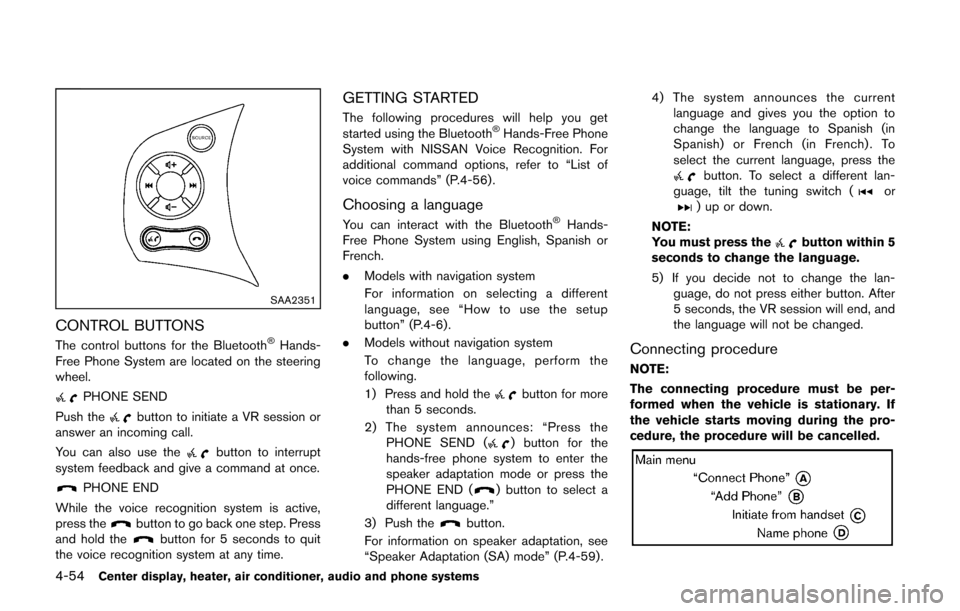
CONTROL BUTTONS
The control buttons for the Bluetooth®Hands-
Free Phone System are located on the steering
wheel.
PHONE SEND
Push the
button to initiate a VR session or
answer an incoming call.
You can also use the
button to interrupt
system feedback and give a command at once.
PHONE END
While the voice recognition system is active,
press the
button to go back one step. Press
and hold thebutton for 5 seconds to quit
the voice recognition system at any time.
GETTING STARTED
The following procedures will help you get
started using the Bluetooth®Hands-Free Phone
System with NISSAN Voice Recognition. For
additional command options, refer to “List of
voice commands” (P.4-56) .
Choosing a language
You can interact with the Bluetooth®Hands-
Free Phone System using English, Spanish or
French.
. Models with navigation system
For information on selecting a different
language, see “How to use the setup
button” (P.4-6).
. Models without navigation system
To change the language, perform the
following.
1) Press and hold the
button for more
than 5 seconds.
2) The system announces: “Press the PHONE SEND (
) button for the
hands-free phone system to enter the
speaker adaptation mode or press the
PHONE END (
) button to select a
different language.”
3) Push the
button.
For information on speaker adaptation, see
“Speaker Adaptation (SA) mode” (P.4-59) . 4) The system announces the current
language and gives you the option to
change the language to Spanish (in
Spanish) or French (in French) . To
select the current language, press the
button. To select a different lan-
guage, tilt the tuning switch (or) up or down.
NOTE:
You must press the
button within 5
seconds to change the language.
5) If you decide not to change the lan- guage, do not press either button. After
5 seconds, the VR session will end, and
the language will not be changed.
Connecting procedure
NOTE:
The connecting procedure must be per-
formed when the vehicle is stationary. If
the vehicle starts moving during the pro-
cedure, the procedure will be cancelled.
Page 286 of 332
CAUTION
Be careful not to allow children to
swallow the battery and removed parts.
SDI2134
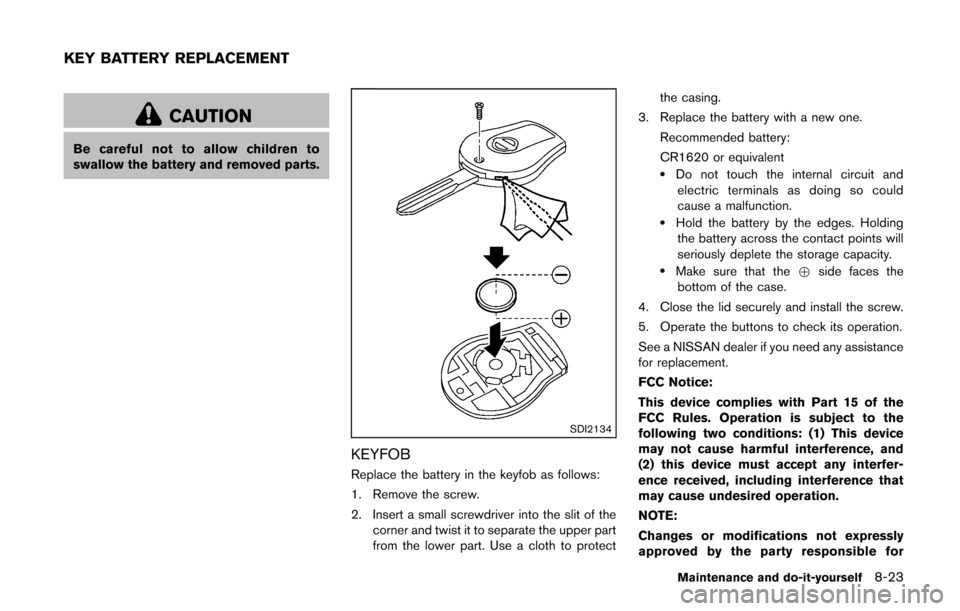
KEYFOB
Replace the battery in the keyfob as follows:
1. Remove the screw.
2. Insert a small screwdriver into the slit of thecorner and twist it to separate the upper part
from the lower part. Use a cloth to protect the casing.
3. Replace the battery with a new one.
Recommended battery:
CR1620 or equivalent
.Do not touch the internal circuit andelectric terminals as doing so could
cause a malfunction.
.Hold the battery by the edges. Holdingthe battery across the contact points will
seriously deplete the storage capacity.
.Make sure that the +side faces the
bottom of the case.
4. Close the lid securely and install the screw.
5. Operate the buttons to check its operation.
See a NISSAN dealer if you need any assistance
for replacement.
FCC Notice:
This device complies with Part 15 of the
FCC Rules. Operation is subject to the
following two conditions: (1) This device
may not cause harmful interference, and
(2) this device must accept any interfer-
ence received, including interference that
may cause undesired operation.
NOTE:
Changes or modifications not expressly
approved by the party responsible for
Maintenance and do-it-yourself8-23
KEY BATTERY REPLACEMENT
Page 288 of 332
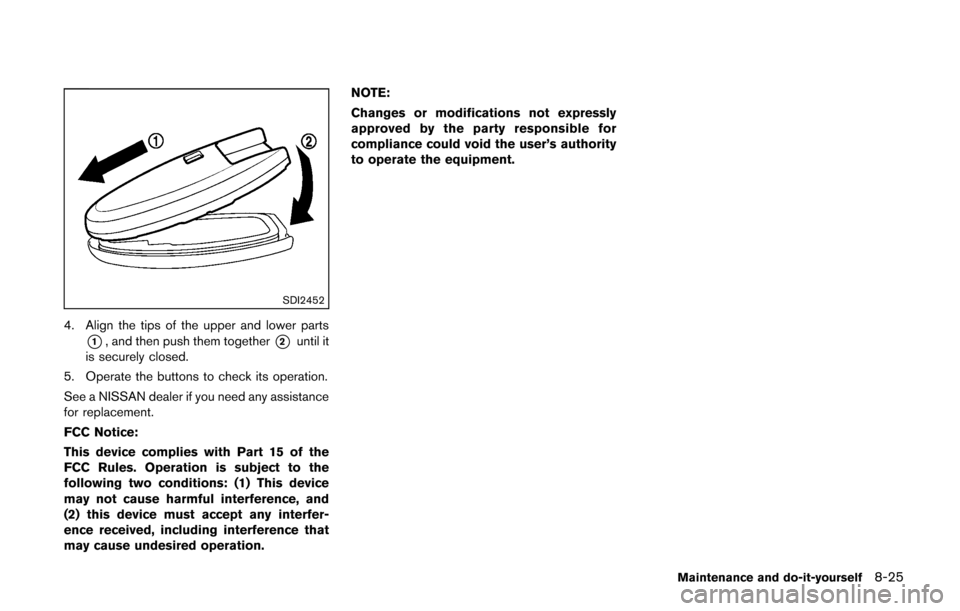
SDI2452
4. Align the tips of the upper and lower parts
*1, and then push them together*2until it
is securely closed.
5. Operate the buttons to check its operation.
See a NISSAN dealer if you need any assistance
for replacement.
FCC Notice:
This device complies with Part 15 of the
FCC Rules. Operation is subject to the
following two conditions: (1) This device
may not cause harmful interference, and
(2) this device must accept any interfer-
ence received, including interference that
may cause undesired operation. NOTE:
Changes or modifications not expressly
approved by the party responsible for
compliance could void the user’s authority
to operate the equipment.
Maintenance and do-it-yourself8-25
Page 324 of 332
10 Index
A
A/C (Air Conditioner) operation.............................. 4-16
ABS (Anti-lock Braking System) ............................ 5-27
Advanced air bag system ......................................... 1-47
Air bag systemAdvanced air bag system .................................. 1-47
Front passenger air bag and status light....... 1-49
Front-seat mounted side-impact
supplemental air bag system ............................ 1-52
Roof-mounted curtain side-impact
supplemental air bag system ............................ 1-52
Air bag warning labels............................................... 1-54
Air bag warning light...................................... 1-55, 2-15
Air cleaner housing filter ........................................... 8-16
Air conditioner Air conditioner operation.................................... 4-14
Air conditioner service ........................................ 4-20
Air conditioner specification label.................... 9-11
Air conditioning system refrigerant and
lubricant recommendations....................... 4-20, 9-7
In-cabin microfilter ............................................... 4-20
Alarm, How to stop alarm (see vehicle
security system)........................................................... 2-20
Alcohol, drugs and driving.......................................... 5-7
Antenna.......................................................................... 4-48
Anti-lock Braking System (ABS) ............................ 5-27
Anti-lock braking system (ABS) warning light..... 2-12
Appearance care Exterior appearance care ...................................... 7-2
Interior appearance care ....................................... 7-4
Armrest ............................................................................ 1-6
Audible reminders....................................................... 2-18
Audio operation precautions.................................... 4-21
Audio setup .................................................................... 4-6
Audio system................................................................ 4-21 Steering wheel audio controls.......................... 4-47
Autolight system.......................................................... 2-25
Automatic Air conditioner....................................................... 4-18
Door locks................................................................. 3-6
AUX (Auxiliary) button.................................... 4-38, 4-42
AUX (Auxiliary) input....................................... 4-38, 4-42
Average fuel consumption ........................................ 2-10
Average speed............................................................. 2-10
Avoiding collision and rollover ................................... 5-5
B
Back door...................................................................... 3-20
Battery............................................................................ 8-13 Battery replacement, Intelligent Key................ 8-24
Battery replacement, Keyfob............................. 8-23
Battery saver system........................................... 2-26
Variable voltage control system........................ 8-15
Before starting the engine........................................ 5-12
Bluetooth
®Hands-Free Phone System ................ 4-50
Booster seats............................................................... 1-38
Brake Anti-lock Braking System (ABS) ..................... 5-27
Brake and clutch fluid......................................... 8-12
Brake system......................................................... 5-27
Parking brake operation ..................................... 5-20
Warning light......................................................... 2-12
Break-in schedule ....................................................... 5-23
Brightness control Display ON/OFF button ........................................ 4-5
Instrument panel................................................... 2-27
Bulb check/instrument panel ................................... 2-12
Bulb replacement........................................................ 8-26
C
Cabin air filter............................................................... 4-20
Capacities and recommended fuel/lubricants ....... 9-2
Car phone or CB radio ............................................. 4-49
Cargo light.................................................................... 2-38
Catalytic converter, Three way catalyst................... 5-3
CD/USB memory care and cleaning ..................... 4-47
Ceiling light................................................................... 2-37
Check tire pressure warning...................................... 2-6
Child restraints............................................................. 1-22
Booster seats........................................................ 1-38
Precautions on child restraints......................... 1-23
Child safety................................................................... 1-20
Child safety rear door lock ......................................... 3-6
Chimes, Audible reminders ...................................... 2-18
Circuit breaker, Fusible link...................................... 8-21
Cleaning exterior and interior............................ 7-2, 7-4
Clock FM-AM radio with Compact Disc
(CD) player ............................................................ 4-32
How to use the setup button............................... 4-6
Clutch fluid.................................................................... 8-12
Cockpit ............................................................................ 2-2
Cold weather driving.................................................. 5-30
Compact Disc (CD) player (See
audio system)................................................... 4-35, 4-40
Continuously Variable Transmission
(CVT) fluid..................................................................... 8-11
Control panel buttons — color screen with
navigation system.......................................................... 4-3
Controls, Steering wheel audio controls............... 4-47
Coolant Capacities and
recommended fuel/lubricants............................... 9-2
Changing engine coolant...................................... 8-8