lock NISSAN CUBE 2014 3.G Owner's Guide
[x] Cancel search | Manufacturer: NISSAN, Model Year: 2014, Model line: CUBE, Model: NISSAN CUBE 2014 3.GPages: 332, PDF Size: 2.59 MB
Page 94 of 332
SIC4160
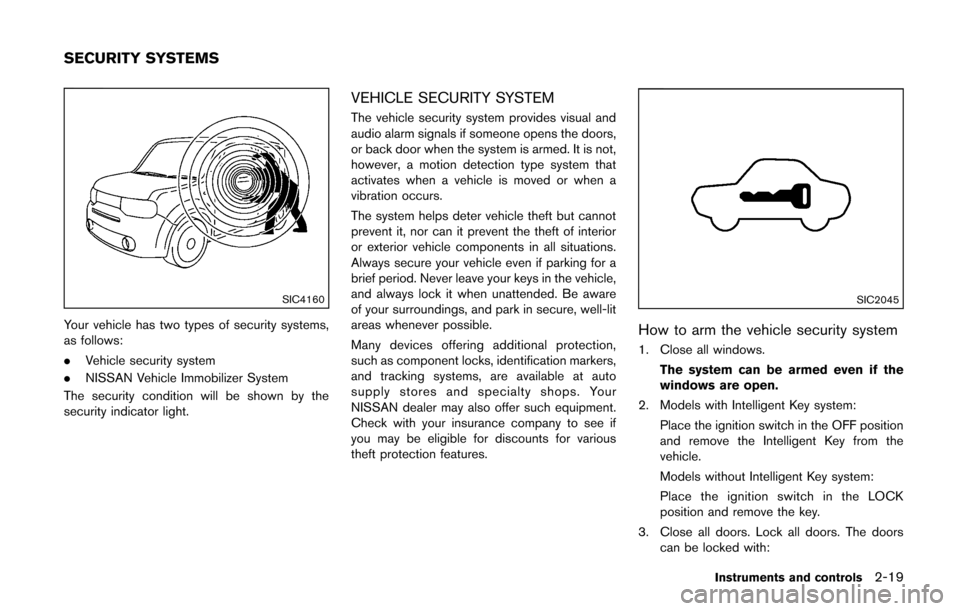
Your vehicle has two types of security systems,
as follows:
.Vehicle security system
. NISSAN Vehicle Immobilizer System
The security condition will be shown by the
security indicator light.
VEHICLE SECURITY SYSTEM
The vehicle security system provides visual and
audio alarm signals if someone opens the doors,
or back door when the system is armed. It is not,
however, a motion detection type system that
activates when a vehicle is moved or when a
vibration occurs.
The system helps deter vehicle theft but cannot
prevent it, nor can it prevent the theft of interior
or exterior vehicle components in all situations.
Always secure your vehicle even if parking for a
brief period. Never leave your keys in the vehicle,
and always lock it when unattended. Be aware
of your surroundings, and park in secure, well-lit
areas whenever possible.
Many devices offering additional protection,
such as component locks, identification markers,
and tracking systems, are available at auto
supply stores and specialty shops. Your
NISSAN dealer may also offer such equipment.
Check with your insurance company to see if
you may be eligible for discounts for various
theft protection features.
SIC2045
How to arm the vehicle security system
1. Close all windows.
The system can be armed even if the
windows are open.
2. Models with Intelligent Key system: Place the ignition switch in the OFF position
and remove the Intelligent Key from the
vehicle.
Models without Intelligent Key system:
Place the ignition switch in the LOCK
position and remove the key.
3. Close all doors. Lock all doors. The doors can be locked with:
Instruments and controls2-19
SECURITY SYSTEMS
Page 95 of 332
2-20Instruments and controls
a. the LOCKbutton on the keyfob or
Intelligent Key (if so equipped)
b. any request switch (Intelligent Key equipped model)
c. the power door lock switch
d. the key — master or mechanical (Intelli- gent Key equipped model)
4. Confirm that the security indicator light illuminates. The security indicator light stays
on for about 30 seconds. The vehicle
security system is now pre-armed. After
about 30 seconds the vehicle security
system automatically shifts into the armed
phase. The security light begins to flash
once every approximately 3 seconds. If,
during this 30-second pre-arm time period,
the door is unlocked, or the ignition switch is
placed in the ACC or ON position, the
system will not arm.
Even when the driver and/or passengers
are in the vehicle, the system will activate
with all doors locked with the ignition
switch in the LOCK position. When placing
the ignition switch in the ACC or ON
position, the system will be released.Vehicle security system activation
The vehicle security system will give the follow-
ing alarm:
. The headlights blink and the horn sounds
intermittently.
. The alarm automatically turns off after
approximately 50 seconds. However, the
alarm reactivates if the vehicle is tampered
with again.
The alarm is activated by:
. Unlocking the door without using the keyfob,
the Intelligent Key (if so equipped) the
request switch (if so equipped) or the key.
(Even if the door is opened by releasing the
door inside lock knob, the alarm will
activate.)
How to stop an activated alarm
The alarm will stop by unlocking a door by
pushing the UNLOCKbutton on the keyfob
or Intelligent Key, pushing the request switch or
using the key. The alarm will not stop if the
ignition switch is placed in the ACC or ON
position.
If the system does not operate as de-
scribed above, have it checked by a
NISSAN dealer.
NISSAN VEHICLE IMMOBILIZER SYS-
TEM
The NISSAN Vehicle Immobilizer System will not
allow the engine to start without the use of the
registered key.
If the engine fails to start using the registered
key, it may be due to interference caused by
another registered key, an automated toll road
device or automated payment device on the key
ring. Restart the engine using the following
procedures:
1. Leave the ignition switch in the ON position
for approximately 5 seconds.
2. Place the ignition switch in the OFF or LOCK position and wait approximately 10
seconds.
3. Repeat step 1 and 2 again.
4. Restart the engine while holding the device (which may have caused the interference)
separate from the registered key.
If this procedure allows the engine to start,
NISSAN recommends placing the regis-
tered key on a separate key ring to avoid
interference from other devices.
Statement related to section 15 of FCC
rules for NISSAN Vehicle Immobilizer
System (CONT ASSY-BCM. ANT ASSY-
IMMOBILISER)
Page 96 of 332
FCC Notice:
This device complies with Part 15 of the
FCC Rules. Operation is subject to the
following two conditions: (1) This device
may not cause harmful interference, and
(2) this device must accept any interfer-
ence received, including interference that
may cause undesired operation.
NOTE:
Changes or modifications not expressly
approved by the party responsible for
compliance could void the user’s authority
to operate the equipment.
SIC2045
Security indicator light
The security indicator light is located on the
meter panel. It indicates the status of the
NISSAN Vehicle Immobilizer System.
The light blinks after the ignition switch was in
the LOCK position. This function indicates the
security systems equipped on the vehicle are
operational.
If the NISSAN Vehicle Immobilizer System is
malfunctioning, this light will remain on while the
ignition switch is in the ON position.
If the light still remains on and/or the
engine will not start, see a NISSAN dealer
for NISSAN Vehicle Immobilizer Systemservice as soon as possible. Please bring
all registered keys that you have when
visiting a NISSAN dealer for service.
Instruments and controls2-21
Page 98 of 332
WARNING
In freezing temperatures the washer
solution may freeze on the rear window
glass and obscure your vision. Warm
the rear window with the defroster
before you wash the rear window.
CAUTION
.Do not operate the washer continu-
ously for more than 30 seconds.
. Do not operate the washer if the
reservoir tank is empty.
. Do not fill the window washer
reservoir tank with washer fluid
concentrates at full strength. Some
methyl alcohol based washer fluid
concentrates may permanently stain
the grille if spilled while filling the
window washer reservoir tank.
. Pre-mix washer fluid concentrates
with water to the manufacturer’s
recommended levels before pouring
the fluid into the window washer
reservoir tank. Do not use the window washer reservoir tank to
mix the washer fluid concentrate
and water.
If the rear window wiper operation is
interrupted by snow or ice, the wiper may
stop moving to protect its motor. If this
occurs, turn the wiper switch to the OFF
position and remove the snow or ice that is
on and around the wiper arms. In approxi-
mately 1 minute, turn the switch on again
to operate the wiper.SIC3666
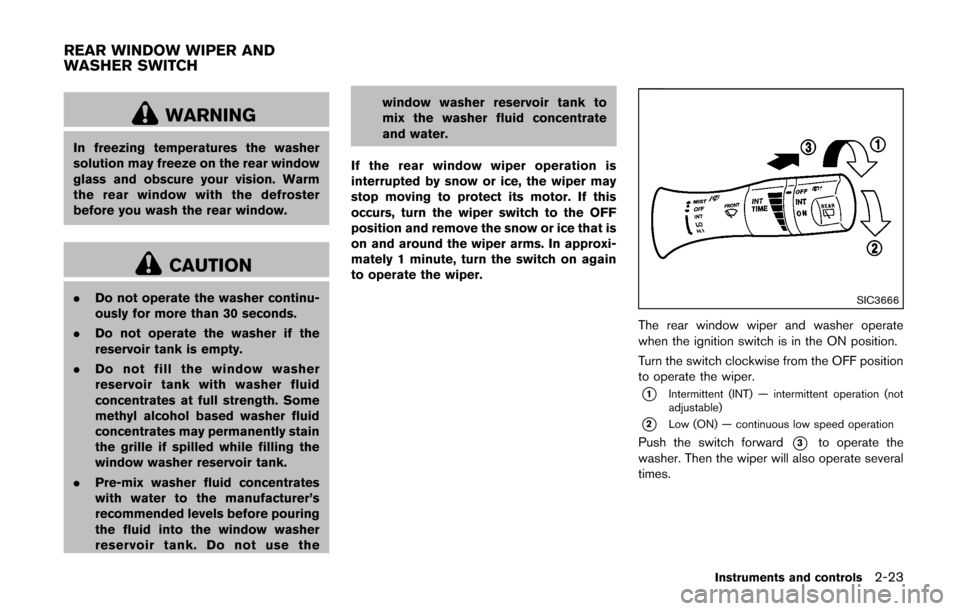
The rear window wiper and washer operate
when the ignition switch is in the ON position.
Turn the switch clockwise from the OFF position
to operate the wiper.
*1Intermittent (INT) — intermittent operation (not
adjustable)
*2Low (ON) — continuous low speed operation
Push the switch forward*3to operate the
washer. Then the wiper will also operate several
times.
Instruments and controls2-23
REAR WINDOW WIPER AND
WASHER SWITCH
Page 106 of 332
Soft bottle holders
CAUTION
.Do not use bottle holder for any
other objects that could be thrown
about in the vehicle and possibly
injure people during sudden braking
or an accident.
. Do not use bottle holder for open
liquid containers.
SIC4138
GLOVE BOX
WARNING
Keep glove box lid closed while driving
to help prevent injury in an accident or a
sudden stop.
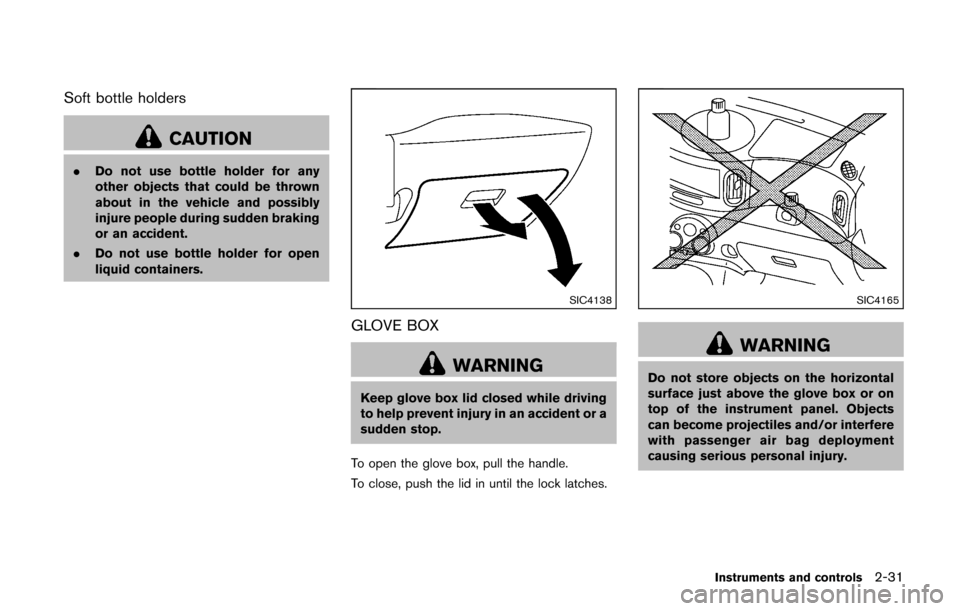
To open the glove box, pull the handle.
To close, push the lid in until the lock latches.
SIC4165
WARNING
Do not store objects on the horizontal
surface just above the glove box or on
top of the instrument panel. Objects
can become projectiles and/or interfere
with passenger air bag deployment
causing serious personal injury.
Instruments and controls2-31
Page 108 of 332
SIC4142Instrument panel
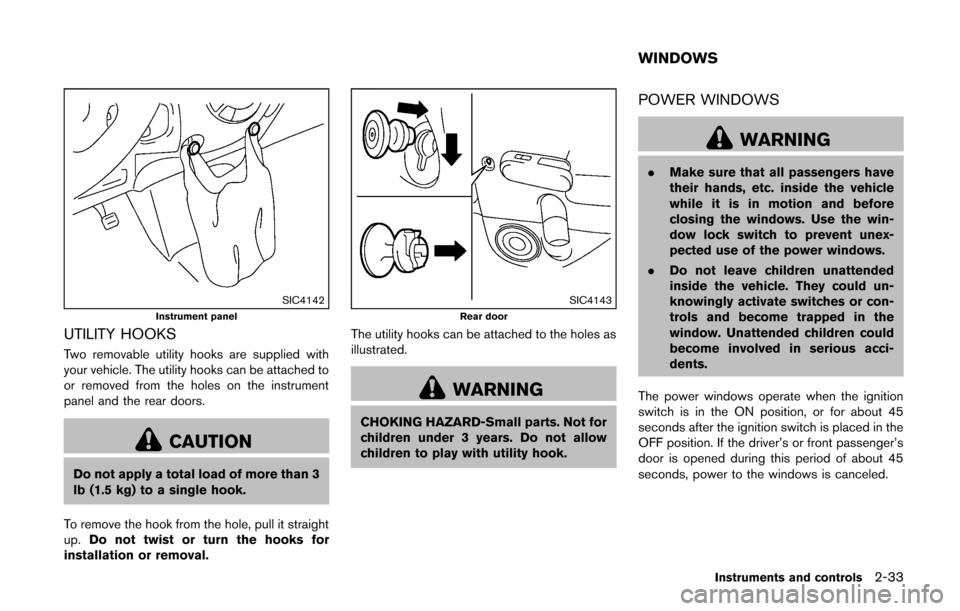
UTILITY HOOKS
Two removable utility hooks are supplied with
your vehicle. The utility hooks can be attached to
or removed from the holes on the instrument
panel and the rear doors.
CAUTION
Do not apply a total load of more than 3
lb (1.5 kg) to a single hook.
To remove the hook from the hole, pull it straight
up. Do not twist or turn the hooks for
installation or removal.
SIC4143Rear door
The utility hooks can be attached to the holes as
illustrated.
WARNING
CHOKING HAZARD-Small parts. Not for
children under 3 years. Do not allow
children to play with utility hook.
POWER WINDOWS
WARNING
. Make sure that all passengers have
their hands, etc. inside the vehicle
while it is in motion and before
closing the windows. Use the win-
dow lock switch to prevent unex-
pected use of the power windows.
. Do not leave children unattended
inside the vehicle. They could un-
knowingly activate switches or con-
trols and become trapped in the
window. Unattended children could
become involved in serious acci-
dents.
The power windows operate when the ignition
switch is in the ON position, or for about 45
seconds after the ignition switch is placed in the
OFF position. If the driver’s or front passenger’s
door is opened during this period of about 45
seconds, power to the windows is canceled.
Instruments and controls2-33
WINDOWS
Page 109 of 332
2-34Instruments and controls
SIC3507
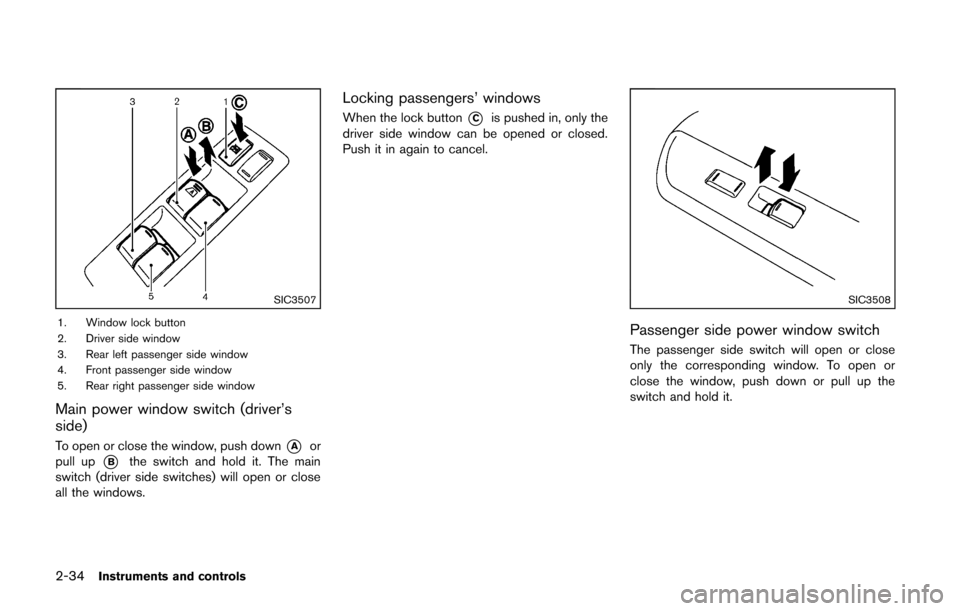
1. Window lock button
2. Driver side window
3. Rear left passenger side window
4. Front passenger side window
5. Rear right passenger side window
Main power window switch (driver’s
side)
To open or close the window, push down*Aor
pull up
*Bthe switch and hold it. The main
switch (driver side switches) will open or close
all the windows.
Locking passengers’ windows
When the lock button*Cis pushed in, only the
driver side window can be opened or closed.
Push it in again to cancel.
SIC3508
Passenger side power window switch
The passenger side switch will open or close
only the corresponding window. To open or
close the window, push down or pull up the
switch and hold it.
Page 112 of 332
Center position
When the switch is in the center position, the
map lights will illuminate under the following
conditions:
.ignition switch is placed in the OFF position
(models with Intelligent Key system)
— remain on for about 15 seconds.
. the key is removed from the ignition switch
(models without Intelligent Key system)
— remain on for about 15 seconds.
. doors are unlocked by pushing the UN-
LOCK
button (on the keyfob or
Intelligent Key) or the request switch (In-
telligent Key system equipped model) , with
the ignition switch in the LOCK position
— remain on for about 15 seconds.
. any door is opened and then closed with the
ignition switch in the LOCK position
— remain on for about 15 seconds.
. any door is opened with the ignition switch
in the ACC or ON position
— remain on while the door is opened.
When the door is closed, the lights go
off.
The lights will turn off after a period of
time when the lights remain illuminated to
prevent the battery from becoming dis-
charged.SIC4148
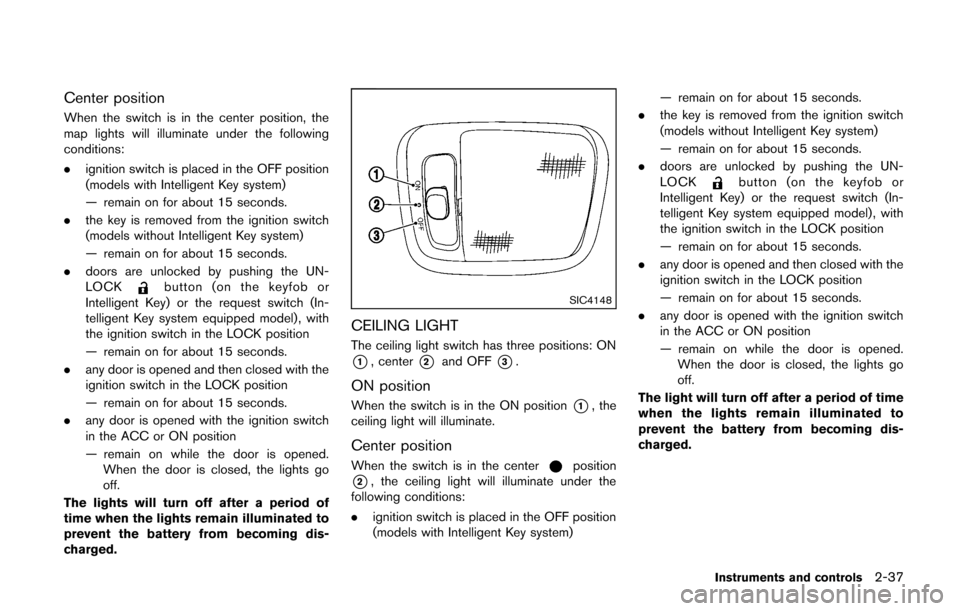
CEILING LIGHT
The ceiling light switch has three positions: ON
*1, center*2and OFF*3.
ON position
When the switch is in the ON position*1, the
ceiling light will illuminate.
Center position
When the switch is in the centerposition
*2, the ceiling light will illuminate under the
following conditions:
. ignition switch is placed in the OFF position
(models with Intelligent Key system) — remain on for about 15 seconds.
. the key is removed from the ignition switch
(models without Intelligent Key system)
— remain on for about 15 seconds.
. doors are unlocked by pushing the UN-
LOCK
button (on the keyfob or
Intelligent Key) or the request switch (In-
telligent Key system equipped model) , with
the ignition switch in the LOCK position
— remain on for about 15 seconds.
. any door is opened and then closed with the
ignition switch in the LOCK position
— remain on for about 15 seconds.
. any door is opened with the ignition switch
in the ACC or ON position
— remain on while the door is opened.
When the door is closed, the lights go
off.
The light will turn off after a period of time
when the lights remain illuminated to
prevent the battery from becoming dis-
charged.
Instruments and controls2-37
Page 114 of 332

3 Pre-driving checks and adjustments
Keys ........................................................................\
...................... 3-2NISSAN Vehicle Immobilizer System keys ................... 3-2
Intelligent Keys (if so equipped) ..................................... 3-3
Doors ........................................................................\
.................... 3-4 Locking with key .................................................................. 3-5
Locking with inside lock knob .......................................... 3-5
Locking with power door lock switch ............................ 3-5
Automatic door locks ......................................................... 3-6
Child safety rear door lock ............................................... 3-6
Remote keyless entry system (if so equipped) ................. 3-7
How to use remote keyless entry system ..................... 3-8
Intelligent Key system (if so equipped) ............................ 3-10 Intelligent Key operating range ..................................... 3-12
Door locks/unlocks precaution .................................... 3-12
Intelligent Key operation ................................................. 3-13
Battery saver system ....................................................... 3-14 Warning lights and audible reminders ...................... 3-14
Troubleshooting guide .................................................. 3-15
How to use remote keyless entry function .............. 3-16
Hood ........................................................................\
................. 3-19
Back door ........................................................................\
........ 3-20
Fuel-filler door ........................................................................\
3-21
Opening the fuel-filler door ......................................... 3-21
Fuel-filler cap .................................................................. 3-21
Tilt steering column .............................................................. 3-23 Tilt operation ................................................................... 3-23
Sun visors ........................................................................\
........ 3-24
Mirrors ........................................................................\
............. 3-24 Inside mirror ..................................................................... 3-24
Outside mirrors ............................................................... 3-25
Vanity mirror ..................................................................... 3-26
Page 116 of 332
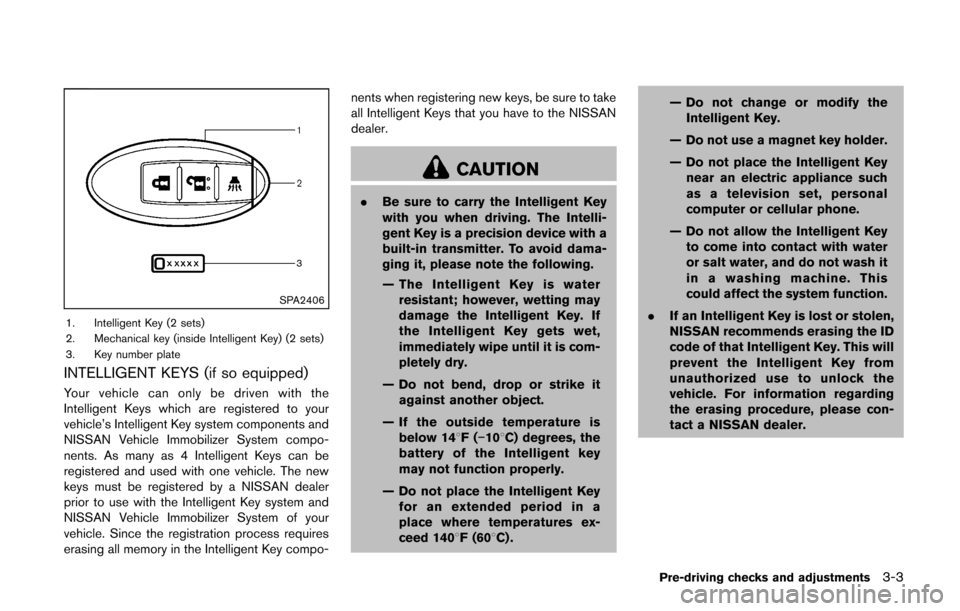
SPA2406
1. Intelligent Key (2 sets)
2. Mechanical key (inside Intelligent Key) (2 sets)
3. Key number plate
INTELLIGENT KEYS (if so equipped)
Your vehicle can only be driven with the
Intelligent Keys which are registered to your
vehicle’s Intelligent Key system components and
NISSAN Vehicle Immobilizer System compo-
nents. As many as 4 Intelligent Keys can be
registered and used with one vehicle. The new
keys must be registered by a NISSAN dealer
prior to use with the Intelligent Key system and
NISSAN Vehicle Immobilizer System of your
vehicle. Since the registration process requires
erasing all memory in the Intelligent Key compo-nents when registering new keys, be sure to take
all Intelligent Keys that you have to the NISSAN
dealer.
CAUTION
.
Be sure to carry the Intelligent Key
with you when driving. The Intelli-
gent Key is a precision device with a
built-in transmitter. To avoid dama-
ging it, please note the following.
— The Intelligent Key is water
resistant; however, wetting may
damage the Intelligent Key. If
the Intelligent Key gets wet,
immediately wipe until it is com-
pletely dry.
— Do not bend, drop or strike it against another object.
— If the outside temperature is below 148F( −108C) degrees, the
battery of the Intelligent key
may not function properly.
— Do not place the Intelligent Key for an extended period in a
place where temperatures ex-
ceed 1408F (608C) . — Do not change or modify the
Intelligent Key.
— Do not use a magnet key holder.
— Do not place the Intelligent Key near an electric appliance such
as a television set, personal
computer or cellular phone.
— Do not allow the Intelligent Key to come into contact with water
or salt water, and do not wash it
in a washing machine. This
could affect the system function.
. If an Intelligent Key is lost or stolen,
NISSAN recommends erasing the ID
code of that Intelligent Key. This will
prevent the Intelligent Key from
unauthorized use to unlock the
vehicle. For information regarding
the erasing procedure, please con-
tact a NISSAN dealer.
Pre-driving checks and adjustments3-3