maintenance NISSAN CUBE 2014 3.G Owner's Guide
[x] Cancel search | Manufacturer: NISSAN, Model Year: 2014, Model line: CUBE, Model: NISSAN CUBE 2014 3.GPages: 332, PDF Size: 2.59 MB
Page 286 of 332
CAUTION
Be careful not to allow children to
swallow the battery and removed parts.
SDI2134
KEYFOB
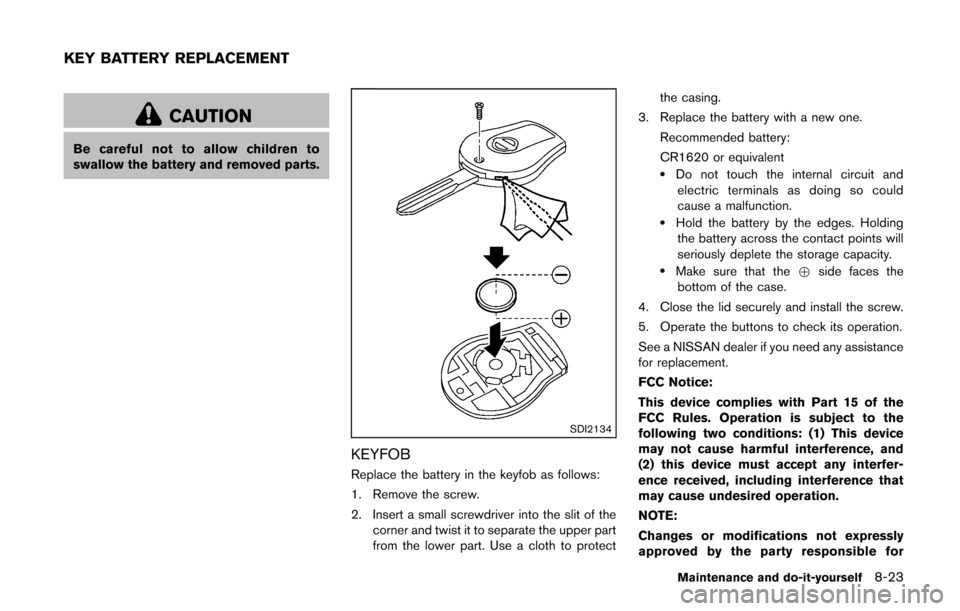
Replace the battery in the keyfob as follows:
1. Remove the screw.
2. Insert a small screwdriver into the slit of thecorner and twist it to separate the upper part
from the lower part. Use a cloth to protect the casing.
3. Replace the battery with a new one.
Recommended battery:
CR1620 or equivalent
.Do not touch the internal circuit andelectric terminals as doing so could
cause a malfunction.
.Hold the battery by the edges. Holdingthe battery across the contact points will
seriously deplete the storage capacity.
.Make sure that the +side faces the
bottom of the case.
4. Close the lid securely and install the screw.
5. Operate the buttons to check its operation.
See a NISSAN dealer if you need any assistance
for replacement.
FCC Notice:
This device complies with Part 15 of the
FCC Rules. Operation is subject to the
following two conditions: (1) This device
may not cause harmful interference, and
(2) this device must accept any interfer-
ence received, including interference that
may cause undesired operation.
NOTE:
Changes or modifications not expressly
approved by the party responsible for
Maintenance and do-it-yourself8-23
KEY BATTERY REPLACEMENT
Page 287 of 332
8-24Maintenance and do-it-yourself
compliance could void the user’s authority
to operate the equipment.
SDI2451
INTELLIGENT KEY
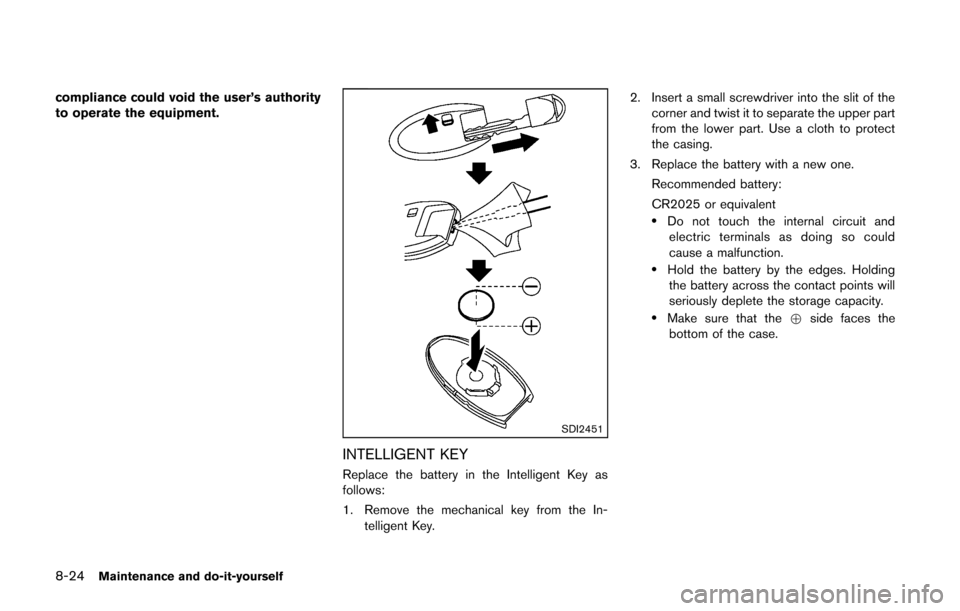
Replace the battery in the Intelligent Key as
follows:
1. Remove the mechanical key from the In-telligent Key. 2. Insert a small screwdriver into the slit of the
corner and twist it to separate the upper part
from the lower part. Use a cloth to protect
the casing.
3. Replace the battery with a new one. Recommended battery:
CR2025 or equivalent
.Do not touch the internal circuit andelectric terminals as doing so could
cause a malfunction.
.Hold the battery by the edges. Holdingthe battery across the contact points will
seriously deplete the storage capacity.
.Make sure that the +side faces the
bottom of the case.
Page 288 of 332
SDI2452
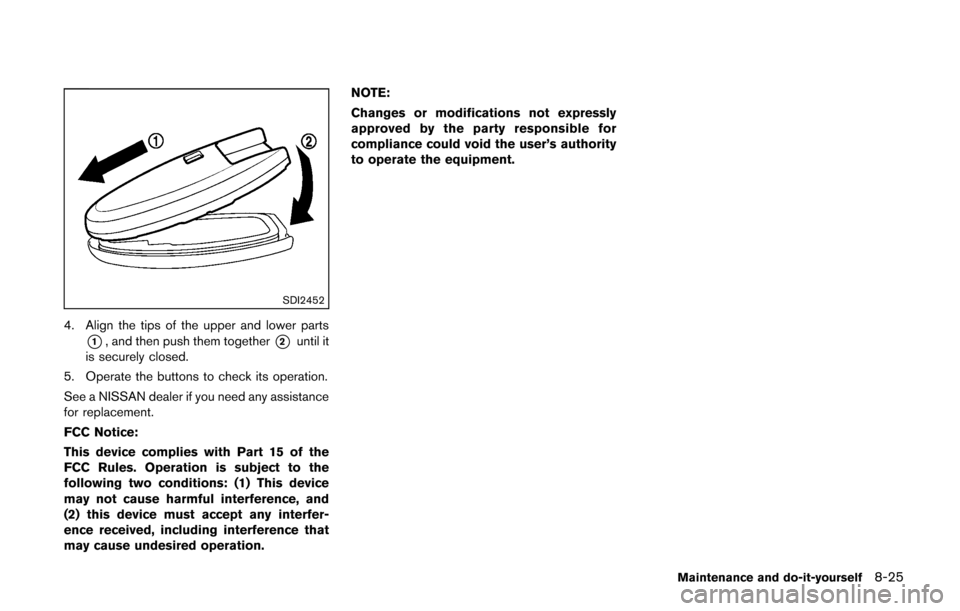
4. Align the tips of the upper and lower parts
*1, and then push them together*2until it
is securely closed.
5. Operate the buttons to check its operation.
See a NISSAN dealer if you need any assistance
for replacement.
FCC Notice:
This device complies with Part 15 of the
FCC Rules. Operation is subject to the
following two conditions: (1) This device
may not cause harmful interference, and
(2) this device must accept any interfer-
ence received, including interference that
may cause undesired operation. NOTE:
Changes or modifications not expressly
approved by the party responsible for
compliance could void the user’s authority
to operate the equipment.
Maintenance and do-it-yourself8-25
Page 289 of 332
8-26Maintenance and do-it-yourself
SDI2497
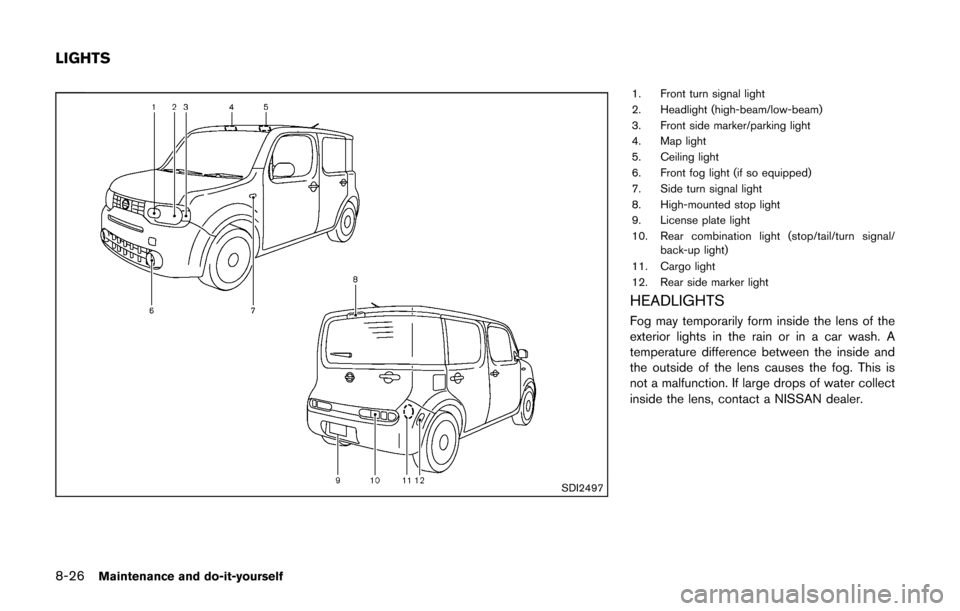
1. Front turn signal light
2. Headlight (high-beam/low-beam)
3. Front side marker/parking light
4. Map light
5. Ceiling light
6. Front fog light (if so equipped)
7. Side turn signal light
8. High-mounted stop light
9. License plate light
10. Rear combination light (stop/tail/turn signal/back-up light)
11. Cargo light
12. Rear side marker light
HEADLIGHTS
Fog may temporarily form inside the lens of the
exterior lights in the rain or in a car wash. A
temperature difference between the inside and
the outside of the lens causes the fog. This is
not a malfunction. If large drops of water collect
inside the lens, contact a NISSAN dealer.
LIGHTS
Page 290 of 332
Replacing
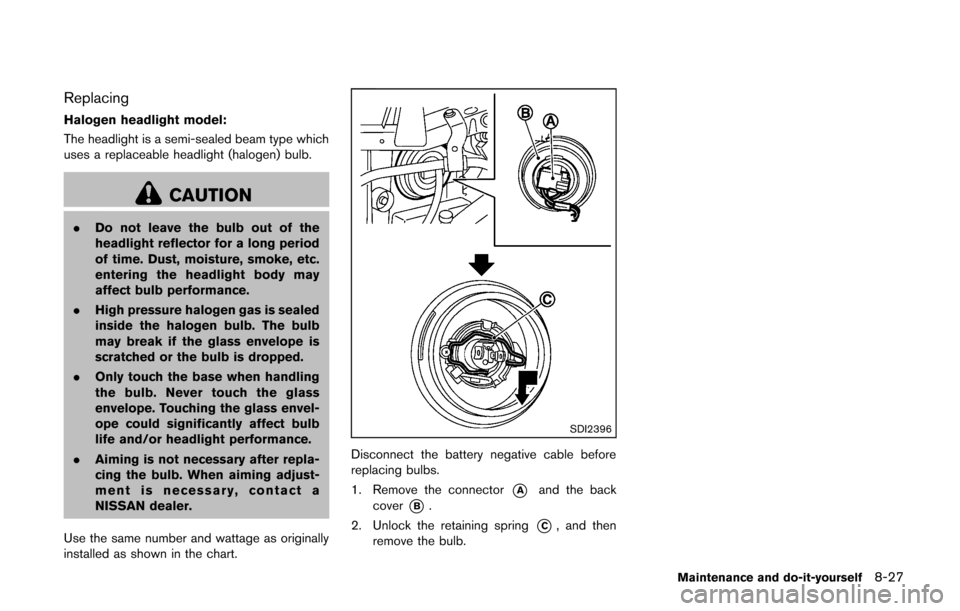
Halogen headlight model:
The headlight is a semi-sealed beam type which
uses a replaceable headlight (halogen) bulb.
CAUTION
.Do not leave the bulb out of the
headlight reflector for a long period
of time. Dust, moisture, smoke, etc.
entering the headlight body may
affect bulb performance.
. High pressure halogen gas is sealed
inside the halogen bulb. The bulb
may break if the glass envelope is
scratched or the bulb is dropped.
. Only touch the base when handling
the bulb. Never touch the glass
envelope. Touching the glass envel-
ope could significantly affect bulb
life and/or headlight performance.
. Aiming is not necessary after repla-
cing the bulb. When aiming adjust-
ment is necessary, contact a
NISSAN dealer.
Use the same number and wattage as originally
installed as shown in the chart.
SDI2396
Disconnect the battery negative cable before
replacing bulbs.
1. Remove the connector
*Aand the back
cover
*B.
2. Unlock the retaining spring
*C, and then
remove the bulb.
Maintenance and do-it-yourself8-27
Page 291 of 332
8-28Maintenance and do-it-yourself
EXTERIOR AND INTERIOR LIGHTS
ItemWattage (W)Bulb No.
Headlight high/low beams (Halogen) 60/55HB2
Front turn signal light* 21PY21W
Front fog light (if so equipped)* 35H8
Front side marker/parking light* 5W5W
Side turn signal light* 5WY5W
Rear combination light*
turn signal 21PY21W
stop/tail 21/5W21/5W
back-up 18W16W
Rear side marker light* 5W5W
License plate light* 5W5W
Map light 5—
High-mounted stop light* 18W16W
Ceiling light 8—
Cargo light 8—
*: See a NISSAN dealer for replacement.
NOTE: Always check with the Parts Department at a NISSAN dealer for the latest information about parts.
SDI2306
: REMOVE
: INSTALL
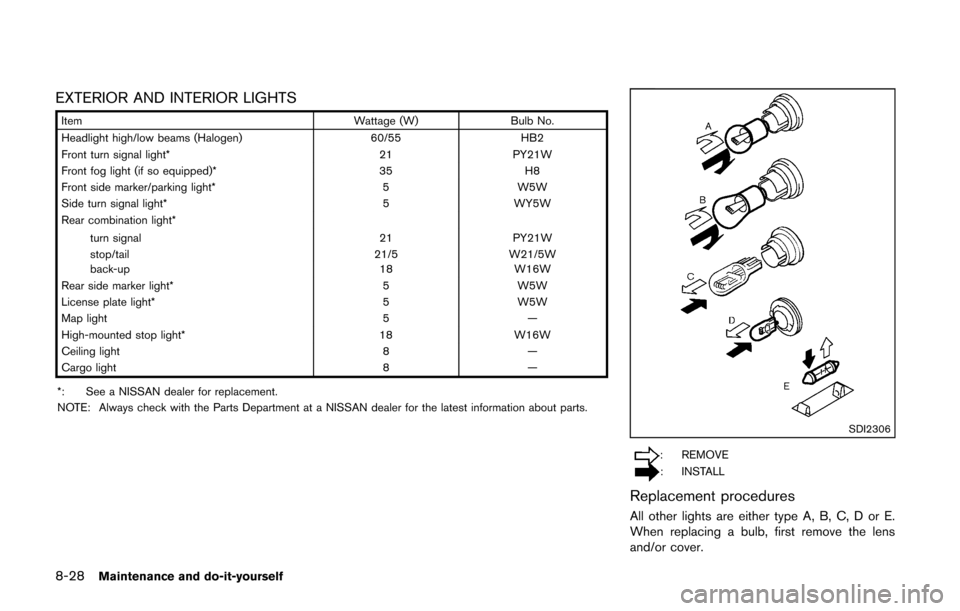
Replacement procedures
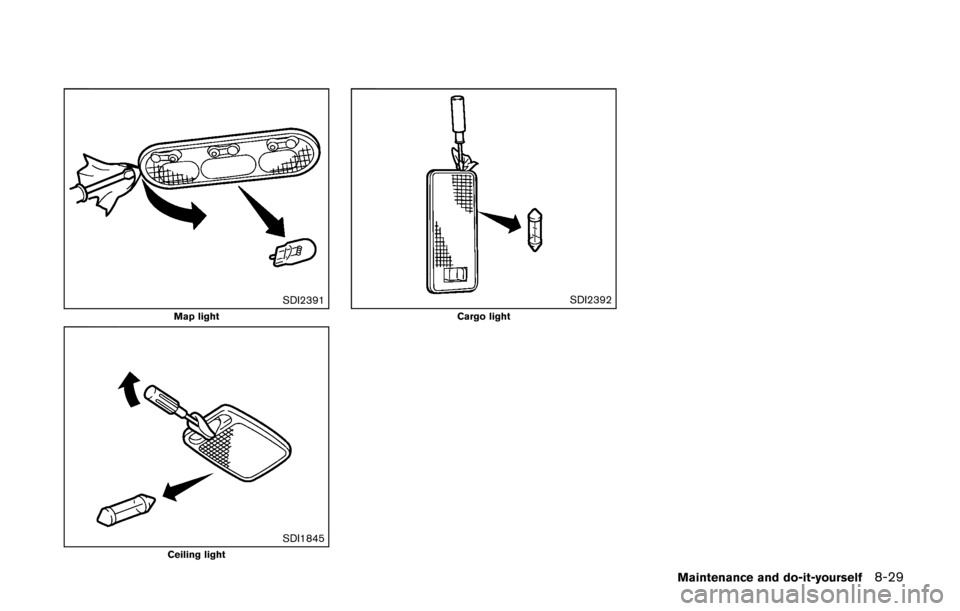
All other lights are either type A, B, C, D or E.
When replacing a bulb, first remove the lens
and/or cover.
Page 292 of 332
SDI2391Map light
SDI1845Ceiling light
SDI2392Cargo light
Maintenance and do-it-yourself8-29
Page 293 of 332
8-30Maintenance and do-it-yourself
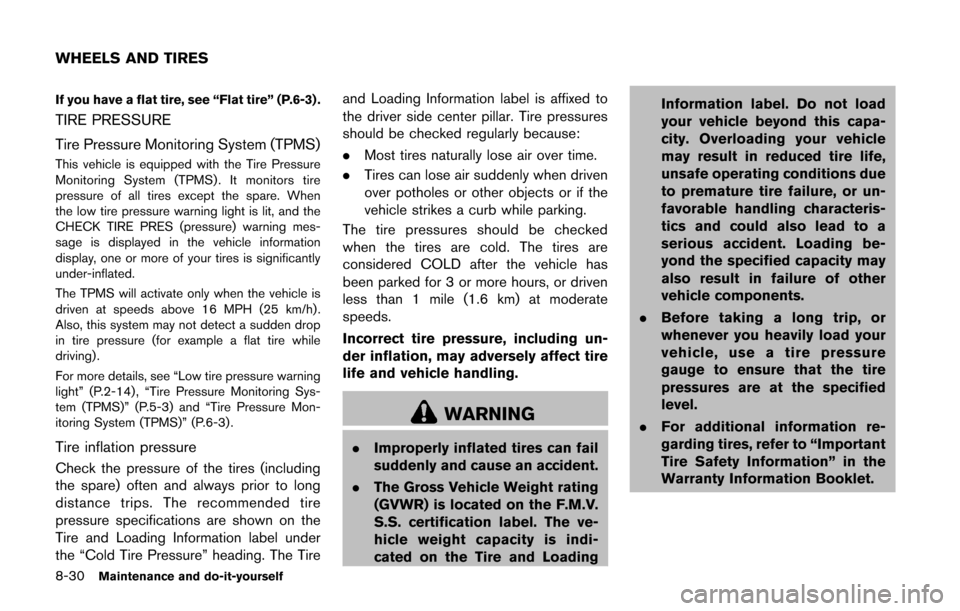
If you have a flat tire, see “Flat tire” (P.6-3) .
TIRE PRESSURE
Tire Pressure Monitoring System (TPMS)
This vehicle is equipped with the Tire Pressure
Monitoring System (TPMS) . It monitors tire
pressure of all tires except the spare. When
the low tire pressure warning light is lit, and the
CHECK TIRE PRES (pressure) warning mes-
sage is displayed in the vehicle information
display, one or more of your tires is significantly
under-inflated.
The TPMS will activate only when the vehicle is
driven at speeds above 16 MPH (25 km/h).
Also, this system may not detect a sudden drop
in tire pressure (for example a flat tire while
driving) .
For more details, see “Low tire pressure warning
light” (P.2-14) , “Tire Pressure Monitoring Sys-
tem (TPMS)” (P.5-3) and “Tire Pressure Mon-
itoring System (TPMS)” (P.6-3) .
Tire inflation pressure
Check the pressure of the tires (including
the spare) often and always prior to long
distance trips. The recommended tire
pressure specifications are shown on the
Tire and Loading Information label under
the “Cold Tire Pressure” heading. The Tireand Loading Information label is affixed to
the driver side center pillar. Tire pressures
should be checked regularly because:
.
Most tires naturally lose air over time.
. Tires can lose air suddenly when driven
over potholes or other objects or if the
vehicle strikes a curb while parking.
The tire pressures should be checked
when the tires are cold. The tires are
considered COLD after the vehicle has
been parked for 3 or more hours, or driven
less than 1 mile (1.6 km) at moderate
speeds.
Incorrect tire pressure, including un-
der inflation, may adversely affect tire
life and vehicle handling.
WARNING
. Improperly inflated tires can fail
suddenly and cause an accident.
. The Gross Vehicle Weight rating
(GVWR) is located on the F.M.V.
S.S. certification label. The ve-
hicle weight capacity is indi-
cated on the Tire and Loading Information label. Do not load
your vehicle beyond this capa-
city. Overloading your vehicle
may result in reduced tire life,
unsafe operating conditions due
to premature tire failure, or un-
favorable handling characteris-
tics and could also lead to a
serious accident. Loading be-
yond the specified capacity may
also result in failure of other
vehicle components.
. Before taking a long trip, or
whenever you heavily load your
vehicle, use a tire pressure
gauge to ensure that the tire
pressures are at the specified
level.
. For additional information re-
garding tires, refer to “Important
Tire Safety Information” in the
Warranty Information Booklet.
WHEELS AND TIRES
Page 294 of 332
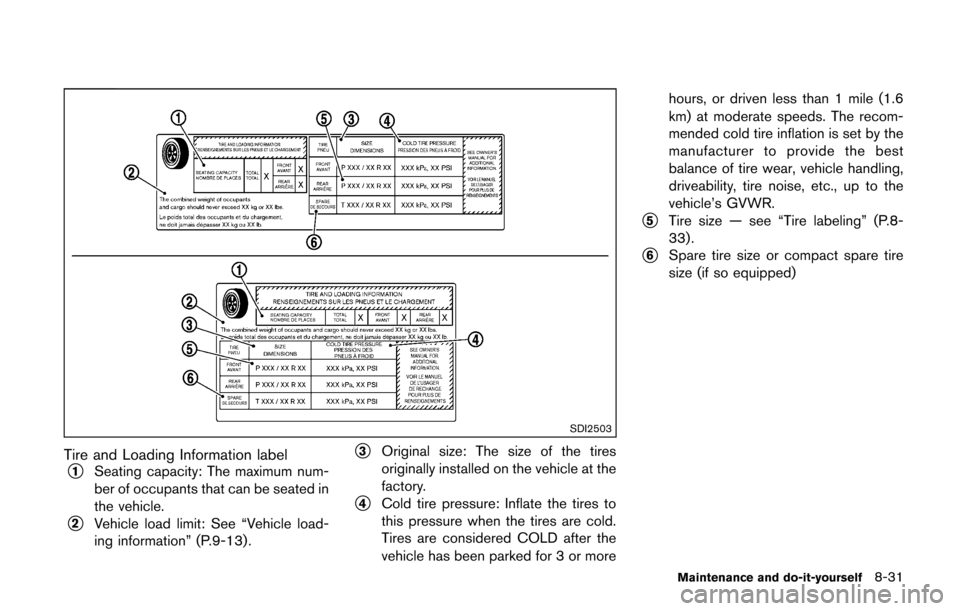
SDI2503
Tire and Loading Information label
*1Seating capacity: The maximum num-
ber of occupants that can be seated in
the vehicle.
*2Vehicle load limit: See “Vehicle load-
ing information” (P.9-13).
*3Original size: The size of the tires
originally installed on the vehicle at the
factory.
*4Cold tire pressure: Inflate the tires to
this pressure when the tires are cold.
Tires are considered COLD after the
vehicle has been parked for 3 or morehours, or driven less than 1 mile (1.6
km) at moderate speeds. The recom-
mended cold tire inflation is set by the
manufacturer to provide the best
balance of tire wear, vehicle handling,
driveability, tire noise, etc., up to the
vehicle’s GVWR.
*5Tire size — see “Tire labeling” (P.8-
33).
*6Spare tire size or compact spare tire
size (if so equipped)
Maintenance and do-it-yourself8-31
Page 295 of 332
8-32Maintenance and do-it-yourself
SDI1949
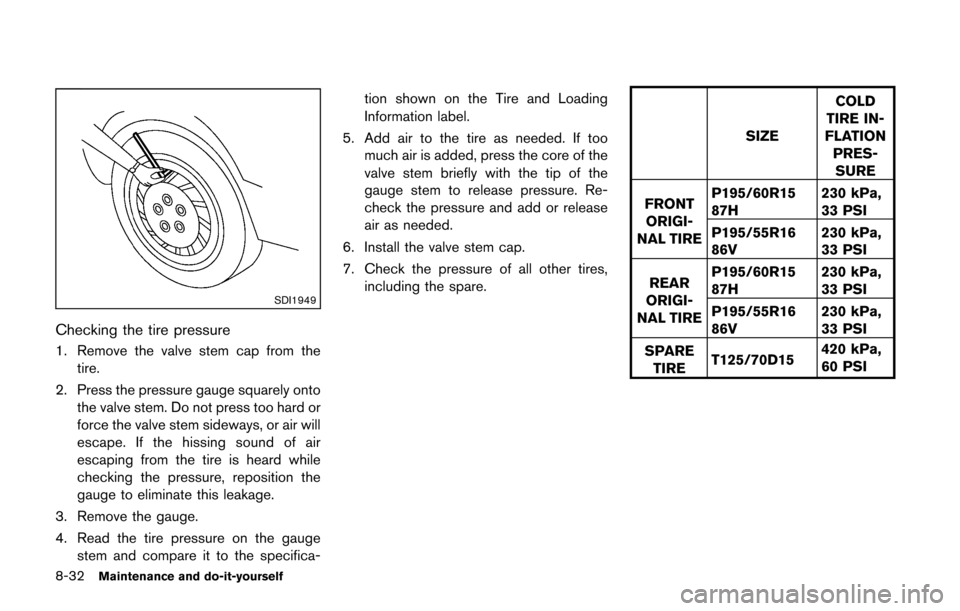
Checking the tire pressure
1. Remove the valve stem cap from thetire.
2. Press the pressure gauge squarely onto the valve stem. Do not press too hard or
force the valve stem sideways, or air will
escape. If the hissing sound of air
escaping from the tire is heard while
checking the pressure, reposition the
gauge to eliminate this leakage.
3. Remove the gauge.
4. Read the tire pressure on the gauge stem and compare it to the specifica- tion shown on the Tire and Loading
Information label.
5. Add air to the tire as needed. If too much air is added, press the core of the
valve stem briefly with the tip of the
gauge stem to release pressure. Re-
check the pressure and add or release
air as needed.
6. Install the valve stem cap.
7. Check the pressure of all other tires, including the spare.
SIZE COLD
TIRE IN-
FLATION
PRES-SURE
FRONT ORIGI-
NAL TIRE P195/60R15
87H
230 kPa,
33 PSI
P195/55R16
86V 230 kPa,
33 PSI
REAR
ORIGI-
NAL TIRE P195/60R15
87H
230 kPa,
33 PSI
P195/55R16
86V 230 kPa,
33 PSI
SPARE TIRE T125/70D15 420 kPa,
60 PSI