ignition NISSAN CUBE 2014 3.G Manual PDF
[x] Cancel search | Manufacturer: NISSAN, Model Year: 2014, Model line: CUBE, Model: NISSAN CUBE 2014 3.GPages: 332, PDF Size: 2.59 MB
Page 234 of 332
The Vehicle Dynamic Control (VDC) system
uses various sensors to monitor driver inputs
and vehicle motion. Under certain driving con-
ditions, the VDC system helps to perform the
following functions.
.Controls brake pressure to reduce wheel
slip on one slipping drive wheel so power is
transferred to a non slipping drive wheel on
the same axle.
. Controls brake pressure and engine output
to reduce drive wheel slip based on vehicle
speed (traction control function) .
. Controls brake pressure at individual wheels
and engine output to help the driver maintain
control of the vehicle in the following
conditions:
— understeer (vehicle tends to not follow
the steered path despite increased
steering input)
— oversteer (vehicle tends to spin due to certain road or driving conditions) .
The VDC system can help the driver to maintain
control of the vehicle, but it cannot prevent loss
of vehicle control in all driving situations.
When the VDC system operates, the VDC
warning light
in the instrument panel flashes
so note the following:
. The road may be slippery or the system may
determine some action is required to help keep the vehicle on the steered path.
. You may feel a pulsation in the brake pedal
and hear a noise or vibration from under the
hood. This is normal and indicates that the
VDC system is working properly.
. Adjust your speed and driving to the road
conditions.
If a malfunction occurs in the system, the VDC
warning light
illuminates in the instrument
panel. The VDC system automatically turns off.
The VDC OFF switch is used to turn off the VDC
system. The VDC off indicator light
illuminates to indicate the VDC system is off.
When the VDC switch is used to turn off the
system, the VDC system still operates to prevent
one drive wheel from slipping by transferring
power to a non slipping drive wheel. The VDC
warning light
flashes if this occurs. All other
VDC functions are off, and the VDC warning
light
will not flash. The VDC system is
automatically reset to on when the ignition
switch is placed in the off position then back
to the on position.
See “Vehicle Dynamic Control (VDC) warning
light” (P.2-16) and “Vehicle Dynamic Control
(VDC) off indicator light” (P.2-18).
The computer has a built-in diagnostic feature
that tests the system each time you start the
engine and move the vehicle forward or in reverse at a slow speed. When the self-test
occurs, you may hear a “clunk” noise and/or feel
a pulsation in the brake pedal. This is normal and
is not an indication of a malfunction.
WARNING
.
The VDC system is designed to help
improve driving stability but does
not prevent accidents due to abrupt
steering operation at high speeds or
by careless or dangerous driving
techniques. Reduce vehicle speed
and be especially careful when driv-
ing and cornering on slippery sur-
faces and always drive carefully.
. Do not modify the vehicle’s suspen-
sion. If suspension parts such as
shock absorbers, struts, springs,
stabilizer bars, bushings and
wheels are not NISSAN recom-
mended for your vehicle or are
extremely deteriorated, the VDC
system may not operate properly.
This could adversely affect vehicle
handling performance, and the VDC
warning light
may illuminate.
. If brake related parts such as brake
pads, rotors and calipers are not
Starting and driving5-29
VEHICLE DYNAMIC CONTROL (VDC)
SYSTEM
Page 239 of 332
6-2In case of emergency
SIC2574
Push the switch on to warn other drivers when
you must stop or park under emergency condi-
tions. All turn signal lights will flash.
WARNING
.If stopping for an emergency, be
sure to move the vehicle well off the
road.
. Do not use the hazard warning
flashers while moving on the high-
way unless unusual circumstances
force you to drive so slowly that
your vehicle might become a hazard to other traffic.
. Turn signals do not work when the
hazard warning flasher lights are
on.
The flasher can be actuated with the ignition
switch in any position.
Some state laws may prohibit the use of
the hazard warning flasher switch while
driving. To shut off the engine in an emergency situation
while driving, perform the following procedure:
.
Rapidly push the push-button ignition switch
3 consecutive times in less than 1.5
seconds, or
. Push and hold the push-button ignition
switch for more than 2 seconds.
HAZARD WARNING FLASHER
SWITCH EMERGENCY ENGINE SHUT OFF
(models with Intelligent Key system)
Page 248 of 332
SCE0862
WARNING
Always follow the instructions below.
Failure to do so could result in damage
to the charging system and cause
personal injury.
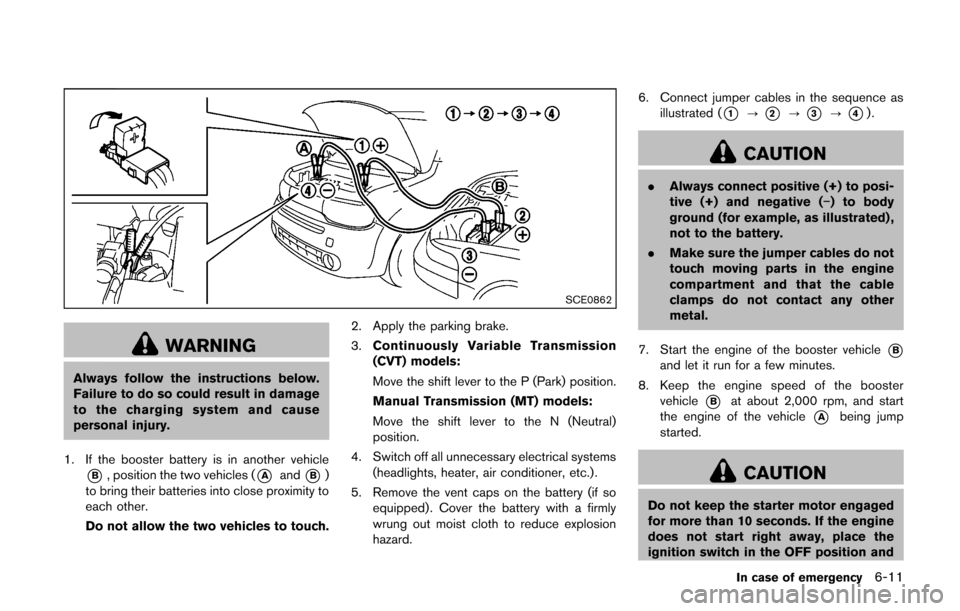
1. If the booster battery is in another vehicle
*B, position the two vehicles (*Aand*B)
to bring their batteries into close proximity to
each other.
Do not allow the two vehicles to touch. 2. Apply the parking brake.
3.
Continuously Variable Transmission
(CVT) models:
Move the shift lever to the P (Park) position.
Manual Transmission (MT) models:
Move the shift lever to the N (Neutral)
position.
4. Switch off all unnecessary electrical systems (headlights, heater, air conditioner, etc.).
5. Remove the vent caps on the battery (if so equipped) . Cover the battery with a firmly
wrung out moist cloth to reduce explosion
hazard. 6. Connect jumper cables in the sequence as
illustrated (
*1?*2?*3?*4).
CAUTION
. Always connect positive (+) to posi-
tive (+) and negative (−) to body
ground (for example, as illustrated) ,
not to the battery.
. Make sure the jumper cables do not
touch moving parts in the engine
compartment and that the cable
clamps do not contact any other
metal.
7. Start the engine of the booster vehicle
*Band let it run for a few minutes.
8. Keep the engine speed of the booster vehicle
*Bat about 2,000 rpm, and start
the engine of the vehicle
*Abeing jump
started.
CAUTION
Do not keep the starter motor engaged
for more than 10 seconds. If the engine
does not start right away, place the
ignition switch in the OFF position and
In case of emergency6-11
Page 252 of 332
SCE0814
TOWING RECOMMENDED BY
NISSAN
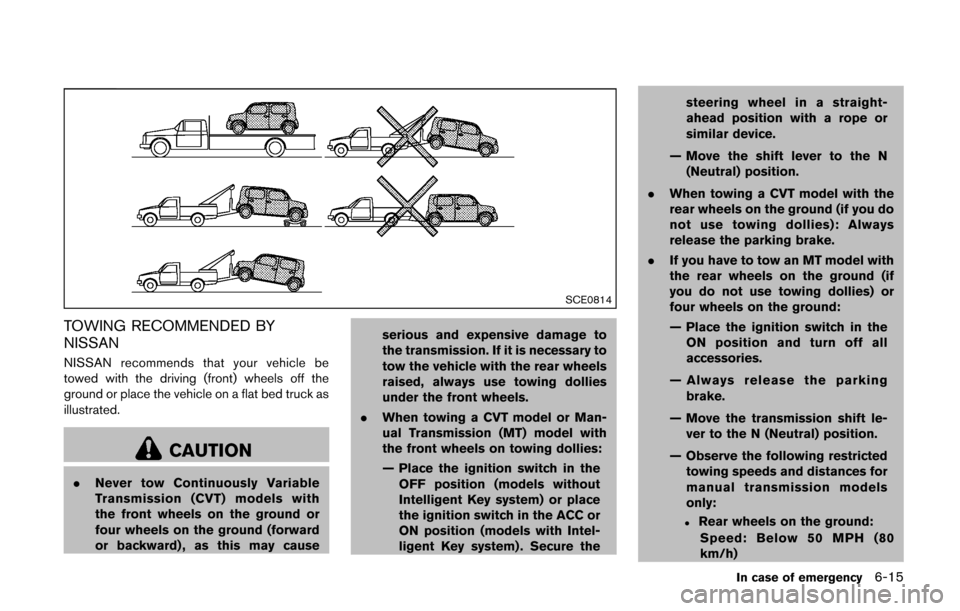
NISSAN recommends that your vehicle be
towed with the driving (front) wheels off the
ground or place the vehicle on a flat bed truck as
illustrated.
CAUTION
.Never tow Continuously Variable
Transmission (CVT) models with
the front wheels on the ground or
four wheels on the ground (forward
or backward) , as this may cause serious and expensive damage to
the transmission. If it is necessary to
tow the vehicle with the rear wheels
raised, always use towing dollies
under the front wheels.
. When towing a CVT model or Man-
ual Transmission (MT) model with
the front wheels on towing dollies:
— Place the ignition switch in the
OFF position (models without
Intelligent Key system) or place
the ignition switch in the ACC or
ON position (models with Intel-
ligent Key system) . Secure the steering wheel in a straight-
ahead position with a rope or
similar device.
— Move the shift lever to the N (Neutral) position.
. When towing a CVT model with the
rear wheels on the ground (if you do
not use towing dollies): Always
release the parking brake.
. If you have to tow an MT model with
the rear wheels on the ground (if
you do not use towing dollies) or
four wheels on the ground:
— Place the ignition switch in the
ON position and turn off all
accessories.
— Always release the parking brake.
— Move the transmission shift le- ver to the N (Neutral) position.
— Observe the following restricted towing speeds and distances for
manual transmission models
only:
.Rear wheels on the ground:
Speed: Below 50 MPH (80
km/h)
In case of emergency6-15
Page 268 of 332
When performing any inspection or mainte-
nance work on your vehicle, always take care
to prevent serious accidental injury to yourself or
damage to the vehicle. The following are general
precautions which should be closely observed.
WARNING
.Park the vehicle on a level surface,
apply the parking brake securely
and block the wheels to prevent
the vehicle from moving. Move the
shift lever to the P (Park) position
(CVT model) or the shift lever to the
N (Neutral) position (MT model) .
. Be sure the ignition switch is in the
OFF or LOCK position when per-
forming any parts replacement or
repairs.
. If you must work with the engine
running, keep your hands, clothing,
hair and tools away from moving
fans, belts and any other moving
parts.
. It is advisable to secure or remove
any loose clothing and remove any
jewelry, such as rings, watches, etc.
before working on your vehicle. .
Always wear eye protection when-
ever you work on your vehicle.
. If you must run the engine in an
enclosed space such as a garage, be
sure there is proper ventilation for
exhaust gases to escape.
. Never get under the vehicle while it
is supported only by a jack. If it is
necessary to work under the vehicle,
support it with safety stands.
. Keep smoking materials, flame and
sparks away from fuel tank and the
battery.
. The fuel filter or fuel lines should be
serviced by a NISSAN dealer be-
cause the fuel lines are under high
pressure even when the engine is
off.
CAUTION
.Do not work under the hood while
the engine is hot. Turn the engine
off and wait until it cools down.
. Avoid direct contact with used en-
gine oil and coolant. Improperly
disposed engine oil, and engine coolant and/or other vehicle fluids
can damage the environment. Al-
ways conform to local regulations
for disposal of vehicle fluid.
. Never leave the engine or the CVT
related component harnesses dis-
connected while the ignition switch
is in the ON position.
. Never connect or disconnect the
battery or any transistorized com-
ponent while the ignition switch is
in the ON position.
. Your vehicle is equipped with an
automatic engine cooling fan. It may
come on at any time without warn-
ing, even if the ignition key is in the
OFF position and the engine is not
running. To avoid injury, always
disconnect the negative battery
cable before working near the fan.
This “8. Maintenance and do-it-yourself” section
gives instructions regarding only those items
which are relatively easy for an owner to perform.
A genuine NISSAN Service Manual is also
available. (See “Owner’s Manual/Service Man-
ual order information” (P.9-20).)
You should be aware that incomplete or
Maintenance and do-it-yourself8-5
MAINTENANCE PRECAUTIONS
Page 278 of 332
CAUTION
.Do not ground accessories directly
to the battery terminal. Doing so will
bypass the variable voltage control
system and the vehicle battery may
not charge completely.
. Use electrical accessories with the
engine running to avoid discharging
the vehicle battery.
The variable voltage control system measures
the amount of electrical discharge from the
battery and controls voltage generated by the
generator.
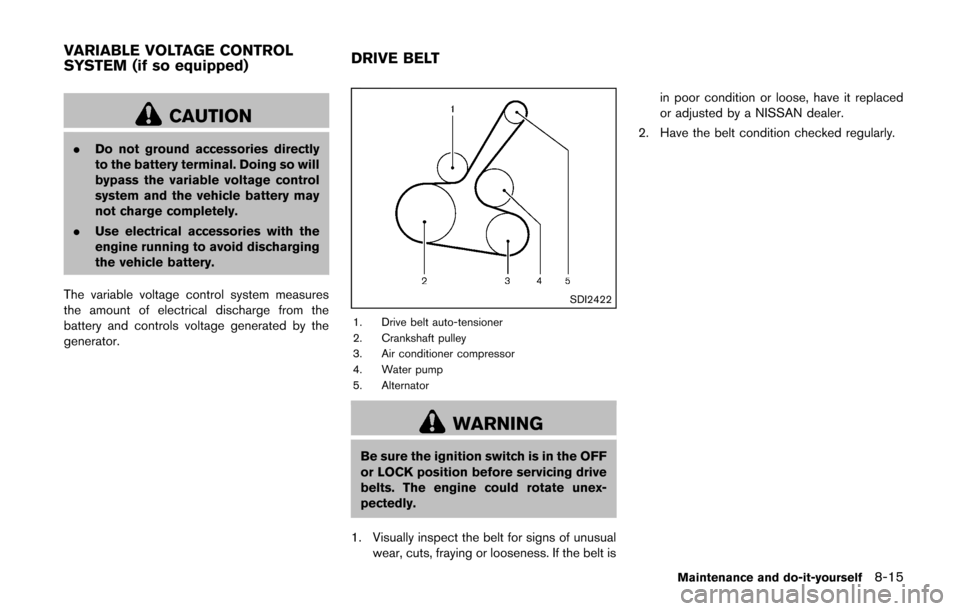
SDI2422
1. Drive belt auto-tensioner
2. Crankshaft pulley
3. Air conditioner compressor
4. Water pump
5. Alternator
WARNING
Be sure the ignition switch is in the OFF
or LOCK position before servicing drive
belts. The engine could rotate unex-
pectedly.
1. Visually inspect the belt for signs of unusual wear, cuts, fraying or looseness. If the belt is in poor condition or loose, have it replaced
or adjusted by a NISSAN dealer.
2. Have the belt condition checked regularly.
Maintenance and do-it-yourself8-15
VARIABLE VOLTAGE CONTROL
SYSTEM (if so equipped) DRIVE BELT
Page 279 of 332
8-16Maintenance and do-it-yourself
WARNING
Be sure the engine and ignition switch
are off and that the parking brake is
engaged securely.
CAUTION
Be sure to use the correct socket to
remove the spark plugs. An incorrect
socket can damage the spark plugs.
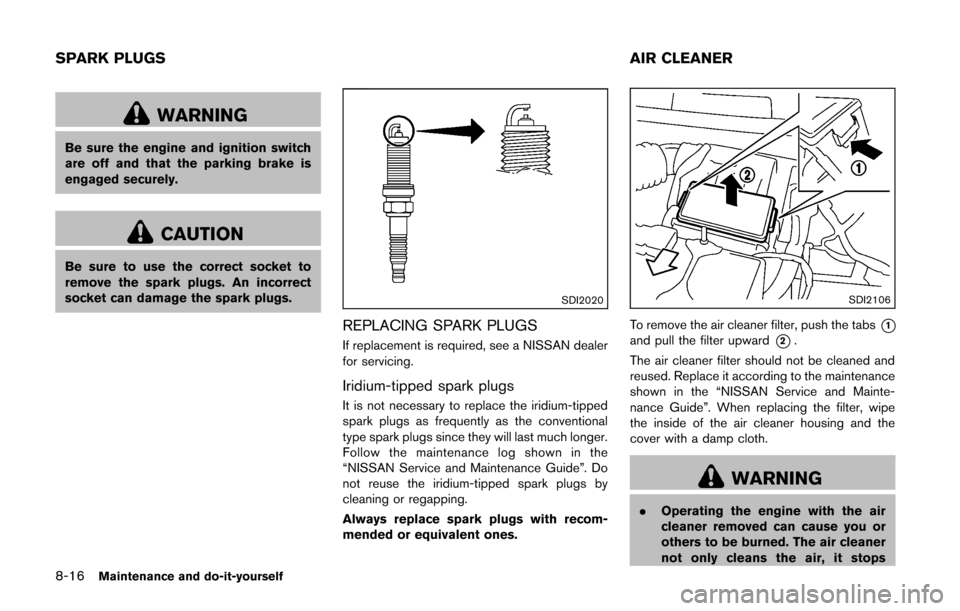
SDI2020
REPLACING SPARK PLUGS
If replacement is required, see a NISSAN dealer
for servicing.
Iridium-tipped spark plugs
It is not necessary to replace the iridium-tipped
spark plugs as frequently as the conventional
type spark plugs since they will last much longer.
Follow the maintenance log shown in the
“NISSAN Service and Maintenance Guide”. Do
not reuse the iridium-tipped spark plugs by
cleaning or regapping.
Always replace spark plugs with recom-
mended or equivalent ones.
SDI2106
To remove the air cleaner filter, push the tabs*1and pull the filter upward*2.
The air cleaner filter should not be cleaned and
reused. Replace it according to the maintenance
shown in the “NISSAN Service and Mainte-
nance Guide”. When replacing the filter, wipe
the inside of the air cleaner housing and the
cover with a damp cloth.
WARNING
. Operating the engine with the air
cleaner removed can cause you or
others to be burned. The air cleaner
not only cleans the air, it stops
SPARK PLUGS AIR CLEANER
Page 283 of 332
8-20Maintenance and do-it-yourself
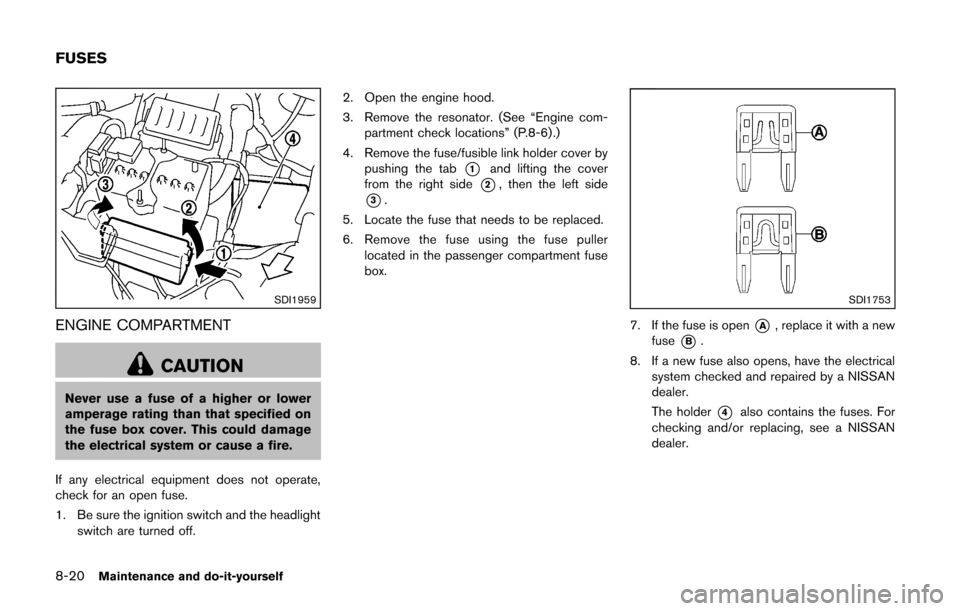
SDI1959
ENGINE COMPARTMENT
CAUTION
Never use a fuse of a higher or lower
amperage rating than that specified on
the fuse box cover. This could damage
the electrical system or cause a fire.
If any electrical equipment does not operate,
check for an open fuse.
1. Be sure the ignition switch and the headlight switch are turned off. 2. Open the engine hood.
3. Remove the resonator. (See “Engine com-
partment check locations” (P.8-6) .)
4. Remove the fuse/fusible link holder cover by pushing the tab
*1and lifting the cover
from the right side
*2, then the left side
*3.
5. Locate the fuse that needs to be replaced.
6. Remove the fuse using the fuse puller located in the passenger compartment fuse
box.
SDI1753
7. If the fuse is open*A, replace it with a new
fuse
*B.
8. If a new fuse also opens, have the electrical system checked and repaired by a NISSAN
dealer.
The holder
*4also contains the fuses. For
checking and/or replacing, see a NISSAN
dealer.
FUSES
Page 284 of 332
SDI1869
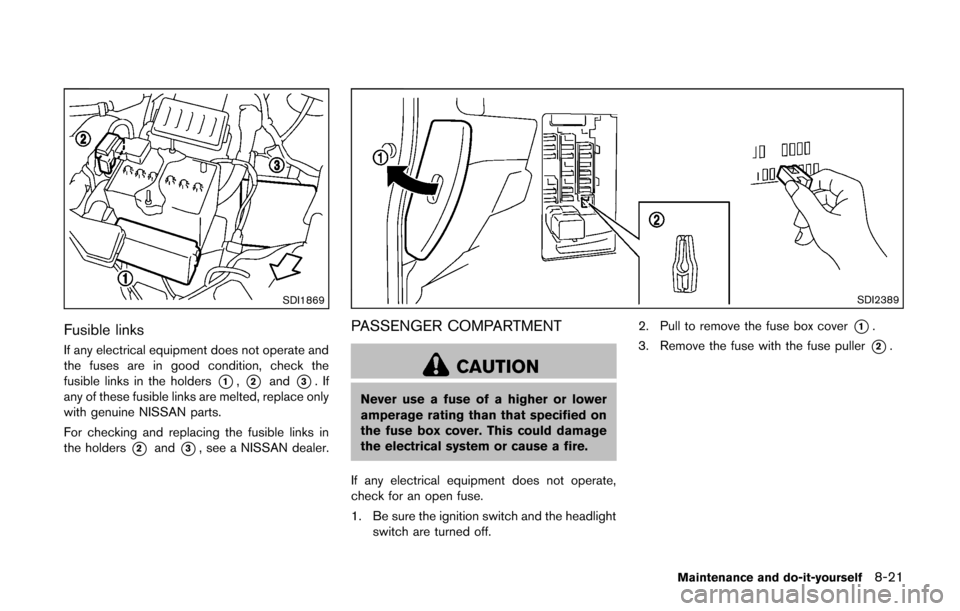
Fusible links
If any electrical equipment does not operate and
the fuses are in good condition, check the
fusible links in the holders
*1,*2and*3.If
any of these fusible links are melted, replace only
with genuine NISSAN parts.
For checking and replacing the fusible links in
the holders
*2and*3, see a NISSAN dealer.
SDI2389
PASSENGER COMPARTMENT
CAUTION
Never use a fuse of a higher or lower
amperage rating than that specified on
the fuse box cover. This could damage
the electrical system or cause a fire.
If any electrical equipment does not operate,
check for an open fuse.
1. Be sure the ignition switch and the headlight switch are turned off. 2. Pull to remove the fuse box cover
*1.
3. Remove the fuse with the fuse puller
*2.
Maintenance and do-it-yourself8-21
Page 285 of 332
8-22Maintenance and do-it-yourself
SDI1753
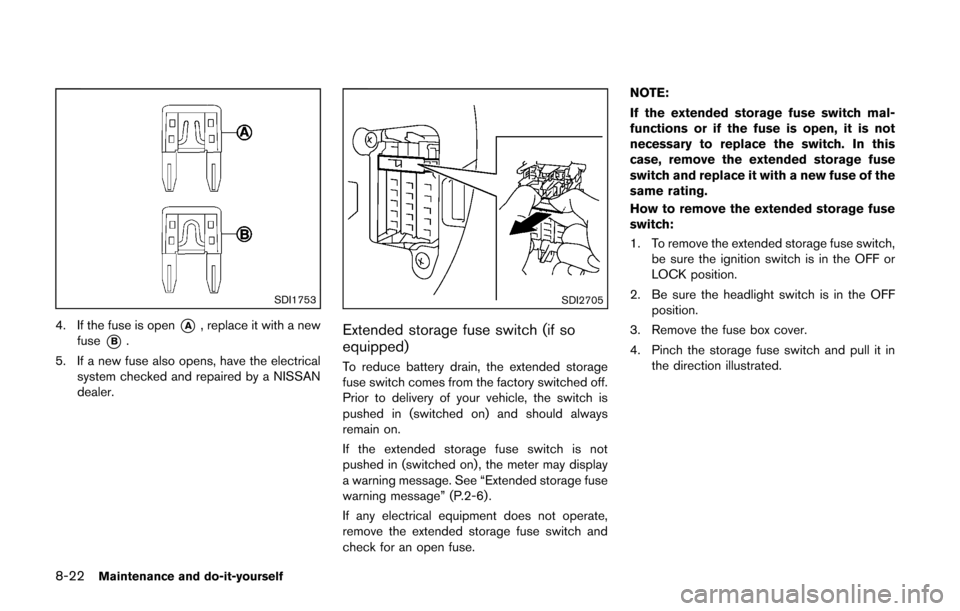
4. If the fuse is open*A, replace it with a new
fuse
*B.
5. If a new fuse also opens, have the electrical system checked and repaired by a NISSAN
dealer.
SDI2705
Extended storage fuse switch (if so
equipped)
To reduce battery drain, the extended storage
fuse switch comes from the factory switched off.
Prior to delivery of your vehicle, the switch is
pushed in (switched on) and should always
remain on.
If the extended storage fuse switch is not
pushed in (switched on) , the meter may display
a warning message. See “Extended storage fuse
warning message” (P.2-6).
If any electrical equipment does not operate,
remove the extended storage fuse switch and
check for an open fuse. NOTE:
If the extended storage fuse switch mal-
functions or if the fuse is open, it is not
necessary to replace the switch. In this
case, remove the extended storage fuse
switch and replace it with a new fuse of the
same rating.
How to remove the extended storage fuse
switch:
1. To remove the extended storage fuse switch,
be sure the ignition switch is in the OFF or
LOCK position.
2. Be sure the headlight switch is in the OFF position.
3. Remove the fuse box cover.
4. Pinch the storage fuse switch and pull it in the direction illustrated.