Cvt NISSAN CUBE 2014 3.G Owners Manual
[x] Cancel search | Manufacturer: NISSAN, Model Year: 2014, Model line: CUBE, Model: NISSAN CUBE 2014 3.GPages: 332, PDF Size: 2.59 MB
Page 15 of 332
0-6Illustrated table of contents
SSI0563
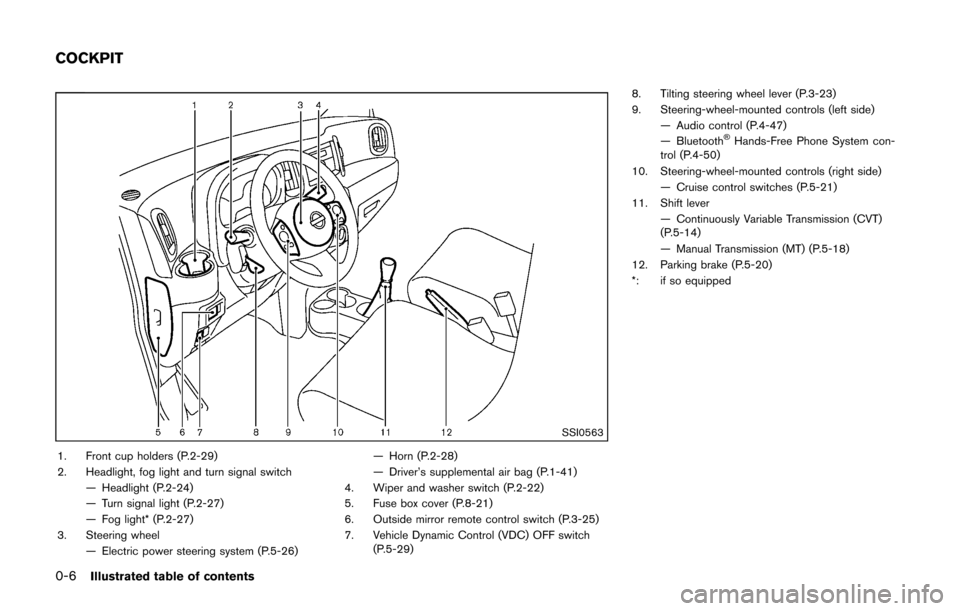
1. Front cup holders (P.2-29)
2. Headlight, fog light and turn signal switch— Headlight (P.2-24)
— Turn signal light (P.2-27)
— Fog light* (P.2-27)
3. Steering wheel — Electric power steering system (P.5-26) — Horn (P.2-28)
— Driver’s supplemental air bag (P.1-41)
4. Wiper and washer switch (P.2-22)
5. Fuse box cover (P.8-21)
6. Outside mirror remote control switch (P.3-25)
7. Vehicle Dynamic Control (VDC) OFF switch (P.5-29) 8. Tilting steering wheel lever (P.3-23)
9. Steering-wheel-mounted controls (left side)
— Audio control (P.4-47)
— Bluetooth
®Hands-Free Phone System con-
trol (P.4-50)
10. Steering-wheel-mounted controls (right side) — Cruise control switches (P.5-21)
11. Shift lever
— Continuously Variable Transmission (CVT)
(P.5-14)
— Manual Transmission (MT) (P.5-18)
12. Parking brake (P.5-20)
*: if so equipped
COCKPIT
Page 17 of 332
0-8Illustrated table of contents
SIC4119
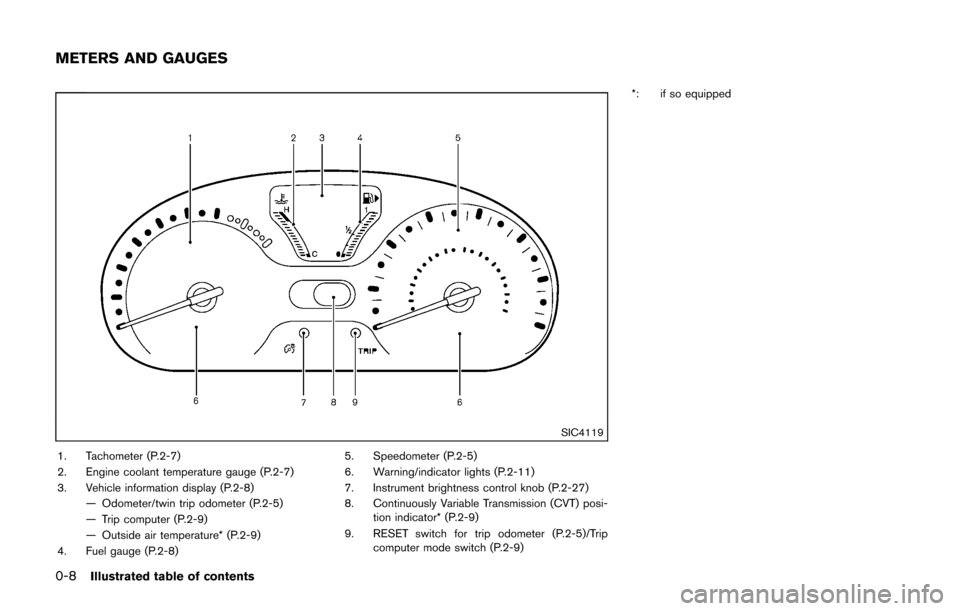
1. Tachometer (P.2-7)
2. Engine coolant temperature gauge (P.2-7)
3. Vehicle information display (P.2-8)— Odometer/twin trip odometer (P.2-5)
— Trip computer (P.2-9)
— Outside air temperature* (P.2-9)
4. Fuel gauge (P.2-8) 5. Speedometer (P.2-5)
6. Warning/indicator lights (P.2-11)
7. Instrument brightness control knob (P.2-27)
8. Continuously Variable Transmission (CVT) posi-
tion indicator* (P.2-9)
9. RESET switch for trip odometer (P.2-5)/Trip computer mode switch (P.2-9) *: if so equipped
METERS AND GAUGES
Page 76 of 332

2 Instruments and controls
Cockpit ........................................................................\
................ 2-2
Instrument panel ........................................................................\
2-3
Meters and gauges ................................................................... 2-4
Speedometer and odometer ............................................ 2-5
Tachometer ........................................................................\
... 2-7
Engine coolant temperature gauge ................................ 2-7
Fuel gauge ........................................................................\
.... 2-8
Vehicle information display ................................................ 2-8
Outside air temperature (if so equipped) ..................... 2-9
Continuously Variable Transmission (CVT) position
indicator (if so equipped) .................................................. 2-9
Trip computer ....................................................................... 2-9
Warning/indicator lights and audible reminders ............ 2-11
Checking bulbs ................................................................. 2-12
Warning lights ................................................................... 2-12
Indicator lights ................................................................... 2-16
Audible reminders ............................................................ 2-18
Security systems .................................................................... 2-19 Vehicle security system .................................................. 2-19
NISSAN Vehicle Immobilizer System .......................... 2-20
Windshield wiper and washer switch ............................... 2-22
Rear window wiper and washer switch ........................... 2-23 Rear window defroster switch ........................................... 2-24
Headlight and turn signal switch ....................................... 2-24
Headlight switch ............................................................ 2-24
Turn signal switch .......................................................... 2-27
Fog light switch (if so equipped) .............................. 2-27
Horn ........................................................................\
.................. 2-28
Vehicle Dynamic Control (VDC) OFF switch ................. 2-28
Power outlet ........................................................................\
.... 2-28
Storage ........................................................................\
............ 2-29 Cup holders ..................................................................... 2-29
Glove box ........................................................................\
. 2-31
Rear pillar pocket ........................................................... 2-32
Luggage hooks ............................................................... 2-32
Utility hooks ..................................................................... 2-33
Windows ........................................................................\
......... 2-33 Power windows .............................................................. 2-33
Interior lights ........................................................................\
.. 2-36 Map lights ........................................................................\
2-36
Map light control switch ............................................... 2-36
Ceiling light ...................................................................... 2-37
Cargo light ........................................................................\
...... 2-38>
Page 77 of 332
2-2Instruments and controls
SSI0563
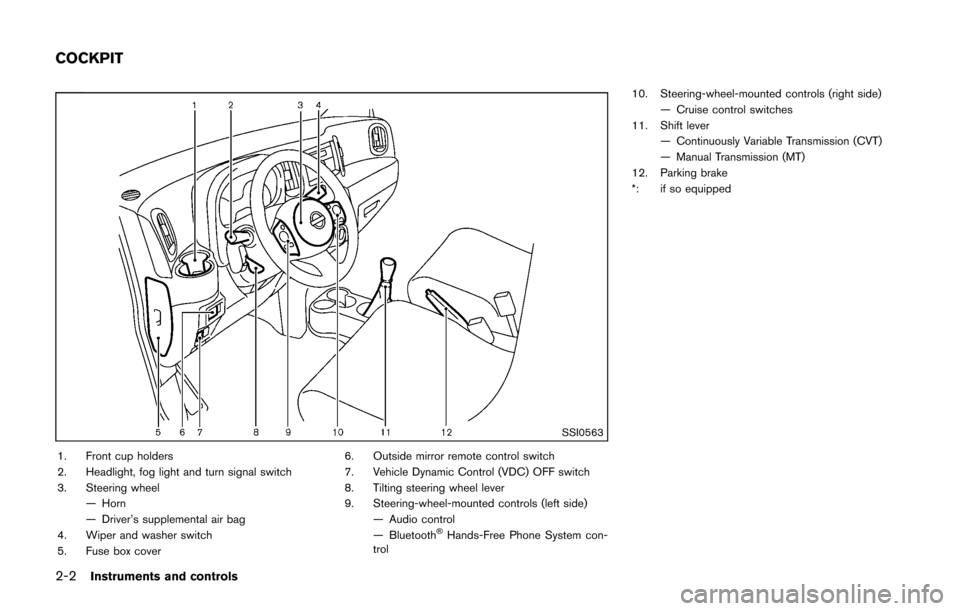
1. Front cup holders
2. Headlight, fog light and turn signal switch
3. Steering wheel— Horn
— Driver’s supplemental air bag
4. Wiper and washer switch
5. Fuse box cover 6. Outside mirror remote control switch
7. Vehicle Dynamic Control (VDC) OFF switch
8. Tilting steering wheel lever
9. Steering-wheel-mounted controls (left side)
— Audio control
— Bluetooth
®Hands-Free Phone System con-
trol 10. Steering-wheel-mounted controls (right side)
— Cruise control switches
11. Shift lever
— Continuously Variable Transmission (CVT)
— Manual Transmission (MT)
12. Parking brake
*: if so equipped
COCKPIT
Page 79 of 332
2-4Instruments and controls
SIC4119
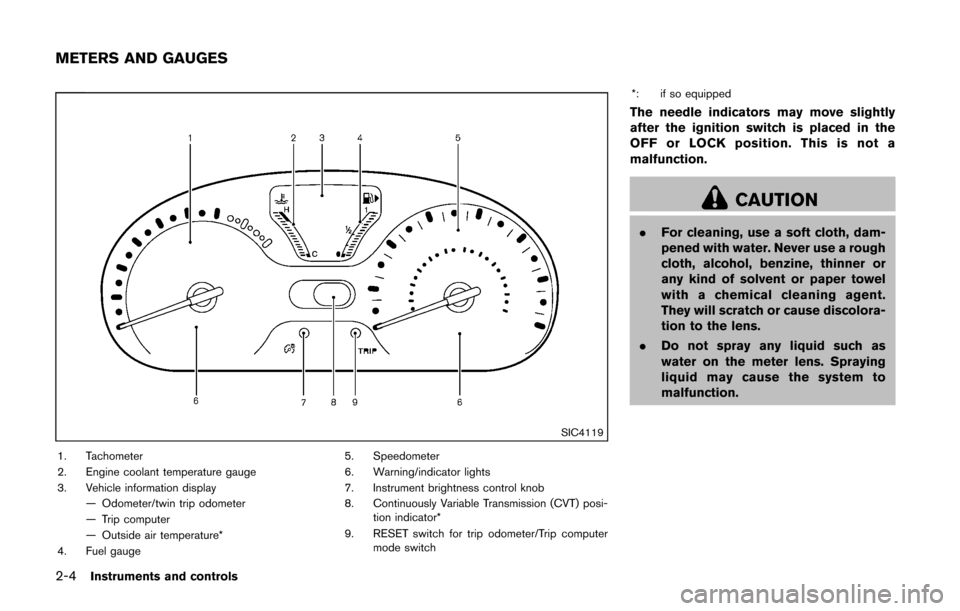
1. Tachometer
2. Engine coolant temperature gauge
3. Vehicle information display— Odometer/twin trip odometer
— Trip computer
— Outside air temperature*
4. Fuel gauge 5. Speedometer
6. Warning/indicator lights
7. Instrument brightness control knob
8. Continuously Variable Transmission (CVT) posi-
tion indicator*
9. RESET switch for trip odometer/Trip computer mode switch *: if so equipped
The needle indicators may move slightly
after the ignition switch is placed in the
OFF or LOCK position. This is not a
malfunction.
CAUTION
.
For cleaning, use a soft cloth, dam-
pened with water. Never use a rough
cloth, alcohol, benzine, thinner or
any kind of solvent or paper towel
with a chemical cleaning agent.
They will scratch or cause discolora-
tion to the lens.
. Do not spray any liquid such as
water on the meter lens. Spraying
liquid may cause the system to
malfunction.
METERS AND GAUGES
Page 83 of 332
2-8Instruments and controls
SIC4124
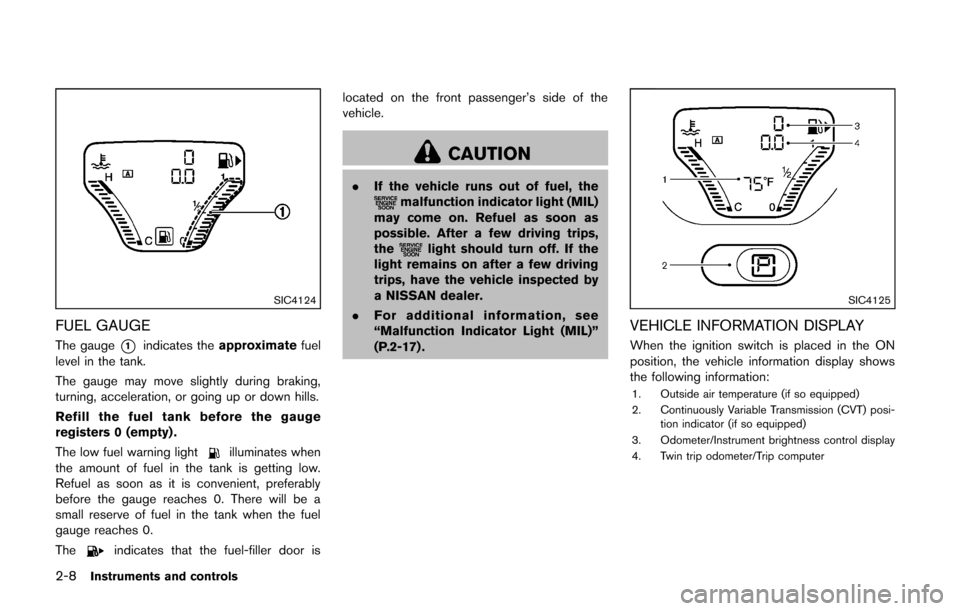
FUEL GAUGE
The gauge*1indicates theapproximate fuel
level in the tank.
The gauge may move slightly during braking,
turning, acceleration, or going up or down hills.
Refill the fuel tank before the gauge
registers 0 (empty) .
The low fuel warning light
illuminates when
the amount of fuel in the tank is getting low.
Refuel as soon as it is convenient, preferably
before the gauge reaches 0. There will be a
small reserve of fuel in the tank when the fuel
gauge reaches 0.
The
indicates that the fuel-filler door is located on the front passenger’s side of the
vehicle.
CAUTION
.
If the vehicle runs out of fuel, themalfunction indicator light (MIL)
may come on. Refuel as soon as
possible. After a few driving trips,
the
light should turn off. If the
light remains on after a few driving
trips, have the vehicle inspected by
a NISSAN dealer.
. For additional information, see
“Malfunction Indicator Light (MIL)”
(P.2-17) .
SIC4125
VEHICLE INFORMATION DISPLAY
When the ignition switch is placed in the ON
position, the vehicle information display shows
the following information:
1. Outside air temperature (if so equipped)
2. Continuously Variable Transmission (CVT) posi-
tion indicator (if so equipped)
3. Odometer/Instrument brightness control display
4. Twin trip odometer/Trip computer
Page 84 of 332
OUTSIDE AIR TEMPERATURE (if so
equipped)
The outside air temperature is displayed in8F.
When the outside air temperature becomes
378F(3 8C) or lower, the outside air temperature
display blinks to give a warning. The display will
stop blinking after 1 minute or when the outside
air temperature becomes 398F(4 8C) or above.
The display may differ from the actual outside
temperature displayed on various signs or bill-
boards.
CONTINUOUSLY VARIABLE TRANS-
MISSION (CVT) POSITION INDICATOR
(if so equipped)
The Continuously Variable Transmission (CVT)
position indicator indicates the shift lever posi-
tion when the ignition switch is in the ON
position.
SIC4126
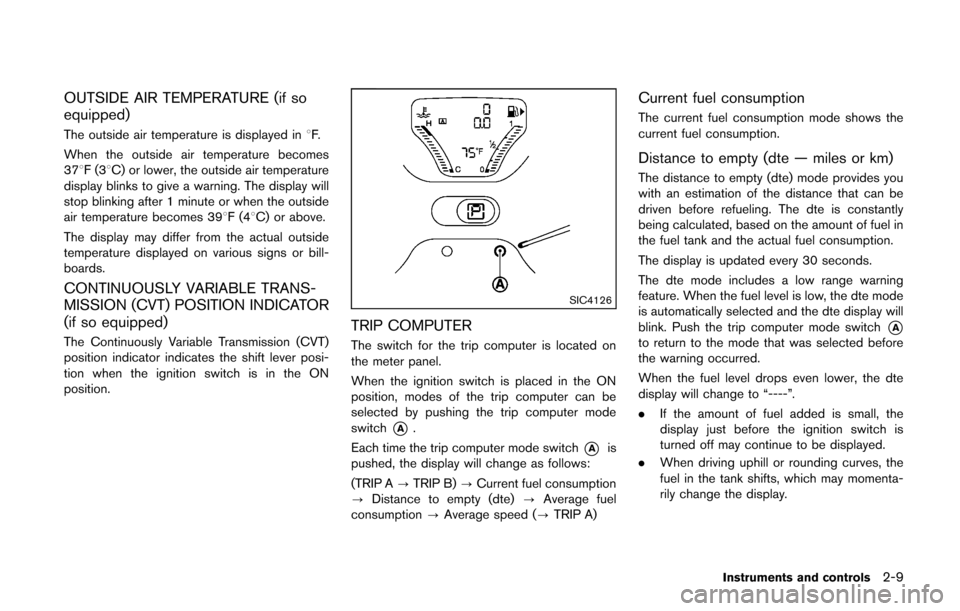
TRIP COMPUTER
The switch for the trip computer is located on
the meter panel.
When the ignition switch is placed in the ON
position, modes of the trip computer can be
selected by pushing the trip computer mode
switch
*A.
Each time the trip computer mode switch
*Ais
pushed, the display will change as follows:
(TRIP A ?TRIP B) ?Current fuel consumption
? Distance to empty (dte) ?Average fuel
consumption ?Average speed (? TRIP A)
Current fuel consumption
The current fuel consumption mode shows the
current fuel consumption.
Distance to empty (dte — miles or km)
The distance to empty (dte) mode provides you
with an estimation of the distance that can be
driven before refueling. The dte is constantly
being calculated, based on the amount of fuel in
the fuel tank and the actual fuel consumption.
The display is updated every 30 seconds.
The dte mode includes a low range warning
feature. When the fuel level is low, the dte mode
is automatically selected and the dte display will
blink. Push the trip computer mode switch
*Ato return to the mode that was selected before
the warning occurred.
When the fuel level drops even lower, the dte
display will change to “----”.
.If the amount of fuel added is small, the
display just before the ignition switch is
turned off may continue to be displayed.
. When driving uphill or rounding curves, the
fuel in the tank shifts, which may momenta-
rily change the display.
Instruments and controls2-9
Page 92 of 332
Malfunction Indicator Light (MIL)
If the malfunction indicator light illuminates
steady or blinks while the engine is running, it
may indicate a potential emission control and/or
Continuously Variable Transmission (CVT) mal-
function.
The malfunction indicator light may also illumi-
nate steady if the fuel-filler cap is loose or
missing, or if the vehicle runs out of fuel. Check
to make sure the fuel-filler cap is installed and
closed tightly, and that the vehicle has at least 3
US gallons (11.4 liters) of fuel in the fuel tank.
After a few driving trips, the
light should
turn off if no other potential emission control
system malfunction exists.
If this indicator light remains on for 20 seconds
and then blinks for 10 seconds when the engine
is not running, it indicates that the vehicle is not
ready for an emission control system inspection/
maintenance test. (See “Readiness for Inspec-
tion/Maintenance (I/M) test” (P.9-19) .)
Operation:
The malfunction indicator light will illuminate in
one of two ways:
. Malfunction indicator light illuminated steady
— An emission control system and/or CVT
malfunction has been detected. Check the
fuel-filler cap if the LOOSE FUEL CAP warning message is displayed on the twin
trip odometer. If the fuel-filler cap is loose or
missing, tighten or install the cap and
continue to drive the vehicle. The
light
should turn off after a few driving trips. If the
light does not turn off after a few driving
trips, have the vehicle inspected by a
NISSAN dealer. You do not need to have
your vehicle towed to the dealer.
. Malfunction indicator light blinking — An
engine misfire has been detected which may
damage the emission control system.
To reduce or avoid emission control system
damage:
1) Do not drive at speeds above 45 MPH
(72 km/h).
2) Avoid hard acceleration or deceleration.
3) Avoid steep uphill grades.
4) If possible, reduce the amount of cargo being hauled or towed.
The malfunction indicator light may stop
blinking and remain on.
Have the vehicle inspected by a NISSAN
dealer. You do not need to have your vehicle
towed to the dealer.
CAUTION
Continued vehicle operation without
having the emission control system
and/or CVT system checked and re-
paired as necessary could lead to poor
driveability, reduced fuel economy, and
possible damage to the emission con-
trol system.
Overdrive off indicator light (if so
equipped)
The overdrive off indicator light illuminates when
the overdrive off mode is selected.
For additional information, see “Continuously
Variable Transmission (CVT)” (P.5-14) of this
manual.
Security indicator light
The light blinks when the ignition switch is in the
ACC, OFF or LOCK position. This function
indicates the security system equipped on the
vehicle is operational.
If the security system is malfunctioning, this light
will remain on while the ignition switch is in the
ON position. For additional information, see
“Security systems” (P.2-19) .
Instruments and controls2-17
Page 206 of 332
5 Starting and driving
Precautions when starting and driving ................................ 5-2Exhaust gas (carbon monoxide) ...................................... 5-2
Three-way catalyst .............................................................. 5-3
Tire Pressure Monitoring System (TPMS) .................... 5-3
Avoiding collision and rollover ......................................... 5-5
Off-road recovery ................................................................ 5-6
Rapid air pressure loss ...................................................... 5-6
Drinking alcohol/drugs and driving ................................. 5-7
Ignition switch (models without Intelligent
Key system) ........................................................................\
........ 5-7
Continuously Variable Transmission (CVT) ................... 5-8
Manual Transmission (MT) ................................................ 5-8
Key positions ........................................................................\
5-9
Push-button ignition switch (models with Intelligent
Key system) ........................................................................\
........ 5-9 Operating range for engine start function .................... 5-9
Push-button ignition switch operation ........................ 5-10
Push-button ignition switch positions ......................... 5-10
Emergency engine shut off ............................................ 5-11
Intelligent Key battery discharge .................................. 5-11
Before starting the engine ................................................... 5-12
Starting the engine ................................................................ 5-12 Models without Intelligent Key system ....................... 5-12
Models with Intelligent Key system ............................. 5-13 Driving the vehicle ................................................................. 5-14
Continuously Variable Transmission (CVT) ............. 5-14
Manual Transmission (MT) ........................................... 5-18
Parking brake ........................................................................\
.. 5-20
Cruise control ........................................................................\
. 5-21 Precautions on cruise control ..................................... 5-21
Cruise control operations ............................................ 5-22
Break-in schedule ................................................................. 5-23
Fuel Efficient Driving Tips ................................................... 5-23
Increasing fuel economy ...................................................... 5-24
Parking/parking on hills ........................................................ 5-25
Electric power steering system ......................................... 5-26
Brake system ........................................................................\
.. 5-27
Braking precautions ...................................................... 5-27
Anti-lock Braking System (ABS) ............................... 5-27
Vehicle Dynamic Control (VDC) system ......................... 5-29
Cold weather driving ............................................................ 5-30 Freeing a frozen door lock ........................................... 5-30
Anti-freeze ........................................................................\
5-30
Battery ........................................................................\
....... 5-30
Draining of coolant water ............................................. 5-30
Tire equipment ................................................................ 5-31
Special winter equipment ............................................ 5-31
Driving on snow or ice ................................................. 5-31
Page 213 of 332
5-8Starting and driving
SSD0392
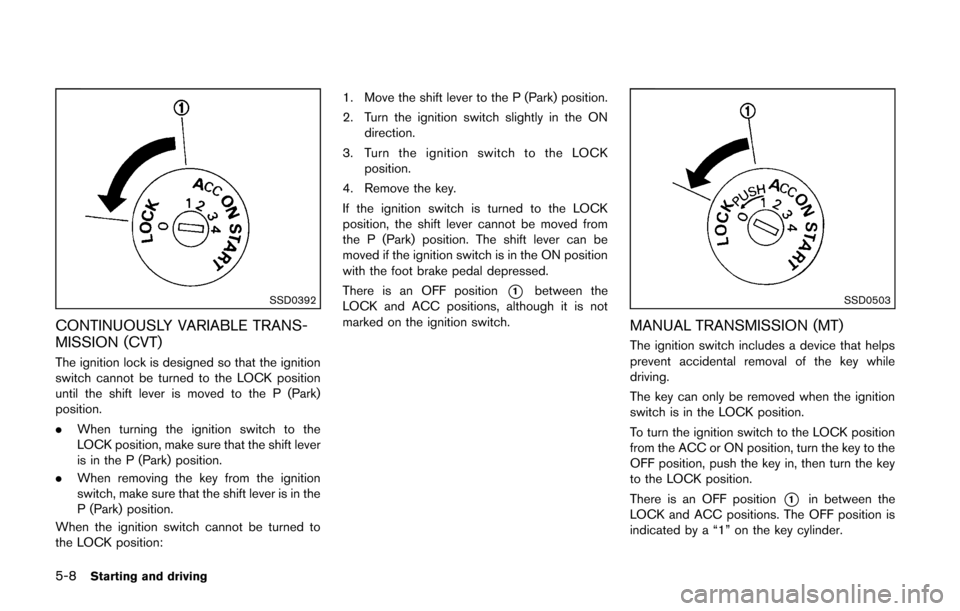
CONTINUOUSLY VARIABLE TRANS-
MISSION (CVT)
The ignition lock is designed so that the ignition
switch cannot be turned to the LOCK position
until the shift lever is moved to the P (Park)
position.
.When turning the ignition switch to the
LOCK position, make sure that the shift lever
is in the P (Park) position.
. When removing the key from the ignition
switch, make sure that the shift lever is in the
P (Park) position.
When the ignition switch cannot be turned to
the LOCK position: 1. Move the shift lever to the P (Park) position.
2. Turn the ignition switch slightly in the ON
direction.
3. Turn the ignition switch to the LOCK position.
4. Remove the key.
If the ignition switch is turned to the LOCK
position, the shift lever cannot be moved from
the P (Park) position. The shift lever can be
moved if the ignition switch is in the ON position
with the foot brake pedal depressed.
There is an OFF position
*1between the
LOCK and ACC positions, although it is not
marked on the ignition switch.SSD0503
MANUAL TRANSMISSION (MT)
The ignition switch includes a device that helps
prevent accidental removal of the key while
driving.
The key can only be removed when the ignition
switch is in the LOCK position.
To turn the ignition switch to the LOCK position
from the ACC or ON position, turn the key to the
OFF position, push the key in, then turn the key
to the LOCK position.
There is an OFF position
*1in between the
LOCK and ACC positions. The OFF position is
indicated by a “1” on the key cylinder.