reset NISSAN FRONTIER 2001 D22 / 1.G User Guide
[x] Cancel search | Manufacturer: NISSAN, Model Year: 2001, Model line: FRONTIER, Model: NISSAN FRONTIER 2001 D22 / 1.GPages: 290, PDF Size: 3.14 MB
Page 142 of 290
cDo not use the following CDs as they
may cause the CD player to malfunc-
tion:
c8 cm (3.1 in) discs with an adapter
cRecordable compact discs (CD-R)
cRewritable compact discs (CD-
RW)
cCDs that are not round
cCDs with a paper label
cCDs that are warped, scratched or
have abnormal edges
STEERING WHEEL SWITCH FOR
AUDIO CONTROLS
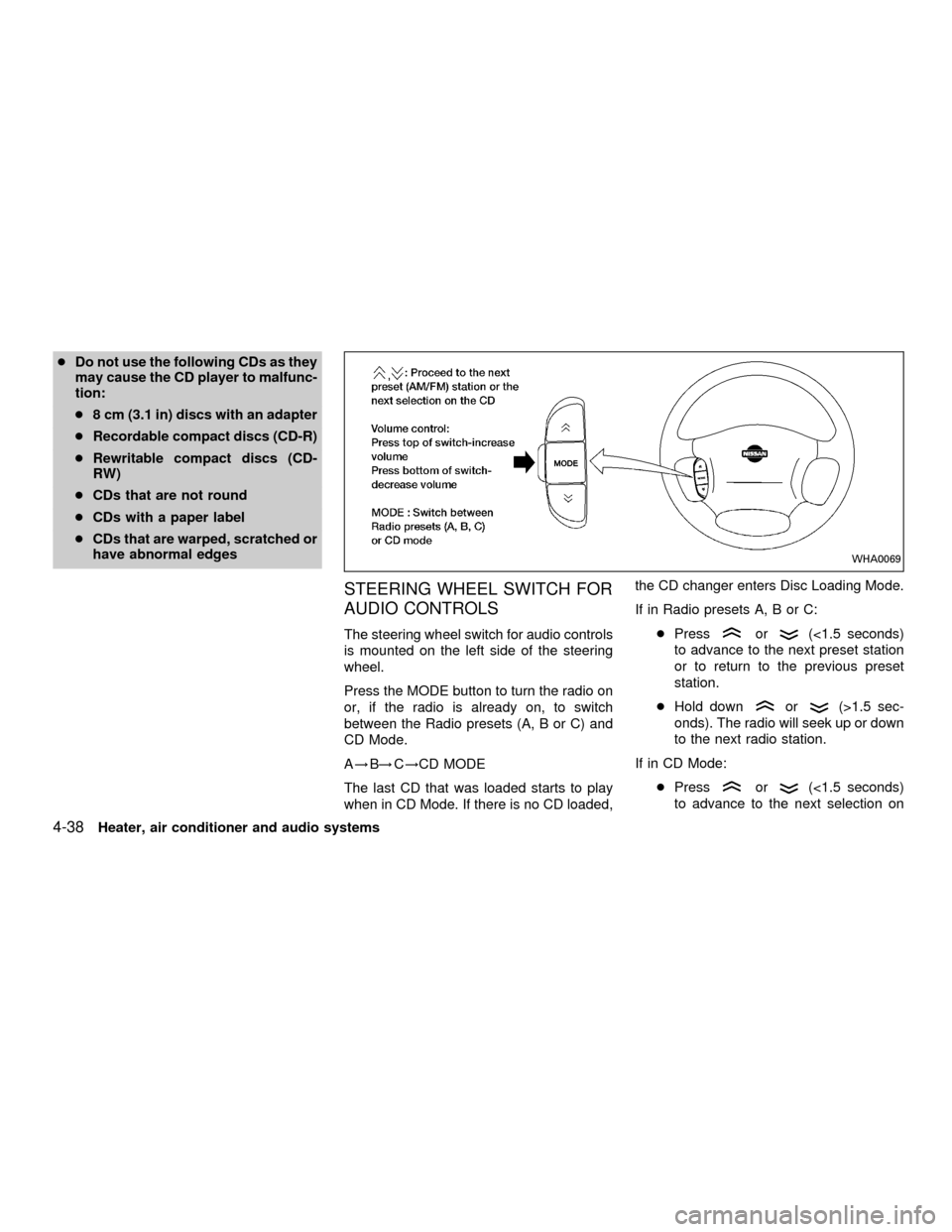
The steering wheel switch for audio controls
is mounted on the left side of the steering
wheel.
Press the MODE button to turn the radio on
or, if the radio is already on, to switch
between the Radio presets (A, B or C) and
CD Mode.
A!B!C!CD MODE
The last CD that was loaded starts to play
when in CD Mode. If there is no CD loaded,the CD changer enters Disc Loading Mode.
If in Radio presets A, B or C:
cPressor(<1.5 seconds)
to advance to the next preset station
or to return to the previous preset
station.
cHold down
or(>1.5 sec-
onds). The radio will seek up or down
to the next radio station.
If in CD Mode:
cPress
or(<1.5 seconds)
to advance to the next selection on
WHA0069
4-38Heater, air conditioner and audio systems
ZX
Page 157 of 290

Accelerator downshift
In D position
For rapid passing or hill climbing while driv-
ing, fully depress the accelerator pedal to
the floor. This shifts the transmission down
into second gear or first gear, depending on
the vehicle speed.
Overdrive switch (KA24DE engine
type a)
ON: For typical driving, push the overdrive
switch ONwith the selector lever
in the D (Drive) position. The trans-
mission is upshifted into OVERDRIVE
as the vehicle speed increases.
OVERDRIVE does not engage until the
engine has reached operating tempera-
ture.
OFF: For driving up and down long slopes
where engine braking is necessary,
push the switch OFF
. The indica-tor light in the instrument panel comes
on at this time. When cruising at a low
speed or climbing a gentle slope, you
may feel uncomfortable shift shocks
as the transmission repeatedly shifts
between 3rd and overdrive. In this
case, set the overdrive switch in the
OFF
position.
When driving conditions change, reset the
overdrive switch in the ON
position to
turn the overdrive on. The indicator light
goes out at this time.
Remember not to drive at high speeds for
extended periods of time with the overdrive
switch set in the OFF
position. This
reduces fuel economy.
WSD0012
Starting and driving5-13
ZX
Page 158 of 290

Overdrive switch (KA24DE engine
type b)
Each time your vehicle is started, the trans-
mission is automatically ``reset'' to overdrive
ON.
ON: For normal driving the overdrive
switch is engaged. The transmission
is upshifted into overdrive as the
vehicle speed increases.
The overdrive does not engage until the
engine has reached operating tempera-
ture.OFF: For driving up and down long slopes
where engine braking is necessary,
push the overdrive switch once. The
O/D OFF indicator light illuminates at
this time.
When cruising at a low speed or climbing a
gentle slope, you may feel uncomfortable
shift shocks as the transmission shifts be-
tween 3rd gear and overdrive repeatedly. In
this case, press the overdrive switch.
When driving conditions change, press the
overdrive switch to turn the overdrive on.
The O/D OFF indicator light goes out.
Remember not to drive at high speeds for
extended periods of time with the O/D OFF
light illuminated. This reduces the fuel
economy.
Overdrive switch (VG33E or
VG33ER engines)
ON: With the engine running and the se-
lector lever in the D (Drive) position,
the transmission upshifts into OVER-
DRIVE as vehicle speed increases.
OVERDRIVE does not engage until the
engine has reached operating tempera-
ture.
OFF: For driving up and down long slopes
where engine braking is necessary
push the OVERDRIVE switch once.
The O/D OFF indicator light in the
WSD0055ASD1023
5-14Starting and driving
ZX
Page 162 of 290
COAST/SET, or CANCEL switch (lo-
cated on the steering wheel). To properly
use the cruise control system, use the
following procedures.
WARNING
Do not use the cruise control when
driving under the following conditions.
cWhen it is not possible to keep the
vehicle at a set speed.
cIn heavy traffic or in traffic that var-
ies in speed.
cOn winding or hilly roads.
c
On slippery roads (rain, snow, ice, etc.).
cIn very windy areas.
Doing so could cause a loss of vehicle
control and result in an accident.
CAUTION
On manual transmission models, do
not shift into N (Neutral) without de-
pressing the clutch pedal when the
cruise control is set. Should this occur,
depress the clutch pedal and turn the-
main switch off immediately. Failure to
do so may cause engine damage.
CRUISE CONTROL OPERA-
TIONS
The cruise control allows driving at a speed
between 25 to 90 MPH (40 to 144 km/h)
without keeping your foot on the accelerator
pedal.
To turn on the cruise control,push the
main switch. The CRUISE indicator light in
the instrument panel comes on.
To set cruising speed,accelerate the ve-
hicle to the desired speed, push the
COAST/SET switch and release it. The SET
light in the instrument cluster comes on.
Take your foot off the accelerator pedal.
Your vehicle maintains the set speed.
cTo pass another vehicle,depress the
accelerator pedal. When you release the
pedal, the vehicle returns to the previ-
ously set speed.
c
The vehicle may not maintain the set speed
when going up or down steep hills. If this
happens, drive without the cruise control.
To cancel the preset speed,use one of
the following three methods:
a) Push the CANCEL button; the SET light
in the instrument cluster goes out.b) Tap the brake pedal; the SET light goes
out.
c) Turn the main switch off. Both the
CRUISE indicator on the main switch and
SET light in the instrument cluster go out.
The cruise control is automatically can-
celled and the SET light in the instrument
panel goes out if:
cyou depress the brake or clutch pedal
while pushing the RES/ACCEL or
COAST/SET switch.
cthe vehicle slows down more than 8 MPH
(13 km/h) below the set speed.
cyou depress the clutch pedal (manual
transmission), or move the shift selector
lever to N (Neutral) (automatic transmis-
sion).
To reset at a faster cruising speed,use
one of the following three methods.
a) Depress the accelerator pedal. When the
vehicle attains the desired speed, push
and release the COAST/SET switch.
b) Push and hold the RES/ACCEL switch.
When the vehicle attains the speed you
desire, release the switch.
5-18Starting and driving
ZX
Page 163 of 290

c)Push and release the RES/ACCEL switch.
Each time you do this, the set speed
increases by about 1 MPH (1.6 km/h).
To reset at a slower cruising speed,use
one of the following three methods:
a) Lightly tap the brake pedal. When the
vehicle attains the desired speed, push
the COAST/SET switch and release it.
b) Push and hold the COAST/SET switch.
Release the switch when the vehicle
slows to the desired speed.
c) Push and release the COAST/SET
switch. Each time you do this, the set
speed decreases by about 1 MPH (1.6
km/h).
To resume the preset speed,push and re-
lease the RES/ACCEL switch. The vehicle
returns to the last set cruising speed when the
vehicle speed is over 25 MPH (40 km/h).
During the first 1,000 miles (1,609 km),
follow these recommendations for the future
reliability and economy of your new vehicle.
Failure to follow these recommendations
may result in vehicle damage or shortened
engine life.
cDo not run the engine over 4,000 rpm.
Avoid driving for long periods at constant
speed, either fast or slow.
cDo not drive over the following speed
limits:
two-wheel drive models and four-
wheel drive models (2H position):
Do not exceed the legal speed limit
four-wheel drive models
(4H position):
55 MPH (88 km/h)
four-wheel drive models
(4L position):
30 MPH (48 km/h)
cDo not accelerate at full throttle in any
gear.
cAvoid quick starts.
cAvoid hard braking as much as possible.cDo not tow a trailer for the first 500 miles
(805 km).
BREAK-IN SCHEDULE
Starting and driving5-19
ZX
Page 279 of 290
Due to legal requirements in some states
and Canadian provinces, your vehicle may
be required to be in the ready condition for
an Inspection/Maintenance (I/M) test of the
emission control system.
The vehicle is set to the ready condition
when it is driven through certain driving
patterns. Usually, the ready condition can
be obtained by ordinary usage of the ve-
hicle.
If a powertrain system component is re-
paired or the battery is disconnected, the
vehicle may be reset to a not ready condi-
tion. Before taking the I/M test, drive the
vehicle through the following pattern to set
the vehicle to the ready condition.
WARNING
Always drive the vehicle in a safe and
prudent manner according to traffic
conditions and obey all traffic laws.
1. Start the engine when the engine coolant
temperature gauge needle points to C.
Allow the engine to idle until the gauge
needle points between the C and H (nor-
mal operating temperature).2. Accelerate the vehicle to 55 mph (88
km/h), then quickly release the accelera-
tor pedal completely and keep it released
for at least 6 seconds.
3. Quickly depress the accelerator pedal for
a moment, then drive the vehicle at a
speed of 53 to 60 mph (85 to 97 km/h) for
at least 5 minutes.
4. Stop the vehicle.
5. Accelerate the vehicle to 35 mph (55
km/h) and maintain the speed for 20
seconds.
6. Repeat steps four through five at least
three times.
7. Accelerate the vehicle to 55 mph (88
km/h) and maintain the speed for at least
3 minutes.
8. Stop the vehicle and turn the engine off.
9. Repeat steps one through eight at least
one more time.
If steps one through seven are interrupted,
repeat the preceding step. Any safe driving
mode is acceptable between steps. Do not
stop the engine until step seven is com-
pleted. If you cannot or do not want toperform the driving pattern, an authorized
NISSAN dealer can conduct it for you.
Dynamometer testing for Inspection/
Maintenance (I/M) test (US only)
Due to legal requirements in some
states/areas, your vehicle may be tested for
emissions on a dynamometer. The transfer
control lever (if so equipped) MUST be in
the 2H position for I/M testing on a two
wheel dynamometer.
WARNING
cIf the transfer control lever is not in
the 2H position during the dyna-
mometer I/M testing, the vehicle
could come off the dynamometer
and cause serious personal injury
and/or body damage to the vehicle.
cSerious damage will occur to the
4WD system if the transfer control
lever is not in the 2H position
READINESS FOR
INSPECTION/MAINTENANCE
(I/M) TEST (US only)
Technical and consumer information10-29
ZX